Image SEO is the practice of making images easy for search engines to find, understand and rank, while keeping pages fast enough that visitors stay. It covers file names, alt text, surrounding copy, file formats, dimensions, lazy loading and structured data. Images appear on 37.81% of search engine results pages, according to SE Ranking’s research on image SEO, so a well-treated photo can win traffic a text listing never would.

Our view: the surrounding words and the page’s load speed matter more than alt text alone. Plan images with the page, not after it. Each image affects whether it appears in Google Images, how quickly the page loads and whether the visitor stays. Compressing each image to a sensible file size helps the page load quickly, and a fast page keeps the visitor on site long enough to read the content around the image. Our guide to website page speed covers the wider speed work.
Key Takeaways
- Image SEO is a technical workflow. It decides whether images appear in Google Images and whether pages keep a good Largest Contentful Paint (LCP, the time the main visible element takes to load) score.
- Prioritise with the Image SEO Priority Matrix. Give full treatment to images scoring high on commercial intent and technical weight.
- Context carries as much weight as alt text. Google reads captions, titles and surrounding copy.
- Set explicit width and height on every image. This reserves layout space and helps LCP on mobile.
- Structured data needs an image attribute where the schema requires it.
- Audit quarterly in Search Console. Track image impressions, clicks and page weight, starting with top-traffic pages.
Why Image SEO Deserves a Priority Order
Not every image deserves the same effort. Rank techniques by return on effort, starting with the images that matter most across your site.
Google’s Image SEO documentation says it reads an image’s subject from the surrounding content, including captions and image titles. The filename gives what Google calls “very light clues” — useful, but secondary.
Plan image SEO in the page brief. Fixing it after publication costs more.
The Image SEO Priority Matrix
- Commercial intent: would a searcher look for this image or what it shows? Score high if it sells a product, shows a property or proves a service.
- Technical weight: how large is the file for its position on the page? Score high if it is a big file, shown large, or above the fold.
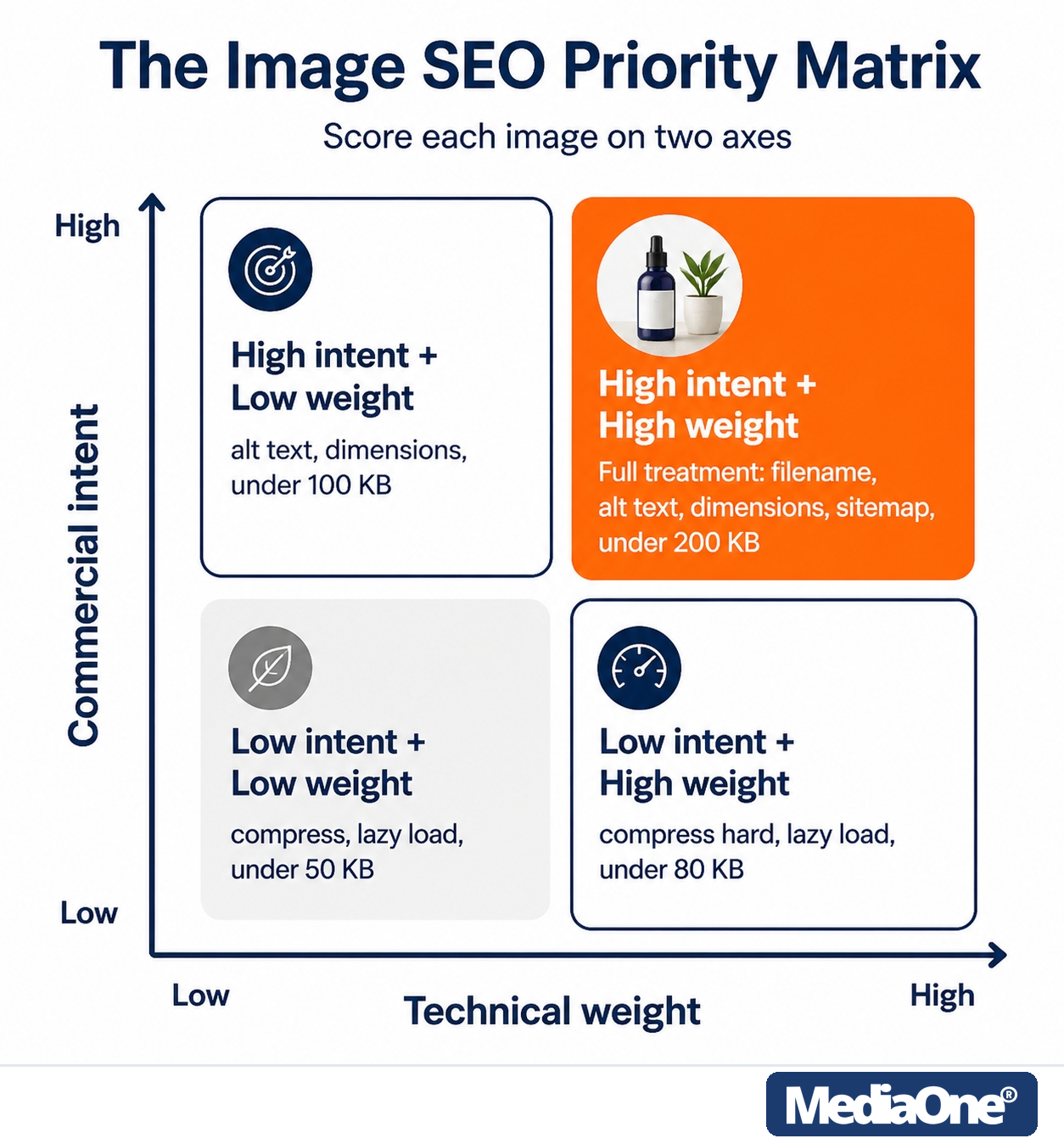
Figure 1: The Priority Matrix: full treatment belongs to the high-intent, high-weight quadrant.
|
Commercial intent |
Technical weight |
Treatment and target |
|
High |
High |
Full treatment: descriptive filename, accurate alt text, explicit width and height, image sitemap entry and structured data where applicable. Export at display width, aiming for under 200 KB. |
|
High |
Low |
Descriptive filename, alt text and explicit dimensions; compress lightly, aiming for under 100 KB. |
|
Low |
High |
Compress hard, resize to display size, lazy load if below the fold. Aim for under 80 KB. |
|
Low |
Low |
Compression and lazy loading only. Aim for under 50 KB. |
These file size targets are working guides we observe in practice, not rules, and Google does not publish image ranking weights. Adjust them to the image’s detail and your page speed results. Use tools such as PageSpeed Insights to check the results.
Test it on one page: score each image and check whether the full-treatment images drive sales or enquiries. If a decorative banner gets full treatment while the product photo gets none, reverse the effort.
On-Page Image Optimisation
On-page work decides how a search engine reads each image on the page. The steps below cover naming, alt text, HTML attributes, formats, sizing and loading.
Descriptive File Naming
Name each file after what it shows, separating words with hyphens. A name like IMG_4471.jpg tells search engines nothing, while teak-dining-table-six-seater.jpg tells them a great deal. Keep names short and specific rather than repeating the page keyword.
Alt Text and Surrounding Copy
Alt text serves screen reader users and describes the image’s subject. Describe what the image shows and why it is there. Do not stuff keywords into it — Google’s guidance treats keyword-stuffed alt text as a spam risk.
Surrounding copy matters more. Google reads the words around an image, so captions and introducing paragraphs should agree with the alt text. Conflicting signals weaken image SEO. For bilingual Singapore sites, write alt text and captions in the page’s language.
Image HTML Attributes: alt, loading, decoding and srcset
An img tag places an image on a page. Four attributes shape how it is read and loaded:
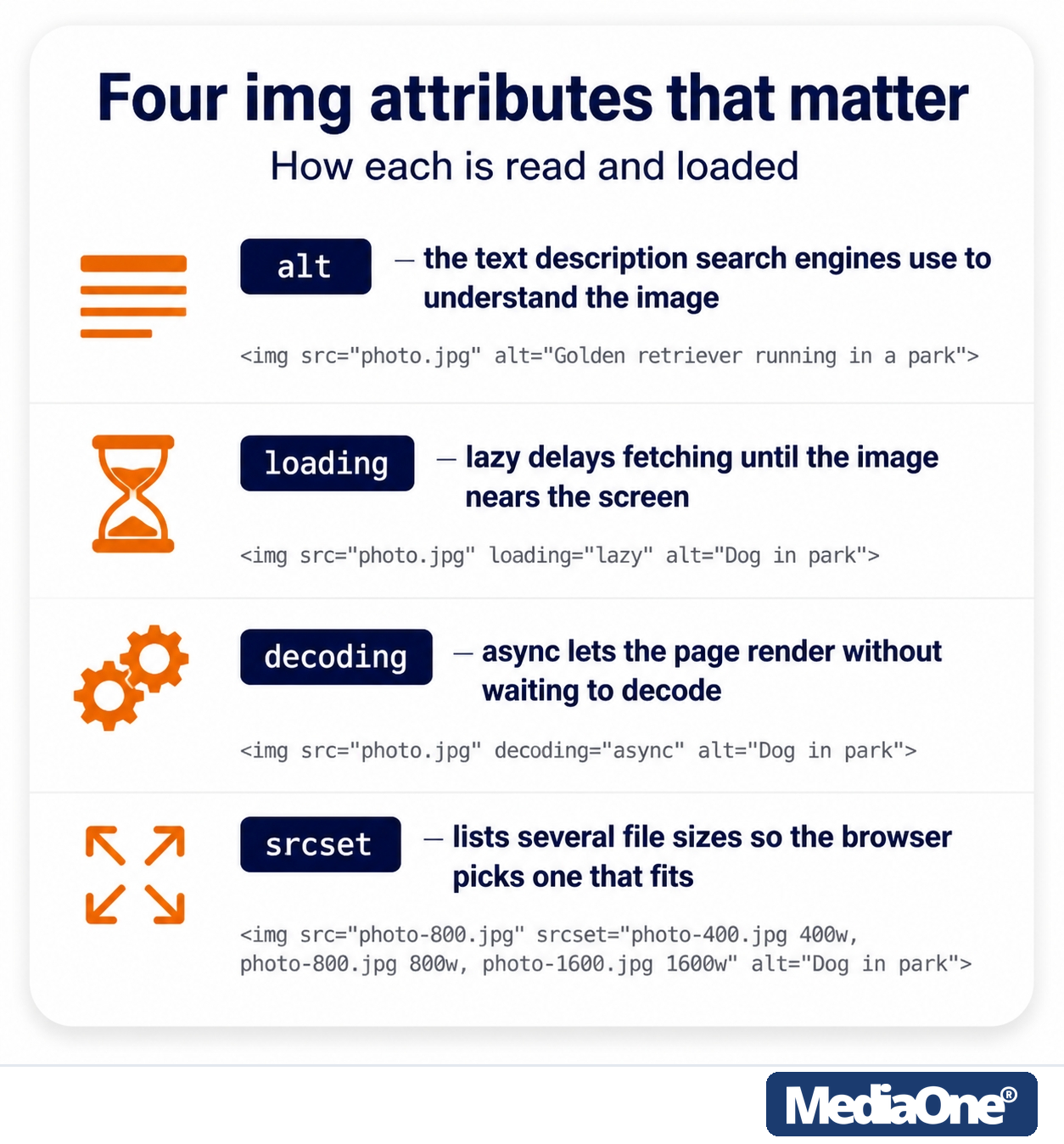
Figure 2: The four attributes worth checking on every upload.
- alt holds the text description that search engines use to understand the image. Example:
<img src=”teak-dining-table-six-seater.jpg” alt=”Six-seater teak dining table in a white dining room”>

- loading=”lazy” delays fetching the image until it nears the screen.
<img src=”footer-banner.jpg” alt=”Store front” loading=”lazy” width=”800″ height=”400″>
- decoding=”async” lets the page render without waiting for the image to decode.
<img src=”product.jpg” alt=”Product photo” decoding=”async” width=”800″ height=”600″>
- srcset lists several file sizes so the browser can pick one that fits the screen.
<img src=”chair-800.jpg” srcset=”chair-400.jpg 400w, chair-800.jpg 800w, chair-1600.jpg 1600w”
sizes=”(max-width: 600px) 400px, 800px” alt=”Rattan armchair” width=”800″ height=”600″>
Always include width and height. Audit tools such as Yoast SEO flag missing dimensions, so checking this before publishing keeps the page accurate.
Image File Formats: Choosing JPEG, PNG, WebP, AVIF and SVG
Format affects file size, quality and browser support. Google Search supports images in BMP, GIF, JPEG, PNG, WebP, SVG and AVIF, and advises matching the file extension to the file type.
|
Format |
Best use |
Transparency |
Compression |
Browser support |
|
JPEG |
Photographs with many colours |
No |
Lossy |
Universal |
|
PNG |
Logos, screenshots, sharp graphics |
Yes |
Lossless, larger files |
Universal |
|
WebP |
Most photos and graphics |
Yes |
Lossy or lossless, usually smaller |
Wide |
|
AVIF |
Photos where the smallest file matters |
Yes |
Often smallest |
Wide, but check your platform |
|
SVG |
Icons, logos and simple illustrations |
Yes |
Vector, scales without quality loss |
Universal |
For lossy formats, you can usually choose a quality setting from 0 to 100. Start near the middle and lower it only while the image still looks sharp on a phone.
Use WebP as your default for website images, try AVIF for large photos where every kilobyte counts, use PNG for screenshots and graphics with text, and keep JPG for anything leaving your website: email, printing, and forms that only accept the classics. Use SVG for logos and icons. Optimise each image before upload, then check results with a tool such as Yoast SEO. For the scale of the saving, our technical SEO for ecommerce guide shows a product page with 10 images saving 400 to 600 KB by converting to WebP — a per-image target our retail SEO clients work to as well.
Image Resizing and Explicit Dimensions
- Resize each image to its display size. For most product photos, export at 800 pixels wide.
- Choose the format per image, using the table above.
- Set explicit width and height on every image, so the browser reserves space before the file arrives.
- Use a CDN (a network that serves files from servers close to the visitor) to handle conversion and delivery.
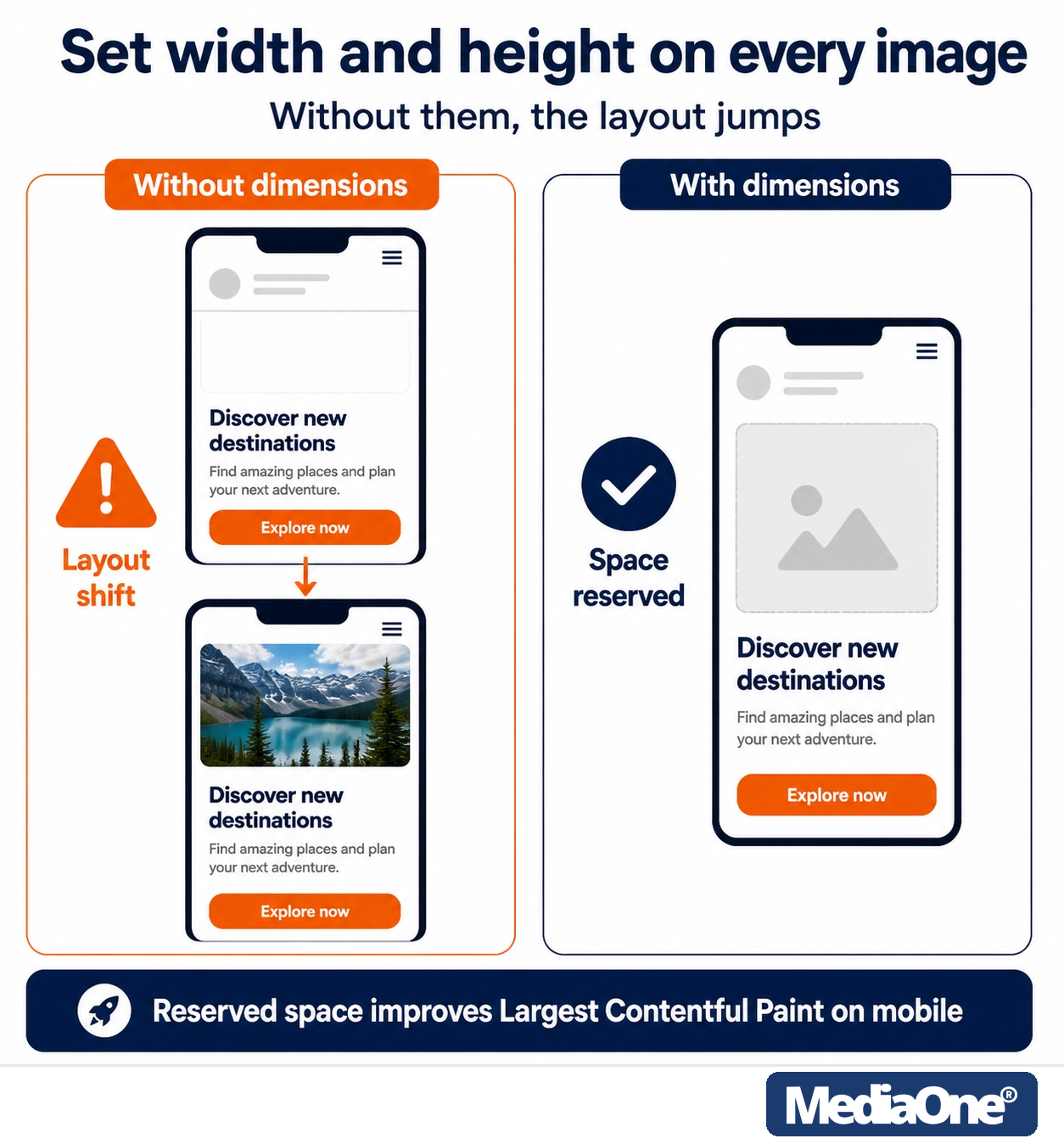

Figure 3: Explicit dimensions reserve the space, so buttons stop moving under thumbs.
Setting explicit dimensions improves the LCP metric because space for the largest element is reserved from the start. Without them, the layout jumps as the image loads. Shoppers on phones feel the delay directly, as a button moves under their thumb. Layout stability itself is a Core Web Vitals metric — our mobile SEO playbook covers the CLS target of 0.1 or less.
Test on a throttled connection with PageSpeed Insights or Chrome DevTools, recording LCP before and after adding dimensions.
A CDN can handle resizing and format conversion, with options including Cloudflare Images, Cloudinary and imgix. It does not replace setting dimensions on the page.

Before-and-after example: a mobile product card with no dimensions drops its text when the photo arrives. Adding width=”600″ height=”600″ and resizing the file to 600 pixels square keeps the text in place.
Lazy Loading: Use It Selectively
Lazy loading defers below-the-fold images until the visitor scrolls near them, saving bandwidth on first load. Use the native attribute:
<img src=”gallery-photo-4.jpg” alt=”Teak sideboard in a living room”
loading=”lazy” width=”800″ height=”600″>
Never lazy load the above-the-fold image, often the LCP element. Load it immediately with loading=”eager” or no attribute.
How Google Images Crawls, Indexes and Ranks Images
Google finds images through the pages that show them, then crawls, reads and indexes them for Google Images. Crawling and indexing decide whether an image can appear at all. Google indexes images embedded with standard HTML img elements; it does not index CSS background images.
Ranking depends on what the image shows and how well it fits the query. Google works out the subject from the page around it. Captions, titles and nearby text give it that context, and the Google Images documentation sets out how these signals are used. A seo checker can help you spot missing image signals on a page.
- Keep images on crawlable pages, not behind scripts the crawler cannot run.
- Make the surrounding text specific to each image on your website.
- Give important images a clear caption or title.
- Follow image SEO best practices when naming files and writing alt text.
Image Search Beyond Google
Google is the largest image search engine, but each platform rewards something slightly different. A clear image with accurate surrounding text performs well almost everywhere.
|
Engine |
How it discovers images |
What to optimise |
|
Google Images |
Reads captions, titles and surrounding text |
Page context, filenames, alt text |
|
Bing Images |
Uses surrounding text and alt text |
Alt text, captions, clear page topics |
|
|
Pin image and description drive discovery |
Tall, clear images, descriptive pin title |
|
Google Lens |
Matches photos to visually similar images |
Clean backgrounds, accurate page copy |
Image Sitemaps
An image sitemap gives Google a direct list of images to index. It helps when images load through JavaScript or sit on a CDN, a network of servers that delivers files quickly. You can include image URLs in <image:loc> elements, provided you have the right to use them. Google’s documentation confirms that image sitemaps — unlike regular sitemaps — can include URLs from other domains in the image:loc elements, which is what lets a CDN host your images. Check Google’s image SEO documentation for current rules.
Google’s own guidance describes image sitemaps as one way to help its crawlers find images, not as a guaranteed route into Google Images. Treat the sitemap as a supporting tool alongside crawlable pages and clear image markup.
Structured Data and Eligibility
Structured data describes a page’s content to search engines. For image SEO, the relevant types include ImageObject, Product and Article. Markup can support richer presentation in Google Images, but valid markup does not guarantee a badge or rich result. Google states that in each structured data type, the image attribute is a required field to be eligible for a badge and rich result in Google Images — so a missing image attribute can stop a page from being eligible, even when the rest of the markup is valid. Check Google’s structured data documentation for current rules.
Here is a minimal JSON-LD example for a product page:
{
“@context”: “https://schema.org”,
“@type”: “Product”,
“name”: “Six-seater teak dining table”,
“image”: “https://www.example.sg/images/teak-dining-table-six-seater.jpg”
}
|
Page type |
Schema type |
Required image field |
|
Product page |
Product |
image |
|
Article or blog post |
Article |
image |
|
Local business page |
LocalBusiness |
image |
Confirm each template’s image attribute points to a real, accessible file. A Yoast SEO plugin or similar tool can help you check and optimise these fields across your website.
Discoverability and Control
By default, Google Images can link to the full-sized version of your image on your site. Publishers can stop this by opting out of inline linking, which keeps the full-sized image off the Google Images results page — Google’s documentation describes the mechanism: reply to image requests from Google domains with a 200 or 204 status code, and Google displays a crawl-time thumbnail instead. You can also use Google’s page-level controls, such as the nosnippet robots meta tag, to configure the preview content shown for your pages. Use these controls only with a clear reason.
Opting out reduces the chance someone saves the full-sized file, but it costs some visibility. It suits licensed photography, unreleased product shots or paid work. For a retailer whose product photos help shoppers find items, leaving inline linking on is usually better for image SEO.
Visual Search and Google Lens
Visual search is a growing discovery route. It helps users find products without typing a query. Google Lens handles over 20 billion searches every month, according to Yoast, corroborated by Google’s own figures reported by Search Engine Land. Shoppers may photograph a product and search for it, so clear images and accurate surrounding copy both count.

Figure 4: Visual search: the photo a shopper takes meets the listing your page describes.
Photograph products on clean backgrounds, show clear scale and describe them accurately. The page content should match the image, so users can recognise what they are buying. Relevant product photos on a well-structured site make it easier for search tools to match the item to the right listing — and they feed the product surfaces covered in our Google AI Overview optimisation guide.

Diagnosing Your Current Images
Start with your highest-traffic pages. Export their images, sort them using the matrix and check for three problems: large files displayed much smaller; above-the-fold images without explicit dimensions; filenames and alt text that describe nothing useful. Fix high-intent, high-weight images first.
Common Issues and Fixes
|
Symptom |
Likely cause |
Fix |
|
Layout jumps as the page loads |
No width and height on images |
Add explicit dimensions to every image |
|
Hero image loads slowly on mobile |
Large file, or lazy loading on the LCP image |
Compress the file and load the hero image eagerly |
|
Image missing from Google Images |
Loaded only through script, or absent from a sitemap |
Make it crawlable and add it to an image sitemap |
|
No rich result for a product |
Missing image field in structured data |
Add the required image field and check the markup |
|
Image ranks for the wrong topic |
Generic filename and alt text |
Rename the file and rewrite the alt text for the subject |
|
Full-sized file copied from search |
Inline linking enabled for licensed images |
Opt out of inline linking for those images only |
Pre-Publish Checklist
- Rename the file with hyphens, e.g. black-leather-office-chair.jpg.
- Resize to display size and choose the smallest format that still looks right, keeping visual quality high.
- Write alt text that describes the image and matches its caption.
- Set explicit width and height so the browser reserves space.
- Lazy load images below the fold. Load above-the-fold images immediately.
- Add the image attribute to structured data that requires it.
- Confirm priority images appear in your image sitemap.
Limits of Image SEO
Image optimisation is worth doing, but it cannot make up for thin content, slow hosting or a page that fails to answer the searcher’s question. An excellent image on a page with little useful text will still underperform. Treat image SEO as one part of the page’s overall quality, alongside the fundamentals in our SEO guidelines.
Conclusion
Image SEO is a discoverability and performance discipline, best planned alongside the page it serves. Images that sell something and sit high on the page deserve full treatment. Decorative images need only compression and lazy loading.
If you do nothing else this week:
- Audit your highest-traffic pages and fix above-the-fold images, setting explicit width and height. Serve responsive images so each device loads a suitably sized file.
- Rewrite filenames and alt text on product, portfolio or property images, using hyphens rather than spaces.
- Add the required image attribute to your structured data, since its absence blocks Google Images badge and rich result eligibility.
Start with the pre-publish checklist on your next upload, then optimise the pages that already bring the most search traffic. If you would rather hand the work over, our guide to choosing SEO services is an honest place to start.
Frequently Asked Questions
What is image SEO?
Image SEO makes images easy for search engines to find, understand and index, so they appear in Google Images and Google Lens and send visitors back to the page. It covers file format, dimensions, descriptive file names, alt text, surrounding text and structured data. It also keeps pages fast enough to protect the Largest Contentful Paint (LCP) score.
Does alt text affect image rankings?
Yes, but its main job is accuracy, not keyword density. Alt text should describe what the image shows and why it is on the page. It works best when it agrees with the surrounding copy, which often explains the image more than the alt text alone.
Which image format should I use in 2026?
Use WebP as your default for website images. Try AVIF for large photos where every kilobyte counts. Use PNG for screenshots and graphics with text, and keep JPG for anything leaving your website, such as email, printing and forms that only accept the classics.
Do I need an image sitemap?
Not always. It helps when images are loaded through JavaScript, sit on a CDN or are hard for crawlers to reach. Submit it in Search Console and check the reports to confirm it is being read.
Should I lazy-load every image?
No. Lazy loading suits images below the fold, the part of the page a visitor must scroll to see. Load your hero image, or the largest image above the fold, immediately, as it is often the LCP element.
Can images from another domain appear in my sitemap?
Yes. Image sitemaps can list images hosted on other domains in the image:loc element, as described in Google’s Image SEO documentation. Confirm you have the right to use them and that the host keeps them available.