
| AI Summary
Effective technical SEO tips for Singapore businesses include resolving crawling and indexing issues, maintaining accurate XML sitemaps and improving website architecture. Optimising Core Web Vitals, ensuring mobile-first indexing compatibility and managing duplicate content also support search visibility. Businesses should implement relevant structured data and conduct regular technical SEO audits using tools such as Google Search Console and PageSpeed Insights. Prioritising fixes based on business impact helps improve website performance, user experience and eligibility for AI-powered search results. |
The most effective technical SEO tips start with making your website accessible to search engines. Fix crawling and indexing problems first, improve your site architecture and mobile performance, then refine your structured data and other technical elements.
Technical search engine optimisation (SEO) helps search engines discover, process and understand your website. Without a sound technical foundation, even well-written content and quality backlinks may struggle to generate organic traffic.
For Singapore businesses, we recommend prioritising fixes according to their commercial impact. A technical error affecting your main service or product category pages deserves immediate attention. A minor warning on an archived page can usually wait.
This guide explains what to fix, which tools to use and how to measure the results.
Key Takeaways
-
Prioritise crawlability and indexing. Check robots.txt, noindex directives, canonical tags and XML sitemaps to ensure important pages are eligible for search results.
-
Improve website architecture. Create clear navigation paths, strengthen internal links and manage unnecessary duplicate URLs.
-
Optimise mobile performance. Use Core Web Vitals and real-user performance data to identify loading, responsiveness and layout issues.
-
Implement accurate structured data. Help search engines understand your business and its content, without expecting guaranteed rich results or artificial intelligence (AI) citations.
-
Monitor and prioritise technical fixes. Use Google Search Console and website crawling tools to identify problems according to their severity and business impact.
What Is Technical SEO and Why Does It Matter?
Technical SEO is the process of improving a website’s infrastructure so search engines can discover, crawl, render and index its content efficiently. It also addresses website performance, security, mobile usability and search accessibility.
Unlike on-page SEO, which focuses primarily on content and keyword relevance, technical SEO deals with how a website functions. Google describes three main stages in its guide to how Google Search works:
| Stage | What happens | Potential technical problem |
|---|---|---|
| Crawling | Google discovers and retrieves website pages. | Blocked URLs or server errors |
| Indexing | Google processes content and determines whether to include it in its index. | Noindex directives, duplicates or rendering problems |
| Serving search results | Google selects relevant indexed content for a search query. | Poor relevance or insufficient content quality |
Rendering also forms part of Google’s processing. It allows Google to interpret content generated through technologies such as JavaScript.
A website that meets technical requirements is eligible for indexing. However, Google does not guarantee that every eligible page will be indexed or ranked.
Why technical SEO matters for Singapore businesses
Singapore businesses often depend on organic search to attract enquiries, bookings and online purchases. Technical problems can prevent potential customers from finding important pages during their research.
Consider a Singapore furniture retailer with hundreds of products. If its website generates thousands of unnecessary filter URLs, search engines may spend resources processing those variations instead of discovering useful product pages efficiently.
A professional services business faces a different challenge. Its website may contain only 30 pages, but an accidental noindex directive could prevent its main service pages from appearing in search results.
Both businesses need technical SEO. However, their priorities differ considerably. We recommend assessing technical performance against your website’s size, platform and commercial objectives rather than chasing a perfect audit score.
15 Technical SEO Tips to Improve Your Website’s Search Performance
The following technical SEO best practices are arranged in a practical implementation sequence. Start with problems affecting search accessibility before moving to performance enhancements and ongoing maintenance.
1. Check your website’s crawlability
Crawlability determines whether search engine crawlers can retrieve your website’s pages and resources.
Googlebot discovers content through links, XML sitemaps and previously known URLs. Problems arise when excessive restrictions or server configurations prevent it from accessing important pages.
Start with Google Search Console. Verify your website and review the Page Indexing and Crawl Stats reports.
Pay particular attention to:
-
Robots.txt restrictions: Look for rules blocking important service pages, product categories or resources needed for rendering.
-
Server errors: Investigate recurring 500-series errors that prevent successful page retrieval.
-
Access restrictions: Check whether security plugins, firewall rules or authentication requirements unintentionally block search engine crawlers.
-
Broken internal links: Identify links pointing to missing or inaccessible pages.
-
Redirect loops: Resolve configurations that prevent crawlers from reaching their intended destinations.
Understand how robots.txt works
The robots.txt file tells compliant crawlers which areas of a website they may access. You can usually find it at yourdomain.sg/robots.txt.
An incorrect rule could block an entire website directory. This sometimes occurs when developers transfer settings from a staging environment to a live website.
However, robots.txt should not be used as an indexing removal tool. A blocked URL may still appear in search results if Google discovers it through other sources.
Google explains this distinction in its robots.txt documentation. We recommend reviewing your robots.txt file after every major website launch, redesign or platform migration. Confirm that important pages remain accessible.
2. Identify and resolve indexing problems
A successfully crawled page does not automatically enter Google’s index. Google must process the page and determine whether it warrants inclusion.
Open the Page Indexing report in Google Search Console. Review the reasons Google provides for pages that remain unindexed.
| Indexing status | What it means | Recommended action |
|---|---|---|
| Excluded by noindex tag | Google detected an instruction not to index the page. | Remove the directive if the page should appear in search. |
| Discovered – currently not indexed | Google knows about the URL but has not crawled it yet. | Review internal links, server health and page importance. |
| Crawled – currently not indexed | Google crawled the page but has not indexed it. | Investigate content quality, duplication and technical configuration. |
| Duplicate without user-selected canonical | Google identified duplicate content without a declared preferred version. | Review duplication and specify an appropriate canonical URL. |
| Alternate page with proper canonical tag | Google recognises the page as an alternate version. | No action is necessary if the configuration is intentional. |
| Soft 404 | Google interprets the content as a missing or error page. | Correct the content or return an appropriate HTTP response code. |
Not every unindexed page represents a technical SEO problem. Shopping carts, account pages and duplicate URL variations may intentionally remain outside Google’s index.
Use the URL Inspection tool to investigate important pages individually. It helps you examine Google’s last known indexing status and test the current live page.
For example, suppose your Singapore accounting firm’s corporate tax service page is not indexed. URL Inspection reveals an accidental noindex directive inherited from a development template.
Removing the directive restores the page’s eligibility for indexing. You can then request indexing and monitor its status.
Do not assume the page will immediately appear in search results. Google determines when to recrawl and whether to index it.
3. Create and maintain an accurate XML sitemap
An Extensible Markup Language (XML) sitemap provides search engines with a list of URLs you want them to discover. Sitemaps are particularly useful for large websites, recently launched businesses and sites with extensive product catalogues. They can also support the discovery of content that receives few internal links.
According to Google’s sitemap documentation, submitting a sitemap supports URL discovery but does not guarantee crawling or indexing.
An effective XML sitemap should include:
-
Preferred canonical URLs intended for indexing.
-
Pages returning successful HTTP 200 responses.
-
Relevant product, service and editorial pages.
-
Accurate last-modified dates where supported.
-
Secure HTTPS versions of website URLs.
Avoid including redirected URLs, deleted pages and URLs containing intentional noindex directives.
Larger e-commerce websites can benefit from separate sitemaps for products, categories and blog content. This makes it easier to investigate indexing problems affecting individual sections.
One sitemap can contain up to 50,000 URLs and must not exceed 50 MB when uncompressed. Websites exceeding these limits should use multiple sitemaps and a sitemap index.
Submit your sitemap through Google Search Console. Review its processing status periodically, especially after substantial changes to your website.
Website architecture describes how pages are organised and connected. A logical structure makes it easier for visitors to locate information. It also helps search engines discover pages and understand their relationships.
We recommend organising related content into meaningful categories. Important commercial pages should have short, accessible navigation paths.
For a Singapore interior design company, a suitable structure might look like this:
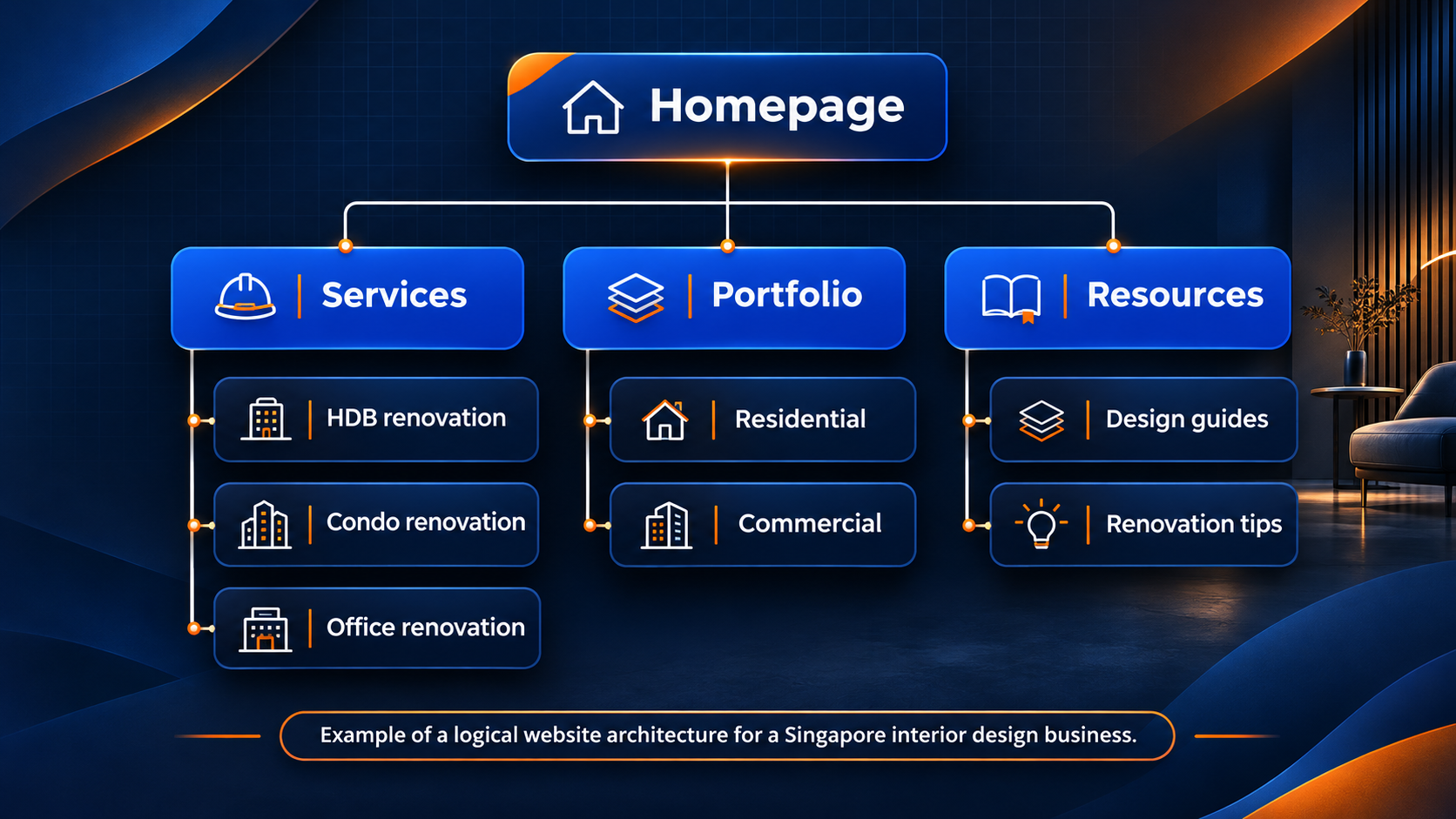
This structure gives important service pages clear navigation paths. Visitors do not need to search through unrelated categories to find relevant information.
As a practical guideline, aim to make commercially important pages accessible within approximately three to four clicks from the homepage. This is an architectural recommendation, not a formal Google ranking requirement.
Use a website crawler to identify:
-
Pages buried deep within the website.
-
Orphan pages with no discoverable internal links.
-
Categories containing excessive navigation layers.
-
Important pages receiving insufficient internal links.
A website does not need an entirely flat structure. Larger websites often benefit from several organisational levels. The objective is to create meaningful relationships without introducing unnecessary barriers.
5. Strengthen internal linking
Internal links connect pages within the same website. They support content discovery and help search engines understand how different topics relate.
A strong internal linking structure can also guide visitors from informational content towards relevant commercial pages.
For example, a Singapore digital marketing agency could link an article about website performance to its SEO services page. The relationship is relevant because readers investigating technical problems may need professional assistance.
Follow these internal linking best practices:
-
Use descriptive anchor text. Explain what readers will find on the destination page.
-
Link related content naturally. Connect supporting articles with relevant service and category pages.
-
Prioritise important pages. Ensure commercially valuable content receives sufficient internal links.
-
Update redirected links. Link directly to the preferred destination instead of relying on redirects.
-
Use crawlable HTML links. Avoid navigation elements that depend entirely on unsupported scripted actions.
Google provides technical examples in its link best practices documentation. Review internal links whenever you publish new content. Identify existing articles that can introduce readers to the new resource.
For larger websites, compare your internal crawl results with sitemap URLs and analytics data. This helps uncover pages that exist but receive little or no navigational support.
6. Fix broken links, redirect chains and server errors
Broken links interrupt website navigation. When they affect important pages, they can also prevent search engines from discovering useful content through existing paths.
Use a website crawler to identify HTTP response codes and redirect configurations.
| HTTP status code | Meaning | Recommended action |
|---|---|---|
| 200 | Successful response | Confirm the correct content is displayed. |
| 301 or 308 | Permanent redirect | Use when content permanently moves. |
| 302 or 307 | Temporary redirect | Use for genuinely temporary changes. |
| 404 | Resource not found | Update internal links or restore missing content when appropriate. |
| 410 | Resource intentionally removed | Use where permanent removal is appropriate. |
| 500 or 503 | Server-side problem or temporary unavailability | Investigate hosting and application errors. |
Google explains how these responses affect crawling in its HTTP status code documentation.
Avoid unnecessary redirect chains
A redirect chain occurs when one URL redirects through multiple intermediate URLs before reaching its final destination.
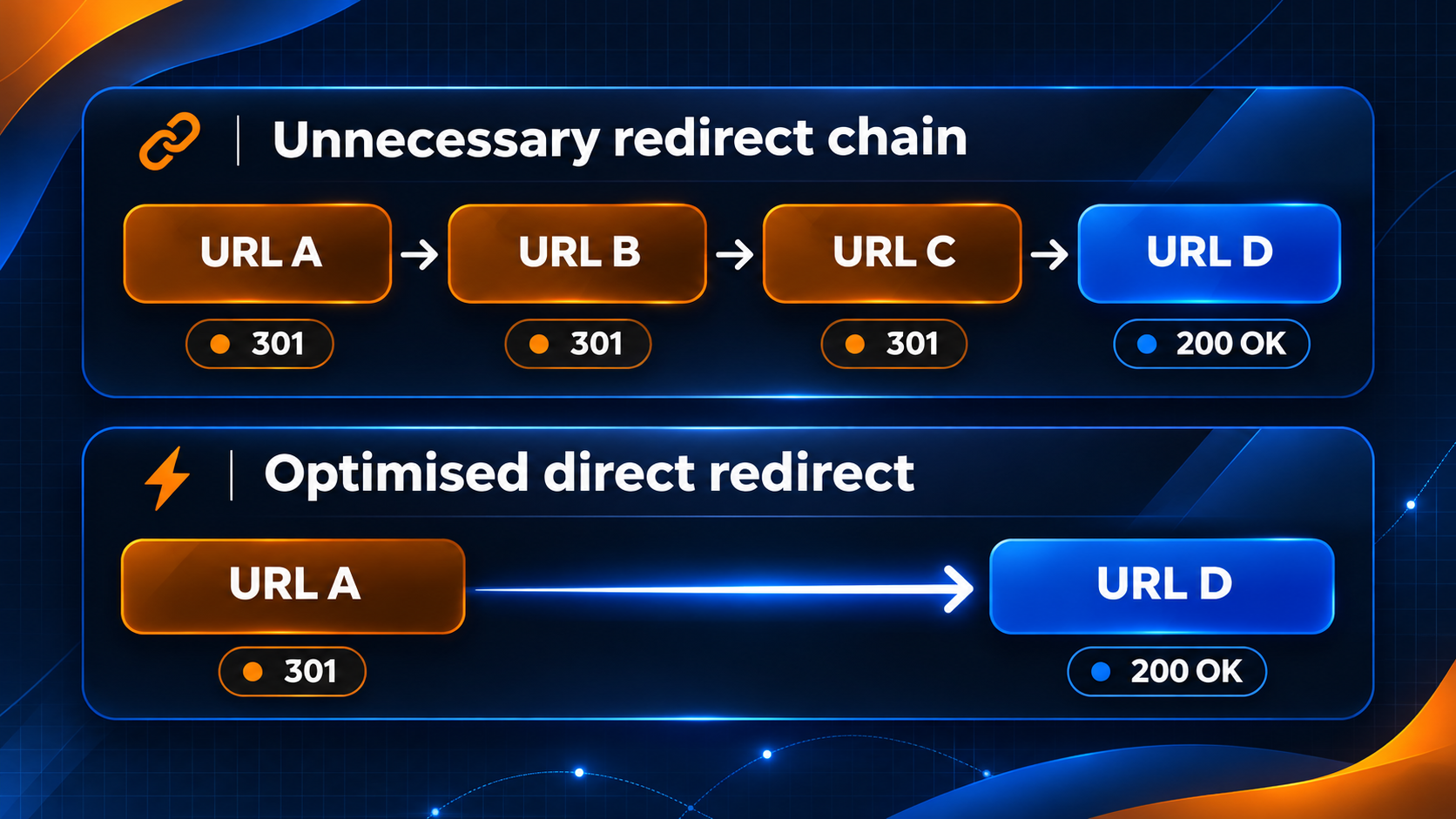
Consolidate unnecessary redirects where possible. This reduces additional requests and allows visitors to reach their destination faster.
Avoid redirecting every deleted page to the homepage. If no relevant replacement exists, returning a genuine 404 or 410 response is generally appropriate.
A healthy website can contain legitimate 404 responses. The priority is correcting broken internal navigation and restoring valuable pages that disappeared unintentionally.
Duplicate content occurs when multiple URLs display identical or substantially similar information. This is common on e-commerce websites, particularly those offering sorting options, product variations and category filters.
Duplicate content does not automatically result in a Google penalty. However, unnecessary duplication can complicate indexing and increase crawling demands.
A canonical tag indicates which URL you prefer Google to treat as the primary version.
For example:
-
example.sg/shoes/ -
example.sg/shoes/?sort=price -
example.sg/shoes/?sort=popular
If these pages contain essentially the same products, the clean category URL may be the appropriate canonical destination. Google treats canonical tags as signals rather than absolute instructions. It may select a different URL if other signals conflict with your preference.
Follow Google’s canonicalisation guidelines when selecting the appropriate method.
| Situation | Recommended action |
|---|---|
| Multiple URLs displaying substantially similar content | Specify a preferred canonical URL. |
| A page permanently moved to another address | Implement a permanent redirect. |
| A unique page targeting distinct search demand | Keep it independently indexable. |
| A public utility page unsuitable for search results | Apply a noindex directive where appropriate. |
| Permanently deleted content without a replacement | Return a 404 or 410 response. |
| Private staging or development website | Restrict access through authentication. |
Check that canonical destinations are accessible, relevant and eligible for indexing. Your internal links, redirects and XML sitemaps should reinforce the same URL preferences. Conflicting signals make canonical selection unnecessarily complicated.
8. Control crawl waste on large websites
Crawl budget concerns the resources Google allocates to crawling a website. It depends on crawl capacity and demand.
For most small business websites, crawl budget does not require dedicated optimisation. Google generally recommends maintaining accurate sitemaps and monitoring indexing instead.
Its crawl budget management guidance primarily addresses large or frequently updated websites. Nevertheless, Singapore e-commerce businesses can generate substantial numbers of URLs through product filters and sorting combinations.
Consider a hypothetical online clothing retailer offering six colours, eight sizes and five price ranges. Those three filter groups alone can produce 240 distinct combinations when one option is selected from each group.
Additional sorting and pagination can increase the number considerably. Not every combination deserves an independently indexable landing page.
How to manage unnecessary crawling
Start by identifying the URL patterns responsible for most duplication. Review your website crawler results, Search Console data and server logs where available.
We recommend the following approach:
-
Preserve category and filter pages that target meaningful search demand.
-
Prevent unnecessary internal links to low-value URL combinations.
-
Consolidate genuinely duplicate pages using appropriate canonical signals.
-
Restrict crawling of unnecessary filter patterns when justified.
-
Keep pagination and product discovery accessible.
Google’s faceted navigation guidelines explain how to manage complex filtering systems.
Be careful when combining robots.txt restrictions with noindex directives. Google must be allowed to retrieve a page to detect its noindex instruction.
A blanket restriction can also block valuable category pages. Review individual URL patterns before implementing site-wide rules.
9. Optimise Core Web Vitals and page speed
Core Web Vitals measure important aspects of real-world website experience. Google considers these metrics within its ranking systems, although strong performance does not guarantee better rankings.
Slow pages can also frustrate visitors and interrupt enquiries or purchases.
Three Core Web Vitals deserve particular attention.
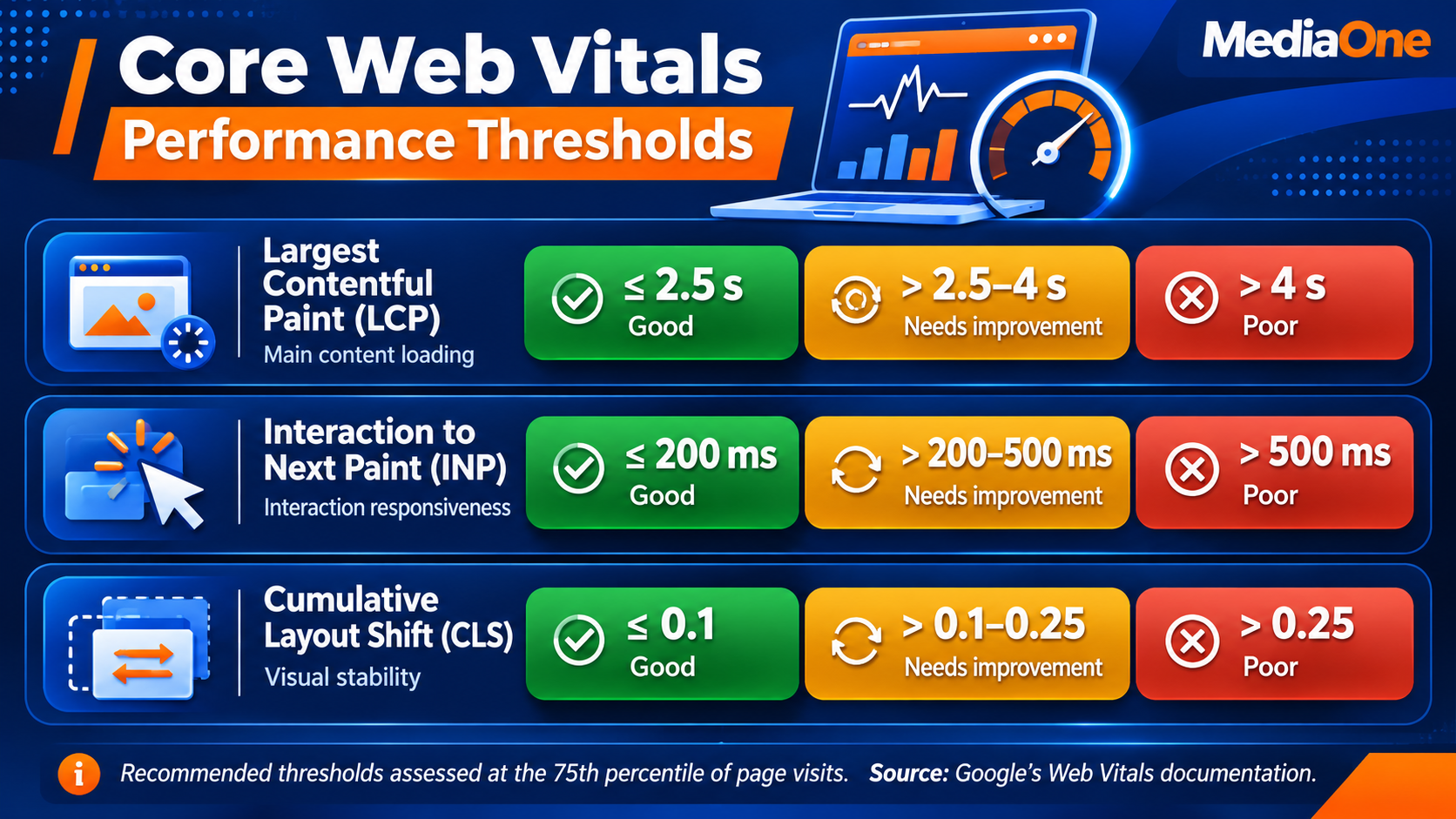
Interaction to Next Paint replaced First Input Delay as a Core Web Vital in March 2024. Use PageSpeed Insights and the Core Web Vitals report in Google Search Console to assess your website’s performance.
Distinguish field data from lab data
Field data reflects actual experiences collected from eligible Chrome users. Lab data comes from controlled performance tests.
Both provide useful information, but they serve different purposes.
| Data type | Best used for |
|---|---|
| Field data | Assessing real-world user experience and longer-term performance |
| Lab data | Diagnosing performance problems and testing individual changes |
PageSpeed Insights uses a rolling 28-day period for its field data. Consequently, improvements may appear gradually rather than immediately after deployment.
Smaller websites may lack sufficient traffic to generate page-level field data. In that situation, use available origin-level data, lab tests and direct user-experience testing.
How to improve Core Web Vitals
Start with the following performance improvements:
-
Optimise large images. Resize images appropriately and use efficient formats such as WebP or AVIF.
-
Prioritise key visual content. Avoid lazy-loading the main hero image when it represents the largest visible element.
-
Reduce unnecessary JavaScript. Review marketing scripts, plugins and third-party widgets that slow interactions.
-
Reserve image and video dimensions. Prevent unexpected layout shifts during loading.
-
Improve server response times. Review hosting performance, database queries and caching configurations.
-
Use a content delivery network (CDN). Deliver suitable resources from locations closer to your audience.
For Singapore-focused websites, regional hosting and CDN infrastructure can reduce network latency. However, server location alone does not determine performance.
Test representative service pages, product templates and enquiry forms. A fast homepage cannot compensate for a slow purchasing or booking experience.
10. Optimise your website for mobile-first indexing
Google primarily uses the mobile version of website content for indexing. This makes mobile accessibility a fundamental technical SEO requirement.
A website can appear functional on desktop while hiding important information on smaller screens. Google outlines its requirements in the mobile-first indexing best practices guide.
Review the following elements:
-
Primary content and headings.
-
Internal navigation and links.
-
Images and descriptive alternative text.
-
Meta titles and descriptions.
-
Robots directives and canonical tags.
-
Structured data.
-
Interactive elements and forms.
Important information should remain available on mobile devices. Avoid requiring users to click, swipe or type before essential content becomes accessible to search engine rendering.
Expandable sections and accordions are acceptable when implemented correctly. The concern arises when their content cannot be retrieved without user interaction.
Test real mobile experiences
Use browser developer tools to simulate different screen sizes. Follow this with testing on an actual mobile device.
Check whether visitors can navigate menus, select products and complete enquiry forms without difficulty.
We recommend testing on a mid-range mobile device using a typical mobile data connection. Your website should remain functional outside an office environment with a high-speed connection.
11. Ensure search engines can render JavaScript content
JavaScript powers interactive menus, product filters and many modern website frameworks. It can also introduce technical SEO problems when implemented incorrectly.
Google can render JavaScript. However, blocked resources, application errors and interaction-dependent content may prevent important information from being processed correctly.
JavaScript-dependent websites should be assessed using Google’s JavaScript SEO guidelines. Use URL Inspection in Google Search Console to test important pages. Examine the rendered screenshot and available HTML.
Compare the output with what a visitor sees in a browser. Pay particular attention to:
-
Product descriptions loaded dynamically.
-
Navigation menus generated through JavaScript.
-
Links requiring scripted interactions.
-
Content loaded through infinite scrolling.
-
Dynamically inserted canonical tags and robots directives.
For websites that depend heavily on JavaScript, server-side rendering or static generation may provide technical and performance benefits. However, neither is mandatory for Google indexing.
Make infinite scrolling search-friendly
Infinite scrolling allows visitors to load additional products or articles without navigating to another page. Search engines do not necessarily interact with the website in the same manner as visitors. Content that appears only after repeated scrolling may therefore be harder to discover.
Provide accessible paginated URLs and meaningful links alongside infinite scrolling where appropriate. Google’s pagination and incremental page-loading guidance explains how to support these configurations.
Do not automatically canonicalise every paginated URL to the first page. Later pages may contain distinct products that search engines need to discover.
12. Implement relevant structured data
Structured data provides machine-readable information about website content. It helps search engines interpret details about businesses, products and articles.
Google supports several structured data types that are relevant to Singapore businesses.
| Schema type | Suitable application |
|---|---|
Organization |
Company identity, official website and business information |
LocalBusiness |
Restaurants, clinics, physical stores and eligible local businesses |
Product |
Product information, pricing and availability |
Article or BlogPosting |
Editorial content and blog articles |
BreadcrumbList |
Page hierarchy and navigation relationships |
Note that Organization uses American English spelling in the actual Schema.org vocabulary, even when the website uses British English. For Singapore retailers, product markup should accurately represent the displayed price and use SGD as the currency where applicable.
Local businesses should provide accurate addresses, contact information and business hours. Consult Google’s supported search appearance features before selecting markup for your website.
Avoid outdated FAQ schema recommendations
Google discontinued FAQ rich results on 7 May 2026, according to its Search documentation updates. Businesses should therefore avoid implementing FAQPage structured data solely to obtain expanded FAQ appearances in Google Search.
Useful frequently asked questions remain valuable for readers. They can clarify purchasing decisions and address specific search queries.
Validate structured data before publishing
Use Google’s Rich Results Test to check supported Google search features. The Schema Markup Validator can help validate broader Schema.org markup.
Common implementation mistakes include:
-
Marking up reviews that do not exist.
-
Publishing incorrect product prices or availability.
-
Adding conflicting markup through multiple plugins.
-
Omitting properties required for a particular search feature.
-
Describing content that users cannot access.
Structured data does not guarantee rich results or higher rankings. Even valid markup must satisfy Google’s relevant eligibility policies.
13. Secure your website with HTTPS
Hypertext Transfer Protocol Secure (HTTPS) encrypts information transmitted between a visitor’s browser and your website. It is particularly important for websites handling customer information, payments and login credentials.
Check that your preferred website version uses HTTPS consistently. The following technical checks can prevent security and duplication problems:
-
Maintain a valid Transport Layer Security (TLS) certificate.
-
Redirect HTTP pages to their corresponding HTTPS destinations.
-
Use one preferred hostname, with or without
www. -
Update internal links and sitemaps to secure URLs.
-
Correct mixed-content warnings caused by insecure resources.
-
Ensure canonical tags point to the preferred HTTPS pages.
Mixed content occurs when a secure webpage loads certain resources through an insecure connection. Besides creating browser warnings or blocked resources, inconsistent HTTP and HTTPS configurations can introduce unnecessary URL variations.
For businesses operating WordPress websites, review security plugins and application updates regularly. Hosted platforms may manage certificates and infrastructure automatically, but merchants should still check their domain configuration.
Maintain backups before making substantial server or security changes. HTTPS supports secure communication, but it does not make a website completely immune to security vulnerabilities.
14. Optimise multilingual and regional websites
Singapore businesses may publish content in several languages or serve customers across Southeast Asia. Technical SEO becomes more complex when similar pages target different countries or languages.
Hreflang annotations help Google understand the relationship between regional and language-specific versions of a page.
For example:
| Hreflang value | Intended audience |
|---|---|
en-SG |
English-speaking users in Singapore |
zh-Hans-SG |
Simplified Chinese users in Singapore |
ms-SG |
Malay-speaking users in Singapore |
ta-SG |
Tamil-speaking users in Singapore |
en-MY |
English-speaking users in Malaysia |
x-default |
Optional fallback version |
Use the language and regional codes that accurately describe your content. According to Google’s guidance on localised page versions, equivalent pages should reference themselves and their corresponding alternatives.
Ensure hreflang URLs return successful responses and remain eligible for indexing. Genuine translations should provide complete content in their intended language. Translating only the navigation while leaving the main content unchanged can create an inconsistent user experience.
Choose an appropriate domain structure
Your domain structure should reflect your current market and expansion strategy.
| Website structure | Best suited to | Consideration |
|---|---|---|
example.sg |
Businesses focused on Singapore | Provides a clear Singapore geographic signal. |
example.com/sg/ |
Businesses expanding into multiple countries | Supports centralised domain management. |
sg.example.com |
Businesses requiring separate regional environments | May require additional technical management. |
| Separate country domains | Established international businesses | Requires greater maintenance and marketing resources. |
A country-code top-level domain (ccTLD) such as .sg provides a strong geographic targeting signal. It does not independently guarantee rankings in Singapore.
Review Google’s multi-regional website guidance before making major structural decisions. We generally recommend retaining an established domain unless there is a clear commercial or technical justification for changing it.
Avoid automatically redirecting every visitor according to their Internet Protocol (IP) address. Provide accessible regional or language-selection options instead.
15. Establish an ongoing technical SEO monitoring process
Technical SEO requires continued maintenance. Website updates, new plugins and changes to product catalogues can introduce new issues.
A successful audit should therefore lead to a monitoring process with clear responsibilities.
We recommend tracking these areas:
| Metric | What it reveals | Suggested review frequency |
|---|---|---|
| Indexing status of important pages | Whether priority content remains indexed | Weekly |
| Server and crawling errors | Website accessibility problems | Weekly |
| Broken internal links | Navigation and discovery issues | Monthly |
| Core Web Vitals | Changes in user experience | Monthly |
| Canonical configurations | Unexpected duplication or consolidation | Monthly |
| Structured data errors | Problems affecting supported search features | Monthly |
| Comprehensive technical health | Broader website infrastructure issues | Quarterly or annually |
Adjust the frequency to your website’s size and rate of change. A retailer adding hundreds of products every month requires closer monitoring than a professional services website that rarely changes.
Record your baseline before implementing substantial updates. Review the same metrics afterwards to determine whether the changes addressed their intended problems.
Avoid relying on a single technical health score. Different tools use different scoring systems, and their warnings do not necessarily reflect the commercial importance of each issue.
Essential Technical SEO Tools for Singapore Businesses
You do not need an expensive software subscription to identify many technical SEO problems. Free tools can reveal indexing issues, performance limitations and common website errors. Paid tools become particularly useful for larger websites and advanced diagnostics.
| Tool | Primary use | Availability |
|---|---|---|
| Google Search Console | Indexing, crawl statistics and organic search performance | Free |
| Bing Webmaster Tools | Bing indexing and website diagnostics | Free |
| PageSpeed Insights | Core Web Vitals and performance testing | Free |
| Google Rich Results Test | Supported structured data validation | Free |
| Schema Markup Validator | Schema.org markup validation | Free |
| Screaming Frog SEO Spider | Website crawling and technical diagnostics | Free version with a 500-URL crawl limit; paid version available |
| Chrome DevTools | Rendering, network and performance diagnostics | Free |
| Google Analytics 4 | Visitor behaviour and conversion measurement | Free standard version |
We recommend starting with Google Search Console, PageSpeed Insights and a website crawler. This combination provides a useful foundation for discovering technical problems and prioritising corrective work.
Google Analytics 4 (GA4) complements technical diagnostics by showing whether visitors complete commercially important actions. However, it does not directly determine whether Google indexes individual pages.
For a comprehensive assessment, our technical SEO audit guide explains how to examine website infrastructure systematically.
How to Prioritise Technical SEO Fixes
A technical audit may identify hundreds of warnings. Treating every warning as urgent can waste resources and distract your team from critical problems.
We recommend evaluating each issue according to three factors: its potential business impact, the number of important pages affected and the effort required to resolve it.
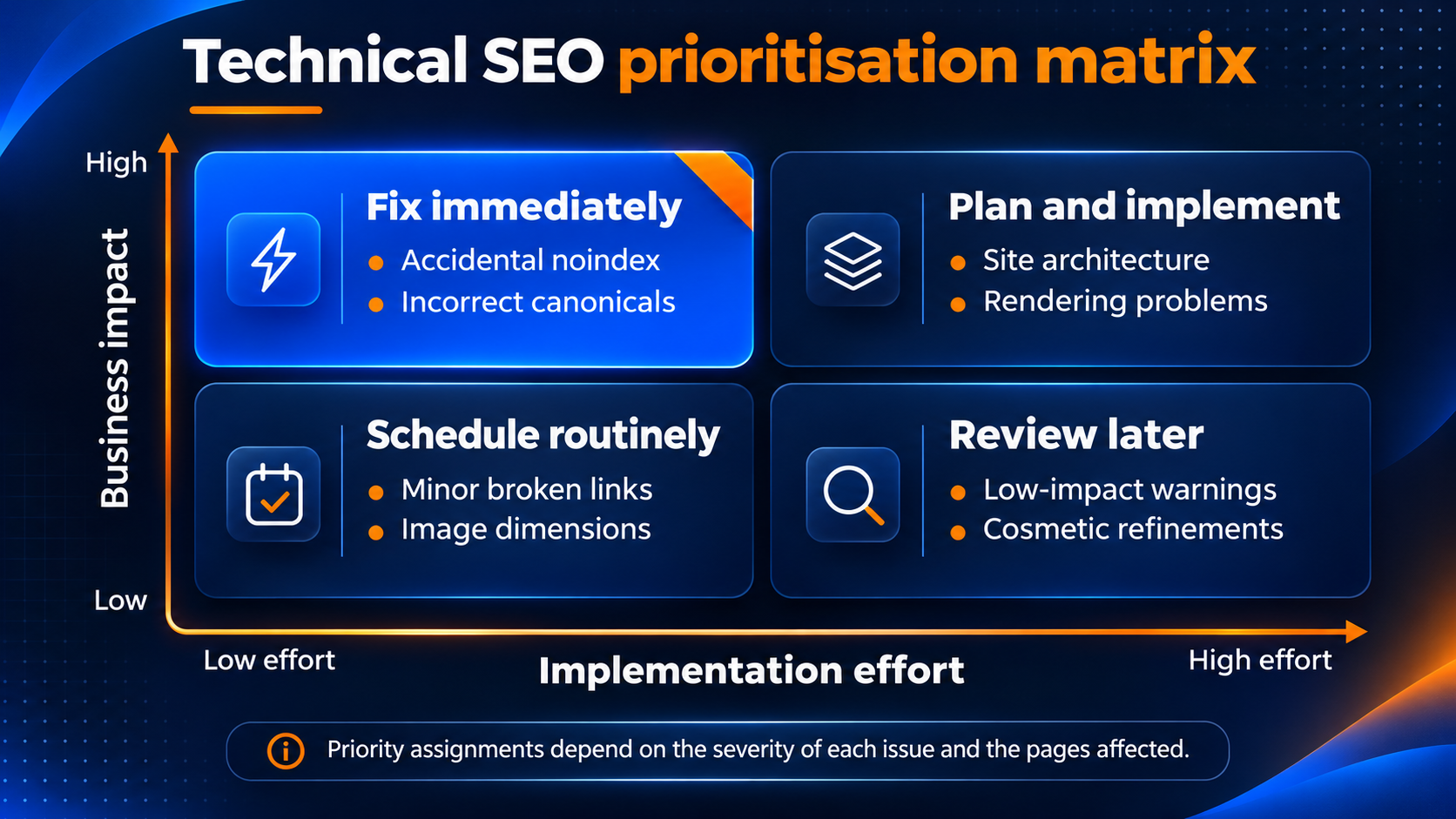
High-impact, low-effort fixes
These generally deserve immediate attention because they may affect commercially important pages. Examples include accidental noindex directives, incorrect canonical destinations and robots.txt rules blocking essential website sections.
Confirm the intended configuration before applying a fix across multiple pages.
High-impact, high-effort fixes
These issues often require development resources and careful planning. Examples include uncontrolled e-commerce URL generation, complex JavaScript rendering failures and poorly executed website migrations.
Create a documented implementation plan. Test substantial changes in a controlled environment before deploying them.
Low-impact fixes
Minor warnings and cosmetic refinements can usually be scheduled as part of routine website maintenance. Their priority may increase if they affect a large number of pages or contribute to measurable usability problems.
The severity of an issue depends on its context. A broken link on an archived blog post is unlikely to have the same impact as a broken navigation link to your main service page.
A 90-Day Technical SEO Action Plan
Singapore small and medium-sized enterprises (SMEs) can organise technical SEO improvements around a manageable 90-day implementation plan. This approach separates urgent accessibility problems from larger development tasks.
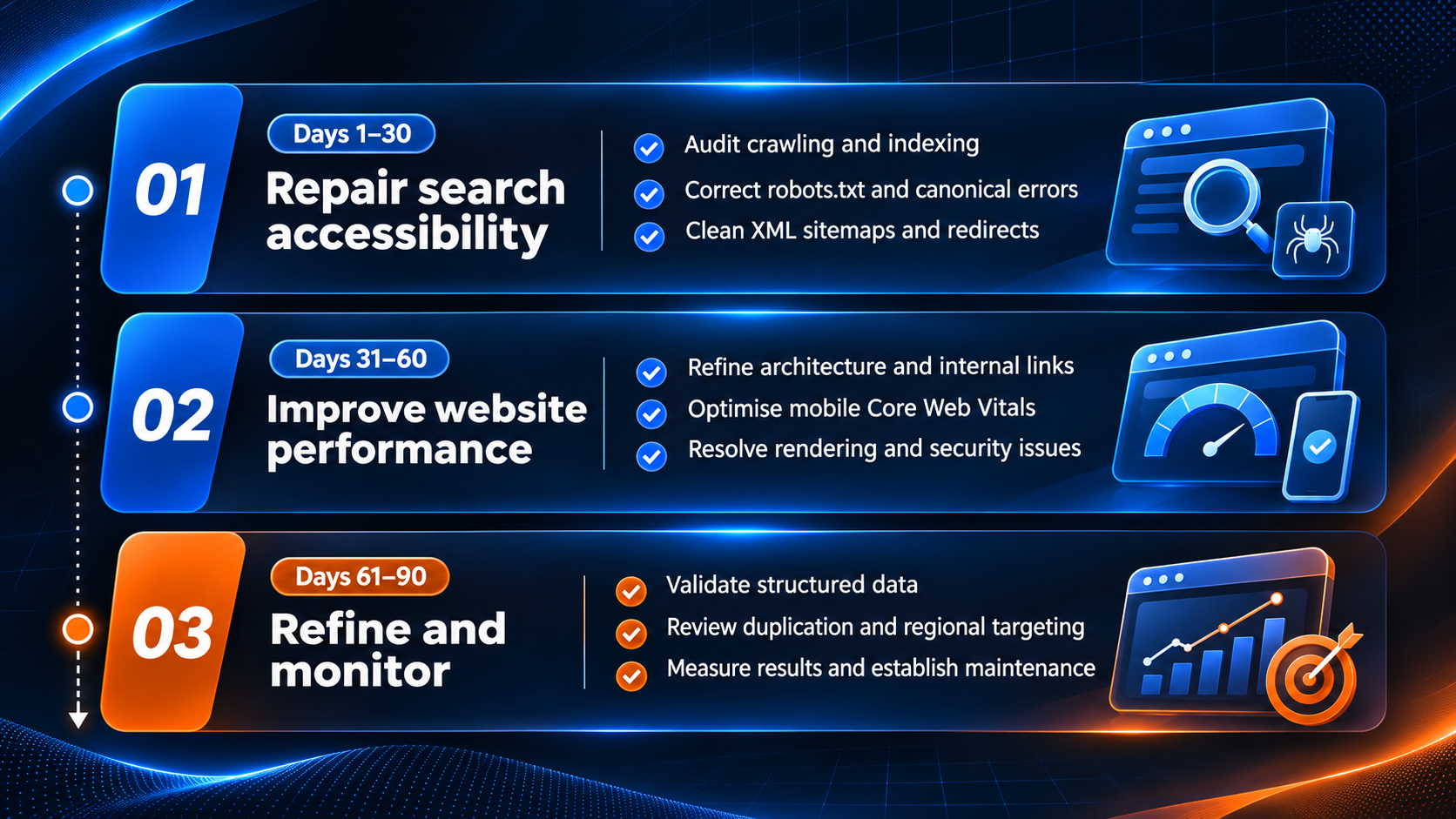
Days 1–30: Repair the technical foundation
- Establish your performance baseline using Google Search Console and a website crawler.
- Identify important pages that are inaccessible, unintentionally unindexed or incorrectly configured.
- Address urgent issues involving robots directives, server errors, canonicalisation and broken internal navigation.
By the end of this phase, your team should understand which commercially important pages are eligible for indexing and which require further investigation.
Days 31–60: Improve usability and website performance
- Review navigation paths and strengthen internal links.
- Use Core Web Vitals data to identify poorly performing templates. Prioritise improvements affecting visitors’ ability to access information, submit enquiries or complete purchases.
- Investigate JavaScript rendering problems and security configurations where necessary.
This phase may require coordination between marketing teams, web developers and hosting providers.
Days 61–90: Refine technical signals and establish monitoring
- Validate relevant structured data. Review language targeting and unnecessary duplicate URLs.
- Compare the updated website against your initial baseline. Assess whether critical indexing problems have been resolved and whether performance indicators have improved.
- Establish a recurring monitoring schedule to prevent previous problems from returning.
The 90-day timeframe is a recommended implementation framework, not a guaranteed recovery or ranking period. More complicated websites may require additional time.
Technical SEO Tips for Different Website Platforms
Technical SEO implementation varies according to your content management system (CMS). Some platforms provide automated technical features. Others offer greater control but require more configuration.
| Platform | Technical SEO advantages | Common areas to review |
|---|---|---|
| WordPress | Extensive configuration and plugin options | Plugin conflicts, archives, caching and security |
| WooCommerce | Flexible product and category management | Filters, duplicate URLs and database performance |
| Shopify | Hosted infrastructure and automated technical features | Theme performance, app scripts and collection URLs |
| Wix | Managed infrastructure and built-in SEO settings | Page configuration, custom scripts and template performance |
| Custom-built websites | Greater control over technical implementation | Rendering, routing, server configuration and maintenance |
WordPress and WooCommerce
Review how your theme and plugins generate canonical tags, XML sitemaps and structured data. Multiple plugins may introduce conflicting configurations. Excessive extensions can also affect performance. Use one clearly defined source for each major technical SEO function.
Shopify
Prioritise theme performance, installed applications and product discovery through collections. Review how product variants and filtered category URLs behave. Check the platform-generated canonical tags before introducing custom modifications.
Not every additional product URL requires removal. Evaluate whether it serves a legitimate navigational or search purpose.
Custom-built websites
Technical SEO should form part of the development process. Developers should account for crawlable navigation, rendering, HTTP response codes and metadata before the website launches. We recommend conducting technical checks during development instead of correcting structural problems only after launch.
Businesses selling through Shopee or Lazada should recognise that marketplace storefronts operate under separate technical infrastructure. Sellers generally have less control over crawling configurations and canonical tags than they do on their own websites.
How Technical SEO Supports AI Search Visibility in 2026
AI-powered search experiences have changed how some users discover information. Platforms can now summarise information from multiple sources and present answers alongside supporting links.
However, technical SEO remains relevant. Google states in its AI features and website guidance that pages must be indexed and eligible to appear in Google Search with a snippet to qualify as supporting links in AI Overviews or AI Mode.
Google does not require special AI-specific schema markup for this eligibility. Other AI search platforms may use different crawling systems and content-access requirements. For example, OpenAI’s ChatGPT Search guidance identifies access for OAI-SearchBot as important for website inclusion.
We recommend checking the following technical elements when AI search visibility forms part of your marketing strategy:
-
Search engine crawling and indexing eligibility.
-
Access permissions for relevant AI search crawlers.
-
Availability of important content within rendered pages.
-
Consistent canonical URLs and internal linking.
-
Accurate machine-readable business information.
-
Clear content organisation and descriptive headings.
Technical accessibility creates opportunities for discovery. It does not guarantee that an AI platform will select your website as a source. Businesses should combine these improvements with original information, credible evidence and relevant content.
Common Technical SEO Mistakes Singapore Businesses Should Avoid
Some technical SEO problems originate from routine website maintenance rather than complex infrastructure. Recognising these mistakes can help your team prevent unnecessary visibility losses.
| Common mistake | Potential consequence | Corrective action |
|---|---|---|
| Leaving staging restrictions on a live website | Important pages may remain unindexed. | Review robots.txt and noindex directives before launch. |
| Allowing public access to staging websites | Test content may become discoverable or indexed. | Protect development environments with authentication. |
| Blocking pages that contain noindex directives | Crawlers cannot detect the indexing instruction. | Allow crawling when using noindex to remove public pages from the index. |
| Canonicalising unrelated pages | Google may receive misleading consolidation signals. | Use canonical tags for duplicate or substantially similar content. |
| Redirecting deleted pages to the homepage | Poor user experience and potential soft 404 classifications | Redirect only to relevant replacements. |
| Optimising desktop performance exclusively | Mobile usability and performance problems remain unresolved. | Test both mobile and desktop experiences. |
| Installing unnecessary SEO plugins | Conflicting configurations or additional scripts | Review existing capabilities before adding plugins. |
| Ignoring technical SEO during website redesigns | Lost URLs, internal links and organic visibility | Establish a migration plan before launch. |
| Chasing perfect audit scores | Resources may be diverted from commercial priorities. | Prioritise evidence-based improvements. |
Website migrations deserve particular attention. Before redesigning or changing your domain, inventory existing URLs and identify pages generating organic traffic. Create a detailed redirect map and preserve relevant content.
Follow Google’s site migration guidelines to minimise avoidable disruptions. After launch, verify redirects, sitemap submissions and indexing configurations. Monitor organic performance while Google processes the changes.
When Should You Hire a Technical SEO Specialist?
Many routine technical SEO improvements can be handled internally. A business with a small WordPress website may only need to correct a few indexing directives, optimise images and improve internal links.
More complex websites often require specialist expertise. Consider professional technical SEO assistance when:
-
Important pages remain unindexed despite initial corrective work.
-
Organic traffic declines substantially following a migration or redesign.
-
Your e-commerce website generates excessive duplicate URLs.
-
JavaScript rendering problems affect important content.
-
Several regional websites have conflicting technical configurations.
-
Your internal team lacks the resources to implement and validate substantial fixes.
Before hiring an SEO provider, ask how its team prioritises technical work. A useful technical SEO audit should identify the affected URLs, explain the underlying problems and provide actionable recommendations. It should also establish how the results will be verified.
Avoid providers promising guaranteed rankings or presenting automated reports without explaining their findings.
At MediaOne, we recommend connecting technical recommendations to measurable business objectives. Our SEO services in Singapore support businesses that need an organised approach to improving search accessibility and organic performance.
Frequently Asked Questions
What are the most important technical SEO tips for beginners?
Start by checking crawlability, indexing and your XML sitemap. Once commercially important pages are eligible for search results, improve internal linking, mobile usability and website performance.
How often should I conduct a technical SEO audit?
Review essential technical metrics monthly and conduct a comprehensive audit at least annually, with more frequent assessments for large or frequently updated websites. Run additional checks after website redesigns, migrations and major platform changes.
Does technical SEO directly improve Google rankings?
Technical SEO can improve search accessibility and address problems affecting ranking potential. However, rankings also depend on content relevance, quality and other factors, so technical improvements alone cannot guarantee higher positions.
Does website speed affect SEO in Singapore?
Google considers Core Web Vitals within its ranking systems. Improving website speed can also support user experience and reduce friction during browsing or purchasing, regardless of whether rankings change significantly.
What is the difference between technical SEO and on-page SEO?
Technical SEO focuses on website infrastructure, crawling, indexing and performance. On-page SEO focuses primarily on content relevance, headings, metadata and other content-level optimisation.
Can I perform technical SEO without paid tools?
Yes. Google Search Console, PageSpeed Insights and free website crawling software can identify many common technical problems, although larger websites may require advanced tools.
What is the difference between robots.txt and noindex?
Robots.txt controls whether compliant crawlers may retrieve particular resources. A noindex directive instructs supported search engines to exclude a page from their index, but the page must remain crawlable for them to detect the directive.
Does every website need structured data?
Structured data is not mandatory for search rankings. Relevant and accurate markup can help search engines interpret website content and establish eligibility for supported search features.
How long does technical SEO take to show results?
Some technical changes take effect immediately on the website, but search engines may require days or weeks to process them. Complex migrations and large-scale indexing changes can take considerably longer.
Can technical SEO help my website appear in AI-generated search answers?
Technical SEO improves accessibility and eligibility for certain AI search features. Actual inclusion depends on the platform, content relevance and other selection systems, so technical improvements cannot guarantee citations.
Turn These Technical SEO Tips Into Sustainable Search Growth
Effective technical SEO starts with identifying the problems that prevent your website from reaching its intended audience.
Prioritise crawling and indexing errors affecting important pages. Then improve website architecture, mobile performance and other technical elements according to their commercial impact.
Small businesses can often begin with free diagnostic tools and a manageable maintenance schedule. Larger e-commerce websites and businesses operating across several markets may benefit from specialist technical assistance.
At MediaOne, we recommend treating technical SEO as an ongoing part of your digital marketing strategy. Every substantial improvement should support a clear objective and produce results your team can evaluate.
If technical problems are limiting your organic visibility, start with our website SEO audit to identify improvement opportunities and develop a prioritised action plan for your business.