| AI Summary
SEO WordPress pages help search engines find, understand and display a business’s content. The work covers indexing settings, page titles, headings, internal links and mobile performance. A small team should resolve access problems on important service pages first, then improve content and track enquiries alongside search traffic. Plugins provide controls, but page decisions still need human review. |
SEO for WordPress pages means improving individual pages so search engines can access them and readers can understand their purpose. The main tasks include checking indexing, writing descriptive titles, answering customer questions, adding relevant internal links and improving mobile loading. A priority checklist helps businesses address the pages most likely to support enquiries.
Key Takeaways
- An excluded page does not always need fixing. Thank-you pages and duplicate URLs may belong outside search results.
- A short title is a writing choice, not a fixed Google character requirement.
- A sitemap helps discovery but does not guarantee indexing.
- Archive pages need individual review before anyone applies noindex.
- Search traffic needs business context. Enquiries and completed bookings help show whether page changes support sales.
WordPress makes publishing straightforward. Search visibility takes more planning. A service page can look finished while carrying an accidental noindex setting, a vague title or a contact form that fails on a phone.
For Singapore businesses with small marketing teams, the challenge is deciding which page deserves attention first. A practical approach starts with access, moves through content and links, and finishes with mobile checks and measurement.
Why WordPress Pages Need Their Own SEO Review
WordPress pages often hold a business’s main services, locations and contact details. A visitor comparing accounting firms or renovation companies may land directly on one of these pages without seeing the homepage.
Each page therefore needs a defined job. A bookkeeping service page should explain the service, who it serves, what customers receive and how an enquiry works. A contact page serves a different purpose and needs different content.
A page review separates three questions:
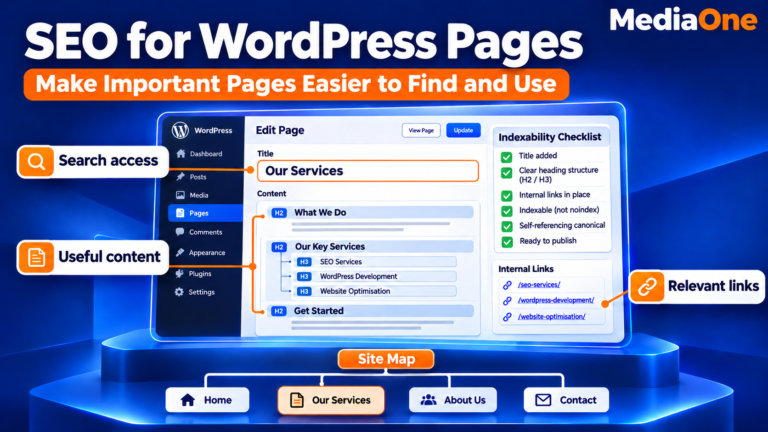
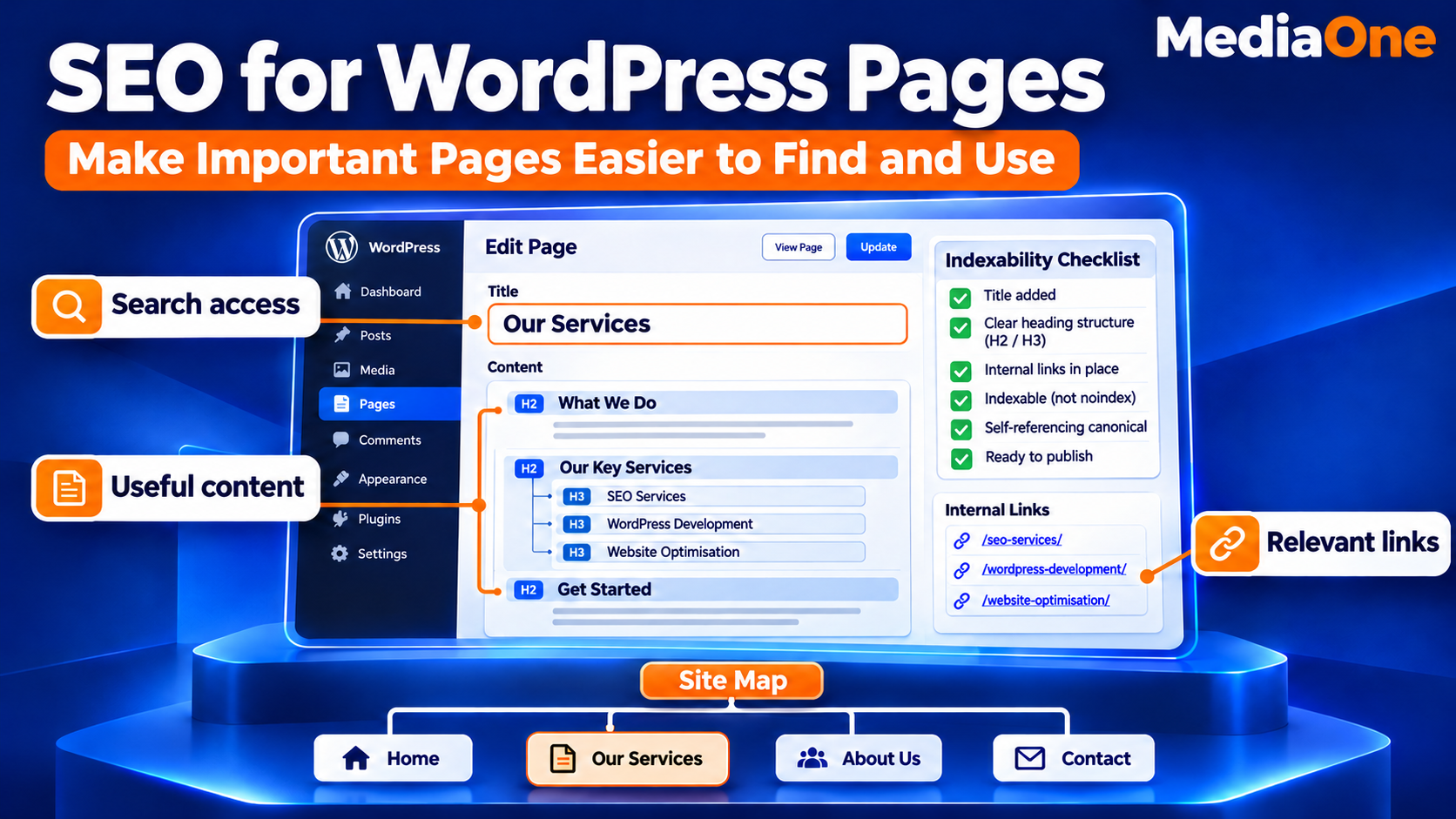
- Access: Can Google reach and index the page?
- Relevance: Does the page answer the visitor’s search?
- Action: Can the visitor take the next step?
A page can pass one test and fail another. An indexed page may answer the wrong question, while a detailed service page may have no links pointing to it. A focused review identifies the actual problem before the team rewrites anything.
Set Up WordPress for Search Access
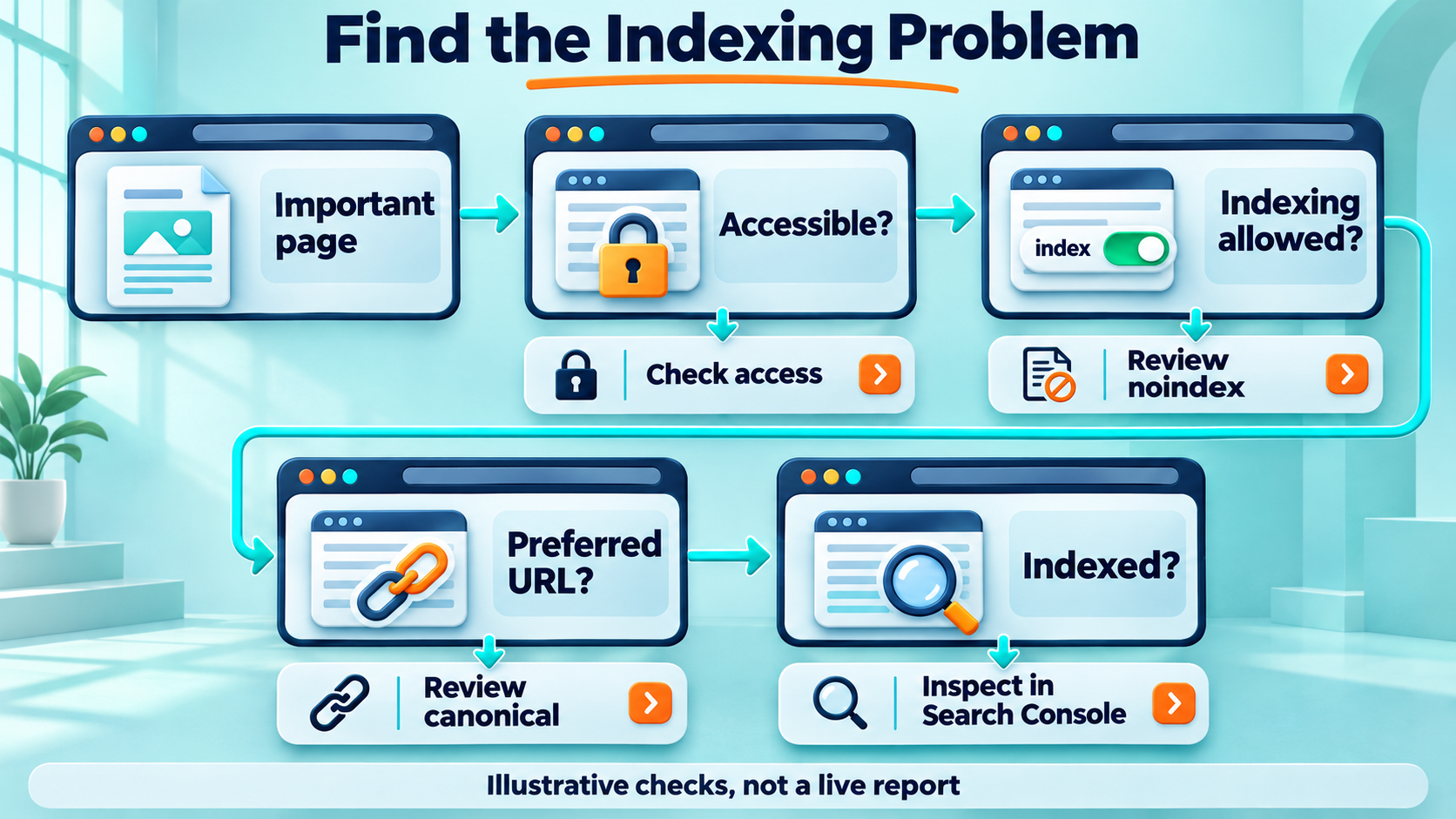
WordPress settings establish whether a public page is available for search. These checks belong near the start of an audit because later improvements depend on access.
Search visibility and page status
The WordPress Reading settings include “Discourage search engines from indexing this site”. On a public business website intended for search, that box should normally remain unticked. The setting requests search exclusion; it does not protect private information.
Individual pages also need checking. A published page may carry a noindex instruction from an SEO plugin even when the site-wide setting allows indexing.
The starting checks are:
- Publication status is public.
- The page loads without a password.
- The intended URL returns a successful response.
- No unintended noindex instruction appears.
- Security tools allow legitimate search crawlers.
Permalinks and plugin controls
Readable URLs help visitors recognise a destination. A service page such as /corporate-tax/ explains more than /page-123/. Existing URLs do not need changing simply to make them shorter.
A URL change needs a redirect from the old address, updated internal links and a revised sitemap. Larger changes belong within a planned website relaunch SEO process.
One main plugin should usually control SEO titles, descriptions, canonicals and sitemaps. Multiple plugins performing the same tasks can produce conflicting output.
The choice among WordPress SEO plugins depends on the controls the team needs and can maintain. A high plugin score does not establish whether a page meets customer needs.
Check Indexing Before Rewriting Content
Crawling and indexing describe different stages. Crawling means Google visits a URL. Indexing means Google processes the content and may store it for search results.
An accessible page is not automatically indexed. An indexed page is not guaranteed to appear for a particular search.
Search Console checks
Google Search Console provides page-level evidence. The URL Inspection tool reports on Google’s indexed version and can test the current page. The indexed report and live test may show different information after recent changes.
A page review should record:
| Check | What the team needs to establish |
| Indexing status | Whether the intended page is indexed |
| Crawl access | Whether Google can fetch the content |
| Indexing permission | Whether the page allows indexing |
| Canonical selection | Whether Google selected the intended main URL |
| Live page | Whether current content loads as expected |
A “Crawled – currently not indexed” status needs investigation, not an automatic rewrite. Content overlap, limited value and other indexing decisions may be involved. The label alone does not identify one cause.
Sitemaps, robots.txt and noindex
An XML sitemap lists URLs a site wants search engines to discover. WordPress and SEO plugins can generate these files. Google describes sitemaps as a discovery aid, with no guarantee that submitted pages will be crawled or indexed.
The sitemap should normally contain preferred, indexable URLs that load successfully. Redirected addresses, deleted pages and noindex pages generally do not belong there.
Robots.txt controls crawling. A noindex instruction controls exclusion from search results. Google must be able to crawl a page to discover its noindex instruction. Blocking the same page in robots.txt can prevent that.
Give Each Page One Search Purpose
A service page works best when its main purpose is obvious. A company offering payroll, bookkeeping and tax services may need separate pages because customers ask different questions about each service.
Separate pages still need enough distinct information to justify their existence. Replacing a neighbourhood name across otherwise identical pages adds little for readers.
Customer intent and page content
Search intent means what someone wants to achieve through a search. “What is payroll outsourcing?” suggests a need for explanation. “Payroll services Singapore” may suggest someone comparing providers.
A commercial page should help that comparison through:
- The service’s scope and exclusions.
- The customers or business types it serves.
- The steps involved.
- Verified credentials or relevant experience.
- Pricing information where available.
- A direct route to an enquiry.
For example, “monthly bookkeeping” leaves several questions unanswered. A fuller explanation might describe transaction recording, reconciliation and reporting, but only when the company actually provides them.
Effective on-page SEO connects the search purpose with the page’s title, headings, explanations and next step.
Headings and readable answers
One main H1 gives readers a recognisable page title. H2 headings organise the major topics, while H3 headings divide longer sections.
A service page could use headings such as:
- What the Service Includes
- Who the Service Supports
- How the Process Works
- Costs and Payment Options
- Questions Before Booking
Each section should answer its heading promptly. A short explanation, example or table often serves readers better than several paragraphs of repeated benefits.
Everyday language also supports answer-focused content. A direct definition followed by supporting detail is easier to understand and quote than a paragraph filled with sales claims.
Write Titles and Descriptions That Match the Page
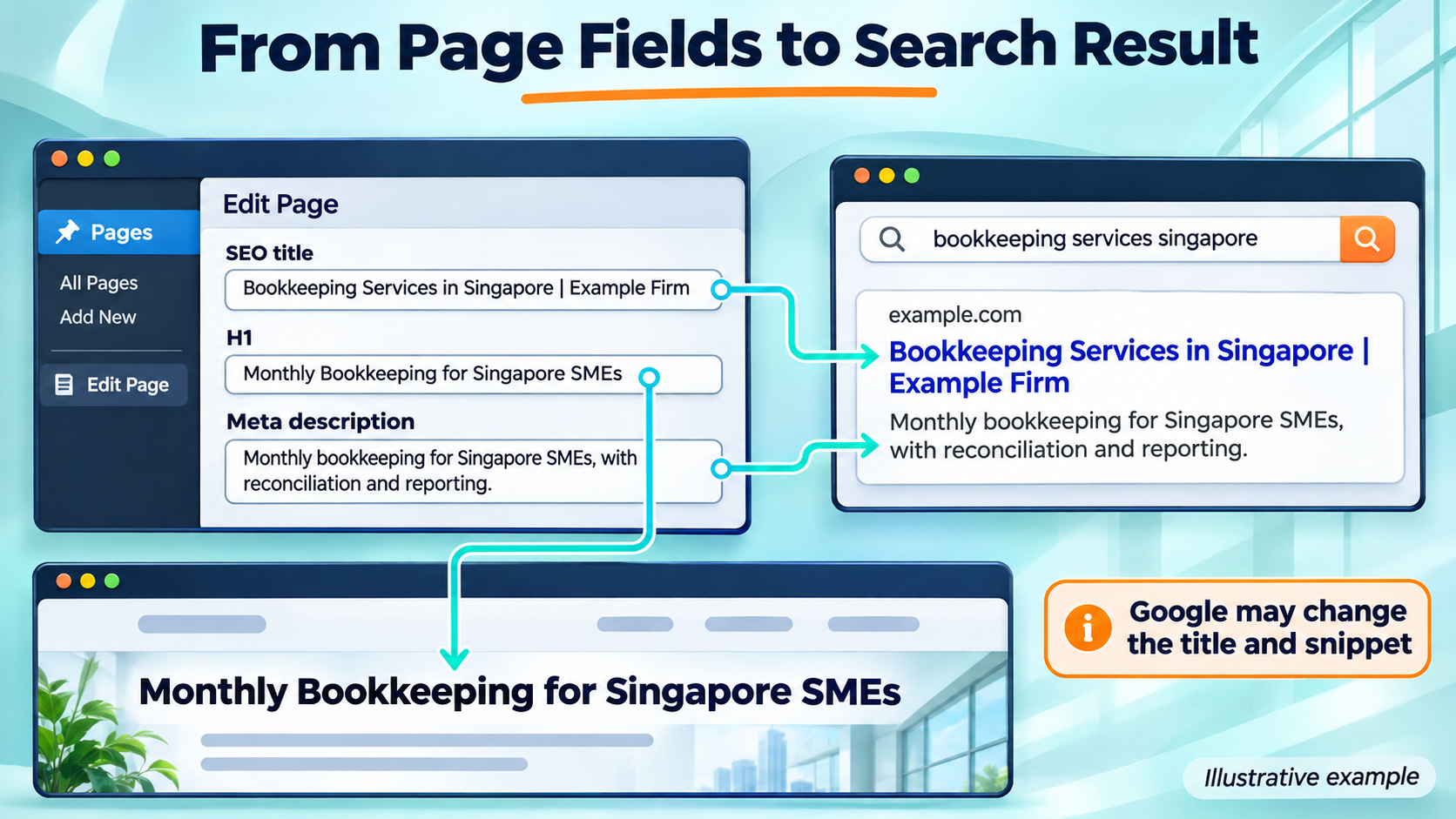
The SEO title, visible H1 and meta description have related jobs, but they are separate elements. The title identifies the page in search. The H1 introduces the page itself. The description provides a possible search-result summary.
Titles that describe the service
A title should name the main subject without forcing an awkward keyword phrase. “SEO for WordPress pages” reads naturally; “SEO WordPress pages” can remain a research keyword without becoming repeated page copy.
Google has no fixed title character limit. Search results shorten titles according to available display space, and Google may generate different title wording. About 50–60 characters can serve as an editorial target, not a technical rule.
| Page element | Weak example | More descriptive example |
| SEO title | Services | Example Firm | Bookkeeping Services in Singapore | Example Firm |
| H1 | Our Solutions | Monthly Bookkeeping for Singapore SMEs |
| Description | Best services and quality solutions | Monthly bookkeeping for Singapore SMEs, with reconciliation and reporting. Enquiries start with a review of business needs. |
These examples are illustrative. Published wording must reflect the actual service.
Descriptions that support a decision
A meta description should summarise what readers can expect. Specific service details provide more value than repeated keywords or claims such as “best company”.
Google may use page content instead of the supplied meta description, depending on the query. Descriptions should therefore support accurate expectations without promising control over the displayed snippet.
Duplicate titles and descriptions are easier to review through a website crawl or page inventory. Search Console does not provide a dedicated duplicate-title report.
Connect Pages With Relevant Internal Links
Internal links help visitors move between related pages. They also help search engines discover content and understand relationships across the site.
A page with no internal links pointing to it is often called an orphan page. A sitemap can help discovery, but it does not replace a sensible website structure.
Links that explain the destination
A practical internal linking strategy connects pages where the next destination answers a related need.
A bookkeeping page might link to payroll support within a sentence about managing employee payments. An article about business records might link to bookkeeping services when discussing ongoing record management.
Google’s link best practices favour crawlable links and descriptive anchor text. “Monthly payroll support” tells readers more about a destination than “click here”.
A link review should cover:
- Relevant links from service hubs and related articles.
- Descriptive wording around each destination.
- Links that point directly to the current URL.
- Broken links and unnecessary redirect chains.
- Menus and breadcrumbs that reflect the site structure.
No universal internal-link count suits every page. Each link needs a reason to exist for the reader.
Review Duplicate URLs and Archive Pages
WordPress can produce several types of URLs beyond standard pages and posts. Categories, tags, author archives and parameter-based addresses all need review. The aim is to establish which URLs deserve search visibility and which version should represent repeated content.
Canonicals and redirects
A canonical identifies a preferred version of duplicate or very similar content. Google treats canonical signals as signals, with Google making the final selection. A canonical does not work as a guaranteed exclusion command.
| Situation | Likely response |
| A page permanently moves | A permanent redirect to its replacement |
| Similar versions must remain accessible | A canonical pointing to the preferred version |
| A public page should stay outside search | A crawlable page with noindex |
| Content disappears without a replacement | A genuine 404 or 410 response |
Each choice depends on the page’s purpose. Redirecting every deleted page to the homepage can confuse visitors.
Archives that help readers
A category archive may organise an important topic and help visitors find related articles. A tag archive containing one repeated listing may offer little additional value.
Archive decisions should consider:
- Whether people use the page.
- Whether it provides a distinct way to browse.
- Whether it receives relevant search visits or links.
- Whether its content overlaps heavily with other URLs.
A blanket noindex rule can remove pages that already serve readers. The review should establish their value before changing their search settings.
Improve Mobile Speed and Usability
Mobile performance includes loading, responsiveness and whether the page works during an enquiry. A fast page still fails its purpose if a banner covers the form or a phone number cannot be tapped. Testing should include real phones where possible, especially for service pages that receive enquiries.
Core Web Vitals in everyday terms
Google’s Core Web Vitals measure loading, response to interaction and unexpected layout movement. The published “good” thresholds apply at the 75th percentile of visits, assessed separately for mobile and desktop.
| Metric | What it measures | Good threshold |
| Largest Contentful Paint (LCP) | When the largest visible content element appears | 2.5 seconds or less |
| Interaction to Next Paint (INP) | How quickly the page responds to interaction | 200 milliseconds or less |
| Cumulative Layout Shift (CLS) | Unexpected movement of page elements | 0.1 or less |
Lab tests help diagnose problems. Real-user data shows how visitors experience the site over time. A page without enough traffic may lack page-level field data.
WordPress fixes with practical value
Common performance work includes:
- Images sized for their displayed dimensions.
- Modern image formats where supported.
- Caching that works with the website’s functions.
- Fewer unnecessary scripts and plugins.
- Reserved space for images and embedded content.
- Hosting that responds reliably.
The main visible image should load promptly. Applying lazy loading to it can delay the content visitors need first.
Broader web page optimisation also covers readable text, working forms and accessible controls. A developer may be needed when problems involve theme code, server settings or interacting scripts.
Prioritise WordPress SEO Fixes With a Page Checklist
A small team needs a manageable queue. A structured SEO audit checklist helps connect each finding with a page, an owner and a next action.
Page value should reflect business relevance and evidence. Existing search impressions, customer demand and enquiries provide stronger reasons for attention than personal preference.
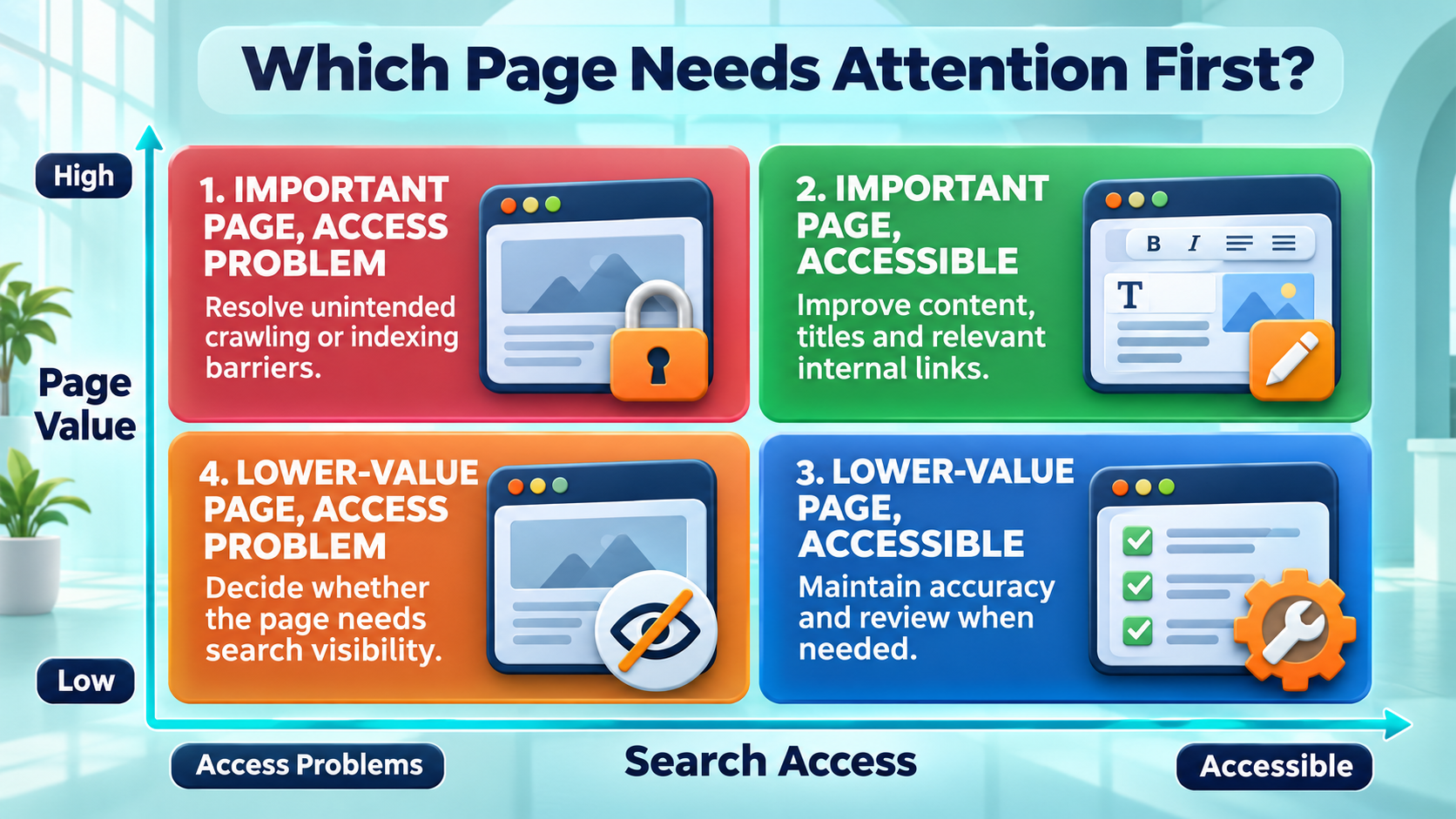
Priority by access and page value
| Page condition | Priority | First action |
| Important page with access or indexing barriers | 1 | Investigate and remove unintended barriers |
| Important, accessible page with weak content or links | 2 | Improve the answer and related internal links |
| Lower-value, accessible page | 3 | Maintain accuracy and review when needed |
| Lower-value page with access problems | 4 | Decide whether it needs search visibility |
A site-wide fault can override this order. A broken shared template affecting every service page deserves attention even when discovered through a lower-value URL.
A repeatable page review
A page inventory can use these columns:
- Page URL and purpose.
- Business importance.
- Indexing status.
- Title and heading concerns.
- Content gaps.
- Incoming internal links.
- Mobile problems.
- Assigned action, owner and review date.
An illustrative 40-page consultancy might begin with three service pages that already receive relevant impressions. The team could correct one accidental noindex setting, explain missing service details and add contextual links. These are example actions, not measured client results.
Measure Search Visibility and Enquiries
A completed task does not prove an SEO improvement. Measurement needs a baseline, a change date and enough time for Google to revisit the page.
Search Console can track impressions, clicks, click-through rate and average position. Analytics and enquiry records add information about what visitors do after arriving.
A monthly review that supports decisions
A small team can review:
- Search terms bringing visitors to priority pages.
- Changes in relevant impressions and clicks.
- Completed enquiries or bookings from organic visits.
- Form failures and broken contact links.
- Whether Google has processed recent page changes.
Comparisons need context. Seasonal demand, advertising and changes elsewhere on the site can affect results.
An increase in impressions with few enquiries may mean the page attracts the wrong audience. Strong enquiries from fewer visits may indicate that the page answers a narrower buying need.
AI search and answer visibility
Google’s AI search features do not require special AI markup or a separate optimisation method. Supporting pages must meet the relevant search eligibility requirements, including indexing and snippet eligibility. Inclusion remains unguaranteed.
Direct answers, descriptive headings and evidence support readers across search formats. Important explanations should remain available as text, even when an infographic helps illustrate them.
Give WordPress SEO a Practical Order
SEO for WordPress pages works through connected decisions: access, page purpose, content, links and mobile usability. A page inventory helps small teams address high-value problems first and measure whether the work leads to relevant visits and enquiries.
At MediaOne, we connect technical checks, content and measurement through our SEO services. Our team can assess your WordPress pages and identify the work most relevant to your business goals, giving your next optimisation decisions a practical starting point.
FAQs About SEO for WordPress Pages
Does changing a WordPress theme affect SEO?
A theme change can alter headings, menus, mobile layouts and how content appears to search engines. A staging review helps identify lost content or changed links before launch. Important URLs and enquiry functions also need checking after the new theme goes live.
Should a PDF replace a WordPress service page?
A PDF can support a service page through downloadable specifications or brochures. The webpage should still explain the service and provide contact options. Readers should not need a download to learn what the business offers or how to enquire.
Does a WordPress page need a minimum word count?
Google does not prescribe a universal minimum for service pages. The page needs enough information to answer its audience’s questions accurately. A narrow service may need less explanation than a complex offering with several conditions, stages or pricing options.
Can customer reviews appear on service pages?
Genuine reviews can help readers assess a provider. Permission, accurate attribution and an unchanged meaning are important. Invented quotations or unsupported customer claims should not appear. Review content also does not automatically qualify a page for review stars in Google.
Should old WordPress pages display a new date after minor edits?
A date should represent the content honestly. A substantial revision may justify an updated date, while a small punctuation correction rarely gives readers a reason to treat the whole page as newly researched. Accurate dating helps visitors judge time-sensitive information.