
The best WordPress SEO plugin gives your website the controls it needs, works reliably with your editor and theme, and is maintained properly. Yoast SEO, Rank Math, All in One SEO (AIOSEO), SEOPress and The SEO Framework can all support technically sound SEO. None can guarantee search rankings, and switching between them rarely fixes weak content, poor internal linking or a badly configured website.
This buyer’s guide does more than list features. It explains what each plugin changes in your site’s HTML, how to choose a free or paid plan, how to test the result in WordPress and Google Search Console, and how to migrate without losing essential metadata. It includes selection scorecards, Singapore business examples, WordPress and Elementor instructions, a 30-minute verification checklist, and realistic troubleshooting scenarios.
Quick answer: For a new single-site blog, begin with a free version of a reputable plugin and keep the configuration simple. For owners who prefer editorial guidance, evaluate Yoast SEO; for modular technical controls and Elementor integration, consider Rank Math; for a guided business-focused setup, consider AIOSEO; for a flexible, less cluttered experience, consider SEOPress; and for automated defaults with fewer prompts, consider The SEO Framework. These are fit recommendations, not independently tested rankings.
Key Takeaways
- One primary SEO system. Avoid letting two full SEO plugins generate competing titles, canonicals, schema or sitemaps.
- Free is often enough. Titles, descriptions, robots directives, canonicals and an XML sitemap usually cover a small brochure site; pay for a feature you will use, not an impressive scorecard.
- Check the output, not the green score. A plugin’s content score is not a Google ranking signal. Inspect the page source, indexability and Search Console results.
- Plan around your site type. A WooCommerce store needs product and variant handling; a local business needs trustworthy business details; a publisher needs editorial consistency and archive controls.
- Watch renewal prices. Some advertised rates are first-year promotions. Compare the renewal amount, supported sites, VAT/tax and premium-feature gates.
- Treat migration as a change release. Back up, export metadata and redirects, test in staging, verify critical pages and watch Search Console afterwards.
What WordPress SEO Plugins Do and Why They Matter
What is a WordPress SEO plugin?
WordPress can publish a page without an SEO plugin. An SEO plugin adds a convenient interface for search-related settings that would otherwise be controlled through themes, templates, code or separate extensions. It commonly manages the HTML title element, meta description, indexing directives, canonical URL, Open Graph previews, XML sitemaps and structured data.
It does not directly place your site in Google’s index, submit every page automatically to all search engines, produce backlinks or decide rankings. Google may rewrite titles and snippets, ignore a canonical hint or decline to index a page even when the configuration is technically valid.
For example, a Singapore tuition centre may publish a page about JC H2 Mathematics. The plugin can produce an appropriate title and canonical, and include the page in a sitemap. But whether it ranks depends on what the page actually offers: class details, teaching approach, instructor qualifications, locations, price transparency and whether it satisfies a student’s or parent’s question.
How SEO plugins work behind the editor
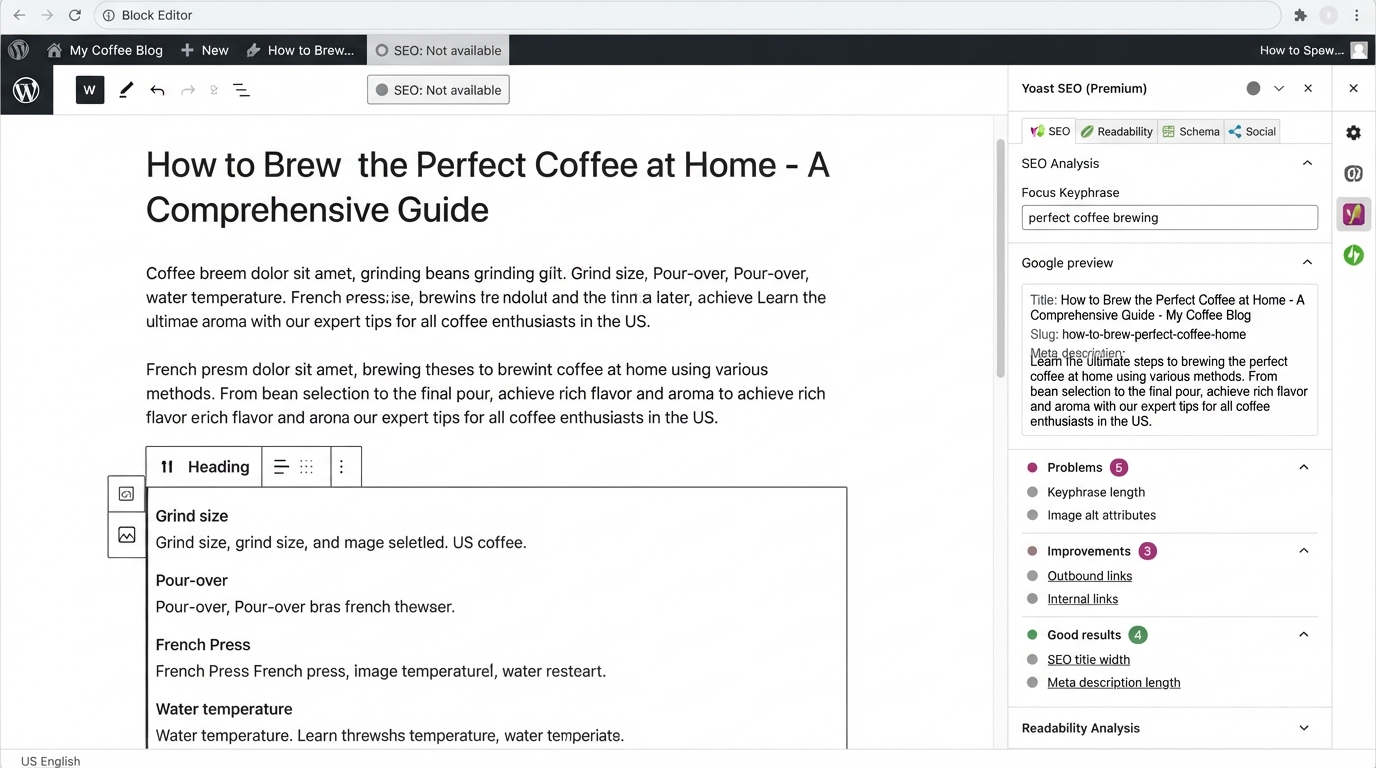
Imagine editing a WordPress page called “JC Maths Tuition Singapore.” Its visible H1 might be JC Mathematics Tuition, while its SEO title could read JC H2 Maths Tuition in Singapore | Example Academy. A meta description might explain the programme and how parents can enquire. The plugin stores these values and outputs the appropriate tags on the published page.
A simplified output looks like this:
<title>JC H2 Maths Tuition in Singapore | Example Academy</title>
<meta name="description" content="Explore JC H2 Maths tuition, class formats, teaching approach and enrolment details in Singapore.">
<link rel="canonical" href="https://example.com/jc-maths-tuition/">
<meta name="robots" content="index,follow">
Illustrative HTML only. Actual output varies by plugin and settings; omission of an explicit index,follow directive is normal. You should not manually paste duplicate tags when an SEO plugin already manages them.
Where to inspect: Open the published page in a browser, right-click and select View Page Source, then search for <title>, description, canonical and robots. Also inspect any JSON-LD structured data. Elementor’s on-screen appearance is not proof that the published metadata is correct.
Why SEO plugins matter for a WordPress site
A small five-page company site may only need good defaults and carefully written titles. A 2,000-product WooCommerce store may need scalable templates, product schema, special rules for variants, canonical choices and controls for archives. A multisite agency may care most about portability, workflow permissions, exports and licensing.
The value is consistent execution, not a magical ranking boost. A team that maintains one well-configured plugin, fixes real indexability issues and produces useful pages will generally have a sounder foundation than one that changes plugins to chase higher colour-coded scores.
Key Features to Look for in an SEO Plugin
On-page analysis and content scoring
Most prominent plugins offer some combination of focus-keyphrase guidance, title and description checks, readability prompts and internal-link suggestions. These indicators may help editors remember routine tasks. They are not a measurement of Google’s relevance or content-quality systems.
Good use: An editor notices that a product page has no clear description of dimensions, warranty or compatibility, then improves those details for buyers.
Poor use: A writer repeats the same phrase twenty times to raise a plugin score, making the page unnatural.
Test the analysis on your own writing and editor. If your authors build pages primarily in Elementor, verify that the plugin can read the relevant content and that the snippet controls are accessible. An incorrect low content score does not necessarily mean Google cannot read the page; inspect rendered HTML before concluding that.
XML sitemaps and indexing controls
An XML sitemap lists URLs you want search engines to discover. It is a discovery aid, not an indexing guarantee. WordPress already has basic core sitemap capability, while SEO plugins typically add more controls. Make sure the preferred sitemap is reachable and that important URLs are eligible for indexing.
Decide intentionally whether author archives, tag archives, attachment URLs, search-results pages and custom post types should be indexed. For a single-author company blog, author archives may duplicate the main blog list. For a publisher with well-developed author profiles, author pages may have genuine value.
Critical distinction: A noindex directive asks crawlers not to index the page; robots.txt disallow rules restrict crawling. If Google cannot crawl a URL, it may not see an on-page noindex. A canonical tag is a hint about the preferred version, not a forced redirect. Do not mark valuable product or service pages noindex casually.
Schema markup and rich-result eligibility
Structured data describes entities or page content in machine-readable form. Common examples include Organization, LocalBusiness, Article, BreadcrumbList and Product. A valid structured-data output does not guarantee a rich result, and not every schema type is eligible for a visible enhancement in Google.
Local-service example: A clinic can identify its official business information and link it to legitimate on-page details. The schema must accurately reflect what visitors can see and what the business actually provides.
WooCommerce example: Product markup must match real product prices, availability and variants. Check the rendered result after changing a plugin, WooCommerce extension or theme; duplicate or contradictory Product nodes can arise when several systems inject schema.
Use Google’s Rich Results Test for supported Google features and Schema Markup Validator for broader vocabulary validation. Both are tests of markup, not forecasts of rankings.
Media integration and image optimisation
An SEO plugin might suggest missing alt attributes, social-share images or relevant image metadata. It usually does not replace an image-compression or caching solution.
Write alt text that communicates the picture’s useful information. An image of a classroom might say “Tutor explaining an H2 Maths problem to three students,” rather than stuffing “best JC tuition Singapore” into every file. Decorative images can use empty alt text.
Compress and resize large hero images separately, and test them on mobile. Optimising image size is important for performance regardless of which SEO plugin you choose.
A 301 permanent redirect is appropriate when a page has permanently moved, such as /old-course/ to /new-course/. Update important internal links to the new address too. Avoid redirect chains and never send every obsolete page to the homepage indiscriminately.
Breadcrumbs help visitors understand site hierarchy and can produce useful structured data. Confirm that your theme or page builder does not already output a competing breadcrumb trail or schema.
For redirects, evaluate whether the plugin’s free or paid tier includes the exact features you need: 301/302/307 redirects, 404 logs, regex patterns, bulk imports and auditability. A dedicated redirect plugin can also be appropriate if it does not conflict with the SEO plugin’s other output.
Social previews, permissions and change history
Look beyond search features. A marketing team may need Open Graph image controls for LinkedIn, user role permissions to prevent accidental noindex changes, and a record of SEO metadata edits. Agencies should test bulk editing, exports, client permissions and rollback processes.
What no plugin can solve by itself
| Problem | Can an SEO plugin help? | What actually needs doing |
|---|---|---|
| No useful content answering the query | Only with reminders | Research intent, add original evidence and improve the page |
| Page blocked by server firewall | Usually not | Correct access and bot/WAF configuration |
| Slow server and oversized media | Limited | Hosting, caching, images and script performance |
| Poor internal linking | Suggestions may help | Build meaningful contextual links and navigation |
| Weak authority or trust | Not by installation | Demonstrate expertise and earn legitimate references |
| Incorrect conversion tracking | Not an SEO-plugin task | Audit GA4, forms, CRM and conversion definitions |
How to Choose the Right SEO Plugin
Define your goals first
Choose the plugin only after documenting your actual site and editorial workflow:
- Content site: How many posts, authors, categories and languages? Are article templates consistent?
- Local services: Are business details, opening hours, locations and service pages correctly maintained?
- WooCommerce: Are there product variants, filters, faceted navigation, out-of-stock products and frequent URL changes?
- Agency: How many client installations? Who can edit metadata? Do you need central reporting, exports and a predictable licence model?
- Elementor: Are titles, canonicals and schema generated once in the final HTML, and can editors update them without touching the theme?
The Site-Fit Scoring Matrix
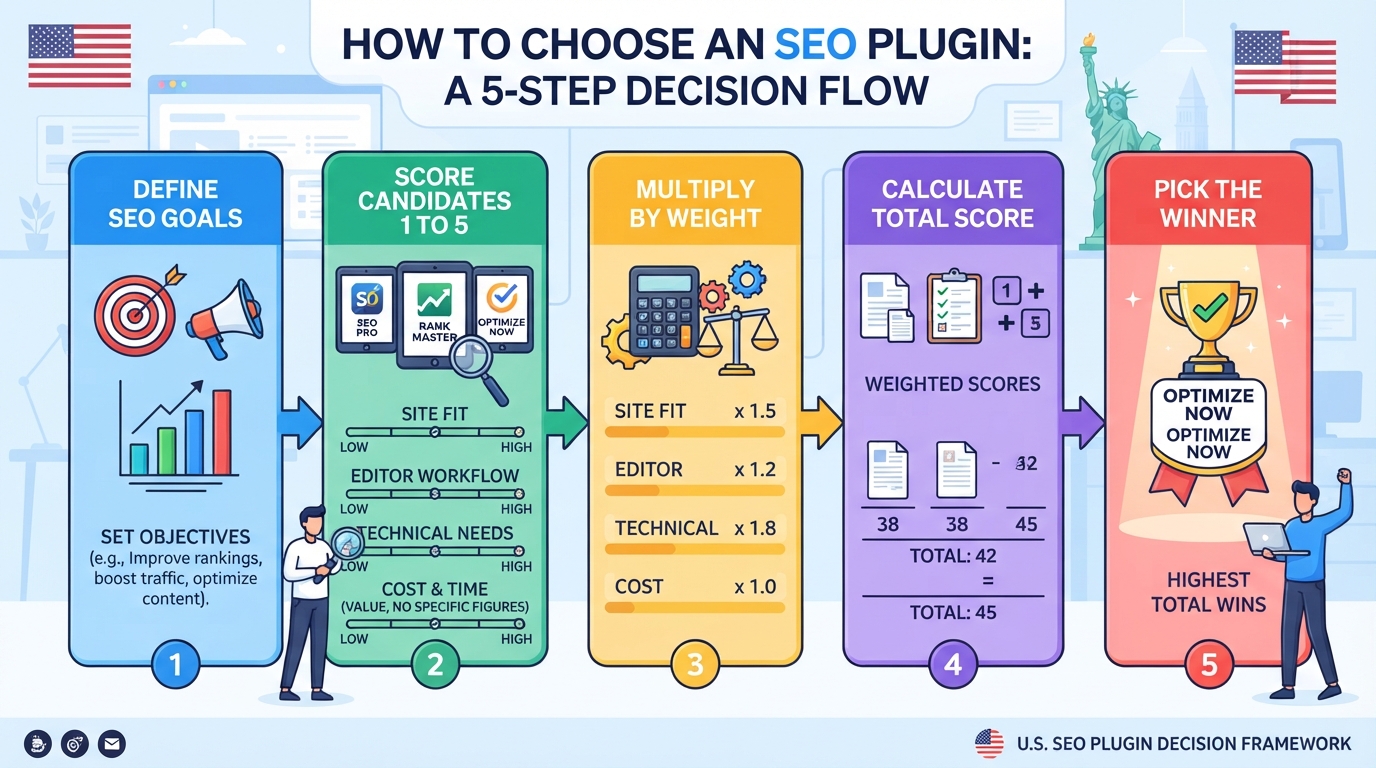
Rate each candidate 1–5, where 1 means poor fit and 5 means excellent fit. Multiply by the weights, then divide by five to obtain a score out of 100.
| Criterion | Weight | Evidence required |
|---|---|---|
| Site and business goals | 25% | Supports required page types and current SEO tasks |
| Editor and team workflow | 20% | Usable in Gutenberg/Elementor, sensible permissions |
| Technical capabilities | 25% | Verified sitemap, schema, canonical, indexing and redirect needs |
| 12-month cost | 15% | Renewal price, taxes, number of sites, add-ons |
| Maintenance and support | 15% | Updates, support, exports, migration and documentation |
Example (illustrative scores, not vendor ratings): A single-site service business compares Candidate A (5,4,4,4,4) and Candidate B (4,5,3,5,3). The weighted totals are 85/100 and 79/100, respectively. Candidate A leads because site fit and technical coverage matter most to this business. Another organisation could reasonably choose differently.
Before scoring, set mandatory gates: current WordPress compatibility, acceptable maintenance/security posture, functional metadata output and the necessary data export options. Do not select a plugin that fails these gates even if its total score is high.
Calculate the first-year cost and the recurring renewal cost separately. A discounted initial year can make one product look artificially cheaper. Convert currency only when your finance team needs a consistent accounting basis, and check applicable taxes.
Include paid add-ons for local SEO, news/video sitemaps or WooCommerce functionality; developer setup and training; and additional licences for multiple domains or client sites. If you only need titles, descriptions, canonicals and XML sitemaps, test a free plan first.
Worked cost example, illustrative: Plugin A costs US$0 but requires four extra hours of manual work each year at US$50/hour, for US$200 annual labour cost. Plugin B costs US$100 per year and saves three of those hours, leaving US$150 of labour savings; its effective cost is US$150 (US$100 fee plus US$50 remaining labour). Plugin B may be the better value even though it is paid. Measure actual savings rather than assume them.
Head-to-Head: Yoast SEO, Rank Math, AIOSEO, SEOPress and The SEO Framework
The following comparison focuses on real buying distinctions, not unsupported claims that one plugin automatically delivers better rankings. Plan availability and pricing can change; the references linked below are official vendor pages checked in November 2026.
| Plugin | Strongest starting use case | Core free capabilities | Paid differentiator to verify | Important caveat |
|---|---|---|---|---|
| Yoast SEO | Editors who like clear content guidance | Basic analysis, metadata, sitemap, structured data | Premium redirects, enhanced editorial and specialist SEO capabilities | Test editor fit and renewal value |
| Rank Math | Owners wanting broad modular controls | Metadata, sitemaps, schema, redirects and integration options | Advanced schema, analytics/keyword tracking, bulk/agency functions | More modules mean more configuration choices |
| AIOSEO | Business sites preferring guided onboarding | Core SEO controls and setup assistance | Local SEO, link assistance, deeper redirects and reporting by tier | Introductory discounts differ from renewals |
| SEOPress | Teams wanting flexible controls and a comparatively straightforward interface | Metadata, sitemaps and core structured data | Local/WooCommerce SEO, schemas, redirects, CSV and audit tools | Verify selected licence’s feature and site-count limits |
| The SEO Framework | Sites prioritising automated defaults | Core metadata, sitemaps and schema | Extensions, monitoring and multi-site support tiers | Less emphasis on traffic-light editorial coaching |
Yoast SEO review
Who should shortlist it: A blog, editorial team or general business website where editors benefit from familiar on-page guidance and established documentation.
Yoast’s premium offering currently advertises redirect handling, expanded editorial assistance and additional SEO capabilities. Its official Premium page showed US$118.80 per year excluding VAT when checked; this is a live vendor price, not a guaranteed future rate. Official Yoast Premium information.
Practical test: Edit three representative articles, adjust their titles/descriptions, publish a change and check the output. Assess whether the suggestions actually help your writers improve substance rather than merely turn checks green.
Watch-outs: Redirects and specialist functions may require Premium or bundled products; compare the currently advertised package carefully. A migration from another plugin should preserve existing custom titles and canonicals.
Rank Math review
Who should shortlist it: A technically engaged site owner, Elementor user or agency looking for a large set of configurable SEO modules.
Rank Math advertises module-based controls, redirections, sitemap management, structured data and Elementor support. Its PRO page displayed a €7.99 monthly equivalent billed annually, excluding VAT, when checked; renewal terms and client-site permissions differ by plan. Official Rank Math pricing.
Practical test: Enable only necessary modules, check how the Elementor editor exposes snippet controls, and inspect pages for duplicate schema or conflicting robots directives. Try the importer on a staging copy before changing your live plugin.
Watch-outs: A large feature list can encourage unnecessary configuration. Confirm which analytics, tracking and schema capabilities apply to the exact tier you intend to buy. The number of focus keywords is not a measure of how many queries Google will rank a page for.
All-in-One SEO (AIOSEO) review
Who should shortlist it: SMEs and business owners who want guided setup and may later need local SEO, WooCommerce or internal-linking features.
AIOSEO’s official pricing page showed a US$49.50 introductory Basic price, renewing at US$99 per year, when checked. Advanced functions are segmented across Plus, Pro and Elite tiers, including local business support and more extensive redirect or link features. Official AIOSEO pricing.
Practical test: Complete the setup wizard in staging, check default metadata templates and verify archive indexing rules. For businesses with multiple locations, confirm which plan supports the specific location workflow.
Watch-outs: Compare the price after promotional discounts end. A feature appearing in marketing copy does not establish that it is included in Basic.
SEOPress review
Who should shortlist it: Site owners, developers or agencies wanting core technical settings with optional specialist capabilities.
SEOPress promotes a free core plugin and paid options including local SEO, WooCommerce, schema, redirects, monitoring and import/export utilities. Its official Pro page advertised options from US$49 per year when checked. Official SEOPress Pro information.
Practical test: Configure title templates and XML sitemaps, inspect schema, and assess the plugin alongside existing theme/builder components. If moving from another plugin, test metadata import and export before deployment.
Watch-outs: Verify 1-site, multi-site or unlimited-site licensing, and which premium capabilities exist in the chosen plan.
The SEO Framework review
Who should shortlist it: Owners who prefer automatic metadata defaults and do not need a heavily gamified content-editing interface.
The SEO Framework publishes a free plan and Pro, Business and Agency options. Its pricing page displayed US$7, US$17 and US$27 monthly equivalents billed annually, respectively, with site counts and extensions varying by tier. Its Local extension is premium. Official pricing and extension information.
Practical test: Check the automatically generated titles and descriptions across a blog, service page and archive. Inspect custom post types and confirm local-business needs rather than assuming every local SEO feature is free.
Watch-outs: An automation-first design may suit experienced operators but provide less inline coaching to a new writer. Verify redirects and extension requirements for your actual site.
Is there one overall winner?
No credible comparison can declare one objectively fastest-ranking plugin without isolating content quality, site architecture, links, implementation and many other variables. A better conclusion is that the best fit depends on thesituation. If your website already performs well and the existing plugin is maintained, a switch just to chase features is often an unnecessary risk.
Choosing the Best SEO Plugin for Your Site
Match the plugin to your site type
Scenario 1: Five-page Singapore services website. An air-conditioning contractor needs an accessible service page, genuine business details and accurate contact options. A free version may be sufficient. Spend effort on service descriptions, FAQs, internal links, Google Business Profile and reliable contact forms, not an expensive dashboard.
Scenario 2: WooCommerce retailer. A shop selling hundreds of products needs accurate Product schema, canonical handling and practical rules for filters, category pages and variants. Test actual products with the Rich Results Test. Ensure the WooCommerce/theme integration is not adding duplicate product data.
Scenario 3: Publisher with 500 articles. Focus on editorial templates, author pages, archives, link suggestions, schema consistency and the cost of migration. A helpful content workflow may matter more than an extra module.
Scenario 4: Elementor-based agency website. Confirm that the SEO plugin’s title, canonical and schema survive Elementor template changes and that the same tags are not added by the theme, header scripts or other extensions. Test mobile rendering and conversion forms separately; SEO plugins do not solve Elementor performance or form delivery problems.
A step-by-step setup checklist after installation
- Back up and inventory. Record WordPress, theme, builder and plugin versions. Note existing SEO titles, robots rules, canonicals, schema and redirects.
- Install one primary SEO plugin. Use the official WordPress plugin directory or vendor site. Remove or disable duplicate features in any competing SEO system.
- Set business identity and defaults. Configure organisation or person details as appropriate, default titles, descriptions, social previews and site-wide metadata.
- Decide which content should be indexed. Review posts, pages, products, categories, tags, author archives and custom post types. Never assume all archives must be indexed.
- Verify XML sitemap output. Open the sitemap URL, check important pages and remove intentionally excluded or noncanonical URLs where possible.
- Inspect a representative service page. View source and confirm one correct title, one canonical, appropriate robots directives, and no conflicting schema.
- Test structured data. Use the Rich Results Test and validate actual product or article pages.
- Check Elementor and mobile. Ensure page text and structured content are present in rendered HTML and the SEO editing controls work for authors.
- Verify Google Search Console. Inspect important URLs and submit the intended sitemap if necessary. A submission does not compel indexing.
- Document ownership. Assign someone to review plugin settings after theme updates, migrations and new template launches.
Thirty-minute post-install verification
| Time | Check | Pass condition |
|---|---|---|
| 0–5 min | Homepage source | Correct title, description and canonical; no obvious duplicate output |
| 5–10 min | Important service/product URL | Indexing directive, page copy and schema make sense |
| 10–15 min | XML sitemap | Reachable and includes indexable canonical priority pages |
| 15–20 min | WordPress archives | Intentional rules for categories, tags and author pages |
| 20–25 min | Search Console URL Inspection | No unexpected blocking or canonical mismatch |
| 25–30 min | Test one URL change in staging | Appropriate redirect, no loops or 404 errors |
Mistakes to avoid when switching plugins
A migration can fail without any immediately visible page-layout change. Your site may look identical while the HTML metadata changes.
Safe migration process:
- Export or back up custom SEO titles, meta descriptions, canonicals, robots settings, redirects, social metadata and, where possible, custom schema.
- Inventory the highest-value URLs, including the homepage, top service pages, product templates and pages with significant organic traffic.
- Use staging to import the old plugin’s data into the new one. Check whether importers include redirects and custom schema or only common metadata.
- Ensure two full SEO systems are not simultaneously generating duplicate output on production. A temporary overlap during a controlled staging migration is different from leaving both active indefinitely.
- Compare old and new rendered HTML for sampled URLs and templates. Check canonical, meta robots, title, description, Open Graph tags, schema and sitemap.
- Publish during a controlled maintenance window, then crawl the site, inspect critical URLs and check Search Console over subsequent weeks.
- Keep a rollback plan and a known-good backup. Document any changes to URLs or canonical targets separately.
Illustrative failure: A company migrates plugins and accidentally marks all service pages noindex. Organic visibility begins to fall while the pages still look normal. The correct response is to restore the intended robots directives and verify Google can crawl the URLs, rather than rewriting every service page or waiting for a different plugin score.
Why you should not run two full SEO plugins
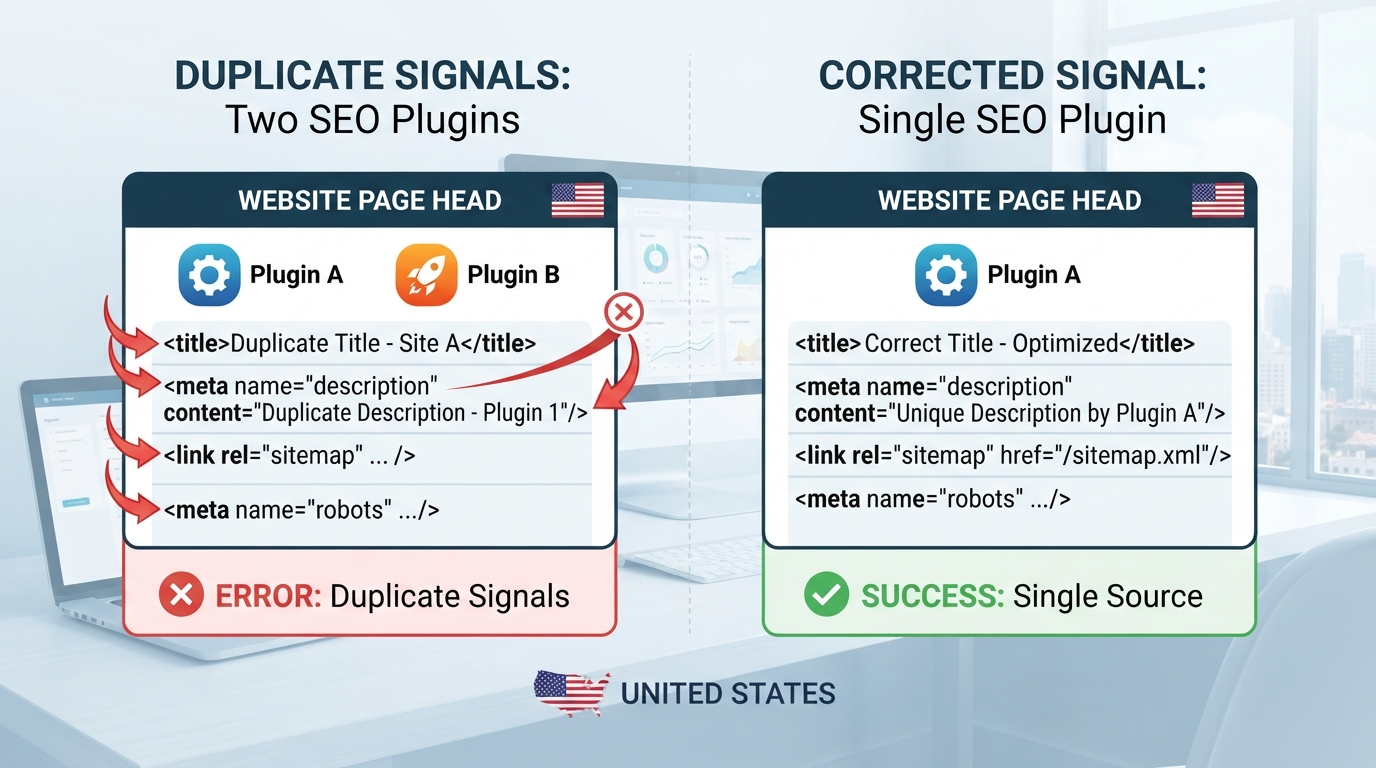
Two plugins can compete to generate titles, meta descriptions, canonical tags, schema graphs, sitemaps and social previews. This may create ambiguous output and complicate troubleshooting. Duplicate sitemaps alone don’t automatically cause a penalty; the problem is unnecessary redundancy and possibly conflicting signals.
The safest default is one system responsible for primary SEO metadata. Separate tools for redirects, image compression, or analytics are fine when their responsibilities don’t overlap improperly. After removing a plugin, confirm its settings and data have been safely migrated.
Troubleshooting: six common WordPress SEO failures
| Symptom | Likely cause to investigate | First action |
|---|---|---|
| SEO title not showing as written in Google | Google may generate a different title; cache or theme conflict | Check rendered <title> first, then assess page title relevance |
| Two canonical tags | Theme/plugin overlap | Identify the source of each tag and disable one output |
| Sitemap URL returns 404 | Permalink rewrite, caching or plugin configuration | Refresh permalinks and check plugin sitemap settings; retest |
| Page says “Crawled – currently not indexed” | Google has crawled but not indexed; reasons vary | Inspect URL, content usefulness, duplicates and canonical signals |
| Product rich result invalid | Missing or inconsistent required fields, multiple schema systems | Compare rendered product details with structured data |
| Elementor page appears unoptimised | Content-analysis integration limitation or missing rendered content | Inspect live rendered HTML and verify editor integration separately |
What to measure after installation
Record a baseline and compare like-for-like periods. Watch priority page indexing, search impressions for relevant queries, organic clicks, important landing pages and qualified leads or sales. Plugin installation is not itself a performance outcome. Rankings can fluctuate due to content, competitors, seasonal demand and search-system changes.
Conclusion and Summary
Yoast SEO, Rank Math, AIOSEO, SEOPress and The SEO Framework are all credible options for WordPress SEO. The right choice depends on your team, site type, technical requirements, budget and maintenance capacity—not a universal “number one” title. Start with the simplest configuration that meets your requirements, verify actual published output, and devote the bulk of your SEO effort to useful content, reliable technical access, strong internal linking and clear business outcomes.
If your website relies on complex WooCommerce templates, multilingual pages, thousands of URLs or a recent migration, a professional audit may be more valuable than buying another premium plugin. MediaOne’s SEO services can help identify whether the real constraint is technical setup, search intent, site architecture or ongoing optimisation.
Frequently Asked Questions
Can I run two SEO plugins at the same time?
Avoid running two general-purpose plugins with overlapping metadata and schema modules. They may emit duplicate or contradictory output. A dedicated redirect or image optimisation extension can still be appropriate if its functions do not conflict. During migration, use staging, backup and output verification rather than leaving both active indefinitely.
Is Yoast SEO or Rank Math better for beginners?
Yoast offers a familiar editorial workflow. Rank Math provides a configurable, module-based approach and advertises Elementor integration. Both can work for beginners. Test a representative post and page in the actual editor, then judge the amount of ongoing configuration your team can comfortably maintain.
Do I need an SEO plugin if I use Elementor?
Not strictly, because WordPress and other systems can output some SEO elements, but an SEO plugin is often the easiest way to manage metadata, sitemaps and indexing controls consistently. Elementor is a page builder, not a substitute for every technical SEO requirement. Verify rendered HTML and check for duplicate output from themes or widgets.
Are free WordPress SEO plugins good enough?
Often yes for small sites that primarily need titles, descriptions, canonicals, basic schema and sitemap generation. Premium plans become more compelling when you need specific features such as advanced redirects, multi-location management, complex WooCommerce requirements, publisher workflows or agency licensing. Confirm current feature gates before purchase.
Will switching SEO plugins hurt my rankings?
A carefully managed switch does not inherently improve or harm rankings. Problems arise when metadata, canonicals, indexing directives, structured data or redirects are lost or changed. Back up, import, compare output in staging, deploy carefully and monitor priority URLs.
Does a green SEO score mean my page will rank?
No. Plugin scores are internal heuristics. Google does not use a Yoast or Rank Math score as a ranking factor. Judge your content on its actual relevance, accuracy, usefulness and the visitor’s ability to complete the intended task.
Do I still need Google Search Console?
Yes. A plugin manages certain WordPress outputs; Search Console helps you observe Google indexing, queries, clicks and related diagnostics. Connect and verify your website independently. Sitemaps and URL Inspection are diagnostic aids, not indexing guarantees.
Will adding a schema automatically give me star ratings?
No. Valid structured data may make a page eligible for certain rich results, subject to Google’s feature policies and discretion. Do not add review markup that misrepresents ratings or content. Test the generated data, but never treat validation as a promise of a visible search feature.
Which plugin works best for WooCommerce?
Select based on tested Product schema, category/indexing controls, variant handling, redirects, custom product data and theme compatibility. Core features can differ by tier. Test several real products and category templates instead of picking solely from an advertised feature list.
Should I change plugins just to get more focus keywords?
Usually not. A focus-keyphrase field is an editorial prompt, not a Google keyword-targeting configuration. Search engines evaluate the full page and the user’s query. Improve search intent coverage and content substance before changing tools merely to raise a score.
Can an SEO plugin make a slow WordPress site faster?
Not by itself. Some suites include performance-related features or integrations, but most speed problems require image optimisation, caching, hosting improvements and script reduction. Measure Core Web Vitals and actual page behaviour before and after changes.
How often should I review my SEO plugin?
Review settings after major WordPress, theme, Elementor, WooCommerce or plugin updates, and after migrations or URL changes. A lightweight monthly check of important pages, indexing and search performance is practical for many SMEs. Use a more formal QA process for large or frequently changing websites.
Official Sources and Further Reading
- Google SEO Starter Guide
- Google guidance on canonicalisation
- Google Rich Results Test
- Yoast SEO Premium
- Rank Math pricing and feature comparison
- AIOSEO pricing and plan comparison
- SEOPress PRO
- The SEO Framework plans
- The SEO Framework extensions
Editorial disclosure: Vendor prices and features were checked on 9 November 2026 and may change. The worked scoring and cost examples are illustrative. Product assessments are editorial fit guidance, not benchmarked ranking-performance tests.