
| AI Summary
Crawlable webpages let search engine bots fetch their content. Search visibility also requires discovery, readable content and indexing. A five-gate audit checks each part of that process, helping website owners identify access failures, repair links and confirm whether search engines have processed their priority pages. |
Crawlable webpages allow search engines to fetch the content you want people to find. When a server blocks a request or delivers an incomplete page, the search engine may miss information that visitors can see.
That explains why publishing a page doesn’t automatically put it in search results. The page first needs to be discovered and fetched, after which the search engine decides whether to include it in its index.
The five-gate audit below follows that sequence so you can identify where progress stops. Our approach to technical SEO audits connects those findings with the service, product and information pages your business needs customers to discover.
Key Takeaways
- Check delivery before rewriting content. Server errors, security restrictions and login requirements can prevent search engines from fetching an otherwise well-written page.
- Connect important pages through relevant links. Navigation, category pages and contextual links support discovery, while an XML sitemap supplies another list of URLs to consider.
- Inspect the content crawlers receive. Mobile templates and JavaScript can affect whether descriptions, headings and links appear during processing.
- Match technical controls to their purpose. Robots.txt manages crawling, noindex controls indexing, and canonical signals identify preferred duplicate versions.
- Verify repairs with current and later evidence. Live tests show whether access works now; subsequent crawl and indexing reports show whether search engines have processed the change.
What Makes Webpages Crawlable?
A crawlable webpage allows a search engine bot to request its URL and retrieve a response. For a public page intended for search, that response should contain the expected content without requiring a password or an interactive security check.
Access also depends on the systems surrounding the page. Robots.txt rules, hosting settings and firewall software can restrict a crawler even when the same address works in your browser.
Crawling, indexing and ranking answer different questions
Google’s explanation of how Search works separates crawling, indexing and serving results. That distinction helps you avoid treating every missing page as a content problem.
| Stage | Question it answers | Example problem |
| Discovery | Does the search engine know the URL exists? | A new service page has no incoming links |
| Crawling | Can the bot fetch the page? | A firewall refuses its request |
| Rendering | Can the fetched content be processed? | A failed script leaves the description empty |
| Indexing | Does the search engine include the page in its index? | Google selects another duplicate version |
| Ranking | When should the indexed page appear? | Other pages answer the search more effectively |
A page can pass one stage and encounter trouble at the next. Successful crawling therefore confirms access, while indexing and ranking require separate checks.
Crawlability gives content a chance to compete
Within a wider SEO strategy for companies, crawlability supports the work invested in writing, design and site structure. Search engines need access to that work before they can assess it.
The next action depends on what they receive. A blocked product page needs an access repair, whereas an accessible page with an incomplete description needs better content. An audit separates those tasks so the team addresses the cause.
How Search Engines Discover Your Pages
Search engines learn about URLs through links, sitemaps and addresses they already know. Once a URL is discovered, the engine decides whether and when to fetch it.
Because discovery has several routes, a page can be found without appearing in the main menu. Relevant internal links still help establish where that page belongs within the website.
Internal links connect broad topics with specific pages
A furniture shop might link from its main dining category to dining tables, then from that category to individual products. Each connection takes visitors closer to the item they want while giving crawlers another URL to discover.
An internal linking strategy extends that structure into supporting articles. A table-care article could connect to an oak table range when the explanation reaches the properties of oak, allowing the surrounding text to explain the relationship.
For those connections to support crawling, their destinations need to be readable. Google’s link requirements generally call for an HTML <a> element with an href attribute containing the destination.
Sitemaps provide another discovery route
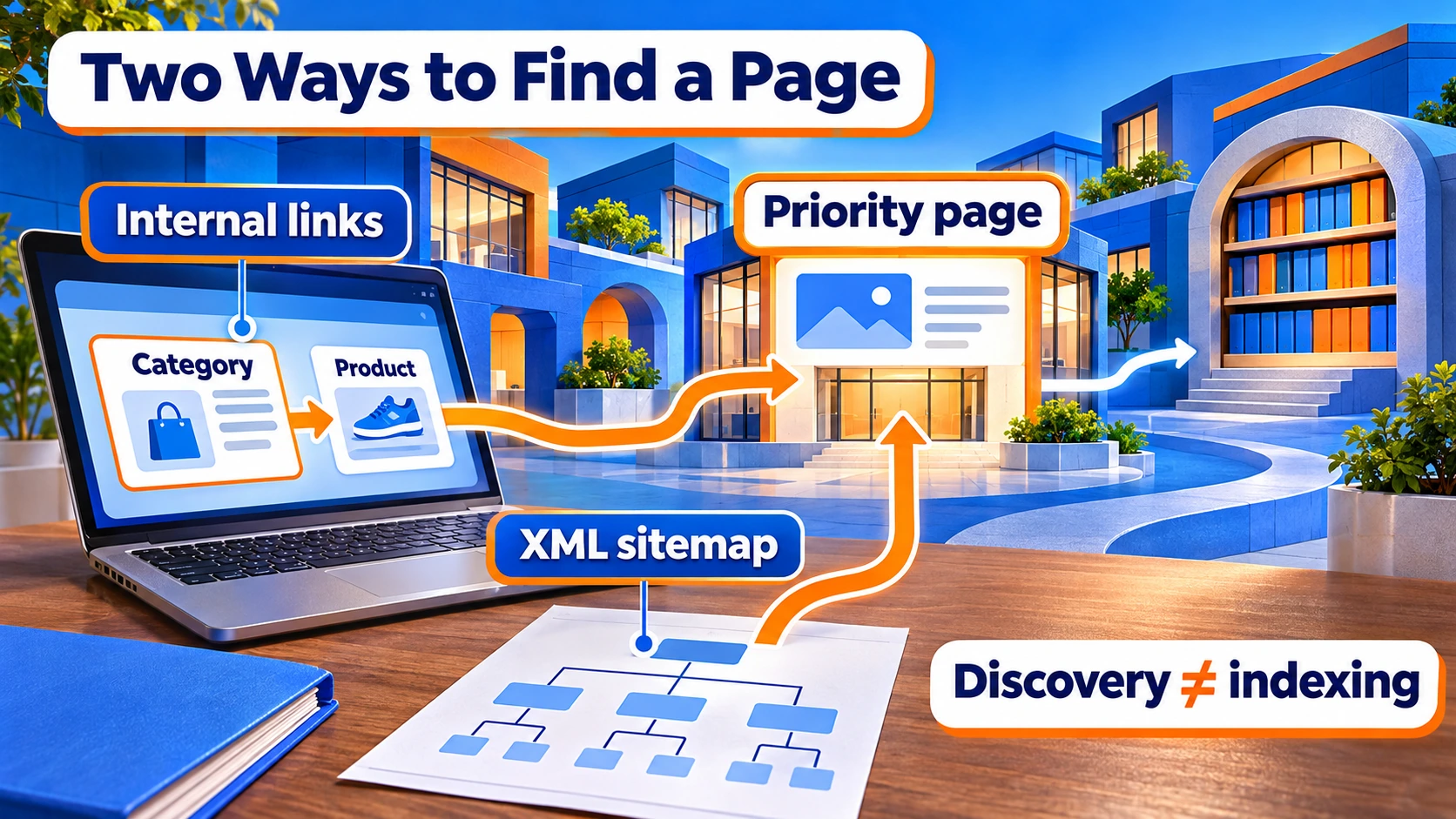
An XML sitemap lists URLs for search engines to consider. It can introduce a new page before a crawler encounters its internal links, although submission doesn’t guarantee a visit or indexing.
Google’s sitemap requirements allow up to 50,000 URLs or 50 MB uncompressed in one file. Larger websites can divide their URLs among several files and reference them through a sitemap index.
Routine sitemap checks should cover:
- Preferred URLs intended for search.
- Removed pages and redirecting addresses.
- Modification dates that reflect meaningful changes.
- Agreement with the site’s canonical choices.
Links and sitemaps should direct attention towards the same priority content. The illustration below shows how those two discovery routes work together.
Common Failures That Interrupt Crawling
Crawling problems often begin outside the page editor. A hosting change may affect responses across the site, while a template change may remove content from just one page type.
A website SEO audit helps establish that scope before repairs begin. Comparing affected URLs with working examples can reveal which shared system needs attention.
Robots.txt blocks public content
Robots.txt tells supporting crawlers which URLs they may request. A rule created for a private directory can accidentally cover a public service section if its URL pattern is too broad.
The same problem can occur after launch when restrictions from a test website remain in place. Reviewing the rules against the live site helps identify blocks that no longer serve their intended purpose.
Security settings refuse legitimate requests
A page may open for an employee who is signed in while presenting a login screen to everyone else. Firewall rules and browser challenges can create a similar gap between what the editor sees and what a crawler receives.
An unexpected block on public content needs investigation by the person managing access controls. Private records and customer accounts should retain their protection, so the repair must target the affected public pages.
Server responses reveal delivery failures
HTTP status codes describe what happened when a server received a request. Reading them alongside the returned content helps distinguish a missing page from a temporary fault or access restriction.
| Response | Meaning | Appropriate action |
| 200 | Request succeeded | Confirm the expected content appears |
| 301 or 308 | Permanent redirect | Link directly to the final destination |
| 302 or 307 | Temporary redirect | Check that the temporary behaviour is intended |
| 401 or 403 | Authentication required or access refused | Review unexpected restrictions on public pages |
| 404 or 410 | Page missing or removed | Restore accidental losses or retain valid removal responses |
| 429 | Too many requests | Review rate limits and capacity |
| 5xx | Server-side failure | Investigate hosting or application faults |
A successful response still needs a content check because an empty template or error message can arrive with a 200 code. Conversely, a genuinely removed page can correctly return 404 or 410.
JavaScript leaves important content missing
Google can process JavaScript, but required scripts must remain accessible and run successfully. Its JavaScript SEO documentation explains how fetching and rendering contribute to that process.
A failed script might leave a shop’s menu visible while removing product details. Websites using a headless CMS need particular attention to these connections because separate systems may supply and display the content.
A Five-Gate Audit for Crawlable Webpages
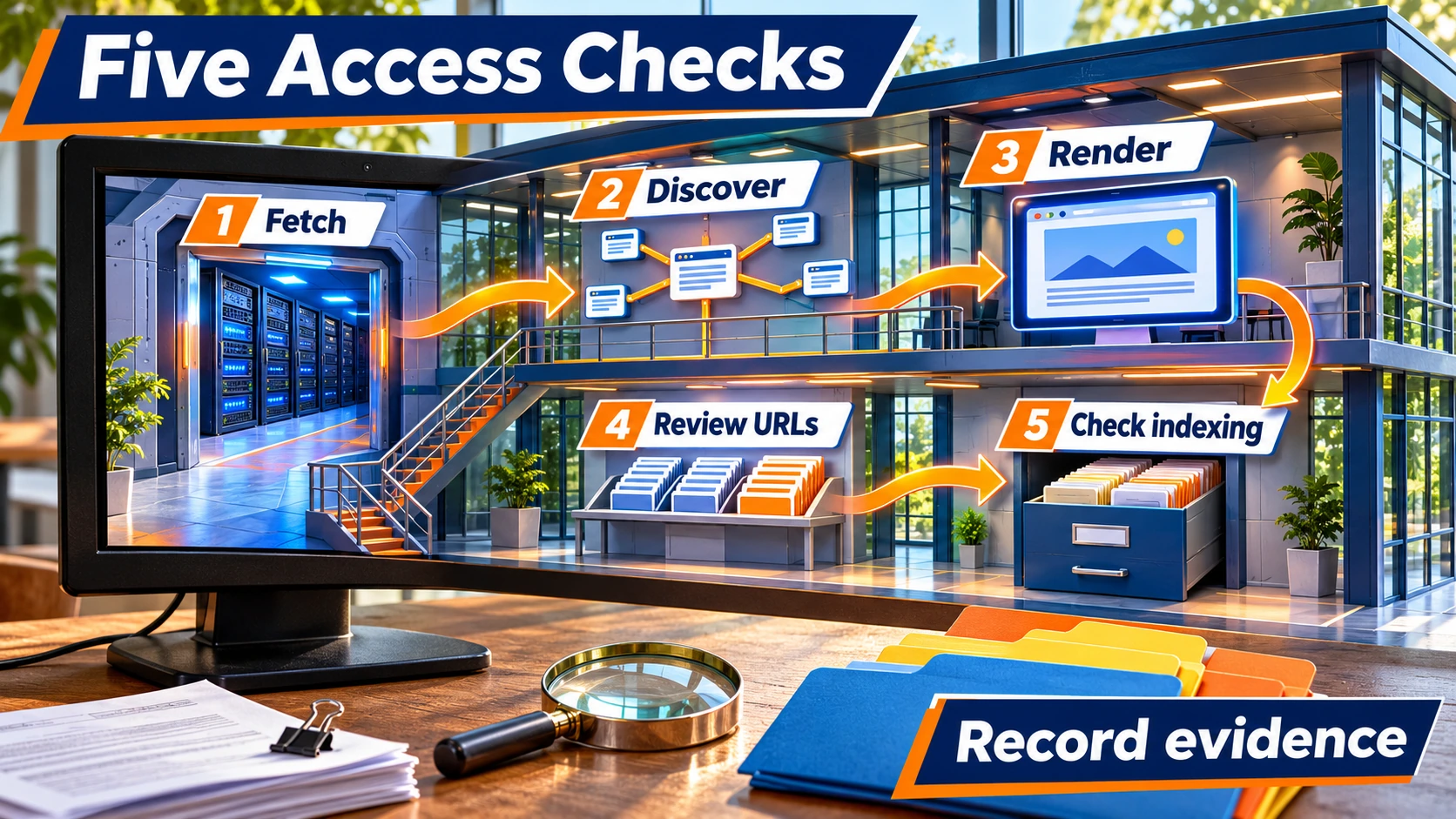
The five gates form a practical checking framework, rather than an official search engine score. Each gate asks for evidence about one part of the journey from access to indexing.
A starting sample should include the homepage, a service page, a category, a product and an article where applicable. Adding recently changed or missing URLs helps connect the audit with the problem you’re investigating.
Gate 1: Can the crawler fetch the page?
The first gate checks whether the intended content reaches a visitor or crawler making a fresh request. An incognito browser session can expose login dependencies, while technical tests reveal responses and crawler restrictions.
The access checklist includes:
- The final address returns the intended response.
- Robots.txt permits the relevant crawler to request it.
- Public content appears without authentication.
- Security systems accept legitimate search engine requests.
- Repeated tests don’t reveal recurring delivery failures.
Any failure should be recorded with the URL and response received. That evidence gives the hosting or development team something specific to reproduce, instead of a general report that the page is missing from search.
Gate 2: Can the crawler discover the URL?
Once access works, the audit checks how the page connects to the website. A crawl starting from the homepage shows which URLs the crawler can reach through the links available to it.
Comparing that result with a content management system export can reveal overlooked pages. A URL in the export but absent from the crawl may lack internal links, although crawler settings and blocked sections also need checking.
The discovery review covers:
- Relevant incoming links.
- Readable destinations in navigation and pagination.
- Unnecessary menu layers around priority content.
- Sitemap URLs missing from the linked website.
- Links pointing to outdated addresses.
Three clicks can serve as a planning target for important pages, but Google sets no universal three-click rule. The aim is to make relevant content reasonably easy to reach without crowding every page into the main menu.
Gate 3: Can the crawler process the main content?
The third gate checks what appears after the page is processed. A working response and visible menu don’t establish that the main description, product information or article has loaded.
A rendered-page review should confirm:
- The main text appears.
- Important links contain working destinations.
- Required scripts and styles load.
- Content doesn’t require typing, swiping or clicking to load.
- Mobile and desktop versions retain equivalent main content.
Google’s mobile-first indexing documentation explains that it uses mobile content for indexing and ranking. The mobile check should therefore compare information and links as well as screen layout.
Gate 4: Are unnecessary URLs complicating crawling?
After confirming that pages can be processed, the audit examines the wider URL collection. Filters, tracking parameters and sorting options can generate many addresses that repeat essentially the same content.
For large websites, crawl budget analysis can help establish whether this volume interferes with important crawling. A smaller website should first resolve direct access and discovery failures.
The URL review should identify:
- Duplicate addresses for the same content.
- Filter combinations with no results.
- Redirect chains within navigation.
- Tracking parameters in internal links.
- Endless calendar or pagination combinations.
Google’s faceted navigation documentation describes how filter-based URLs can expand crawling. Any restrictions should preserve distinct category pages that customers need and that the business intends to appear in search.
Gate 5: Is the intended page indexed?
The final gate examines the result after discovery and access. A technically available page may still carry a noindex instruction, or Google may select another version to represent duplicate content.
The record should therefore include the reported indexing status, indexing instructions and selected canonical. A canonical identifies the preferred representative of duplicate or closely similar pages.
The inspection stations below show the evidence each gate contributes, helping the team connect a failed check with the next action.
Which Controls Affect Crawling and Indexing?
Technical controls need to match the intended outcome. Preventing a crawler request, excluding content from search and identifying a preferred duplicate are separate tasks.
Confusion between them can delay a repair. A crawl block, for example, may stop Google from reading the very instruction intended to remove a page from its index.
Robots.txt manages crawler access
Robots.txt controls requests from supporting crawlers. Because it doesn’t protect confidential information, private content still needs authentication or another suitable access restriction.
A blocked URL may also appear in search if Google discovers it elsewhere. Robots.txt alone therefore doesn’t provide a reliable removal method.
Noindex controls search inclusion
A noindex directive tells supporting search engines to exclude content from their index. Google needs permission to crawl the page so it can read that directive, and it doesn’t support noindex inside robots.txt.
For WordPress pages, the instruction may come from an SEO plugin or template setting. Checking the published page helps confirm what visitors and crawlers receive after those settings take effect.
Canonicals identify preferred duplicate versions
Canonical signals help search engines choose a representative URL when several pages contain duplicate or closely similar content. Google’s canonical documentation explains how tags, redirects and sitemap entries contribute to that choice.
Those signals should normally agree. A page linked throughout the site as the preferred version should also appear consistently in its sitemap and canonical settings.
How to Read Crawl Reports and Search Console
A crawler and a search engine report observe your website in different ways. The crawler tests the site under its current settings, while search engine reports describe recorded activity and processing.
A complete Google Search Console setup helps you compare those findings within the correct property. That comparison becomes more reliable when you also record the date of each test.
Each tool answers a different question
| Tool or report | Main purpose | Limitation |
| Site crawler | Find link, response, canonical and depth issues | Results depend on settings and access |
| URL Inspection | Examine a URL’s recorded and live states | A live test doesn’t guarantee indexing |
| Page Indexing report | Review indexing patterns | Examples may not include every affected URL |
| Crawl Stats | Examine Google crawling and host responses | It isn’t a complete per-page crawl history |
| Server logs | Examine requests received by the server | Claimed bot identities need verification |
A disagreement between tools needs investigation before a major change. A firewall may block your audit crawler while allowing Google, so one failed crawl doesn’t establish that all search engines lack access.
Current access and recorded indexing describe different times
Google’s URL Inspection tool provides information about its indexed version and offers a live test. The live result helps assess current access, while the stored result reflects earlier processing.
That timing explains why an indexing report may still show an old problem after a repair passes testing. The next check is whether Google has revisited the changed page and updated its recorded state.
Crawl budget needs proportionate attention
Google’s crawl budget documentation primarily addresses very large or rapidly changing websites. Smaller sites often need accessible pages, accurate sitemaps and regular indexing reviews before advanced crawl-rate analysis.
A service website with one missing page should begin with that URL’s evidence. A shop producing thousands of repetitive filter combinations needs a wider investigation into how its URLs are generated.
A Worked Example: Repairing a Missing Product Page
A fictional furniture shop publishes an oak dining table page. The editor can open the address, but a homepage crawl fails to find it.
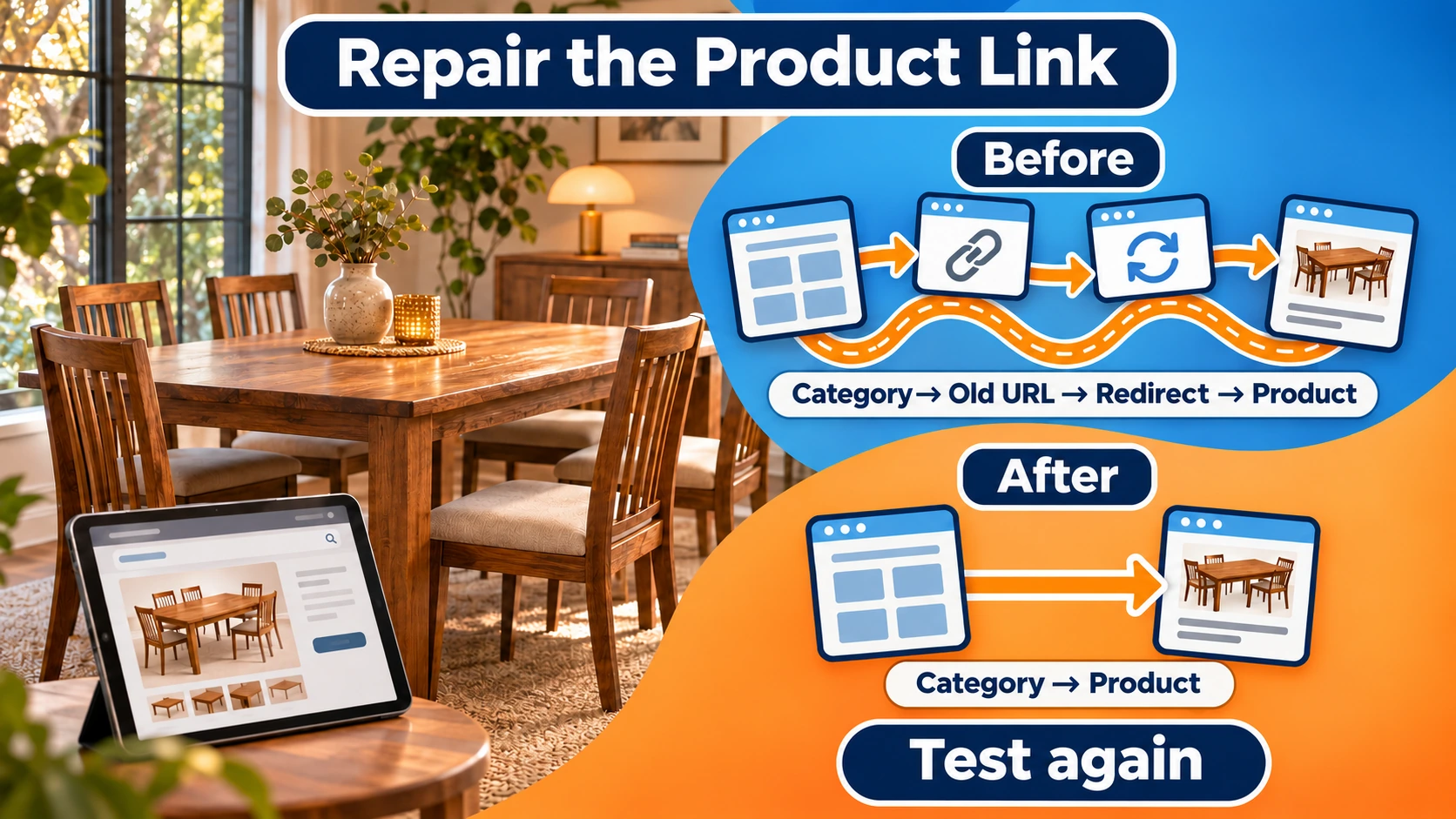
The audit confirms that the page loads correctly, then identifies an outdated category link. Because the category still points to the former address, the current product lacks the intended direct connection.
The five gates separate the findings
| Gate | Finding | Action |
| Fetch | Product returns 200 with expected content | Retain the working response |
| Discover | Category points to the old address | Link directly to the current product |
| Render | Mobile test shows description and price | Record the successful result |
| Review URLs | Old address passes through two redirects | Shorten the chain where appropriate |
| Check indexing | Google hasn’t processed the repaired version | Monitor after recrawling |
Repairing the category link gives visitors and crawlers direct access to the current product. Updating the sitemap and redirect arrangements then brings the remaining signals into agreement.
Retesting confirms what changed
A second crawl should reach the product from its category and report the intended destination. A live inspection then checks whether Google can fetch the repaired page.
Those tests establish the immediate result. Later indexing data shows whether Google has processed the changes, without turning a successful access repair into a promise about rankings.
The comparison below highlights the connection that changed.
How to Prioritise Repairs and Monitor Results
An audit becomes actionable when each finding has an owner and a verification step. A shared SEO audit checklist helps organise that work around the pages affected.
Priority should reflect both business importance and technical scope. A blocked service directory usually deserves attention before a minor issue on an unused archive.
Repair order should follow the cause
A practical work order is:
- Restore essential access: Resolve widespread blocks, accidental login requirements and recurring server failures.
- Reconnect priority pages: Repair broken links and restore missing category connections.
- Correct incomplete delivery: Address absent mobile content and failed scripts.
- Align indexing signals: Review unintended noindex directives and conflicting canonical choices.
- Reduce repetitive URLs: Address duplicate addresses where the evidence supports further work.
The repair record should retain the affected URLs, original finding, change and retest result. That allows another team member to verify the outcome without starting the investigation again.
Monitoring should follow website changes
Navigation, templates, plugins, hosting and security settings can all affect access. Checks should follow those changes, with website relaunch planning covering them together when several systems change at once.
Routine technical SEO maintenance can then track recurring failures and unexpected indexing changes. The goal is to keep intended pages accessible and eligible, rather than increase the indexed-page count without considering what those pages contain.
Make Crawlable Webpages Part of Routine SEO
Crawlable webpages rely on accessible delivery, readable content and connected site structure. The five-gate audit follows those dependencies through to indexing, helping you identify the cause of a missing page and verify the repair.
Our SEO services can help assess access problems and prioritise work around your key pages. A conversation with our team can establish which checks your website needs and how to measure the results.
Frequently Asked Questions
Can PDFs appear in search results?
Google can index supported PDFs when it can access and process their content. Each document therefore needs its own search controls. A noindex instruction on the webpage linking to a PDF doesn’t automatically exclude the document itself.
Does a site search box help crawlers find every page?
Google generally doesn’t submit search forms to discover every available result. Pages accessible only through a site search may therefore be missed. Relevant category and navigation links give important content another discovery route.
A cookie banner needs checking when the main content loads only after someone makes a choice. Crawlers may not complete that interaction, leaving them with an incomplete page. A rendered-page test can show whether the content appears before consent-dependent features load.
Does every page need to be crawlable?
Public pages intended for search need suitable crawler access. Account areas, private records and administrative pages have different requirements and should retain appropriate protection. Authentication secures confidential information, while crawling and indexing settings manage search access and inclusion.
Does crawlability guarantee inclusion in AI-generated answers?
Crawlability supports access without guaranteeing selection for an AI-generated answer. Services use different retrieval systems and crawler controls, so their requirements need separate review. Content accuracy and relevance also influence whether an accessible page can support an answer.