
| AI Summary
Google Search Console helps website owners understand how their pages perform in Google Search. This guide explains property setup, ownership checks, search metrics and common indexing problems. A report-by-report routine helps Singapore businesses connect changes in search traffic to specific pages, investigate the cause and track completed fixes. |
Google Search Console is a free Google tool for monitoring a website’s search performance and indexing. Website owners can see search queries, clicks, impressions and technical issues. Setup involves adding a property, verifying ownership and submitting a sitemap where needed. Regular checks help identify problems affecting important pages.
Key Takeaways
- A Domain property combines protocols and subdomains; a URL-prefix property covers the address prefix entered.
- A sitemap marked “Success” confirms processing, not that Google indexed every listed page.
- Non-indexed URLs can be expected, including redirects and duplicate versions.
- Click-through rate needs context from search terms, ranking position, country and device.
- A completed website fix and an updated Google report are separate milestones.
- Search clicks need business context from enquiries, purchases and other customer actions.
Google Search Console can feel like a dashboard full of numbers with no obvious next step. A falling line catches attention, but the chart alone rarely explains what happened.
A better starting point is a specific concern: an important page has disappeared, Singapore traffic has fallen, or a new article receives impressions without clicks. Each concern leads to a different report.
The routine below moves from setup to diagnosis, with examples showing how to turn findings into practical work.
What Does Google Search Console Show?
Google Search Console provides information about a website’s presence in Google Search. Google’s Search Console overview describes its role in monitoring performance and identifying problems.
The main reports help answer four questions:
| Question | Report or Tool |
| Which searches bring people to the website? | Performance |
| Which pages has Google indexed? | Page indexing |
| What does Google know about one URL? | URL Inspection |
| Which page groups have loading or interaction problems? | Core Web Vitals |
An index is Google’s stored collection of information about pages. A page generally needs to enter that collection before it can appear as a search result.
Search Console supports search engine optimisation by supplying evidence about discovery, indexing and search traffic. It does not edit website content, repair hosting problems or guarantee rankings.
Search Console and Google Analytics answer different questions
Search Console explains how people encounter a website in Google Search. Google Analytics helps explain what visitors do after arriving.
For example, Search Console might show clicks to a cleaning service page. Analytics might show whether those visits led to enquiry forms.
Google explains that Search Console and Analytics data can differ because the tools measure activity differently. Clicks and sessions should not be expected to match exactly.
How to Set Up Google Search Console
Setup starts with a Google account and access to the website or its domain settings. A business should keep ownership under an account it controls.
Choose the right property type
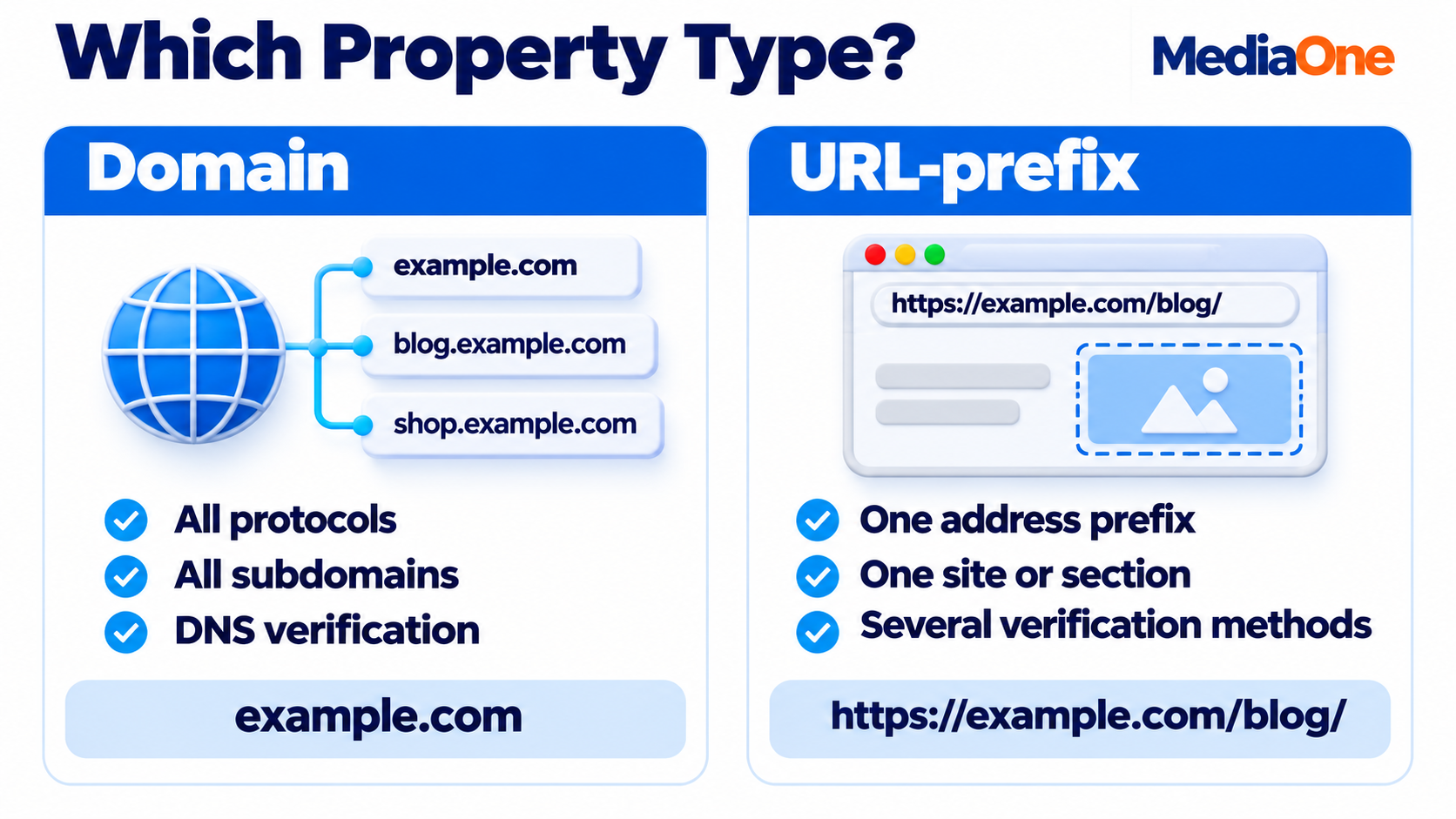
A property defines the website address or group of addresses included in a report. Google supports two main website property types.
| Property Type | Coverage | Verification |
| Domain | The domain across protocols and subdomains | DNS verification |
| URL-prefix | Addresses beginning with the specified prefix | Several supported methods |
A Domain property for example.com includes versions such as https://example.com and https://shop.example.com.
A URL-prefix property for https://example.com/blog/ covers that section. It does not include a different protocol or subdomain.
A Domain property usually gives a business one combined website view. Separate URL-prefix properties can support reporting for individual sections.
Verify website ownership
Ownership verification proves control of the property. Domain verification usually involves adding a record in the domain’s DNS settings, which control how the domain connects to online services.
Google’s ownership verification methods also include options such as an HTML file or tag for eligible URL-prefix properties. DNS changes can take time to appear, so verification is not always immediate.
The setup checklist is:
- The owner signs in and selects Add property.
- The property type and website address are entered.
- The required verification record, file or tag is added.
- Verification is completed in Search Console.
- The verification record remains in place.
Add colleagues and check notifications
Individual accounts help a business manage access without sharing passwords. Search Console’s user permissions distinguish owners, full users and restricted users.
Each person should receive the access needed for their role. Email preferences also deserve a check so important notifications reach someone responsible for acting on them.
How to Submit and Check a Sitemap
An XML sitemap lists website URLs that Google should know about. Many content management systems and SEO plugins generate one automatically.
The actual address depends on the website. Common examples include /sitemap.xml and /sitemap_index.xml.
A sitemap submission follows these steps:
- The website owner confirms the sitemap address opens.
- The correct property is selected in Search Console.
- The sitemap address is entered under Sitemaps.
- The report is checked for processing errors.
Google’s Sitemaps report records submissions and problems Google encounters when reading them. A “Success” status does not mean every listed page has entered the index.
A sitemap should reflect the pages intended for Search
A practical sitemap review checks for:
- Current pages that should appear in search results.
- Preferred URLs instead of duplicate versions.
- Removed pages or addresses that redirect elsewhere.
- Important pages missing from the file.
A product catalogue, for example, should not keep listing deleted product URLs indefinitely.
Website moves need additional planning. Website relaunch SEO also involves redirects, internal links and checks on the new addresses; a new sitemap alone does not complete the move.
Which Reports Should You Check First?
A fixed review order helps prevent wasted work. An unavailable service page needs attention before its search title does.
The sequence below is a working routine, not a Google ranking formula:
| Priority | Check | Reason |
| 1 | Security issues and manual actions | Problems may affect visitors or search visibility |
| 2 | Indexing of important pages | Missing pages need investigation |
| 3 | Search performance | Filters help locate changes in traffic |
| 4 | Experience and rich results | Reports identify further page improvements |
Security issues need a direct response
The Security issues report can identify hacked content, malware and other harmful behaviour detected by Google. Affected pages may carry warnings.
The website team should investigate the reported issue, remove the cause and follow the review process shown in the report.
A traffic drop does not prove a manual action
A manual action follows a human review that identifies a breach of Google’s spam policies. The Manual actions report states whether one applies.
A falling traffic chart alone cannot establish a penalty. Ranking changes, demand, website faults and reporting differences all need consideration.
How to Read Clicks, Impressions, CTR and Position
The Performance report shows how a website appears and receives clicks in search results. Its four main measures work best together.
| Metric | Meaning | Example |
| Clicks | Clicks from Google to the website | A searcher opens a service page |
| Impressions | Recorded appearances in search results | Google displays a page link |
| CTR | Clicks divided by impressions | 20 clicks from 1,000 impressions equals 2% |
| Average position | Average position of the highest relevant result | Position varies across recorded searches |
Google’s Performance report definitions explain how these measures appear in charts and tables. Average position is not a fixed ranking for every person searching.
A fair comparison starts with matching filters
A comparison can mislead when one period includes different countries, search types or page groups.
A repeatable review uses:
- Equal date ranges, such as consecutive 28-day periods.
- The same search type.
- The same country and device filters.
- The same page or group of pages.
- A note about holidays, promotions or website changes.
Seasonal businesses may also need a comparison with the same period in the previous year, where data is available.
A florist comparing Valentine’s week with an ordinary week should expect different demand. The difference does not establish an SEO fault.
Low CTR needs investigation before a rewrite
High impressions and low CTR can indicate a weak title, but other explanations exist. The page may rank below stronger results, appear for broad searches or receive impressions from people seeking something else.
A review should connect the query, page and search result. A pricing query leading to a page with no prices may reveal a content gap.
Relevant keyword analysis helps distinguish search terms the business can answer from unrelated impressions. Title changes should accurately describe the page.
How to Find Changes in Singapore Search Traffic
A country filter helps a Singapore business separate local search activity from overseas visits.
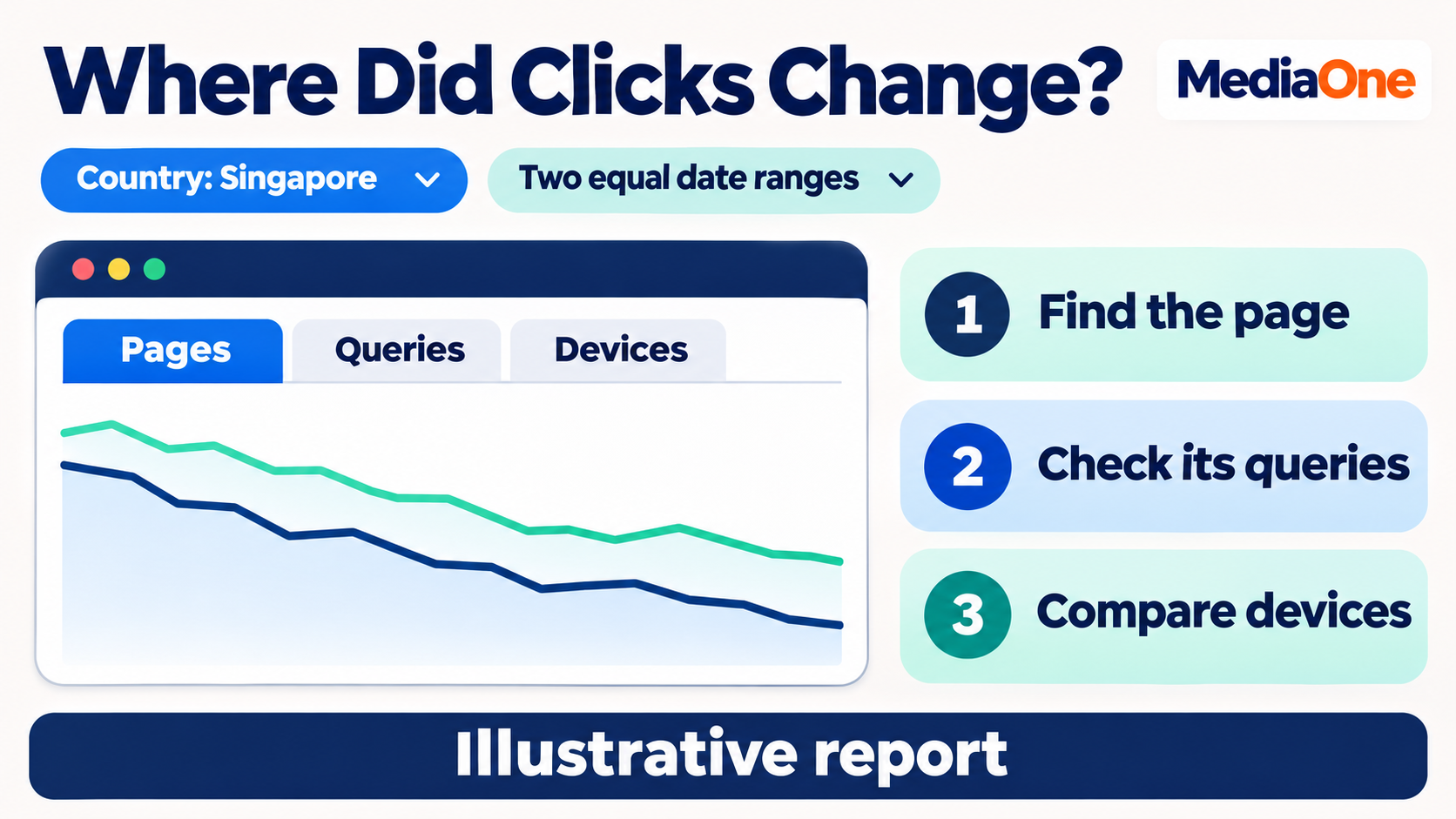
A simple review follows this order:
- The Performance report is opened.
- A country filter is set to Singapore.
- Two comparable date ranges are selected.
- The Pages tab identifies URLs with changed clicks.
- A selected page is reviewed through its Queries tab.
- Device comparisons show whether the change is concentrated on mobile or desktop.
A country filter describes the recorded search audience. It does not prove that visitors became Singapore customers.
Branded and service searches need separate attention
Branded searches contain the company name or a close variation. Service searches describe what the customer needs.
For example:
- “Example Cleaning” suggests the searcher knows the company.
- “Office cleaning Singapore” suggests interest in the service.
- “How to remove carpet stains” may signal an information need.
A rise in branded clicks can accompany a publicity campaign. It does not automatically mean service pages gained visibility for broader searches.
The business should review both groups. Brand recognition and discovery by new customers answer different marketing questions.
How to Understand Pages That Are Not Indexed
The Page indexing report separates indexed pages from pages Google has not indexed and lists reasons.
The goal is not to make every URL indexed. Duplicate addresses, redirects and pages deliberately kept out of Search can appear among non-indexed URLs.
A review should focus on pages the business actually wants customers to find. Google’s Page indexing report provides the reasons and affected examples.
Common statuses and their first checks
| Status | What It Indicates | First Check |
| Discovered, currently not indexed | Google knows the URL but has not crawled it | Internal links, discovery and server availability |
| Crawled, currently not indexed | Google visited but has not indexed it | Content, duplication and page purpose |
| Excluded by ‘noindex’ tag | An instruction prevents indexing | Whether the instruction is intentional |
| Page with redirect | The URL sends visitors elsewhere | Whether the destination is correct |
| Not found (404) | The page could not be found | Whether removal was intended |
| Server error (5xx) | The server failed to fulfil the request | Hosting and server logs |
“Crawled, currently not indexed” does not prove that a page has poor content. The status describes the outcome; further checks establish the cause.
A larger non-indexed total is not always bad news
An online shop may generate many filtered addresses for colours, sizes and sorting options. Several addresses can show much the same product collection.
Google may index a preferred version while leaving alternatives out. That can be expected.
The concern becomes more urgent when core service pages, product categories or other intended search pages lose indexing. A broader SEO website audit can connect those losses to template changes, links or technical settings.
How to Inspect One Page and Request Indexing
URL Inspection provides details about a specific address within the selected property. The tool helps move from a site-wide pattern to evidence about one page.
Google’s URL Inspection tool distinguishes information about the indexed version from a live test of the current page. A successful live test does not guarantee indexing.
Indexed information and live tests serve different purposes
The indexed information reflects Google’s stored view. A live test checks the page as it is available now.
That distinction matters after a repair. A developer may have removed an accidental indexing block, while the stored report still reflects Google’s earlier visit.
A page review should record:
- The inspected URL.
- Its indexing status.
- The last crawl details available.
- Whether crawling and indexing are allowed.
- Google’s selected canonical, where shown.
A canonical is the version Google treats as the main page when several addresses contain similar material.
An indexing request follows the repair
An indexing request makes sense after the team checks that the intended page works and the reported obstruction has been addressed.
Google states that recrawling can take days to weeks. Repeated requests do not make a page move through the process faster, and a request does not guarantee inclusion.
What Core Web Vitals and Rich Results Tell You
These reports cover different parts of the page experience. Neither should replace an indexing check or a review of the content itself.
Core Web Vitals measure loading, response and movement
The Core Web Vitals report uses real-user data and groups similar URLs. Its measures cover loading performance, responsiveness and visual stability.
| Measure | Everyday Meaning | Example Problem |
| Largest Contentful Paint | How quickly the main content appears | A large banner loads slowly |
| Interaction to Next Paint | How quickly the page responds | A button responds late |
| Cumulative Layout Shift | How much content moves unexpectedly | An image pushes a link down |
Some pages lack enough data for reporting. An absent result is not proof that a page performs well.
A developer can investigate the affected templates and test likely causes. A shared template repair may improve many pages at once.
The old Mobile Usability report was retired in December 2023. Mobile checks still belong in website reviews, but instructions to open that report are outdated.
Structured data supports eligible search features
Structured data adds machine-readable information about content, such as products or articles. Eligible markup can support enhanced search appearances. Google’s structured data documentation explains that correct markup creates eligibility, not a guarantee of a rich result.
The team should correct reported errors and confirm that marked-up information matches the visible page. Rich result reports vary according to the supported features Google detects.
A Worked Example: Investigating a Traffic Drop
The following scenario is illustrative, not a client result.
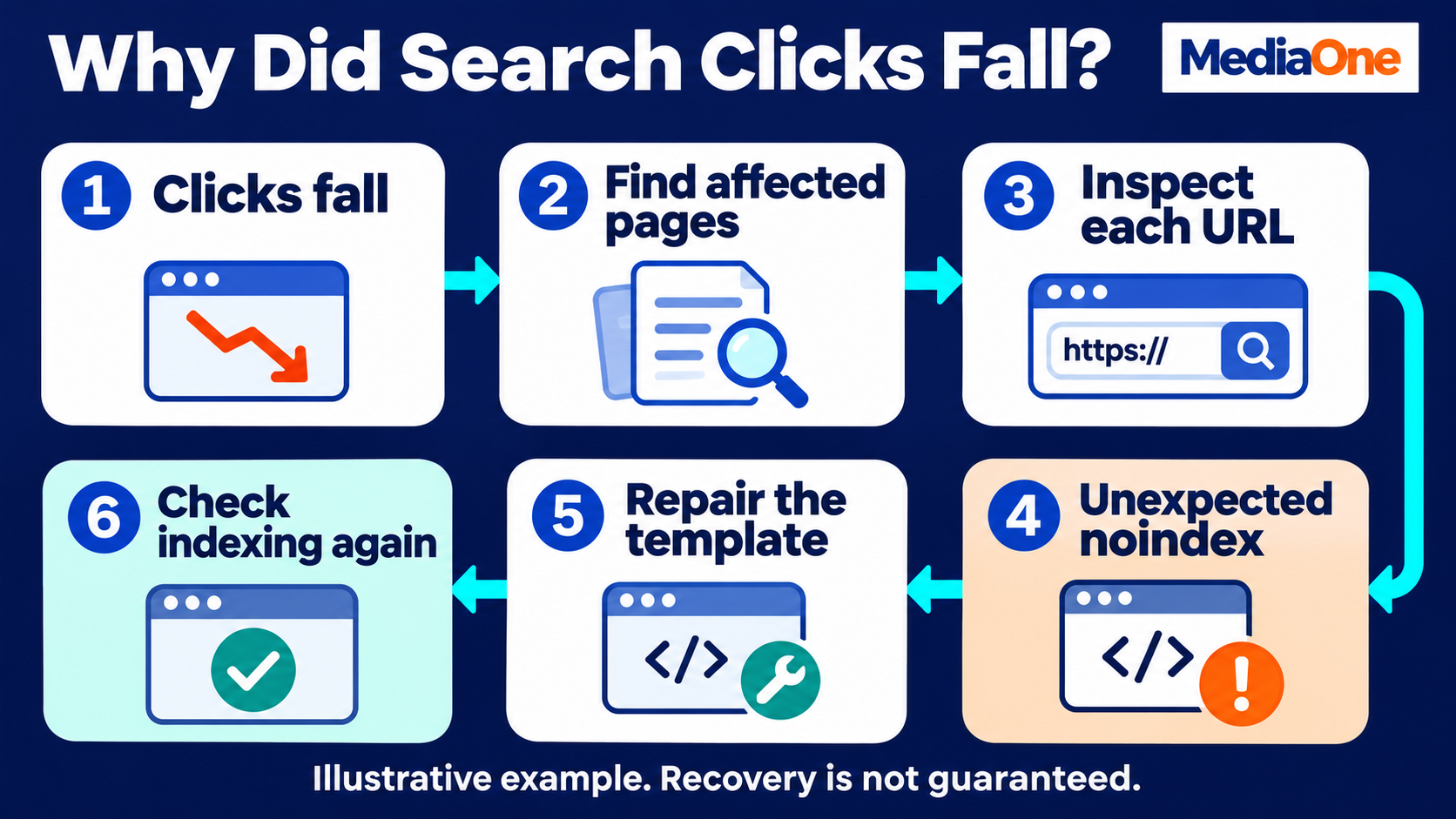
A Singapore supplier receives about 400 search clicks a week. The total falls to 280, a 30% decline. The owner suspects the page titles need rewriting.
The investigation needs more evidence:
| Check | Illustrative Finding | Next Step |
| Security and manual actions | No issues reported | Investigation continues |
| Pages with lost clicks | Three category pages account for most losses | Each URL is inspected |
| Indexing | Two pages have an unexpected noindex instruction | The website team checks recent changes |
| Website changes | A template update added the instruction | The template is repaired |
The cause determines the work
In this example, title edits would leave the indexing instruction in place. The repair concerns the template and affected pages.
A different finding would lead elsewhere. If the pages remained indexed but their search terms lost impressions, the team would investigate demand, rankings and the search results. Google’s approach to diagnosing search traffic drops considers multiple causes, including technical problems, seasonality and changes in search interest.
Recovery needs separate checks
The team should confirm that the live instruction has changed, then monitor Google’s later processing and search performance.
A technical repair can remove an obstacle without restoring the old traffic total. Rankings, demand and competing pages may have changed during the same period.
The record should distinguish what the team fixed from what the search data subsequently showed.
How to Turn Reports Into a Weekly Action List
A regular routine reduces the temptation to react to every daily movement. The routine should be short enough to repeat and detailed enough to leave a record.
A weekly review can cover:
- New messages and urgent issues.
- Important pages with unexpected indexing changes.
- Pages contributing most to changed clicks.
- The status of repairs already assigned.
A monthly review can examine query patterns, customer actions and recurring template problems in more depth.
Every task needs evidence and a completion check
A task such as “improve SEO” is too broad to verify. A specific finding gives the next person something concrete to investigate.
| Task Field | Example |
| Finding | A service page contains an unintended noindex tag |
| Evidence | URL Inspection and the live page show the instruction |
| Responsible person | Website developer |
| Completion check | The live instruction is removed |
| Follow-up | Later inspection checks Google’s updated view |
Content tasks need the same care. A page receiving relevant pricing searches may need actual pricing information, examples or an explanation of cost factors.
Repeated keywords do not fill that gap. Keyword stuffing can make a page harder to read while leaving the customer’s question unanswered.
Search results need a business measure
A website can earn more clicks without receiving more suitable enquiries. A business should connect search trends to customer actions through its analytics and sales records.
That connection supports data driven SEO: decisions based on evidence about discovery, website activity and business results.
A short change log also helps. The date, affected URLs and reason for each edit make later comparisons easier to interpret.
Turn Google Search Console Findings Into Action
Google Search Console becomes part of a working process when each finding has evidence, an owner and a completion check. A small set of important pages gives the team a manageable starting point.
MediaOne’s SEO audit tool can support an initial website review. Search Console findings can then help frame a discussion about missing pages, declining clicks or technical repairs that need attention.
FAQs About Google Search Console
Does a website need Search Console to appear on Google?
A website does not need a Search Console account to appear in Google Search. Google can discover pages through links and other sources. Search Console gives owners access to reports and tools for monitoring that presence.
Why are some search queries missing?
Some queries are withheld to protect user privacy. Search Console also has limits on the rows displayed in reports. The visible query list should therefore not be treated as a complete record of every search.
Can Search Console show a competitor’s private data?
Search Console requires verified ownership or permission from an existing owner. A business cannot enter a competitor’s domain and receive its private clicks, indexing details or account reports.
Does Search Console include Google Ads results?
Google Ads reporting is separate from Search Console’s organic search performance reporting. Paid campaign clicks belong in Google Ads. A business reviewing both channels should keep their measures and sources identifiable.
Can Search Console identify individual visitors?
Search Console provides grouped search performance data. It does not provide a list of named people who searched for the business or clicked its pages. Customer identification requires separate, appropriate business records.
Does Search Console show every backlink?
The Links report provides a sample of links Google knows about. It is not a complete backlink inventory, and its lists should not be treated as a real-time record of every link gained or lost.