
| AI Summary
Local SEO schema markup labels business details so search engines can understand them. A suitable setup uses a specific LocalBusiness type, accurate information and JSON-LD code that reflects the page. Businesses should test the published markup, connect branches correctly and track technical health separately from search performance. Valid markup supports eligible search features, while rankings depend on wider SEO work. |
Local SEO schema markup describes your business in code, including its name, location, telephone number and opening hours. These labels help search engines interpret details that customers see on your website.
For example, a clinic’s contact page may list several names and numbers. Structured data identifies which name belongs to the clinic and which number customers should call.
An effective setup starts with choosing the right business type. From there, this guide explains how to add JSON-LD, prevent conflicting information and measure results within your wider local SEO work.
Key Takeaways
- Choose a specific business type. A restaurant, dental practice or plumbing business should use an appropriate Schema.org subtype when one exists.
- Match the information customers see. Business details in the code should agree with the page and accurately describe the location.
- Build and test the JSON-LD. Validation should cover both Schema.org vocabulary and Google’s supported search features.
- Connect locations correctly. Each branch needs its own identity, with a separate reference to its parent company when applicable.
- Measure implementation and performance separately. Error checks confirm technical health; traffic and enquiries need broader analysis.
What Is Local SEO Schema Markup?
Schema markup uses a shared vocabulary from Schema.org to label information on a webpage. Search engines can then recognise a business name as a name, an address as an address and opening hours as opening hours.
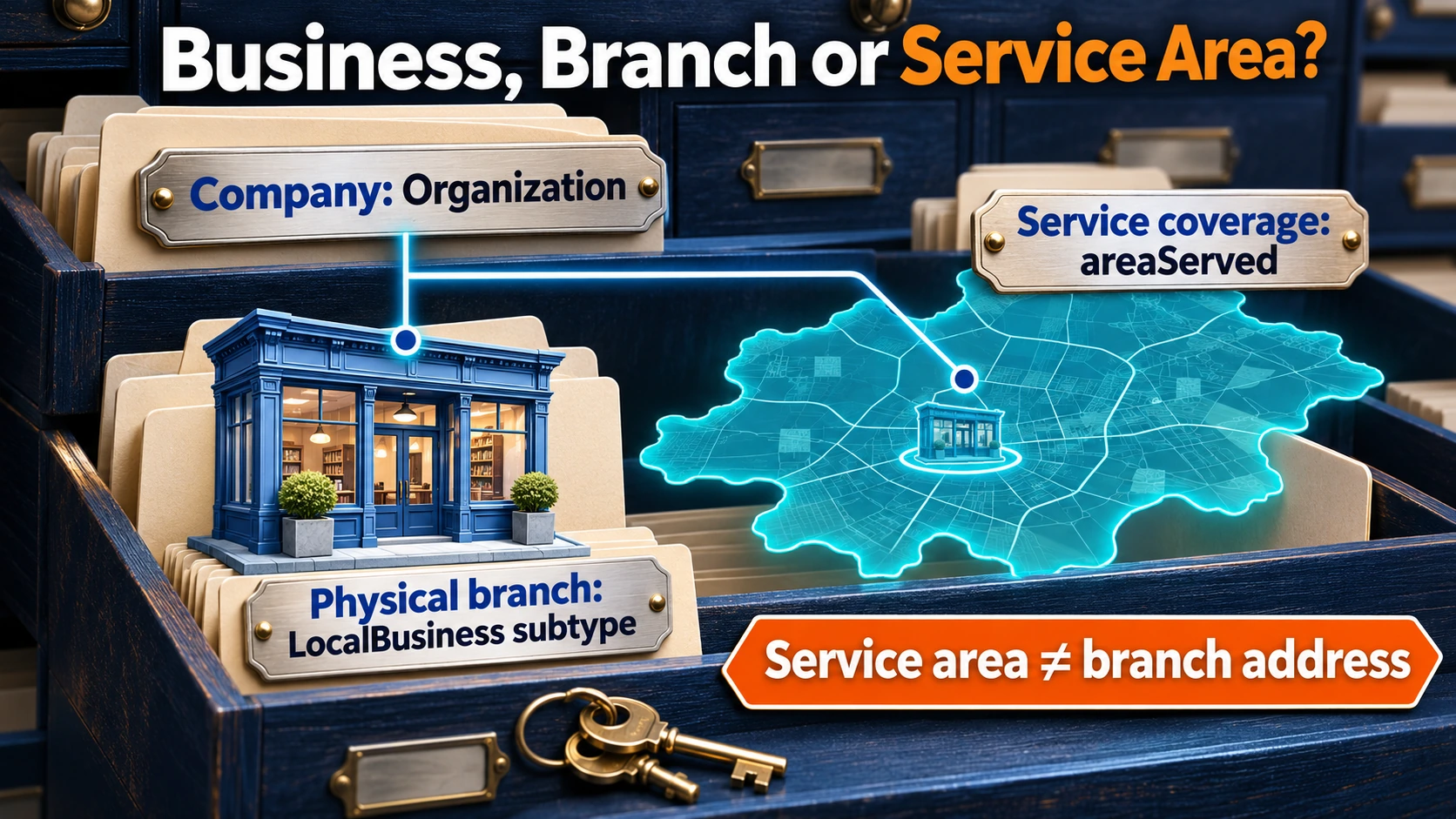
Schema.org defines LocalBusiness as a particular physical business or branch. A café, repair shop or medical practice can therefore have its own business entry.
The main terms describe different parts of the setup:
| Term | Meaning | Example |
| Schema.org | The vocabulary used to label information | LocalBusiness, telephone |
| Structured data | Information arranged in a machine-readable format | A labelled business record |
| JSON-LD | A format for adding structured data to a page | A script containing business details |
| Entity | The person, business or place being described | One dental practice |
| Property | A detail about that entity | Its address or telephone number |
Schema belongs alongside other technical SEO checks. A well-labelled business record still needs an accessible page that explains the services customers can receive.
Which Schema Type Should Your Business Use?
Your schema type should describe the real business. The choice begins with whether the code represents a company, a particular location or both.
LocalBusiness and its specific subtypes
A specific subtype tells search engines more than the general LocalBusiness label. For example, Plumber already belongs within the LocalBusiness family, so it carries that broader meaning too.
Common choices include:
| Business | Suitable type to consider |
| Restaurant | Restaurant |
| Dental practice | Dentist |
| Plumbing business | Plumber |
| Hair salon | HairSalon |
| Physical shop | Store or a more specific shop subtype |
| Local business without a suitable subtype | LocalBusiness |
A business offering several services should select types that accurately describe its operations. Extra types add value only when the page supports them.
Organization for company-level information
Organization describes the company behind a website. Its properties can include the company’s name, logo, contact information and official profiles.
Google’s Organization documentation recommends a relevant, specific subtype. A local business can include company details within its LocalBusiness entry because LocalBusiness is already a subtype of Organization. A separate company entry becomes helpful when the parent and its branches are distinct entities.
That distinction gives a chain a practical structure: one entry describes the company, while individual entries describe its locations.
Service-area businesses and private addresses
A business that travels to customers can describe its coverage through areaServed. That property identifies where a service is provided; it does not create a physical branch in every town listed.
Address privacy needs separate attention. Google’s Business Profile rules require service-area businesses to hide their address when customers are not served there. Website code is publicly accessible, so a private home address should never be treated as hidden simply because it appears inside JSON-LD.
Google’s LocalBusiness rich-result requirements include an address. An address-free description may express truthful information through Schema.org, but areaServed does not replace that requirement.
The relationship between a company, its branches and its service area is easier to follow visually.
What Can Schema Help Your Business Achieve?
Structured data gives search engines explicit information about a page. Depending on the type and requirements, that information can support enhanced search displays.
For business owners, the practical benefit starts with a more accurate description of the business. Expectations should then account for three limits:
- Search appearance: Valid markup can support eligibility, while Google decides what appears.
- Local rankings: Google describes local results mainly through relevance, distance and prominence.
- AI visibility: Google says its AI search features require no special schema markup.
Google’s local ranking explanation helps put schema within the wider picture. A business still needs relevant services, accurate profile information and a website that serves customers.
Similarly, Google’s AI search documentation supports established SEO practices. Schema should express facts already supported by the page, without promises of AI citations.
Your SEO plan can therefore treat markup as one defined task, with its own checks and owner. Content, reputation and customer experience continue alongside it.
Which Business Details Should You Include?
The most reliable starting point is a business record approved by someone who knows the location. This record should guide the website, structured data and public listings.
A spreadsheet can hold the following details before any code is written:
| Property | Information to prepare | Check before publication |
| name | Public business name | Matches the real business |
| @id | Stable identifier for the entity | Distinguishes it from other locations |
| url | Relevant business or branch page | Opens the intended page |
| address | Applicable public postal address | Describes the actual premises |
| telephone | Customer contact number | Reaches the correct business |
| openingHoursSpecification | Customer-facing opening hours | Agrees with the page |
| geo | Latitude and longitude, if included | Points to the premises |
| sameAs | Profiles identifying the same entity | Belongs to the business |
NAP consistency means keeping the business name, address and phone information accurate across sources. A missing unit number or old telephone number deserves attention because it can send customers to the wrong place.
Minor formatting differences need sensible review. “Street” and “St” can describe the same address; an outdated street number changes the information itself. A review of local citations can help uncover those older records.
The sameAs property also needs care. Its links identify the same entity, such as an official company profile. General industry articles, suppliers and nearby businesses do not belong in that list.
How Do You Add Local SEO Schema Markup?
Google recommends JSON-LD because it can express structured data separately from the visible page layout. The script can sit in the page’s head or body.
The implementation becomes easier when business information is settled first. Your developer or website manager can then follow a defined sequence.
Step 1: Choose the page and check existing markup
A single-location business may describe itself on its homepage or a detailed contact page. A branch usually needs its own location page containing relevant business information.
Before adding code, the person managing the website should inspect what already exists. An SEO plugin, theme or custom template may already generate the business entry.
The initial check should record:
- Which page describes the business or branch.
- Which tool currently generates its schema.
- Which identifier represents the business.
- Which details need correction or expansion.
Step 2: Prepare the JSON-LD
The example below shows the structure for a fictional plumbing business with public premises. Every example value needs replacement before publication.
<script type=”application/ld+json”>
{
“@context”: “https://schema.org”,
“@type”: “Plumber”,
“@id”: “https://www.example.com/#business”,
“name”: “Example Plumbing”,
“url”: “https://www.example.com/”,
“telephone”: “+44 20 7946 0000”,
“address”: {
“@type”: “PostalAddress”,
“streetAddress”: “12 Example Street”,
“addressLocality”: “London”,
“postalCode”: “EX1 1AA”,
“addressCountry”: “GB”
},
“openingHoursSpecification”: [
{
“@type”: “OpeningHoursSpecification”,
“dayOfWeek”: [
“Monday”,
“Tuesday”,
“Wednesday”,
“Thursday”,
“Friday”
],
“opens”: “08:00”,
“closes”: “18:00”
}
]
}
</script>
Several fields explain how the record works:
- @context identifies the vocabulary.
- @type names the business category.
- @id identifies this particular business.
- url points to its webpage.
- address groups the postal details.
- openingHoursSpecification groups days and times.
The OpeningHoursSpecification definition supports structured opening and closing times. Different schedules need separate entries, so Saturday hours should have their own entry when they differ from weekdays.
Step 3: Publish through a controlled source
A suitable SEO plugin, maintained template or custom implementation can generate the script. The best choice depends on who will maintain the information after launch.
For example, an owner who updates opening hours through WordPress needs an editing process that updates the page and schema together. A developer-managed site may instead generate both from the same stored business record.
Your wider SEO implementation process should identify who approves business details and who checks the published output.
Step 4: Test the published page
A code test catches problems before launch, but the live URL needs testing too. Publication can introduce issues through caching, templates or plugin settings.
The final release checks should confirm:
- The script appears on the intended page.
- Its details agree with the visible content.
- The live markup passes relevant validation.
- Search engines can access the page.
That last check prevents a technically valid script from sitting on a page Google cannot process.
How Should Multi-Location Businesses Structure Schema?
Each real branch should have its own identity and relevant location page. Branch addresses, telephone numbers and hours belong to those individual records.
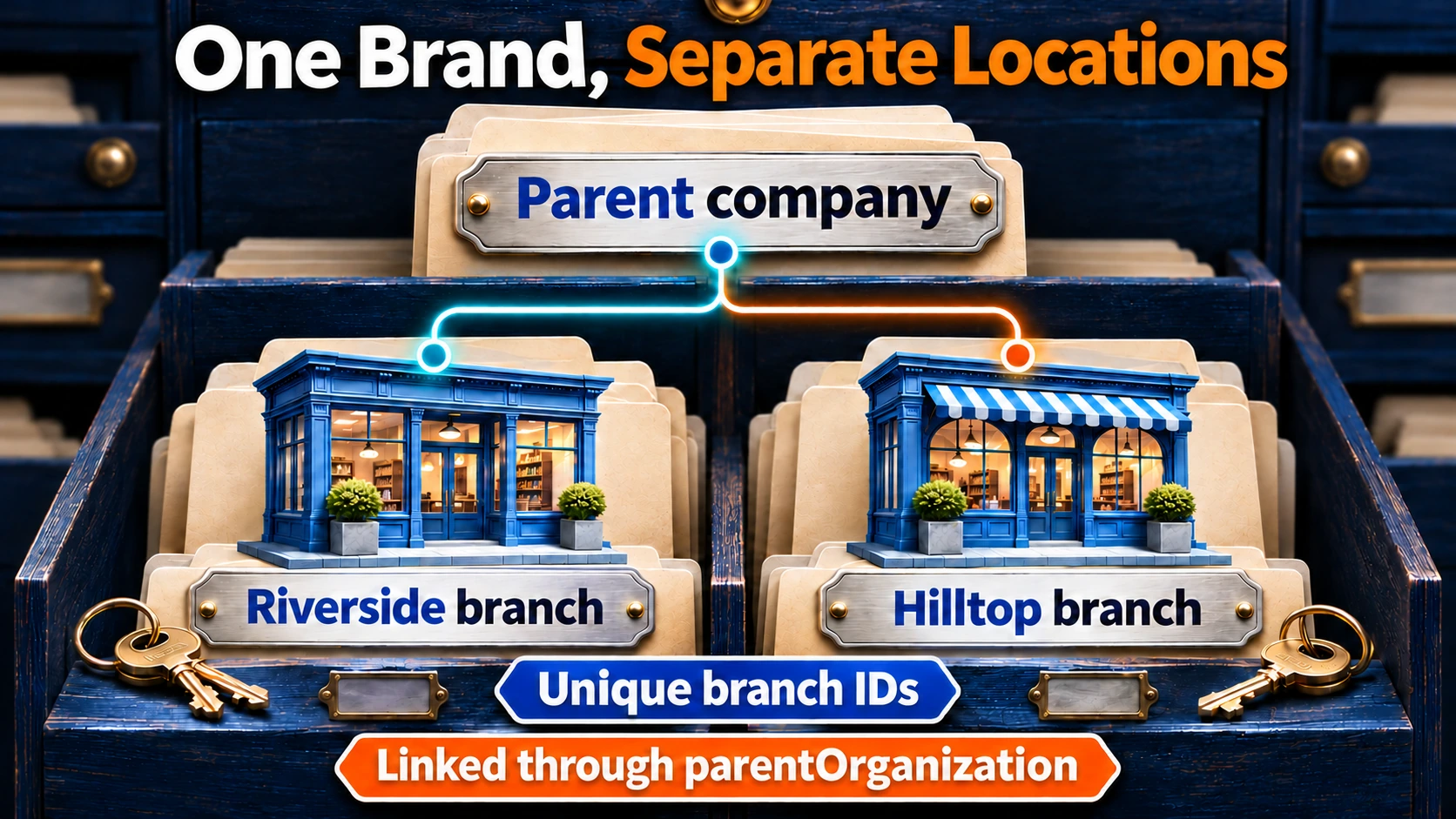
A parent company can have a separate Organization entry. The branch then references it through parentOrganization, which describes the larger organisation it belongs to. The property name keeps its American spelling in code.
A practical arrangement looks like this:
| Entity | Example identifier | Information it owns |
| Parent company | https://example.com/#organization | Company identity and main website |
| Riverside branch | https://example.com/locations/riverside/#business | Riverside address, telephone and hours |
| Hilltop branch | https://example.com/locations/hilltop/#business | Hilltop address, telephone and hours |
The branch reference can use:
“parentOrganization”: {
“@id”: “https://example.com/#organization”
}
A shared parent reference connects the branches without merging their identities. Each branch keeps its own identifier because it represents a different location.
Your local SEO audit should compare those records with their location pages. A copied template can otherwise leave one branch displaying another branch’s hours.
The diagram below shows how shared company information connects with separate location details.
How Can WordPress Sites Avoid Conflicting Schema?
WordPress sites can receive structured data from several sources. A theme may describe the business while an SEO plugin adds another version with older details.
Multiple scripts are not automatically a problem. A page can legitimately describe a business, an article and breadcrumbs. The review should focus on what each entry represents and whether its information agrees.
Identify the source of each business entry
The website manager can search page source for application/ld+json, then inspect the relevant entries in a validator. A working record should include:
| Source | Entity described | Identifier | Action needed |
| SEO plugin | Business | Current business ID | Retain and verify |
| Theme | Same business | Separate older ID | Review conflicting output |
| Custom template | Branch | Branch-specific ID | Check location details |
| Article plugin | Blog post | Article ID | Review separately |
Plugin changes belong on a staging copy when available. That allows the team to trace output without interrupting the live website.
Give each business record one maintained source
A maintained source reduces the number of places someone must edit when details change. Your chosen generator should receive approved information, while redundant output should be removed or aligned.
A final check across the homepage, contact page, branch pages and a blog post should confirm:
- References to the same business use consistent identifiers.
- Separate branches retain their own identifiers.
- Telephone numbers and hours agree with the relevant location.
- Article and breadcrumb entries remain intact.
- Cached pages show the updated information.
These checks belong within the site’s SEO audit checklist, especially after template or plugin changes.
How Do You Validate Local Business Schema?
Validation needs two views: whether the vocabulary is used correctly and whether the page meets the rules for a supported Google feature. The tools answer different questions:
| Tool | Main purpose | Practical use |
| Schema Markup Validator | Checks Schema.org markup | Reviews types, properties and relationships |
| Rich Results Test | Checks supported Google rich-result markup | Identifies relevant eligibility errors |
| URL Inspection | Examines Google’s information about a URL | Helps investigate access and indexing |
The Rich Results Test describes possible supported search features. A successful test does not promise that Google will display them.
Errors and warnings need different responses
An error can identify a missing required property or invalid value. A warning may concern recommended information that would add detail.
The response should follow the underlying fact:
- Invalid syntax needs correction.
- Missing required information needs review against the relevant feature requirements.
- Recommended fields should contain genuine information when available.
- Unavailable facts should remain absent.
A test result cannot fully assess honesty or relevance. Google’s structured data policies also require accurate, relevant markup that reflects page content.
Which Common Schema Errors Need Attention?
Most local business errors come from copying records, adding unsupported claims or leaving information unchanged after the business changes. A short correction list helps teams resolve the cause:
| Problem | Why it causes trouble | Correction |
| Invented office address | Misrepresents the business | Describe actual operations |
| Old telephone number | Sends customers to the wrong contact | Update the source record |
| Shared ID across branches | Confuses separate locations | Assign branch-specific IDs |
| Conflicting business entries | Gives inconsistent details | Align the generators |
| Unsupported review stars | Creates false expectations | Follow review eligibility rules |
| Hidden or unrelated claims | Misrepresents page content | Match the visible information |
Review stars deserve particular care. Google’s review snippet rules make a business’s own pages ineligible for self-serving LocalBusiness or Organization review stars. An embedded third-party review widget does not remove that restriction.
Customer feedback still helps visitors assess the business. Your approach to Google reviews can support reputation and customer decisions without treating testimonials as a guaranteed search feature.
How Should You Measure Results Over Time?
Measurement starts before publication. A dated baseline makes later changes easier to interpret, particularly when schema launches alongside content or website updates. A practical baseline includes recent performance for the affected pages, current validation findings and a record of planned changes.
Technical health comes first
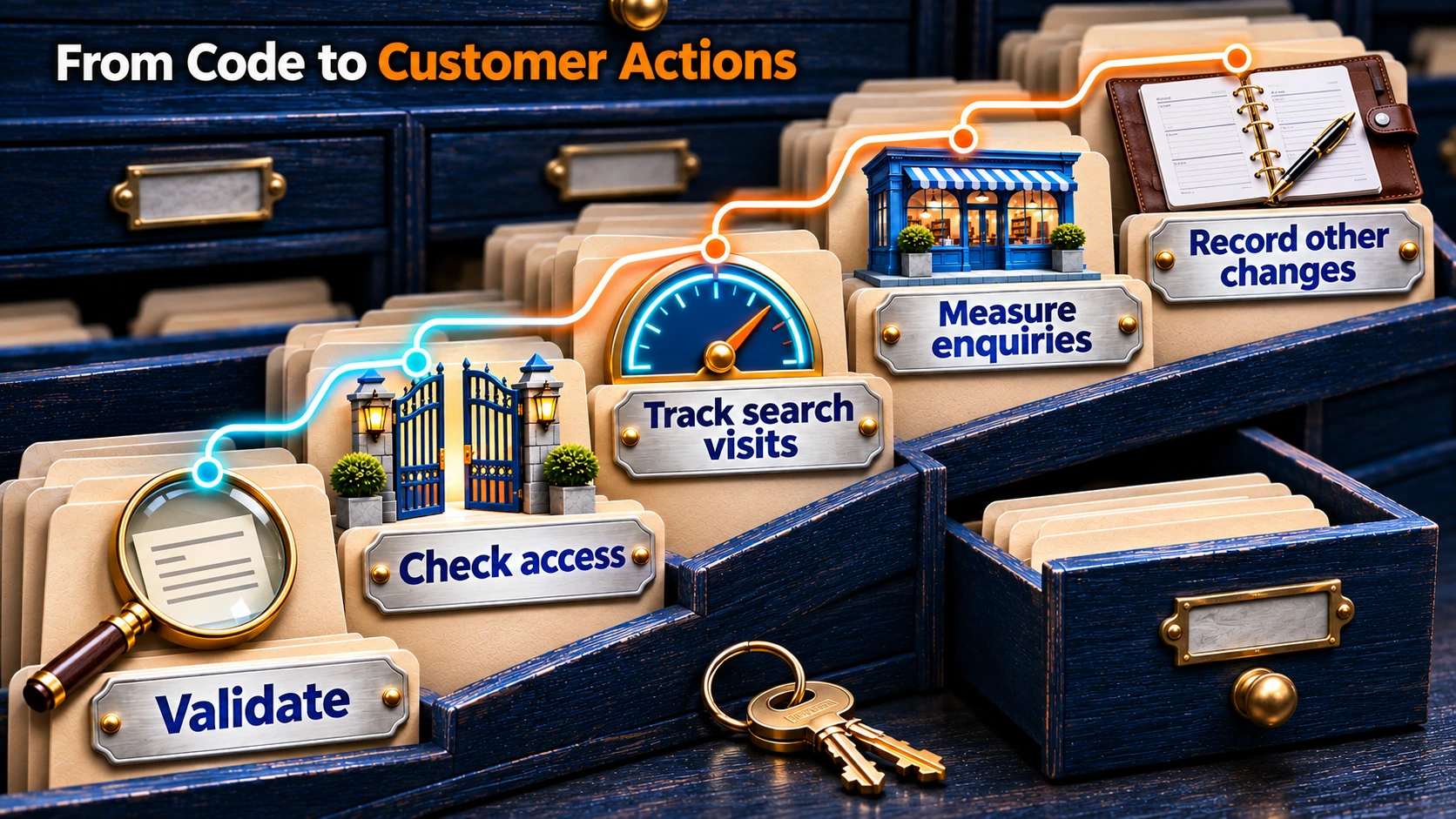
The first review asks whether the implementation survived publication. The team should test the live page, record the result and confirm that the correct details appear.
URL Inspection can help investigate the indexed page and test the live URL. Its findings help separate access problems from markup problems.
A technical record can track:
- Pages tested.
- Business entries detected.
- Errors requiring correction.
- Relevant warnings.
- Last update and responsible person.
Search performance needs context
Search Console can show clicks, impressions and queries for affected pages. A missing dedicated LocalBusiness enhancement report should not be treated as proof that the markup failed.
Your Business Profile performance provides another view through available customer interactions. Google notes that these reports can include activity from organic results and Google Ads, so the figures need context.
A measurement plan should distinguish the evidence:
| Evidence | What it helps assess |
| Validation results | Implementation health |
| Search Console page data | Website search performance |
| Business Profile interactions | Activity involving the profile |
| Completed forms or bookings | Customer enquiries |
| Change log | Other possible causes of movement |
The same distinction applies to brand mentions. A new mention or citation can reflect wider marketing activity, so it needs separate investigation.
The monitoring sequence below connects technical checks with business outcomes.
Accurate Business Details Support Local SEO
Local SEO schema markup works best when the business type, page content and code describe the same operation. A maintained source, separate branch identities and live testing make that information easier to manage as the business changes.
At MediaOne, our local SEO services connect website work with business visibility. Our SEO team can discuss your current setup and the technical work your website needs.
Frequently Asked Questions
Can schema markup create or verify a Google Business Profile?
Schema markup describes website information. Google Business Profile creation and verification follow a separate process. A business should manage its profile directly and complete the verification steps Google provides; publishing website code does not complete those steps.
Can different departments have different opening hours?
Schema.org’s department property can describe a department within an organisation. A pharmacy inside a larger shop, for example, may have separate contact details and hours. The department should represent a real part of the business.
Can JSON-LD run website features?
JSON-LD supplies data for systems to interpret. A booking form, payment button or telephone link needs its own website functionality. Business details in schema can describe the operation, while customers interact with the page’s actual forms, links and booking tools.
Does schema replace an XML sitemap?
An XML sitemap helps search engines discover URLs, while schema describes information on individual pages. A website can use both because they perform different jobs. Its pages also need accessible links and content that explains the business to visitors.
Who should own schema maintenance?
The business should name someone responsible for approving factual changes, such as new hours or an address move. A website manager or developer can manage the implementation. A shared change record helps both people check that the published page and its code remain aligned.