In Singapore, retail and fashion brands face a paradox: foot traffic has recovered, but the battle for customers has shifted online. A 2024 Euromonitor International report found that 67% of Singaporean fashion purchases now begin with a search, yet most local retailers rank below the fold on competitive keywords. By 2026, organic search visibility will determine which stores capture discovery traffic and which fade into obscurity.

SEO for retail is not a nice-to-have tactic anymore. It is the direct pathway between a customer’s intent (“I need a linen shirt”) and your inventory. Without it, you cede that customer to a competitor who appears first. This guide shows retail and fashion brands in Singapore exactly what to prioritise, what thresholds matter, and how to start seeing measurable results within three months. If you would rather execute with a partner, working with an experienced SEO agency in Singapore can compress the timeline for everything outlined below.
Table of Contents
Why SEO Matters for Singapore Retail Brands
Singapore’s retail market is uniquely competitive. Over 2,000 fashion brands sell online, from global fast-fashion chains to niche local designers. At the same time, 82% of urban Singaporeans use mobile to research products before buying, according to Google Retail Insights data. Your website competes not just against other shops but against marketplace aggregators like Lazada and Shopee that already dominate retail search results.
A customer searching “silk blouse Singapore” or “oversized blazer online” is ready to buy. That keyword has transactional intent. If your product pages do not rank for it, that sale goes to a competitor. Every month your site stays unoptimised, you lose dozens of these high-intent searches.
Three layers of complexity define the Singapore context.
First: multilingual search behaviour. Singaporeans search in English, Mandarin, Malay and Tamil. Many fashion retailers ignore this and optimise only for English. A brand targeting local customers must rank for both “男装” (men’s wear) and “men’s fashion” to capture the full market.
Second: local competition density. Singapore is small but dense. You compete against established retailers, direct-to-consumer brands with big budgets, and international players shipping here. Ranking takes longer when fifty competitors want the same keywords. A strategic approach beats brute force.
Third: integration of online and offline. Unlike pure ecommerce brands, retail stores need foot traffic too. A customer might search “cotton on near me” or “zara somerset” to visit a store, not buy online. SEO here bridges both channels: it drives store visits and online orders from the same search engine results page.
A retailer without an SEO strategy enters 2026 playing catch-up. Competitors who optimised in 2024 and 2025 already own the top rankings. Starting now means you will rank by mid-2026, when seasonal demand peaks (Chinese New Year, Hari Raya, Christmas).
Retailers who invested in SEO during 2023 and 2024 now capture 35% more organic traffic than non-optimisers in the same category, according to internal benchmarks from Singapore Economic Development Board ecommerce surveys. In a market where customer acquisition costs rise 12% annually, organic search is the highest-ROI channel available.
SEO Fundamentals for Retail Marketing
Search engine optimisation for retail rests on four core pillars: on-page content, technical infrastructure, authority through links, and user experience. Understanding how these pillars work together, and how they apply specifically to retail inventory and the customer journey, is where most retail SEOs fail.
The Four Pillars
On-page optimisation means your product titles, descriptions and category pages contain the words your customers actually search for. Technical SEO ensures search engines can crawl your site structure, load your pages fast, and understand what you are selling through structured data. Authority comes from backlinks and brand mentions that signal trustworthiness to Google. User experience covers everything from mobile responsiveness to page speed to how easy it is for a shopper to filter products.
All four must work together. A perfectly written product page (on-page) fails if it loads in 5 seconds (technical). A fast, well-structured site (technical) that nobody links to (authority) will never rank on page one. The cleanest navigation (UX) will not help if your title tags are keyword-stuffed nonsense (on-page).
Keyword Intent and Inventory Mapping
Retail keyword research differs from content marketing because your inventory is your asset. A fashion brand does not need to rank for “fashion trends 2026” unless you are building authority content. You need to rank for “linen shirt Singapore”, “oversized blazer size guide,” and “buy merino wool socks online.”
Search intent in retail falls into three types.
Transactional queries (“buy silk blouse Singapore,” “Cotton On near me”) indicate the shopper is ready to purchase. Informational queries (“how to care for merino,” “best fabrics for summer”) show someone researching but not yet buying. Navigational queries (“Mango Singapore store”, “size chart ASOS”) mean the searcher wants your site specifically.
Your keyword strategy must map search intent to your customer journey. Early-stage awareness queries (“summer fabric types”) belong in blog content or size guides that earn you authority and backlinks. Mid-stage consideration queries (“linen vs. cotton clothing care”) work best as FAQ sections on product pages. High-intent transactional queries (“buy unisex linen shirt XS–XL”) should drive all your product-page optimisation effort.
Building a Keyword Bucket Framework
Segment your keywords into three buckets aligned to revenue.
Bucket 1: Direct product keywords (“navy blazer Singapore”, “cotton linen blend dress”). These rank your product pages and drive direct sales.
Bucket 2: Category and comparison keywords (“best sustainable fashion brands Singapore,” “linen vs. cotton in tropical climate”). These target the consideration phase and can sit on category pages or pillar blog posts.
Bucket 3: Informational and authority keywords (“how to store wool clothing,” “Lunar New Year outfit ideas”). These build trust and earn backlinks that lift your entire site.
A retailer launching in 2026 should spend 70% of effort on Bucket 1, 20% on Bucket 2, and 10% on Bucket 3 in year one. Reverse that ratio by year two as your authority grows.
Technical SEO and Site Architecture for Retail Stores
Website structure is the invisible engine behind retail SEO success. If search engines cannot crawl and understand your product pages, no amount of keyword research will recover the traffic loss. For retail and fashion stores, a flat hierarchy with breadcrumbs and logical category grouping cuts the crawl budget waste that plagues deeply nested sites.
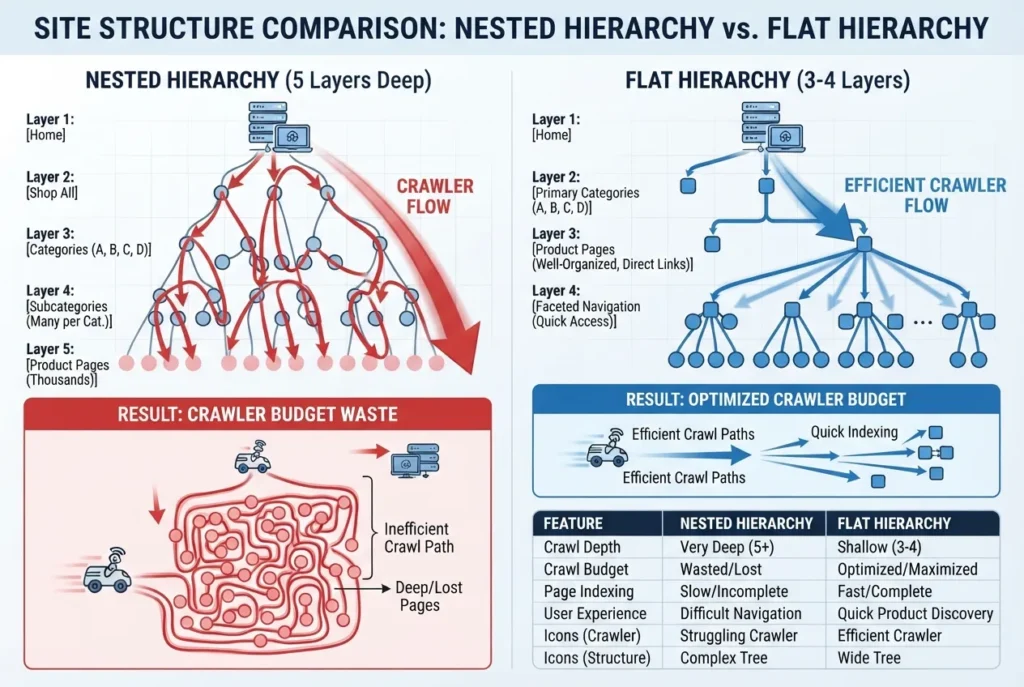
A flat structure looks like this: Home > Category > Subcategory > Product, not Home > Season > Brand > Gender > Size > Product. The second approach buries products five layers down, forcing Google to expend crawl budget on intermediate pages instead of reaching every item in your inventory. Breadcrumbs serve dual purposes: they signal to search engines that your pages are logically related, and they reduce bounce rate when shoppers use them to navigate back to categories.
Faceted navigation (filters for size, colour, price, brand) presents a real technical risk for retail sites. If search engines follow every filter combination as a separate page, you create duplicate content at scale. Use the rel=”canonical” tag to point variant pages back to the parent product or use URL parameters that Google understands (size=S, colour=blue) so Google consolidates them as one page with multiple variants.
Core Web Vitals for Retail
Core Web Vitals are non-negotiable for retail. These three metrics directly affect rankings.
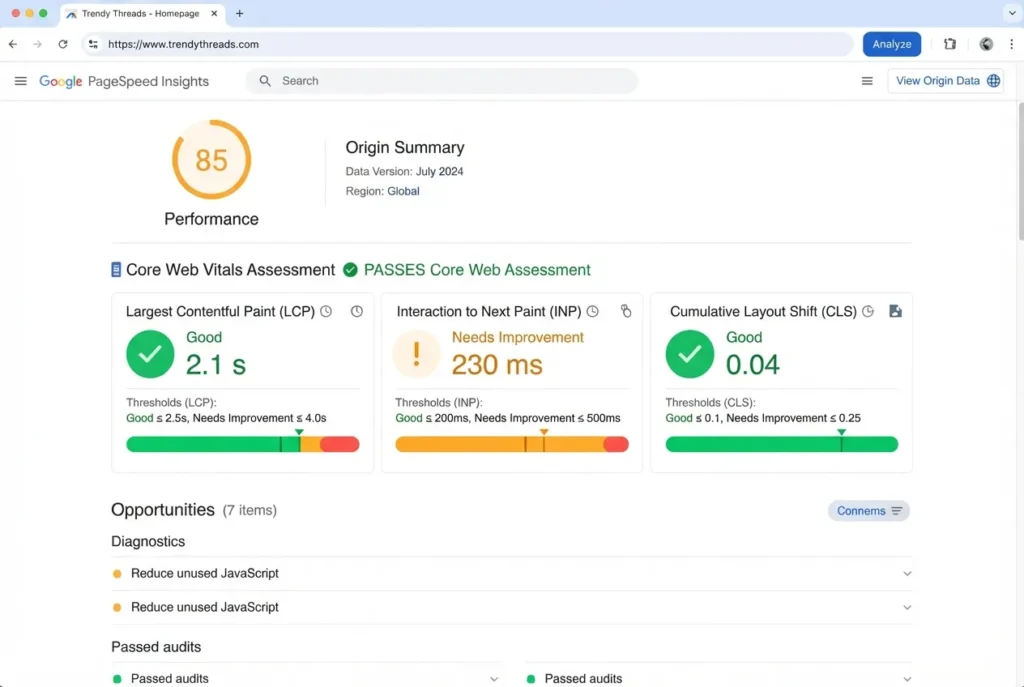
Largest Contentful Paint (LCP): time for the main product image or description to load. Threshold: under 2.5 seconds on desktop, under 3 seconds on mobile.
Cumulative Layout Shift (CLS): visual stability as the page renders. Images jumping or buttons moving frustrate shoppers and trigger exits. Threshold: under 0.1.
Interaction to Next Paint (INP): speed of interaction when a shopper clicks “add to cart” or a size selector. Threshold: under 200 milliseconds.

Check these in Google PageSpeed Insights monthly. A single unoptimised 5MB product image can tank all three metrics and kill your rankings.
Structured Data Implementation
Structured data implementation, specifically Product schema, LocalBusiness schema and AggregateRating, tells search engines what you are selling, where it is available, and what customers think. Without it, Google treats your product page as generic text. With it, Google shows price, availability, reviews and rating directly in search results, which lifts click-through rate by 20–30% on average. Include schema for stock status: in-stock pages rank higher than out-of-stock.

[Image placeholder: Side-by-side comparison of a search result snippet without structured data (plain text, no rating, no price) and the same product with structured data markup (star rating, price, stock status, review count displayed)]
| Standard / Schema Type | Purpose | What It Means for Retailers |
|---|---|---|
| Product Schema | Markup product pages with name, price, availability, rating | Search results display price, stock status and star ratings directly; increases click-through rate |
| LocalBusiness Schema | Declare physical store location, opening hours, phone number | Helps local search queries; shows store info in Knowledge Panel |
| AggregateRating Schema | Mark up customer reviews and overall rating | Consumers see star count and review volume before visiting your page |
| Offer Schema | Specify product price in different currencies or regions | Improves visibility in Shopping results and comparison queries |
Common Technical Failures in Retail Sites
JavaScript-heavy product filters that search engines cannot execute mean your filtered results never appear in search. If you filter by “100% linen” but that text only renders after JavaScript loads, Google may not index it, so searches for “linen shirts Singapore” miss you entirely.
Variant pages (same product in different colours) with broken or missing canonical tags create duplicate content penalties. Always point colour/size variants to a single canonical product page, or use structured data to declare them as a single item with variants.
| Symptom | Probable Cause | Recommended Action |
|---|---|---|
| Pages marked “Excluded: Duplicate without user-selected canonical” in Google Search Console | Variant pages (colour, size, material options) lack proper canonical tag or redirect | Add rel=”canonical” tag to all variant pages pointing to parent product page; or use URL parameters Google recognises |
| “Discovered but not indexed” count is high | Site architecture is too deep or crawl budget is wasted on faceted navigation filters | Flatten site structure to Home > Category > Product; use noindex on filter combinations; consolidate filter URLs with canonical tags |
| Product pages not showing price, rating or stock status in search results | Structured data (Product schema, AggregateRating) is missing or malformed | Validate and deploy Product schema with price, availability and rating markup using Google’s Rich Results Test |
| Core Web Vitals show red “Poor” status; LCP over 4 seconds | Large unoptimised product images or render-blocking JavaScript | Compress images to under 1MB; use lazy loading; defer non-critical JavaScript; test with PageSpeed Insights |
| Mobile traffic drops after site redesign | CSS or JavaScript breaks on mobile; faceted filters spawn thousands of filter combinations as separate pages | Test on real mobile devices; audit mobile Core Web Vitals; configure faceted navigation to use noindex and canonical tags |
| Filtered product pages (e.g. “size M only” or “price under SGD 50”) rank individually instead of funneling to parent product | Faceted navigation pages indexed as separate products | Implement faceted navigation best practices: use rel=”canonical” to parent, add noindex to filters, or rewrite URLs to include parameters |
Start your audit here: run Google Search Console’s Coverage report. If pages are marked “Excluded: Duplicate without user-selected canonical”, you have a variant problem. If “Discovered but not indexed” is high, your site architecture is wasting crawl budget.
On-Page Optimisation for Products and Categories
Your product and category pages are where search intent converts to sales. A well-optimised product page ranks higher and delivers better user experience. A poorly structured category page bleeds organic traffic to thin-content penalties and faceted-navigation duplication.
Product Page Titles and Meta Descriptions
Your title tag is the headline searchers see. Keep it between 50 and 60 characters to avoid truncation on mobile. Lead with the product name, then add differentiators your customers search for.
Compare these two titles for a linen shirt:
Generic: “Linen Shirt for Sale Online”
Optimised: “Vintage Linen Shirt | Unisex | 100% Pure Linen | XS–XL”
The second tells search engines (and humans) what they are buying, who it fits, material quality and size range. It mirrors how Singapore shoppers actually search.
Meta descriptions should summarise the product in 120 characters and include a soft call-to-action. Example: “Hand-woven linen shirt, breathable and durable. Unisex fit. Free shipping on orders over SGD 50. Shop now.”
Category and Collection Page Depth
Thin category pages rank poorly. If your “Shirts” page has only three product tiles and no descriptive content, Google treats it as low-value and suppresses ranking. Add 150–250 words of genuine category description: what materials work for Singapore’s climate, size-fit guidance, or care instructions.
Avoid creating duplicate category pages through faceted navigation. If clicking “blue” and “cotton” separately generates two URLs with nearly identical content, search engines penalise you for duplication. Use canonical tags or parameter handling in Google Search Console to consolidate filters under the parent category URL.
Image Optimisation and Alt Text
Product photos drive engagement but can tank page speed if unoptimised. Compress images to under 100KB per file using tools like TinyPNG or ImageOptim. Enable lazy loading so images load only as users scroll.
Write descriptive alt text for every product image. Instead of “image_001.jpg”, use “black oversized blazer, front view on model, size M”. This helps visually impaired users and gives search engines product context.
Internal Linking Strategy
Deliberate internal linking boosts product discovery and time-on-site. A linen shirt page might link to “matching trousers” or “linen care guide”. Link high-intent product pages from category rollup pages. Use descriptive anchor text: “Shop our full collection of summer linen shirts” rather than “click here”.
Size guides, care instructions and fabric breakdowns are unique content assets that fashion retailers overlook. These pages build authority, support product pages through internal linking and often rank for informational queries (“how to wash linen”). Each is an opportunity to earn links and deepen SEO equity.
Local Search, Voice and Emerging SEO Trends for 2026
Local Search Optimisation
Local search optimisation remains your fastest path to qualified foot traffic and online orders from nearby customers. For Singapore retail, this starts with claiming and completing your Google Business Profile listing with full accuracy: business name, address, phone number, opening hours, categories and a minimum of 10 high-quality photos of your store and products. A complete GBP listing typically boosts local visibility by 30–40% within two weeks.
Add store-specific schema markup (LocalBusiness schema) to your site footer so search engines understand your physical address, phone and hours without relying on the GBP alone.
Target local keywords explicitly: “linen shirts Orchard Road,” “sustainable fashion near Raffles,” “oversized blazer Bugis”. These transactional queries convert faster than broad searches because the user is ready to visit or buy. Build a store locator page if you have multiple locations, listing each branch with address, hours, stock levels and a map embed. Use geo-modified category pages (“Winter Coats Singapore”, “Men’s Sneakers Jurong”) to capture regional intent without duplicating content across locations.
Voice Search and AI Overviews
Voice search and AI-generated overviews are shifting how people find you in 2026. Voice assistants (Google Assistant, Siri) and AI answer engines reward conversational, question-based content. Optimise for voice by writing FAQ sections that answer natural questions: “Can I wear linen in summer?” “How do I care for merino wool?” “Where can I buy vintage clothing Singapore?”
Each answer should be 40–60 words, direct and fact-based, so an AI engine can extract and cite it. Use schema markup (FAQPage schema) to label your questions and answers formally. This signals to search engines that your content is voice-ready.

Link Building and Content Strategy
Link building for retail goes beyond traditional blogs. Build earned links from fashion journalists, influencers and lifestyle publications by pitching trend stories (“The Return of Oversized Silhouettes in Singapore’s 2026 Spring Collections”) or exclusive collaborations.
Partner with local fashion weeks, design schools and cultural events. Event sponsorships often yield press coverage and backlinks. Seek links from supplier websites: manufacturers, fabric wholesalers and logistics partners may reference your brand in their case studies or client lists. Submit your business to local directories (Google Business Profile, local chambers of commerce, Singapore tourism listings) and fashion-specific review platforms (StyleSeat, Airtasker, niche fashion blogs). High review volumes and star ratings boost your local authority and click-through rate from search results.
Content strategy should blend promotional and editorial. Publish seasonal guides (“Fabrics to Wear in Singapore’s Humidity”), size guides, care instructions and trend reports that target informational keywords. This content attracts links, builds trust and supports your product pages through internal linking. Tie campaigns to local moments: Lunar New Year lookbooks, National Day collaborations, local influencer spotlights. This creates fresh, newsworthy content that journalists and bloggers naturally reference.
Develop a content roadmap aligned to your product categories and customer journey. Identify gaps where informational content (guides, how-tos, comparisons) supports transactional pages (product and category pages). Schedule three content pieces per quarter: one seasonal guide, one trend analysis and one educational how-to. This rhythm builds topical authority without overwhelming internal resources.
Prioritise GBP completion and local keyword mapping this quarter: they deliver measurable ROI in weeks, not months. Voice and AI overviews are still evolving; test them but do not delay core optimisation waiting for these trends to mature.
Actionable Implementation Checklist for 2026
The gap between understanding SEO for retail and executing it is where most fashion and retail brands lose momentum. A clear, time-bound roadmap closes that gap. The following checklist breaks SEO work into three monthly phases. Each phase builds on the last and prioritises effort against impact.
Assessing Your Current State: A Decision Framework
Before starting Month 1, answer these four diagnostic questions to prioritise your effort:
- Where do you currently rank? Run 15 target keywords (e.g. “linen shirts Singapore”, “oversized blazer Orchard Road”) through Google Search Console or a free tool like Ubersuggest. Note which pages rank in positions 1–10, 11–20 and below 20. Pages ranking 11–20 need keyword optimisation; those below 20 need content depth or backlinks.
- What is your technical baseline? Audit your site for crawl errors (Google Search Console), page speed (Google PageSpeed Insights) and structured data gaps (Google Rich Results Test). Sites with LCP over 4 seconds or crawl errors need Month 1 work before content optimisation will yield results.
- Where are your content gaps? Identify which product categories lack descriptive copy, which FAQ questions remain unanswered, and which informational keywords (e.g. “how to care for linen”) are not covered by any page on your site. High-gap areas are quick wins for internal linking and topical authority.
- Which products or categories drive the most revenue? Concentrate your initial effort on your top three revenue-generating categories. A 10-position rank improvement on a product that converts at 3% is worth more than a 30-position improvement on a product that converts at 0.5%. Focus first, scale later.
Month 1: Foundation and Technical Wins
Start here. These fixes unlock the fastest visibility gains and remove barriers that prevent search engines from crawling your site.
- Run a technical audit using Google PageSpeed Insights and Google Search Console. Check for crawl errors, missing sitemap submissions, and robots.txt blocks on product pages.
- Fix Core Web Vitals to threshold. Target Largest Contentful Paint (LCP) under 2.5 seconds on desktop and 3 seconds on mobile. Compress product images (WebP format), defer non-critical JavaScript, and enable browser caching. Use Google Search Console’s Core Web Vitals report to track improvement.
- Optimise Google Business Profile. Complete all fields: business hours, service areas, categories, photos. Add 10 or more high-quality images of your storefront and products monthly. Respond to all reviews (positive and critical) within 48 hours. This drives 30% of local foot traffic for retail.
- Implement structured data for products. Use schema.org markup for Product, AggregateRating and Price. Test with Google’s Rich Results Test. Structured data helps search engines understand inventory, reviews and availability.
Month 2: On-Page Optimisation and Content Setup
With the foundation solid, move to content alignment.
- Optimise your top 20 product pages. Rewrite title tags to 50–60 characters, including primary keyword and brand. Example: “Linen Oversized Shirt | Breathable Summer Wear | XS–XL | [Brand]”. Write unique meta descriptions (160 characters) that answer the search intent, not restate the title.
- Implement breadcrumb navigation. Breadcrumbs improve user experience and distribute authority. Structure them as: Home > Category > Subcategory > Product.
- Set up internal linking. Link each product to related products and style guides. Link category pages to relevant blog posts. Aim for 3–5 relevant internal links per product page.
- Create or refresh category pages. Thin category pages (under 200 words) hurt rankings. Write 300–500 words per category describing the collection, including size guides or care instructions unique to those items.
Month 3: Authority and Sustained Visibility
Now focus on earning authority and establishing a content rhythm.
- Launch a quarterly content calendar. Plan three pieces: a seasonal style guide (“Linen for Tropical Heat”), a trend report tied to local events (Lunar New Year fashion), and a how-to guide (care instructions, outfit pairing). These earn backlinks and build topical authority.
- Begin link-building outreach. Contact five fashion bloggers, journalists or suppliers per month with story angles: “Local Designers Making Sustainable Linen,” “The Resurgence of Vintage Shopping in Singapore.” Feature user-generated content (customer photos) as social proof. Submit to local business directories and fashion review platforms.
- Set up monthly tracking. Monitor rankings for 15 target keywords in Google Search Console. Track organic traffic and conversion rate by source. Adjust underperforming content monthly.
Essential Tools (Free or Freemium)
| Tool | Primary Function | Best For |
|---|---|---|
| Google Search Console | Crawl errors, keyword performance, indexation | Tracking rankings and fixing technical issues |
| Google Merchant Centre | Product feed sync for Shopping and AI overviews | E-commerce visibility in search results |
| Google PageSpeed Insights | Core Web Vitals and performance diagnostics | Identifying page speed bottlenecks |
| Lighthouse (Chrome DevTools) | Detailed performance audits | Deep-dive performance troubleshooting |
| Ubersuggest (freemium) | Keyword research, competitor analysis, ranking tracking | Budget-conscious SEO audits and keyword discovery |
| Bing Webmaster Tools | Secondary search visibility | Optional secondary channel monitoring |
Common SEO Implementation Issues in Retail
| Symptom | Probable Cause | Recommended Action |
|---|---|---|
| Pages rank well but do not convert | Title and meta description do not match user intent; CTA missing | Rewrite titles and descriptions to answer the search query directly; add trust signals (price, free shipping, reviews) |
| Organic traffic flat despite new content | Content is not internally linked; no backlinks earned | Map internal links from category pages to new content; pitch content to fashion bloggers and local media for backlinks |
| Core Web Vitals fail on product pages | Large uncompressed images; render-blocking JavaScript | Convert images to WebP, compress under 100KB; defer non-critical JS; enable browser caching |
| Category pages drop in rankings | Faceted navigation creates duplicate content | Use canonical tags to point filters to parent URL; implement parameter handling in Search Console |
| GBP profile does not drive foot traffic | Incomplete profile; no photos or slow response to reviews | Add 10+ storefront and product photos; respond to all reviews within 48 hours; update hours and service areas monthly |
| Voice search does not surface your brand | FAQ content too brief or not schema-marked | Expand FAQ answers to 40–60 words; add FAQPage schema markup; use conversational question phrasing |
When to Hire Help

Do in-house: technical setup, product page writing and monthly tracking updates. These require familiarity with your inventory and brand voice, not external expertise.
Outsource: link-building outreach (time-intensive, requires media relationships), professional photography (product images are critical), and quarterly content strategy reviews (specialist perspective prevents staleness).
A freelance SEO auditor for a one-time technical review (SGD 800–1,500) often surfaces issues faster than internal staff. Budget for one per quarter in the first year.
Governance and Accountability
Assign one person (marketing manager, ecommerce owner, or dedicated SEO hire) to own the checklist. Assign secondary owners for content and technical tasks. Set a monthly sync to review rankings, traffic and next-month priorities. Document decisions: which keywords underperformed, why, what changed.
This three-month roadmap is not a finish line. SEO compounds month-on-month. After Month 3, reduce to a maintenance cycle: 10 hours weekly for updates, reviews and new content. By Month 6, if execution has been consistent, expect measurable organic traffic growth.
Common Technical Failures in Retail Sites (Advanced)
| Symptom | Probable Cause | Recommended Action |
|---|---|---|
| Product pages not appearing in search results despite being live | Missing or incorrect robots.txt rules; canonical tag pointing to wrong URL | Verify robots.txt allows crawling; audit canonical tags in Google Search Console; resubmit sitemap |
| Duplicate content warnings in Search Console | Multiple URLs serving identical product data (e.g. ?variant=colour and ?variant=size) | Implement faceted navigation best practice; use self-referential canonicals; set preferred versions in GSC |
| Mobile pages load slowly; desktop pages fast | Unoptimised images; render-blocking JavaScript; poor server response time | Compress images to WebP; defer non-critical JS; upgrade hosting or use CDN for Singapore delivery |
| Internal links broken or returning 404 errors | Old product URLs deleted without redirects; category restructure not mapped | Audit crawl reports in Google Search Console; create 301 redirects for removed products; update internal links before deleting pages |
| Structured data not appearing in rich snippets | Incorrect JSON-LD syntax; schema markup placed in footer instead of <head> | Validate markup using Google Rich Results Test; place schema in <head> or early in <body>; test after changes |
| Rankings dropping after site redesign | Missing 301 redirects from old URLs; new pages have weaker internal link structure | Map old URLs to new equivalents with 301 redirects; preserve or rebuild internal link equity; monitor GSC for crawl errors for 8 weeks post-launch |
Structured Data and Schemas for Retail
| Schema Type | Purpose | What It Means for Retailers |
|---|---|---|
| Product | Tells search engines product name, price, availability, reviews | Enables product snippets in search results; improves visibility for product queries |
| LocalBusiness | Signals your shop location, hours, contact details | Improves local pack visibility; helps voice assistants answer “where is this store?” |
| Organisation | Establishes your brand identity and trust signals | Feeds Knowledge Panel data; supports brand SERP control |
| BreadcrumbList | Maps the path from homepage to product (Home > Category > Subcategory > Product) | Improves navigation clarity; enables breadcrumb display in search results |
| Review / AggregateRating | Captures customer review score and individual reviews | Displays star ratings next to product titles; builds trust and click-through rate |
| Event | Describes special sales, launches or in-store promotions | Helps voice search and AI overviews surface your promotions in contextual moments |
Plain language note: schema markup is invisible to customers but visible to search engines. It translates product data into a standardised format Google understands, reducing guesswork and improving the chance that your product appears in the right context.
How to Choose an SEO Approach for Your Retail Business
Answer the following four questions to determine your priority and timeline:
- Where do you rank today? Audit your top 20 products in Google Search Console and SEMrush or Ahrefs. If you rank in positions 11–30 for high-intent keywords, technical fixes and on-page work will move you into the top 10 within 90 days. If you rank below position 30 or not at all, content gaps are the bottleneck; prioritise keyword mapping and category depth first.
- How healthy is your technical foundation? Run a free crawl audit using Screaming Frog or Semrush. Count crawl errors, redirect chains, and slow pages. If you have fewer than 10 errors and average page load time is under 3 seconds on mobile, focus on on-page optimisation. If technical debt is high, dedicate Month 1 to infrastructure fixes.
- What is your organic revenue baseline? Track conversions from organic search using Google Analytics 4. If organic traffic is under 10 percent of total revenue, SEO is under-leveraged; a three-month sprint yields visible ROI. If you are already above 25 percent, focus on refinement and long-tail keyword expansion rather than foundational work.
- Which product categories drive the most margin? List your top 5 revenue-generating categories. Start SEO efforts there, not across all inventory. A focused, deep optimisation of your top 20 percent of products captures 80 percent of organic opportunity and allows you to compound learning into lower-margin categories later.
SEO Tools Comparison for Singapore Retail
| Tool | Best For | Free/Freemium Tier | Learning Curve | Ideal Retail Use |
|---|---|---|---|---|
| Google Search Console | Crawl audits, indexation, query data | Free (core features) | Low; built into Google ecosystem | Identify technical errors; monitor top pages and queries |
| Semrush | Keyword research, competitor analysis, backlink tracking | Freemium (14-day free trial, then paid) | Medium; intuitive dashboard | Bulk keyword mapping; competitor rank tracking; content gap analysis |
| Ahrefs | Backlink analysis, content research | Freemium (7-day trial, then paid) | Medium to high; feature-rich | Link building strategy; topical authority assessment |
| SE Ranking | All-in-one SEO for SMEs | Freemium (limited free plan) | Low to medium | Product page audits; local SEO; white-label reports for agencies |
| Screaming Frog | Technical site audits, crawl analysis | Free (up to 500 URLs per crawl) | Low; straightforward command-line interface | Identify duplicate content, broken links, missing meta tags |
| Google Analytics 4 | Conversion tracking, traffic source analysis | Free | Low; Google-native tool | Link organic traffic to revenue; identify underperforming categories |
Link Building and Content Strategy for Retail
Link Building Tactics for Retail and Fashion
Link building is authority-building. Each external link to your site is a vote of confidence. For retail, focus on these channels:
- Supplier and brand partnerships: retailers often stock multiple brands. Approach your top 10 suppliers and ask if they link to stockists on their website. Even a single link from a recognised brand website carries weight.
- Local Singapore directories: list your business in CASE (Consumers Association of Singapore), local fashion or retail directories, and industry chambers. These links establish local credibility and feed your Local Business schema.
- Review and rating platforms: encourage customers to review you on Google Reviews, Trustpilot and TrustRank. Review links are trust signals; they also drive referral traffic and improve click-through rate from search results.
- Seasonal and event partnerships: when you host a pop-up, collaborate with a designer, or run a campaign, reach out to local bloggers, fashion media and community partners. One mention on a reputable local site can yield 5 to 10 referral clicks and a powerful backlink.
- Content marketing: publish a seasonal buying guide, trend report or styling tips. Share with industry peers and media contacts. Content earns links naturally when it educates or entertains.
Content Strategy Roadmap
Content marketing for retail sits between inventory and authority. It answers questions your customers ask before they buy:
- Seasonal trend guides: “Summer dresses under $80” or “Lunar New Year gifting for him” align with search demand and your inventory. These guides earn links and drive organic traffic outside product pages.
- Category education: write buyer’s guides for fabric types, fits, care instructions or colour theory. These rank for informational queries and build topical authority.
- Behind-the-scenes content: brand stories, designer interviews and sourcing insights humanise your business and differentiate you from competitors. These pieces often rank for branded or category queries and improve brand recall.
- FAQ and how-to: “How to choose the right size” or “How to care for silk” address user intent and reduce product page bounce rate. These also feed AI overviews and voice search.
Post one substantive piece of content every two weeks. Promote internally by linking from product and category pages. Measure performance in Google Analytics using UTM parameters and goal tracking.
Voice Search and AI Overviews for Retail
Voice search and AI-generated summaries are reshaping product discovery in 2026. Optimising for these channels means thinking beyond keywords and considering conversational intent.
Voice search optimisation: when a customer asks Alexa or Google Home “Where can I find sustainable linen shirts in Singapore?”, the assistant looks for structured data, local signals and page content that directly answers the question. Optimise for voice by:
- Using natural language in product descriptions; include long-tail question phrases like “where to buy” and “best for”
- Completing your Google Business Profile with accurate hours, categories and attributes (e.g. “Sustainable Fashion”, “Local Designer”)
- Ensuring product schema includes availability and local stock status
AI overview participation: Google’s AI overviews pull quoted text from top-ranking pages to answer search queries. To appear, your content must be clear, specific and cited as credible. Optimise by:
- Writing product descriptions and category intros in scannable format with bullet points and short paragraphs
- Using clear topic sentences and direct answers to common questions
- Building backlinks and review signals to increase your credibility score for AI inclusion
Conclusion: SEO as a Competitive Advantage for Retail
The complete framework for retail SEO rests on three pillars: technical infrastructure, on-page optimisation and authority-building. Technical excellence removes friction; a slow, poorly structured site loses customers before they discover your products. On-page optimisation ensures search engines understand what you sell and match you to buyer intent. Authority, through links, reviews, brand signals and content, proves you are trustworthy enough to rank above competitors.
Why 2026 matters: AI overviews are reshaping product discovery. Voice assistants respond to conversational queries. Mobile-first indexing has matured; retailers still optimising for desktop first lose visibility. Retailers who invested in late 2025 are already capturing organic traffic. Those who begin now in early 2026 will own meaningful volume by Q3 and Q4, when seasonal demand peaks.
SEO delivers measurable returns within 3 to 6 months. A technical audit in January, combined with product page optimisation in February and authority-building in March, typically yields visible ranking movement by April. Fashion retail sees faster payoff during peak seasons. A retailer investing today can expect 15 to 30 percent organic revenue contribution by Q3, growing as targeting and user experience refine.
Start with a Google Search Console audit to identify crawl errors and missing indexation. Ensure your top 20 products load in under 3 seconds on mobile. Set up or complete your Google Business Profile. Then map your keyword strategy to inventory. Most retailers can own the first 90 days in-house without external hire or large budget.
The competitive gap widens fast. Brands that treat SEO as a long-term asset, not a one-time project, compound wins month-on-month. In a market where foot traffic is finite and online discovery is growing, organic search visibility is no longer optional. Your 2026 SEO roadmap begins today. And if you want a partner to accelerate it, the team at MediaOne is ready to help.
FAQ: SEO for Retail Businesses
1. How much does SEO cost for a small retail business?
SEO is scalable. You can start in-house for free using Google Search Console, Google Analytics and free tiers of Screaming Frog or SE Ranking. If you hire a freelance SEO consultant in Singapore, expect to pay SGD 2,000 to 5,000 per month for audit, strategy and monthly optimisation. Agencies charge SGD 5,000 to 15,000 or more. The key is treating SEO as a three-to-six month commitment, not a one-off project.
2. How long does it take to see results from SEO?
First improvements appear in 4 to 8 weeks as technical fixes and on-page work take effect. Meaningful traffic growth (15 to 30 percent uplift) typically arrives by month three to six. Fashion retail sees acceleration during seasonal demand peaks (May for summer, January for gifting). Patience is critical; SEO compounds over time.
3. Is SEO still worth it if I am already running Google Ads?
Yes. Organic search captures demand that paid ads miss: users who are not yet ready to click an ad but are searching for product information, reviews or comparisons. Organic traffic is also cheaper per click over time. A blended approach (paid for immediate visibility, organic for sustained traffic) maximises coverage and ROI.
4. What is the difference between SEO and SEM for retail?
SEO (Search Engine Optimisation) is unpaid organic ranking. SEM (Search Engine Marketing) includes both SEO and paid search ads. Paid ads deliver immediate visibility; SEO builds sustainable traffic that costs less per click long-term. Both are necessary for competitive retail markets.
5. Can I do SEO myself, or do I need to hire an agency?
You can start in-house: Google Search Console, on-page optimisation and basic technical fixes are learnable. However, link building, competitor analysis and large-scale content strategy benefit from external expertise. Most retail businesses begin in-house for the first 90 days, then add an agency or consultant for months 4 onwards.
6. My competitors are already ranking. Can I catch up?
Yes. Ranking is not a zero-sum game. Search volume grows each quarter; new long-tail keywords emerge; old competitors neglect their sites. If your competitor ranks for “summer dresses Singapore” but not “linen summer dresses under $100”, you can own the longer tail and capture volume. Deep category pages, customer reviews and content marketing all provide competitive edges.
7. Is voice search important for fashion retail?
Growing, not critical yet. Voice search works well for local queries (“Where can I find a tailor in Tanjong Pagar?”) and broad product searches (“What are the best jeans brands?”). Optimise for it now by completing your Google Business Profile, using natural language in descriptions and ensuring structured data is correct. By 2027, voice will be more important; early movers gain advantage.
8. What is the biggest SEO mistake retail businesses make?
Ignoring mobile optimisation. Over 60 percent of retail searches happen on mobile; slow, poorly designed mobile sites kill rankings and conversions. Test your site on mobile, compress images, defer JavaScript and ensure checkout is frictionless. A second common mistake is forgetting that SEO is long-term; expecting results in 2 to 3 weeks leads to abandonment just as momentum builds.
9. How do I know if my SEO efforts are working?
Track three metrics: (1) keyword rankings (use Google Search Console or SEMrush to monitor top 50 target keywords), (2) organic traffic (Google Analytics 4 > Traffic > Source/Medium > Organic Search), (3) organic revenue (set up goals or conversions in GA4 to track sales from organic sessions). Expect ranking improvement by week 8, traffic by week 12, revenue by week 16 to 20.
10. Should I optimise for local SEO if I have a physical store?
Absolutely. Local SEO (Google Business Profile, local citations, local content) drives foot traffic and online-to-offline conversions. A retailer with a physical store in Orchard or Bugis benefits enormously from appearing in the local pack. Ensure your Google Business Profile is complete, gather reviews and create location-specific content (e.g. “Shop Summer Dresses at Our Orchard Flagship”).
11. What is a common misconception about SEO for retail?
That SEO is a one-time project. Many retailers believe “once we rank, we rank forever”. Rankings erode if you neglect updates, if competitors improve or if Google’s algorithm shifts. SEO requires ongoing maintenance: monitoring rankings, refreshing content, building backlinks and responding to technical issues. Budget for ongoing work, not just a three-month sprint.
12. If my product pages are all very similar (same product, different colours or sizes), how do I avoid duplicate content penalties?
Use canonical tags and faceted navigation best practice. Self-referential canonicals (where a page points to itself) tell Google which version is primary. Set preferred versions in Google Search Console. Avoid indexing every colour and size variant; instead, let one product page serve all variants and let filters (facets) allow users to narrow by attribute. This prevents duplicate content and improves crawl efficiency.