
WhatsApp has become an important communication channel for businesses that want to connect with customers directly. In Singapore, where customers often prefer to ask questions before making a purchase, WhatsApp offers businesses a convenient way to turn advertising interest into meaningful conversations.
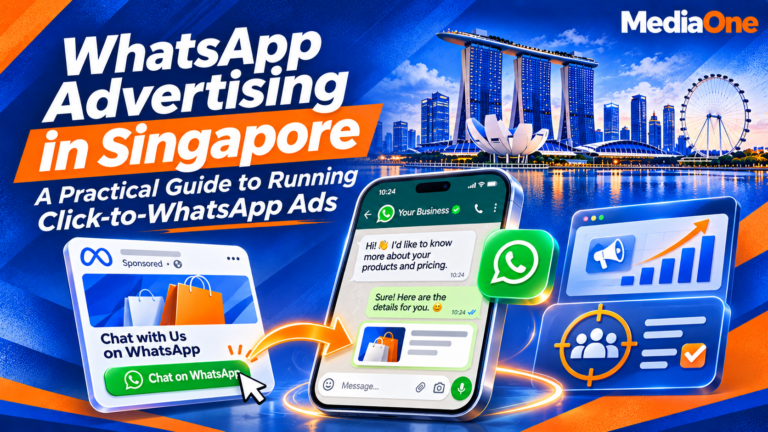
With Click-to-WhatsApp ads, potential customers can move from a Facebook or Instagram advertisement straight into a conversation with your business. Instead of relying entirely on website visits or contact forms, you can answer questions, understand customer requirements, recommend suitable products or services, and follow up on enquiries through one messaging channel.
However, successful WhatsApp advertising involves more than simply publishing an advertisement. Businesses need the right account setup, a clear campaign objective, compelling ad creative, a realistic budget and a reliable process for responding to enquiries.
This guide explains how Singapore businesses can set up, manage and optimise WhatsApp advertising campaigns, including how to calculate advertising costs and measure whether conversations are generating qualified leads and sales.
Key Takeaways
- WhatsApp advertising encourages direct customer conversations. Click-to-WhatsApp ads allow potential customers to move from Facebook or Instagram advertisements into a business chat.
- Measure meaningful conversations, not just clicks. Track conversations started, qualified leads, response times and completed sales.
- Prepare your team before launching. Assign someone to handle incoming enquiries and establish a consistent response process.
- Understand the different advertising costs. Account for Meta advertising spend and any applicable WhatsApp Business Platform messaging fees.
- Use relevant creative and clear calls to action. Give potential customers a specific reason to start a conversation.
- Track campaign performance. Identify which advertisements generate qualified enquiries and which ones contribute to actual revenue.
What Is WhatsApp Advertising and Why Should Businesses Use It?
WhatsApp advertising refers to paid promotional activities that help businesses reach potential customers and encourage them to communicate through WhatsApp.
One of the most common formats is Click-to-WhatsApp advertising. A user sees an advertisement on Facebook or Instagram, clicks its call-to-action button and is redirected to a WhatsApp conversation with the business.
This approach is particularly useful for businesses offering services or products that require consultation, clarification or personalised recommendations before purchase.
How Click-to-WhatsApp Advertising Works
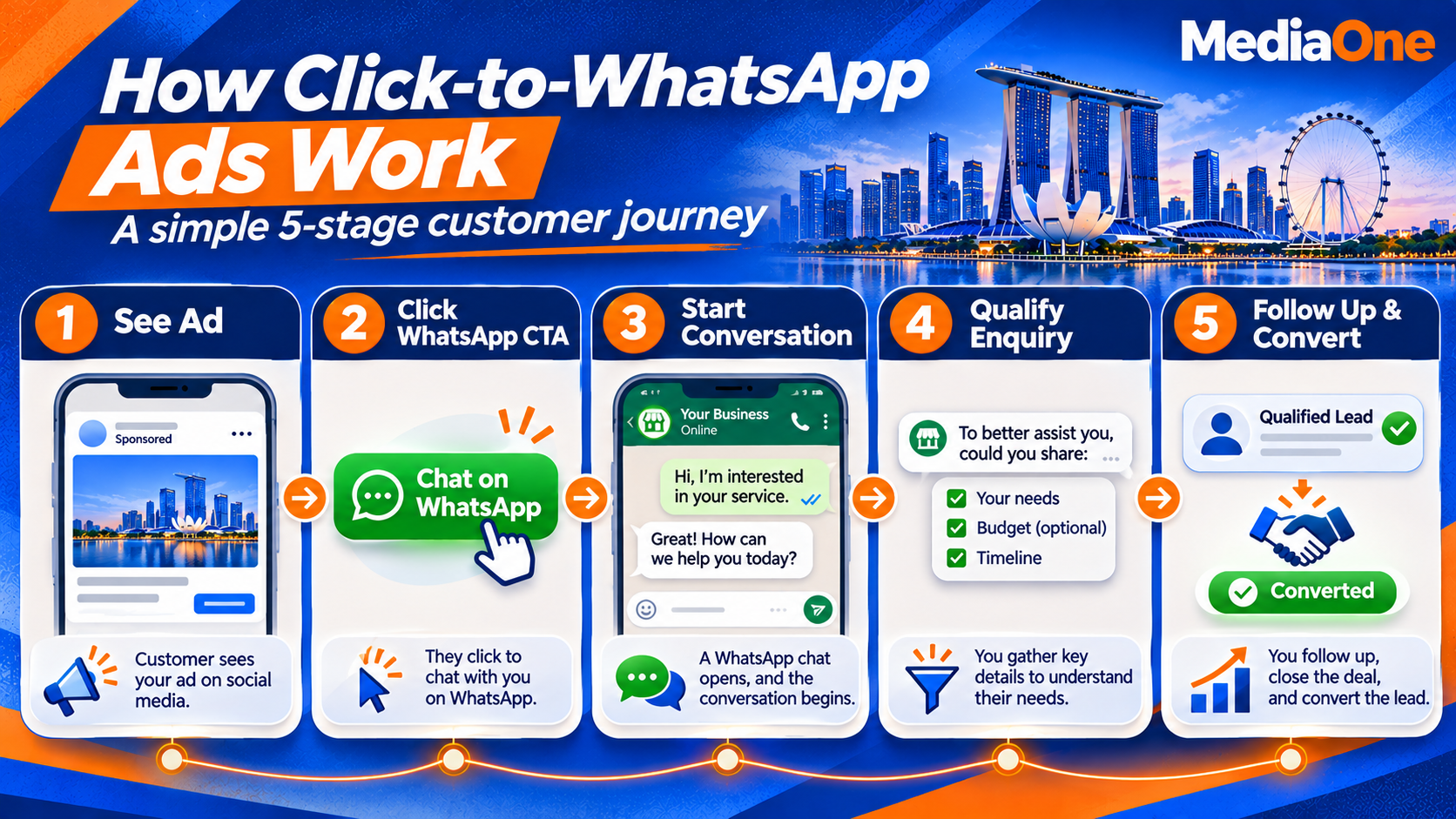
The customer journey is relatively straightforward:
- A business creates an advertisement through Meta Ads Manager or an available WhatsApp Business advertising workflow.
- The advertisement appears on an eligible Facebook or Instagram placement.
- A potential customer clicks the messaging button.
- WhatsApp opens with a conversation involving the business.
- The business responds to the enquiry, qualifies the prospect and provides relevant information.
- The sales team follows up and attempts to convert the enquiry into a customer.
For example, a renovation company in Singapore could run an advertisement promoting its HDB renovation packages. Interested homeowners can click the advertisement and ask about pricing, renovation timelines or available consultation appointments.
Rather than directing every prospect to a lengthy website form, the company can address these questions through a direct conversation.
Businesses with larger customer service teams can also use the WhatsApp Business Platform to manage messaging workflows, integrate customer relationship management (CRM) systems and automate selected interactions.
Why WhatsApp Advertising Can Be Effective
WhatsApp advertising offers several advantages, particularly for businesses that depend on customer enquiries before making a sale.
1. Shorter communication journey
Traditional advertising often directs customers to a landing page, where they must find the relevant information or complete an enquiry form.
Click-to-WhatsApp ads reduce these steps by allowing customers to ask questions immediately.
2. Direct customer interaction
Businesses can clarify customer requirements, answer objections and recommend appropriate products or services in real time.
3. Personalised communication
Unlike a generic advertisement, a WhatsApp conversation allows businesses to tailor their responses to individual enquiries.
For example, a tuition centre can recommend different programmes depending on a student’s academic level, subject requirements and preferred schedule.
4. Easier follow-ups
Businesses can continue conversations, provide quotations and respond to additional questions through the same communication channel, subject to applicable messaging rules and customer consent.
5. Better opportunities for lead qualification
A conversation can help sales teams determine whether a prospect has the budget, requirements and purchasing intention to become a customer.
However, WhatsApp advertising is not automatically more effective than every other marketing channel. Its performance depends on the offer, audience, advertising creative and quality of customer service.
Businesses should compare its results with other channels as part of a broader social media marketing strategy.
WhatsApp Advertising Placements: Facebook, Instagram and Status
Click-to-WhatsApp advertisements can appear across eligible Facebook and Instagram placements. WhatsApp has also introduced advertising within its own Updates tab.
These placements provide different opportunities for businesses to reach potential customers.
1. Facebook Feed
Facebook Feed advertisements appear as users browse posts, videos and other content.
They are useful for businesses targeting local audiences, promoting service packages or explaining offers that require slightly more information.
For example, a Singapore air-conditioning company could advertise a servicing package and invite homeowners to message the business for a quotation.
2. Instagram Feed and Stories
Instagram is particularly useful for businesses with visually appealing products or services.
Examples include:
- Interior design and renovation companies.
- Beauty and wellness businesses.
- Fashion and lifestyle retailers.
- Restaurants and food businesses.
- Photography and event services.
Businesses can use photographs, short videos and customer testimonials to attract attention before encouraging viewers to start a WhatsApp conversation.
3. WhatsApp Status Ads
WhatsApp introduced advertisements within the Updates tab, which includes Status and Channels.
According to Meta’s announcement in June 2025, the Updates tab was being developed to help users discover businesses and channels through features such as Status advertisements and promoted channels.
Status advertisements provide another opportunity for businesses to reach users within WhatsApp itself.
However, availability and advertising features can vary by market and rollout. Businesses should check the official WhatsApp advertising information before including this placement in their campaign plans.
It is also important to distinguish WhatsApp Status advertisements from conventional Click-to-WhatsApp ads on Facebook and Instagram. They are related advertising formats, but their setup and availability may differ.
Which Placement Should Your Business Choose?
The best placement depends on your audience, creative assets and campaign objectives.
| Placement | Suitable for |
|---|---|
| Facebook Feed | Local businesses, service promotions and enquiry generation |
| Instagram Feed | Visual products, lifestyle brands and service showcases |
| Instagram Stories | Short promotional messages and time-sensitive offers |
| WhatsApp Status | Business discovery and promotions within the Updates tab |
Start with the placements that best match your target audience. Review the quality and cost of the conversations generated by each placement before expanding your campaign.
Prerequisites: What You Need Before Creating a WhatsApp Ad
Before spending money on WhatsApp advertising, ensure that your business has the necessary accounts and customer service arrangements.
For a typical Click-to-WhatsApp campaign created through Meta Ads Manager, you will need a WhatsApp Business account or eligible business messaging setup, a connected Facebook Page and access to a Meta advertising account.
1. Set Up a WhatsApp Business Account
Download the WhatsApp Business app and create a business profile.
Include the following information:
- Business name.
- Business category.
- Operating hours.
- Business address, where applicable.
- Website and contact information.
- Short business description.
- Product or service catalogue, if relevant.
A complete profile helps potential customers understand who they are communicating with.
You should also configure greeting and away messages so customers receive an appropriate acknowledgement when they contact your business.
2. Connect Your Facebook Page
Your Facebook Page provides the business identity associated with your advertising activities.
Ensure that you have the necessary administrative access to manage the Page and connect it to your WhatsApp Business account.
Follow the official WhatsApp instructions for linking WhatsApp Business with Facebook and Instagram.
3. Set Up Your Meta Advertising Account
Create or access your advertising account through Meta Business Suite.
Check that:
- Your Facebook Page is connected.
- Your WhatsApp business number is linked correctly.
- Your advertising account has the necessary permissions.
- Your payment method is valid.
- Your business information is accurate.
The available setup process may differ depending on whether you create an advertisement directly through the WhatsApp Business app or use Meta Ads Manager.
4. Verify and Test Your Business Number
Use an appropriate business number and complete the verification process required by WhatsApp.
Check that your business display name is recognisable and consistent with your actual business identity.
Before launching your campaign, test the entire customer journey:
- Open the advertisement preview.
- Click the WhatsApp button.
- Send a test message.
- Confirm that the message reaches the correct business inbox.
- Check that the business profile and automated greeting are displayed correctly.
This simple test helps prevent enquiries from being directed to the wrong number or inbox.
5. Assess Your Conversation Readiness
A business should be ready to handle customer enquiries before launching a Click-to-WhatsApp campaign.
Use this Conversation Readiness Scorecard to evaluate your business.
The five-question assessment:
- Is there a designated person or team available to respond to incoming enquiries promptly?
- Is there a prepared first-response message addressing common customer questions?
- Does your product or service benefit from a conversation before purchase?
- Does the expected value of a qualified lead justify the time and cost of handling it?
- Can you identify which advertisement generated each conversation?
If you answer yes to four or five questions, your business may be ready to test a campaign.
If you answer yes to three or fewer, address the operational gaps first.
For example, a Singapore renovation company with two sales representatives may be ready to launch if both staff members can handle enquiries, provide preliminary quotations and record leads.
A tuition centre that cannot respond to enquiries outside office hours may need to establish a staff schedule before investing in advertising.
The objective is simple: generate conversations that your business can actually manage.
How to Set Up a WhatsApp Advertising Campaign
Once your accounts and customer service processes are ready, you can start building your campaign.
Meta regularly updates its advertising interface, campaign objectives and optimisation options. The exact setup may therefore vary depending on your account and the features available.
Step 1: Choose the Campaign Objective
Open Meta Ads Manager and create a new campaign.
Select an objective that supports WhatsApp as the messaging destination. Where available, the Leads objective can be configured to generate conversations through WhatsApp.
Depending on your account and campaign setup, other eligible messaging or engagement options may also be available.
Choose a performance goal that reflects what you want the campaign to achieve, such as maximising the number of conversations.
Refer to Meta’s official Click-to-WhatsApp advertising guidance for the latest information.
Step 2: Set Your Advertising Budget
Decide how much your business can afford to spend during the testing period.
You can generally configure budgets at the campaign or ad set level, depending on your chosen campaign settings.
For example, a small business might begin with a controlled test budget of S$300 to S$600.
This is an illustrative budget rather than a recommended minimum. Your actual spending should depend on your industry, audience size, expected cost per lead and available resources.
Avoid committing a large budget before establishing whether your advertisement can generate qualified enquiries.
Step 3: Define Your Target Audience
Identify the customers most likely to be interested in your product or service.
For Singapore businesses, audience targeting may involve:
- Geographic location.
- Relevant interests and behaviours.
- Age ranges, where appropriate.
- Existing customer audiences, where permitted.
- Eligible custom and lookalike audience options.
For example:
| Business type | Potential target audience |
|---|---|
| Renovation company | Singapore homeowners and prospective property renovators |
| Tuition centre | Parents and families seeking academic support |
| Dental clinic | Local residents interested in dental services |
| Property agency | Individuals interested in property-related services |
| Air-conditioning company | Homeowners and businesses requiring servicing |
Avoid targeting everyone simply to increase reach. A smaller, relevant audience can be more valuable than a large audience that has little intention of purchasing.
Step 4: Select Your Ad Placements
Choose the Facebook and Instagram placements that best match your creative and audience.
You can begin with eligible automatic placements or use manual placement controls, depending on the campaign setup.
Review the results regularly. If a placement generates many clicks but very few qualified conversations, investigate whether the creative, audience or message needs adjustment.
Step 5: Create Your Advertisement
Develop a visual and message that communicate the offer clearly.
Your advertisement should explain:
- What your business offers.
- Who the offer is intended for.
- Why potential customers should be interested.
- What they should do next.
For example, a renovation company could use a photograph of a completed project with the headline:
“Planning to renovate your HDB flat? Message us for a personalised renovation quotation.”
A clear message helps customers understand what they can expect when they click the advertisement.
Creating Effective WhatsApp Ad Creative and Call-to-Action Messages
The advertisement encourages a customer to start a conversation, but the opening message helps determine whether that conversation becomes a useful enquiry.
Your creative and call to action should therefore work together.
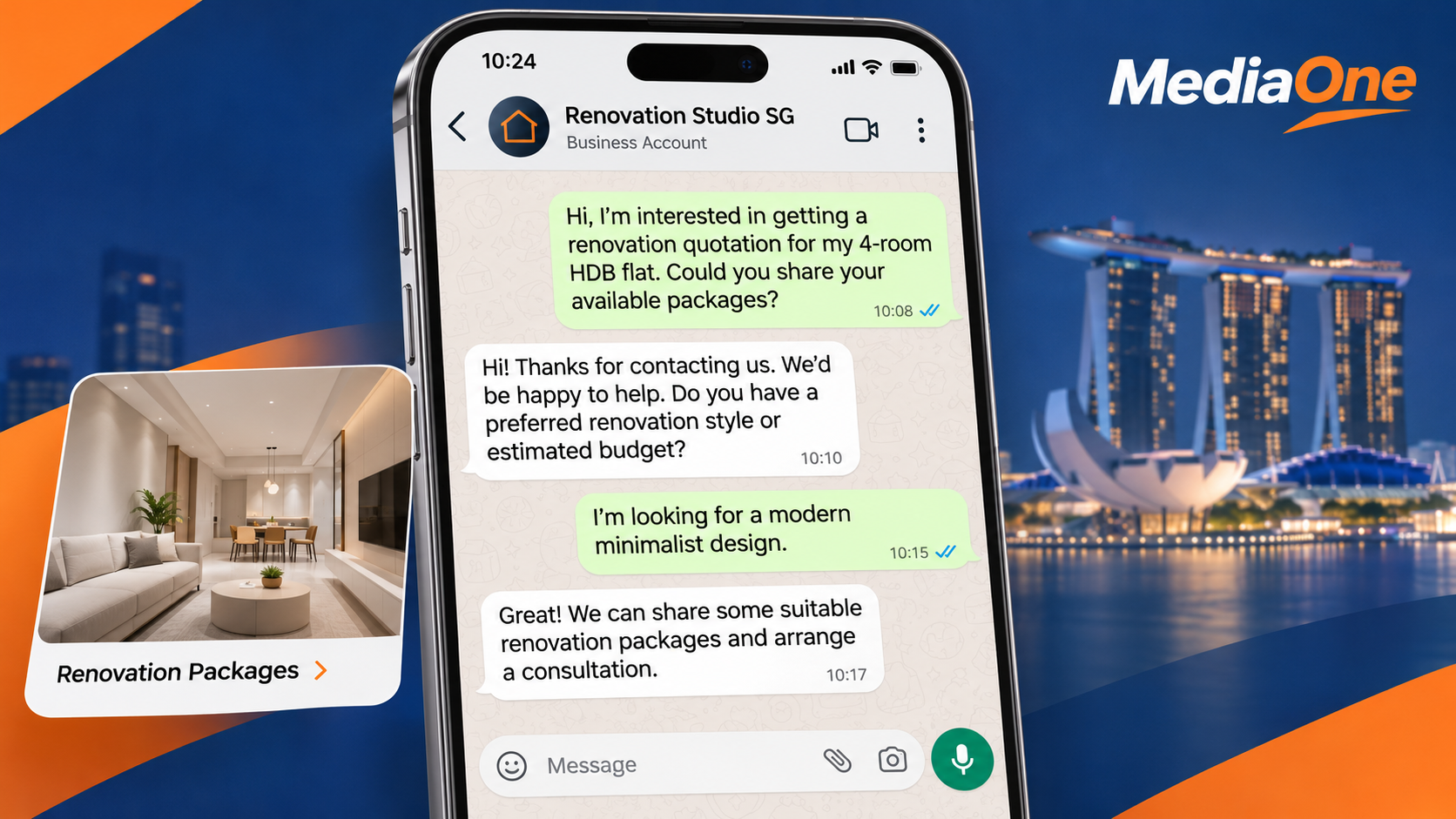
1. Write Clear and Relevant Opening Messages
Avoid generic messages that do not explain the customer’s next step.
Instead, use opening messages that reflect the customer’s likely requirements.
Example:
2. Choose the Right Call to Action
Your call-to-action (CTA) should tell customers exactly what to do.
Examples include:
- “Message us for a quotation.”
- “Chat with us about available packages.”
- “Ask us about our services.”
- “Contact our team for a consultation.”
- “Message us to check availability.”
Avoid making promises that your business cannot fulfil. If you advertise a free consultation, ensure that your team is prepared to provide one.
3. Match the Advertisement to the Conversation
The customer’s experience should be consistent from the advertisement to the first reply.
For example:
| Advertisement promise | Appropriate first response |
|---|---|
| Request a renovation quotation | Ask about property type, size and requirements |
| Check tuition availability | Ask about the student’s level and preferred schedule |
| Get an air-conditioning servicing price | Ask about the number and type of units |
| Book a consultation | Provide available appointment dates |
A mismatch between the advertisement and the actual response can discourage customers from continuing the conversation.
4. Use Consistent Follow-Up Messages
Not every customer will make a purchase immediately.
Prepare suitable follow-up messages for customers who have requested information but have not made a decision.
For example:
“Hi, just checking whether you had a chance to review the quotation we shared. Let us know if you have any questions or would like to discuss the available options.”
Make sure that follow-up marketing messages comply with WhatsApp’s business messaging policies and Singapore’s applicable data protection and marketing requirements.
WhatsApp Advertising Costs: What Singapore Businesses Should Know
Before launching a campaign, understand the different costs associated with advertising and business messaging.
1. Meta Advertising Spend
This is the amount your business pays Meta to distribute advertisements across eligible Facebook and Instagram placements.
Your actual advertising costs depend on factors such as:
- Target audience.
- Competition among advertisers.
- Campaign objective.
- Advertisement quality.
- Placement.
- Campaign duration and budget.
There is no universal cost per WhatsApp conversation. Two businesses operating in the same industry may experience different advertising costs because their audiences, offers and creatives differ.
2. WhatsApp Business Platform Messaging Fees
Businesses using the WhatsApp Business Platform may also incur messaging charges, depending on the message category, destination country and applicable pricing rules.
These charges are separate from Meta’s advertising spend.
The WhatsApp Business app and WhatsApp Business Platform should not be treated as identical products. A business using the standard app does not necessarily incur the same messaging charges as an organisation using the Business Platform or an API integration.
Check the latest WhatsApp Business Platform pricing documentation before calculating your messaging costs.
Do not rely on outdated commission rates or historical pricing announcements when preparing your budget.
3. Calculate Your Cost per Conversation
Cost per conversation measures how much you spend to generate a conversation through your campaign.
Use this formula:
Cost per conversation = Total campaign costs ÷ Conversations started
For example:
- Meta advertising spend: S$500
- Applicable messaging and platform fees: S$50
- Total campaign costs: S$550
- Conversations started: 50
Cost per conversation:
S$550 ÷ 50 = S$11
This gives you a more complete picture of campaign spending than looking at the cost per click alone.
4. Calculate Your Cost per Qualified Lead
Not every conversation represents a potential customer.
Some people may ask general questions, while others may have genuine purchasing intentions.
To understand whether your campaign is attracting valuable prospects, calculate cost per qualified lead.
Cost per qualified lead = Total campaign costs ÷ Number of qualified leads
For example:
- Total campaign costs: S$550
- Qualified leads: 20
Cost per qualified lead:
S$550 ÷ 20 = S$27.50
This metric helps you determine whether your advertising investment is generating enquiries that have a realistic chance of becoming customers.
5. Scale Your Campaign Gradually
Do not increase your advertising budget simply because a campaign generates a high number of conversations.
First, check whether:
- Leads match your target customer profile.
- Customers respond to your sales team’s messages.
- Enquiries progress towards quotations or appointments.
- Qualified leads convert into sales.
- Your cost per acquisition remains commercially viable.
Once you have consistent results, increase your budget gradually and monitor whether performance remains stable.
A business should scale based on actual sales performance rather than assumptions about potential reach.
Common WhatsApp Advertising Mistakes and How to Avoid Them
Even a well-designed advertisement can underperform if the business does not manage the conversations effectively.
Here are five common mistakes to avoid.
1. Measuring Success Through Clicks Alone
A high number of clicks does not necessarily mean that your advertisement is generating valuable enquiries.
For example, an advertisement may attract 200 clicks but generate only 15 actual conversations.
Of those conversations, perhaps five may qualify as potential customers.
Track conversations started, qualified leads and completed sales instead of relying exclusively on clicks and impressions.
2. Responding Too Slowly
Customers who contact your business may also be enquiring with competitors.
A delayed response can reduce their interest and give them a reason to look elsewhere.
Assign someone to monitor incoming enquiries during business hours. Establish an internal response-time target and use automated acknowledgements when appropriate.
3. Choosing the Wrong Campaign Objective
A campaign optimised for broad awareness may generate visibility without producing the conversations your business needs.
Select an objective and performance goal that support your intended outcome.
Review the options available in Ads Manager rather than assuming that every campaign objective supports WhatsApp messaging in the same way.
4. Failing to Track Conversations
Without proper tracking, it becomes difficult to identify which advertisements generate qualified leads.
Record:
- Campaign and advertisement name.
- Date the conversation started.
- Customer enquiry.
- Lead qualification status.
- Follow-up activity.
- Final sales outcome.
A spreadsheet or CRM system can help your sales team maintain these records.
5. Launching Without a Proper Response Workflow
Advertising can generate enquiries faster than a small team can handle them.
Before launching, determine who will answer messages, how enquiries will be assigned and what happens when the responsible staff member is unavailable.
Create response templates for common questions, but allow staff to personalise their replies when necessary.
Tracking and Optimising Your WhatsApp Advertising Campaign
Once your campaign is running, use performance data to identify opportunities for improvement.
1. Monitor the Right KPIs
Focus on metrics that reflect the actual customer journey.
| KPI | What it measures |
|---|---|
| Reach | Number of unique people who saw the advertisement |
| Impressions | Total number of advertisement displays |
| Link clicks | Number of clicks on the advertisement link |
| Conversations started | Number of chats initiated through the advertisement |
| Cost per conversation | Total campaign costs divided by conversations started |
| Qualified leads | Number of conversations that meet your customer criteria |
| Cost per qualified lead | Total campaign costs divided by qualified leads |
| Conversion rate | Percentage of qualified leads that become customers |
| Cost per acquisition | Campaign costs divided by acquired customers |
Meta also provides advertising performance information for WhatsApp Business advertisements. Refer to its official guide to WhatsApp ad performance metrics for details.
2. Identify Your Best-Performing Advertisements
Compare advertisements based on their ability to generate relevant conversations.
For example, you might test:
- An advertisement highlighting affordable pricing.
- An advertisement showcasing completed projects.
- An advertisement offering a free consultation.
Monitor which version generates more qualified leads rather than simply selecting the advertisement with the most clicks.
3. Test One Variable at a Time
Make controlled changes to understand what influences performance.
You can test:
- Different images or videos.
- Alternative headlines.
- Different customer offers.
- Opening message templates.
- Audience targeting.
- Call-to-action wording.
Changing too many elements simultaneously makes it difficult to identify which adjustment influenced the results.
4. Connect Advertising Results to Sales
The ultimate objective is to understand how many advertising conversations become paying customers.
Record the original campaign source and follow each qualified lead through the sales process.
For businesses using a CRM system, consider integrating WhatsApp conversations with lead management and reporting workflows.
This helps your team identify whether a campaign is generating revenue rather than simply attracting enquiries.
Singapore Marketing and Data Protection Considerations
Businesses running WhatsApp advertising should also consider Singapore’s applicable data protection and marketing requirements.
The Personal Data Protection Commission (PDPC) provides guidance on the Personal Data Protection Act (PDPA), including the collection, use and disclosure of personal data.
When handling WhatsApp enquiries:
- Collect only the personal information required for legitimate business purposes.
- Explain how customer information will be used where appropriate.
- Protect customer information against unauthorised access or disclosure.
- Respect customers who withdraw consent or request that marketing messages stop.
- Review the applicable requirements before using customer contact lists for promotional messaging.
The PDPA’s Do Not Call (DNC) provisions may also apply to certain marketing messages sent to Singapore telephone numbers. Businesses should review the PDPC’s Advisory Guidelines on the Do Not Call Provisions and obtain appropriate consent where required.
For additional information, consult the relevant official guidance rather than assuming that every WhatsApp message is treated identically under the law.
Next Steps
WhatsApp advertising provides Singapore businesses with another way to connect with potential customers and generate enquiries through direct conversations.
Click-to-WhatsApp advertisements can be particularly useful for businesses offering products and services that require consultation, personalised recommendations or clarification before purchase.
However, campaign success depends on more than advertising reach. Businesses must have the right account setup, a relevant offer, compelling creative and a team capable of responding to enquiries promptly.
Before launching your first campaign, take these steps:
- Assess your business readiness. Use the Conversation Readiness Scorecard to determine whether your team can handle incoming enquiries.
- Prepare your accounts. Set up your WhatsApp Business account, connect your Facebook Page and configure your Meta advertising account.
- Develop your campaign. Choose an appropriate objective, define your target audience and prepare relevant advertisements.
- Establish your budget. Account for advertising spend and any applicable messaging fees.
- Prepare your response workflow. Create opening messages, assign staff responsibilities and establish follow-up procedures.
- Track campaign performance. Monitor conversations, qualified leads, customer acquisition costs and completed sales.
- Optimise and scale. Improve underperforming advertisements and increase spending only when the results justify it.
The most effective WhatsApp advertising strategy is one that turns customer interest into meaningful conversations and measurable business outcomes.
Frequently Asked Questions About WhatsApp Advertising
1. Do I Need a WhatsApp Business Account to Run WhatsApp Ads?
For a typical Click-to-WhatsApp campaign, you need an eligible WhatsApp business setup connected to the relevant Meta advertising account and Facebook Page.
The WhatsApp Business app is suitable for many small businesses, while larger organisations may prefer the WhatsApp Business Platform for more advanced messaging, automation and integration capabilities.
2. Can I Run WhatsApp Ads Without a Facebook Page?
For conventional Click-to-WhatsApp advertisements created through Meta Ads Manager, you generally need a Facebook Page connected to your WhatsApp business number.
However, some advertising workflows available directly through the WhatsApp Business app may offer different setup options.
Check the current requirements for your chosen advertising method before launching.
3. How Much Should a Small Business in Singapore Spend on WhatsApp Ads?
There is no fixed minimum advertising budget that guarantees results.
A small business could begin with a controlled test budget of S$300 to S$600, depending on its industry, target audience and expected cost per qualified lead.
Use the initial campaign to understand how much it costs to generate conversations and convert prospects into customers.
Increase your spending only when the results justify the additional investment.
4. Which KPIs Should I Track for a Click-to-WhatsApp Campaign?
The most important KPIs include:
- Conversations started.
- Cost per conversation.
- Average response time.
- Qualified leads generated.
- Cost per qualified lead.
- Lead-to-customer conversion rate.
- Customer acquisition cost.
- Revenue generated from the campaign.
Impressions and clicks are useful supporting metrics, but they do not establish whether your campaign is generating actual business.
5. Are WhatsApp Ads Suitable for Every Type of Business?
No. WhatsApp advertising is generally more suitable for businesses whose customers need information, consultation or personalised assistance before making a purchase.
Examples include:
- Renovation and interior design companies.
- Tuition centres and education providers.
- Clinics and appointment-based services.
- Property agencies.
- Professional service providers.
- Home maintenance and repair businesses.
Businesses selling low-cost products that customers can purchase immediately may find that a direct website checkout or another advertising format is more efficient.
Evaluate your customer journey and the cost of handling enquiries before deciding whether WhatsApp advertising is suitable for your business.