Did you know that around 46% of all Google searches now have local intent? That means nearly half of the time someone uses Google, they’re looking for a business, service, or shop nearby, perhaps exactly what you offer.


If your business isn’t optimised for local search, you could be invisible to almost half of your potential customers. A well-crafted profile gives you a real chance to be discovered right when it matters most.
This is where working with a professional local SEO agency can make a big difference. They help businesses optimise their Google Business Profile, manage listings, generate reviews, and implement location-specific strategies that improve visibility in search results.
For broader support, a full-service SEO agency can integrate your local SEO efforts into your overall digital marketing strategy to drive more traffic, leads, and conversions.
That’s why this Google Business Profile SEO guide gives you everything you need to make your profile stand out: from the basics to advanced tactics. Whether you’re new to local SEO or looking to sharpen your online presence, these steps will help ensure your business gets seen whenever someone nearby is searching.
Key Takeaways
- Make sure every bit of your profile is filled out; business name, address, phone number, website, categories and attributes so Google knows exactly who you are and shows you in local searches.
- Good photos, regular posts and keeping on top of reviews and Q&A not only help customers trust you, but also tell Google your business is active and relevant.
- Don’t forget consistency. Keeping your info the same across your website, social media and other directories makes your business look reliable and helps boost your rankings.
What is Google Business Profile SEO?
Google Business Profile SEO is the process of optimising a business’s presence on Google to improve its visibility in local search results and Google Maps. Formerly known as Google My Business, a Google Business Profile (GBP) serves as a company’s primary online presence in Google’s search ecosystem.
Optimising this profile involves more than simply filling in basic business information—it requires a strategic approach to enhance discoverability, engagement and credibility. Through effective optimisation, businesses can influence how their listing appears in search results, including the display of their business name, address, phone number, opening hours, reviews, images and posts.
Google’s algorithm evaluates relevance, distance and prominence to determine which profiles appear for specific local queries. GBP SEO is therefore crucial for ensuring that a business not only appears in search results but also stands out to potential customers, encouraging interactions such as website visits, calls, or in-person visits.
Why Local SEO Matters for Your Business

Image Credit: Appco Software
Local SEO is the practice of optimising a business’s online presence to attract customers from specific geographic areas. Unlike traditional SEO, which targets broad keywords and national audiences, local SEO focuses on connecting businesses with potential customers nearby.
This is particularly important in today’s digital-first environment, where most consumers use Google to find services or products in their area.
Effective local SEO ensures that when someone searches for a service like yours—such as “coffee shop near me” or “plumber in Singapore”—your business appears prominently in Google’s local pack and maps. This visibility directly influences foot traffic, leads and sales.
Moreover, local searches tend to have higher conversion rates than general searches because users are often actively seeking a solution in real time. A well-optimised local SEO strategy ensures your business captures this intent. It also provides opportunities to dominate niche markets in your area by leveraging hyper-local keywords, integrating local content on your website and securing reviews from geographically relevant customers.
Local SEO is also a competitive advantage. Many small and medium businesses neglect local optimisation, which means that a well-optimised Google Business Profile can quickly set a company apart from competitors, establish authority and increase trust among local audiences.
Key Components of Google Business Profile SEO
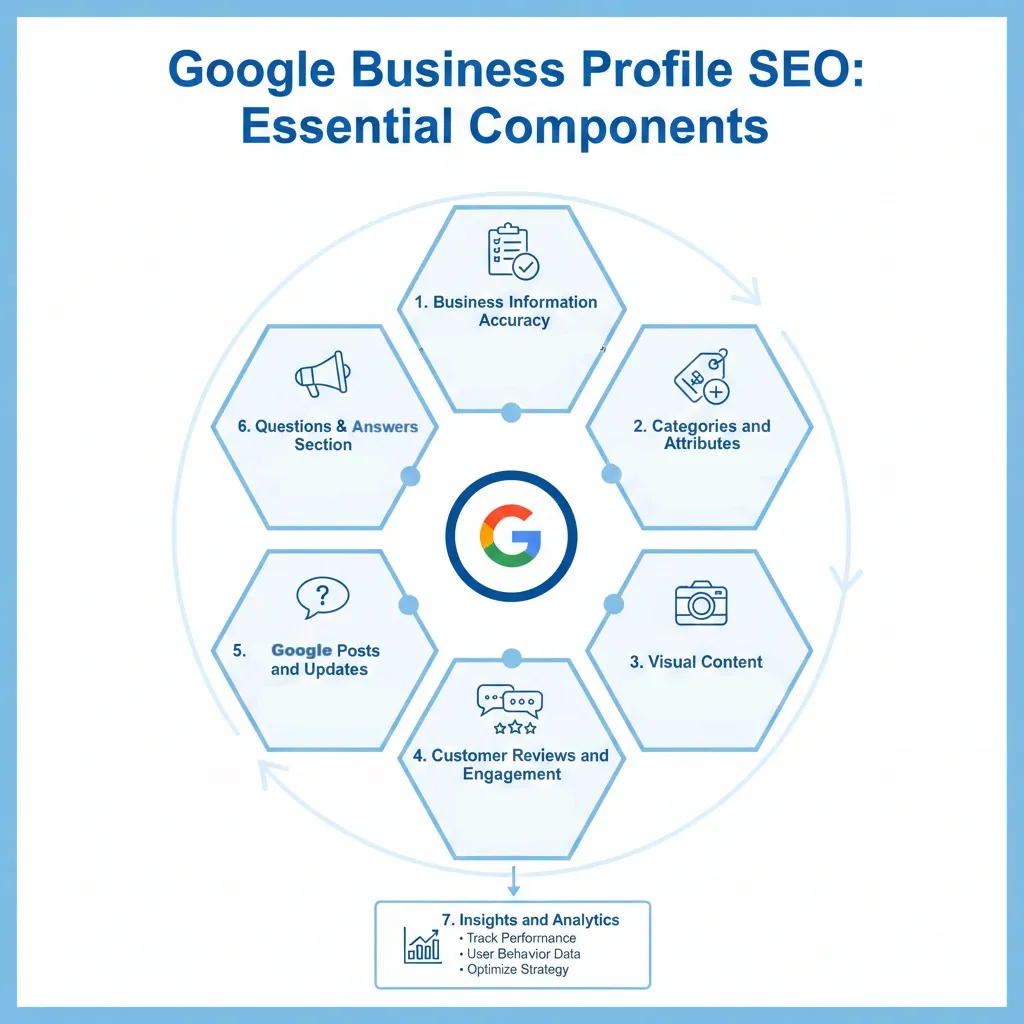
Image Credit: Generated by Gemini
Optimising a Google Business Profile involves multiple components that contribute to better visibility, credibility and engagement. The main elements include:
Business Information Accuracy
First things first. Make sure all your business info is correct. That means your name, address and phone number (NAP) should match across your website, social media and any local directories. Even small inconsistencies can confuse Google and your customers.
Keep your opening hours up to date too, including holidays or seasonal changes, so people know exactly when they can reach you. Think of it as laying a strong foundation: if your info isn’t right, nothing else really matters.
Categories and Attributes
Choosing the right categories and attributes is like telling Google exactly what your business does. Your primary category should reflect your main service, while secondary categories cover other things you offer.
Attributes like “wheelchair accessible,” “free Wi-Fi,” or “pet-friendly” make your profile more attractive and can help you appear in filtered local searches. Basically, the more precise you are, the better Google can match you with people searching for what you actually provide.
Visual Content
A profile without visuals is like a shop with the lights off. High-quality images and videos of your products, services, team, or premises make your profile more engaging and trustworthy. Use descriptive file names and alt text for SEO benefits so Google understands what the images show.
And don’t just upload them once and forget about them. Refresh visuals regularly to showcase new products, seasonal promotions, or changes in your space. Fresh visuals make your business feel active and relevant.
Customer Reviews and Engagement
Reviews are one of the most powerful ways to build trust and show Google your business is credible. Encourage happy customers to leave detailed reviews mentioning specific products or services. Respond to all reviews. Thank people for positive feedback and professionally handle complaints.
Keep an eye on trends too; recurring feedback can reveal ways to improve your service. Engaging with reviews shows both potential customers and Google that your business cares and is actively managed.
Google Posts and Updates
Google Posts let you share fresh content right on your profile, which keeps it active and engaging. Post about promotions, events, product launches, or announcements and include clear calls-to-action like “Book Now” or “Learn More” to drive engagement.
Don’t forget to include relevant keywords naturally as this helps Google understand what your post is about and improves discoverability. Regular updates show customers and search engines that your business is current and active.
Questions & Answers Section
The Q&A section is a place to answer common customer questions before they even ask. You can post FAQs yourself and monitor any new user-submitted questions. Respond promptly with helpful, clear answers. Doing this not only helps potential customers make decisions faster but also signals to Google that your profile is well-maintained and reliable.
Insights and Analytics
Finally, use Google Business Profile Insights to see how your profile is performing. Track things like profile views, website clicks, calls, direction requests and search queries. Understanding this data helps you see what’s working and what’s not.
For example, if certain posts or photos get more engagement, create similar content in the future. Analytics lets you make smarter, data-driven decisions to improve visibility and attract more local customers.

Each of these components works together to create a well-rounded, authoritative presence on Google. By carefully attending to all areas, a business can maximise its chances of appearing in local search results, enhancing both visibility and engagement with potential customers.
How to Optimise Your Google Business Profile
Optimising your Google Business Profile is a comprehensive, multi-step process designed to ensure your business not only ranks highly in local search results but also attracts the right audience and encourages meaningful interactions. Each element of your profile contributes to your online credibility and discoverability, making thorough optimisation essential for maximising local visibility. Key strategies include:
Complete Your Profile Thoroughly
A complete and accurate profile forms the foundation of effective Google Business Profile SEO. Every field should be filled in meticulously:
- Business Name, Address and Phone Number (NAP): Ensure these are precise and match exactly across all online platforms, including your website, social media and local directories. Inconsistencies can confuse customers and reduce your search rankings.
- Website URL: Linking to your website increases traffic and establishes authenticity.
- Business Description: Craft a compelling description that emphasises your unique selling points, core services and geographic location. Use natural language to incorporate relevant keywords without keyword stuffing.
- Opening Hours and Special Hours: Clearly indicate regular and holiday hours, including variations for public holidays, to ensure potential customers have accurate information at all times.
Select Appropriate Categories and Attributes
Categories and attributes help Google understand your business and match it to relevant search queries:
- Primary Category: Choose the category that best represents your leading service or product. This is crucial for appearing in the correct local searches.
- Secondary Categories: Add additional categories to capture broader searches or complementary services without diluting the primary focus.
- Attributes: Attributes such as “wheelchair accessible,” “offers delivery,” or “accepts card payments” improve visibility in filtered searches and help potential customers make informed decisions.
Optimise Visual Content
Images and videos are key to attracting attention and engagement:
- High-Quality Photos: Showcase your premises, products, team, or events. Images should be clear, professional and representative of your brand.
- Keyword-Rich Captions and Filenames: Descriptive captions and filenames improve SEO and provide context for Google’s algorithm.
- Regular Updates: Refresh visuals periodically to reflect seasonal changes, promotions, or new services, demonstrating that your business is active and trustworthy.
Leverage Posts and Updates
Google Posts allow you to share timely updates and create fresh content signals:
- Promotions and Announcements: Share limited-time offers, events, or product launches to keep your audience informed.
- Keyword Integration: Use relevant keywords naturally within post titles and descriptions to enhance discoverability.
- Call-to-Actions (CTAs): Encourage user engagement with actionable prompts such as “Book Now,” “Call Today,” or “Learn More,” which can directly influence customer behaviour.
Manage Reviews Strategically
Customer reviews are both a ranking factor and a trust signal:
- Encourage Feedback: Request detailed reviews from satisfied customers to improve credibility and provide social proof.
- Respond Promptly: Address all reviews professionally, thanking customers for positive feedback and offering solutions for negative experiences.
- Monitor Trends: Analyse review content to identify common compliments or complaints, helping refine services or address recurring issues.
Utilise Q&A Effectively
The Questions & Answers section allows you to anticipate customer queries:
- Pre-emptive Answers: Post answers to frequently asked questions to guide potential customers.
- Ongoing Monitoring: Regularly check for new questions and respond promptly to maintain accuracy and demonstrate attentiveness.
Maintain Consistency Across Platforms
Consistency strengthens credibility and SEO:
- Ensure your business name, address, phone number and website are identical across your Google Business Profile, website, social media and other directories.
- Consistency signals trustworthiness to Google and reduces the risk of confusion for potential customers, improving both rankings and user experience.
By carefully implementing these strategies, businesses can build a highly optimised Google Business Profile that not only ranks well in local search results but also drives meaningful engagement and conversions.
Common Mistakes to Avoid When Implementing Google Business Profile SEO

Image Credit: Skillfloor
Avoiding errors in your Google Business Profile SEO is just as crucial as implementing optimisation strategies. Mistakes can harm your search rankings, reduce customer trust and limit engagement. The most common pitfalls include:

Incomplete or Inaccurate Information
Even small mistakes in your business details can confuse potential customers and hurt your visibility on Google. Accuracy matters and inconsistencies can make your business look unprofessional. Some of these include:
- Missing or incorrect details such as opening hours, contact numbers, or addresses can confuse potential customers and signal unreliability to Google.
- Even minor inconsistencies, like abbreviations in your address (“Rd” vs “Road”) or mismatched phone numbers across platforms, can negatively impact your local search rankings.
Regularly audit your profile and cross-check it against your website, social media and local listings to ensure consistency and accuracy.
Neglecting Visual Content
A picture is worth a thousand words—and on Google Business Profiles, it can be worth many clicks. Failing to include up-to-date, high-quality images can make your profile less engaging and reduce customer interest. Here’s what can happen:
- Profiles without images or videos, or with outdated photos, tend to see lower engagement. Visual content not only attracts attention but also helps customers understand what your business offers.
- Poor-quality images can create a negative impression, while outdated visuals may misrepresent your current services or premises.
Upload high-resolution images showcasing products, services and team members. Update visuals seasonally or when introducing new offerings.
Ignoring Reviews
Customer reviews are one of the most powerful trust signals for your business. Ignoring them, especially negative feedback, can damage your reputation and send the wrong signals to Google about your engagement. Here’s what can happen when you ignore reviews:
- Failing to monitor and respond to reviews, particularly negative ones, can damage your reputation and reduce customer trust.
- Ignoring reviews also sends a negative signal to Google about your customer engagement, potentially impacting your rankings.
Respond to every review professionally. Thank customers for positive feedback and address complaints promptly, showing a commitment to service quality.
Overusing Keywords or Spam Tactics
Trying to game the system rarely works. Overloading your profile with keywords or using spammy tactics can harm your rankings and make your content difficult for users to read. These can hurt your brand:
- Keyword stuffing in business descriptions, posts, or FAQs can make content unreadable and may trigger penalties from Google.
- Using irrelevant categories, fake reviews, or misleading information also harms credibility and can lead to profile suspension.
Use keywords naturally, focus on providing value to users and ensure all content accurately represents your business.
Failing to Update the Profile Regularly
A static profile can signal to both Google and customers that your business isn’t active. Regular updates are key to staying relevant and maintaining visibility in local searches.
- Google values active, up-to-date profiles. Businesses that neglect to update opening hours, services, or special offers risk losing visibility and relevance.
- Seasonal changes, new services, or relocations must be reflected promptly to maintain trust and search ranking.
Schedule quarterly reviews of your profile to update information, add fresh posts and replace outdated images.
Neglecting Analytics
Without reviewing the data, you’re essentially flying blind. Analytics provide insights into how customers find and interact with your profile, helping you make informed improvements.
- Google Business Profile Insights provides critical data on profile views, search queries and customer actions. Ignoring these analytics means missing opportunities to optimise performance.
- Without data-driven adjustments, businesses may continue ineffective strategies while competitors improve their visibility.
Regularly review Insights to understand which queries drive traffic, which posts perform best and how customers engage with your profile. Use this information to refine your strategy.
Measuring Success in Google Business Profile SEO

Image Credit: Recurpost
Effectively measuring success in Google Business Profile (GBP) SEO allows businesses to make informed decisions and continuously improve their local search performance. Beyond simply monitoring rankings, success should be evaluated across visibility, engagement, reputation and conversions.
1. Search Visibility
This metric shows how often your business profile appears in Google search results or Google Maps for relevant queries. Higher visibility means more potential customers are exposed to your business. Even if clicks don’t occur immediately, frequent impressions signal relevance to Google’s algorithm.
- Actionable Steps:
- Use Google Business Profile Insights to track the number of views over time.
- Identify which search queries lead users to your profile and optimise descriptions, posts and categories accordingly.
- Compare visibility trends month-over-month to assess the impact of new optimisation strategies.
- Example: If your café appears 5,000 times for “coffee near me” in a month but only receives 200 clicks, you know visibility is strong, but the call to action or visuals may need improvement.
2. Customer Engagement
Measures how users interact with your profile, including website clicks, phone calls, direction requests, or bookings. Engagement indicates that your profile is not just being seen but actively encouraging customer action. High engagement correlates with potential revenue generation.
- Actionable Steps:
- Track clicks to your website, calls and direction requests in Google Insights.
- Analyse which posts or images generate the most engagement.
- Experiment with different CTAs (“Book Now”, “Call Today”, “Get Directions”) to see which drives better interaction.
- Example: A local plumber sees an increase in “Call” clicks after adding a post about a seasonal plumbing check promotion.
3. Reviews and Ratings
The number, quality and sentiment of customer reviews on your profile. Reviews are a key ranking factor for local SEO and a primary trust signal for customers. Positive reviews improve credibility, while consistently addressing negative feedback demonstrates professionalism.
- Actionable Steps:
- Encourage satisfied customers to leave detailed reviews mentioning specific services.
- Respond promptly to every review, thanking customers for positives and resolving complaints professionally.
- Monitor review trends to spot recurring issues or highlight strong service areas.
- Example: A restaurant tracks a rise in 5-star reviews mentioning “quick service” and uses this in marketing materials.
4. Conversions and Business Outcomes
Measures actual results from profile interactions, such as bookings, purchases, or inquiries. Clicks and views are valuable, but the ultimate goal is converting interest into action.
- Actionable Steps:
- Use tracking URLs in posts and website links to accurately monitor traffic sources.
- Align profile CTAs with measurable outcomes, e.g., “Book a Free Consultation”.
- Compare interactions with revenue to calculate ROI from GBP efforts.
- Example: A hair salon tracks appointment bookings generated via Google Maps links to quantify the financial benefit of optimisation.
5. Profile Completeness and Activity
Indicates how complete and up-to-date your profile is. A full and active profile signals credibility and authority to Google, increasing the likelihood of higher rankings.
- Actionable Steps:
- Conduct quarterly audits to ensure descriptions, categories, photos and attributes are up-to-date.
- Regularly post promotions, seasonal updates, or news to signal ongoing activity.
- Example: A local gym updates its profile with new class schedules and photos every season, resulting in increased clicks and enrolments.
Advanced Tips & Strategies For Google Business Profile SEO

Image Credit: Generated by Gemini
Once foundational optimisation is in place, advanced strategies can further improve local visibility, engagement and conversion. These approaches are designed to give your business a competitive edge.
1. Leverage Local Backlinks
Backlinks are links from other reputable local websites to your business website or profile. Backlinks enhance your authority in Google’s eyes and strengthen local search rankings.
- Actionable Steps:
- Collaborate with local news sites, blogs, or business associations for feature articles or directory listings.
- Sponsor local events and request inclusion in online event listings.
- Encourage partnerships with nearby businesses and community websites for mutual link sharing.
- Example: A local bakery gets featured on a city tourism site, boosting visibility in searches like “best cakes in [city]”.
2. Optimise for Voice and Mobile Search
Optimising for mobile devices and voice search queries, where users ask conversational questions. Most local searches are performed on mobile and voice searches are becoming increasingly common.
- Actionable Steps:
- Incorporate natural, conversational language in FAQs and descriptions.
- Ensure your profile and linked website load quickly on mobile devices.
- Focus on long-tail keywords that match spoken queries (e.g., “Where can I get vegan coffee in [city]?”).
- Example: A florist optimises posts with “Open today for same-day flower delivery” for voice search users.
3. Create Location-Specific Content
Content tailored to your business’s geographic area. Location-specific posts and updates enhance relevance and increase the likelihood of appearing in hyper-local searches.
- Actionable Steps:
- Highlight neighbourhoods or landmarks in descriptions and posts.
- Use events or promotions tied to local festivals or holidays.
- Encourage customers to tag your business location in social posts.
- Example: A café posts about “Summer Specials at [Town Centre]” to target locals during peak months.
4. Monitor and Respond to Q&A Strategically
Managing the Questions & Answers section of your profile proactively. This section directly influences customer decisions and can affect local rankings.
- Actionable Steps:
- Pre-empt common queries with your own answers.
- Regularly monitor incoming questions to ensure timely responses.
- Keep answers informative, concise and keyword-optimised.
- Example: A fitness studio posts answers to questions like “Do you offer beginner classes?” to guide prospective clients.
5. Integrate with Other Local SEO Efforts
Ensuring your GBP works alongside other local SEO strategies. Google values consistent and authoritative signals across multiple platforms.
- Actionable Steps:
- Keep NAP (name, address, phone number) consistent across directories and social media.
- Include location-specific landing pages on your website linked from GBP posts.
- Example: A plumber links a GBP post to a “Drain Cleaning in [Suburb]” page on their website for better conversion and relevance.
6. Seasonal and Promotional Optimisation
Tailoring your profile to seasonal trends and promotional campaigns. Active, timely updates keep your business relevant and encourage engagement.
- Actionable Steps:
- Add seasonal images, promotions, or Google Posts for holidays or events.
- Update service offerings or hours to reflect seasonal changes.
- Example: A garden centre posts summer planting tips and offers, attracting local searchers seeking seasonal products.
7. Analyse Competitor Profiles
Studying competitor GBPs to identify opportunities and gaps. Understanding competitor strategies helps you differentiate and optimise your own profile.
- Actionable Steps:
- Review competitor categories, posts, reviews and attributes.
- Identify keywords or offerings they rank for that you can incorporate responsibly.
- Example: A local hairdresser notices competitors highlighting “express services” in posts and adds similar targeted offers to capture searches.
By implementing these advanced strategies, your Google Business Profile can maintain a strong presence, outperform competitors in local search and consistently drive customer engagement and conversions.
Master Google Business Profile SEO With A Reliable Agency
Optimising your Google Business Profile is a must for any business wanting to stand out locally. A fully optimised profile boosts your visibility, builds trust with potential customers and encourages real-world actions like enquiries, bookings, or sales.
Avoiding common mistakes like outdated info, neglected reviews, or keyword overload is just as critical as adding new content. Consistency across platforms, quick responses to customer engagement and data-driven tweaks help your business maintain a strong, trustworthy presence.
As part of comprehensive digital marketing services, MediaOne can help you optimise your Google Business Profile to attract more customers and maximise local impact. Get in touch with us today!
Frequently Asked Questions
Can I manage multiple locations from a single Google Business Profile?
Yes, Google allows businesses with multiple locations to manage them under a single account. Each area should have its own profile with accurate details and optimised content.
How long does it take for changes on my profile to appear in Google search?
Updates can appear within a few hours, but in some cases, it may take several days for changes to reflect in search results or Google Maps.
Does having a Google Business Profile affect my website SEO?
While GBP primarily influences local search visibility, optimised profiles can indirectly improve website traffic and engagement, which positively affect overall SEO performance.
Can I schedule Google Posts in advance?
Currently, Google Business Profile does not allow native post scheduling. However, third-party tools and marketing platforms may offer scheduling capabilities.
Are there any costs associated with Google Business Profile SEO?
Creating and maintaining a profile is free. Costs arise if you choose professional services for optimisation, advanced content creation, or third-party tools for analytics and post management.