
| AI Summary
Schema markup gives search systems machine-readable information about a webpage. It helps describe products, businesses, articles, authors and locations. Heading into 2027, we recommend focusing on schema types that match visible content and current Google Search support. Schema can improve eligibility for richer Search features. However, it does not directly raise rankings or guarantee artificial intelligence visibility. |
Open the Schema Generator in Digimetrics and the schema markup looks simple. Select a type, enter the page information and generate JavaScript Object Notation for Linked Data, known as JSON-LD. The harder part is deciding which markup deserves development time.

Heading into 2027, adding every Schema.org type is no longer practical. Google retired several structured data Search features across 2025 and 2026. Businesses should now focus on supported uses and accurate data they can maintain.
Key Takeaway
- Prioritise schema with a clear job. A Schema.org type can exist without having a dedicated Google Search feature. We check current Google documentation first and identify a valid use before approving development work.
- Stop budgeting for retired Search displays. Google stopped showing Frequently Asked Questions rich results from 7 May 2026. Useful questions can stay on a page, but the old Search expansion should no longer drive implementation.
- Keep changing fields connected to dependable data. Prices, stock, opening hours and policies can become inaccurate quickly. We prefer source-system data or clear ownership instead of static markup that nobody updates.
- Measure before assigning credit. Google advises sites to compare suitable pages before and after structured data deployment. We also check ranking movement, seasonality and other page changes before linking a traffic change to schema.
What Schema Markup Actually Does
Schema markup labels webpage information in a machine-readable format. Schema.org supplies the vocabulary, while search engines decide how they use it. Google supports JSON-LD, Microdata and Resource Description Framework in Attributes, known as RDFa.
According to Google’s structured data guide updated in December 2025, JSON-LD is usually the easiest format to implement and maintain at scale. Google also tells site owners to use Search Central documentation as the definitive source for Google Search behaviour. Schema.org contains many additional types that Google does not use for a dedicated Search feature.
That distinction is increasingly important. Schema.org released version 30.1 on 16 September 2026 and added new ecommerce vocabulary. New fields included consumerNotice, isOftenBoughtWith and minimumOrderValue.
| Term | What It Means | How We Use It |
| Structured data | Machine-readable page information | Describe facts supported by the page |
| Schema markup | Schema.org vocabulary applied to structured data | Label entities and content |
| JSON-LD | A supported structured data format | Use for most new implementations |
| Rich result | An enhanced Search presentation | Target current Google features |
| Schema.org type | A class in the Schema.org vocabulary | Use when it has a defined purpose |
Schema does not fix thin content or blocked indexing. It also cannot replace a clear page purpose. We place it after basic crawlability and indexability checks.
The 2027 Shift Is From More Schema to Better Schema
Many older guides encourage businesses to add every related schema type. That approach creates unnecessary development work and increases maintenance risk. Google has also removed Search features that no longer provide enough value.
In June 2025, Google announced that several structured data Search displays would be phased out. They included Course Info, Estimated Salary, Learning Video, Special Announcement and Vehicle Listing. Google also said those removals would not affect rankings.
The clean-up continued in 2026. Google removed Practice Problem documentation in January. It stopped showing FAQ rich results from 7 May and removed the related documentation in June.
Before approving a schema task, we check four things.
- Current Search support comes first. If the goal is a Google Search feature, we confirm that Google still documents it. A plugin option does not prove that the feature remains active.
- The page must fit the type. The markup should describe visible content and the main purpose of the page. We would not mark a standard service page as Product simply to pursue another Search presentation.
- Changing data needs ownership. Price, availability, hours and event dates can become stale. We identify the source and the person or system responsible for updates.
- The work needs business value. Important products, branches and content templates usually deserve priority. Low-value schema should not sit ahead of indexing fixes or stronger content.
Which Schema Types Should Singapore Businesses Prioritise

The best schema stack depends on the page. We start with the primary entity or content type, then add supporting information that the page can substantiate. This approach keeps the implementation smaller and easier to maintain.
| Page or Business Need | Schema to Consider | 2027 Priority |
| Homepage | Organisation and Website | High |
| Physical branch | Specific LocalBusiness subtype | High |
| Editorial article | Article or BlogPosting plus BreadcrumbList | High |
| Author page | ProfilePage and Person | Medium |
| Ecommerce product | Product and Offer | Very high |
| Product variants | ProductGroup plus Product | High |
| Service page | Service plus Organisation | Medium |
| Event page | Event | Conditional |
| Video-led content | VideoObject | Conditional |
| FAQ section | FAQPage | Low for Google display |
Organisation Markup Should Clarify Business Identity
Organisation markup can help Google understand administrative information about a business. Google’s documentation, updated on 15 April 2026, covers fields such as business name, logo, address and public contact details. It does not require every available property.
For a Singapore company, we would keep the public name and contact information consistent with the visible site. We also check for duplicate Organisation nodes from themes or plugins. Conflicting records add upkeep without adding clarity.
LocalBusiness Markup Should Match Each Real Branch
Google’s LocalBusiness guidance says each physical location should describe its own business information. The documentation was updated on 10 December 2025 and advises sites to use the most specific subtype available.
For Singapore clinics, restaurants, retailers and other branch-based businesses, we focus on accurate public details. Address, telephone number, and opening hours should match the visible location page. Our local SEO services for Singapore businesses connect location-page optimisation with structured data and local search work.
Review markup needs tighter control. Google updated its review snippet documentation on 24 July 2026 and added guidance about fake or undisclosed incentivised reviews. Self-serving reviews for LocalBusiness and Organisation pages also remain ineligible for review-star treatment.
Product Schema Deserves High Priority for Ecommerce
Product schema has gained greater commercial depth. Google’s Product documentation was updated on 10 December 2025 and separates product snippets from merchant listings. It also covers price, availability, shipping information and return data.
Variant-heavy stores should also review ProductGroup. Google updated its Product variant documentation on 20 May 2026. It supports products that differ by size, colour, material or another defined property.
Two areas deserve special attention heading into 2027.
- Merchant shipping data can sit at organisation level. Google’s Shipping Service documentation was updated on 7 January 2026. This can reduce repeated shipping fields when a store uses standard merchant policies.
- Return policies can also use organisation-level markup. Google’s Merchant Return Policy documentation was updated on 10 December 2025. Product-level exceptions can still be represented when the Google requirements support them.
Article and Video Markup Need Current Fields
Article or BlogPosting markup can describe the headline, author, image and publication dates. Google’s Article documentation was updated on 10 December 2025. We use those fields only when they match the published page.
VideoObject received another update on 24 September 2026. Google added the creator property and clarified supported interaction statistics. Video publishers should review older templates before carrying them into 2027.
Our Four-Check Schema Value Test
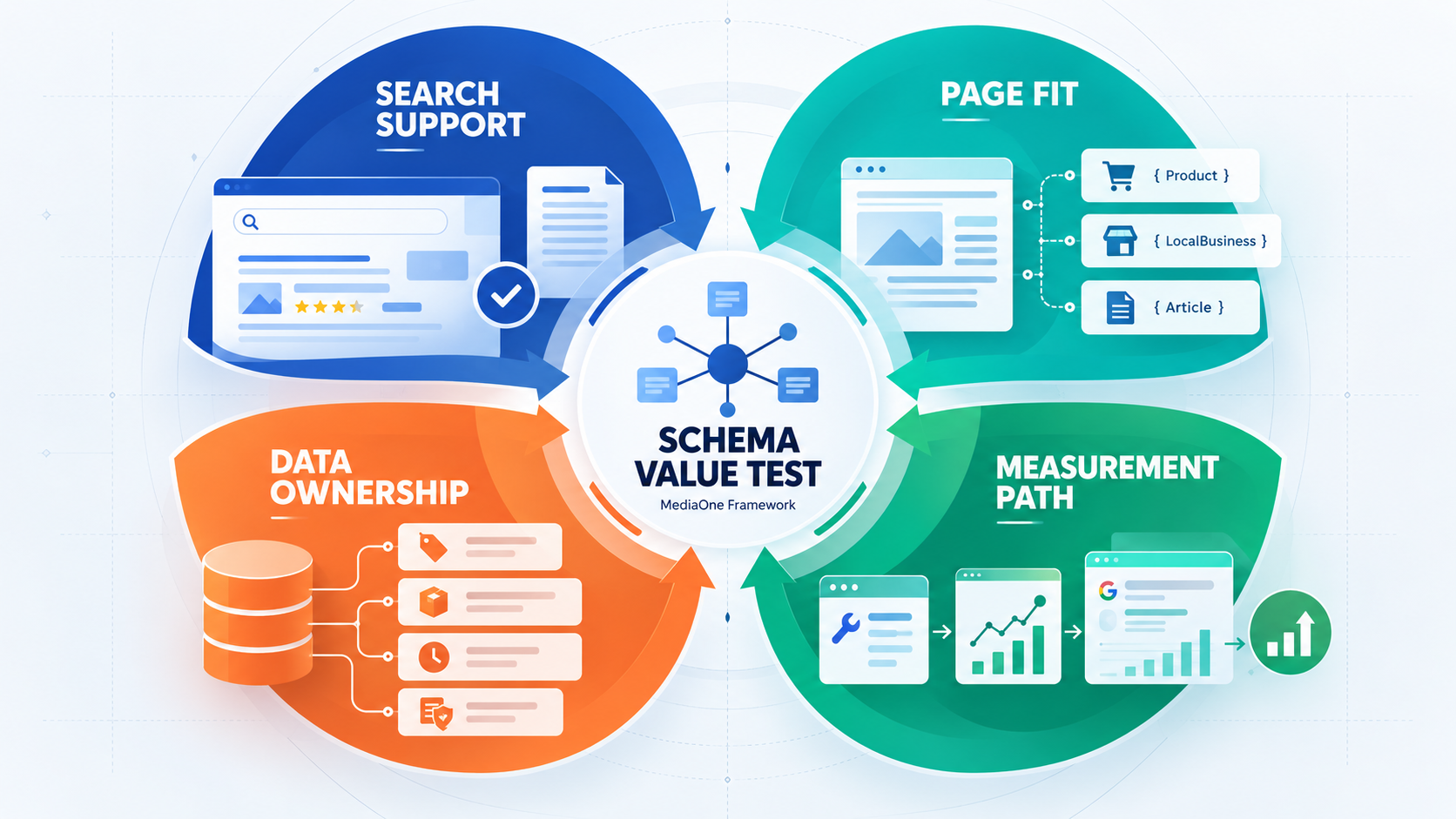
For this guide, we use a four-check Schema Value Test before approving development work. It is a MediaOne decision framework for prioritisation, not a Google scoring model. The goal is to connect technical work with page value and maintenance cost.
- Search Support
We confirm the current Google feature or another defined use. If the purpose cannot be explained clearly, the task should not enter the development queue. - Page Fit
We compare the schema type with visible content. The type should describe the page accurately without stretching the meaning of the content. - Data Ownership
We identify who controls every field that can change. Prices, stock, hours and policies need a dependable source or a named owner. - Measurement Path
We decide how we will check processing and performance before launch. Work that cannot be evaluated may rank below higher-value technical fixes.
Large sites need stricter governance because one template can affect thousands of URLs. Our enterprise SEO strategy for large organisations covers the governance issues that appear when many teams control shared templates. The same discipline applies to structured data.
How We Implement Schema Markup
Good schema markup implementation starts with templates and dependable source data. Hand-written JSON-LD can work for static pages, but it becomes fragile when commercial information changes. We build around repeatable page types where the website platform allows it.

1. Map the Page Templates
We first group pages by purpose. Common groups include branches, products, articles, services and author pages. This shows where one implementation can cover many URLs safely.
2. Generate a Clean Starting Block
MediaOne’s Digimetrics structured data tool can generate JSON-LD for common schema types. The current MediaOne SEO page lists FAQ, Local Business and Product among its examples. We treat generated code as a starting point and review every field before publication.
3. Connect Dynamic Fields to Source Data
Static markup becomes risky when the visible page changes. Product prices, stock levels and branch hours should come from the same trusted system that feeds the page where practical. This reduces mismatches between customer-facing information and structured data.
4. Validate the Output
Google identifies the Rich Results Test as a tool for checking supported structured data. Its December 2025 guidance also advises site owners to monitor structured data after deployment because templates or serving changes can break valid markup.
We also use the Schema.org Validator for broader vocabulary checks. Passing either validator does not prove that a type is strategically useful. Human review still needs to compare the markup with visible content.
5. Release a Small Sample First
We prefer a controlled rollout before applying a template across a large site. Representative URLs can expose data or implementation problems while the affected page set is still small. Ecommerce sites and multi-location businesses benefit most from this approach.
6. Monitor After Processing
We check the Search Console after Google processes the pages. We also recheck important templates after redesigns, plugin changes and commerce migrations. Schema quality can fall even when nobody directly edits the JSON-LD.
Schema Audit Checks That Catch Expensive Errors
A schema audit should examine strategy as well as syntax. A page can pass a validator while carrying an unsuitable type or outdated commercial information. We compare the code with visible content and current Search support.
- Find duplicate entities. Themes, plugins and tag managers can create competing Organisation or BreadcrumbList records. We consolidate conflicting output so the site has one dependable source.
- Check high-change fields first. Prices, stock, opening hours and event dates become stale faster than static company details. These fields deserve closer monitoring.
- Remove legacy Search assumptions. FAQ markup is a clear 2026 example. We separate markup with another valid use from markup kept only for a retired Google display.
- Review ratings carefully. Visible testimonials do not automatically qualify a business for review stars. We compare the implementation with Google’s July 2026 review guidance before retaining AggregateRating or Review markup.
- Fix discovery problems before low-value schema. A well-marked page still needs crawlable internal links. Our internal linking strategy guide explains how site structure supports discovery and page relationships.
How We Measure Schema Markup
Google’s structured data guide gives a useful testing model. It advises sites to compare a group of suitable pages before and after implementation. Google also recommends pages with several months of Search Console history and limited seasonal variation.
We use the same discipline when reporting results. Schema should not receive credit for every traffic increase after deployment. Rankings, content changes and demand can also affect performance.
Track five layers.
- Technical processing
Review valid items and URL inspection results. This shows if Google can process the implementation. - Search visibility
Track impressions and relevant Search appearances for the affected page group. This shows if visibility changed after processing. - Search response
Review clicks and click-through rate alongside average position. A stable position with a stronger click-through rate can provide a useful signal. - Business response
Track leads, sales or another qualified action. Extra Search visibility has limited value if it produces no useful business outcome. - Testing controls
Record other changes made during the test window. This helps us avoid giving schema credit for work done elsewhere on the page.
A simple example shows why controls are needed. At 30,000 impressions, a 3 per cent click-through rate produces 900 clicks. At 31,000 impressions and 3.6 per cent, the result rises to 1,116 clicks, but we would still check position and other changes before concluding.
How Schema Markup Fits AI Search and GEO
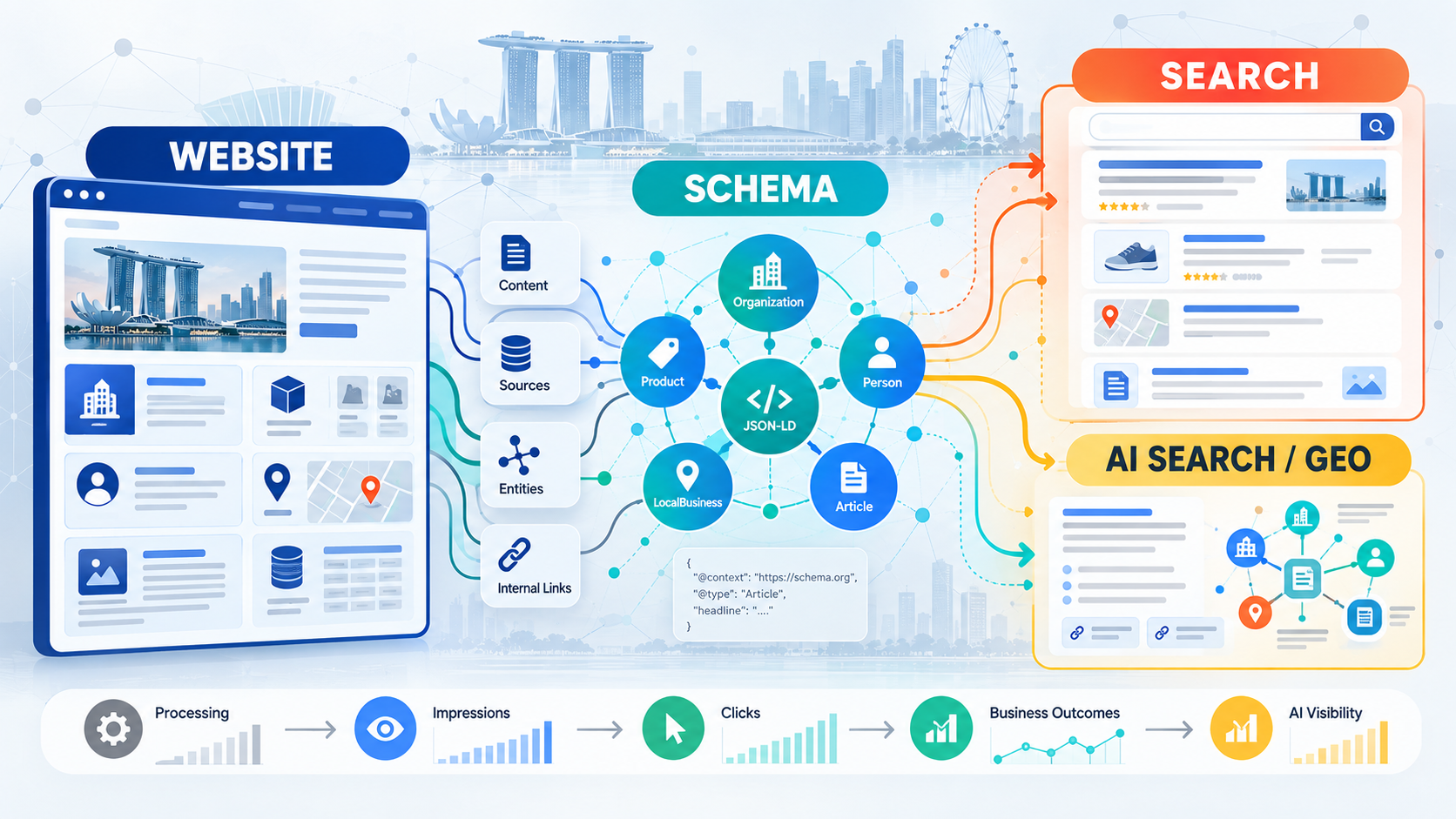
Generative Engine Optimisation, known as GEO, has created many claims about special AI markup. Google’s official guide says structured data is not required for generative AI Search. It also says there is no special Schema.org markup to add.
Our recommendation is restrained. Use schema to describe real entities and public facts. Then invest in original information, clear sourcing and crawlable internal links.
Google published additional AI Search guidance on 15 May 2026. It highlighted useful original content and standard Search Engine Optimisation, known as SEO, foundations.
For practical GEO work, we focus on three areas.
- Make entity facts explicit. Organisation, Product, Person and LocalBusiness markup can give machines structured facts. Those facts still need to match visible content.
- Build information worth citing. Original calculations, local examples and clear source attribution add information gain. Rewriting generic definitions adds little value.
- Measure AI visibility separately. Google launched dedicated Search Generative AI performance reports on 3 June 2026. By 31 August, the reports had rolled out to all websites worldwide.
We would not credit schema alone for a rise in generative AI impressions. Content updates and indexing changes can affect the same result. Attribution needs stronger evidence than timing alone.
Singapore Compliance and Data Quality Checks
Structured data sits in page code that search systems can access. We treat marked fields as public information and keep private customer or employee records out of JSON-LD. Automated feeds need the same control.
The Personal Data Protection Commission published guidance on common data protection lapses in January 2026. It states that Section 24 of Singapore’s Personal Data Protection Act, known as PDPA, requires reasonable security arrangements for personal data under an organisation’s control.
For schema projects, we apply three practical checks.
- Publish public business information only. Structured data should not expose private records from customer or internal systems. Review automated fields before they reach public markup.
- Check regulated claims against the page. Clinics, financial firms and professional practices should not use structured data to strengthen a licence or service claim beyond what the page supports. The markup should describe the published fact accurately.
- Assign ownership before automation. Contact information, policies and other changing fields need a responsible source. This reduces accuracy problems after launch.
A 2027 Schema Priority Plan by Business Type
One universal schema package does not suit every business. Development time should follow the page inventory and commercial model. We would prioritise the following areas.
- Local service businesses
Start with Organisation and the correct LocalBusiness subtype for real physical locations. Connect the work with accurate location pages and local search optimisation. - Ecommerce businesses
Give Product, Offer and ProductGroup greater attention. Shipping and return data also deserve review when the store can keep those fields current. - Publishers and content-led brands
Focus on Article or BlogPosting, author entities and BreadcrumbList. Review VideoObject when video carries significant editorial value. - Enterprise websites
Start with governance and template ownership. Test a controlled group before scaling changes across thousands of pages.
Make Every Schema Implementation Earn Its Place
Heading into 2027, every schema implementation should have a clear purpose. Prioritise current Google-supported uses and accurate entity data. Remove outdated Search assumptions from the development queue.
Organisation, LocalBusiness, Article and Product markup are strong starting points for many Singapore businesses. Ecommerce and multi-location sites also need clear data ownership. This is because template errors can spread quickly. Businesses that need support can contact us for a technical SEO review.

Frequently Asked Questions
Does schema markup directly improve Google rankings?
No direct ranking boost is documented for schema markup. Google stated in June 2025 that removing several structured data Search features would not affect rankings, so we treat schema as a content-understanding and Search-eligibility tool.
Is the FAQPage schema still useful in 2027?
We would not prioritise FAQPage for Google rich-result visibility on a standard commercial website. Google stopped showing FAQ rich results from 7 May 2026, though useful questions can still help readers.

Which schema markup should a Singapore local business use?
Start with the most specific LocalBusiness subtype that represents each real physical location. Keep the address, telephone number and opening hours aligned with visible location information.
Is JSON-LD still a good format for schema markup?
Yes. Google’s December 2025 documentation supports JSON-LD, Microdata and RDFa, while noting that JSON-LD is usually easiest to implement and maintain at scale.
Can schema markup improve AI Overview visibility?
Schema can give machines explicit page facts, but Google says no special structured data is required for generative AI Search. We use it as part of standard SEO and track AI visibility separately.
How often should schema markup be audited?
Audit it after template changes, plugin updates, redesigns and ecommerce migrations. Pages with changing prices, stock, events or opening hours need closer checks than static corporate pages.