Retail today is unforgiving when your systems fall out of sync. A product shows as available online. A customer walks into your store. Your staff checks the shelf and comes up empty. That gap is where trust breaks down, and that is why Shopline POS matters.
Shopline POS is Shopline’s point-of-sale system built to connect in-store checkout with your online store, inventory, and customer data inside a single backend. Instead of treating physical and digital sales as separate operations, it runs them as one system with shared records and real-time visibility.
In practice, Shopline POS links what happens at the counter to what customers see online. In-store sales update inventory immediately. Online orders appear inside the same admin environment your retail staff already uses. Customer purchases across channels are consolidated into a single profile rather than fragmented into multiple records.
This guide explains how Shopline POS works across three operational pillars. Retail execution at the counter. Inventory synchronisation across channels. Omnichannel selling workflows that reduce friction for both staff and customers.
Key Takeaways:
- Shopline POS integrates in-store and online sales into a single system. Transactions, inventory, and customer data are managed through a shared backend rather than separate tools that require manual reconciliation.
- Inventory sync is central to how Shopline POS works. Stock updates flow across channels as sales occur. Sync is best understood as near-real-time and still depends on connectivity and disciplined product setup.
- Shopline POS supports practical omnichannel workflows. Use cases like buy online, pick up in store, cross-channel returns, and unified customer profiles rely on shared order and inventory records.
- Operational benefits first appear on the shop floor. Faster checkout, fewer inventory errors, simpler staff training, and cleaner reporting precede any gains from high-level strategy.
- Best fit is retailers already using the Shopline ecosystem. Shopline POS delivers the most value when it extends an existing Shopline online store into physical retail rather than replacing a standalone POS.
- Technology enables consistency. Processes determine outcomes. Shopline POS supports omnichannel retail, but results still depend on staff workflows, access controls, and inventory discipline.
What is Shopline POS?

At its core, a Shopline Point of Sale (POS) system is designed to reliably perform four key tasks:
- Process transactions
- Accept payments
- Update inventory
- Record sales data
Where modern POS systems differ is in how seamlessly they connect these actions to the rest of your business.
Integrated Operations with Shopline POS
Shopline POS is built to integrate directly with the Shopline backend. In practical terms, this means:
- Unified data environment: In-store sales, online orders, product catalogues, and customer records all exist in the same administrative system
- Real-time updates: Stock levels automatically update across online and offline channels whenever a product is sold
- Shared interfaces: POS, online storefront, and admin dashboard act as three interfaces on top of a shared data layer
This eliminates the need for manual reconciliation between systems, a common pain point in traditional setups.
Cloud POS vs Legacy POS
- Legacy POS systems: Operate in closed, standalone environments with limited connectivity and reporting
- Cloud-based POS platforms (like Shopline POS): Prioritise connectivity, centralised reporting, and operational visibility across locations
Why Centralised Data Matters
Centralising your POS data impacts nearly every aspect of business operations:
- Improved reporting accuracy: Consistent sales, inventory, and customer metrics across channels
- Reduced inventory errors: Automatic stock updates reduce discrepancies
- Cleaner marketing data: Accurate customer information supports targeted campaigns and loyalty programs
- Operational efficiency: Teams spend less time resolving mismatches and more time optimising sales
By connecting your in-store and online operations, Shopline POS creates a truly unified retail ecosystem, enabling smoother operations, better decision-making, and scalable growth.
How Shopline POS Works in a Physical Retail Environment

When you look past the marketing language, what matters in a physical store is execution. You need a fast, reliable checkout flow, inventory that updates automatically without manual fixes, and staff workflows that do not break down during peak hours.
This is where Shopline POS has to prove itself, not as software on a screen, but as an operational tool your team can rely on every day. In a retail environment, the POS becomes the nerve centre of the store. It connects what happens at the counter to your wider business system, including stock levels, order records, and customer data.
Understanding how this works in practice helps you assess whether the system supports your real-world conditions rather than ideal scenarios. The sections below outline how Shopline POS operates at the counter, how it interacts with hardware, and how staff access is structured to ensure accountability and accuracy during busy periods.
In-Store Checkout Flow
A typical in-store transaction with Shopline POS follows a familiar and intuitive flow:
- Products are scanned or searched
- Items are added to a cart
- Payment is processed
- Receipt is issued digitally or in print
Behind the scenes, the system automates key operations:
- Each transaction is recorded in the central order database
- Inventory levels are updated automatically
- Customer purchase history can be captured for identified shoppers
For staff, this reduces manual steps. For business owners, it ensures cleaner data that informs reporting, inventory planning, and marketing follow-ups.
Hardware and Device Compatibility
POS software relies on hardware to function efficiently in a retail environment, including:
- Tablets or POS terminals
- Barcode scanners
- Receipt printers
- Cash drawers
Modern POS platforms, including Shopline, are generally hardware-agnostic, integrating with commonly used devices via standard protocols. However, compatibility can vary by region, supplier, and Shopline plan, so validating hardware before rollout is essential.
Staff Roles and Permissions
Retail operations depend on people, and POS systems reflect that reality through role-based access:
- Cashiers: Process sales at the counter
- Supervisors: Handle refunds and exceptions
- Managers: Access reports, settings, and analytics
This structure improves accountability, protects sensitive data, and enables performance tracking at the staff member or shift level. Role-based access also supports workforce planning, training, and operational efficiency.
How Shopline POS Keeps Stock Aligned

Inventory is one of the most common points of failure in retail systems. Shopline POS is designed to reduce stock discrepancies by treating inventory as a shared resource rather than channel-specific counts. This ensures your online store and physical locations are always aligned, improving customer trust and operational efficiency.
Centralised Inventory Management
The foundation of accurate stock control is a single, centralised source of truth. Shopline POS ensures that all sales and stock movements across all channels are recorded in one place.
- Shopline POS maintains a single source of truth for all inventory.
- Every sale, whether in-store or online, automatically updates the same inventory record.
- When a product sells in-store, online availability reflects the change immediately.
- When an online order is fulfilled, in-store stock adjusts accordingly.
- Why it matters: overselling or stockouts can damage customer trust and lead to lost sales or costly customer service issues.
Real-Time vs Near-Real-Time Updates
Inventory updates are fast, but no system is truly instant. Understanding the difference helps set realistic expectations and operational practices.
- Updates are often marketed as “real-time,” but in practice, they are near-real-time, occurring as quickly as connectivity and system processing allow.
- Occasional delays can happen due to network outages or latency.
- While Shopline POS reduces the risk of stock discrepancies, operational planning and monitoring are still important to ensure inventory accuracy.
Product Variants and SKUs
Products with multiple options, such as size, colour, or bundles, add complexity. Shopline POS manages this with precise SKU tracking.
- Complex products with sizes, colours, bundles, or limited editions require disciplined SKU management.
- Shopline POS tracks inventory at the SKU level, ensuring accurate counts across channels.
- Key principle: clean product data in = reliable inventory data out. Poor SKU setup or inconsistent product entries will always cause issues downstream.
Multi-Location Inventory Tracking
Businesses with more than one store or warehouse need a system that tracks stock across all locations and supports modern fulfilment options.
- For retailers operating across multiple stores or warehouses, Shopline POS segments inventory by location.
- Stock transfers between locations are automatically recorded to maintain accuracy across the system.
- Supports modern fulfilment options such as in-store pickup and ship-from-store, which are increasingly important in Singapore’s dense retail landscape.
- Helps operations teams make data-driven decisions about stock allocation and replenishment.
By combining centralised inventory management, precise SKU tracking, and multi-location support, Shopline POS ensures that your stock is accurate across all channels. This reduces overselling, improves customer trust, and enables businesses to scale efficiently while maintaining inventory control.
How to Do Omnichannel Selling with Shopline POS
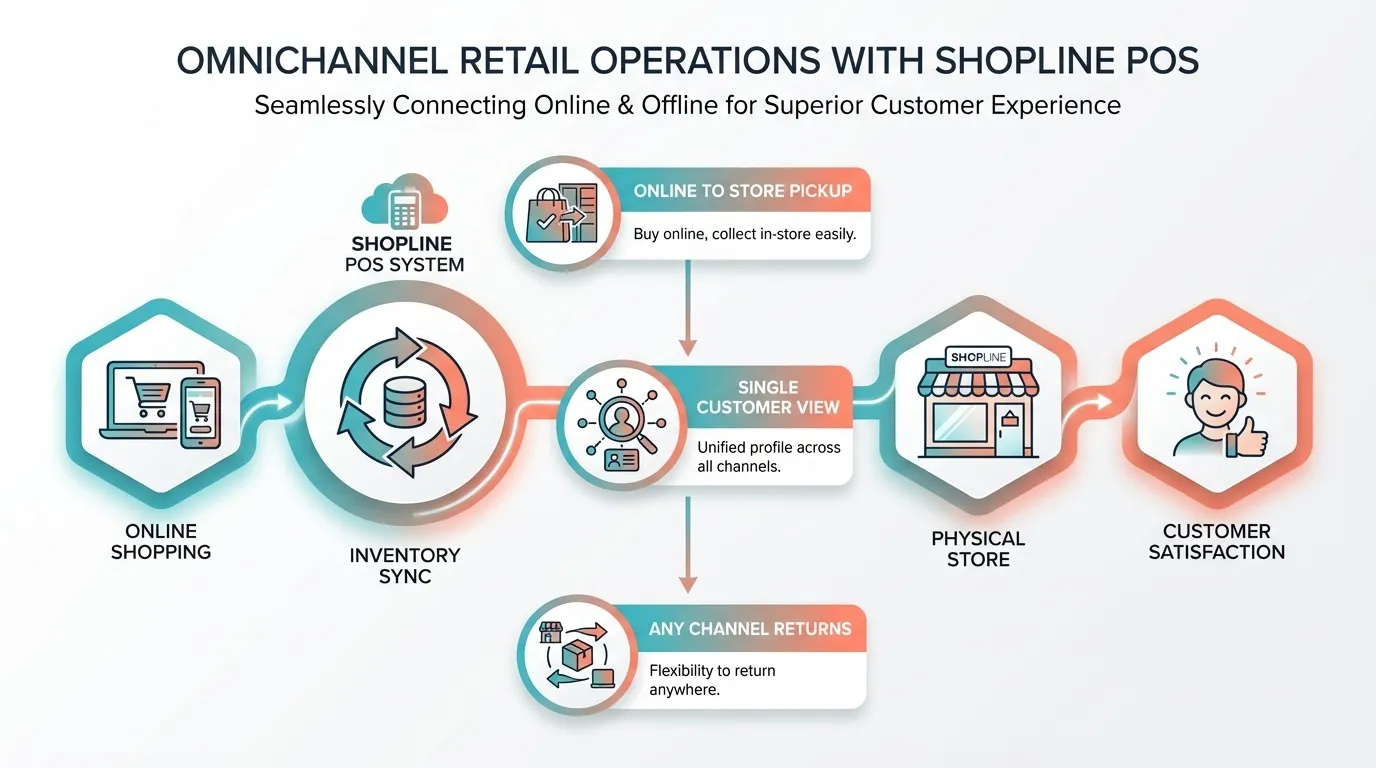
Omnichannel selling is often misunderstood as a race to show up on every possible platform. That mindset misses the point. What customers actually want is continuity. They expect to start a journey on one channel and continue it on another without friction, repetition, or contradictory information.
If your systems cannot meet that expectation, your channels work against each other rather than compounding value. Customers switch devices, locations, and platforms fluidly. Your operations must keep up.
This is where Shopline POS plays a structural role rather than a cosmetic one. Omnichannel only works when inventory, orders, and customer records are connected at the system level, not manually stitched together by staff.
Buy Online, Pick Up In Store (BOPIS)
Buy Online, Pick Up In Store is one of the most visible omnichannel workflows because it forces alignment between eCommerce and physical retail. The moment an order is placed online, the system must determine where it will be fulfilled, accurately reserve inventory, and notify the store team responsible for preparation.
In practice, a BOPIS workflow typically involves the following steps:
- An online order is placed and assigned to a specific store location.
- Inventory is reserved so the item cannot be oversold online or in-store.
- Store staff receive the order details and prepare it for pickup.
- The customer is notified when the order is ready.
When executed well, this reduces shipping costs and increases foot traffic into your physical locations. It also exposes weak spots quickly. Inventory inaccuracies, unclear staff responsibilities, or delayed notifications all surface at the worst possible moment. BOPIS rewards operational discipline and punishes assumptions.
Unified Customer Profiles Across Channels
One of the less visible but more valuable aspects of omnichannel selling is the continuity of customer data. When POS transactions feed into a shared customer profile, you gain a consolidated view of behaviour rather than fragmented snapshots.
This unified history can include:
- Online browsing and purchase activity.
- In-store purchases are recorded through the POS.
- Returns, exchanges, and refunds across channels.
From a commercial perspective, this enables more relevant marketing, better service interactions, and loyalty programmes that reflect actual customer value rather than channel-specific behaviour.
From a compliance perspective, it introduces responsibility. In Singapore, handling of personal data must comply with the Personal Data Protection Act. Any system that centralises customer data requires clear access controls, consent management, and internal processes to avoid misuse.
Returns and Exchanges Across Channels
In omnichannel retail, returns are a critical moment that can either build or erode customer trust. Customers increasingly expect flexibility. For example, if they purchased online, they want the ability to return items in-store without having to explain their order history or provide extra information.
Handling returns efficiently requires a combination of unified records, clear operational processes, and well-trained teams. Shopline POS is designed to support this, but the outcome depends on how well data, processes, and people are aligned.
Key points about how Shopline POS supports cross-channel returns:
- Unified order records
- All orders, whether placed online or in-store, are tracked in a single, central system.
- Staff have immediate access to the relevant order details at the point of return, reducing the chance of errors and the need to ask customers for additional information.
- Unified records reduce disputes and ensure that all staff operate from the same accurate data.
- Automatic inventory adjustments
- When a return is processed in-store, stock levels are updated automatically across all sales channels.
- This prevents overselling and ensures that online and in-store availability is always accurate.
- Accurate inventory improves operational planning, avoids stockouts, and maintains customer confidence.
- Consistent and correct refunds
- Refunds are processed according to the original payment method, whether that is a credit card, digital wallet, or store credit.
- Correct and predictable refunds enhance the customer experience and reduce time spent resolving payment issues.
- Faster resolution and reduced operational friction
- Unified systems allow staff to handle returns quickly and accurately.
- This eliminates slow, awkward interactions that can erode trust and waste staff time.
- Operational efficiency improves, freeing staff to focus on sales and customer support.
- Operational alignment and leadership enforcement
- Omnichannel selling is not a feature that can simply be activated; it is a strategic approach to operations.
- Successful implementation requires clean and accurate data, clearly defined workflows, and staff trained to follow processes consistently.
- Shopline POS provides the technology to maintain consistency, but leadership is responsible for enforcing standards and ensuring compliance across teams.
Omnichannel selling succeeds when operations, technology, and team practices are fully aligned. Shopline POS enables continuity across channels by centralising inventory, orders, and customer data, supporting workflows like BOPIS and seamless returns.
When executed properly, it reduces errors, builds customer trust, increases operational efficiency, and allows businesses to deliver a consistent, frictionless shopping experience across all touchpoints.
Operational Benefits for Retailers Using Shopline POS

When your POS, eCommerce platform, and inventory management operate inside a single system, the impact is operational before it is strategic. You feel it on the shop floor, in your weekly reports, and in how quickly your team adapts as the business grows.
At a practical level, unifying these systems eliminates layers of manual work that most retailers accept as the norm. Stock updates no longer require cross-checking spreadsheets. Online and in-store sales do not need to be reconciled at the end of each day.
Instead, data flows through one backend, creating a clearer picture of what is actually happening in your business. Some of the most tangible benefits show up quickly:
- Fewer manual reconciliations: Sales and inventory updates are captured automatically across channels. This reduces human error and frees up time that would otherwise be spent fixing mismatches between systems.
- Faster staff onboarding: When your tools are integrated, staff learn a single workflow rather than juggling multiple platforms. This shortens training time and lowers the risk of mistakes during busy periods.
- Cleaner customer data: In-store and online purchases are consolidated into a single customer record. This improves data quality and makes follow-ups, loyalty programmes, and support interactions more effective.
- More consistent brand experience: Pricing, promotions, and product availability remain aligned across channels. Customers see the same business whether they shop online, in-store, or through pop-ups.
What makes these benefits significant is their compounding. At one store, manual work feels manageable. At three or five locations, it becomes a structural problem. Unified systems scale with you by reducing complexity as volume increases, rather than adding to it.
That shift is often the difference between controlled growth and operational strain.
Who Shopline POS Is Best Suited For

Choosing a POS system is less about feature checklists and more about operational fit. The question you should be asking is not whether a platform can do everything, but whether it supports how your business actually runs today, and how you expect it to grow over the next few years.
Shopline POS is best suited for retailers already operating within the Shopline ecosystem who want tighter control across channels without introducing unnecessary complexity.
Retailers Already Using Shopline Ecommerce
If your online store already runs on Shopline, the value proposition is straightforward. A POS that connects natively to the same backend reduces duplication, data mismatches, and manual workarounds.
You are not stitching together separate systems for orders, inventory, and customers. You are extending an existing platform into your physical retail environment. That architectural consistency matters as transaction volume grows and reporting expectations increase.
Businesses Selling Across Online and Offline Channels
Shopline POS makes the most sense when you are not treating your physical store and online shop as separate businesses. This includes:
- Brick-and-mortar retailers are adding ecommerce to reach customers beyond their immediate location
- Online-first brands opening showrooms, pop-ups, or permanent retail spaces
- Merchants selling through social commerce who need in-store fulfilment support
If your customers move fluidly between channels, your systems need to do the same. A POS that shares inventory and order data with your online storefront helps prevent friction that customers notice immediately.
Small to Mid-sized Retailers Planning Omnichannel Growth
Shopline POS is particularly relevant if you are scaling, but not at an enterprise level, where custom-built systems and large IT teams make sense. For many small and mid-sized retailers, the challenge is growth without operational drag. Adding more stores, SKUs, or fulfilment options often increases complexity faster than it increases revenue.
A centralised POS and inventory system helps you grow in a controlled way, without rebuilding your stack every time you add a channel.
Businesses that Prioritise Inventory Accuracy and Visibility
If inventory accuracy is a recurring pain point, Shopline POS can have an outsized impact. Centralised inventory management supports better planning, cleaner reporting, and fewer customer disappointments caused by stock errors.
This is especially important if you offer in-store pickup, run limited inventory drops, or manage multiple product variants. The more moving parts you have, the more valuable a single source of truth becomes.
Who It May Not Be Ideal For
Shopline POS may not be the right fit if you operate a purely offline business with no plans for eCommerce, or if you require highly specialised enterprise POS features built for large-scale retail chains. In those cases, simpler standalone systems or enterprise-grade platforms may align better with your needs.
The key takeaway is fit over features. Shopline POS works best when your goal is to unify sales, inventory, and customer data across channels, while keeping operations manageable as your retail business evolves.
How Shopline POS Fits into a Modern Retail Stack Through MediaOne

A modern retail stack is not defined by how many tools you use. It is defined by how well those tools talk to each other. When systems are disconnected, teams spend their time reconciling data instead of serving customers. When systems are aligned, retail becomes easier to operate, scale, and optimise.
This is where Shopline POS fits in. Not as a standalone checkout tool, but as an operational layer that connects in-store activity with your wider commerce ecosystem.
The Role of POS in Today’s Retail Architecture
In a modern setup, the POS sits between customer-facing touchpoints and backend systems. It connects what happens at the counter to inventory management, order processing, customer data, and reporting.
Instead of treating physical retail as a separate channel, Shopline POS integrates it into the same system that powers your online store. This alignment reduces friction across teams and ensures decisions are made using a single source of truth.
At a high level, a typical modern retail stack includes:
- An ecommerce platform that manages products, pricing, and online transactions
- A POS system that handles in-store sales and staff workflows
- Inventory management that syncs stock across all sales channels
- Customer data that feeds marketing, loyalty, and service interactions
- Analytics and reporting that combine online and offline performance
Shopline POS is designed to fit within this structure rather than operate independently.
Why Integration Matters More than Features
Many retailers focus on POS features in isolation. Receipt printing, barcode scanning, and payment acceptance. These are table stakes. What actually drives long-term efficiency is how well the POS integrates with the rest of your stack.
When Shopline POS is connected to the Shopline backend:
- Inventory updates automatically across online and offline sales
- Orders are visible across teams without manual syncing
- Customer purchase history remains unified rather than fragmented
- Reporting reflects total performance, not channel-specific snapshots
This reduces operational blind spots. It also shortens the feedback loop between customer actions and your responses.
Supporting Omnichannel Workflows Without Rebuilding Your Stack
As retail operations mature, new workflows emerge. In-store pickup, cross-channel returns, pop-up sales, and social commerce fulfilment all introduce complexity.
Shopline POS supports these workflows by extending existing infrastructure rather than forcing you to bolt on separate systems. That matters because every additional tool introduces more training, more failure points, and more data inconsistencies.
Instead of rebuilding your stack each time your selling model evolves, the POS acts as an extension of what is already in place.
Scale Your Retail Operations with MediaOne and Shopline POS
At small volumes, almost any POS can work. Scale is where cracks appear.
Shopline POS fits into a modern retail stack by supporting growth without forcing enterprise-level overhead too early. It gives you enough structure to manage multiple locations, growing inventories, and expanding sales channels, while keeping operations manageable for lean teams.
The key takeaway is this. A modern retail stack is not about chasing the most advanced tools. It is about building a system where data flows cleanly, teams stay aligned, and customer experience remains consistent as complexity increases.
In that context, Shopline POS functions as connective tissue. It links physical retail to digital commerce and turns daily transactions into usable insight rather than isolated activity.
If you want that level of alignment done properly, MediaOne can help you plan, set up, and optimise your Shopline store so Shopline POS fits cleanly into your overall retail and digital marketing strategy. Give us a call today to get started.
Frequently Asked Questions
Does Shopline POS support training and setup assistance for merchants?
Shopline provides onboarding support, including assistance with uploading products and configuring the POS system, to accelerate rollout and reduce setup friction. Additionally, merchant success teams often offer training and live support through chat, phone, or email to help staff quickly become effective with the POS workflows.
Does Shopline POS support inventory sync across channels?
Shopline POS is designed to sync inventory across in-store and online sales channels to keep stock levels aligned. When an item is sold in-store, available inventory updates in the same system that powers your online store. Sync speed can vary based on connectivity and configuration, so it should be treated as near-real-time rather than a guaranteed fixed rate.
Can Shopline POS handle multiple store locations?
Shopline POS supports multi-location inventory tracking in principle, allowing stock to be assigned to different stores or fulfilment points. This enables location-based availability management and supports workflows such as in-store pickup.
Location limits and transfer rules depend on your Shopline plan and should be confirmed before rollout.
Is Shopline POS suitable for omnichannel selling?
Shopline POS supports common omnichannel workflows such as buy online, pick up in store and cross-channel returns. Orders and inventory are shared across online and offline touchpoints, creating a more consistent customer experience. Successful omnichannel use still depends on clear staff processes and accurate inventory setup.
Do I need special hardware to use Shopline POS?
Like most POS systems, Shopline POS typically runs on compatible devices, including tablets, barcode scanners, and receipt printers. The software connects to hardware to support checkout and inventory scanning in a physical store. Hardware compatibility can vary by provider and region, so local verification is recommended before setup.