Shopify SEO starts with your store’s structure, not its keywords. To rank well, fix page speed, duplicate collection pages and heavy images first, because these problems affect every page on the website. Then check the results in Google Search Console. A well-organized store helps customers find products through a search engine more reliably, and every later change works better once the structure is sound.

This guide covers:
- The problems that hold back most Shopify stores
- The order in which to fix them
- The checks that prove a change worked
- The cost bands you can expect from agencies
Figures in this guide are Singapore agency pricing in S$, offered as a reference point. US merchants should request US-dollar quotes from any provider before committing.
Key Takeaways
- Fix the foundation before you invest in content. Speed problems, duplicate collection pages, and heavy images usually produce the fastest gains and affect every page.
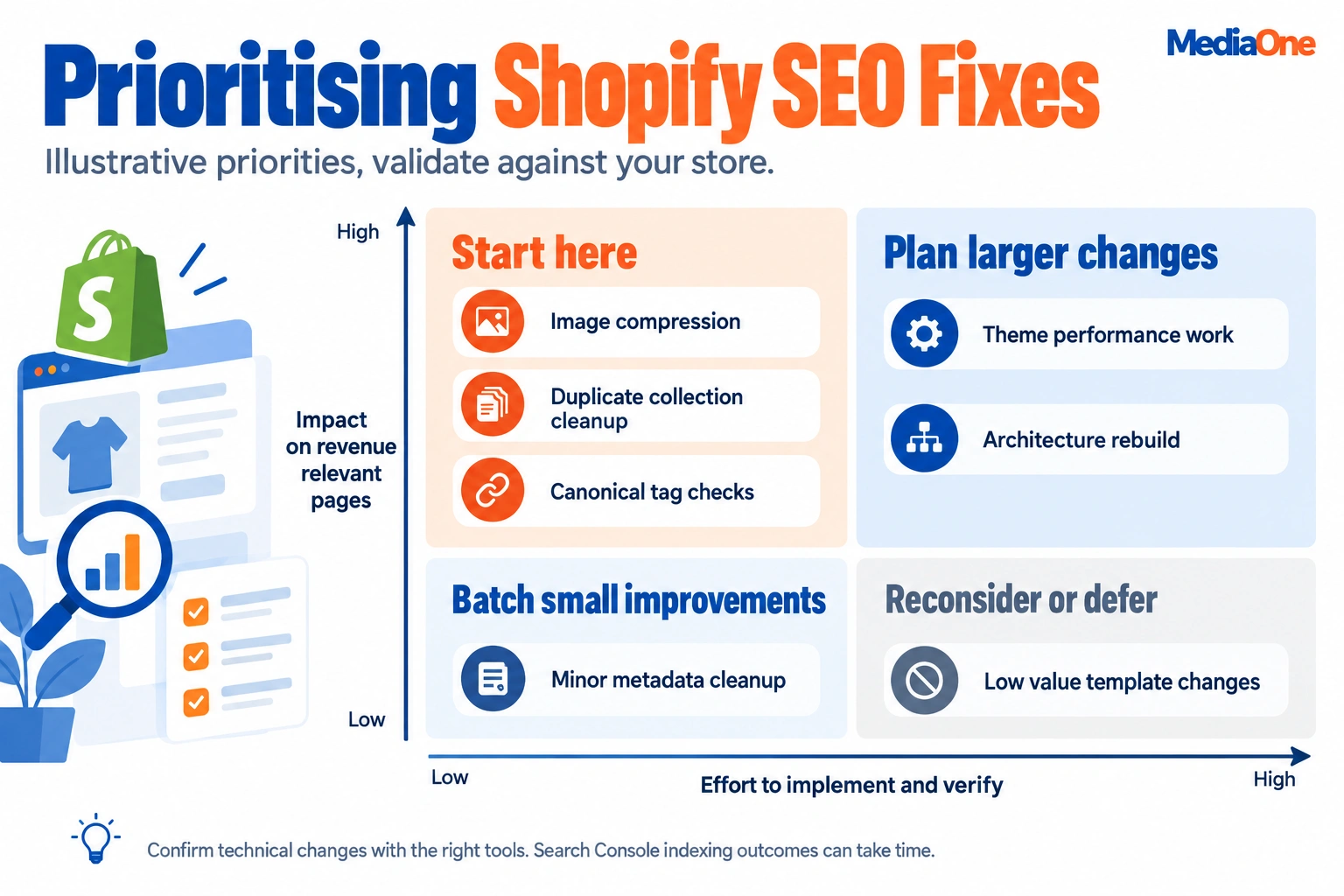
- Use a two-axis priority matrix. Score each fix based on its impact on pages that earn revenue and how easily you can confirm it in Google Search Console. Start with the high-impact, low-effort fixes.
- Convert images to WebP. According to Google’s WebP documentation, WebP files are 25% to 34% smaller than JPEG, one of the cheapest speed wins available.
- Treat speed as a revenue issue. Google has said BBC lost an additional 10% of users for every extra second its site took to load.
- Measure before you change anything. Record a baseline in Search Console and Google Analytics so you can credit gains to the right fixes.
- Plan for AI Overviews. Ahrefs reports that AI Overviews reduce click-through rates on top-ranking content by 34.5%, so prioritize pages that earn clicks and sales, not rankings alone.
Why Shopify SEO Is Harder Than It Looks, and What to Prioritize First
Most Shopify merchants start SEO the same way. They install an app, rewrite a few product titles and wait. When traffic does not move, they assume the problem is content or links. Common audits of Shopify stores point to a different cause: the structure underneath the content dilutes ranking signals before any keyword work can help.
The Ranking Gap Most Store Owners Miss
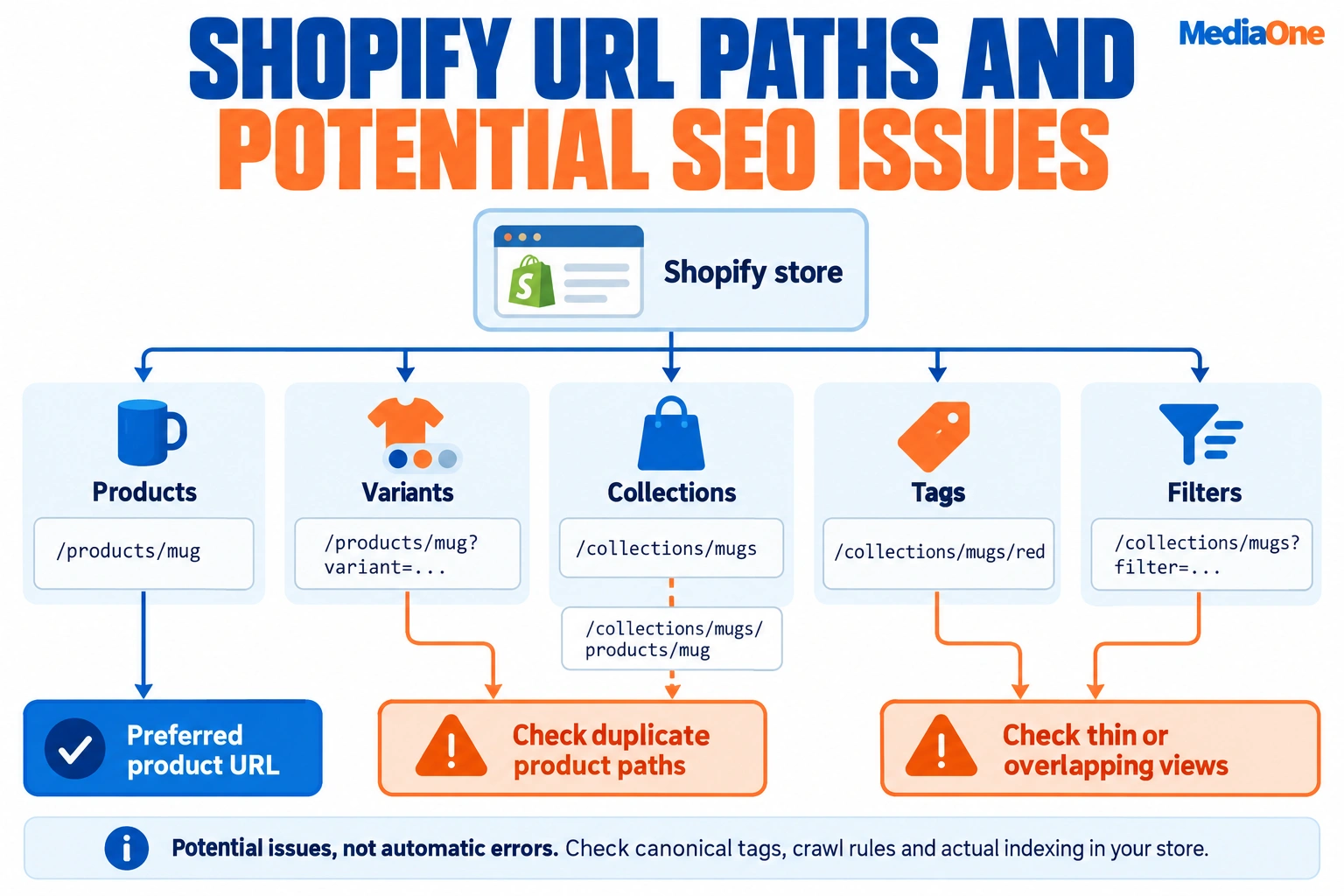
Search engines do not rank a store as a single entity. They crawl the website page by page, and every crawlable URL competes for attention. A store with 400 products and 80 collections may have 1,000 or more indexable URLs once you count tags, filters, and variants. If many of those URLs show near-identical content, Google has to choose between them and often picks none of your important pages, which weakens organic traffic to the pages that matter most.
The gap is not between good and bad keywords. It is between the pages you want to rank and the pages Google actually indexes. Closing that gap usually moves rankings faster than adding new articles. Optimization of the site structure, rather than the copy alone, is where most online stores find the fastest gains. Many of the seo features that control indexing sit in the theme, so review them before adding content.
Why Shopify’s Defaults Create Duplicate and Thin Pages
Shopify is fast to launch, but several default behaviors create SEO noise. Their effect depends on your theme and plan, so check your store against the current Shopify documentation:
- Collection and tag URLs can create several paths to the same products, each with a thin description.
- Product variants can create separate URLs that repeat the same copy.
- Filtered and sorted views may be indexed if they are linked internally.
- Blog tags and author pages can produce near-empty archive pages.
A 2026 study of more than 1,400 Shopify stores examined common SEO issues, and duplicate and thin content appeared as a recurring problem. Use these findings to audit your own store, not as a benchmark to match.
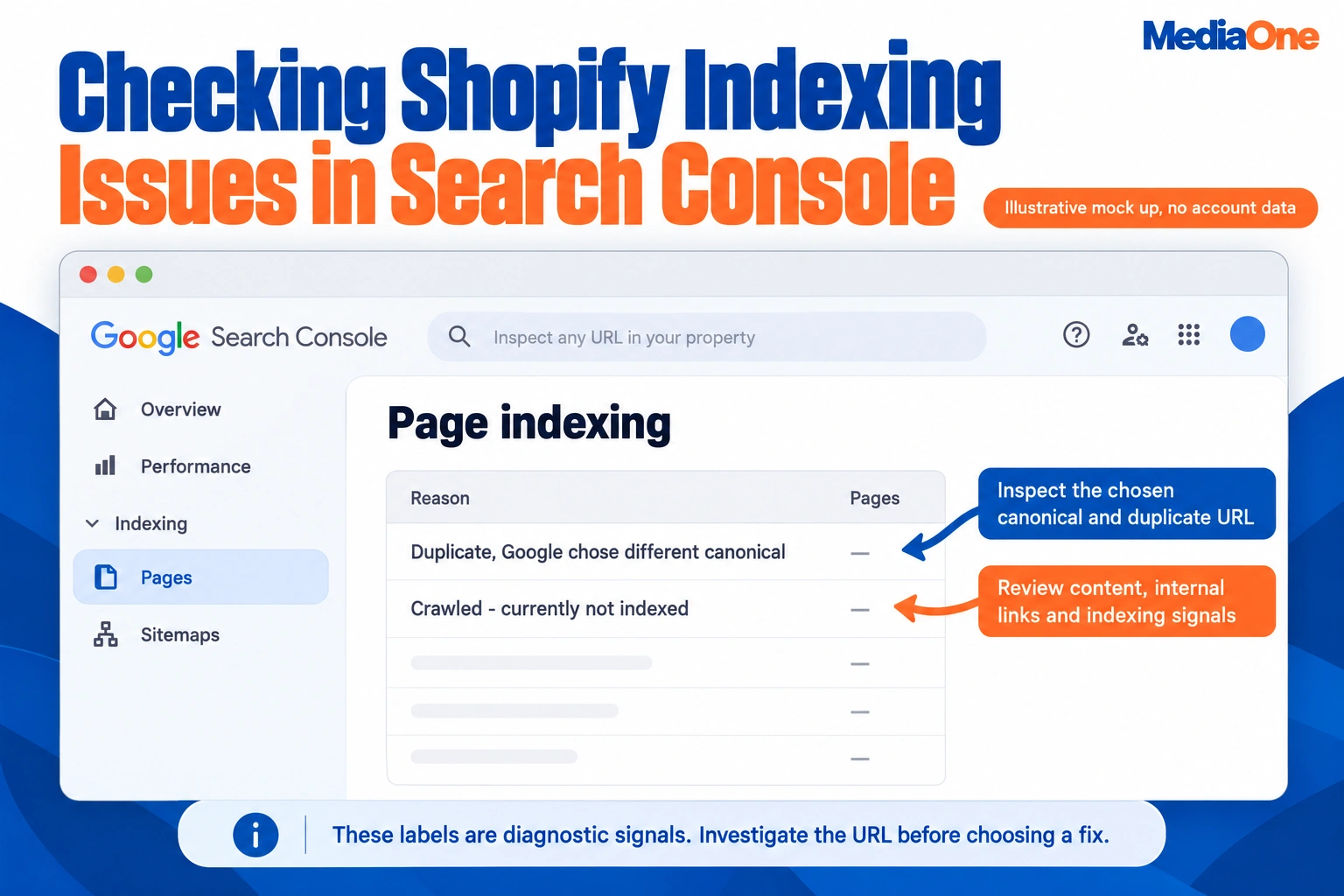
Before you write anything new, check the Pages report in Google Search Console for “Duplicate, Google chose a different canonical” and “Crawled, currently not indexed.” Those two labels usually point to architecture problems. A canonical tag tells Google which version of a page to index. On your store, confirm each product page resolves to one clean canonical URL using the URL Inspection tool. Canonical behavior varies by theme, so verify it rather than assuming the default is correct.
The Cost of Slow Pages and Where Your Budget Should Go
Speed is the clearest revenue risk on most Shopify stores. Google has said BBC lost an additional 10% of users for every extra second its site took to load, according to Google’s published performance research. A slow product page loses shoppers before they see the offer, hurting rankings and sales.
Budget is the second constraint. The table below gives a Singapore reference for how agency costs are typically structured:
Singapore agency pricing reference (S$)
| Engagement | Typical cost (Singapore agencies, S$) |
|---|---|
| Technical SEO audit with prioritized roadmap | 1,500 to 5,000, one-off |
| Collection and site architecture overhaul | 2,000 to 8,000, one-off |
| Foundation monthly SEO tier | 800 to 1,800 per month |
| Growth monthly SEO tier | 2,000 to 4,500 per month |
| Scale monthly SEO tier | 4,500 to 8,000 per month |
| Enterprise monthly SEO tier | 8,000 to 15,000+ per month |
These are Singapore dollar figures from MediaOne’s published Shopify SEO pricing. US merchants should treat them only as a reference and request US-dollar quotes from providers.
Your priority matrix is based on this data. Score each candidate fix on two axes: its impact on pages that earn revenue and the effort needed to confirm the change worked in Search Console. Fixes that are high impact and low effort, such as compressing images, cleaning duplicate collection URLs and correcting canonical tags, come first. Content and link work comes after, because it builds on a sound foundation. Track each fix against your meta title and search results over time. Keeping your brand name consistent across titles and product descriptions also helps search engines and shoppers connect your store with its offers.
Set Up Shopify’s SEO Foundations and Search Console Correctly
Most Shopify stores launch with default SEO settings. Those settings get pages indexed, but they rarely help pages rank. Before you change content or links, get the basics right, confirm that search engines can read what you publish, and record a baseline so you can later show whether your changes worked. Shopify’s defaults can differ by theme and plan, so check your own store’s behavior rather than assuming it. The Shopify Help Center has the current documentation for your plan and theme.
Shopify SEO Settings: Title Tags, Meta Descriptions, and Homepage Basics
Shopify generates title tags and meta descriptions for every page type, and you can override them in the admin. Open Online Store > Preferences to set the homepage title and meta description. Then edit individual products, collections and pages through their Search engine listing section. Shopify’s own SEO guide for merchants explains which fields apply to each page type.
Work through these checks in order. Each one has a pass threshold.
- Homepage title: Name the brand and the main category. Pass: the title is 60 characters or fewer, such as “Brand Name | Handmade Ceramic Mugs and Tableware”.
- Homepage meta description: Say what you sell and why a buyer should choose you. Pass: the description is 155 characters or fewer, so it does not truncate in search results.
- Product titles: Include the product type and one distinguishing attribute that a shopper would search for, not just the internal product name. Pass: every product title names its type and one attribute a shopper would search for.
- Collection titles and descriptions: Ensure every collection has every collection a unique title and a short introductory paragraph that explains who the collection is for, so customers understand the range before they browse. Pass: each collection has its title and at least one paragraph of copy.
- Duplicate meta descriptions: Ensure that no two pages share the same description. Please prioritise fixing the highest-value pages, as Shopify can auto-generate identical text for variants. Pass: no two pages share a description.
Search engines often rewrite meta descriptions, so treat them as a click-through lever rather than a ranking signal. Their value lies in persuading someone who already sees your result to click it. Clear titles and descriptions help your store present itself well in search results, which matters most when you compete for the same searches as larger brands. Consistent copy also supports a smoother user experience once visitors land on the page. Treat every title and description edit as part of ongoing search optimization rather than a one-time task.
Configuring Custom Domains, Redirects, and Google Redirect URL Handling
Every Shopify store also has a default myshopify.com address. Search engines should index only one version of your store, so set your custom domain as the primary domain under Settings > Domains. Once you make the change, Shopify will automatically redirect the old domain to the new one. Confirm this by visiting the old address yourself. Shopify’s domain documentation lists the current limits for your plan.
Redirects deserve more attention than most merchants give them. Each time you rename a product, change a handle or delete a collection, Shopify leaves behind a URL that no longer exists. Those broken URLs can carry links and history that you lose unless you redirect them. Use Online Store > Navigation > URL Redirects to send old paths to their closest current equivalent. Avoid redirecting everything to the homepage, which search engines treat as a poor match.
“Google redirect URL” is a term you may see in reports. It refers to the tracking addresses Google wraps around outbound links in search results, so it is not something you configure in Shopify. In Search Console, these appear as redirect or outbound-click behavior rather than as a setting you can change. Your job is to make sure your redirects point to live, relevant pages.
You can add more than one domain, but they all redirect to the primary domain. This is useful for regional or campaign domains, yet each extra domain adds canonical and redirect work. Pick one primary domain and make sure every alternative redirects to it.
Connecting Google Search Console and Google Analytics
Google Search Console shows which queries bring impressions and clicks, which pages are indexed, and which pages have crawl or indexing errors. Google Analytics shows what visitors do once they arrive. You need both before you change anything so you can attribute later gains correctly. Both tools are free, and the Search Console query report is the fastest way to see which keywords already bring impressions.
To connect Search Console:
- Go to Google Search Console and add your domain as a Domain property, which covers http, https, www and non-www versions in one place.
- Verify ownership. You can verify Shopify stores through a DNS record at your domain registrar, which is the most reliable method.
- Submit your sitemap. Shopify generates one at /sitemap.xml for every store, so please submit that address under Sitemaps.
- Check the Pages report for indexing errors and note how many pages are indexed at the start of your project.
To connect Google Analytics, create a GA4 property, then add the measurement ID in Online Store > Preferences or through the Google & YouTube sales channel. Confirm that purchases are tracking. A traffic report without conversion data cannot show whether SEO is earning revenue.
Before editing anything, record a baseline: organic clicks, impressions, average position, indexed pages and organic revenue for the last 90 days. Save it as a dated spreadsheet. Without that record, a later rise in organic traffic could come from seasonality or a paid campaign, and you would have no way to tell.
Before you spend on content or backlinks, find out which fixes will move results. For most Shopify merchants, keyword research and on-page work only pay off once the website is clean enough for Google to crawl, index and rank the right pages. The sections below cover how to find the terms worth targeting, where to place them without harming the page, and how to handle images and internal links so each one supports the others.
Keyword Research Workflow for Shopify Stores
Keyword research for a Shopify store differs from keyword research for a blog. Your money pages are products and collections, and each one should target a specific buyer intent. A useful working rule is one primary keyword per collection or product page, with a small cluster of close variants that the same page can naturally cover. Keep the list tied to your brand’s own terms as well as generic category searches, and check that each term reflects how buyers actually search on your website.
Follow this sequence:
- Start with your catalogue, not a tool. List your top 20 products and top 10 collections by margin, not by traffic. Write the term a buyer would type into Google for each one, in their own words.
- Pull volume and difficulty data. Use Google Search Console for queries you already rank for in positions 5 to 20, which are often the fastest wins. Add a keyword tool such as Ahrefs or Semrush to assess volume and competition for new terms.
- Classify intent. For each term, decide whether the searcher wants to buy now (product or collection page), compare options (a collection or buying guide), or learn something (a blog post). A product page does not rank for informational queries, and a blog post rarely converts a buyer.
- Map each term to one URL. Assign every primary keyword to a single page. When two pages target the same term, search engines split the signal between them, a problem often called keyword cannibalization.
- Record the decision. A simple spreadsheet with columns for term, volume, intent, target URL and current position keeps the work consistent.
Search Console is the most underused source here. Its Performance report shows the exact queries already bringing impressions, so you can see the gap between what customers search for and what your pages say. Pages that appear in results for a query but attract few clicks usually need a stronger title tag before they need new content. Customer reviews and social media comments also show which phrasing buyers use, which is useful input for the keyword list. Reviewing the user experience on each target page, including load speed and navigation, shows whether visitors stay long enough to convert. Ongoing optimization of each page keeps these targets current as search demand shifts.
Strategic Keyword Placement in Product Descriptions and Collections
Keyword placement is where most stores either overdo it or ignore it. The goal is to make the page clear to a person first, with the keyword appearing where it reads naturally. Good on-page optimization helps search engines understand the page without making the copy sound forced, and it helps customers find the right product faster across every online channel. Clear keywords and a logical site structure make the website easier to navigate and the product pages easier to scan. Used well, a Shopify store’s built-in SEO features help search engines read these signals accurately, so visitors who arrive on a product page find what the search promised, supporting a better user experience.

Place your primary term in these locations on a product page:
- The title tag, near the start, followed by your brand name if space allows
- The H1 heading, which should match the product name the customer sees
- The first 100 words of the description, written as a plain statement of what the product is and who it is for
- Specification and variant text, where the term appears in context, such as material, size or use case
- The URL slug, kept short and free of dates or stop words
Collection pages need more care because they usually have few descriptions. Shopify themes often output an empty or near-empty collection page, which is one reason collections are flagged as thin content. Add useful copy above or below the product grid. A solid description contains about 100 words, so aim for a short introduction that explains the category, compares the main product types and answers the questions a shopper has before buying. A collection page that says only “Shop our range of sunglasses” gives search engines little to rank and gives customers little to go on, so write copy that helps them choose.
Avoid repeating the same product description across variants or across similar products. Duplicate descriptions are a common cause of weak rankings in Shopify catalogues, so audit them before you invest in new copy. Each product’s meta title should also be unique, since it is often the first thing a shopper reads in search results. Free tools can help you spot duplicates quickly.
Alt Text, Image Formats, and Internal Linking Tactics
Images affect both search visibility and page speed, so treat them as part of your Shopify store optimization work rather than decoration. Good image handling supports your website’s search performance and your brand’s presentation across the store and on social media. It also helps your keywords reach the right shoppers. Most tools for managing store imagery can automate some of this work, but a human eye still needs to make the decisions.
Alt text describes the image for screen readers and gives search engines context about what it shows. Write it as a concise description of under 125 characters when possible, and include the product name or key attribute where it fits naturally. “Black leather crossbody bag with gold clasp” is useful. Best bag buy now best quality bag” is not. Decorative images can take an empty alt attribute.
Image format matters more than most merchants expect. According to Google, WebP offers 25%-34% smaller file sizes than JPEG, which means faster pages and a better user experience. Shopify can serve modern formats automatically in many themes, but check your theme’s output rather than assuming it. Compress large uploads before they reach the store, and avoid uploading 4000-pixel originals when the largest display size is 1200 pixels.
Internal linking tells search engines which pages matter and helps customers move between related products. Three tactics work well on Shopify:
- Link from blog posts and buying guides to the relevant collection, using the target keyword as descriptive anchor text such as “compare our leather crossbody bags”, rather than “click here”
- Link from each product to two or three related products or its parent collection through the theme’s recommendations block
- Link from high-traffic pages to newer pages you want to rank, since internal links pass authority across the site
Keep the number of links per page reasonable. A page carrying dozens of unrelated links dilutes the signal each one sends.
Once these basics are in place, check your work in Search Console over four to six weeks before making further adjustments. Track impressions and clicks on your product pages and collection pages, and watch how they appear in rich snippets. Note the change in each meta title as well. Aim for a clear rise in impressions and a stable or rising click-through rate before you call a change done. That shows which edits actually moved visibility on your website.
Technical SEO for Shopify: Speed, Mobile, HTTPS, Robots.txt, and Schema
Technical SEO is where most Shopify stores lose the most value, and it is often the cheapest place to fix things. Content and link building only pay off when search engines can crawl, index, and load your pages quickly. This section covers what to fix first, how to check each fix, and why the order matters. Clear keywords mapped to each page template help search engines understand what each URL is for, so this is a good place to start. Shopify’s built-in SEO features cover the basics, but each one needs checking on your own store, and ongoing optimization depends on verifying each default rather than assuming it.
Page Speed, Mobile Responsiveness, and Theme Selection for SEO
Speed affects revenue before it affects rankings. Google has shared that BBC lost an additional 10% of users for every extra second that their site took to load. Every second a product or collection page takes to load costs sales, and that loss repeats across every page of your online store.
Measure before you change anything. Run your key templates (homepage, a collection, and a product page) through Google PageSpeed Insights. Record the mobile scores and the Core Web Vitals in the Core Web Vitals report in Google Search Console. Note the date and values. Set a target, such as a Largest Contentful Paint under 2.5 seconds on mobile, so you know when a fix is finished rather than guessing.
Large images are often the most significant cause of slow pages. Shopify and most modern themes serve sized and compressed images, but original uploads are often oversized. Resize product photos to the largest size you display, and confirm that lazy loading is active for images below the fold.
Your theme sets the baseline for every page, so check it before you commit. When you choose or audit a theme, check:
- Lightweight code: few render-blocking scripts and few stylesheets. Pass if the page has no render-blocking scripts that delay the first view.
- Mobile layout: the theme renders cleanly at phone widths, with no horizontal scrolling and tap targets big enough to use. Pass if no horizontal scrolling appears at a standard phone width.
- Clean heading structure: one H1 per page and logical H2 and H3 levels. Pass if each template has exactly one H1.
- Editable meta fields: the meta title and meta description fields on products, collections, and pages. Pass if you can edit both on every template.
- App footprint: how many third-party scripts the theme and its demo setup load by default. Pass if the page loads no scripts you cannot name and justify.
Apps are the most common hidden drag on speed. Every review widget, pop-up, or tracking script adds JavaScript. Remove the apps you no longer use, and keep the number of active apps to a small, justified set. Test the effect of each remaining app on page speed, and test each change against the experience your customers actually have on phones, not only on desktops. Good user experience and search performance tend to move together, so judge each change by how the page feels to a shopper as well as by its score.
Theme and plan behaviour can vary, so confirm each default against Shopify’s theme documentation for your own store before relying on it.
HTTPS, Robots.txt, and Crawl Control
Shopify provides HTTPS and an SSL certificate for every store by default, so the practical checks are about consistency. Confirm that every version of your domain (with and without www, plus any old subdomains) redirects to one secure, preferred address. Pass if every variant resolves to a single HTTPS address. Mixed or duplicate versions split ranking signals and waste the attention search engines give your website.
Shopify creates a robots.txt file automatically. Since 2021, merchants can edit it through the robots.txt.liquid template in the theme code, though the behavior depends on your theme and setup, so verify it against Shopify’s robots.txt documentation. The default file already blocks checkout, cart, and internal search, which is what you want. Edit it only for a specific reason, such as blocking a filter path that creates many near-duplicate URLs. A mistaken rule can remove whole sections from search, so test any change with the URL Inspection tool in Google Search Console before you publish.
Crawl control also covers duplicate and thin pages. Shopify creates collection URLs under /collections/ and product URLs under /products/, and when a product sits in a collection, it can also appear at /collections/x/products/y. Canonical tags tell search engines which version to treat as the main one. Verify that the main template outputs a canonical tag and that filtered or sorted collection URLs point back to the clean collection. Canonical output also depends on the theme, so please confirm it against Shopify’s canonical tag documentation. To verify, enter a /collections/x/products/y address into URL Inspection and compare the “User-declared canonical” with the “Google-selected canonical”. Pass if the two match. If they differ, the page is being treated as a duplicate. Use the Pages report in Search Console to see which URLs are indexed, which are excluded, and why.
Duplicate collection URLs are the fix that most often changes what Google indexes. Before cleanup, a store may have several versions of the same collection competing with each other. After you correct canonicals, the Pages report should show fewer excluded duplicates and a higher share of indexed, revenue-relevant URLs. Pass when the clean collection URLs make up most of the indexed collection pages. Cleaning these up also tends to concentrate organic traffic on the pages that sell.
Schema Markup and Structured Data for Products and Reviews
Structured data describes a page in a format search engines can read. For a Shopify store, the most useful type is Product markup, which can include name, image, price, availability, and aggregate review ratings. When it is valid, eligible products can appear with rich snippets such as star ratings and price.
Shopify themes often output some product schema by default, but quality varies. Check a product page with Google’s Rich Results Test. Pass if the price, currency, availability, and rating values match what the customer sees and the test reports no errors. Mismatched or missing values can make the markup ineligible. Google’s guidelines also require any reviews in markup to reflect genuine customer reviews on the page.
Add Organization markup on the homepage and BreadcrumbList markup on collection and product pages where the theme does not output them. Please limit the markup to what is visible on the page. Structured data supports rich results and clearer entity signals, but it does not fix weak pages, so treat it as a later step rather than the first.
Clean, validated markup also helps AI systems extract accurate product facts, which matters as AI Overviews change how shoppers reach stores. Product pages shared on social media platforms also benefit from the same accurate fields, since previews pull the same data.
The Priority Order: Diagnose, Then Fix
Start with a diagnosis, not a settings checklist. First, open the Pages report and the Core Web Vitals report, and then sort the problems into a short list. Score each fix on two axes: its impact on crawlable, indexable, revenue-relevant pages, and the effort needed to verify that it worked. Fixes in the high-impact, low-effort corner, such as compressing images to WebP, cleaning up duplicate collection URLs, and correcting canonicals and robots.txt rules, come first. Content and link work come after, because it multiplies the impact of a site that already loads quickly and indexes cleanly.
Getting the order wrong is expensive. A technical SEO audit with a prioritized roadmap typically costs $500 to $5,000 as a one-off engagement, according to Google’s SEO guidance. Pricing varies by provider and scope, so request quotes in US dollars. Paying for content or links before the foundation is sound often produces pages that cannot rank well and results that are hard to attribute.
A technical-first approach is not always the right one. A brand with strong existing rankings and a clean site may gain more from a content gap or a digital PR campaign. If the diagnosis shows both reports are clean, the foundation is already sound, and the order can change.
Off-Page SEO, Content Marketing, and Choosing Tools or an Agency Partner
Off-page SEO work is where many Shopify merchants spend money first, and that is usually the wrong order. Links and content help only a site that search engines can already crawl, render and index cleanly. If the foundation is weak, every backlink points at pages that dilute authority, such as duplicate collections, slow templates and heavy images. A store with sound technical foundations and clear site optimization gets far more value from every link it earns. This section covers how to earn links, run a blog that supports product pages, and choose between apps, in-house work and an agency.
Backlink Acquisition and Digital PR That Earns Links
Links still matter, but the cheapest links are rarely the useful ones. A study by Editorial.Link found that almost 49% of SEO professionals believe digital PR is the most effective route to links. Merchants often see the same result once they stop chasing directory listings and start producing content that other sites want to cite.

For a Shopify store, four link sources tend to work:
- Original data. A customer survey, a price index for your category, or a returns analysis gives journalists a reason to link to you.
- Supplier and manufacturer pages. Brands you stock often publish dealer or partner directories with genuine follow links.
- Industry associations and local business listings. These take little effort and support trust signals, though they rarely move rankings alone.
- Resource and “best of” pages. Email the editors of relevant roundups with a specific, useful addition rather than a generic pitch.
Measure links by the pages they reach. A link to your homepage helps less than a link to a product or collection page that already has a clean URL, a unique meta title and enough content to rank. If the destination page is thin or duplicated, the link is wasted. That is why this work comes after the technical checklist.
Blogging Strategy and Content Promotion
A blog earns its place when it helps readers with questions that come before a purchase, such as sizing, compatibility, care or comparison. It fails when it republishes generic advice that search engines already have in abundance.
Plan posts around three buckets:
- Pre-purchase questions that link to the relevant product or collection page.
- Use-and-care content that provides repeat customers a reason to return.
- Original research or news that attracts links, as described above.
Each post should link to two or three relevant product or collection pages with descriptive anchor text, and those pages should link back to the post where it helps the reader. Promote each article through your email list, social channels and outreach to the sites it references.
To measure content returns, track impressions and clicks in Google Search Console for each post’s target keywords, then compare the revenue those visits produce in Google Analytics. Total sessions alone do not show whether a post earns its place. Record the same measures before you edit a post and again afterwards, so you can compare the two.
Keep the blog focused. Ten well-researched posts that answer distinct questions will do more for organic traffic than fifty short, overlapping posts.
SEO Apps and Plugins, and When to Hire an SEO Agency Partner
Shopify’s built-in settings cover title tags, meta descriptions, redirects and robots.txt editing, so many stores need few or no SEO apps. Apps help when they automate work you would otherwise do by hand at scale, such as bulk image alt text, structured data for reviews (which can produce rich snippets in search results) or redirect management after a catalogue change. Check that any app’s output stays consistent with your core settings rather than duplicating them. A well-built website keeps these settings in one place, so an app that duplicates them creates conflicts you will have to debug later. Choose only the SEO features you actually need, since every extra app adds maintenance and a potential point of conflict.
Use this decision rule before installing anything:
| Situation | Recommended approach |
|---|---|
| Under 100 products, one person managing the store | Built-in settings plus a manual checklist |
| Large catalogue with frequent new products | One app for bulk metadata and structured data |
| Recurring redirect or duplicate-URL problems | App for redirect management, plus a one-off technical audit |
| No in-house time for execution | Agency retainer for ongoing work |
When you hire an agency, separate the two types of spending. Agency pricing reference (Singapore market): a technical SEO audit with a prioritized roadmap typically costs S$1,500 to S$5,000 as a one-off engagement, according to MediaOne Marketing’s guide to Shopify SEO companies in Singapore. Ongoing retainers in the same source range from S$800 to S$1,800 per month for a foundation tier, S$2,000 to S$4,500 for growth, S$4,500 to S$8,000 for scale and S$8,000 to S$15,000 or more for enterprise work.
These figures are Singapore agency pricing. If you sell into the United States, use them only as a reference point and request US-dollar quotes, because scope and labor costs differ by market.
A practical test for any agency: ask them to show the audit findings, the order they would fix them in, and how they would confirm each change worked in Search Console before discussing link building. An agency that leads with backlink volume before the foundation is sound is selling the amplifier before the engine. Ask, too, how they would show progress in an online dashboard your team can check without waiting for a monthly summary.
Conclusion: Your Shopify SEO Priority Plan

Most Shopify merchants do not need more content or more backlinks first. They need a sound foundation. Speed, duplicate and thin collection pages, and heavy images are the fixes that compound across every product and collection, and they are the cheapest to verify. Content and link building then add to a site that search engines can crawl, index and load quickly. A sound foundation also helps your brand show up consistently for customers searching online across tools and devices, and it protects the organic traffic your store already earns. Clean, well-structured keywords and accurate titles on every product and collection page also make your Shopify store easier for search engines to interpret, which supports ongoing optimization.

The Priority Checklist
- Record a baseline. Before you edit anything, export your organic clicks, impressions and average position from Google Search Console. Note your sessions, conversion rate and revenue per session in Google Analytics. Without a baseline, you cannot tell which change produced which gain.
- Compress and convert images. Serve product images in WebP where your theme supports it. According to Google, WebP files are 25%-34% smaller than JPEG, which reduces load time without changing how the product looks.
- Clean up duplicate collection URLs. Check for the same products that are reachable through several collection paths. Confirm the canonical tags point to the version you want ranked, and review Shopify’s canonical tag documentation for how your theme outputs them. A store completes this step when each product is reachable through one canonical URL.
- Fix robots.txt and indexing rules. Please confirm you are not blocking pages you want crawled and that low-value filter and tag pages aren’t flooding the index. Shopify generates robots.txt by default and lets you customize it through a robots.txt.liquid template, so review Shopify’s robots.txt documentation before editing. Changes to some templates may vary based on your theme, so please test them on a duplicate theme first.
- Check speed on mobile. Measure your key templates in PageSpeed Insights. Google has shared that BBC lost an additional 10% of users for every extra second its site took to load, so slow templates are a revenue risk, not just a ranking note. Aim for a target LCP on your main templates, and treat the fix as done only when your measured results meet it.
- Only then schedule content and link work. Once the checklist is complete and verified, put your budget into blog content and digital PR, where returns are easier to attribute.
How the Order Changes Your Spending
Sequencing affects cost and results. A technical SEO audit with a prioritized roadmap typically costs S$1,500 to S$5,000 as a one-off engagement, and a collection and site architecture overhaul typically costs S$2,000 to S$8,000. These figures are Singapore agency pricing. If you are based in the United States, treat them as a reference point and request US-dollar quotes from providers.
Paying a monthly retainer for content before the foundation is sound means paying for output; the site cannot yet rank well.
The Counterpoint
This order is not universal. A store with a strong existing foundation, a clear content gap in a commercial niche, or competitors who are already winning on links may gain more from early content or digital PR. The priority order is a default. Your Search Console baseline should tell you when to break from it.
Why Speed Matters More Now
AI-generated answers are changing how many clicks reach websites. Ahrefs found that AI Overviews reduce click-through rates for top-ranking pages by 34.5%. When fewer people click through, each visit that does arrive needs to load quickly and convert. Fixing the foundation protects the traffic you still earn from search results and social channels.
Frequently Asked Questions
How long does it take for Shopify SEO to show results?
Most stores see the first measurable movement in Google Search Console within four to twelve weeks after a technical fix. Google has to recrawl and reindex the changed pages before rankings shift. Content and link work usually takes longer to compound, often three to six months. Fixes to speed, duplicate collection URLs and image weight tend to show earlier because they affect every page at once. Check their effect in the coverage and performance reports of your search engine tool. Treat the first quarter as a baseline and verification period. Set a clear target for the first 90 days, such as fewer duplicate URLs in the coverage report, so you know when a fix is working.
Do I need an SEO app for Shopify, or can I do it with built-in settings?
Shopify’s built-in settings cover a great deal. You can edit page titles, meta descriptions, URL handles and redirects, and control homepage and product metadata directly. Apps help when you need bulk editing across hundreds of products, automated image compression, schema beyond the default, or crawl reports that flag duplicate and thin pages. Start with the native tools and add an app only for a specific gap you have measured. Each app adds page weight, so keep the count low and check its effect on speed before you keep it.
How do I connect Google Search Console to my Shopify store?
Open Google Search Console, add your store as a property (a domain property is preferred), and verify ownership. Domain verification with a DNS record is usually the simplest route, though the HTML tag method through the theme also works. After verification, submit your sitemap, which Shopify generates automatically at /sitemap.xml. Then connect Google Analytics to compare search traffic with on-site behavior. Record a baseline of clicks, impressions, and indexed pages before you change anything, so you can attribute later gains correctly.
Is Shopify effective for SEO compared with other ecommerce platforms?
Shopify handles the basics well: clean URLs, editable metadata, automatic sitemaps, HTTPS and mobile-responsive themes. Its weak points are structural. Products can appear under several collection URLs, which creates duplicate pages, and the default setup can produce thin collection pages. Platforms with more flexible URL control can avoid some of these issues but need more technical maintenance. For most merchants, the real question is whether they have fixed and monitored the store’s architecture. Theme choices and plan settings can change this output, so confirm behavior against Shopify’s SEO documentation.
How much does Shopify SEO cost when outsourced?
Pricing varies by market, scope and provider, so there is no single US figure to quote. The standard agency model is a fixed monthly retainer, which for a mid-sized Shopify store typically runs from a few thousand dollars. A technical SEO audit with a prioritized roadmap is usually a one-off engagement, with cost depending on store size and depth of analysis. US merchants should request quotes in US dollars and compare scope, deliverables and reporting, not just price.
How do AI Overviews affect Shopify store traffic?
AI Overviews are reducing clicks on traditional organic results. Ahrefs reports that AI Overviews reduce click-through rates on top-ranking pages by 34.5%. The practical response is to prioritize pages with clear commercial intent, such as product and collection pages with strong structured data and fast load times. Build pages that answer specific buyer questions directly. Monitor clicks and impressions in Search Console rather than rankings alone, because a page can rank well and still earn fewer visits.