
| AI Summary
Posting frequency is the number of times a business publishes on a social media platform over a set period. A small Singapore team can start with 3 to 4 weekly Facebook posts, 3 to 5 Instagram feed posts, 2 to 3 LinkedIn Page posts or 3 to 5 TikTok videos. These are planning ranges for organic content. Businesses can test one extra weekly post on their main channel and compare the result with the previous two weeks. The decision should account for the business goal, results per post and the time needed to create content and answer customers. |
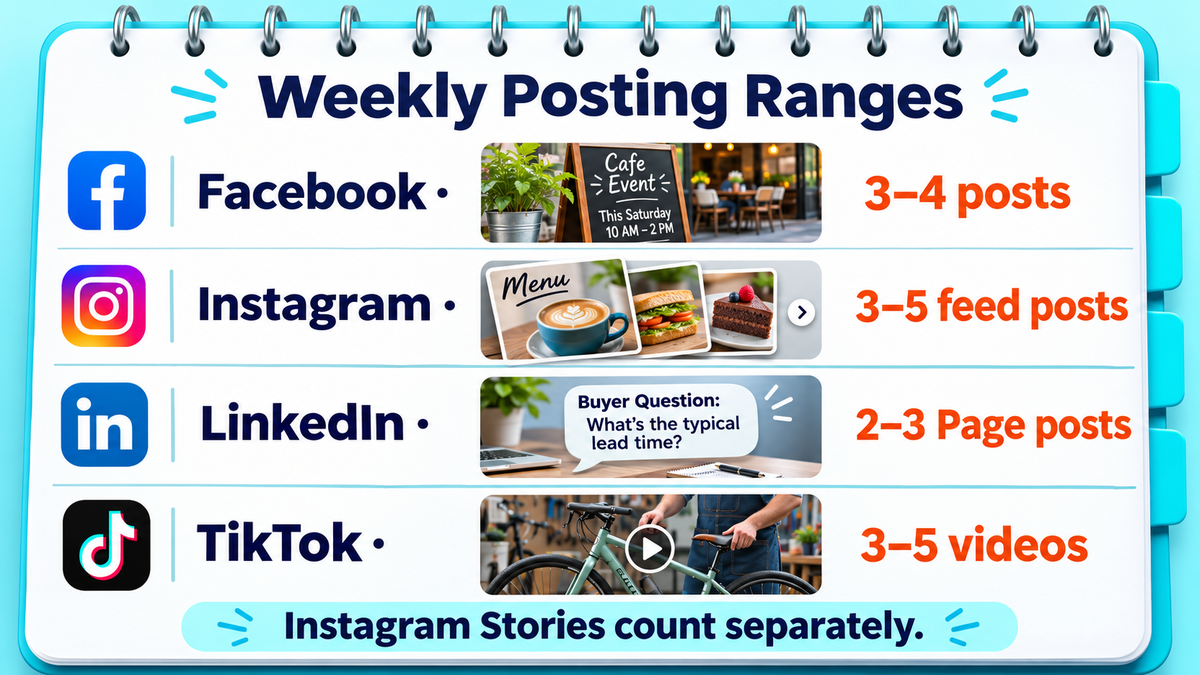
A small Singapore business can start with 2 to 5 social media posts a week on its main platform. That means 3 to 4 posts on Facebook, 3 to 5 on Instagram, 2 to 3 on LinkedIn or 3 to 5 on TikTok. Instagram Stories count separately. These are starting points for a test.
Key Takeaways
- Each post needs a job. A shop update can help people plan a visit. A product demo can answer a question that holds up a sale.
- The calendar needs room for replies. Writing, filming and approving posts are only part of the work. Someone also needs time to answer customers.
- The comparison needs equal time. A post that has been live for a week has had more time to reach people than one that went up yesterday.
- Weekly totals and results per post answer different questions. Weekly totals show what the schedule delivered. Results per post show what each piece of content contributed on average.
- A change in the numbers needs context. A public holiday, paid promotion or sold-out item can change the results during a posting test.
Posting frequency becomes easier to decide when each post has a purpose. A Singapore bakery might use one Instagram post to show its weekend menu and another to answer a common cake order question. A B2B supplier might use LinkedIn to explain what buyers need to know before they ask for a quote.
Both businesses can put a number on the calendar. The harder part is finding out whether another post earns its place. The weekly ranges and test below give a small team a way to find out.
What Does Posting Frequency Measure?
Posting frequency counts how often an account publishes. If a business shares a Reel on Monday, a carousel on Wednesday and a photo on Friday, its Instagram feed posting frequency is three posts that week. If it shares the Reel on Facebook as well, that upload also counts once in the Facebook total.
Frequency tells you how many chances the team created to reach someone. Reach tells you how many accounts saw the content, where the platform reports that number. Impressions count displays, including repeat displays to the same account. Engagement covers actions such as reactions, comments or shares. Each measure answers a different question, so the same report can show more impressions and fewer enquiries.
What belongs in the weekly count?
A simple log starts with the posts your business publishes on each channel. The following rules keep the count consistent from week to week:
- Instagram: Reels, carousels and photos count towards the feed total. Stories get their own line in the log.
- Facebook and LinkedIn: Each post published on the business Page counts once. A staff member’s LinkedIn profile has its own count.
- TikTok: Each video your account publishes counts once. The log can identify a video from a regular series so you can compare it with similar clips.
- Paid promotion: A published post that later receives ad spend still counts as one post. The log should record when the spend started so the team can separate its effect from the organic test.
An existing social media marketing strategy gives those counts a purpose. A retailer that needs more product discovery might watch shares or product page visits. A service business that already gets plenty of views might look at how many people ask about pricing or availability. Both can publish three times a week and judge success differently.
How Often Should Businesses Post on Each Platform?
A small team can use the table below as a starting plan for its main channel. The ranges assume unpaid posts and enough time to review the content before it goes out. A team that already publishes at a pace it can manage can use its current count as the starting point for a test.
Buffer’s posting frequency guide gives broader reference ranges, including 3 to 5 weekly posts on Instagram and 2 to 5 on TikTok and LinkedIn. Its Facebook suggestion is higher than the range below. The table gives a small team a practical first workload. Buffer’s figures come from a broader audience and should be read in that context.
| Platform | Starting posts per week | What a small business could publish | What to watch first |
| 3 to 4 | An opening-hours update, an event post and a customer question | Event responses, link clicks or messages | |
| 3 to 5 feed posts | A product Reel, a carousel and a photo that shows the product in use | Saves, shares or product page visits | |
| 2 to 3 Page posts | A buying question, a team lesson or a short case example | Relevant comments, clicks or enquiries | |
| TikTok | 3 to 5 videos | A demo, a reply to a question and a behind-the-scenes clip | Average watch time, shares or profile visits |
Facebook and Instagram
Facebook posts can give people a reason to check a Page before they visit or book. A cafe might share its weekend opening hours, show what is on the menu and answer a question about reservations.
If the team tries a fourth post, a good candidate is a question customers keep asking, such as whether a group can walk in without a booking. Meta’s Business Suite overview explains how businesses can review Facebook and Instagram insights and manage messages in one place. Instagram gives the same cafe room to show what visitors can expect.
A Reel can show how a dish is served. A carousel can show menu options or explain how to get there from the nearest MRT station. A Story can cover a short update, such as a sold-out item or a table that has opened up.
Instagram’s Best Practices hub includes account-specific tips in the professional dashboard. Those tips can help the team choose what to test on its own account.
LinkedIn and TikTok
LinkedIn gives a B2B team space to answer questions buyers ask before a call. A workplace training company could share one post on how to choose a course and another on what a supervisor should prepare before a session.
The team can then look at who responds and whether anyone asks a follow-up question. LinkedIn’s Page playbook explains how Page admins can use analytics to learn about their audience and content performance.
TikTok gives a business room to show an answer in action. A bicycle repair shop might film how a worn brake pad looks, what a service includes and what customers can bring to an appointment.
One filming session can cover all three if each video answers a separate question. TikTok Studio gives teams a place to review account and content performance. Video length and topic are worth recording alongside the post count because either can affect the comparison.
What about YouTube or a second channel?
YouTube can work on a weekly, fortnightly or monthly schedule if that is what the team can produce. A software firm might publish a longer product walkthrough once a month and answer one setup question in a Short between uploads.
YouTube’s upload schedule tips ask creators to consider how long a video takes to make, what it costs and how often the schedule can run. A team that takes a day to film and edit a walkthrough can account for that before it adds a weekly commitment.
A second channel can use a lighter schedule while the team tests the first. One idea from a social media content plan can serve both channels when the format suits the audience.
A caterer might turn a packing demo into a Reel for Instagram and use one still photo on Facebook with a note on delivery areas. The team can count the two uploads separately and record the time it took to adapt the idea.
How to Build a Posting Schedule Your Team Can Keep
A weekly calendar works best when it includes the jobs that happen before and after a post goes live. A 30-second video may need a staff member on camera, a quiet place to film, captions and a final check. A price update may take minutes to write and still need someone to confirm the price and start date. The production time for each format helps set the schedule.
How much can the team make in a normal week?
A team can start by checking how much time it spent on posts last week. A staff member who has three hours for social media might spend one hour filming, one hour writing and editing, and the final hour checking posts and answering replies. If a fourth post would use up the reply time, a shorter format or a different topic may be a better option for that slot.
A simple mix of social media post ideas can help the team avoid filling the week with variations of the same sales message. For example, a small furniture shop could give each post one job:
- Monday’s post answers a buying question. A carousel shows how to check whether a dining table will pass through a lift door.
- Wednesday’s post shows the product in use. A short video shows the difference between the table’s open and closed size.
- Friday’s post helps someone take the next step. A photo shows a display model and tells visitors when they can see it in the showroom.
The calendar can name the person who checks stock, the person who approves the caption and the person who answers questions. Content scheduler tools can help the team see what is queued and spot two posts that cover the same point. A shared spreadsheet can do the same planning job for a single channel.
When should those posts go live?
Account insights are a starting point when they show when followers are active. A business serving Singapore can log its times in Singapore time, or SGT, and try two windows it can staff.
For example, a lunch outlet can test a menu update before noon because the information helps customers decide where to eat. A B2B supplier could test a weekday window when someone from sales can answer questions about a quote.
A business selling in several markets can record who each post is for. A timing test aimed at Singapore buyers can use the same local time windows for both weeks.
A post about a launch for a different market can sit outside that comparison. This keeps changes in audience and timing from clouding the frequency test.
What should go in the calendar?
The calendar can show the publish date, channel, format, topic, person responsible and main result to watch. One field for changes helps when a post moves, a product sells out or a caption needs a correction.
An empty slot can remain open for news that comes up during the week. A blank Wednesday poses less of a problem than an update that sends someone to a shop at the wrong time.
How to Test Posting Frequency Over Two Weeks
A two-week test gives a small team a first look at what happens when it changes the number of posts. The previous two weeks form the baseline. The next two weeks form the test. Both periods should use the same channel, similar topics and the same approach to measuring results.
How a bakery could test one extra post
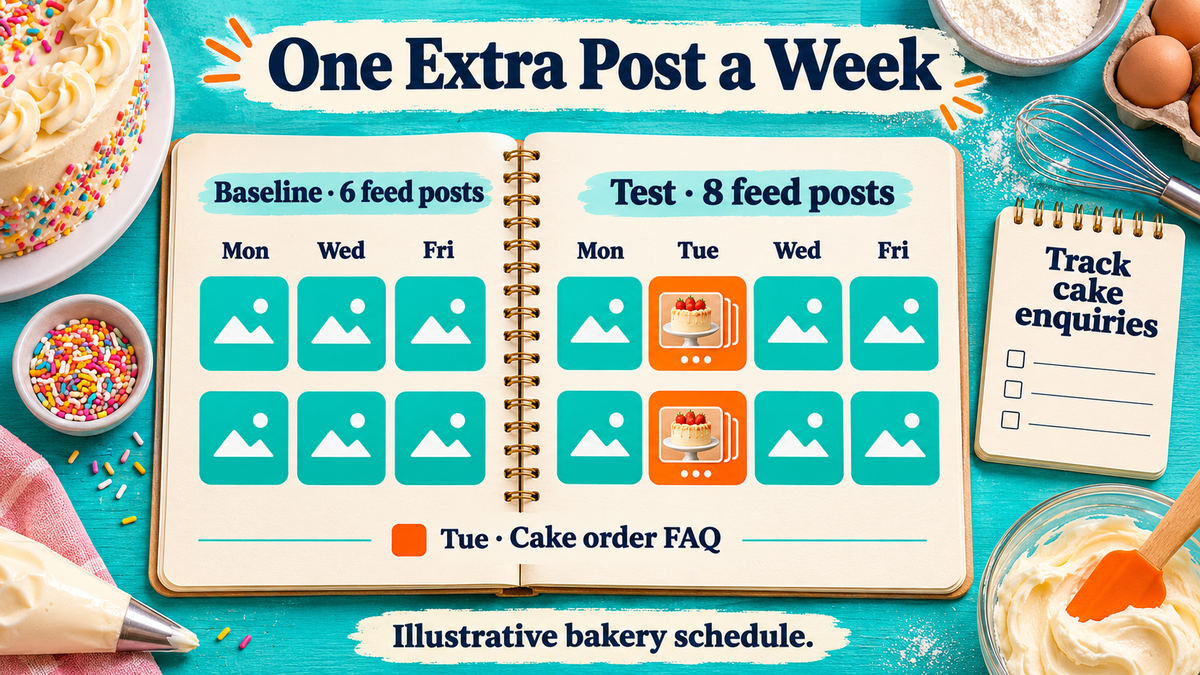
A Singapore bakery posts to Instagram three times a week. It shares a cake Reel on Monday, an order FAQ carousel on Wednesday and a weekend menu on Friday.
The team wants more cake enquiries and can spare enough time to add one post a week. Its extra Tuesday carousel answers a question it already receives about how early customers should place an order.
| Part of the test | Baseline fortnight | Test fortnight |
| Instagram feed schedule | Monday, Wednesday and Friday | Monday, Tuesday, Wednesday and Friday |
| Total feed posts | 6 | 8 |
| Tuesday slot | No feed post | Cake order FAQ carousel |
| Main result | Cake enquiries | Cake enquiries |
| Checks | Reach per post and staff time | Reach per post and staff time |
The example shows what the team would do. The bakery could record a cake enquiry when someone asks about ordering, pricing or a date.
A second message from the same person about the same order would stay under one enquiry. The team could also record how long the Tuesday carousel took to make and whether staff could keep up with replies.
How to compare posts fairly
Each post should have the same amount of time to collect results. If the team records reach seven days after publication, it should wait until the final test post reaches seven days before comparing the two groups. The same rule applies to saves, shares or clicks. Account-level measures such as enquiries can use the same two-week reporting window on both sides, with any later enquiries recorded separately.
A small log can capture three views of the results:
- The business result is the number of enquiries, bookings, sign-ups or other actions the team wanted. A new café could count table booking requests. A software company could count demo enquiries.
- The post result is a comparable measure such as average reach per post. The average comes from adding the reach figures for the posts and dividing by the number of posts. The same account can see more than one post, so the sum does not represent unique weekly reach.
- The workload is the time spent planning, making, approving and answering replies. If the extra post delays other work or leaves customer questions waiting, that cost belongs in the decision.
A business that sends people to its website can use Google Analytics campaign tags to identify visits from links in posts. A team that takes orders through messages can log which posts customers mention and leave the source unknown when it cannot tell. A consistent record also helps when the team later measures social media ROI.
When to extend the test
A fortnight can give a team enough evidence to try the same schedule again. A business that gets only a few enquiries each month may need several more weeks to see a pattern.
A promotion, a public holiday or an unusually popular post may also account for much of the difference. The log should record these events and show how the other posts did.
A bakery testing during a festive order period can compare that period with a similar one when possible. A team testing during an ordinary trading week can repeat the schedule for another fortnight and see whether the extra slot still earns enquiries. If the goal is to test a new posting time next, the team can keep the number of posts steady during that test.
When to Post More, Less, or at the Same Rate
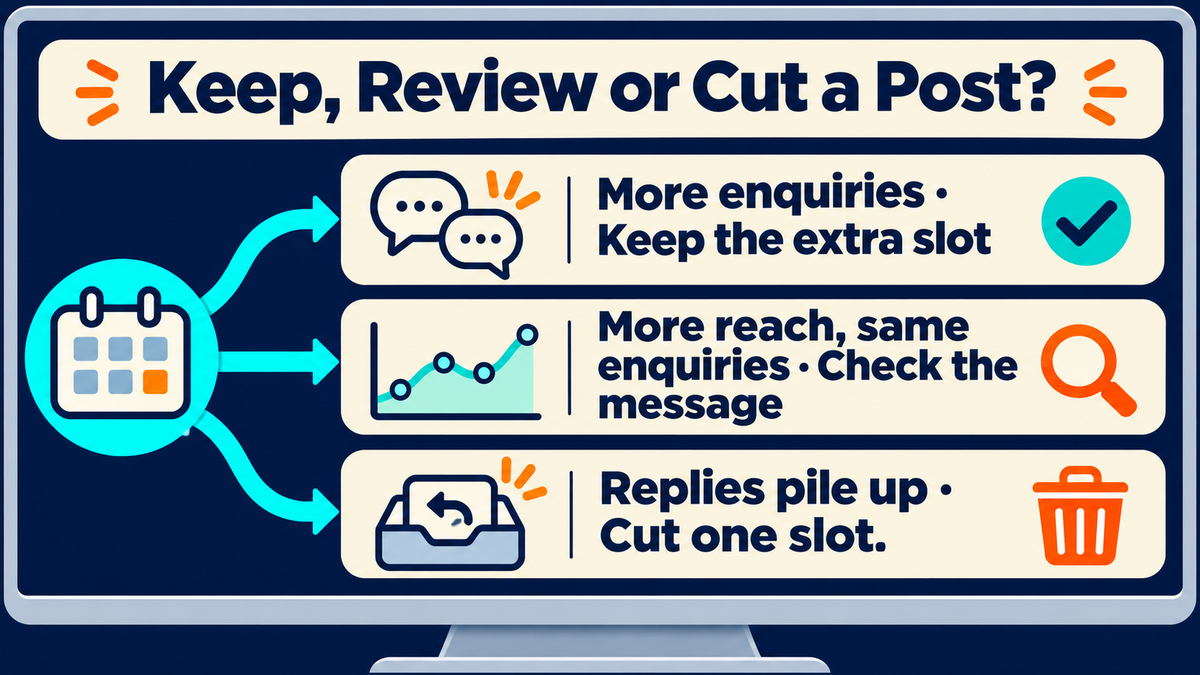
A team can make its decision once it sees the main result alongside the work that went into getting it. More enquiries and enough time to handle replies give the team a reason to keep the extra slot. A rise in total reach with fewer enquiries may call for a check of the post topic, offer or booking page before any further increase.
| What the team sees | What it can check | What it can try next |
| Enquiries rise and the workload stays manageable | Whether enquiries came from people the business can serve | Keep the extra slot for another fortnight |
| Reach rises while enquiries stay flat | Whether posts give people enough information to take the next step | Keep the count steady and test the message |
| Replies pile up after more posts go live | Whether anyone has time to handle the extra messages | Cut one slot and use that time for replies |
| A single post accounts for most of the change | Whether the topic, timing or promotion was unusual | Repeat the same schedule before changing it |
| The same customer questions keep coming up | Whether existing posts answer them in plain language | Use the next slot for one recurring question |
How to spot audience fatigue
Audience fatigue can show up when people see the same message too often. A retailer that posts a version of the same offer several times might see fewer comments or saves on later posts.
If unfollow data is available, a sustained increase is another signal to check. One drop in reach or a handful of unfollows gives too little information to blame the schedule.
The team can check whether the topic, video length, offer or audience changed at the same time. Social media listening can add context by showing what people say in comments and other public conversations. If several comments ask for product details that the posts leave out, the next test could replace one promotion with a demo and keep the weekly count steady.
How to tell when you have room for another post
A good reason to publish more is that customers keep asking a question your current posts leave unanswered. A tuition centre that announces its term dates might keep getting questions about class size.
A short post that answers that question gives the extra slot a specific job. The team can then see whether parents who contact the centre ask about a trial class or still need the same basic details.
A slower schedule can also leave gaps in information that customers rely on. A cafe that changes its opening hours each week can reserve one regular slot for those updates. If the hours stay the same, a current pinned post can carry that information while the next slot goes to a different customer question.
A Posting Schedule Your Team Can Measure
Your next planning meeting can settle one decision. The team can choose a main channel, name the customer action it wants to see and put one test on the calendar. A shared record gives the person making the posts and the person answering enquiries the same evidence when they review the results.
If your business needs help working out which posts support sales or enquiries, MediaOne’s social media marketing team can help connect content planning with performance tracking. A recent calendar and a few examples of the enquiries you receive can give that conversation a starting point.
FAQs About Posting Frequency
Do scheduled posts count towards posting frequency?
A scheduled post counts on the date it goes live. A draft saved in the calendar or a scheduled post that fails to publish belongs in the production log. A post that went live and was later removed can stay in the published count, with a note showing when it came down.
Do pinned posts count again each week?
A pinned post counts once, on its original publish date. Pinning keeps it visible on the account, but it creates no new publication. If the team publishes an updated version as a separate post, the updated version counts on its own publish date.
Should a new account publish several posts on launch day?
A business can publish a small set of opening posts if visitors need basic information such as what it sells, where it operates and how to contact it. The launch day can sit in its own row in the calendar so that first-day activity stays visible when the team sets its ongoing schedule.
What happens to the schedule if the business misses a day?
A missed slot can stay empty. If the post is still relevant, the team can move it to the next open slot. A post with an expired offer, an old event date or a sold-out item needs an update before it goes live. The calendar should record the actual publication date.
Should a business pause scheduled posts during a service disruption?
A team can review its queue when a closure, delay or website outage affects customers. Posts that send people to a closed shop or a form that is down can wait. A service update can say what happened, who is affected and when the business expects to share its next update.