The best content scheduler for a Singapore marketing team fits how people draft, approve and publish.

It does not win on the longest list of features. This guide covers what these tools do, who benefits most, and the costs that headline prices miss, including seats, add-ons and extra channels. It also gives a scorecard to run in a two-week trial on real content.
If you manage social media accounts for a Singapore business, you need a shortlist you can compare on screen. The options below offer one-line workflow verdicts, not an unverified price ranking. Check each vendor’s current pricing page before buying.

Key Takeaways
- Choose content scheduler tools for workflow fit by testing how your team drafts, approves and publishes across the social channels it actually uses.
- Score every candidate on five weighted criteria covering platform coverage, publishing formats, approvals, full monthly cost in S$ and useful reporting.
- Check account and format permissions before relying on auto-publishing, since some platforms or post types still require a manual step.
- Budget for paid seats, extra channels and add-ons before comparing equivalent monthly and annual plans rather than trusting a headline price.
- Run a 14-day test on real posts and approval steps to assess calendar visibility, publishing reliability, reporting and export options before committing.
What Content Scheduler Tools Do and Why Singapore Teams Use Them
A social media scheduler lets you prepare posts ahead of time and publish them to connected accounts at times you choose. Many tools connect to multiple networks through official application programming interfaces (APIs). One dashboard can coordinate Instagram, LinkedIn, Facebook, TikTok and other supported channels, but each platform has different publishing permissions. In Meta’s Instagram API, for example, publishing options depend on whether the account is a professional account and which format it uses; confirm account eligibility before relying on auto-publishing.
A scheduler does not replace content strategy, although some include drafting assistants. Its core job is timing and distribution. It also usually keeps a record of what went out and when.
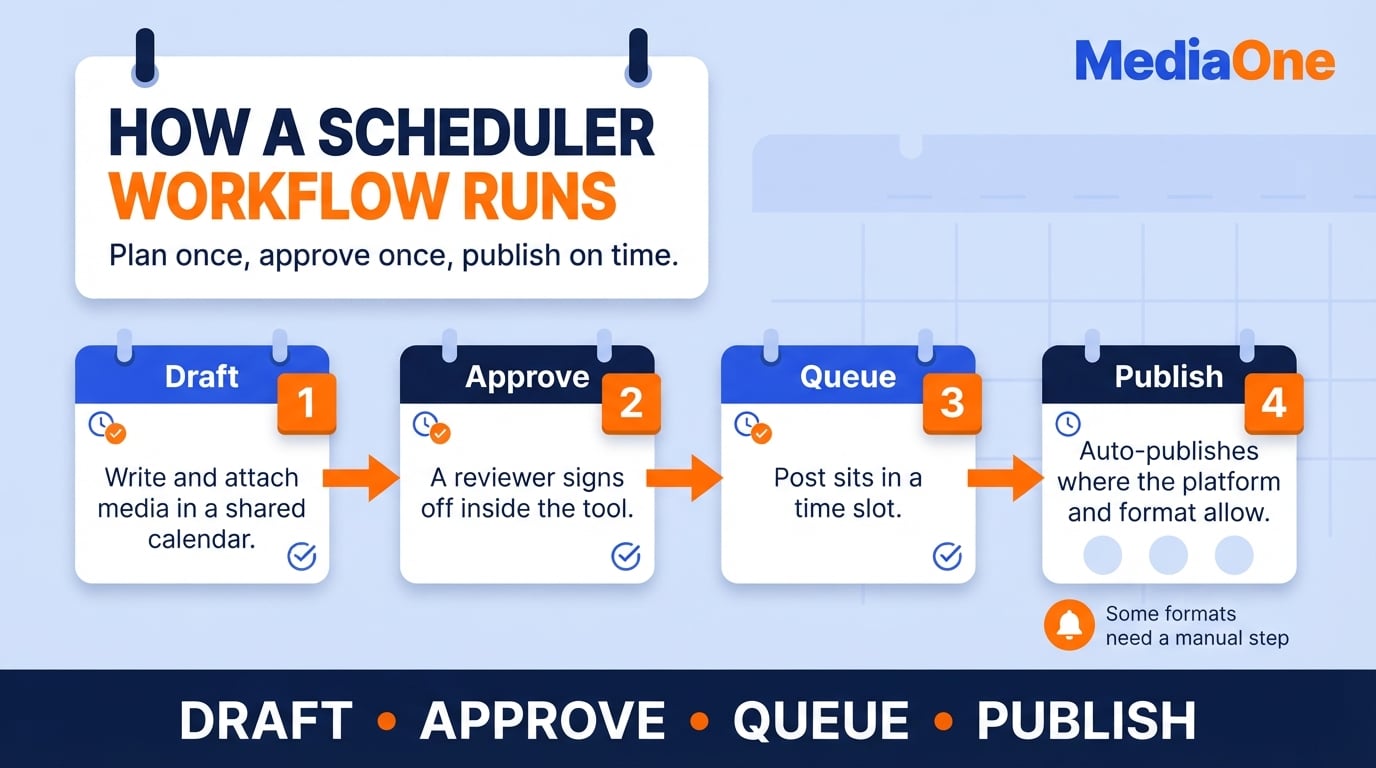
The core job: planning, queuing and auto-publishing
The work breaks into three steps. You plan posts on a calendar, queue them into time slots and let the tool publish them when the format permits. Some tools also accept bulk uploads, which can help a Singapore marketer preparing a month of LinkedIn and Instagram content in one session. Support for Reels, Stories, TikTok videos, carousels and CSV import varies by tool and plan, so include each required format in your test.
Common use cases for brands, agencies and solo creators
- Brands keep a steady cadence across several channels, often with a shared calendar that marketing, sales and product teams can see.
- Agencies manage many client accounts, so the scheduler becomes a control point for approvals, client-specific calendars and reporting.
- Solo creators and founders use it to protect time. Writing a week of posts on Sunday night is often the only way to stay visible on busy weekdays.
The common thread is consistency. A scheduler does not make a post better. It closes the gaps that appear when posting depends on spare time.
Teams that gain the most from scheduling
Scheduling delivers a return when posting is frequent, shared or spread across several channels. A solo creator who posts twice a week on one platform may find manual posting quick enough. A team that publishes daily across Instagram, LinkedIn, Facebook and TikTok is more likely to benefit.
Three profiles tend to benefit most:
- Multi-channel brands that keep messaging consistent without logging into each platform separately.
- Agencies managing several client accounts, where batching work and routing approvals count more than the posting itself.
- Teams with a fixed publishing rhythm, such as a weekly newsletter companion or a campaign with launch dates that cannot slip.
For these teams, the value comes from separating creation from publication. The scheduler releases a month of batched content on time, even when the writer is in a meeting or on leave.
When a scheduler adds little value
A tool is a poor investment when volume is low, the workflow is informal or the content depends on real-time reactions. A business that posts once a week gains little from queuing posts in advance. The same is true for a business whose output is mostly live replies to customer comments.
Watch for these signs that a scheduler will sit unused:
- You publish fewer than about three posts a week in total.
- Only one person touches the account and posts directly from the native app.
- Most content is time-sensitive commentary written the same day.
In these cases, a calendar in a shared spreadsheet covers most of the need at no cost.
Signs you are ready to move from manual posting to a tool
The clearest trigger is missed posts. If a campaign goes quiet because one person was away, the process has outgrown that person. Other signals include:
- Posting happens in bursts at odd hours, whenever someone is free.
- Approvals happen over chat messages, and it is unclear which version went live.
- Two or more people need access to the same accounts.
- You manage three or more channels, and the same post is rewritten for each.
- You cannot see next month’s plan at a glance.
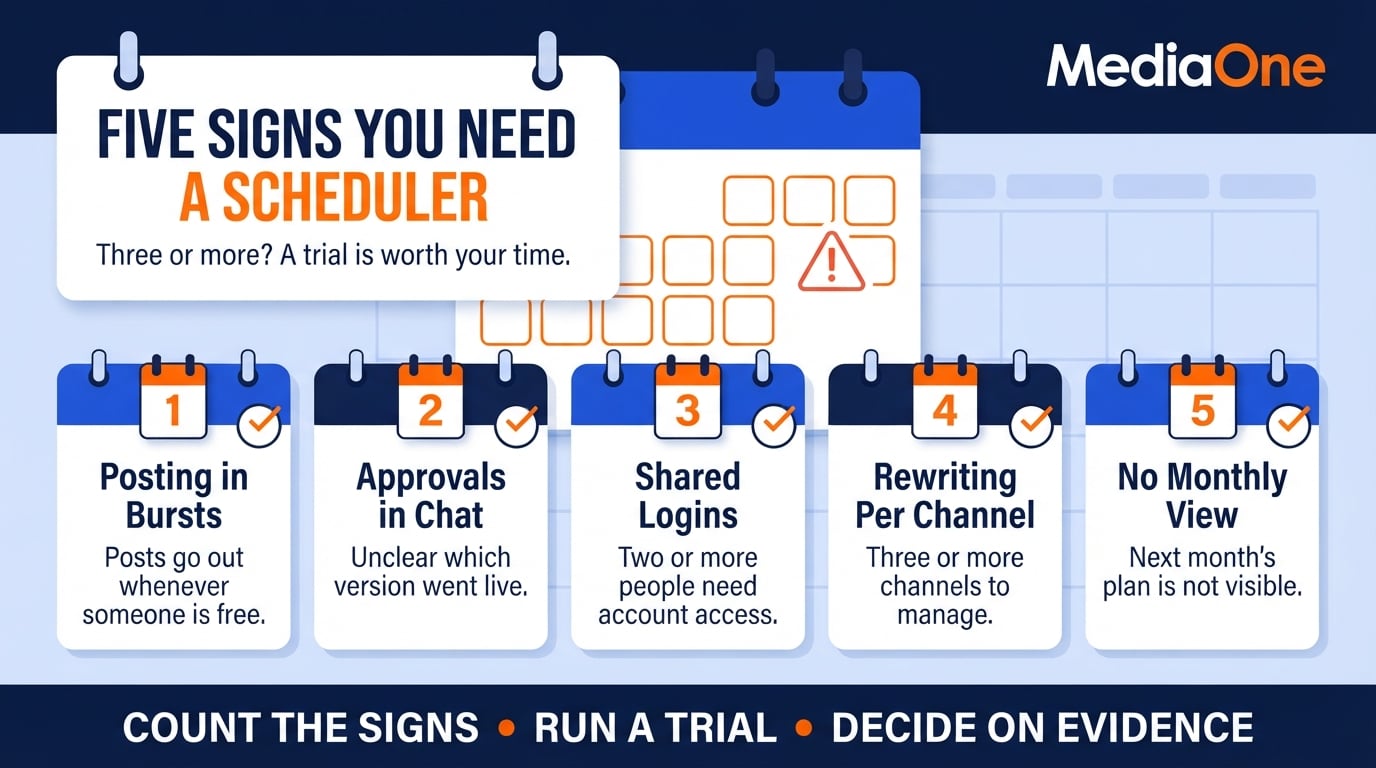
If three or more of these apply, a scheduler is worth testing for time savings and fewer hand-off errors. The scorecard below makes that trade-off concrete; MediaOne’s social media marketing guide for Singapore businesses covers the wider planning approach.
The Workflow-Fit Scorecard
Score each candidate tool from 1 to 5 on five criteria. Multiply each score by its weight, then shortlist the top two.
- Platform coverage for the channels you actually use.
- Publishing formats you need, such as reels, stories, carousels, video or text.
- Approval and collaboration steps required before a post goes live.
- Total monthly cost once seats and add-ons are counted, in S$.
- Reporting you will genuinely review.
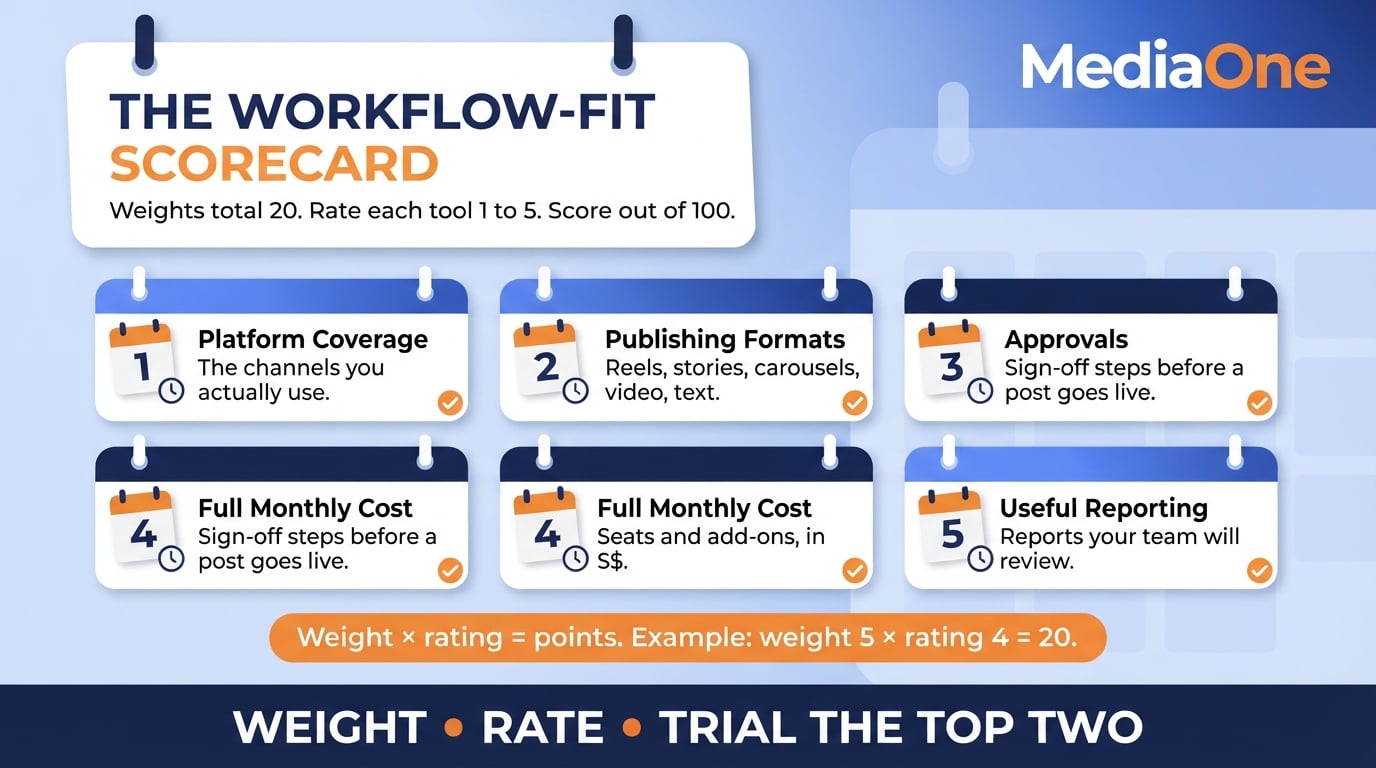
Weight the criteria by what slows your team most. A one-person account might give cost and coverage the highest weights, while a five-person team may prioritise approvals. For a comparable score out of 100, assign weights totalling 20 across the five criteria, rate each tool from 1 to 5, multiply each rating by its weight and add the results. For example, approvals weighted 5 and rated 4 contribute 20 points. Keep the same weights for every tool.
Run the shortlisted tools through a 14-day trial on your real content calendar. The trial, not the marketing page, decides the winner. Use a free trial when available, or request a demonstration that covers your actual approval and publishing steps.
Start with the channels your team actually posts to, not the longest list on a vendor’s homepage. A Singapore team might use Instagram, LinkedIn, Facebook and TikTok, with WhatsApp Business for customer messages. WhatsApp Business messaging is not the same as scheduling a public social post, so check it as a separate integration. TikTok’s Content Posting API distinguishes direct posting from sending a draft to the app, and available capabilities depend on the integration. Check support at the level of account type, format and actual publishing, not merely whether an account can connect; the social media marketing platforms guide helps separate paid channels from publishing tools.
Publishing formats and essential scheduler features
Three features count most for most teams.
Bulk upload can save time for teams producing posts in batches. Check whether each shortlisted tool can import your CSV structure and publish the specific formats you use. Previews show how posts may appear on each network, although the live result can differ from the preview. Reels and carousels can look wrong when cropped, so test with your own files. Auto-publishing means the post goes out without someone clicking the final publish button, where the platform permits it.
User interface and onboarding time
A scheduler that takes too long to learn can slow a busy campaign. Judge the interface with one test: can a new team member schedule a week of posts without asking for help? Time it during your trial. Ask vendors about guided setup, and check whether connecting your accounts requires admin permissions you do not have.
Scheduling limits and how far ahead you can plan
Headline scheduling windows can be impressive but are rarely decisive for a team planning a few weeks ahead. Limits also differ between plans and may restrict the size of the queue rather than the number of days ahead. Calendar visibility is often more useful: see what is planned, what awaits approval and what has gone out in one view. Keep that view current across every channel.
Comparing Tools by Workflow, Not Feature Count
Most comparison pages rank tools by feature count. For a Singapore team, that says little about real fit. Two tools with similar feature lists can differ sharply in account pricing, channel handling and how much time a reviewer loses to clumsy approvals. Match a tool to its workflow, and the content scheduling decision becomes clearer. A consistent content marketing process also depends on how the team coordinates drafts and sign-off.
A quick shortlist by team workflow
These are starting points for a trial, not a ranking of performance or price; review the current plan details for your team size and account types.
| Tool | Indicative workflow fit | Check before choosing |
| Buffer | Solo creators and small teams that need queues and a simple calendar | Per-channel billing and whether approvals require the Team plan |
| Later | Visual planning across supported social profiles | Plan-level publishing limits and approval access |
| Hootsuite | Teams coordinating several accounts and reviewers | Which plan includes multi-step approvals |
| Sprout Social | Teams requiring shared workflows and reporting | Approval-plan eligibility, seat costs and analytics depth |
What each tool type does well

Lightweight schedulers suit a solo creator or small business posting to two or three channels. Buffer and Later are examples worth testing for that workflow, but their plan limits and account permissions differ. Mid-range suites may add approvals and collaboration once a second person needs to sign off. Enterprise-style suites often add listening and deeper analytics, which are most useful when a team will act on those reports.
Match the tool to the job. A team posting mostly text and single images may not need automatic publishing for Stories and carousels. A team producing short-form video across TikTok and Instagram Reels should test both formats end to end, because media support depends on the destination and account type. Compare the actual file handling and review steps before choosing.
| Team type | Priority feature | Typical fit | Cost check before subscribing |
| Solo creator | Low cost, auto-publishing | Lightweight scheduler | Lowest tier, confirmed on the vendor’s pricing page |
| Small team (2 to 3 people) | Approvals, shared calendar | Mid-range suite | Mid tier; check whether reviewers need paid seats |
| Agency or larger team | Multi-client reporting, seats | Enterprise suite | Top tier, quoted per seat and channel |
| Multi-seat team (4 to 5 people) | Approvals, bulk upload, reporting | Mid-range or enterprise suite | Varies with seat count, confirmed on enquiry |
Feature access and billing vary by plan. Check each vendor’s current pricing and help pages before you budget.
Crossposting sounds simple, but tools differ on three points. First, some adapt captions and aspect ratios while others copy them. Second, automatic publishing may vary by format, account type and social platform. Third, formats that need a native-platform step may require a notification instead. LinkedIn’s Posts API also distinguishes supported organic formats from sponsored ones, so do not assume every carousel option works for a standard organic post. Check each destination before committing.
Test these on your own assets. Schedule one video and one carousel to each channel in your mix, then check the live posts. If your team needs Stories to publish unattended, reject any plan that only supports reminder publishing for your account type.
Social media analytics and reporting
Reporting depth differs by tool and plan, even when basic impressions and engagement counts are available. The question is whether your team will review the report at all. Weight reporting by how often someone will act on it. An enterprise-style dashboard may suit an agency, while a simple export may suit a small marketing team that reviews numbers monthly.
Key metrics to check include reach, engagement rate, click-throughs and follower growth. Check whether reports export cleanly to a spreadsheet, whether you can compare channels side by side, and whether the report covers the metrics your manager asks about. A monthly review works best with a simple CSV export and a short summary; pair it with a process for turning social media insights into decisions. A straightforward export can be more useful than a complex dashboard.
Turn each report into a monthly decision. Pick one channel to improve, one format to test and one post type to drop. A clear reporting routine is more useful than a dashboard nobody reviews.
Team Collaboration, Approvals and Content Calendars
For many Singapore teams, scheduling posts is the simple part. The harder questions are who signs off a post, how long that takes and where the approved version lives. A scheduler that publishes on time but sends every approval through a long email chain can cost more effort than it saves. Assess approval handling alongside publishing features.
Mapping collaboration and approvals
Map who touches a post before it goes live. In a team of three to five, that usually means a writer, a designer, a reviewer and whoever holds the account login. Each handoff is a point where a post can stall, and a clear map helps teams save time on every cycle.
When you compare content scheduler tools, check four things:
- Roles and permissions: Can a freelancer have draft-only access?
- Approval steps: Can a reviewer approve or reject inside the tool, with comments attached?
- Notifications: Does the tool alert the next person when something needs them?
- Audit trail: Can you see who changed a caption and when?
For teams handling regulated or sensitive claims, approvals may be more important than the scheduling window. The tool should hold a post until someone approves it. During your trial, submit a post without approval and confirm it does not go out.
Require sign-off only where the risk justifies it: product claims, pricing, sensitive topics and anything naming an individual.
Building a content calendar the team will follow
A calendar fails when nobody keeps it current. The version a team will use is visible to everyone, shows the status of each post and is updated as part of the normal workflow. Make it part of the wider social media marketing plan so campaign owners can see deadlines and approvals.
- Set a fixed planning rhythm. Plan two to four weeks ahead in one recurring meeting.
- Use stages, not dates alone. Label posts as idea, drafting, in review, approved or scheduled.
- Assign one owner per post. Shared ownership usually means no ownership.
- Batch production. Write and design a week of content in one session, then load it using bulk upload.
- Review weekly. Anything in review for more than two working days gets a decision: approve, rewrite or drop.
Counterpoint: a calendar inside a tool becomes a bottleneck if only one person can edit it. If your team works mainly through chat and email, a shared document linked from the scheduler may serve you better.
Pricing, Hidden Costs and Total Cost in S$
Headline prices do not always reflect the plan your team needs. Start by checking limits, seats and billing terms on the vendor’s official pricing page. Entry plans may cover a single user and basic scheduling. Higher tiers can add analytics, bulk upload, approvals or more social profiles, although the bundle differs across vendors. These limits decide whether a platform suits your workflow.
Reading published prices
Published starting prices vary by tool, billing term and number of social profiles. Some charge per channel while others bundle profiles into sets or charge per user. Compare the lowest plan that includes all five scorecard requirements, not the smallest advertised figure. Pricing and trial conditions can change, so verify them on the official vendor page when you buy.
When prices are quoted in another currency, convert them to S$ and label the estimate ‘approximately’, using the rate on your decision date. Check whether the fee is per user, per channel, per social set or per workspace, and confirm tax and annual-billing terms before you budget. Listening, exports or additional historical data may sit behind a higher tier.
Where costs rise
The headline price often covers one user and a fixed number of social accounts. Costs rise in three common places:

- Extra seats: Each approver, designer or client reviewer may need a paid seat.
- Extra channels: A base plan may cover three profiles. Your brand may manage more profiles than the plan allows, with WhatsApp Business messaging assessed separately.
- Analytics and reporting: Some vendors charge separately for historical data, custom dashboards or export. For example, some advanced reports are limited to higher tiers, so match reporting needs to a plan before you commit.
Check what happens when you hit a limit. Some tools block new scheduling until you upgrade, which can disrupt a launch week. Marketing teams planning campaigns should confirm limits before a busy period.
Calculating annual cost in S$
Use this five-line calculation before you shortlist any tool:
- Base plan price per month in S$.
- Number of paid seats × seat price.
- Extra channels beyond the plan limit × channel price.
- Analytics or reporting add-ons per month.
- Total monthly cost × 12, then compare annual and monthly billing separately.
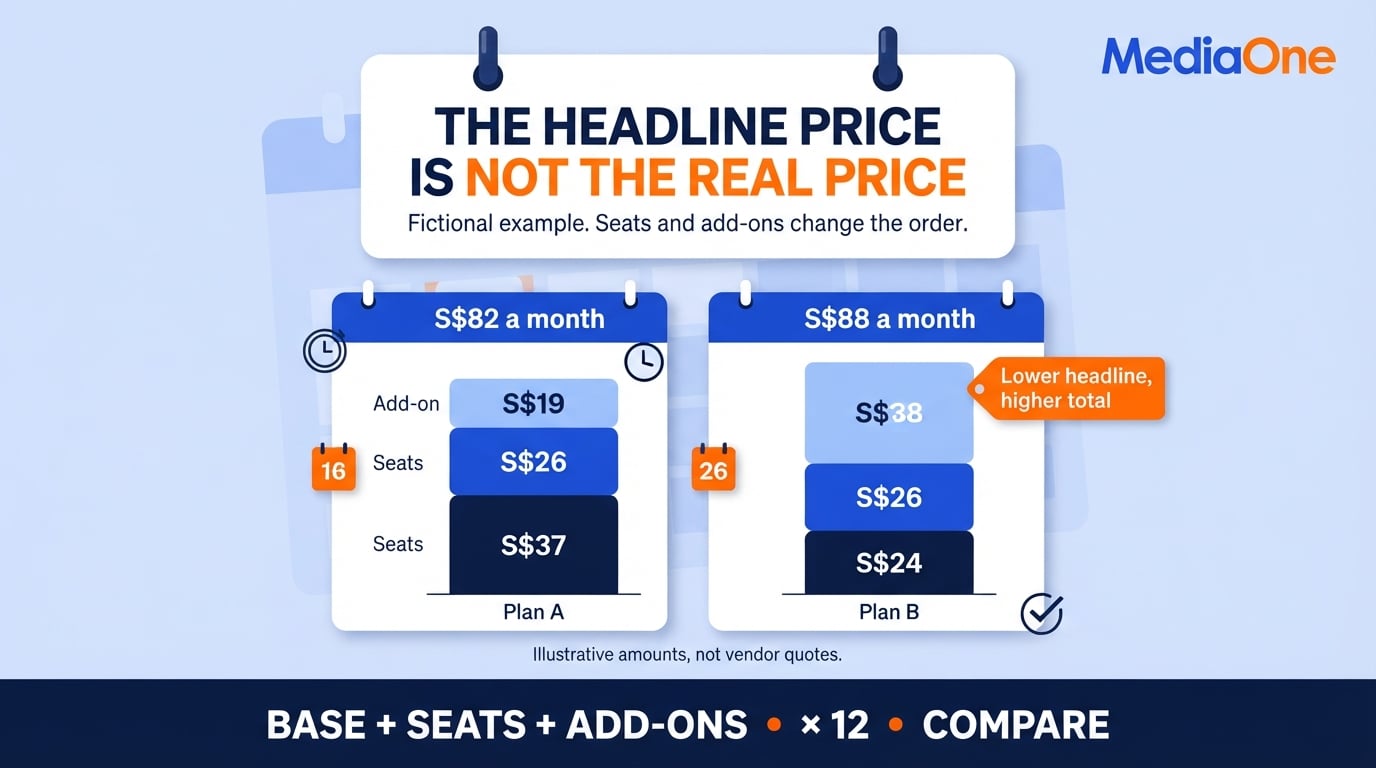
For illustration only, a fictional plan with a base fee of approximately S37permonth,twoextraseatsatapproximatelyS13 each and one S19add-oncostsapproximatelyS82 a month, or S984over12months.AnotherfictionalplanmaystartatjustS24 but, after two S13seatsandaS38 add-on, cost approximately S88permonth.Thelowerheadlinepriceisthenthedearerchoice.TheseexamplesconvertassumedUS-dollaramountsusingUS1 = S$1.28183 on 15 October 2026; they are not current vendor quotes. Replace every assumption with the selected vendor’s charges.
Data handling and exit planning
Before committing, check data handling and exit options. Review account permissions, how long the vendor retains uploaded content, whether external reviewers can see personal data and how third parties process it. The Singapore PDPC’s guidance on managing data intermediaries highlights governance, service management and exit planning when organisations outsource personal-data processing. Check the scheduler’s current privacy notice and your organisation’s own obligations before connecting accounts.
Next, check how easily you can leave. Confirm that you can export the calendar, captions and post history in a usable format. If the tool cannot export these records, switching may mean rebuilding the archive manually. Ask whether the export preserves dates, post status and images as well as text so future teams can still use it.
Conclusion and Next Steps
The right content scheduler fits how your team approves, reviews and publishes content. Feature counts and long scheduling windows are weak signals on their own. Use the Workflow-Fit Scorecard to compare content scheduler tools on platform coverage, required formats, approval steps, total monthly cost in S$ and reporting your team will use.
List your three most-used channels and shortlist the two highest scorers. Run a 14-day trial with a real content batch, confirm reviewers can approve posts, then export your calendar to test how easily your data moves.

Frequently Asked Questions
It depends on how many channels you run and whether anyone else approves posts. Free plans may limit users, connected accounts, queued posts or formats. If you post to one or two channels and work alone, they may be enough. Once you need approvals, more profiles or bulk uploads, compare the paid tiers using current pricing pages.
Can a content scheduler publish Reels, Stories and carousels automatically?
Some tools can, but confirm the exact format and account type. A scheduler may auto-publish a Reel or carousel while requiring a reminder to finish a Story in the native app. Test one of each during your trial, as support can vary by platform, account and subscription tier.
Two to four weeks is a useful planning horizon for many teams, not a platform rule. Scheduling windows and queue-size limits depend on the tool and plan, so check both. The more useful test is whether your team can see the calendar, make urgent edits and respond to changes without losing approval history.
Do not assume a third-party scheduler automatically reduces organic reach, or that the same results are guaranteed as native posting. Platform policies, supported formats, content quality and audience timing all affect what happens next. Test comparable posts and check the platform’s current third-party publishing guidance before drawing conclusions.
A scheduler focuses on planning, queuing and publishing. A full suite adds listening, inbox management, deeper analytics and sometimes advertising. If your main pain is getting posts out on time, a scheduler is enough. If you also need to respond to comments and track brand mentions across the team, a suite may justify its higher price.
Which features count most for a team of three or more?
Prioritise approval steps, shared content calendars, role-based permissions and clear post status. Check how many seats each plan includes, because added seats often drive the monthly bill more than the headline price. Use your trial to test one full approval cycle, from draft to sign-off to publication, with your real team.