| AI Summary
Mobile responsive website design helps Singapore businesses serve phone, tablet and desktop visitors through the same pages. A working layout keeps information readable and customer actions within reach. This guide explains design options, page structure, navigation, forms, speed and testing. Business owners can use the checks to identify problems, brief a developer and assess the finished work without needing to write code. |
Mobile responsive website design is an approach that adjusts a webpage’s layout to the available screen space. Flexible columns, images and CSS rules help the same page work across phones, tablets and computers. Visitors can read content and complete tasks without struggling with a desktop-sized layout.

Key Takeaways
- Content should determine where layouts change; a standard phone width cannot cover every page.
- Menus, enquiry forms and checkout steps need testing with real customer tasks.
- Image resizing controls appearance, while smaller downloads and lighter scripts address speed.
- Mobile pages need the same main information and search details as desktop pages.
- Repair priorities should reflect blocked bookings, lost enquiries and failed purchases.
- Launch checks need finished content, working integrations and evidence from actual devices.
A customer searching for a nearby cafe may need opening hours and directions. Someone comparing business services may want prices, evidence of past work and an enquiry form. Both visitors need a website that works comfortably on their phone.
Mobile responsive website design helps businesses meet those needs across screen sizes. The work involves more than shrinking images or hiding a menu. Each page must support the action that brought the visitor there. For Singapore business owners and marketers, the decisions below turn that requirement into practical checks, from the first layout discussion to the final booking test.
What Is Mobile Responsive Website Design?
A responsive website changes its layout as the available browser space changes. Three service cards might appear side by side on a desktop and stack vertically on a phone. The information remains available, while the arrangement changes.

The same page address serves both visitors. A customer who shares a product link from a phone can send a desktop user to that product without a separate mobile address.
Responsive Design and Mobile-First Design
Responsive describes how a page behaves. Mobile-first describes how a team plans and builds it: the smallest layout comes first, followed by additions for larger screens.
MDN’s explanation of responsive web design covers both concepts. A responsive website does not automatically mean its designers started with phones.
For a service business, mobile-first planning might place the service description, service area and booking button before a large decorative banner. That order follows the customer’s task. The desktop version can add more space without burying those details.
Responsive, Adaptive or a Separate Mobile Site?
These approaches describe different ways to serve people using smaller screens. Responsive design is a practical starting point for many business websites, but the terms are not interchangeable.
| Approach | How it works | What the business maintains |
| Responsive design | A flexible layout changes with available space | Shared pages and layouts that work across widths |
| Adaptive design | The site selects among prepared layouts for different conditions | Several layout versions and their behaviour |
| Separate mobile site | Phone visitors receive pages at different addresses, often on an m. subdomain | Separate URLs, redirects and matching content |
Adaptive techniques can share a URL and code. They can also work alongside responsive layouts. Extra layouts do not automatically mean a separate website, and responsive design does not require one stylesheet.
Google’s mobile site documentation recommends responsive design because it is the easiest pattern to implement and maintain. Google also supports other configurations when implemented correctly.
A website builder service may include responsive templates. The template still needs testing after staff add photographs, product names, forms and apps. A ready-made theme cannot guarantee that the finished page will work well.

How Responsive Layouts Work
Responsive pages combine flexible layouts, images that stay within their containers and rules that change presentation when necessary. Business owners do not need to code these features, but knowing their purpose makes design reviews easier.
Flexible Columns and Page Widths
A flexible layout allows sections to grow, shrink or wrap as space changes. A product grid might show four columns on a wide screen, two on a tablet and one on a narrow phone.

The layout should also limit long lines of text on large monitors. A page that stretches every paragraph across the full desktop width can become tiring to read.
CSS is the code that controls presentation. Two common CSS layout tools serve different needs:
- Flexbox arranges items along a row or column, such as buttons or navigation links.
- Grid controls rows and columns together, such as aligned product cards.
MDN’s comparison of Flexbox and Grid explains this distinction. Both can appear on the same page; neither is a compulsory choice for every component.
The order of the content also matters. A sidebar containing delivery restrictions may move below the products on a phone. Customers still need those restrictions before paying. The design review should consider where information appears during the task, alongside how the columns stack. A smaller layout should preserve the relationship between a price, its conditions and the button used to buy.
Images and Embedded Media
An image should stay within its column and keep its proportions. A common CSS rule is img { max-width: 100%; height: auto; }.
That rule controls the displayed size. It does not reduce the downloaded file. A large photograph can look small on a phone while still taking time to download.
Video players, maps and booking widgets also need space that scales with the page. A fixed-width embed can push the whole page sideways. The review should cover these additions alongside the text and photographs.

Breakpoints Based on Content
A breakpoint is a width where layout rules change. A navigation bar might switch to a menu when its links no longer have enough room. CSS media queries apply rules according to conditions such as browser width. There is no universal requirement to change every layout at 768 pixels.
The content provides the test. Long product names, translated labels and extra menu items may need a different breakpoint from a page with three short links.
The browser also needs the correct viewport setting, which tells it how to size the page on a phone. Browser zoom should remain available for people who need larger text.
Responsive design succeeds when visitors can complete a task. A neat screenshot does not show whether someone can open a menu, select a date or send an enquiry.
Menus That Reveal What the Business Offers
A menu icon can save space, but visitors still need to recognise it and understand what it opens. A visible “Menu” label can help, especially when the icon’s meaning is uncertain.
The most important action may deserve its own button outside the menu. A clinic might keep “Book an appointment” visible; a restaurant might show “Reserve a table”. Effective call to action strategies connect that wording to what happens after the tap.
The menu review should cover:
- Opening and closing controls that work by touch and keyboard.
- Labels that describe the destination.
- Submenus that do not depend only on hovering a mouse.
- Focus that remains visible when someone navigates with a keyboard.
- Sticky headers that leave enough room for the page content.
Buttons People Can Tap Comfortably
A tap target is the area that responds when someone touches a control. Its size includes the clickable space around an icon, not only the icon itself.
WCAG 2.2’s minimum target size criterion sets a baseline of 24 by 24 CSS pixels, with exceptions including sufficient spacing and links within sentences. This minimum is not a reason to make every main button that small.
Primary controls can be larger where the design allows. Nearby buttons also need separation, so a customer does not accidentally tap “Remove” while changing a quantity. Sticky booking or call buttons should never cover form fields or error messages.
Forms and Checkout Without Unnecessary Work
A phone form should ask for information needed at that stage. An initial service enquiry may need a name, contact detail and brief description; a complete billing address may belong later.
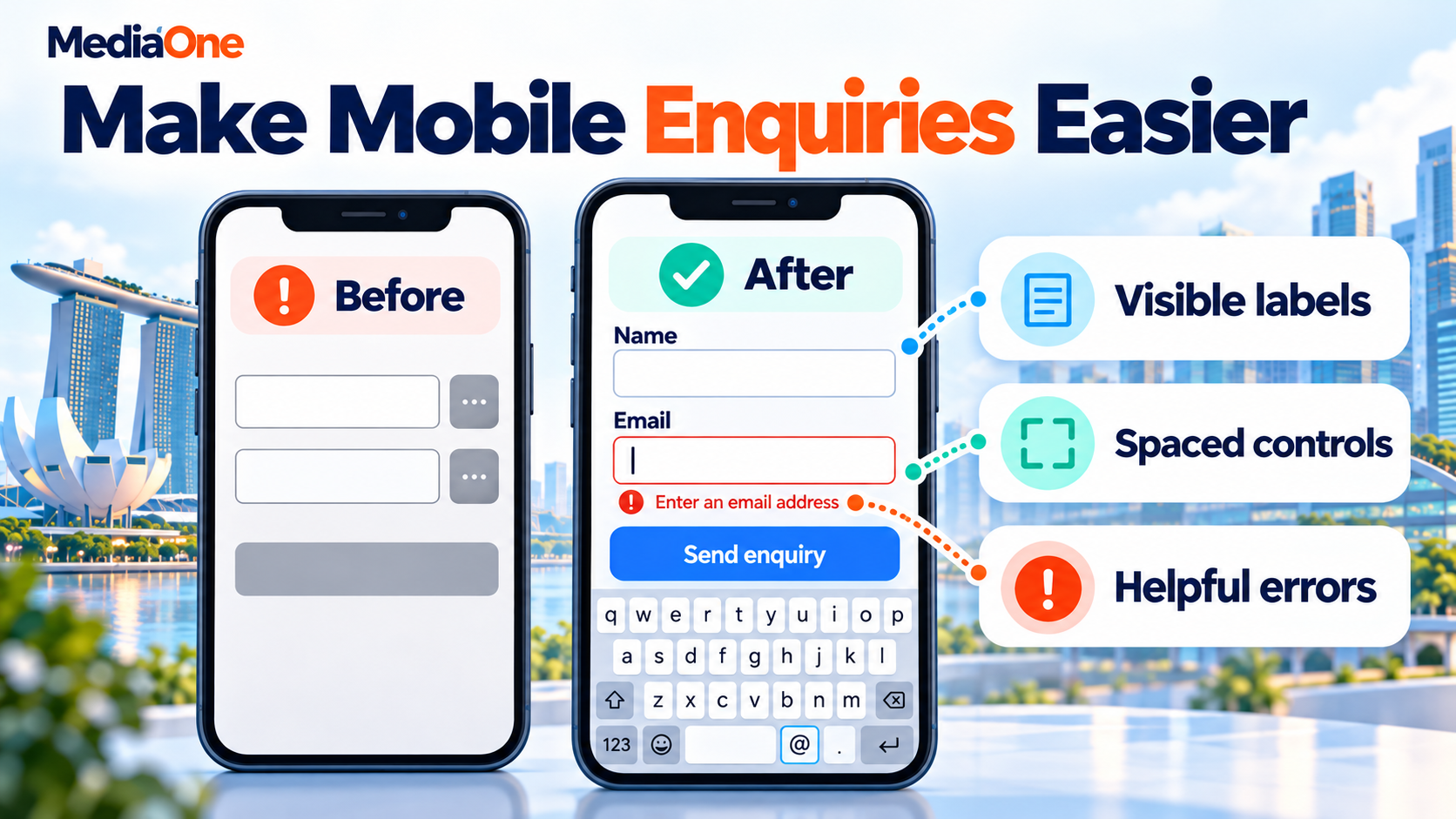
W3C’s explanation of form labels shows why each field needs an associated label. Placeholder text alone can disappear as the person types, leaving them unsure what the box means.
The form should provide:
- Labels that remain understandable during entry.
- Suitable keyboards for email addresses and phone numbers.
- Error messages beside the fields that need attention.
- Previously entered details after a validation error.
- A confirmation message after successful submission.
For online shops, ecommerce website design also includes delivery choices, payment screens and order confirmation. A responsive product page cannot compensate for a checkout that fails when the phone keyboard opens.
Mobile Page Speed: What Responsive Design Does Not Fix
A page can adapt perfectly to a phone and still load slowly. Layout and performance need separate checks because they solve different problems. A business assessing website page speed should examine the files and services its pages load, including images, fonts, scripts and third-party widgets.
Smaller Downloads and Fewer Delays
Responsive image features such as srcset, sizes and the picture element let browsers choose among supplied image files. The choice can account for the displayed size and screen density. The picture element can also offer a different crop.
For example, a wide restaurant photograph may need a closer crop on a phone so the food remains visible. Good image SEO also includes relevant alternative text and images that support the surrounding content.
Other performance work may include:
- Compression that reduces image file sizes without losing needed detail.
- Delayed loading for images farther down the page.
- Space reserved for images and embeds before they appear.
- Removal of unused plugins, scripts and duplicate tracking tags.
- Review of chat tools, pop-ups and video backgrounds.
The main image visible at the top of the page needs prompt loading. Delaying every image can make that first screen slower.
Core Web Vitals in Everyday Terms
Google’s Core Web Vitals measure loading, response to interaction and visual stability. Their names sound technical, but each relates to something a visitor experiences.
| Measure | What it checks | Good threshold |
| Largest Contentful Paint (LCP) | When the largest visible content element appears | 2.5 seconds or less |
| Interaction to Next Paint (INP) | How quickly the page responds visually to interaction | 200 milliseconds or less |
| Cumulative Layout Shift (CLS) | How much content moves unexpectedly | 0.1 or less |
The thresholds apply at the 75th percentile: at least three quarters of measured visits should meet each target. A single fast test on an office connection cannot establish how most customers experience the site.
How Responsive Design Supports SEO and AI Search
Google uses the mobile version of page content for indexing and ranking. That makes the phone version important even when some customers complete their purchase on a computer.
The Same Main Information Across Devices
Mobile visitors need the same main information as desktop visitors. Product descriptions, service details, headings and important links should remain available. Search details, including titles, descriptions and relevant structured data, also need consistency across versions.
An accordion can organise content into expandable sections. The information must already be available to Google; important text should not load only after someone taps. Removing details simply to shorten the phone page can leave customers and search engines with less information.
A technical SEO audit can examine crawling and indexing alongside these content checks. Responsive design alone does not guarantee higher rankings. Google’s explanation of page experience confirms that good Core Web Vitals do not guarantee top search positions.

Answers That Remain Easy to Find
Readable headings, direct answers and descriptive links help people understand a page. A service page might state what the service includes, where it is available and how customers can enquire.
These habits also support content prepared for answer engines. Google’s documentation on AI features and websites says AI Overviews and AI Mode require no special optimisation beyond established SEO practices.
A responsive layout supports access to those answers. It does not guarantee a featured snippet, an AI citation or inclusion in an AI Overview.
How to Test a Responsive Website Before Launch
Testing should use finished pages and the tasks customers actually perform. A homepage preview cannot represent a long service page, a product with several options or an external booking screen.
A Test Sample That Covers Different Page Types
Pages built from the same template can share problems, so the sample should cover each main template and its more demanding content. A shop with hundreds of products needs checks that go beyond its shortest product name.
- A product with several sizes, a sale price and a long title.
- A service page with a price table and customer reviews.
- A booking page with unavailable dates or appointment options.
- A search results page with both many matches and no matches.
These examples expose problems that tidy demonstration content can hide. A button that works beside a short label may overlap when the real wording wraps onto another line.
Browser Checks and Real Phones
Chrome’s Device Mode simulates screen sizes, orientation and other conditions. It helps reveal layout problems, but Chrome describes the result as an approximation of a real phone experience.
The testing sequence should include:
- A gradual change from narrow to wide browser widths, including widths between presets.
- Real iPhone and Android checks where available, with browsers used by the audience.
- Portrait and landscape views, enlarged text and browser zoom.
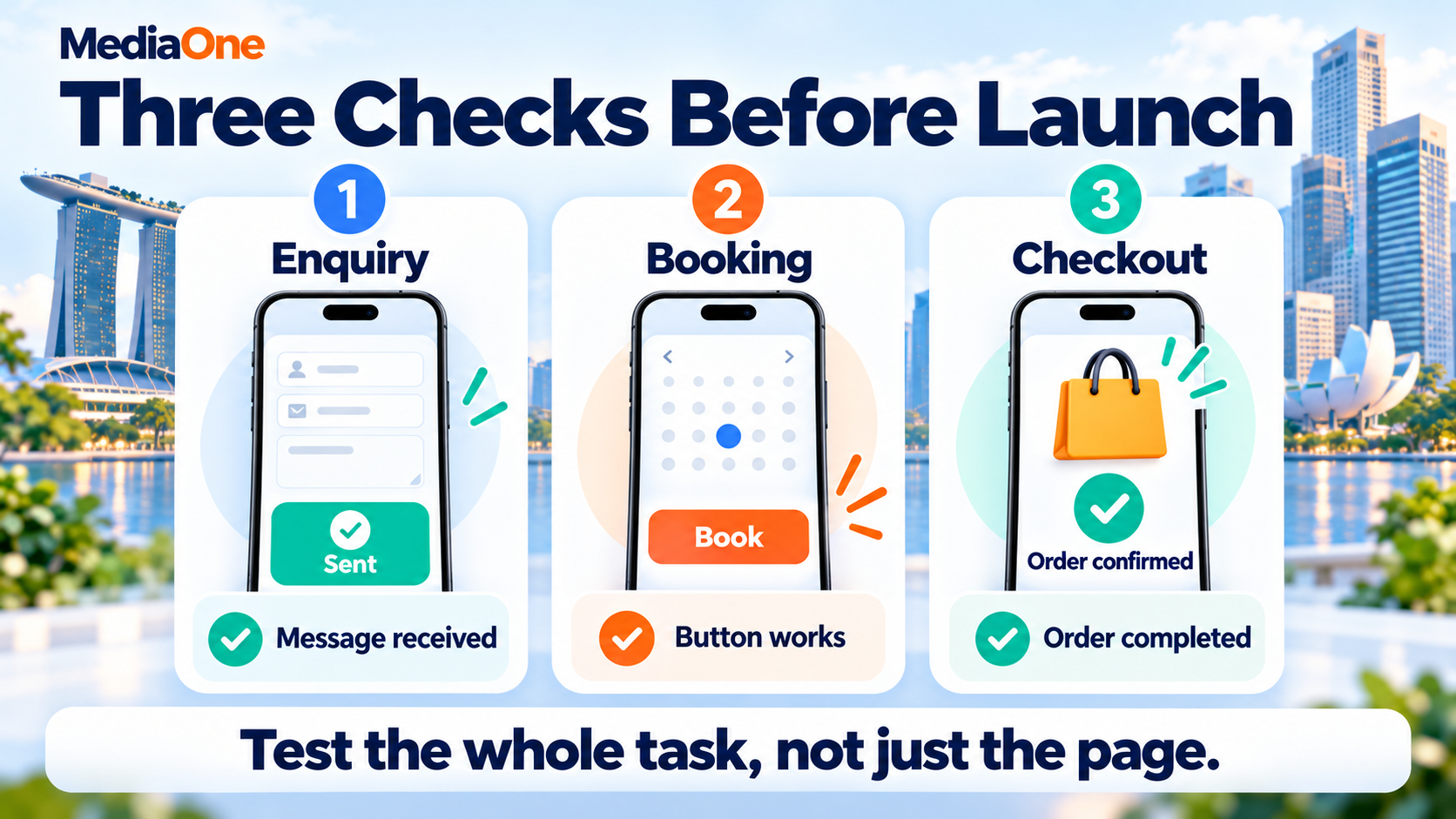
- Full customer tasks, including errors, payments and confirmation messages.
- Checks with the phone keyboard open and pop-ups displayed.
A Short Task With Someone Outside the Project
A person who did not help build the site can expose confusing labels or missing information. The test can start with a realistic request: “Find an appointment next Tuesday and check what it costs.”
The observer should let the person attempt the task without explaining where to tap. Hesitation, repeated taps and trips back to earlier pages reveal places that need attention. The aim is to understand what prevents completion. A successful demonstration by the developer shows that a feature works; an independent attempt helps establish whether a customer can understand it.
Readability and Page Content
W3C’s reflow criterion generally expects content to work at a width equivalent to 320 CSS pixels without two-direction scrolling. Exceptions include content that needs a two-dimensional layout, such as maps and data tables.
A wide comparison table can sit in its own horizontally scrolling area. The surrounding page should still remain readable without sideways movement. Text should also remain available when enlarged, without buttons or headings covering it.
Speed Reports and Launch Records
PageSpeed Insights combines lab tests with real-user data when enough data exists. Its real-user figures cover a rolling 28-day period, so they will not immediately reflect a repair. Low-traffic pages may have no page-level field data.
Each issue needs a page address, device or browser, steps to reproduce it and the expected behaviour. A screenshot helps, but “The submit button disappears when the keyboard opens” gives the developer more to work with than “Mobile looks wrong.”
When a redesign changes addresses, website relaunch SEO includes mapping old URLs to relevant replacements and testing redirects. A responsive redesign does not require changing every address.
Which Mobile Website Problems Should a Business Fix First?
The first repairs should address customer tasks that fail. A broken payment step deserves attention before a decorative animation, even if the animation looks more noticeable in a design meeting.
Repair Priorities Based on Customer Impact
| Priority | Example problem | Evidence of a completed repair |
| First | Enquiry form or checkout cannot finish | A complete test reaches confirmation and the business receives it |
| Next | Main action is hidden or covered | The visitor can find and activate it across tested widths |
| Next | Essential information is unreadable | Text remains available at narrow widths and with enlargement |
| Then | Heavy media or scripts delay interaction | Comparable tests show improvement without broken features |
| Later | Decorative spacing or effects need adjustment | Visual changes preserve working tasks and readability |
A repair brief should name the affected pages and the test that proves completion. “Improve mobile” leaves too much open; “Keep the booking button visible without covering the date selector” describes a result someone can verify.
Targeted Repairs or a Larger Rebuild?
A few broken components may need targeted repairs. Problems across every page template may justify a larger rebuild. The decision should follow an examination of the existing site, including its theme, custom features and the work needed to keep them running.
A comparable quote should identify:
- Page templates included in the work.
- Forms, booking systems and payment integrations covered.
- Content or image preparation the business must supply.
- Browser and device checks included before launch.
- Support for faults found after publication.
Page count alone cannot describe the workload. Ten pages sharing one template may involve less design work than three pages with different booking or shopping functions. A cheaper quote may also leave integration testing to the business, so the comparison needs the same deliverables on both sides.
Results Beyond a Design Score
Measurement should connect the repair to business activity. For lead generation campaigns, completed enquiries and their quality matter alongside visitor totals.
The business can compare:
- Completed enquiries against form starts.
- Confirmed bookings against booking starts.
- Completed purchases against checkout starts.
- Qualified enquiries against total enquiries.
Similar dates, traffic sources and offers make comparisons more meaningful. A campaign, price change or seasonal rush can affect results alongside the redesign. Small samples need more observation before anyone credits the layout for a sales increase.
For a hypothetical example, 20 completed enquiries from 1,000 mobile visits produce a 2% enquiry rate. Thirty enquiries from 1,500 visits also produce 2%. The higher total does not show that the design converts more visitors. The business should also check enquiry quality, because more submissions have little value if they contain spam or requests for services it does not provide.
Checks After Staff Update the Site
The finished site also needs an owner for routine mobile checks. New promotions, longer menu labels and additional widgets can introduce problems after launch. Staff should preview changed pages on a phone before publishing, especially when replacing banners or adding form fields. A short record of the affected template and its working behaviour makes later faults easier to trace.
Mobile Responsive Website Design That Helps Customers Take Action
A completed mobile design project should leave the business with evidence that customers can finish its main tasks. The final review can follow one real journey: finding a service, understanding the offer and completing an enquiry or purchase.
MediaOne’s website design and development services cover responsive websites and redesigns. A discussion can start with the pages causing problems, the actions customers need to complete and the testing required before launch.
Frequently Asked Questions
Does a responsive website need a mobile app?
A responsive website works through a browser and does not require a separate app. An app is a separate product decision based on customer needs, such as frequent account use or functions that benefit from deeper device integration. A business can assess those needs separately from making its website work on phones.
Can responsive design support more than one language?
Responsive layouts can support multilingual content, but each language needs checking. Translated headings and buttons may take more space, while some writing systems need different fonts or text direction. A language selector should identify the available options, and translations should cover forms and error messages as well as main paragraphs.
An HTML page is often easier to read and update on a phone. A PDF can remain available for downloading or printing, while menu items, prices and other essential details also appear as webpage text. A scanned image of a document creates extra reading work because visitors may need to zoom and move around it.
Can a responsive webpage also have a printable version?
A webpage can include print-specific CSS that changes its appearance on paper. Printed estimates, product details or booking information may need fewer navigation elements and a different page arrangement. Browser print preview provides a separate check; a responsive screen layout does not automatically produce a readable printed document.