A call to action (CTA) prompts users to take the next step, such as booking, buying, or signing up. Effective call-to-action strategies state the exact outcome, show the cost before the click, and sit after proof or price details.

Most CTAs fail because users cannot tell what they get, what it costs, or whether it is worth the effort. Singapore users are mobile-first and comparison-minded, so clear outcome and cost wording usually beats urgency.
Key Takeaways
- Trust comes before wording. Singapore users check for hidden charges, so clear costs often beat urgency.
- Name the exact outcome. Verbs like “Book a 30-minute consultation” show what happens next.
- Show cost before the click. “From S$49, no hidden fees” sets expectations early.
- Place the CTA after proof or price. Users click once the offer is clear.
- Design for thumbs. One primary CTA within easy mobile reach matters more than colour.
- Test one change at a time. Results can take hours, days or weeks.
What a Call to Action Is and What Makes One Work
Definition of calls to action and their role in the conversion path
A call to action (CTA) is the instruction on a page that asks the user to do something next. It marks the point where interest becomes a measurable step, and well-placed CTA buttons turn that step into a conversion. Singapore buyers rarely move from first sight to purchase in one go, so timing matters as much as wording: too early asks for trust not yet earned, and too late and the user has already left.
Characteristics of a successful CTA
A strong CTA shows:
- Clarity: the user knows what happens after the click.
- Specificity: “Get your free quote” is better than “Submit.”
- Value: the user sees what they gain.
- Low friction: fields and steps are kept to a minimum.
- Clear contrast: the button has at least 3:1 contrast against the background, as per WCAG 2.2 criterion 1.4.11.
Why Singaporean audiences respond to some CTAs and not others
Singapore users are comparison-minded and mobile-first. Price transparency helps: “From S$49, no hidden fees” earns more trust than “Start now.” Naming familiar routes such as PayNow or GrabPay signals a straightforward transaction. Concrete gains outperform fake urgency, such as countdown clocks, which erode trust once noticed. A well-written call-to-action also helps create a sense of progress rather than pressure.
A user typically asks three questions before clicking: what happens next, what it will cost, and whether it’s worth my time. A CTA that answers all three in a few words usually converts better than one that is merely louder.
Types of CTAs and When to Use Each
A CTA’s format determines how much effort a user feels they need to put in before deciding whether they want the offer. A button at the end of a useful article is tolerated, but a full-screen pop-up may be closed almost at once. The right format depends on where the user is in their decision and how they arrived, and a clear marketing choice here protects the reader’s time as well as the conversion rate.
Buttons, forms and contextual links compared
A contextual link sits inside a sentence and asks very little. A CTA button asks for one clear action, such as starting a trial or signing up. A form asks for personal details, carries the most friction and often produces a qualified sales lead.
| Format | Best use | Typical friction | Example |
|---|---|---|---|
| Contextual link | The user is still reading and wants a related resource | Very low | “Compare plans in our pricing guide” |
| Button | User has seen the offer and is ready to act | Low to medium | “Start free trial” |
| Form | User is ready to exchange details for a quote or demo | Medium to high | “Request a callback” |
Use the lowest-friction format that still delivers the outcome you need.

Banners, pop-ups, slide-ins and welcome gates
Interruptive formats work only in narrow conditions. Welcome gates cost the most users and are suited only to high-value downloads. Before using one, ask:
- Did the user ask for this, or are they reading something specific to their need?
- Is the offer true, specific and time-bound rather than generic?
- Can the user dismiss it easily on a small screen?
If any answer is no, use an inline button instead.
Decision framework: matching CTA type to funnel stage and traffic source
The format should follow both the user’s stage and their source. Tracking conversion and click-through rates by format shows which pairings help a website meet its sales goals.
| If the user is… | And they came from… | Then use… |
|---|---|---|
| Early, still researching | Organic search or a social post | A contextual link or related-guide slide-in |
| Comparing options | A review page or comparison search | A clear button with the price or outcome visible |
| Ready to act | A paid ad or a returning email | A direct button or short form |
| Already known | Direct visit or bookmark | A single primary button, no interruption |
The most common error is sending cold paid traffic straight to a form. A comparison page or short explainer usually works better as the opening step.
Desktop and mobile comparison
The same CTA can perform very differently across screens. On a phone, the thumb must reach the action, and a time-bound offer only adds urgency if the button is easy to tap. Test any format on a real device before trusting it.

| CTA type | Desktop | Mobile |
|---|---|---|
| Contextual link | Easy to scan within text | Works if the tap target is large enough |
| Inline button | Clear and prominent | Should sit within the lower thumb zone |
| Form | Comfortable to complete | Often abandoned if long; keep to essential fields |
| Banner | Stays out of the way at the top | Uses valuable screen height; use sparingly |
| Pop-up or welcome gate | Easy to dismiss | Often blocks content and drives exits |
A format should earn its place on the smallest screen first.
How to Write Effective CTAs
Good call-to-action phrases and action verbs
Strong CTAs pair a specific verb with a visible result, such as “Book a 30-minute consultation” or “Start your free trial.” Avoid vague verbs, such as “Submit” or “Click here.” Take the time to match each verb to the outcome the reader actually gets.
Creating a sense of urgency without dark patterns
Urgency works when it is real, such as a real closing date or limited places. Fake countdown timers and false claims of “only 2 left” are dark patterns that Singapore users increasingly distrust. Honest deadlines create urgency while protecting trust and supporting long-term sales.
Creative CTA patterns and when each fits
- Outcome-led: “See your savings in 2 minutes” suits comparison pages.
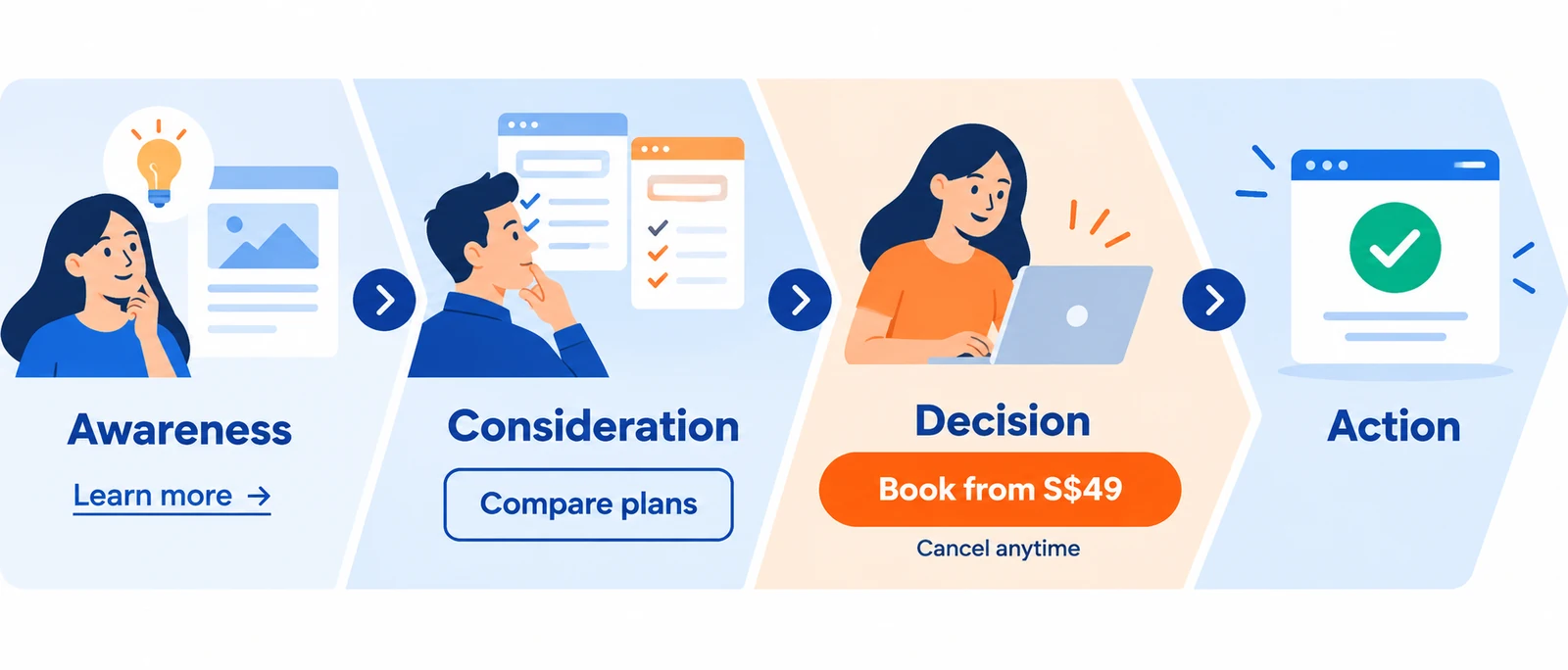
- Risk-reversing: “Cancel anytime” lowers hesitation before a paid signup.
- Question-based: “Ready to compare?” can work on blog posts.
Numbered checklist for writing a CTA
- Name the action in one verb and one object.
- State the outcome the user receives
- Show the price or time commitment, if any.
- Remove the nearest objection, such as “no card needed”.
- Place it where the user has enough information to decide.
A note on local language
Singapore users are fluent in English. Plain, direct English works best; avoid forced local phrasing.
CTA Placement and Visual Design
Placement strategy by page section
The primary CTA should be placed after the proof or price, rather than before it. A hero section can carry a secondary, low-friction CTA that offers instant access to a free resource. Repeat the primary CTA at the end of long pages so users know what to do next.
Visual design: contrast, white space and hierarchy
Make the primary button the most dominant element in its section, using one primary colour for the main action and a muted style for secondary links. Leave white space around it and keep the contrast high enough to meet the WCAG criterion noted earlier. An effective call to action should convert attention into action without visual clutter.
Mobile optimisation and touch-friendly sizing
Make buttons large enough to tap without error and place them in the lower thumb zone. Keep mobile forms short, as long forms drive abandonment.
A/B Testing CTAs: Sample Sizes, Significance and Segmentation
Test one change at a time, such as the verb, price cue or button colour, so you know what caused any difference. Run the test until you have enough conversions to separate a real difference from chance.
Worked example. At a 4% conversion rate, detecting a lift to 5% (95% confidence, 80% power) typically needs several thousand visitors per variant. At 1,000 visitors a day split evenly, that is roughly a week or more. Please calculate the sample size first, and do not stop early.
Segment results by device and traffic source, as a mobile winner may lose on desktop.
Real-World CTA Examples: Local and International
Examples below describe the general pattern of each approach. Please review each brand’s current site before quoting it, as live pages may change.
Singapore examples for landing pages and websites
- Price-first offers. Many Singapore service providers show a starting price and next step before users click.
- Familiar payment routes. Showing PayNow or GrabPay beside checkout reduces uncertainty.
E-commerce examples: product pages, checkout and cart recovery
- Product pages that show delivery windows next to the add-to-cart button tend to reduce drop-off.
- Cart recovery emails with a “Complete your order” button often outperform discount-led messages.
Social media and paid ad examples
- Paid social ads that state the offer and price in the first line encourage clicks.
- Retargeting works best with a direct button rather than a generic brand message.
Why these examples work
Each CTA matches the user’s stage. Price-first offers remove objections, payment cues reduce uncertainty, and retargeting buttons ask for one step because the user already knows the product.
Conclusion and Summary
Effective CTAs state a specific outcome, show the cost before the click, and place themselves where trust already exists. Choose the format based on the user’s stage and source, design for thumb use on mobile, and test one change at a time against a sample size that fits your traffic.
Frequently Asked Questions
What is the best call to action for a Singapore business website?
The best CTA states the outcome and cost plainly, such as “Book from S$49, cancel anytime.” Test it against a vaguer alternative with your audience.
How many CTAs should one page have?
One primary CTA, supported by one or two secondary links. More can split attention.
Do pop-ups hurt conversions on mobile?
They can, since interruptive pop-ups are particularly difficult to dismiss on small screens. Use them sparingly, with a specific offer.
How do I write a CTA that does not feel pushy?
Name the outcome honestly, state the cost and any commitment, and remove the nearest objection. Avoid fake urgency.
What is a reasonable CTA conversion rate, and how do I measure it?
No universal benchmark exists, as it varies by industry, offer, and traffic source. Divide completed actions by visitors who saw the CTA, and compare variants against your baseline.
Types of CTAs and When to Use Each
Buttons, forms and contextual links compared
Buttons suit a single clear action. Forms suit cases where the reader must provide information. Contextual links suit readers who are still reading. Match format to commitment: a button for “Add to cart”, a short form for “Get a quote”, and a text link for “See how it works”. Make clear what the step costs before the reader begins.
Banners, pop-ups, slide-ins and welcome gates
These can lift sign-ups but add friction, especially on phones. Use them sparingly, one prompt per screen. Singapore users are quick to close prompts that interrupt a task, so reserve pop-ups for readers who have shown clear interest, such as after viewing several pages.
Decision framework: matching CTA type to funnel stage and traffic source
| Reader stage | Best CTA format | Example wording |
|---|---|---|
| First visit, little trust | Text link or secondary button | “See pricing” |
| Comparing options | Contextual link | “Compare the three plans” |
| Ready to act | Primary button with price cue | “Book a 30-minute call” |
| Returning, cart abandoned | Reminder with exact item | “Complete your order” |
Visitors from search results often need a contextual link, while those from paid social ads may be ready for a primary button.
Desktop and mobile comparison
Desktop readers compare more options at once. On mobile, place the CTA within thumb reach. Test both layouts before launch.
How to Write Effective CTAs
Good Call-to-Action Phrases and Action Verbs
Start with a verb that names the exact outcome. “Submit” describes a form. “Get my quote” describes a result that readers value.
| Bad | Good | Why the rewrite works |
|---|---|---|
| Submit | Get my S$ quote | Names the outcome and price context |
| Click here | See full pricing | Tells the reader what they will see |
| Learn more | Compare the three plans | Sets a clear, bounded task |
| Buy now | Add to cart, pay with PayNow | Names a payment route readers recognise |
| Enquire | Book a 30-minute call | Specifies the time commitment |
If the reader cannot picture what happens next, the verb is too broad.
Creating Urgency Without Dark Patterns
Urgency works only when it is true. Fake countdown clocks and false stock warnings erode trust, and that cost more than the clicks they earn. Marketing teams should treat credibility as the asset that urgency consumes.
Use urgency only where it is factual:
- Real deadlines: “Early-bird rate ends 30 November” is fine if it really ends then.
- Verified stock levels: Show a live count only if it comes from your inventory system.
- Scheduled changes: “Price rises to S$120 from 1 December” works if the increase is set.
Creative CTA Patterns and When Each Fits
- Benefit-led: “Keep your weekends free” suits services where the result matters most.
- Question-based: “Ready to cut your delivery costs?” works for visitors who know the problem.
- Playful: “Treat yourself, add to cart” suits low-stakes products, not costly services.
Numbered Checklist for Writing a CTA
Work through these five steps before publishing any button or link:
- Verb: Does the first word name a specific action?
- Outcome: Does the CTA say what the reader receives
- Objection: What will the reader hesitate over (cost, time, commitment)? Address it nearby.
- Reassurance: Is there one trust cue nearby, such as “GST included”?
- Placement: Has the reader seen enough information to decide?
A Note on Local Language
Write in plain English for a bilingual, multicultural audience. Avoid slang such as “shiok” or “lah” on buttons. Naming familiar payment options such as PayNow or GrabPay signals practicality. Keep the wording consistent across every page so that readers can recognise the path to purchase.
CTA Placement and Visual Design

Placement decides whether a call to action is seen. Design decides whether it is noticed. Both depend on how far along the reader is in their decision. Readers usually ignore a button they don’t trust, no matter how bright it is. CTAs that appear too early tend to be skipped by people still deciding whether the website is worth their time, and a clear, free first step can keep those visitors moving toward a conversion. Effective marketing depends on this sequencing: the reader should see the offer only after you’ve made your case.
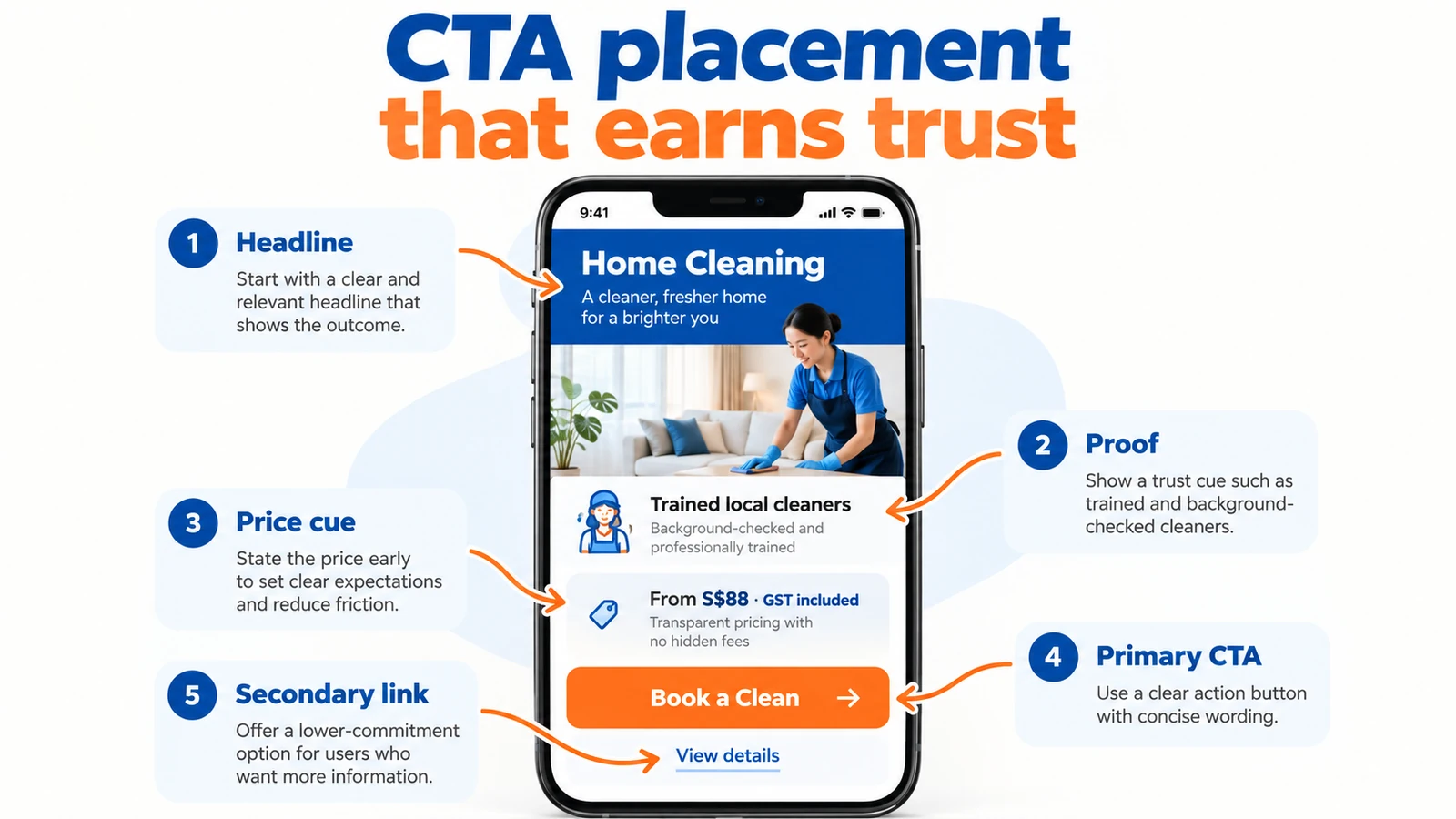
Placement strategy by page section
Match the CTA to the point where trust is highest:
- Above the fold: Suits low-commitment actions such as “See pricing” or a brand the reader already knows. Asking a first-time visitor to “Buy now” before they understand the offer tends to produce bounces, so help people take a small step first.
- After proof: Place the main CTA directly below reviews or a plain statement of what the reader gets, such as “From S$49, GST included, no setup fee”. Users who have just read the proof are the most likely to act, and a time-limited offer can add a sense of urgency here if it is genuinely limited.
- End of content: Use on long pages. Restate the outcome here, not just “Submit”.
- Sticky elements: Use one sticky CTA at most. A sticky bar, a pop-up, and a banner together create pressure.
Visual design: contrast, white space and hierarchy
Contrast. The CTA button colour must differ from the page background and from other interactive elements. WCAG 2.2 success criterion 1.4.3 requires at least 4.5:1 for normal text and 3:1 for large text. The W3C’s Understanding Contrast Minimum guidance details this requirement. WCAG 1.4.11 adds a 3:1 requirement for interactive element boundaries where needed to identify the control, so an outlined button on a pale background needs a visible edge.
Colour-independent cues. Pair the button with a label, icon, or border so readers with colour-vision differences and those on dim screens can clearly understand the action. Clear labelling helps people act and keeps click-through rates steady across all users, which supports the conversions the page is built to earn.
White space. Leave clear space around the button. Three buttons of equal weight in a row force a choice, and many readers will choose nothing.
Hierarchy. Use one primary CTA per screen and make secondary actions quieter, such as an outlined button or a text link. Where several CTA buttons sit on one page, only the primary one should carry full visual weight.
Mobile optimisation and touch-friendly sizing
Many Singapore visitors reach a website while standing or travelling. Design for one thumb.
- Tap target size: WCAG 2.2 success criterion 2.5.8 sets a floor of 24 by 24 CSS pixels. Apple’s Human Interface Guidelines list 44 by 44 points as the default control size for iOS and iPadOS, while Google’s Material Design guidance sets a comparable touch target size. Aim for the larger size on the main CTA.
- Thumb zones: On a tall phone held in one hand, the lower centre and lower right are the easiest to reach. Place the primary CTA there or in a bottom sticky bar.
- Full-width buttons: On small screens, a full-width button is easier to tap than a small link in the text.
Test on a real device. A layout that looks balanced on desktop can place the CTA under the browser’s address bar or behind a cookie banner on mobile.
A/B Testing CTAs: Sample Sizes, Significance and Segmentation
Test one change at a time. Use a sample size calculator with your conversion rate, the smallest lift you care about and 95 per cent confidence. For example, a page converting at 2.2 per cent and aiming for 2.6 per cent needs a calculated sample per variant; divide this by daily traffic and round up to full weeks. Declare a winner only at 95 per cent significance, never stopping early. Analyse mobile and desktop separately. Track click-through and conversion rates together, as more clicks can mean fewer sales.
The Best 50 Call-to-Action Lines You Can Use
The difference between a call to action that gets ignored and one that earns a click often comes down to a few words. “Submit” tells visitors what they must do. “Get my personalised quote” tells them what they will receive.
The best call-to-action lines combine a clear action, a tangible benefit and a reason to feel comfortable taking the next step.

Below are 50 ready-to-use CTA examples for Singapore businesses, covering websites, landing pages, e-commerce stores, lead generation campaigns, social media advertising and email marketing. Choose the ones that match your audience’s intent, then adapt them to your actual offer.
1. CTAs That Spark Curiosity and Encourage Exploration
These work best when visitors are still researching and are not ready to buy.
| # | Call-to-action line | Best used for |
|---|---|---|
| 1 | See How It Works | Software, services and product demonstrations |
| 2 | Discover What’s Possible | Innovative products and new services |
| 3 | Find the Right Solution for Me | Guided product selection |
| 4 | Explore My Options | Visitors comparing alternatives |
| 5 | Watch a Quick Demo | SaaS platforms and digital tools |
| 6 | See What You’re Missing | Feature discovery and product comparisons |
| 7 | Preview the Results | Reporting tools and sample deliverables |
| 8 | Find Out What Fits My Needs | Personalised recommendations |
| 9 | Show Me What’s Included | Packages and service descriptions |
| 10 | Take a Closer Look | Product details and portfolio showcases |
Why these work: They invite exploration without demanding commitment. Visitors can learn more while staying in control of their buying journey.
2. CTAs That Highlight Value, Pricing and Savings
For Singapore audiences comparing costs, transparent pricing and tangible benefits can help reduce hesitation.
| # | Call-to-action line | Best used for |
|---|---|---|
| 11 | See All Prices in S$ | Pricing pages and local offers |
| 12 | Get My Personalised Quote | Professional and home services |
| 13 | Calculate My Potential Savings | Financial calculators and cost comparisons |
| 14 | Compare Plans Side by Side | Subscription and insurance products |
| 15 | See Exactly What I’m Paying For | Transparent pricing pages |
| 16 | Check the Total Including GST | Singapore e-commerce checkout |
| 17 | Find a Plan That Fits My Budget | Tiered services and subscriptions |
| 18 | Show Me the Cost Breakdown | High-value purchases and B2B services |
| 19 | See What My Budget Can Get Me | Custom packages and service bundles |
| 20 | Get a No-Obligation Estimate | Renovation, education and agency services |
Why these work: They address the questions buyers frequently ask before committing: How much does it cost? What am I getting? Are there additional charges?
3. CTAs That Generate Leads and Book Consultations
These suit businesses where the next meaningful conversion is a qualified enquiry, appointment or consultation rather than an immediate purchase.

| # | Call-to-action line | Best used for |
|---|---|---|
| 21 | Book My Free Consultation | Agencies and professional services |
| 22 | Speak to a Specialist | Technical and complex services |
| 23 | Get My Customised Action Plan | Marketing and business consulting |
| 24 | Schedule a Call at My Convenience | B2B lead generation |
| 25 | Request a Tailored Proposal | Corporate services and enterprise sales |
| 26 | Ask an Expert Before Deciding | Education, technology and advisory services |
| 27 | Check Availability for My Preferred Date | Appointments and bookings |
| 28 | Get My Free Website Audit | SEO and digital marketing agencies |
| 29 | Show Me How to Improve My Results | Performance marketing and consulting |
| 30 | Let’s Discuss My Requirements | Complex and customised services |
Why these work: Visitors understand what happens next. The CTA promises a specific interaction or deliverable rather than an ambiguous sales conversation.
4. CTAs That Encourage Purchases and Bookings
These work best when customers have already assessed the offer and are ready to act.
| # | Call-to-action line | Best used for |
|---|---|---|
| 31 | Add This to My Cart | E-commerce product pages |
| 32 | Choose My Delivery Date | Online retail and home services |
| 33 | Reserve My Appointment | Clinics, salons and professional services |
| 34 | Confirm My Booking | Travel, events and appointments |
| 35 | Check Stock Availability | Retail and limited-inventory products |
| 36 | Complete My Purchase Securely | E-commerce checkout |
| 37 | Pay with PayNow | Singapore checkout pages supporting PayNow |
| 38 | Review My Order Before Paying | Checkout reassurance |
| 39 | Get My Order Delivered | Delivery-focused retail offers |
| 40 | Reorder My Favourites | Repeat purchases and customer retention |
Why these work: They eliminate ambiguity and help customers understand the immediate next step. Checkout CTAs are especially useful when they clarify payment, delivery or order confirmation.
5. CTAs That Reduce Risk and Encourage Sign-Ups
These work for visitors who are interested but need reassurance, a trial experience or a smaller initial commitment.
| # | Call-to-action line | Best used for |
|---|---|---|
| 41 | Start My Free Trial | SaaS and subscription platforms |
| 42 | Try It Before I Decide | Interactive product demonstrations |
| 43 | Get Started Without a Credit Card | Free trials with no payment details required |
| 44 | Download My Free Checklist | Content marketing and lead magnets |
| 45 | Get My Free Sample | Samples, templates and digital resources |
| 46 | Book My Trial Class | Education and fitness providers |
| 47 | Save My Progress for Later | Multi-step applications and shopping journeys |
| 48 | Join the Next Workshop | Webinars, training and events |
| 49 | Notify Me When Places Open | Fully booked services and limited-capacity events |
| 50 | Continue Where I Left Off | Abandoned carts and incomplete registrations |
Why these work: They reduce perceived risk, offer a useful first step or help visitors return to an action they have already started.
How to Choose the Right CTA for Your Website
Not every call to action is suitable for every visitor. Match your wording to the stage of the customer journey:
| Customer stage | What visitors are thinking | Recommended CTA |
|---|---|---|
| Awareness | “What does this business offer?” | See How It Works |
| Consideration | “Is this the right option for me?” | Compare Plans Side by Side |
| Evaluation | “How much will it cost?” | Get My Personalised Quote |
| Decision | “I’m ready to proceed.” | Confirm My Booking |
| Retention | “I’d like to buy or engage again.” | Reorder My Favourites |
Five Rules for Turning These CTA Examples into Better Conversions
- Start with an action verb. Words like “Get”, “Compare”, “Book”, “Calculate” and “Download” tell visitors what they can accomplish.
- Make the benefit explicit. “Get My Personalised Quote” conveys more value than “Submit Enquiry”.
- Remove uncertainty before the click. Show pricing in S$, clarify GST where applicable, and explain whether a booking or consultation carries any obligation.
- Match the button to the destination. A “Download My Free Checklist” button should deliver the checklist, not lead to an unrelated sales form.
- Test rather than assume. Compare CTA variants using actual clicks, completed enquiries, purchases and qualified conversions. The phrase that attracts the most clicks may not generate the most revenue.
Important: Only use promises that are genuinely true. “Free consultation”, “No credit card required”, “No-obligation estimate” and similar reassurances must accurately reflect what customers receive.
The Bottom Line
A compelling CTA does not simply tell people to click. It helps them feel confident about taking the next step.
Start with the visitor’s intention, choose a specific action, and remove the biggest obstacle to moving forward. Then run A/B tests using your traffic and conversion data.
The best call to action is not necessarily the most creative phrase. It is the one that makes the next step clear, worthwhile and easy to take.
Other Real-World CTA Examples: Local and International
Theory only goes so far. The clearest way to see why a call to action works is to look at how it was built. Where a brand’s outcome can’t be verified, we mark the example as illustrative. Working professionals can use these patterns to test their CTA strategies.
Singapore Examples for Landing Pages and Websites
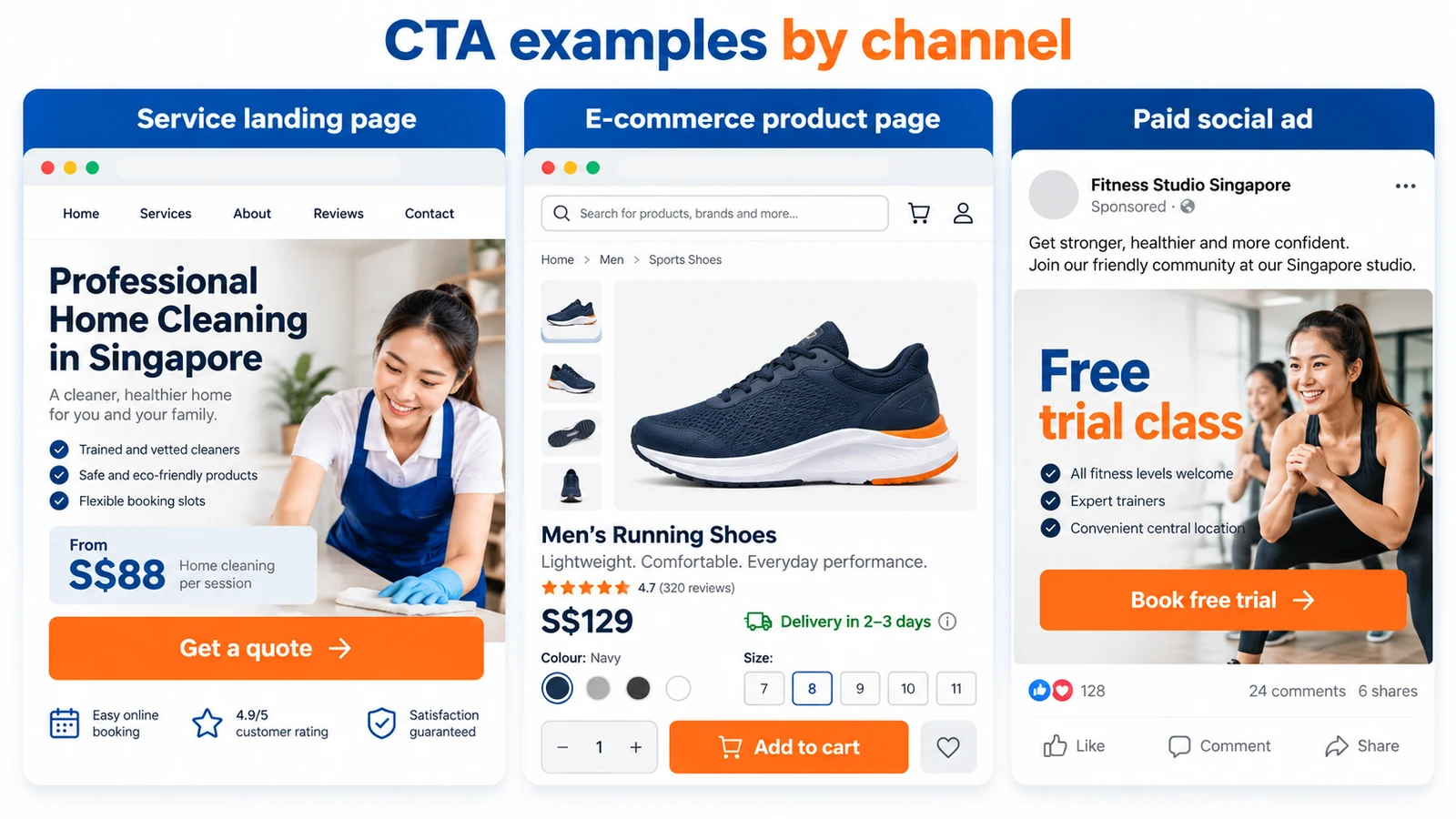
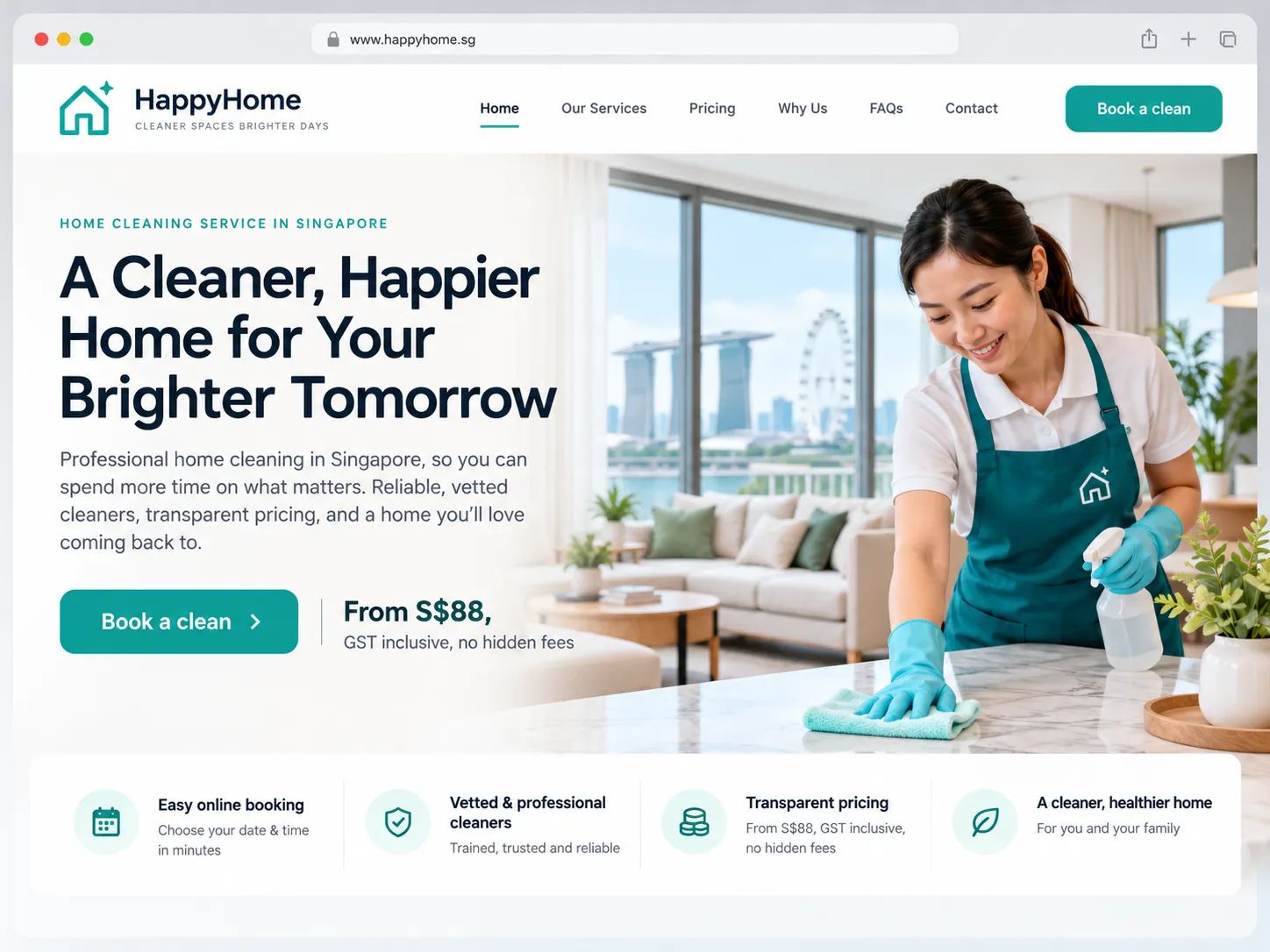
A landing page for a Singapore service business tends to win when the CTA includes a price and a next step.
- Before: “Enquire now”
- After: “Get a quote in 2 minutes” beside “From S$88, GST inclusive, no hidden fees”
E-Commerce Examples: Product Pages, Checkout and Cart Recovery
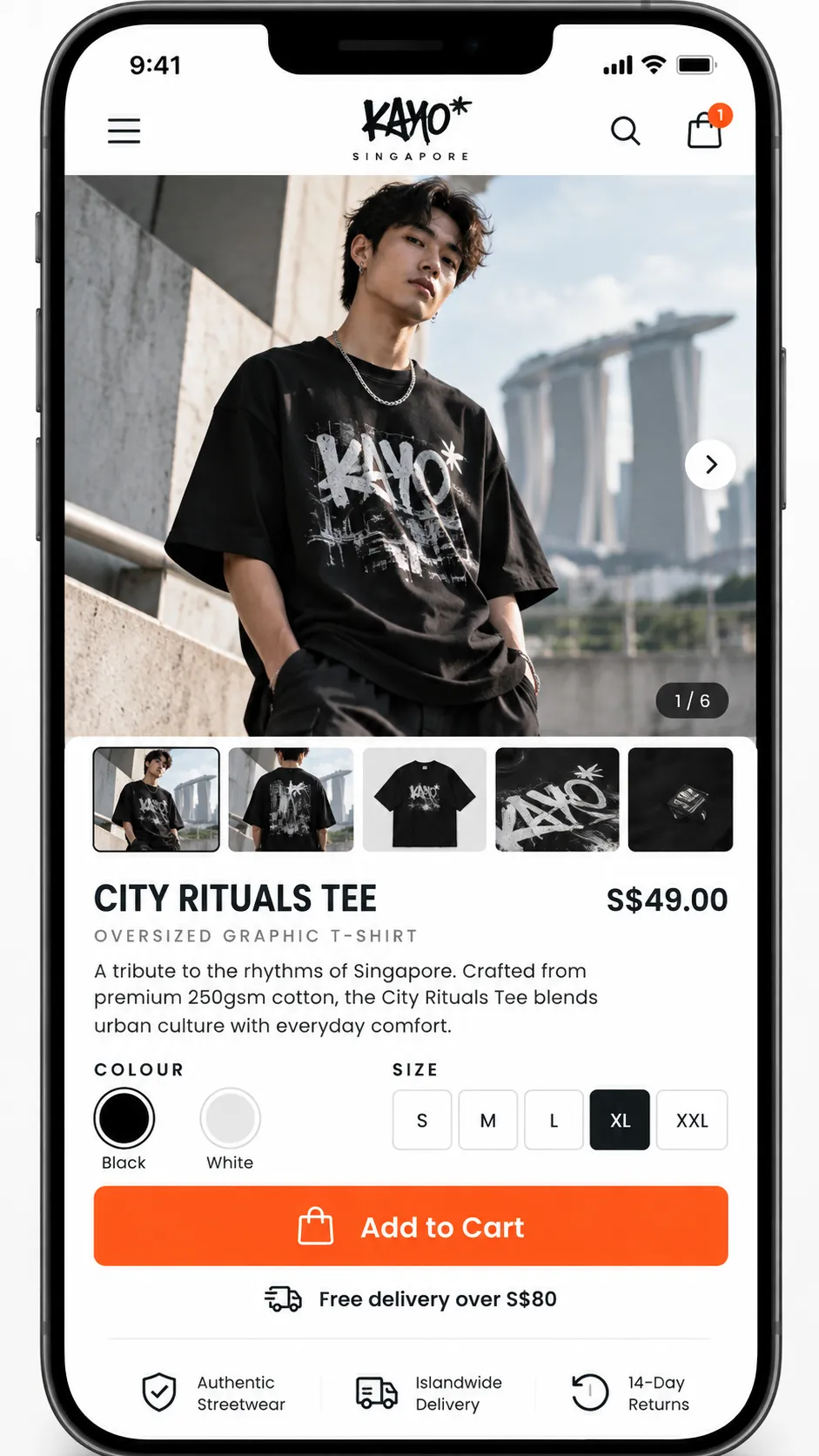
Singapore shoppers often pay via PayNow, GrabPay, or credit card. Naming a familiar payment route near the purchase button reduces hesitation.
- Before: “Continue”
- After: “Pay S$79.90 now” with “PayNow or card” beneath
Social Media and Paid Ad Examples
In short-form video, clear verbs tend to outperform vague wording because people have seconds to decide.
- Before: “Find out more”
- After: “Book a free trial class”

Why These Examples Work
The CTA states an exact outcome, shows the cost or commitment before the click, and sits where the reader is already persuaded. Where a result cannot be verified, treat the example as a template to test, not a proven win.
Conclusion and Summary
A call to action works in Singapore when it matches how the reader weighs trust, price and convenience. Remove friction, state the cost and outcome clearly, then test. When no CTA can rescue a weak offer, fix the offer instead.
Score each CTA from 0 to 2 on five questions before publishing:
- Name the outcome: does the verb say exactly what happens on click?
- Show the cost: is the price in S$, GST status and next step visible before the tap?
- Place it where trust peaks: is the reader persuaded by that point?
- Design for one thumb: does it work one-handed on a phone?
- Use only true urgency: is any deadline or stock level real?
Totals of 8 to 10 justify a live test. Below 5, rewrite first.
Next, build the page that sends traffic to this CTA, using our landing page design guide.
Frequently Asked Questions
What is the best call to action for a Singapore business website?
The strongest CTA names the exact outcome and shows the cost before the click. “Get a quote in 2 minutes, no obligation” usually beats “Learn more” for service businesses. State fees in S$, with GST shown where it applies.
How many CTAs should one page have?
Aim for one primary CTA per screen. Secondary links, such as “View pricing,” should not compete for the same tap.
Do pop-ups hurt conversions on mobile?
They can, especially when they appear immediately and cover the content. A banner triggered after scrolling, with an easy close button, is less disruptive. Test the timing on your traffic.
How do I write a CTA that does not feel pushy?
Describe what happens next and what it costs, then add one reassurance, such as “Cancel anytime.” Avoid fake urgency, which erodes trust.
What is a reasonable CTA conversion rate, and how do I measure it?
There is no universal benchmark. Divide conversions by the visitors who saw the CTA, and compare each CTA only to its own earlier version.