
| AI Summary
Singapore businesses can generate website traffic by matching each channel to the action they want visitors to take. Local search and search ads can reach people who already need a service. Content, social posts, email and referrals can introduce the business or bring people back. A 30-day test helps teams connect visits to enquiries or sales, find problems on landing pages and decide where to spend next. |
Singapore businesses can generate website traffic by improving service pages for local searches, running a small paid search test, sharing helpful content through social media and email, and earning links from relevant partners. Google Search Console tracks Google Search clicks. Google Analytics 4 helps businesses see which channels bring website sessions and important actions such as enquiries or purchases.
Key Takeaways
- A submitted quote form gives a service business a stronger sales signal than a click on its contact button.
- A page with search impressions and few clicks calls for a different fix from a page with plenty of visits and few enquiries.
- A campaign can pay more per click and still spend less per enquiry.
- Third-party traffic estimates can reveal topics worth exploring. The business’s own reports are the basis for decisions about its leads and sales.
A Singapore air-con servicing business could get visitors from Google Maps, a condo directory or an ad for emergency repairs. Each visitor arrives with a different reason to click. Someone who needs a repair today may book straight away. Someone checking service prices may come back next week.
The first month gives a small team time to follow those visits from the first click to the first enquiry. The sections below show what to set up, which sources to test and how to tell whether the website helped visitors take the next step.
Week 1: Set a Traffic Goal and Check Your Tracking
What counts as website traffic?
Website traffic is the flow of visits to a site. In Google Analytics 4 (GA4), those visits are grouped into sessions. The same person can start a session on Monday and another on Friday. A rise in sessions can therefore reflect more people finding the business, existing visitors returning or both.
The GA4 Traffic acquisition report groups sessions by source or channel. Organic Search covers unpaid search visits. Paid Search covers visits from search ads. Referral traffic comes through links on other websites. Email and social can appear as their own channels. GA4 may classify a visit as Direct when it has no usable source information, so Direct traffic can include more than typed addresses and bookmarks.
| Traffic source | Example for a Singapore business | What the visit can help achieve |
| Organic search | A homeowner finds an air-con repair page through Google | A visit from someone looking for a service |
| Paid search | A search ad takes the homeowner to a repair quote page | An enquiry from a campaign the business can test |
| Referral | A condo directory links to the provider’s service page | A visit from someone checking local providers |
| Organic social | An Instagram post links to a guide on air-con leaks | Interest from people who recognise the problem |
| A servicing reminder takes an existing customer to the booking page | A repeat booking |
Pick one action to measure
A service business can start with completed quote requests or confirmed bookings. A shop can start with completed purchases. A team that needs to build a customer list might choose newsletter sign-ups. GA4 calls actions a business marks as important key events. The team can keep other signals, such as contact-button clicks, available for troubleshooting.
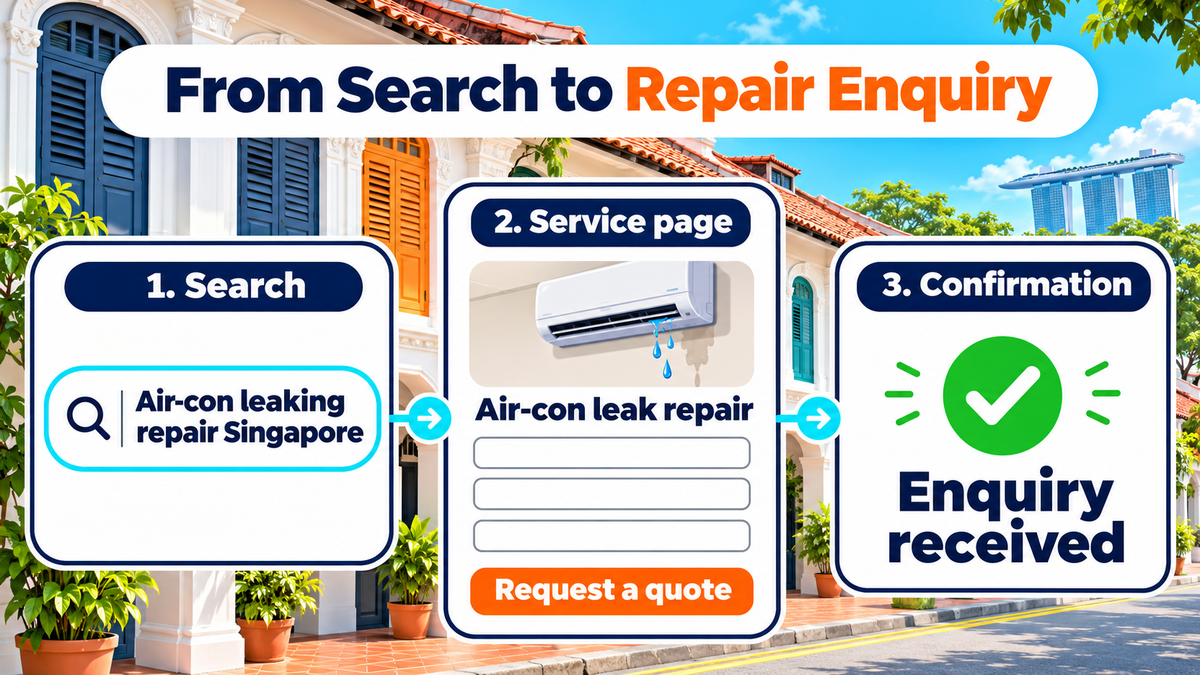
A quote form shows why the distinction helps. A visitor may tap “Request a quote”, see the form and leave when it asks for too much information. That click tells the business someone showed interest. A successful submission tells the team it has an enquiry to follow up. A test submission on a phone can confirm that the website records the action and that the sales team receives it.
A first-week record can be as simple as this:
- Page: Air-con repair service page.
- Main action: Completed repair quote request.
- Starting figures: Sessions, completed requests and requests the team could serve.
- Tracking check: The success event fires after the form goes through.
- Review date: 30 days after the test starts.
Give the visit a destination
A landing page is the first page a visitor sees after clicking a link. A person who searches “air-con leaking repair Singapore” should land on a page that covers leaks and repairs. The page can show the areas served, the information needed for a quote and a short form. A confirmation message tells the visitor the request went through and explains when to expect a reply, if the business can give a reliable timeframe.
Week 2: Get Found in Local Search
Match each search to a page
Customer questions give a business a place to start. An accounting firm might hear questions about what a company secretary does, what a package includes and how to request a quote. Those questions point to different pages. A short guide can explain the role. A package page can show the work each option covers. A service page can explain how to start and what details the firm needs.
A new page earns its place when it answers a separate need. “Company secretary Singapore” and “Singapore company secretary service” could lead to the same service page. Several pages built around near-identical phrases can leave readers choosing between pages that say the same thing. Google’s SEO Starter Guide explains how descriptive titles and link text help people understand what they will find on a page.
| What the customer wants | Example search | Page to offer |
| Understand a service | What does a company secretary do? | A guide with a short answer and an example |
| Compare options | Company secretary package Singapore | A page showing what each package includes |
| Contact a provider | Company secretary services Singapore | A service page with a quote form |
Check what people already search for
The Search Console Performance report shows Google Search queries, impressions and clicks. An impression means a result appeared under Google’s counting rules. A click means someone followed the result. A Google Search Console reporting routine can help a team connect a change in clicks to a page or group of searches. The country filter can narrow the report to Singapore when the business serves local buyers.
An air-con repair page might appear for searches about water dripping from an indoor unit. If its search title only says “Home Services”, the team can test a title that names air-con repairs. The page itself can describe the problem and what happens during a visit. If the page already earns clicks and few visitors request quotes, the team can inspect the page on a phone and check the form before rewriting the search title again.
Google’s documentation on AI search features says that the same SEO basics apply to AI Overviews and AI Mode. A service page can answer a question near the top and give details a customer needs before booking. For air-con repairs, that could include what to report when booking or whether the technician needs access to the outdoor unit. The value comes from information the business can confirm.
Help nearby customers find the business
An eligible business can keep its Google Business Profile up to date with the correct category, hours, phone number and website link. Google explains that local results depend mainly on relevance, distance and prominence. A local SEO audit can help a team spot wrong contact details and gaps in listings before customers call or visit.
The profile’s website link should take people somewhere that answers their next question. A bakery with two shops could link each profile to its own location page. Each page could show the address, collection hours and how to place an order. An air-con company that visits customers could show its service areas and how to book. Location pages are easiest to maintain when each has details customers can use.
Week 3: Bring People Back Through Content, Social and Email
Give one customer question several uses
An inbound marketing plan can start with a question the team answers every week. An air-con business might publish a guide on what to tell a technician about a leaking unit. A short social post can show which details to note, such as when the drip starts and where it lands. The website guide can hold the full explanation and link to the repair page for readers who want to book.
A team can make more of that guide with a few changes in format:
- Website guide: A short explanation of the issue and the details that help the technician prepare.
- Social post: A photo or short clip showing the details a homeowner can describe.
- Email: A seasonal reminder that links to the guide and gives existing customers a way to book.
- Partner link: A property manager can share the guide with residents when it answers a question they ask.
Send readers to the page promised in the link
A social post about repair prices should link to a page that explains prices or what affects a quote. A collection reminder should link to the page for that shop. This gives readers a reason to continue when the page opens. The team can start with one platform where customers already ask questions, then check how often those visits lead to the intended action.
Email can bring customers back when there is a reason to return, such as a servicing reminder or a new booking slot. In a small-business lead generation plan, a short email can follow up after someone asks for information. Campaign tags in Google Analytics help the team tell visits from that email apart from visits from other messages. The business can use the same naming pattern for each send so its reports are easier to read.
A referral link works best when the other site has a reason to send people to the business. A neighbourhood directory can point visitors to a shop’s location page. A supplier can link to a guide that answers a question its customers ask. One relevant link can put a page in front of people who already care about the topic.
How to Read Traffic Before Spending More
Compare search clicks, sessions and enquiries
Search Console and GA4 answer different questions. Search Console shows how people find the site in Google Search. GA4 shows the sessions and actions it records on the website. A sales sheet or booking system shows whether an enquiry could become work. Each record covers a different part of the visit, so the totals can differ.
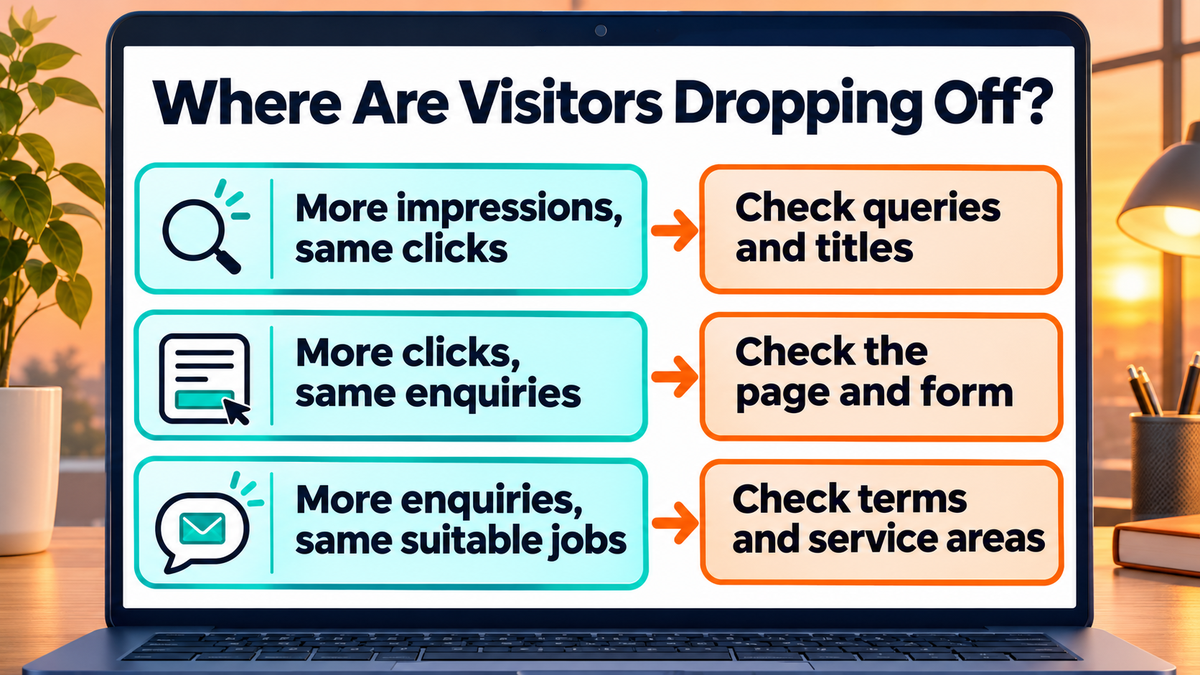
| What the team sees | What to check next |
| Search impressions rise while clicks stay flat | The search queries and whether the title describes the page |
| Search clicks rise while enquiries stay flat | The landing page, form and offer on a phone |
| Enquiries rise while suitable jobs stay flat | The search terms, service areas and requests the team receives |
An engaged session in GA4 lasts longer than 10 seconds under the default setting, records a key event or includes at least two page or screen views. It helps show whether visitors did something after arrival. A person can qualify as engaged while reading a guide and leave without asking for a quote. Enquiries and sales still deserve their own columns in the report.
Use traffic estimates for outside research
SpyFu’s website traffic checker can help a business spot topics or pages another site may draw Google Search visits from. An estimate can suggest a question to explore. It cannot tell the team how many people booked a service, how much they spent or how many visits came through a private mailing list. The team can use its own reports to decide whether a similar topic attracts the customers it serves.
A site’s own data can also need context. If visits fall after a public holiday, one week may tell the team little about demand. A comparison with a similar period can help. If the fall starts the day the site changes its booking page, the team can check tracking and links first. If visitors report that the page hangs before the form appears, website speed optimisation gives the team a specific area to investigate.
Week 4: Test Paid Search and Compare Costs
Start with a service people can book
A small search ad test can focus on one service, one landing page and one action. A repair business could advertise leak repairs in the areas it serves, send visitors to the repair page and count completed quote forms. A Google Ads and SEO comparison can help the team weigh the value of immediate search visibility against the time needed to build organic traffic.
The Google Ads search terms report shows eligible searches that triggered ads. A business that only handles home repairs can look for terms about commercial servicing and consider excluding them if they bring clicks the team cannot serve. A check of actual enquiries can then show whether people reached the right page and asked for the service advertised.
Compare cost per enquiry
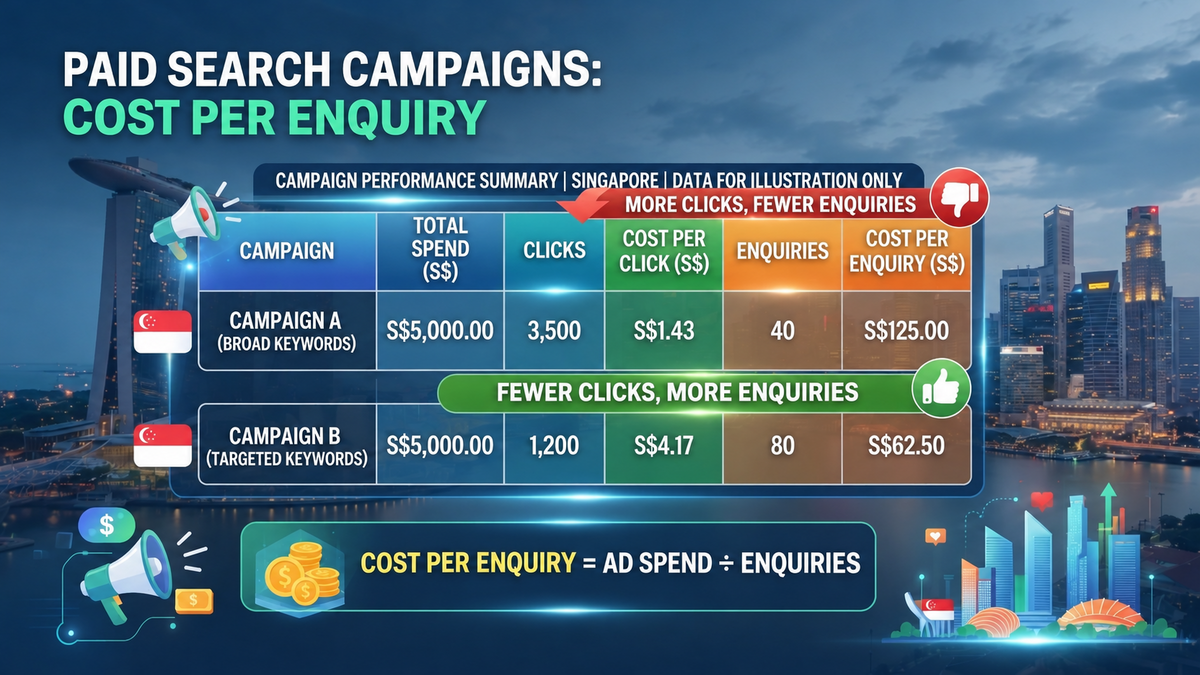
Cost per enquiry equals ad spend divided by completed enquiries from the campaign. A campaign can pay more for each click and still bring enquiries at a lower cost. The example below uses the same spend for both campaigns. Campaign B receives fewer clicks and twice as many enquiries. Its cost per enquiry is half of Campaign A’s.
| Illustrative campaign | Ad spend | Clicks | Cost per click | Enquiries | Cost per enquiry |
| Campaign A, broad keywords | S$5,000 | 3,500 | S$1.43 | 40 | S$125.00 |
| Campaign B, targeted keywords | S$5,000 | 1,200 | S$4.17 | 80 | S$62.50 |
The sales team can check how many enquiries from each campaign match the services offered. If many Campaign B requests fall outside the service area, the cost per suitable enquiry could tell a different story. Sales records also help the team judge return on investment, which depends on the value and cost of the work won. The figures in the table are for illustration.
How to Choose Your Next Traffic Channel
Score the options against your goal
A small team can rate each channel from one to five on four points. A high score means the channel serves that point well for the business. Search ads might score high for speed because a campaign can start bringing visits once it runs. Email might score high for cost if the business has an active subscriber list. A service page might score high for lasting value if it can answer a question customers ask throughout the year.
| Scoring point | Question for the team |
| Speed | How soon can the team get enough visits to learn from? |
| Cost | Can the business afford the spend and staff time? |
| Control | Can the team change the audience, message or destination page? |
| Lasting value | Can the work keep bringing visits after the first push? |
The same scores can lead to different choices. A new provider with spare appointments may value speed and test paid search. A business with a steady customer list may get more from a booking reminder. A shop with plenty of visitors and few orders may spend its next week on the product or checkout page. Each team can weight the points based on the problem it has to solve.
Set a rule for the next review
A review date and a spending limit give a test a stopping point. The team can set a maximum it is prepared to pay for a suitable enquiry, using what it knows about how often enquiries become jobs and what those jobs are worth. A campaign with a handful of clicks may need more time to show a pattern. A campaign that keeps sending people to a broken form needs a fix before the next round of spend.
Turn Website Traffic Into Enquiries and Sales
The next 30 days can start with one service page and one action. A team can check that the action records, choose a source likely to send the right visitors and set a date to review the result. At the review, the sales or booking record can show whether the enquiries were worth following up.
A page that earns visits and loses people at the form is a candidate for conversion rate optimisation. If the team needs help deciding whether to work on search, ads or the landing page first, a digital marketing consultation with MediaOne can start with that page and the traffic it already receives.
Frequently Asked Questions
Can a QR code on a flyer generate website traffic?
A QR code can bring people from a flyer, counter sign or event handout to a website. A bakery could send readers to a collection menu, while a training provider could send them to the registration page for a specific class. A tagged link for each print location can help the business see which placement sent visits.
Can visitors from an English page reach a Chinese version?
A business can add a visible language link between English and Chinese versions of a page. Each version should carry the same core service details, and staff should be able to keep both pages current. A company with many translated pages can use Google’s documentation for multilingual sites as a starting point for making those pages easier to find.
What should a business do with visits to a sold-out product?
A sold-out page can explain whether the item will return and offer a stock alert if the shop can send one. A related item can help shoppers who need something sooner. If an ad still promises the sold-out product, the team can pause it or update the offer so visitors know what they can buy before they click.
Can a business promote a service before it opens for bookings?
A page can state when bookings are expected to open, if that date is confirmed, and explain what the service will cover. An email sign-up can give people a way to hear when booking starts. The page should make the next step explicit so visitors know whether they can book now or register interest.