
| AI Summary
Instagram SEO helps Singapore businesses match their profiles and posts to the words customers search for. This guide explains how to choose local search terms, write captions, use hashtags and make Reels and carousels easier to follow. It also covers which Instagram content can appear on Google and how to use Instagram Insights to see whether discovery leads to enquiries, bookings or sales. |
Instagram SEO is the practice of making your profile and posts easier to find in Instagram Search. Businesses can use customer search terms in their profile name, bio and captions, with relevant hashtags and location tags where appropriate. Eligible public posts and Reels from professional accounts can also appear in Google Search.
Key Takeaways
- A search for “pottery classes Singapore” can show different results to different people. One search from your own account gives you a limited view.
- A profile visit is a chance to answer practical questions about price, location, delivery or bookings.
- A Reel can show what a product looks like in use. A carousel can explain details a shopper may want to save.
- Alt text helps people using screen readers understand a photo. The best description tells them what the image shows.
- A fair post comparison uses the same format, a similar topic and the same amount of time since publication.
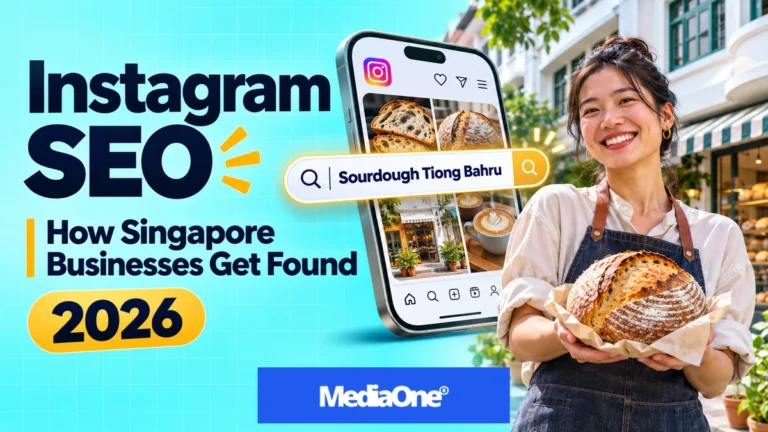
A shopper looking for sourdough in Tiong Bahru might search Instagram before deciding where to go. Your bakery could have a feed full of fresh loaves, but someone who has never heard of you may search for the bread or the neighbourhood first. The words on your profile and posts can help that shopper find you.
The same applies to online shops, studios and service businesses. You can start with one product or service, one phrase a customer might type and one post that answers their question.
What Is Instagram SEO and How Does It Work?
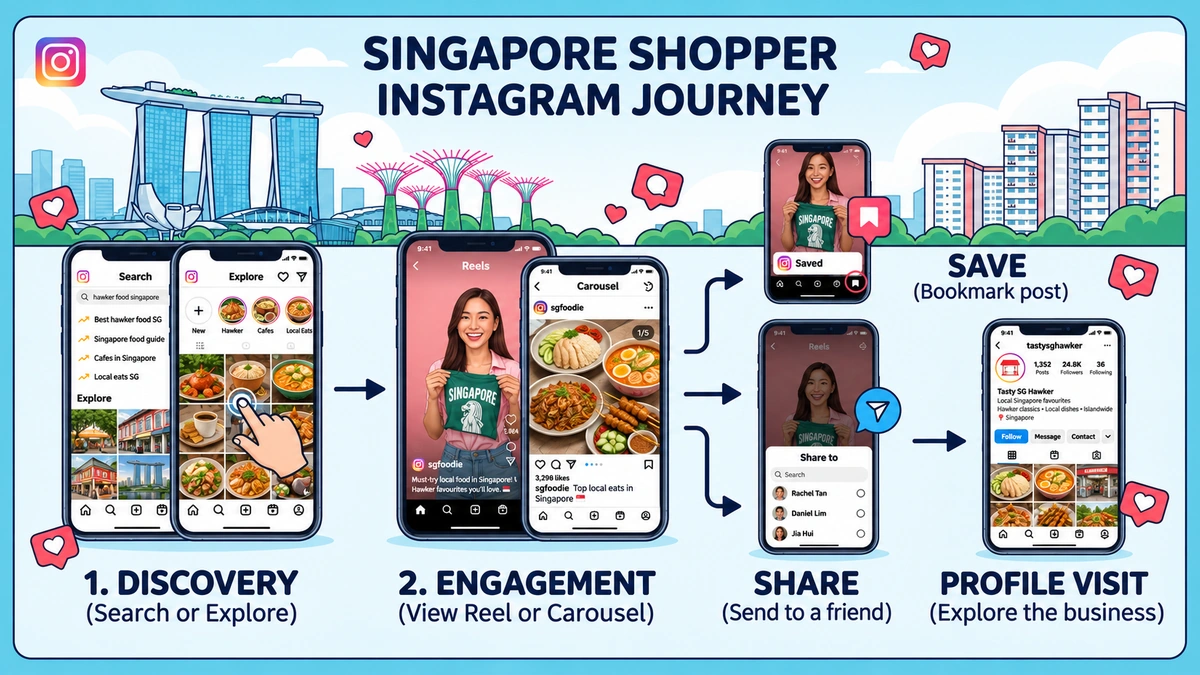
Instagram SEO helps people find your account or content when they search inside the app. A customer might type your brand name, a product such as “eggless birthday cake” or a service and place such as “pottery class Joo Chiat”. Each search tells Instagram something about what the person wants.
What Instagram Search looks at
Instagram’s explanation of Search puts the words a person types first. Instagram looks for matches in places such as usernames, bios, captions, hashtags and locations. Past activity, including accounts a person follows or posts they have viewed, can affect the order of results. Instagram can also consider how popular a result is when several matches are available.
That helps explain why the shop owner and a new customer may see different results for the same search. The owner probably visits the shop’s account often. The customer may have spent more time looking at other shops or products. When you test a phrase, record what appears and look for patterns across several searches.
How Search differs from Explore and Reels
Search begins with words someone types. Explore and the Reels tab can show people posts they never asked for. Meta describes these as recommendations from accounts people don’t follow. The same post can reach someone through either route, depending on what they do in the app.
Imagine a homeware shop posts a Reel showing how a drying rack folds. One shopper finds it while searching for “foldable dish rack”. Another sees it while browsing Reels. The first shopper needs to recognise that the video answers their search. The second needs to see the rack fold before they scroll past. Both jobs belong in an Instagram marketing plan.
How to Optimise Your Instagram Profile for Local Search
A profile should help a first-time visitor work out what you sell, where you operate and how to buy or book. That visitor may have found one post and tapped through without knowing your brand. The name, bio and link should make sense on their own.
Profile name and username
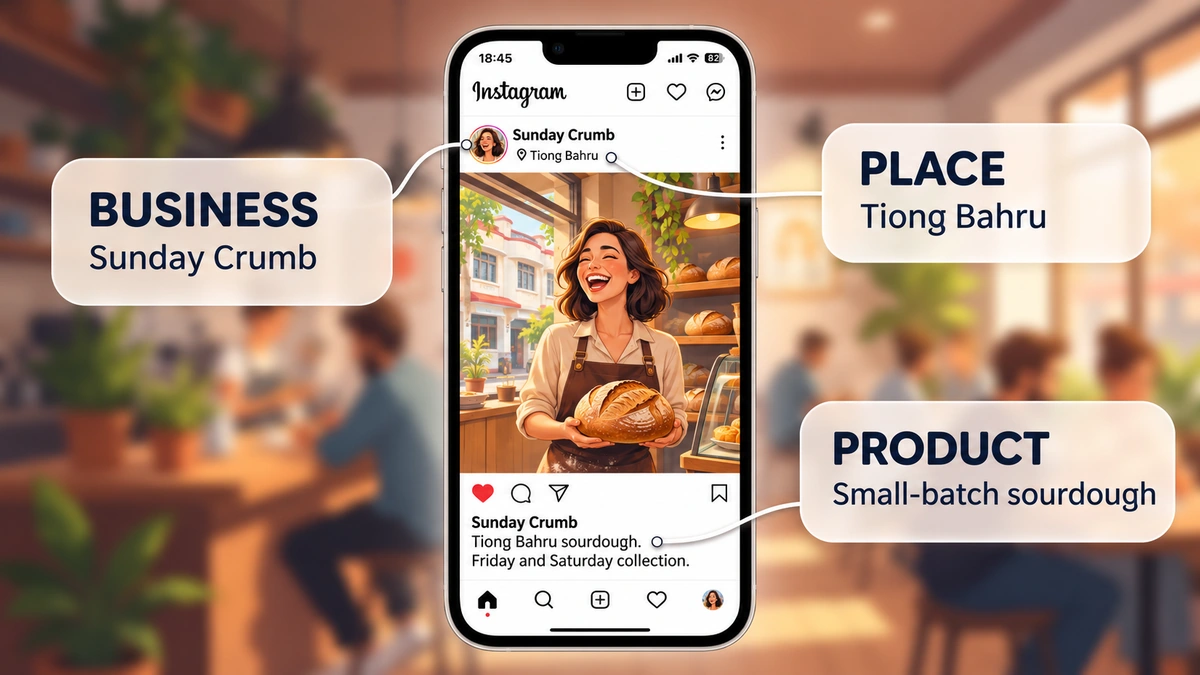
The username is your @handle. The profile name is the display name people see on your account. A bakery could keep its familiar handle and use a display name such as Sunday Crumb | Sourdough Bakery. That gives a new visitor the product category while keeping the name regular customers recognise.
A service business can follow the same idea. Little Kiln | Pottery Classes says what a studio offers. Little Kiln | Pottery, Gifts, Events, Singapore asks the reader to work out which offer comes first. The display name works best when it puts the main offer in plain words.
Bio, neighbourhood and booking link
The bio can fill in the details the name leaves out. A bakery might write, “Small-batch sourdough baked in Tiong Bahru. Friday and Saturday collection. Pre-orders open each Monday.” Those lines answer three questions a buyer may have before tapping the order link.
| Profile detail | What it can tell a customer | Singapore example |
| Bio | What the business sells and whom it serves | “Beginner pottery classes for adults” |
| Location | Where to visit, collect an order or get delivery | “Joo Chiat studio, five minutes from the bus stop” |
| Profile link | Where to take the next step | A booking page with upcoming class dates |
| Pinned post | What a new visitor often needs first | Class prices, opening hours or collection instructions |
A shop with a physical address can use the neighbourhood in its bio and tag the venue on posts filmed there. A delivery-only business can name the area it serves in words a customer understands. For a business with a storefront, local SEO can help people find the same location details when they look on Google.
The destination should match the offer in the post. If a Reel invites people to book a beginner pottery class, the link should lead to a page with beginner classes, prices and dates. A visitor who has already decided to check availability should be able to find it on the first screen.
How to Find Instagram Keywords Your Customers Use
Instagram keyword research starts with customer language. The word your team uses on a stock sheet may differ from the words a shopper types. A furniture shop might label an item “compact dining solution”. A customer is more likely to describe what they need as “small dining table for HDB flat”.
Start with customer questions
Direct messages, product reviews and sales conversations can show what buyers want to know. A customer who asks whether a table can seat four in a small flat gives you an idea for a post. Several people asking about the same thing give you a stronger reason to make it.
- List the main offers. A bakery might start with sourdough, cinnamon rolls and birthday cakes.
- Add real customer details. A phrase can include a neighbourhood, a budget, a size or an occasion. “Eggless birthday cake Singapore” gives the baker a specific need to answer.
- Check what Instagram shows. Search each phrase and look at the posts, places and accounts that appear. Suggestions can supply ideas for wording. They give you no reliable count of how often people type a phrase.
- Keep the phrases you can answer. A post for “same-day cake delivery” only belongs in the plan if the business offers same-day delivery and can explain the order cut-off.
Match one search to one post
The reason behind a search is its keyword intent. Someone typing “how to keep sourdough fresh” wants storage help. Someone typing “sourdough Tiong Bahru” may want to find a bakery or check its opening hours. The two searches point to different posts.
| Search phrase | What the customer may want | Post idea |
| “Small dining table for HDB flat” | Dimensions and room to move around | Carousel with table measurements and chairs pulled out |
| “Beginner pottery class Singapore” | A look at a first lesson | Reel showing the clay, the wheel and what a beginner makes |
| “Eggless birthday cake Singapore” | Flavours, sizes and ordering details | Carousel with cake examples, serving sizes and order lead time |
| “Cold brew Tiong Bahru” | A nearby café and when it opens | Short video showing the drink, storefront and hours |
A small list is enough to begin. Each phrase should give you a different customer question or a different way to show the answer. If two phrases lead to the same post, choose the one that sounds closest to how customers talk.
How to Write Instagram Captions and Alt Text
A caption should tell a reader what they are looking at and give them the detail they came for. Alt text has a different job. It describes the image for someone who cannot see it.
Captions that answer the search
The first line can name the product, service or place in words that make sense on their own. A café might write, “Our Tiong Bahru cold brew is made in small batches and served over ice.” The next line could say when it is available. A post about a workshop might need more room for the price, dates and what the fee covers.
A helpful caption often includes three pieces of information.
- What the post shows. “A foldable dining table for small flats.”
- The detail a buyer needs. “It seats two when folded and four when open.”
- The next action, if there is one. “The full dimensions are on the product page linked in our bio.”
Different posts can use different openings. A product demonstration can start with the product name. A care post can start with the problem the reader wants to solve. A launch can start with when the item becomes available. Across a social media content plan, that variety gives people different reasons to stop and read.
Alt text for photos and carousels
The W3C’s approach to describing informative images centres on what the image communicates. For a furniture carousel, a useful description could be, “Oak dining table folded against a wall with two chairs tucked underneath.” A second slide can describe the table open, with four seats. Each description gives the reader a different piece of information.
A photo of a shop’s opening-hours sign calls for the hours in the description or nearby caption. A close-up of a bag can describe the material and pocket shown. The words should make sense when a screen reader reads them aloud.
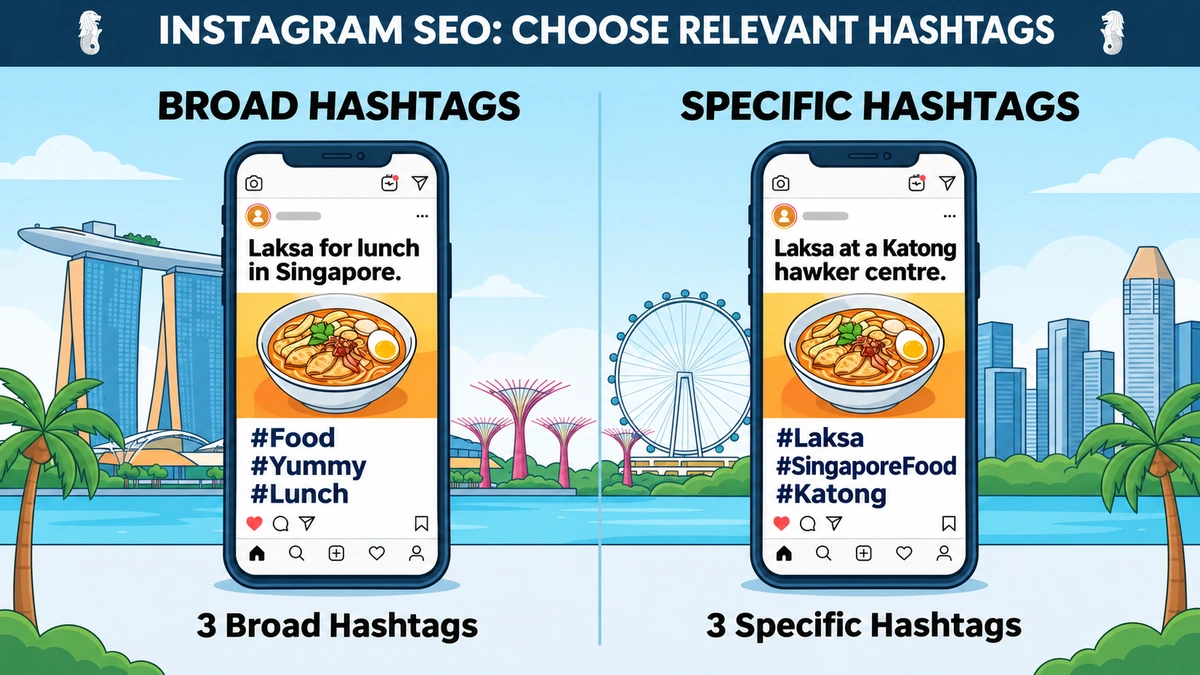
Hashtags can label the subject of a post. Instagram announced a limit of five hashtags per post. A business can use fewer when fewer describe the post well. A specific tag can tell the reader what they will find, while a broad one may have little connection to the product.
A bakery posting about weekend collection could use #Sourdough, #SourdoughSingapore and #TiongBahru in the caption. The location tag can name the shop or the place featured. The caption can then carry information the tags cannot convey, such as when orders close and where to collect a loaf.
Before choosing a tag, a quick search can show what people tend to post under it. A local tag that mostly brings up holiday photos may be a poor choice for a product. A product tag that shows similar items in the right market is a better description. The post itself still needs to tell a shopper what the business offers.
How to Make Reels and Carousels Worth Opening
A Reel works well when seeing something happen helps a customer understand it. A carousel works well when the customer needs to compare details or follow steps at their own pace. The best format depends on the question the post answers.
Reels that show the answer early
A video for “how to fold a small dining table” can open with the table halfway through folding. The viewer can see the result before the video explains each step. A pottery studio could open with a student lifting a finished bowl from the wheel, then show how the teacher helps a beginner shape the clay.
On-screen text can name what is happening. Subtitles can carry spoken instructions for people who watch on mute or cannot hear the audio. The post caption can then cover the details someone may look for after watching, such as the size of the table or the length of a class.
Businesses can film their own products, staff or demonstrations when those details help a buyer decide. Meta’s recommendation rules explain that some content can stay on Instagram while being ineligible for recommendations. If the app flags an issue, Account Status is a sensible first check before changing the caption or tags.
Carousels that help people compare
The first slide should tell someone what they will learn by swiping. The next slides can answer one question each. A shop that sells work bags could build a post around what fits inside.
- Slide 1: “What fits in our 13-inch work tote?”
- Slide 2: A photo of a laptop inside the padded sleeve.
- Slide 3: The bottle pocket and its measurements.
- Slide 4: The bag on someone’s shoulder, with the strap length.
- Slide 5: The total dimensions and available colours.
That post gives a buyer something to refer back to or send to someone else. These social media engagement signals can help you see how people use a post. A product question in the comments can also point to a detail worth adding to your next carousel.
Can Instagram Posts Appear on Google?
Yes. From July 2025, Instagram expanded search engine access to eligible public content from professional accounts. That means some public posts and Reels can appear in Google results when the account and content are eligible and the account permits indexing. Google decides what it indexes and shows, so an eligible post may still be absent from the results.
A bakery could publish a Reel about its eggless birthday cakes and include the city, available sizes and ordering lead time in the caption. Those details help someone who lands on the post from Google understand the offer. That visitor may never have seen the bakery’s profile or its other posts.
For a business that takes orders online, the website product page can carry the full price, stock and delivery information. The Instagram post can show the cake being decorated or compare two serving sizes. Each page has a job, and the customer can move from seeing the product to deciding whether to order.
How to Measure Instagram SEO With a Simple Audit
A post can bring new people to your profile, answer a product question or prompt a booking. Those are different results. The audit starts with the job you gave the post, then checks whether people took the action you wanted.
Check each post at the same age
A first review after 48 hours gives a small team a routine. A second review after seven days gives posts more time to reach people. Those are example checkpoints for your own records. You can choose different ones as long as you compare posts at the same age.
Instagram’s Reels watch-time metrics can help show whether people stay to see the demonstration. Average watch time is the time viewers spend watching on average. Compare Reels of similar lengths before deciding that an opening or topic worked better. A six-second clip and a 45-second lesson ask for different amounts of attention.
| What you want to learn | What to record | What to test next |
| Are new people seeing the post? | Accounts reached and non-follower reach, when shown | A more specific topic or a different cover |
| Do viewers stay for the demonstration? | Reel length and average watch time | Showing the result sooner |
| Do people keep or pass along the post? | Saves and shares | Adding measurements, a price list or a short checklist |
| Do people take the next step? | Profile activity when available, link clicks, booking requests or product enquiries | Making the price, booking link or order instructions easier to find |
Separate discovery from customer action
Reach tells you that people saw the post. It cannot, by itself, tell you how many found it through Search or which phrase they typed. A high-reach Reel could have found most viewers through recommendations. A post with lower reach could have answered a question for several buyers who were ready to order.
A social media marketing strategy can give each post a job before it goes live. For a “beginner pottery class” Reel, the studio might record how many people ask about available dates. If the messages mostly ask what the class costs, the next post can show the price on screen and say what it includes.
A small team can run this audit in a shared spreadsheet. One row per post is enough. Record the search phrase, format, date, results and the one change you plan to try next. After several posts, you can see whether the same issue keeps turning up. A series of booking questions may point to a profile link problem. Short watch times across several demonstrations may point to openings that take too long to show the product.
From Instagram Searches to Customer Enquiries
A good first test starts with a question your team answers every week. A bakery that gets asked about cake collection could post the available times and show customers how to find the shop. A studio that gets asked about beginner classes could show what a first lesson looks like and link to a page with open dates.
When the posts start bringing in enquiries, the next step is to see which topics lead to bookings or orders. MediaOne’s social media marketing services can help businesses connect content planning and reporting to those customer actions.
FAQs About Instagram SEO
Should I create a separate Instagram account for each outlet?
A single account is often easier for a small team to keep current. It can show each outlet’s address, hours and offers in separate pinned posts or Highlights. Separate accounts can work when outlets serve different audiences and have staff who can post updates and reply to messages regularly.
Should a Singapore business post in more than one language?
Customer messages can help you decide. If people often ask questions in English and Mandarin, for example, a business could write the main caption in the language most of its audience uses and add a short second-language version of the price, dates or ordering details. The aim is to help customers understand the offer in the language they use.
Can I update an older Instagram post?
Yes. A caption update can correct an opening time, add a size or explain how to order. An image with an old price may need a new post so customers see the right figure in the image as well as the caption. A caption edit gives readers better information, with no guaranteed change in search position.
Can I test a Reel before showing it to followers?
If your account has the option, Trial Reels let you show a Reel to people who do not follow you first. A studio could test a video for a new workshop and review the response before sharing it with followers. The feature tests how that audience responds to the video. It does not tell you where the Reel ranks for a search phrase.
How can a seasonal post stay useful after the offer ends?
The caption can include the full dates, including the year, so customers can tell when the offer ran. After it ends, the business can update the caption to say that orders have closed. A new post can give the dates for the next run. That helps someone who finds last year’s post avoid planning around an offer that has expired.