

| AI Summary
The top WordPress alternatives serve different needs. Wix and Squarespace suit small teams building a service site. Shopify and BigCommerce focus on online sales. Webflow and Framer give designers more control over page layouts. Ghost brings articles, newsletters and memberships together. Joomla, Statamic, Craft CMS and Strapi suit teams that need more control over how they manage content. Singapore businesses should compare annual costs in S$, check which payment methods customers can use and test how the new platform handles existing page addresses. |
Wix and Squarespace are WordPress alternatives for small business websites. Shopify and BigCommerce suit online stores, while Webflow and Framer suit design-led sites. Ghost works well for newsletters and memberships. Joomla, Statamic, Craft CMS and Strapi are options for teams that need custom content tools and have technical support.
Key Takeaways
- A free trial can reveal how much work a routine task takes. One staff member should try editing a page, publishing it and checking it on a phone.
- Two plans with similar prices can cost different amounts once the business adds payment fees, paid apps and staff time.
- A list of WordPress plugins is a starting point. The new site must also handle the jobs those plugins do, from taking bookings to sending order emails.
- A page with steady search traffic or sales deserves its own check before and after a move. A short list of these pages makes launch checks easier to manage.
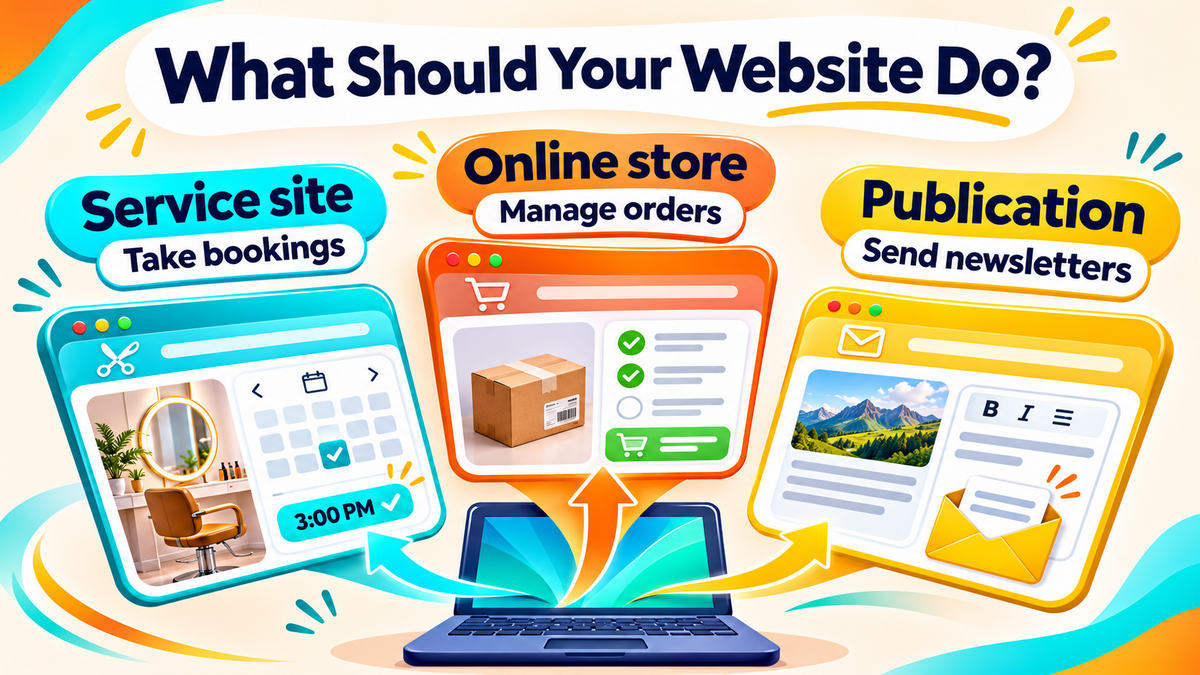
A new website platform can save a small team time. It can also add steps to work the team already does well. A tuition centre that changes class times every week needs a different setup from a retailer that sends out orders each day.
The top WordPress alternatives below cover both kinds of business, as well as publishers and teams with developers. The comparison starts with what each platform does well, then looks at what Singapore businesses should test before paying for a plan or moving a live site.
Top WordPress Alternatives at a Glance
These 15 options are grouped by what they help businesses do. Hosted platforms keep the site online for you. Self-hosted systems give you more control over hosting. Headless systems store content separately from the website that displays it.
| Platform | Best for | What to check first |
| Wix | Service sites, bookings and small shops | Which plan includes bookings or payments |
| Squarespace | Portfolios and service sites built from templates | Whether scheduling and selling tools cost extra |
| Hostinger Website Builder | Small sites with a few pages | Renewal cost, billing term and export options |
| Carrd | One-page sites and campaign landing pages | Which plan includes a custom domain and forms |
| Weebly | Simple sites with separate service and contact pages | Which plan connects a custom domain |
| Shopify | Stores that manage products, stock and orders daily | Singapore payment options and app costs |
| BigCommerce | Stores with complex catalogues or B2B needs | Plan limits, sales thresholds and payment terms |
| Magento Open Source | Custom stores with developer support | Hosting, updates, extensions and support costs |
| Webflow | Marketing sites with custom, reusable layouts | Content and publishing limits |
| Framer | Campaign sites, portfolios and landing pages | Page and content limits |
| Ghost | Publications, newsletters and memberships | Which plan supports the required member features |
| Joomla | Self-hosted sites with several languages or editor roles | Who will maintain the software and extensions |
| Statamic | Content-rich sites built with Laravel | Licence, hosting and developer time |
| Craft CMS | Sites that need custom editing screens and content fields | Edition limits, hosting and support |
| Strapi | Content shared across a website, app or other channels | Who will build and maintain the site visitors use |
Website Builders for Small Teams
Wix
Wix suits a business that wants one place to manage pages, enquiries and appointments. A salon can test a service page, a booking form and a confirmation email during the same trial. That gives the owner a better idea of daily work than a template preview does. A paid Wix website plan is needed to connect a custom domain. The tools available for taking payments also depend on the plan.
Wix is a candidate when staff will handle most site changes. The trial should include a real edit, such as changing a service price or adding a public holiday notice. The staff member who makes that update after launch should try it on the test site.
Squarespace
Squarespace suits studios, consultants and other service firms that want a site built from a template. A photographer could publish a gallery, a page for each type of shoot and an enquiry form. A consultancy could use the same approach for services, case studies and contact details.
The business should check what its Squarespace plan covers, especially if staff need appointment scheduling or plan to sell products. A template that displays ten projects well should also make it easy for a visitor to find one type of project and send an enquiry.
Hostinger Website Builder
Hostinger Website Builder offers a drag-and-drop editor and tools for building a small business site. It suits teams with a short list of needs, such as service pages, a contact form and a gallery. A home cleaning business could use a trial build to see how quickly it can update its service areas and add a new enquiry field.
The first bill and the renewal bill deserve separate lines in the budget. The business should also check the billing term and what it can export if it moves again. These details can affect a small site long after launch.
Weebly
Weebly suits a small team that needs separate pages for services, opening hours and contact details. The Weebly plan comparison lists a free plan for basic use and paid plans that connect a custom domain.
Ecommerce Platforms for Online Stores
Shopify
Shopify suits businesses that use the site to take orders and manage stock. A food retailer can trial a product with several pack sizes, a pickup order and a refund. Running those tasks together shows whether the owner can manage the store without a separate spreadsheet for each step.
Shopify’s Singapore pricing lists plan features and payment rates. The platform also has a separate list of payment methods for Singapore merchants. Merchants should check eligibility and rates for the options they need. A store moving from WooCommerce can also scope Shopify SEO alongside the build, especially for product and collection pages that already bring in shoppers.
BigCommerce
BigCommerce suits teams comparing tools for large catalogues or more complex selling. A distributor can use a trial to see how staff add product options and handle different customer needs. An online retailer can load a sample catalogue and check whether staff can find, update and group items without help.
The BigCommerce plan comparison gives buyers a place to check plan limits and payment terms. A B2B team should confirm where features such as customer-specific pricing are available. A successful demo with a few products tells the team how the editor works. A test with real product data tells it how much daily work the store will take.
Magento Open Source
Magento Open Source gives developers software they can use to build a custom store. The software is free to download. The business still pays to run the site and may need support for hosting, extensions and updates. Adobe Commerce is Adobe’s separate commercial offering, so quotes should name the product they cover.
A wholesaler might need its website to share stock levels with a warehouse system or show a large range of products with detailed options. Those needs can justify a custom ecommerce website build. A team with a small catalogue and standard checkout may find a hosted store easier to run.
Platforms for Custom Design and Publishing
Webflow
Webflow suits a design or marketing team that wants to control page layouts and reuse them. A consultancy could build one case study template with fields for the client, project and result. The next case study can use the same layout while staff fill in fresh details.
Webflow’s site plans list publishing and content limits. A team with several editors should also check permissions and any workspace costs. A good trial gives an editor a brief and asks them to publish a case study on their own. Any step that still needs a designer belongs in the operating plan.
Framer
Framer suits landing pages, portfolios and marketing sites where page design is a large part of the work. A team launching a new service can build a page with a headline, examples and a form, then check how it looks on a phone. The same trial can show how quickly staff can make a second page.
The Framer plan comparison helps teams check how many pages and content collections their site can use. A company that expects to add several service areas can test a group of pages before committing. The first landing page may be easy to build. The next twenty need a layout and editing process the team can reuse.
Carrd
Carrd suits one-page websites and campaign landing pages. A workshop organiser could put the schedule, venue and sign-up form on one page. A Carrd Pro plan can add a custom domain and forms.
The comparison table still lists all 15 platforms. Moving the Carrd profile keeps the article within the 3,500-word limit.
Ghost
Ghost suits a business that publishes often and wants its site, email newsletters and members in one place. A trade publication could publish a weekly article on the web, send it by email and offer paid issues to members. A team that only posts news a few times a year may get more value from a general website builder.
Ghost’s hosted plans list newsletter and membership features. A publisher should trial sign-up, email delivery and access to a paid post with a few test accounts. That small test helps the team see what a reader experiences from the first visit to the first issue.
Content Platforms for Teams With Technical Support
Joomla
Joomla is an open-source content management system with multilingual tools and user permissions. An association could use it to publish in several languages and give editors access to the sections they manage. The business can choose its host and budget for someone to maintain the site.
A sample build should include one article in two languages and two accounts with different roles. The team can then check how much work it takes to add a translation, publish it and update the original later.
Statamic
Statamic is built on Laravel, a framework developers use to build websites and apps. It lets developers set up fields around the content editors use. A property firm, for example, could give each listing fields for location, floor area and contact details. Staff can enter those details in the same order each time.
The value comes from making frequent updates easier for editors. A team should ask its developer how the site will handle changes to those fields after launch. An editing screen that works well for ten listings should also work when staff need to update a hundred.
Craft CMS
Craft CMS gives developers tools to build custom editing screens. A training provider could create each course once, then show it on a course page, an instructor’s profile and a list of upcoming classes. The team can test whether one edit updates every place the information appears.
A quote for Craft should cover the work needed to set up templates and fields, along with hosting and support. The licence is one part of that cost. The amount of content to organise and the number of page types can change the size of the project.
Strapi
Strapi is a headless content management system. It stores content and sends it to a website or app through a connection called an API. A business could manage branch hours in one place, then display them on its website and in its app. A developer still needs to build and maintain what visitors see.
Strapi is worth testing when several channels need the same information or when the team has specific design and data needs. A test should include the person who edits the content and the developer who connects it to each channel. Both need to see how a change goes live.
How to Compare Costs and Daily Work
Work out the full cost in Singapore dollars
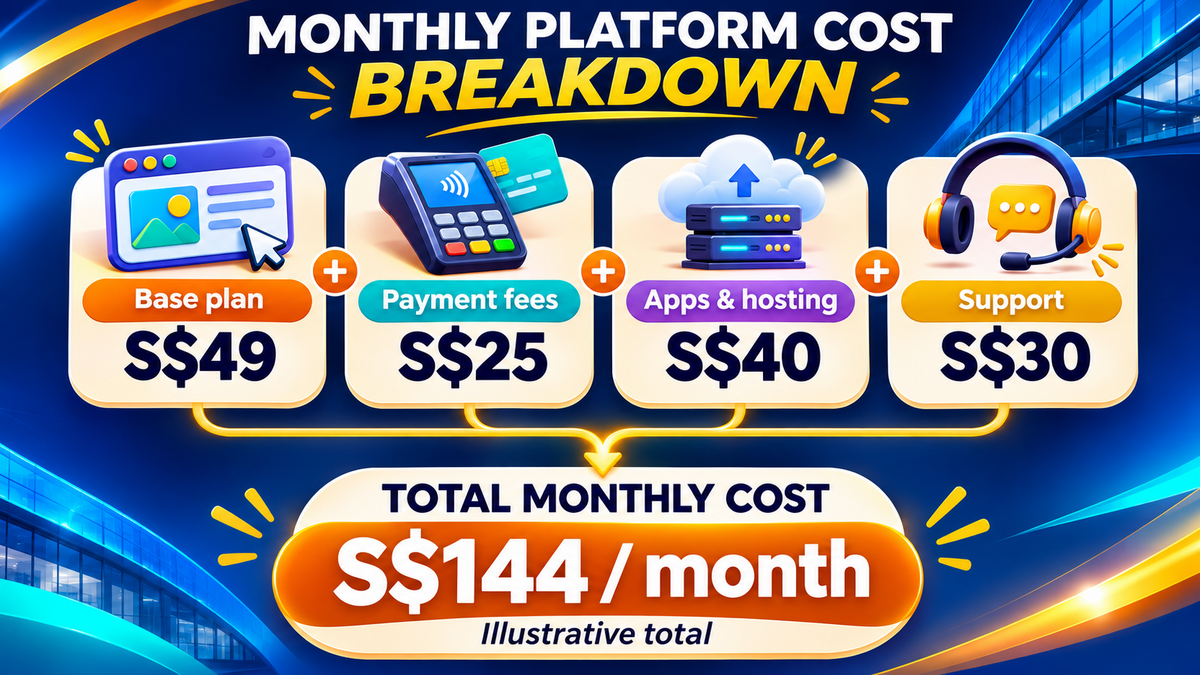
The monthly plan fee is one part of the budget. The business should also allow for its domain, paid apps, any separate hosting, payment fees and outside support. For a plan billed in a foreign currency, the budget should show the amount in S$ and allow for exchange rate changes and any card charges.
A simple example shows how the costs add up. A plan costs S$49 a month, estimated payment fees come to S$25, and apps and hosting add S$40. Ongoing support adds S$30. The total is S$144 a month. The figures are illustrative. A business can use the same calculation with its own sales volume and quotes, then record one-off build and migration costs separately.
Test how customers pay and staff handle orders
A Singapore store should test checkout in S$ with the methods its customers use. If PayNow is on the list, staff should check how the platform or payment provider handles it, how the business matches each payment to an order and what happens during a refund.
A live store has more steps than a checkout demo. A trial should cover one normal order, one failed payment, one refund and one delivery or pickup change. For teams planning ecommerce SEO, the trial should also show how staff edit category pages and handle products that go out of stock.
Compare speed using similar pages
A site can feel slow because of large images, heavy page scripts or how it loads content. A platform demo with a few light pages tells the team little about how its own site will behave. The comparison is fairer when both versions use similar photos, forms and layouts.
Google’s Core Web Vitals cover loading, response to user actions and changes in page layout as a page loads. A team can test a home page and a busy product or service page on mobile. The results can show which part needs work, such as a large first image or a button that moves while the page loads.
Assign the work that continues after launch
A hosted builder handles the service that keeps the site online. Staff still need to manage accounts, app access, content and forms. With self-hosted software, the business also needs someone to manage hosting, updates and backups.
Before buying, the team should name who will handle routine edits and who can fix a problem. A team reviewing its current WordPress website setup can use the same exercise to see which tasks a move would remove and which it would keep.
How to Move From WordPress
List the pages and features the new site needs
A migration starts with the pages customers use and the tasks they perform. The list should include pages that bring enquiries or sales, plus forms, bookings, orders and any connection to other tools. A baseline website SEO audit can help the team spot issues before it starts rebuilding.
The WordPress export tool can export content such as posts and pages. The new platform determines what it can import. A backup and a trial import give the team a way to check text, images, links and page layouts before it moves the whole site.
Match old page addresses to new ones
The team should keep important page addresses where the new platform allows it. Each address that changes needs a relevant new destination. For example, an old /services/aircon-repair/ page can point to /aircon-repair/ if the new page covers the same service.
Google’s site move documentation explains how to map addresses, use permanent redirects and submit a new sitemap. MediaOne’s website relaunch SEO guidance also covers checks before and after the move. A test should start with the old address and end on the right live page.

Check the site after launch
The first checks should cover the actions that keep the business running. Staff can send an enquiry, place a test order or book an appointment, then confirm that the right person receives it. The team can also check mobile menus, contact links and analytics events for those actions.
The SEO review should continue after launch. The team can watch important pages in Google Search Console, check errors and compare traffic with its earlier records. A sudden drop on one page gives the team a specific place to check its redirect, internal links and search visibility.
Test Your WordPress Alternative Before You Move
A short trial gives a business something concrete to compare. The trial can use one real page, one task staff do every week and one action customers need to complete. A team that can publish an update, receive an enquiry or process a refund during the trial has a better sense of how the platform will work after launch.
For a site with years of content or several connected tools, MediaOne’s website design and development services can help turn those needs into a build brief. A shortlist, a sample page and a record of what the current site does give both teams a place to start.
Frequently Asked Questions
Can a business keep its .sg domain when it changes platforms?
Yes. A business can usually leave the domain with its current registrar and point it to the new website. If the same domain handles business email, the person making the change should preserve the records that route mail and test sending and receiving after the switch.
Can a team build the new site while the old one is live?
Yes. The team can use a temporary address or a private test site to build and review the replacement. Staff can check pages and forms there while customers continue to use the live site. Password access is helpful when the test site contains private material.
Can customers keep their old passwords after a store migration?
That depends on what the old platform can export and what the new one accepts. The store owner should test a sample account before launch. If customers need to set new passwords, the store can explain when the change takes effect and where to reset them.
Who should own the new website account if an agency builds the site?
The business should hold the primary account and give the agency the access it needs. The handover should cover billing, recovery details and staff roles. If the business later changes providers, it can update access while keeping control of the account.
Can a business run WordPress alongside a new online store?
Yes. A business could keep its main site on WordPress and run the store on a subdomain such as shop.example.com. The team should test the move from the main site to the shop on a phone and make sure visitors can get back to the main site after checkout.