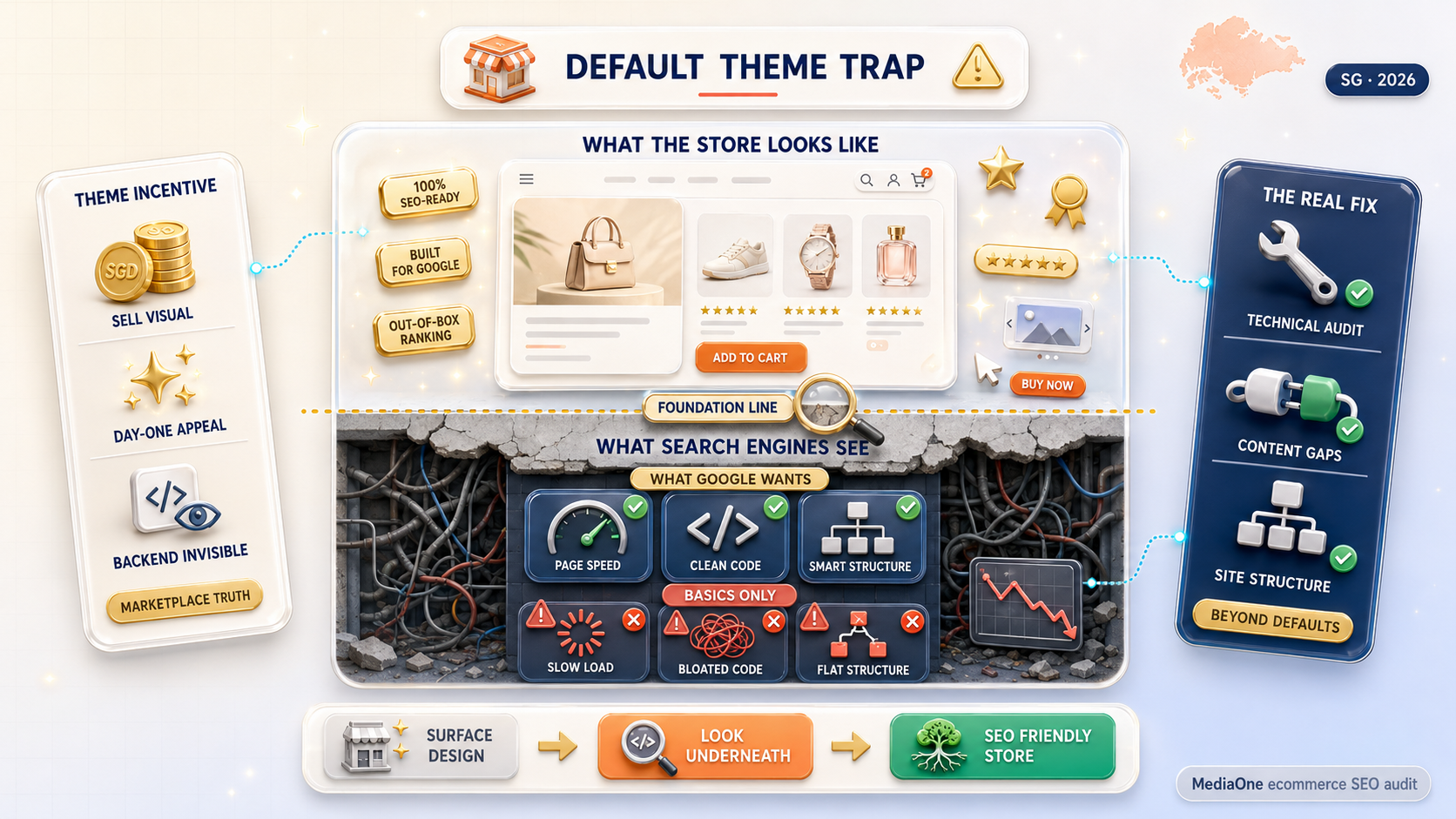
When you launch a brand-new online shop, it is easy to assume that buying a sleek, professional template means your search engine optimization is already taken care of. Theme developers love to plaster big claims across their landing pages: “100% SEO-Ready,” “Built for Google,” or “Out-of-the-Box Ranking Power.”
It sounds great, but is it actually true? For the most part, no.
While modern platform templates give you basic groundwork, relying on default settings is one of the primary reasons store owners end up with flatlining search traffic. Most pre-built designs prioritize flashy visuals, dynamic banners, and complex animations over what search engines actually care about: fast page speeds, clean website code, and smart structural organization.
Building a truly seo friendly ecommerce store means going beyond surface-level design to fix the underlying technical glitches, content gaps, and site architecture issues that default themes leave behind.
Key Takeaways
- “SEO-Ready” Is Marketing: Marketplace themes prioritize visuals (carousels, web fonts, heavy scripts) over speed and clean code.
- Core Technical Flaws: Default themes often introduce render-blocking scripts, messy heading trees (H1–H4), missing schema tags, and duplicate filter URLs.
- Platform Realities: Platforms like Shopify offer convenience but restrict URL structures; open-source options like WooCommerce offer total control but require technical maintenance.
- The Fix: Audit app code, fix heading hierarchies, implement complete JSON-LD schema, configure canonicals for faceted navigation, and write intent-focused content.
In our technical audits across dozens of e-commerce storefronts, we consistently find that store owners conflate aesthetic polish with search readiness. A store can look stunning to human visitors while under the hood, search engine crawlers struggle through bloated script bundles, duplicate parameter loops, and missing structured data. Fixing these hidden bottlenecks is often what separates stagnant stores from those that scale organic revenue.
In this guide, we will break down why default themes fall short, how popular platforms stack up against each other, and what practical steps you can take today to build a storefront that ranks.
The Default Theme Trap: Why “SEO-Ready” Is Mostly Marketing
When theme creators sell a template as “SEO-ready,” they are usually referring to three standard features:
- You get fields in the admin panel to type in title tags and page descriptions.
- The layout adjusts automatically when viewed on a mobile phone screen.
- Your platform automatically generates a basic sitemap file for search engines.
While these foundational settings are helpful, they only make up a tiny fraction of what it takes to rank on the first page of search results.
To understand why theme listings are misleading, you have to look at the economic incentives of theme marketplaces. Developers build themes to sell them to as many different businesses as possible. Their primary goal during the design phase is to create a visual “wow factor” that convinces store owners to click the purchase button. Technical SEO parameters, on the other hand, are invisible during a brief visual preview. As a result, theme creators routinely sacrifice clean backend execution to add visual bells and whistles that impress buyers on day one.
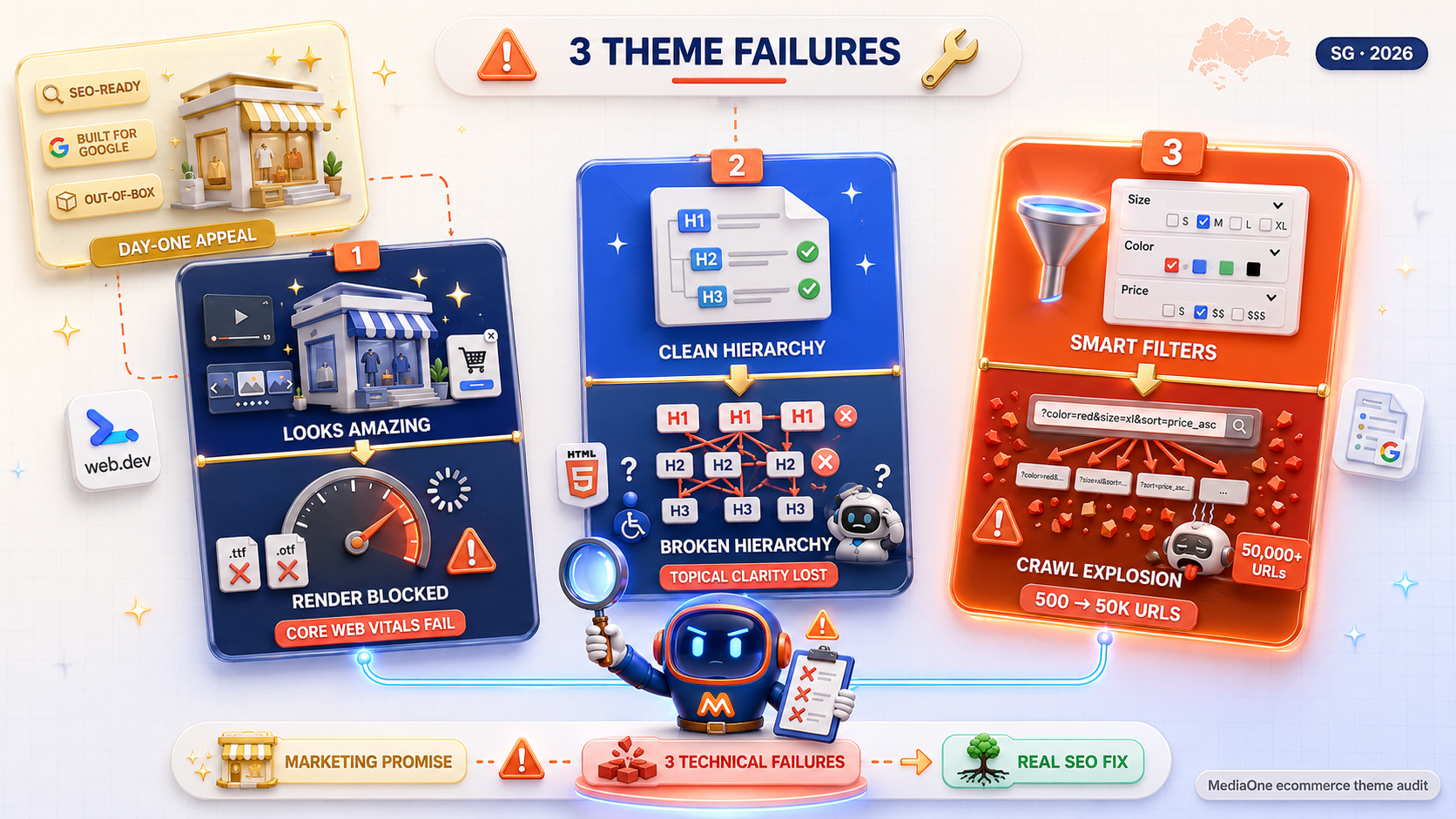
1. Flashy Looks vs. Actual Site Speed
Theme marketplaces are competitive, so developers want their designs to stand out immediately. To pull this off, they pack templates with full-screen video banners, looping product sliders, pop-up cart drawers, and custom web fonts. They look amazing on day one, but all those extra design features clutter your site code, making your pages slow to load.
According to web.dev performance guidelines, rendering critical visual elements without render-blocking resources is vital for maintaining acceptable Core Web Vitals thresholds. In practice, themes frequently import legacy web font formats (like .ttf or .otf) instead of modern compressed .woff2 files, or they trigger synchronous JavaScript executions for visual carousels. This blocks the main browser thread, stalling page rendering on mobile networks.
2. Broken Heading Structures
A surprising number of premium themes violate basic header hierarchy rules out of the box. For example, it is very common to find themes where every single product name on your homepage is tagged as a primary heading (<h2> or <h3>), or where your store logo is hardcoded as the main headline (<h1>) on every page.
It is a common SEO myth that having multiple <h1> tags will break your rankings or trigger a search penalty—modern HTML5 standards and Google’s rendering systems handle multiple headings fine. However, a clean heading hierarchy still matters for topical clarity, accessibility, and helping crawlers quickly parse structural sub-topics across dense collection pages.
3. Duplicate Content and Product Filter Bloat
When shoppers filter products by size, color, or price on a store, standard themes often generate brand-new, unique Web addresses (URLs) for every option chosen. Without proper background setup, search engine bots start treating every filter combination as a completely new page. This leads to massive duplicate content issues, diluting your website’s search authority.
Google Search Central’s Faceted Navigation Documentation explicitly warns that unmanaged faceted search creates infinite crawl paths, duplicate pages, and wasted crawl budget. During real-world catalog audits, we routinely see storefronts with 500 core products balloon into 50,000+ indexed parameter URLs (e.g., ?color=red&size=xl&sort=price_asc). This eats up crawler bandwidth and fragments link equity across endless thin variations instead of concentrating authority on the primary category hub.
Ecommerce Platform Breakdown: Technical Baseline Comparison
Not every software platform builds its theme baseline the same way. Picking the right foundation reduces the manual cleanup work needed down the road. The comparison below evaluates platforms across specific technical capabilities:
| Platform | Out-of-the-Box Code Footprint | Native Customization Flexibility | Built-In Structured Data (Schema) | Permalink & URL Control | Technical Profile Summary |
| Shopify | Moderate (App script clutter) | High (Flexible template setup) | Basic (Requires app/code additions) | Restricted (Mandatory /products/ and /collections/ paths) | Great security & hosting reliability; requires Liquid theme cleanup for advanced permalink management. |
| WooCommerce | Varies widely by theme chosen | Unlimited (Fully open source) | Moderate to Good (Dependant on SEO plugins) | Unlimited (Full rewrite rule control) | Unmatched architectural control over permalinks and schema; requires active server-level management. |
| Magento / Adobe | High (Requires dev optimization) | Enterprise-Grade | Advanced (Natively supported) | High | Enterprise power out-of-the-box; high development overhead to maintain lean front-end code. |
| BigCommerce | Lean (Stencil framework) | High | Good (Built-in microdata) | Flexible (Custom URL paths supported) | Strong out-of-the-box technical baseline; clean default URL handling for catalog filters. |
| Squarespace / Wix | Moderate | Low to Moderate | Basic | Low | Simple visual management; limited flexibility for deep technical overrides or faceted indexing controls. |
Selecting an e-commerce platform involves balancing technical flexibility with operational convenience. While SaaS platforms like Shopify handle hosting security and infrastructure automatically, official Shopify Liquid documentation confirms that core folder path structures remain locked. Open-source platforms like WooCommerce offer total control over code optimization, but require hands-on management of server response speeds and plugin compatibility.
Hidden Technical Flaws Found in Default Store Themes
If you launch an online shop without making adjustments to your default setup, you are likely inheriting structural issues that limit your visibility in ecommerce search results.
1. Frustrating Page Load Drops and Layout Shifts
Google tracks specific speed and usability scores called Core Web Vitals:
- Loading Delay: Default themes frequently load heavy banner graphics without telling the browser to prioritize them first, stalling page speed.
- Layout Jumps: Dynamic pop-ups, delayed review widgets, and images without set dimensions cause your text to jump around while loading, annoying customers on mobile devices.
- Delayed Response: Heavy JavaScript files tied to fancy drag-and-drop page builders lag behind main user interactions, like clicking a button.
In practical audits, layout jumps (Cumulative Layout Shift) are most frequently caused by sticky navigation headers or review widgets injecting dynamic content above the fold after render. Adding explicit image aspect ratios and reserving layout space for dynamic elements prevents these jarring shifts.
2. Disorganized Headline Trees
Search bots rely on clear, organized heading structures to figure out what a page is about:
- Using multiple main topic headers (<h1>) on a single page.
- Assigning header status to sidebar items, cart pop-ups, or copyright footers.
- Skipping levels unexpectedly (like jumping directly from an <h1> header down to an <h3> tag).
3. Missing Structured Data (Schema Markup)
Rich search listings—like showing star ratings, product prices, stock status, or shipping details directly inside Google search results—require proper background code called JSON-LD schema markup. Most store templates skip this or use incomplete versions, triggering warnings in Google Search Console.
According to official Schema.org Product Specifications, valid merchant listings require specific nested properties including priceValidUntil, hasMerchantReturnPolicy, and shippingDetails. A common audit finding is theme schema that omits these required properties. While missing these attributes won’t remove your listing, including them ensures eligibility for Google’s enhanced Shopping panel treatments.
7-Step Playbook: Turning Your Theme into an SEO Powerhouse
Ready to clean up your template and boost your rankings? Follow this straightforward, step-by-step checklist.
Step 1: Trim Code Bloat and Optimize Images
- Test your website on Google PageSpeed Insights to uncover bottlenecks.
- Swap heavy JavaScript slideshow banners for clean, static CSS image grids.
- Compress images using WebP or AVIF formats, and set explicit size dimensions to stop content from jumping around as pages load.
- Audit installed apps and plugins, completely removing any abandoned code snippets left behind in theme files.
- Minify HTML, CSS, and JavaScript files to compress asset download sizes for mobile shoppers.
Pro Tip from Real Audits: When store owners uninstall e-commerce apps (especially on Shopify), app developers rarely clean up the Liquid code tags inserted into theme files. Over time, dozens of orphan script references remain active, making calls to dead external servers and dragging down mobile performance.
Step 2: Fix Your Heading Hierarchy
Ensure every page template follows a simple, natural structure:
- Homepage: H1 = Store Name & Primary Value Proposition. H2 = Product Categories, Featured Products.
- Category Page: H1 = Main Category Name (e.g., “Men’s Leather Boots”). H2 = Sub-Categories, Product Names.
- Product Page: H1 = Product Title. H2 = Product Overview, Key Features, Specs, Customer Reviews.
Step 3: Add Proper Rich Snippet Markup
Instead of relying on theme settings, add complete Product and Offer schema tags. This helps search engines clearly read:
- Current pricing and currency types.
- Stock availability (In Stock / Out of Stock).
- Customer star ratings and total review counts.
- Clean breadcrumb navigation trails.
- Merchant return policies, shipping dimensions, and brand GTIN/SKU identifiers.
Prevent dynamic product filters from eating up your search presence:
- Ensure paginated collection pages (like /page/2) use self-referential canonical tags (pointing to /page/2, not back to /page/1). As outlined in Google Search Central’s Pagination Guidelines, pointing paginated pages back to page 1 forces search engines to misinterpret deeper product pages as duplicates, ignoring products listed on subsequent pages.
- Use dynamic filtering options (like AJAX) that update product grids without creating dozens of separate web addresses for color or size variations.
- Use robots.txt carefully to manage crawl budget, but understand that blocking a URL in robots.txt stops Google from crawling it—meaning Google cannot process noindex tags or canonical headers on that page.
- Apply rel=”canonical” tags on product variant pages so search engine authority consolidates onto your master product URL.
Strategic internal links guide both visitors and search engines through your site:
- Include helpful contextual links inside category descriptions pointing to related sub-categories or buying guides.
- Keep clean breadcrumb navigation menus visible at the top of product pages.
- Ensure internal search queries do not get indexed by search engines to avoid low-quality page clutter.
- Build “Frequently Bought Together” or “Related Items” recommendation blocks to pass link equity across deeper catalog inventory.
Step 6: Upgrade Thin Content Across Product & Category Pages
Give Google’s crawlers actual text to read:
- Category Pages: Add unique, valuable context near your product grids to help shoppers choose the right product. Focus on satisfying search intent rather than hitting an arbitrary word count—helpful buying considerations beat superficial fluff every time.
- Product Pages: Write unique descriptions focused on benefits and real customer questions. Avoid relying solely on manufacturer spec sheets, which create identical duplicate content across thousands of competing retail sites.
Step 7: Refine the Mobile Shopping Experience
Search engines evaluate your mobile layout first before ranking your site:
- Keep buttons, links, and product selection options big enough to easily tap with a thumb.
- Avoid horizontal scrolling issues on smaller screens.
- Ensure key product images, prices, and “Add to Cart” buttons load instantly near the top of the mobile screen.
- Eliminate intrusive full-screen promotional pop-ups that block main product visuals upon page load.
Advanced Growth Tactics for Large Ecommerce Catalogs
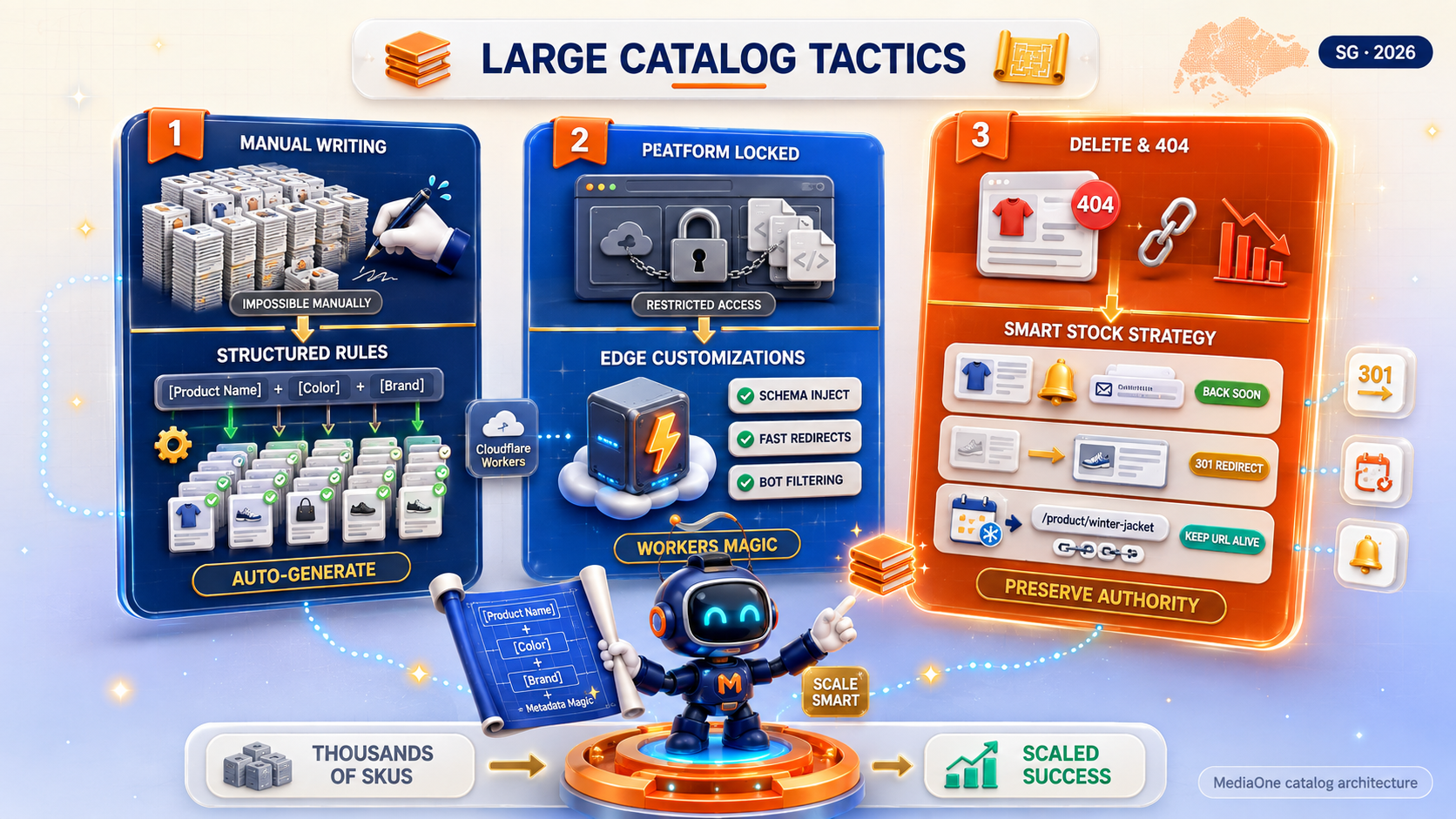
Managing thousands of product listings requires a slightly different approach. When scaling up a large catalog, basic theme tweaks need to be paired with smart store architecture strategies.
Smart Metadata Templates
For huge online inventories, writing unique descriptions for every single SKU by hand is impractical. Use structured metadata rules across your backend setup:
- Product Title Formula: [Product Name] – [Color/Size] | [Brand Name]
- Meta Description Formula: Shop the [Product Name] in [Color]. Enjoy fast shipping on orders over $50. Features include [Key Feature 1] and [Key Feature 2]. Order online today!
Edge SEO Customizations
If you use a closed SaaS platform where core template files are restricted, you can apply Edge SEO techniques using services like Cloudflare Workers. This lets you:
- Inject updated schema tags directly into page headers on the fly.
- Set up dynamic page redirects without slowing down site loading speeds.
- Keep search engine bots away from dynamic search and tag filtering paths.
Handling Sold-Out Products the Right Way
Deleting out-of-stock items creates broken links (404 errors) and wastes built-up search rank. Instead:
- Temporarily Out of Stock: Leave the product page live, turn off the buy button, display a back-in-stock estimate, and collect customer emails for notification lists.
- Permanently Discontinued: If you have an updated version of the item, set up a permanent 301 redirect to the new listing or main category hub. If no replacement exists, direct visitors gracefully to the closest matching category.
Real-World Nuance: For seasonal out-of-stock items that return every year (e.g., “Winter Parkas”), never delete or replace the URL annually. Keep a single persistent URL (e.g., /products/mens-winter-parka) live year-round to retain historical backlinks and search authority.
Transform Your Store into a Search Engine Magnet
Assuming a store theme is completely search-engine-ready by default is one of the easiest ways for online merchants to lose ground to competitors. While pre-made templates offer convenience and nice visual styling, they rarely provide the lean code, balanced header structures, and smart URL management required to stand out in crowded search results.
To turn your store into a dependable driver of organic traffic:
- Run a complete audit of your theme’s underlying code, speed bottlenecks, and headline structures.
- Add complete product schema markup and clean up messy filter page paths.
- Strengthen your internal linking networks and write helpful, original copy for your main category pages.
Search engine optimization is not a one-time project you check off when launching a store—it is an ongoing process of refining performance, expanding helpful content, and maintaining technical hygiene. By taking proactive ownership of your site architecture today, you build a sustainable digital asset that attracts qualified buyers and scales organic revenue for years to come.
Taking charge of your technical SEO foundation transforms your theme from a simple visual design into a powerful organic growth engine for your business.
Frequently Asked Questions
Are Shopify themes SEO-friendly by default?
Shopify themes provide solid basic tools out of the box, such as simple title and description fields, auto-generated XML sitemaps, and free SSL certificates. However, default Shopify themes carry rigid URL structures (like forcing /products/ into links) and can become cluttered with code leftover from installed apps. They need clean-up work to perform at their best.
Do custom-designed themes rank better than off-the-shelf themes?
In general, yes. Off-the-shelf marketplace templates are designed to fit everyone, so they come packed with extra scripts, styles, and options you will likely never use. Custom themes are built specifically for your store, resulting in cleaner code, faster page loads, and precise control over layout tags and structured data. By eliminating unnecessary feature bloat, custom themes deliver a much leaner codebase that executes faster on mobile devices.
How much does site speed actually impact online sales?
Site speed indirectly influences search visibility while directly impacting conversion rates. Slow pages frustrate shoppers, increasing bounce rates and abandoned carts. While speed alone won’t catapult a poor site to rank #1, improving load times removes friction and directly lifts overall sales conversions across mobile devices.
Should I block product filter URLs using robots.txt?
Blocking filtered URLs completely using robots.txt stops search engines from crawling those URLs, but it also prevents them from seeing any noindex directives or canonical tags placed on those pages. A cleaner setup is to handle faceted navigation via AJAX/JavaScript without spawning crawlable URL parameters, or to use canonical tags pointing back to the main category root.
You can fix native heading errors by editing your platform template files. Use browser inspection tools (pressing F12 on your keyboard) to find non-heading elements like logos, footer titles, or pop-up text that are wrapped in <h1> or <h2> tags, and swap them out for standard text containers styled with CSS. This simple code update clarifies your page hierarchy for search bots without altering the visual design of your storefront.