Imagine walking into a massive library where every book has a blank spine. How would you find what you need? You wouldn’t. This is precisely how the internet looks to search engines without effective metadata. In the vast ocean of search results, your title tag is not just a label; it is your billboard, your pitch, and your first handshake with a potential customer.
As we navigate the SEO landscape of 2026, the humble title tag remains surprisingly resilient. Despite the rise of AI-generated answers and voice search, the blue clickable link is still the primary gateway to the web.
Any experienced SEO agency knows that strong title tags can still shape both visibility and click-through performance in a crowded SERP.
However, the game has evolved. It is no longer enough to simply cram keywords into a 60-character limit. Today, to truly rank, you must master the art of title tag SEO, a blend of technical precision and copywriting psychology.
Whether you are a seasoned veteran or a business owner managing your own site, understanding the nuances of how to optimise title tags is critical. A well-optimised title can increase your Click-Through Rate (CTR) by upwards of 20%, directly signalling to Google that your content is valuable.
In this guide, we will dismantle the old myths, provide you with copy-paste formulas, and show you exactly how to write titles that humans love and bots respect.
Key Takeaways
- Keep your title tags between 50-60 characters (approximately 580 pixels) and front-load your primary keyword to maximise visibility in search results and improve click-through rates by up to 20%.
- Use proven title tag formulas tailored to your page type (blog posts, product pages, service pages) and align with user intent to ensure your titles attract the right audience at the right stage of their journey.
- Monitor your title tag performance using Google Search Console to identify pages with high impressions but low CTR.
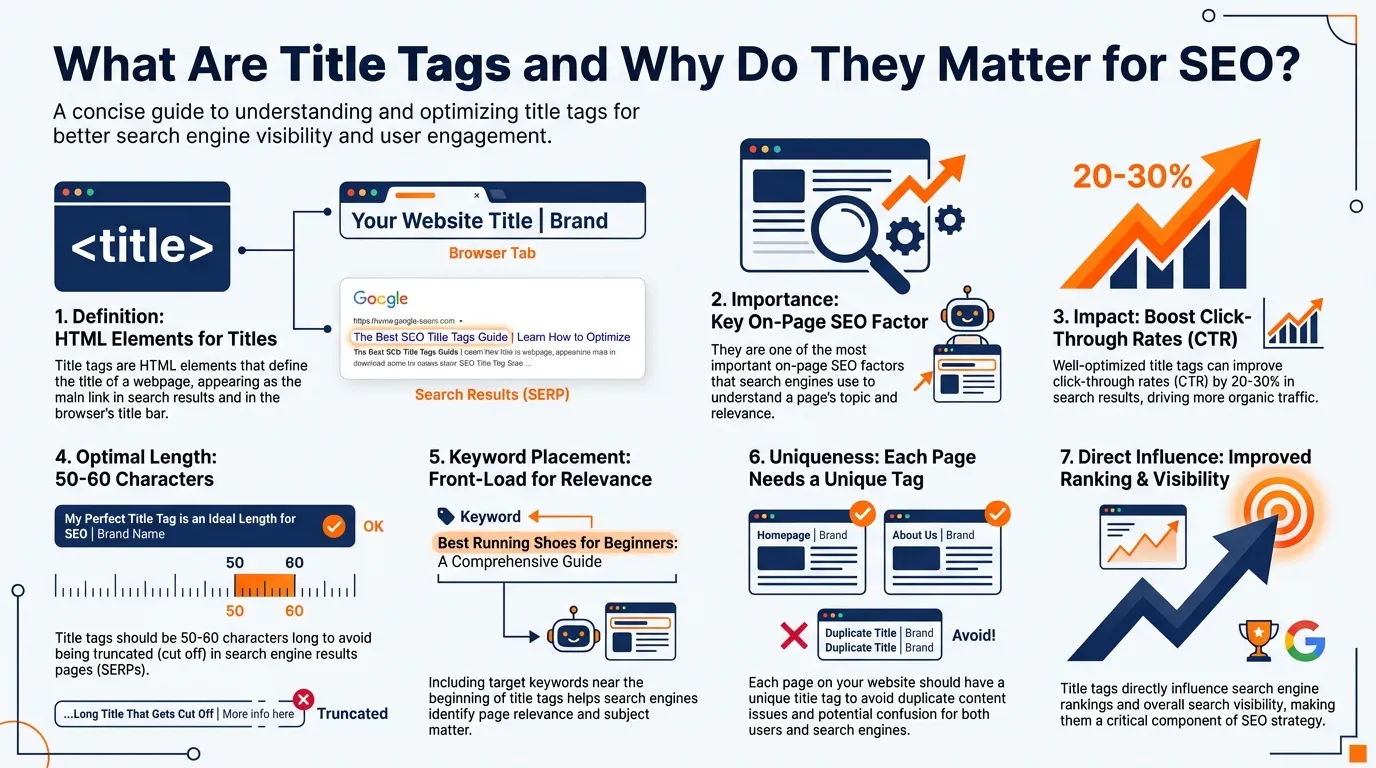
Before we dive into advanced strategies, we must ground ourselves in the definitions. A title tag is an HTML element that specifies the title of a web page. It is displayed on Search Engine Results Pages (SERPs) as the clickable headline for a given result, and it is crucial for usability, SEO, and social sharing.
The Technical Definition of Title Tags
From a technical perspective, a title tag is a core HTML element that defines the official title of a web page. It is placed within the <head> section of a page’s source code and is one of the first on-page signals search engines read to understand what the page is about.
In your page’s source code, it looks like this:
<head>
<title>Example Title | Brand Name</title>
</head>
This simple line of code carries significant weight. The text inside the <title> tag is used by search engines to interpret topical relevance, by browsers to label tabs and bookmarks, and by external platforms to generate page previews.
Search engines rely on the title tag as a primary ranking and relevance signal, especially when determining whether a page matches a user’s query.
When your target keyword appears naturally within the title, it reinforces topical alignment and improves your chances of ranking for that term. Conversely, missing, duplicated, or poorly written title tags can dilute relevance and reduce visibility.
It is also important to note that each page should contain only one title tag. Multiple title tags, or dynamically generated errors that create conflicting titles, can confuse search engines and lead to unpredictable indexing behaviour.
Three Key Locations Where Title Tags Appear

Title tags do not exist solely for search engines. They shape how users encounter, recognise, and interact with your content across multiple touchpoints on the web. Understanding where title tags appear, and how they function in each context helps you write titles that perform consistently, not just in rankings but in real user behaviour.
Title tags do not exist solely for search engines. They shape how users encounter, recognise, and interact with your content across multiple touchpoints on the web. Understanding where title tags appear, and how they function in each context helps you write titles that perform consistently, not just in rankings but in real user behaviour.
Title Tags in Google Search Results (SERPs)
This is the most critical placement for your title tag. In the SERPs, it appears as the blue clickable headline and is often the first impression a user has of your brand.
A well-written title confirms relevance, matches search intent, and provides a compelling reason to click. If your title is unclear, generic, or misleading, users will scroll past, even if you rank well.
Why This Placement Matters:
- First impression: Your title is often the first element users read when scanning search results
- Click-through rate impact: A compelling title can significantly increase CTR, even from lower positions
- Relevance signal: Keywords in the title help users quickly assess if your page matches their query
- Competitive differentiation: Your title competes with 9+ other results on the page
Real-World SERP Examples
Example 1: E-commerce Product Page
- Your Title Tag: <title>Wireless Bluetooth Headphones – Noise Cancelling | TechAudio</title>
- Displayed in SERP: “Wireless Bluetooth Headphones – Noise Cancelling | TechAudio”
- Why it works: Clear product description, key features included, brand name present, and matches user intent for someone searching “wireless bluetooth headphones.”
Example 2: How-to Guide
- Your Title Tag: <title>How to Fix a Leaking Faucet in 5 Easy Steps (2026 Guide)</title>
- Displayed in SERP: “How to Fix a Leaking Faucet in 5 Easy Steps (2026 Guide)”
- Why it works: Action-oriented language, specific benefit (5 easy steps), includes freshness signal (2026), and directly matches informational search intent.
Title Tags in Browser Tabs and Bookmarks
Title tags are displayed in browser tabs, helping users identify and return to pages they have already opened. When users have multiple tabs open (which is common), a clear and descriptive title improves usability and reduces friction.
Why This Placement Matters:
- Multi-tab navigation: Users often have 10+ tabs open simultaneously and rely on title text to identify pages
- Bookmark organisation: When users save your page, the title tag becomes the default bookmark name
- Return visits: Clear titles make it easier for users to find and return to your content
- Character limitations: Only the first 15-20 characters are typically visible in tabs, making front-loading crucial
Best Practices for Tab Display:
- Place the most important identifying information at the beginning of your title
- Consider mobile users who see even fewer characters
- Avoid starting every page title with your brand name unless you have very high brand recognition
- Use concise, distinctive language that differentiates pages from one another
This subtle clarity supports better engagement and can indirectly influence dwell time and return visits.
Title Tags in Social Media and Link Previews
When a page is shared on platforms like LinkedIn, Facebook, X (Twitter), Slack, or messaging apps, the title tag is often pulled in as the default headline for the preview snippet (though Open Graph tags can override this).
Why This Placement Matters:
- Social visibility: Your title becomes the headline in social feeds, competing for attention alongside countless other posts
- Shareability: A compelling title encourages both initial shares and subsequent engagement
- Traffic beyond search: Social media can drive significant referral traffic, especially for timely or trending content
- Brand perception: How your content appears when shared reflects on your brand’s professionalism
Best Practices for Social Sharing:
- Write titles that work out of context (social users may not see your URL or meta description)
- Use emotional triggers or curiosity gaps appropriately for your industry
- Avoid clickbait that damages trust or creates misleading expectations
- Consider implementing Open Graph tags (og:title) for more control over social previews
- Test how your titles appear across different platforms
A strong title increases visibility, encourages clicks, and reinforces your message outside of search. Poorly written titles, on the other hand, can limit reach and engagement even when the content itself is valuable.
How Google Rewrites Title Tags
Important Note: Google doesn’t always display your title tag exactly as you wrote it. In August 2021, Google announced significant changes to how it generates title links in search results, and this remains a critical consideration for SEO practitioners.
When and Why Google Rewrites Titles:
Google may rewrite your title tag when it believes it can create a more relevant or useful title for users. Common scenarios include:
- Title is too long (exceeds ~60 characters or 600 pixels)
- Title is stuffed with keywords and appears spammy
- Title doesn’t match the page content or search query
- Title is too vague or generic (e.g., “Home” or “Untitled”)
- Title is missing entirely
- Better alternatives exist in H1 tags, prominent page text, or anchor text pointing to the page
What Google Uses as Replacement:
- H1 headings on the page
- Other prominent text from the page content
- Anchor text from internal or external links
- Structured data markup
- A combination of the above
Best Practices to Minimise Rewrites:
- Keep titles between 50-60 characters
- Ensure title tags accurately reflect page content
- Avoid keyword stuffing
- Make titles descriptive and unique
- Align your title tag with your primary H1
- Write for users first, search engines second
While you can’t completely control Google’s title rewriting, following best practices significantly increases the likelihood that your carefully crafted title will be displayed as intended.
The role of title tags in search rankings has evolved significantly, particularly as Google’s algorithms have become more sophisticated with AI and machine learning integration. Understanding both traditional ranking factors and modern AI-driven signals is essential for optimising title tags in 2026.
Traditional Ranking Signals
Keyword Matching and Placement:
- Title tags remain a high-weight on-page ranking signal that search engines use to determine topical relevance
- If your target keyword does not appear in the title, it is significantly harder (though not impossible) to rank for that term
- Exact-match keywords historically carried more weight, though semantic understanding has reduced this dependency
- Keyword placement matters: keywords near the beginning of the title traditionally receive more emphasis
- Title tags act as a primary indicator of what the page content covers, especially for crawlers indexing new pages
Technical Ranking Factors:
- Title tag uniqueness across your site prevents keyword cannibalization
- Proper HTML implementation ensures search engines can parse and weight the signal correctly
- Title length affects whether the full title is displayed, which impacts both user perception and algorithmic interpretation
- Missing or duplicate title tags can result in significant ranking penalties
AI Relevance Signals (2026 and Beyond)
User Experience as a Ranking Factor:
- Google’s algorithms in 2026 place immense weight on User Experience signals, fundamentally changing how title tags impact rankings
- Click-Through Rate (CTR) has become a critical feedback mechanism: if your title tag is boring or misleading, users won’t click
- A low CTR tells Google your page isn’t relevant, causing your rankings to drop over time, even if traditional signals are strong
- Conversely, a compelling title attracts clicks, boosting your perceived relevance and signaling to Google that users find your result valuable
Behavioural Signals Loop:
- High CTR from search results → Increased rankings → More visibility → More traffic
- Low CTR → Decreased rankings → Less visibility → Declining performance
- Google’s AI systems learn which types of titles drive engagement for specific queries
- Pogo-sticking (users clicking back immediately) negatively impacts rankings, even with initially high CTR
Semantic Understanding:
- Modern AI systems (like BERT, MUM, and SGE) understand semantic relationships beyond exact keyword matching
- Title tags are evaluated for topical coherence with page content, not just keyword presence
- Synonyms, related concepts, and natural language variations are recognised and weighted appropriately
- Intent matching matters more than ever: transactional, informational, and navigational queries require different title approaches
Context and Personalisation:
- AI considers user search history, location, and behaviour patterns when evaluating title relevance
- The “best” title isn’t universal; it varies based on user context and query nuances
- Google may show different title variations to different users based on predicted intent
- Mobile vs desktop contexts may trigger different title display and ranking considerations
In 2026, optimising title tags requires balancing traditional keyword signals with AI-driven engagement metrics.
A technically perfect title that includes target keywords but fails to generate clicks will underperform a more compelling title that drives user engagement, even if it’s less traditionally optimised.
Title Tag SEO Best Practices (The 2026 Standard)
To effectively optimise title tags in 2026, you must balance technical precision with copywriting intent. While creativity helps attract clicks, title tags still operate within strict search engine constraints.
The following best practices represent the current standard for writing titles that rank, display correctly, and convert impressions into clicks.
The Length Rule: Pixels vs. Characters

The traditional advice to “keep title tags under 60 characters” remains a useful guideline, but it oversimplifies how titles are actually rendered. Google does not measure title tags by character count; it measures them by pixel width, allocating approximately 600 pixels for desktop search results.
Because individual characters vary in width (for example, a capital “W” takes up far more space than a lowercase “i”), two titles with the same character count may display very differently in the SERPs. As a result, character limits should be treated as estimates, not hard rules.
In 2026, the safest benchmarks are:
- Optimal length: 50–60 characters
- Pixel limit: Maximum of ~580 pixels
- Mobile consideration: Mobile results can sometimes display longer titles, but optimising for desktop ensures consistency across all devices
Staying within these limits reduces the risk of truncation and increases clarity at a glance.
Keyword Placement
Front-loading your primary keyword continues to be a best practice. Users naturally scan search results from left to right, and seeing the keyword early helps confirm that your page matches their intent.
- Bad: The Ultimate Guide to the Best Strategies for Title Tag SEO
- Good: Title Tag SEO: The Ultimate Guide for 2026
Placing the keyword first also strengthens topical relevance for search engines, particularly for competitive queries.
Brand Usage
For most websites, brand names should appear at the end of the title tag rather than the beginning. Unless you are a globally recognised brand like Nike or Apple, leading with your brand often wastes valuable pixel space that could be used to communicate relevance or value.
For local businesses, replacing the brand name with a location modifier can be more effective, especially for service-based searches where geography influences intent.
Uniqueness Is Non-Negotiable
Every page on your website must have a unique title tag. Duplicate titles create ambiguity for search engines, making it harder to determine which page is most relevant for a given query. This often results in diluted rankings or inconsistent visibility across similar pages.
Unique title tags ensure that each page has a clear purpose, distinct keyword targeting, and a stronger chance of ranking on its own merits.
Common Mistakes to Avoid When Conducting Title Tag SEO
Even experienced marketers at a top-tier digital marketing agency can occasionally fall into these traps. Avoid these common errors to ensure your site remains healthy.
1. Keyword Stuffing
This is a relic of 2010 that needs to disappear. Google is smart enough to understand synonyms and context.
Avoid: SEO Agency | SEO Company | Best SEO Services | SEO Help
Do: SEO Agency Singapore: Award-Winning Services | MediaOne
2. Default Titles (“Home”, “Untitled”)
Leaving your title tag as the default generated by your CMS (like “Home” or “New Page”) is a wasted opportunity. It tells Google nothing about your business.
3. Title Tag Hijacking
Title tag hijacking occurs when Google overrides your provided title and displays an alternative version in search results. This is not random; it is a corrective action driven by AI relevance systems.
- Google may generate a replacement title using:
- Your H1 tag
- Internal anchor text
- External link context
- Your H1 tag
- Rewrites commonly occur when titles are:
- Too long
- Keyword-stuffed
- Generic or vague (e.g. “Home”)
- Too long
- Frequent rewrites are a clear signal that your title does not meet AI relevance and clarity standards, even if it technically follows traditional SEO rules.
4. Duplicate Title Tags
Duplicate title tags occur when two or more pages share the exact same <title> element. While this often happens unintentionally (through templates, pagination, or faceted URLs), it creates ambiguity for both search engines and AI systems.
- Reusing the same title across multiple pages confuses search engines about which page should rank.
- Ranking signals are diluted because relevance is split across URLs instead of being consolidated.
- Google is forced to choose which page is “most relevant,” often not the one you intended.
- Duplicate titles frequently trigger automatic title rewrites by Google’s AI to restore clarity.
5. Default Titles (“Home”, “Untitled”)
Default titles are placeholder values automatically generated by CMS platforms when no custom title is set. These titles provide no meaningful information about the page’s purpose.
- Leaving CMS-generated defaults is a wasted ranking opportunity.
- Titles like “Home” or “Untitled” offer zero topical relevance.
- There are no intent signals for users or algorithms to interpret.
- Both traditional ranking systems and AI-based classifiers struggle to categorise the page correctly, increasing the risk of poor rankings or rewrites.
If you see Google rewriting your titles, it is a sign you need to rewrite them to be more descriptive and concise.
Title Tag Templates and Formulas
You do not need to reinvent the wheel for every page. Use these proven formulas to streamline your process while ensuring high performance.
For Informational Blog Posts
These need to promise value, answer a question, or provide a guide.
Primary Keyword + Colon + Benefit/Hook | Brand Name
- Example: Keto Diet Plan: Lose 5kg in 2 Weeks | HealthBlog
- Example: How to Tie a Tie: Step-by-Step Guide | GentStyle
For Product Pages (eCommerce)
Clarity is key here. Include the specific model, name, and perhaps a key spec.
Product Name + Category/SKU + Primary Attribute | Brand
- Example: Nike Air Max 270 – Men’s Running Shoe | Nike Store
- Example: Sony WH-1000XM5 Wireless Headphones | Noise Cancelling
For Service Pages (Local SEO)
Location is crucial for local services.
Service Keyword + Location + USP | Brand Name
- Example: Emergency Plumber London: 24/7 Repairs | PipeFix
- Example: Wedding Photography Manchester | Award-Winning | SnapShot
For Hompages
Your homepage is your flagship. It needs to summarise your entire brand proposition.
Brand Name: Primary Service/Product + Core Benefit
- Example: MediaOne Business: Leading Digital Marketing Agency in Singapore
- Example: Slack: Where Work Happens | Team Collaboration Software
In 2026, matching search intent is the most critical factor in ranking. Your title tag acts as a signal to both users and search engines, telling them exactly what your page is about and why it’s relevant to a specific query.
A well-crafted title tag aligns with the user’s goal, whether they’re looking for information, trying to make a purchase, or comparing options.
| Intent Type | User Goal | Common Modifier Words | Before (Poor Intent Match) | After (Intent-Aligned Title Tag) |
| Informational | Learning, solving a problem | How to, Guide, Tutorial, What is, Examples, Tips | SEO Title Tags | What Is a Title Tag? Complete SEO Guide (2026) |
| Transactional | Ready to buy | Buy, Price, Deal, Sale, Discount, Shipping | SEO Services | Buy SEO Services in Singapore – Transparent Pricing |
| Commercial | Comparing options | Best, Top, Review, Vs, Comparison, 2026 | SEO Tools | Best SEO Tools for Agencies (2026 Review & Comparison) |
| Navigational | Finding a specific site | Brand Name, Login, Contact, Support | MediaOne | *MediaOne Business Group |
If someone searches for “best running shoes,” they are in Commercial Investigation mode. A title like “Buy Running Shoes Now” (Transactional) might fail because the user wants to compare reviews first. A better title would be “10 Best Running Shoes for 2026 (Reviewed & Tested).”
Advanced Title Tag SEO Strategies for 2026
Once you have mastered the basics, use these advanced tactics that an SEO company uses to edge out the competition.
Using Brackets and Parentheses
Brackets and parentheses improve visual scannability in search results and often increase CTR by highlighting a “bonus” element such as a format, offer, or outcome.
- Standard: Content Marketing Guide for Beginners
- Optimised: Content Marketing Guide for Beginners [PDF Checklist] / The State of SEO (2026 Report)
When NOT to use this strategy:
- On short navigational queries (e.g. brand names or login pages)
- When the bracketed text adds no real value (e.g. [Best], [Awesome])
- On titles already approaching pixel limits, where brackets may trigger truncation or rewrites
The “Current Year” Freshness Hack
For fast-changing topics like SEO, technology, finance, or regulations, including the current year reassures users that the content is up-to-date and relevant.
- Example: Best Android Phones to Buy in 2026
When NOT to use this strategy:
- For evergreen content that doesn’t materially change year to year
- When you are unlikely to update the content annually
- On cornerstone pages where frequent year changes may cause unnecessary title volatility
Emotional Power Words (Without Clickbait)
Carefully chosen emotional or benefit-driven words can increase engagement while still maintaining credibility.
- Examples: Proven, Essential, Effortless, Complete, Practical
When NOT to use this strategy:
- On informational or academic content where neutrality matters
- If the content cannot clearly deliver on the promise
- When emotional language overshadows intent clarity and risks AI rewrites
Dynamic Title Tags (Programmatic SEO)
For large-scale websites, such as eCommerce stores, marketplaces, or directories, manual title creation is impractical. Dynamic rules allow you to scale while preserving relevance.
- Example rule: Cheap Flights from {Origin_City} to {Dest_City} | From {Price} | Brand
When NOT to use this strategy:
- On high-value landing pages that deserve handcrafted titles
- When templates produce near-duplicate titles at scale
- If dynamic values are inconsistent or frequently missing, leading to malformed titles
Tools and Testing Methods for Title Tag Optimisation
You cannot manage what you do not measure. In 2026, this is especially true for title tags. A well-crafted title is only half the battle. The other half is testing, analysing, and iterating based on real-world data. Here’s a comprehensive toolkit for optimising your titles.
Preview Tools: Check Before You Publish
Before your page goes live, it is essential to see how your title appears in search results. Even a perfect title can underperform if it is truncated or visually confusing.
- Moz Title Tag Preview Tool
- A long-standing favourite for measuring pixel width rather than just character count.
- Helps ensure your most important words appear in the visible snippet.
- Yoast SEO / RankMath (WordPress plugins)
- Provides real-time feedback as you type your title within WordPress.
- Warns if titles are too long, lack keywords, or risk being rewritten by Google’s AI.
Tip: Always consider mobile SERPs, where the visible width is smaller. What looks perfect on a desktop may be truncated on a phone.
Performance Analysis: Use Data, Not Gut Feeling
Google Search Console (GSC) is your source of truth for understanding how your titles perform in the wild. Focus on the “Performance” tab to track click-through rate (CTR) for individual queries.
- The CTR Test:
- Identify pages with high impressions but low CTR; these titles are underperforming.
- Rewrite the title using intent-aligned formulas, emotional power words, or freshness hacks.
- Monitor for two to four weeks to allow Google to recrawl and for data to stabilise.
- Why CTR matters in 2026:
- Google’s AI now evaluates engagement signals as part of relevance scoring.
- A low CTR is effectively a signal that your title does not match user intent.
- Google’s AI now evaluates engagement signals as part of relevance scoring.
A/B Testing: Scientific Optimisation for High-Traffic Pages
For enterprise or high-traffic websites, controlled experiments can show which titles actually drive more organic clicks.
- SEO split-testing tools:
- Examples include SEOmonitor and SplitSignal.
- These tools allow you to serve different titles to Googlebot or rotate titles for a portion of users to measure impact.
- Best practices:
- Focus on pages with significant impressions, as low-traffic pages may yield inconclusive results.
- Run tests for 4–6 weeks minimum to capture enough data and minimise noise.
- Ensure other variables (meta description, content, structured data) remain constant to isolate the title effect.
- When to avoid:
- For small sites with low search volume, the results may be statistically insignificant.
- Pages where brand consistency outweighs minor CTR gains.
- Combining Tools for Maximum Impact
- Start with preview tools to guarantee clarity and pixel-safe titles.
- Monitor real-world performance in GSC to validate theory.
- Scale optimisation with A/B tests only where sufficient traffic allows meaningful insights.
Pro tip: The most effective title tag optimisation is iterative: plan, test, measure, tweak, and repeat. Titles that worked last year may need a refresh in 2026 to remain competitive, particularly as AI-driven ranking signals evolve.
How to Win with Title Tag SEO in 2026
As we move through 2026, the SEO guidelines remain anchored in user experience. The title tag is a small piece of code with massive power. It sits at the intersection of technical SEO, user psychology, and branding.
To recap, effective title tag SEO involves:
- Sticking to the pixel width limit (approx. 60 characters).
- Placing your primary keyword at the start.
- Writing for the human click, not just the search bot.
- Adding specific modifiers (intent-based words) to qualify the click.
- Ensuring every single page has a unique title.
Do not let your content sit unnoticed in the library of the internet. Give it the spine it deserves. Review your site today, identify your low-CTR pages, and apply these templates. The rankings are there for the taking.
For more insights on digital strategy, consult with a specialised agency to handle your technical optimisation needs. Contact us today!
Frequently Asked Questions
How often should I update my title tags?
Title tags should be reviewed periodically, especially for pages that rely on trending topics, seasonal offers, or fast-changing industries. Updating every 6–12 months is generally sufficient, but high-traffic pages with declining CTR may require more frequent tweaks.
Can title tags impact voice search results?
Yes. Voice assistants like Google Assistant often read out the page title or snippet when answering queries. Using natural language and question-based titles can improve your chances of being chosen for voice responses.
Should I use numbers or symbols in title tags?
Numbers (e.g., “10 Tips” or “2026 Guide”) and symbols like brackets or pipes can increase CTR by making titles more scannable and attention-grabbing. However, avoid overuse, which can look spammy or cluttered.
Do title tags affect social media sharing?
Indirectly, yes. When a page is shared on platforms like Facebook or LinkedIn, the title tag often populates the headline in the preview. A clear, compelling title increases the likelihood of clicks and engagement.
Can duplicate title tags ever be okay?
Ideally, every page should have a unique title. In rare cases, like identical product variations or dynamically generated pages, minor duplication may be unavoidable. When this happens, consider adding differentiators like location, size, or a unique benefit to minimise SEO impact.