
Organic search drives 43% of ecommerce traffic and 23.6% of orders. This makes your Shopify store’s technical SEO more crucial than ever. A solid technical foundation ensures that search engines can easily crawl, index, and rank your store, making it easier for potential customers to find you.

While Shopify offers powerful tools for creating visually appealing, functional online stores, it can also introduce technical challenges that affect your SEO performance.
From duplicate content caused by product variants and collections to wasted crawl budget from unnecessary pages, these technical issues can prevent your store from reaching its full ranking potential.
In this blog, we’ll dive into the most common Shopify SEO problems and provide actionable solutions. By addressing these issues, you’ll be able to optimise your store’s performance, improve your search engine rankings, and drive more organic traffic.
Key Takeaways
- Shopify automatically generates several URL variations for the same product, which can lead to duplicate content issues.
- Duplicate URLs from variants and filters can significantly harm your rankings. Variants such as colour, size, or SKU parameters can generate separate URLs, resulting in duplicate content in Google’s index.
- While canonical tags direct search engines to the preferred version of a page, they alone won’t fix the underlying technical issues. Proper internal linking is essential to ensure all signals are directed to the right pages.
- No matter how much effort goes into content marketing or paid ads, underlying technical SEO problems must be resolved first. A well-optimised site structure ensures that all other marketing efforts deliver maximum impact.
What is Shopify Technical SEO?
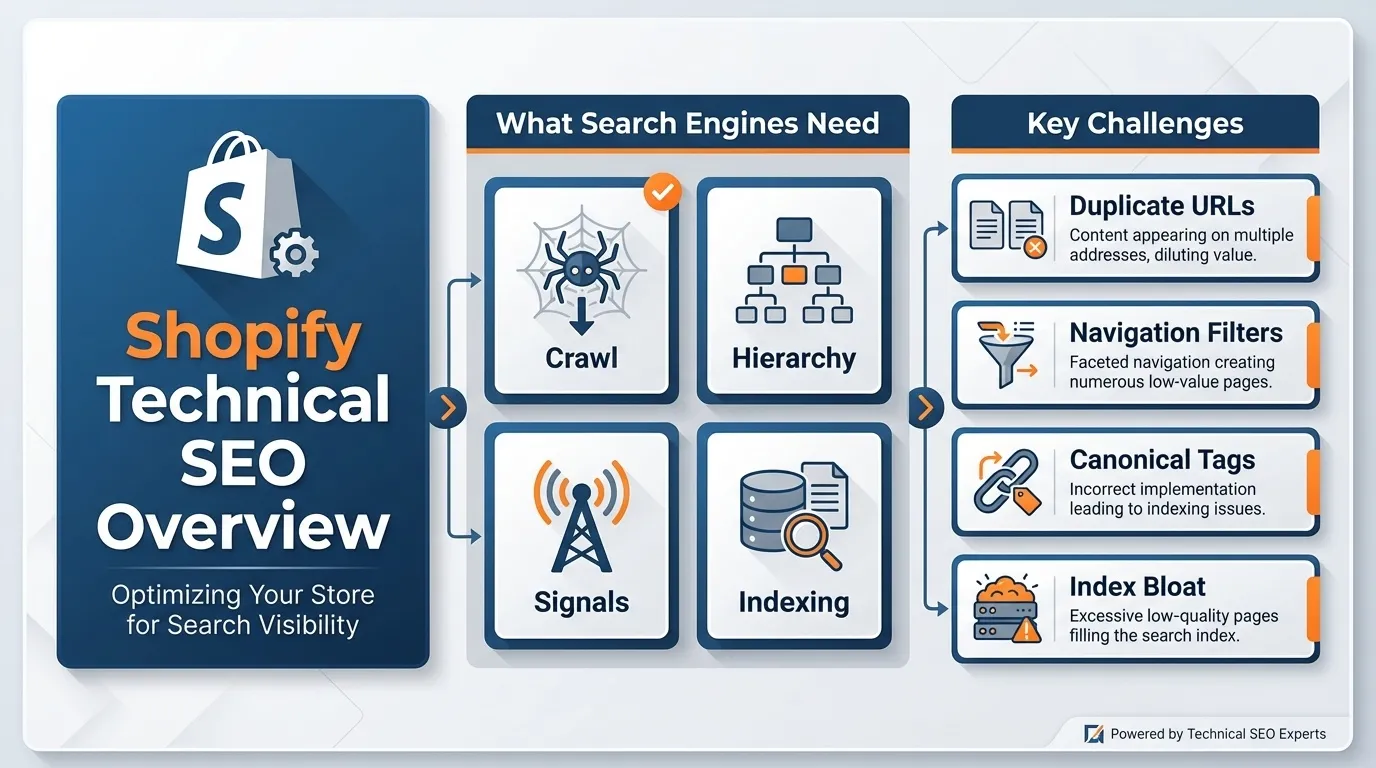
Shopify technical SEO refers to the structural optimisation of a Shopify store to ensure that search engines can:
- Crawl pages efficiently
- Understand page hierarchy
- Consolidate ranking signals properly.
- Avoid indexing duplicate or low-value URLs
Unlike on-page SEO, which covers the text and images on a page, technical SEO in Shopify focuses on how your store is set up behind the scenes. This includes issues such as Shopify automatically creating duplicate pages and adding extra components to your URLs for tracking or sorting, known as URL parameters.
Shopify’s template-based structure is great for beginners, but it can lead to significant technical SEO issues if not managed correctly. These issues often arise from:
- Duplicate product URLs created by variant parameters
- Filtered navigation creates unnecessary pages.
- Poor canonical tag management
- Index bloat that harms crawl efficiency
Why Technical SEO Matters for Shopify Stores
Shopify is a powerful platform, but its default behaviour can lead to technical SEO issues that silently harm a store’s search engine performance.
One of the most significant issues arises from Shopify’s automatic generation of multiple URLs for the same product page. While this might seem convenient for store owners, it can confuse search engines and lead to SEO inefficiencies.
For instance, a single product can be accessible by several different URLs:
- /products/product-name
- /collections/sale/products/product-name
- /collections/shoes/products/product-name
- /products/product-name?variant=123456
Although these URLs point to the same product, Google treats them as separate pages. This is a duplicate content issue: search engines treat these different URLs as distinct pages, even though they display the same content.
This creates several challenges for SEO, as Google may index multiple versions of the same product, leading to confusion about which version should rank. Here are more reasons why technical SEO matters for Shopify:
1. Diluted Ranking Signals
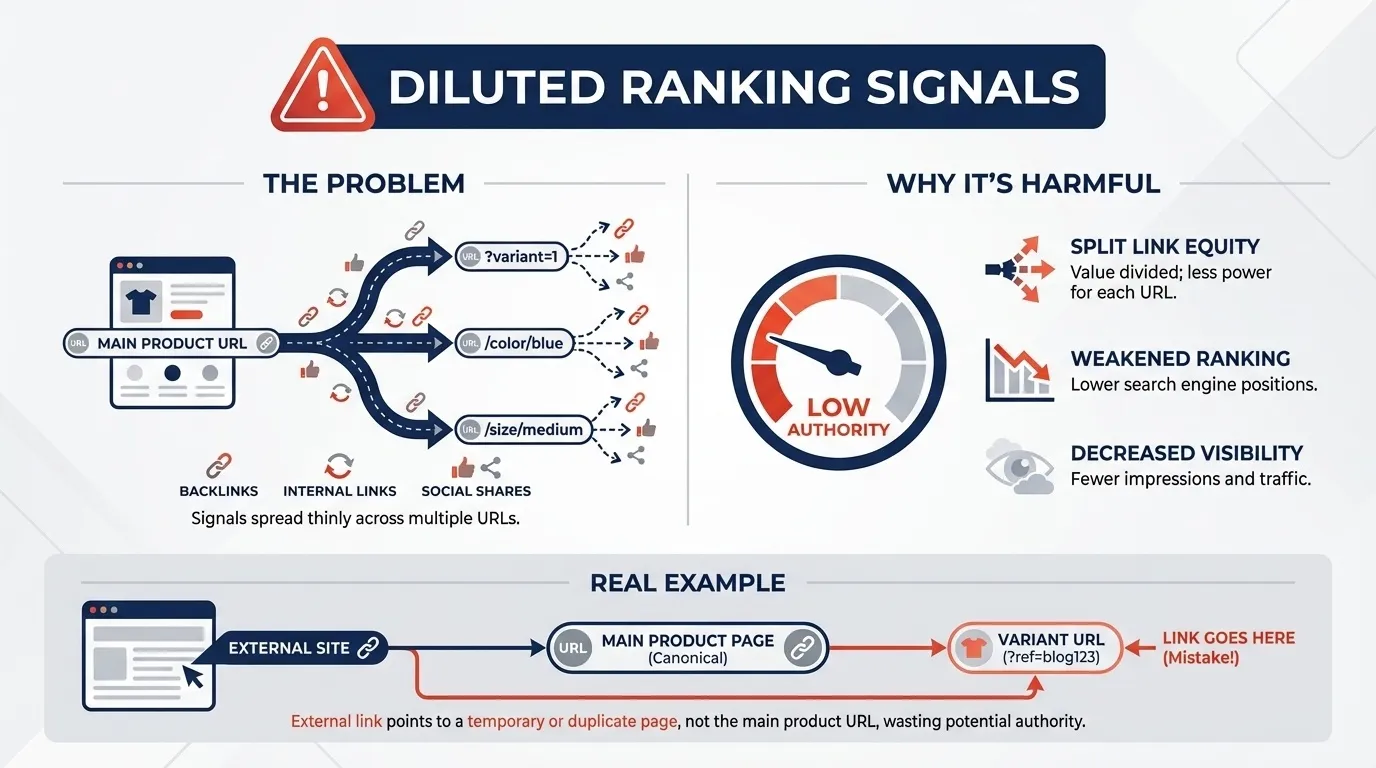
Each of these multiple URLs (e.g., /products/product-name, /collections/sale/products/product-name) could attract backlinks, internal links, and authority. When Google indexes multiple versions of the same product, ranking signals such as backlinks and internal link equity are spread thin across those duplicate URLs.
Why It’s Harmful
Search engines look for signals of authority to determine how relevant and authoritative a page is. Backlinks from other sites, internal links from your own store, and social shares all help determine a page’s ranking potential.
However, if these signals are split across different URL variations, none of them receives enough concentrated link equity to rank effectively. As a result, the main product page may struggle to rank, and your products’ visibility in search results may decrease.
Example:
Let’s say a third-party site links to your product, but they link to one of the variant URLs, such as /products/product-name?variant=123456.
That link equity is not passed to the main product page (/products/product-name) but instead is associated with the variant page, which could weaken your product’s overall ranking.
2. Wasted Crawl Budget
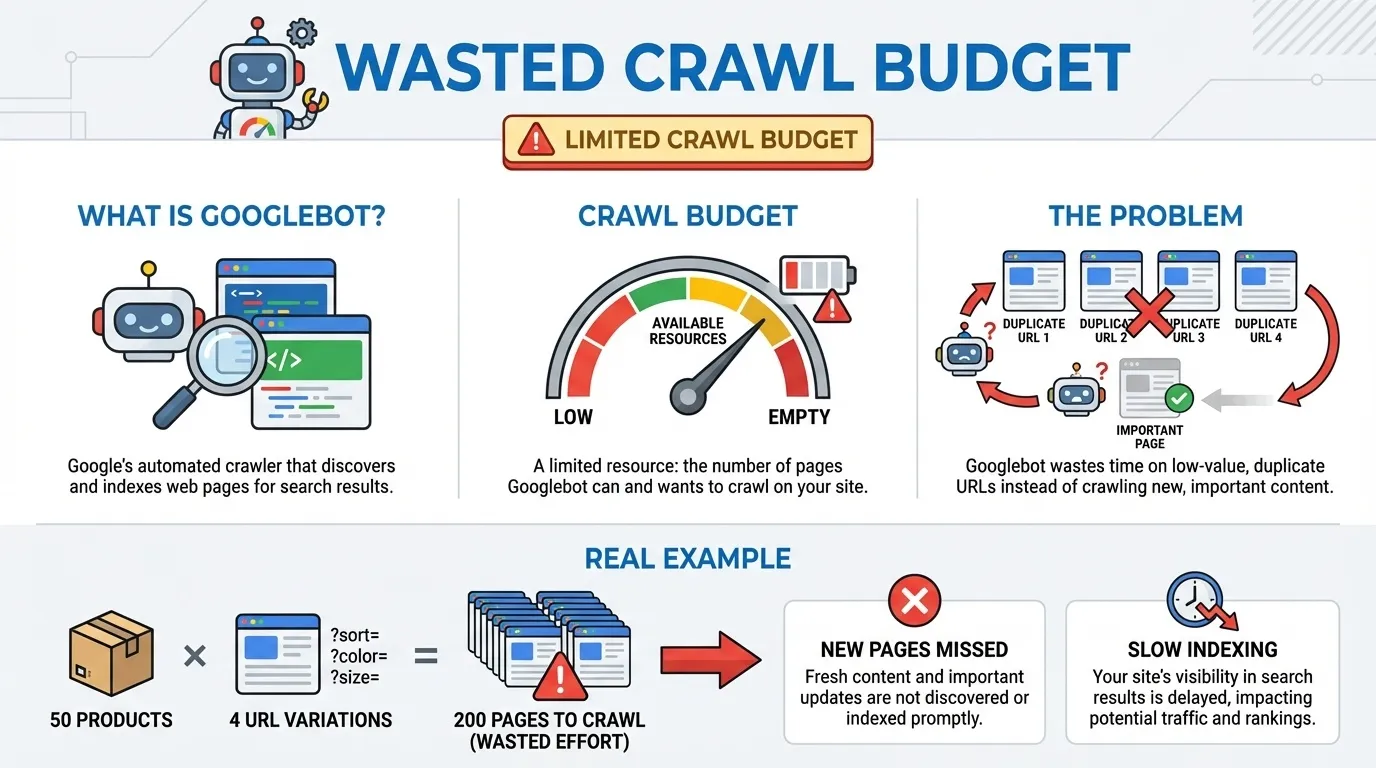
Googlebot is an automated program (a crawler) from Google that scans and stores copies of your site’s pages in Google’s search database (index). However, each site gets a limited crawl budget, which means Googlebot can only spend so much time crawling a store’s pages.
When Shopify generates multiple duplicate URLs for the same content, Googlebot spends time and resources crawling these redundant URLs instead of focusing on the main product page or more important pages.
This means valuable crawl budget is wasted on pages that don’t improve your SEO.
Why It’s Harmful
If Googlebot spends time crawling duplicate content, it may miss important new pages, reducing your search visibility.
Example:
Let’s say your Shopify store has 50 products, and each product is accessible via 4 different URLs (main product page, collection page, sale page, and variant page).
Instead of using its crawl budget to index new products or key collection pages, Googlebot spends unnecessary time on duplicate URLs, slowing overall indexing and hurting your store’s visibility.
3. Index Bloat
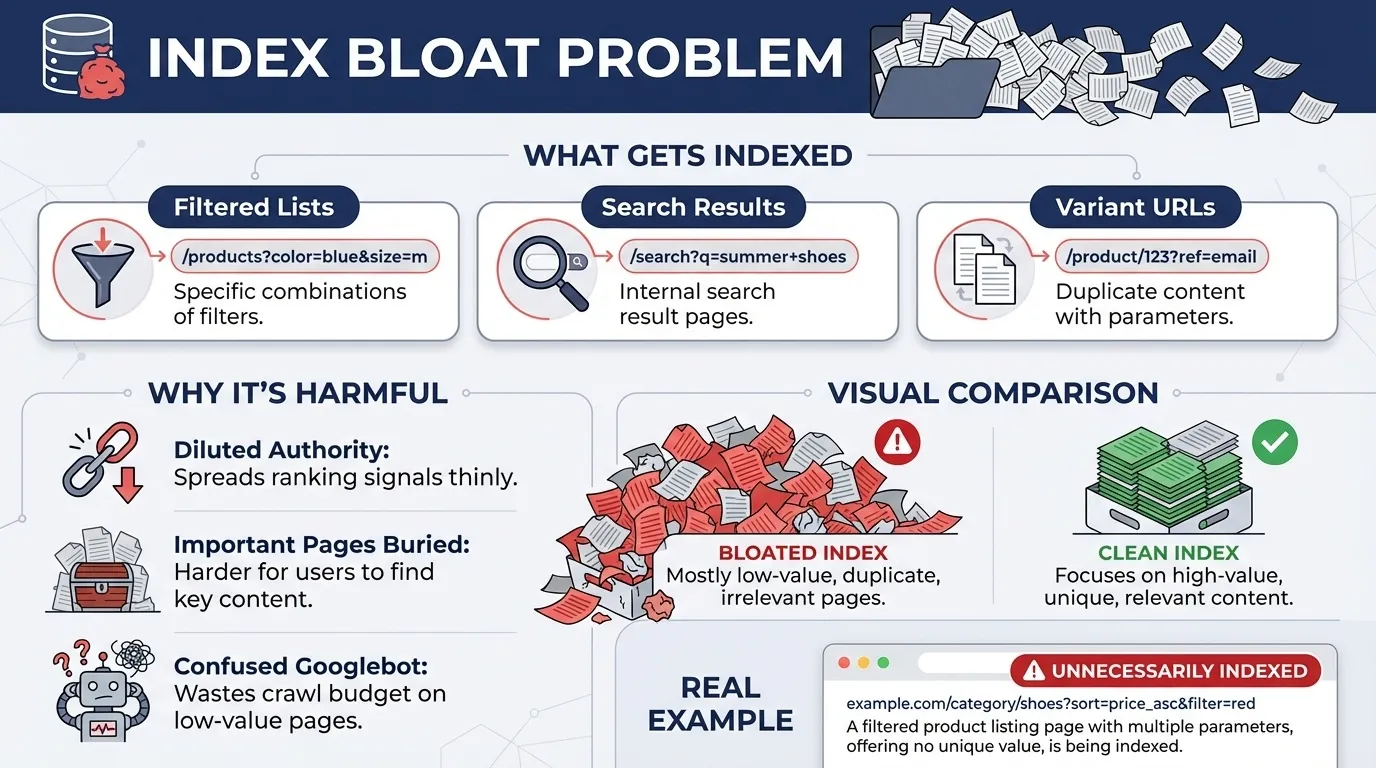
Index bloat, or the indexing of too many unnecessary pages by search engines, often results from how Shopify is configured by default. Common low-value pages include:
- Filtered product lists (e.g., /collections/shoes?filter.v.price=50-100)
- Search result pages
- Variant URLs (e.g., /products/product-name?variant=123456)
These pages don’t contribute significantly to SEO, yet they are still indexed. As a result, they artificially inflate the number of indexed pages in Google’s search results.
Why It’s Harmful
Having too many low-value pages in Google’s index not only dilutes the overall site’s authority, but it also makes it harder for important pages to stand out in search results. If Google’s index is clogged with unimportant filtered or variant pages, it becomes less clear which pages should actually rank for valuable search terms.
Additionally, a bloated index can confuse Googlebot, leading it to prioritise unnecessary pages for crawling and indexing, further wasting your crawl budget.
Example:
Imagine that Googlebot indexes multiple filtered versions of your product pages, such as /collections/shoes?filter.v.price=50-100. While these URLs are technically accessible to users, they don’t serve any unique SEO purpose.
These pages don’t add much value, but they still consume valuable indexing space in Google’s search engine, which could be better used for product pages or content that actually drives traffic.
4. Weakened Topical Authority
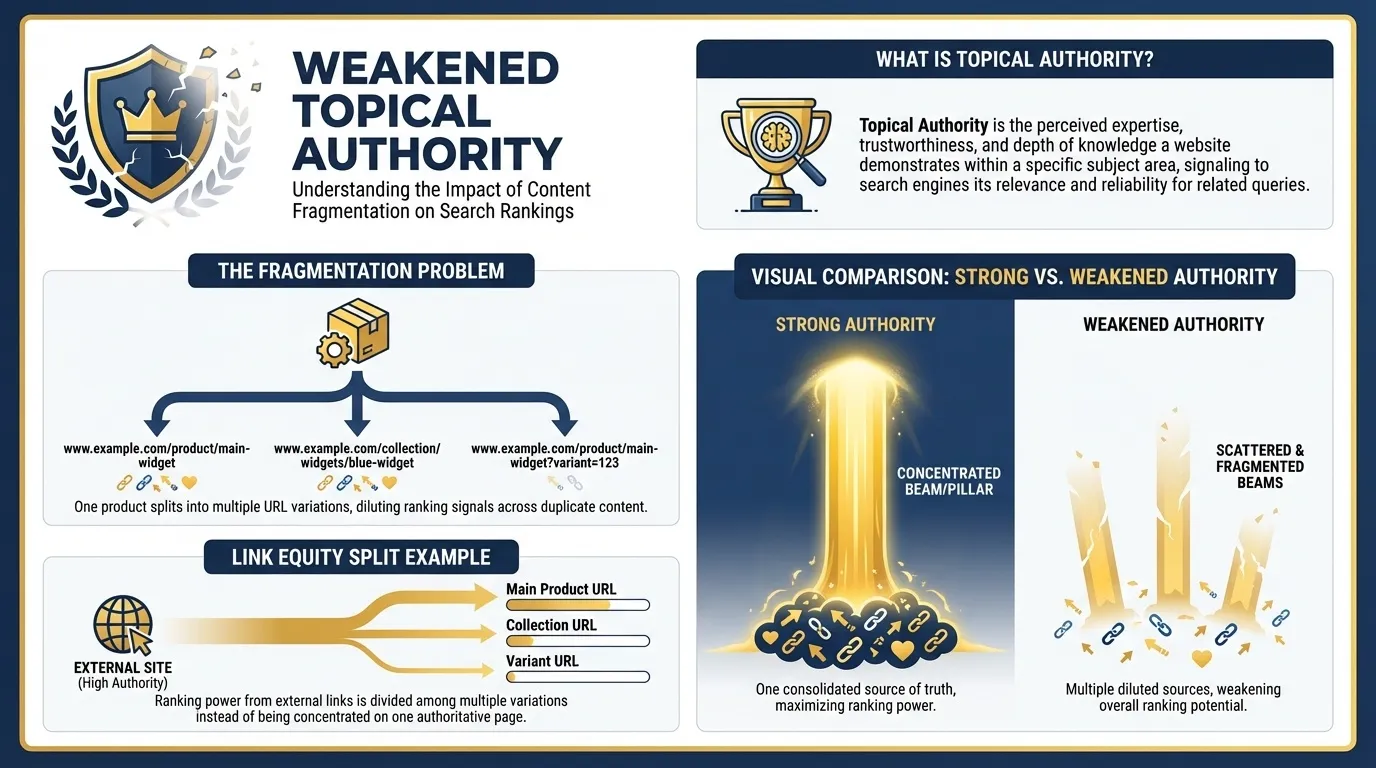
Topical authority is a website’s perceived expertise in a subject area. Publishing high-quality content on a single topic increases a site’s authority, but publishing multiple versions of the same content can dilute ranking signals and weaken that authority.
For instance, when Shopify generates duplicate URLs for the same product, such as:
- /products/product-name
- /collections/sale/products/product-name
- /products/product-name?variant=123456
Each of these pages competes for the same ranking signals like backlinks, internal links, and user engagement metrics, despite leading to essentially the same content. This fragmentation weakens the page’s overall topical authority and makes it harder for the primary page to rank well.
When multiple versions of content exist, link equity gets split across duplicate URLs. For example, if an external site links to both /products/product-name and /products/product-name?variant=123456, the link’s ranking power is split instead of boosting the main product page.
Shopify Technical SEO Checklist
To ensure your Shopify store ranks well in search engines, addressing key issues through a technical SEO audit is a smart move. This checklist covers the critical areas, from fixing duplicate content to optimising crawl budget, helping you build a strong foundation for SEO success.
1. Fix Duplicate Content from Product Variants
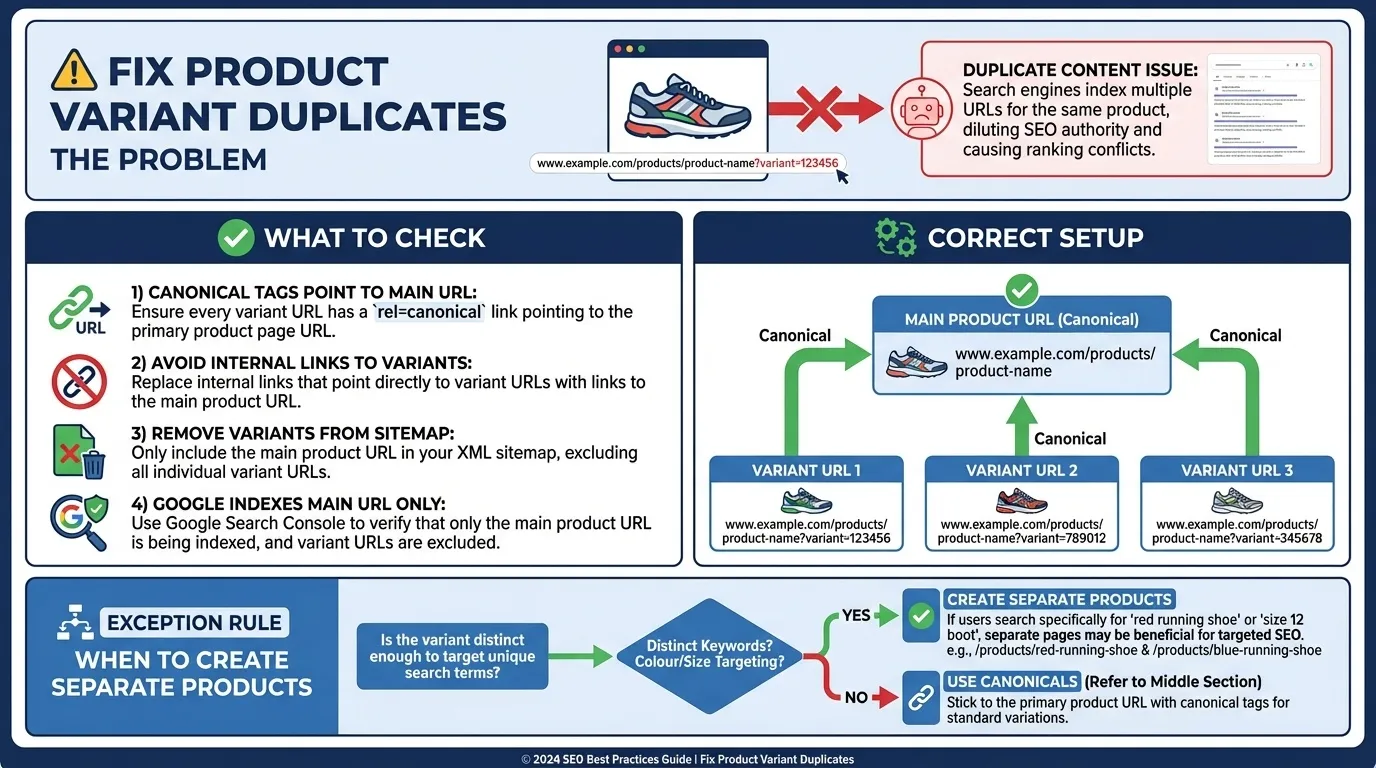
Shopify automatically generates URLs for each product variant, such as:
- /products/product-name?variant=123456
If these variant URLs are indexed, they can lead to duplicate content and confuse search engines.
What to Check
- Ensure canonical tags on variant URLs point to the main product URL.
- Avoid linking internally to variant-specific URLs.
- Remove variant URLs from your sitemap.
- Ensure Google indexes only the primary product URL.
When Variants Should Be Separate Products
When colour, size, or SKU variations target distinct keywords, separate product pages may be necessary. Otherwise, consolidate authority to a single URL to avoid dilution.
2. Control Filter and Faceted Navigation URLs
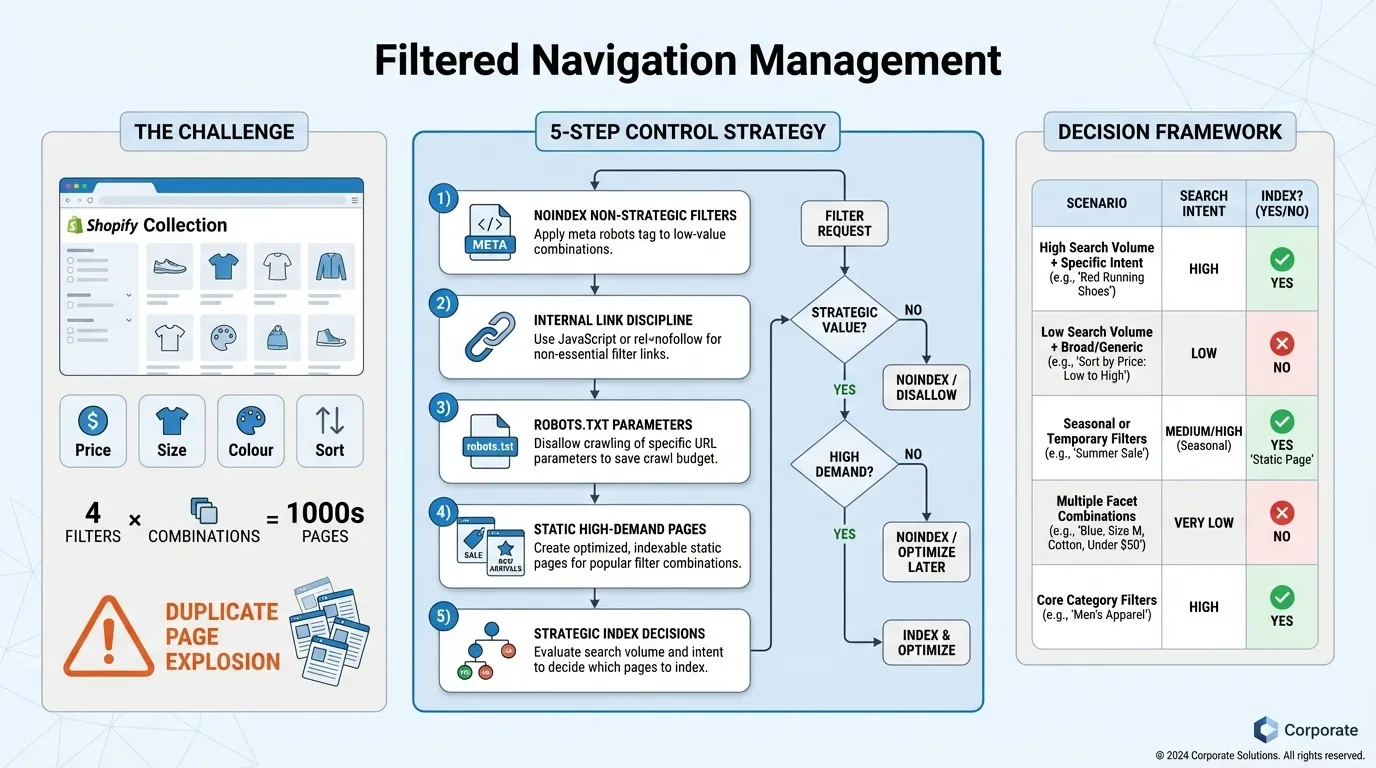
Shopify’s collection pages often have filter options such as:
- Price range
- Size
- Colour
- Sort order
Each filter combination generates a new URL, potentially causing thousands of duplicate pages.
Best Practices for Managing Filtered URLs
- Apply noindex to filter combinations that don’t have standalone search intent.
- Avoid linking internally to filtered URLs.
- Prevent search engines from crawling unnecessary parameters using robots.txt.
- Create static collection pages for high-demand filters, such as a dedicated “sale” or “new arrivals” collection.
Index only those filter pages that directly serve the user’s search intent.

3. Correct Canonical Tag Implementation
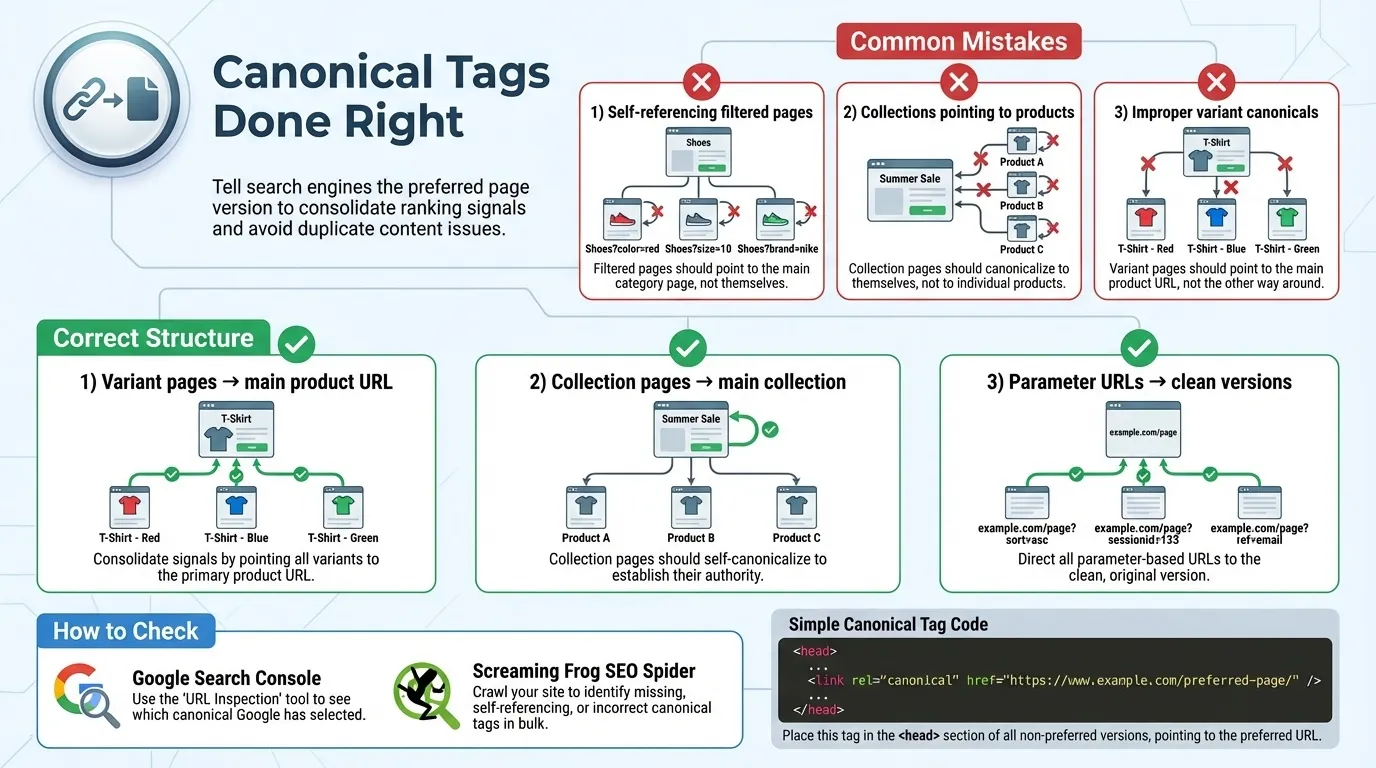
Canonical tags tell search engines which version of a page is the preferred or original when there are duplicate pages with similar content. Properly implement these:
- Self-referencing canonical tags on filtered pages.
- Canonical tags pointing to collection paths rather than product URLs.
- Improper handling of product variants with canonicals.
Correct Canonical Tag Structure
- Ensure canonical tags on product variant pages point to the main product URL.
- Collection pages should canonicalise to their main version, not specific products.
- Avoid canonicalising parameter-based URLs to themselves.
How to Check Canonical Tags
- Use Google Search Console to inspect pages.
- Crawl the site with Screaming Frog to verify proper implementation of the canonical tag.
4. Fix Collection-Based Duplicate Product URLs
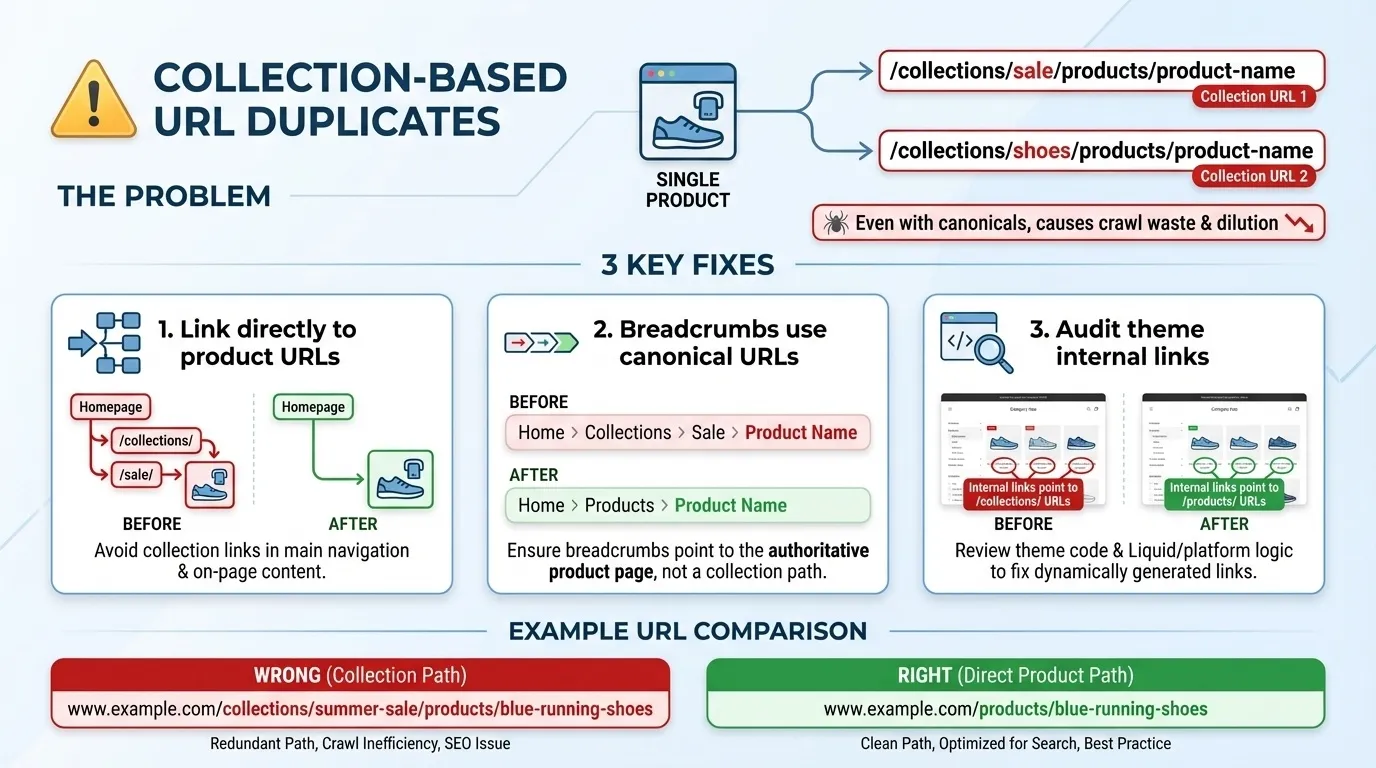
Shopify often creates multiple versions of the same product URL nested within different collections.
Example:
- /collections/sale/products/product-name
- /collections/shoes/products/product-name
Even if canonical tags are set correctly, linking to these collection paths can create crawl inefficiencies.
Fixes
- Link directly to product URLs rather than through collection pages.
- Ensure breadcrumbs use canonical product URLs.
- Audit internal links in your theme files to avoid promoting duplicate URLs.
5. Reduce Index Bloat
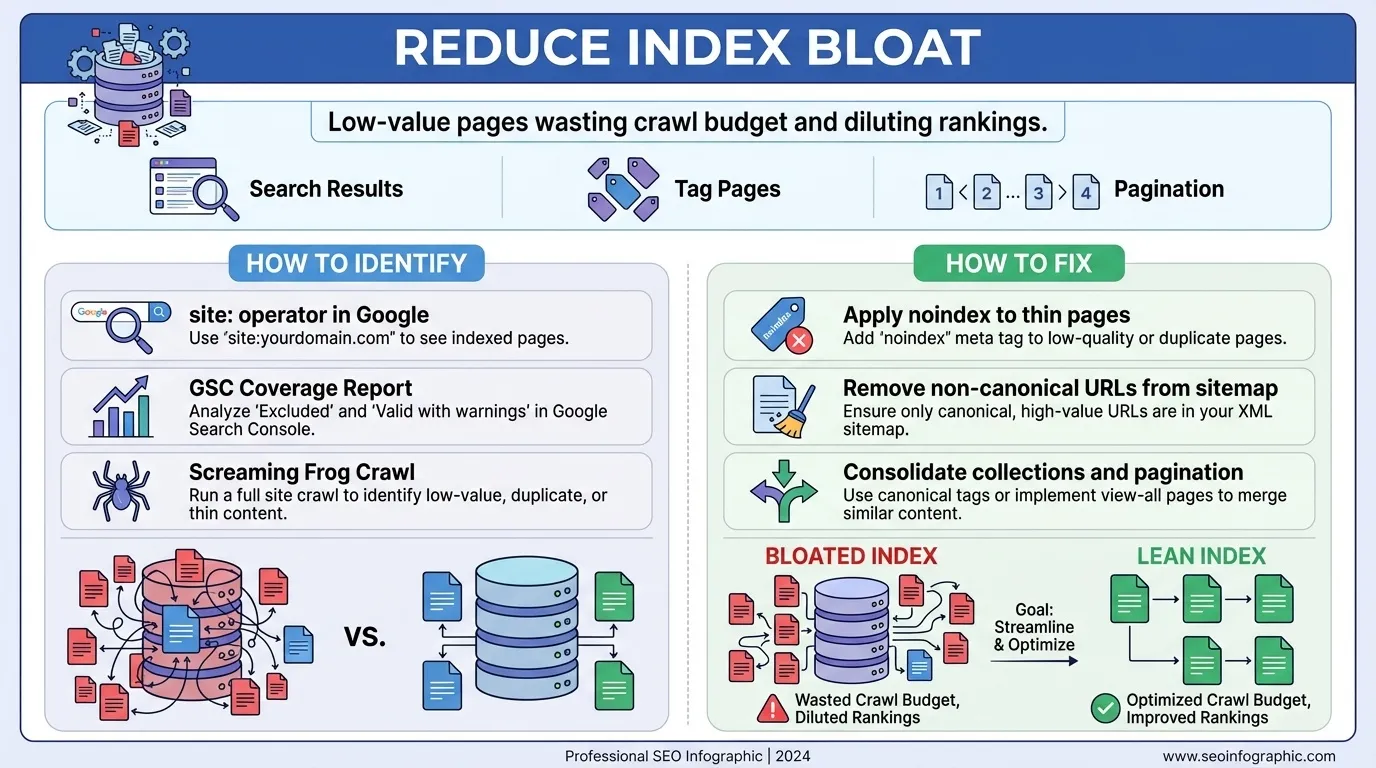
Index bloat occurs when low-value pages, such as search results, tag pages, or pagination, are indexed, wasting crawl budget and diluting rankings.
How to Identify Index Bloat
- Use the site: operator in Google Search to check which pages are indexed.
- Review your Google Search Console coverage report for unusual page counts.
- Use Screaming Frog to crawl and identify unnecessary URLs.
How to Fix Index Bloat
- Apply noindex to thin pages, like search results or tag-based collections.
- Remove non-canonical URLs from your sitemap.xml.
- Consolidate overlapping collections and remove unnecessary pagination.
A lean index improves ranking stability and crawl efficiency.
6. Optimise Shopify Sitemap Structure
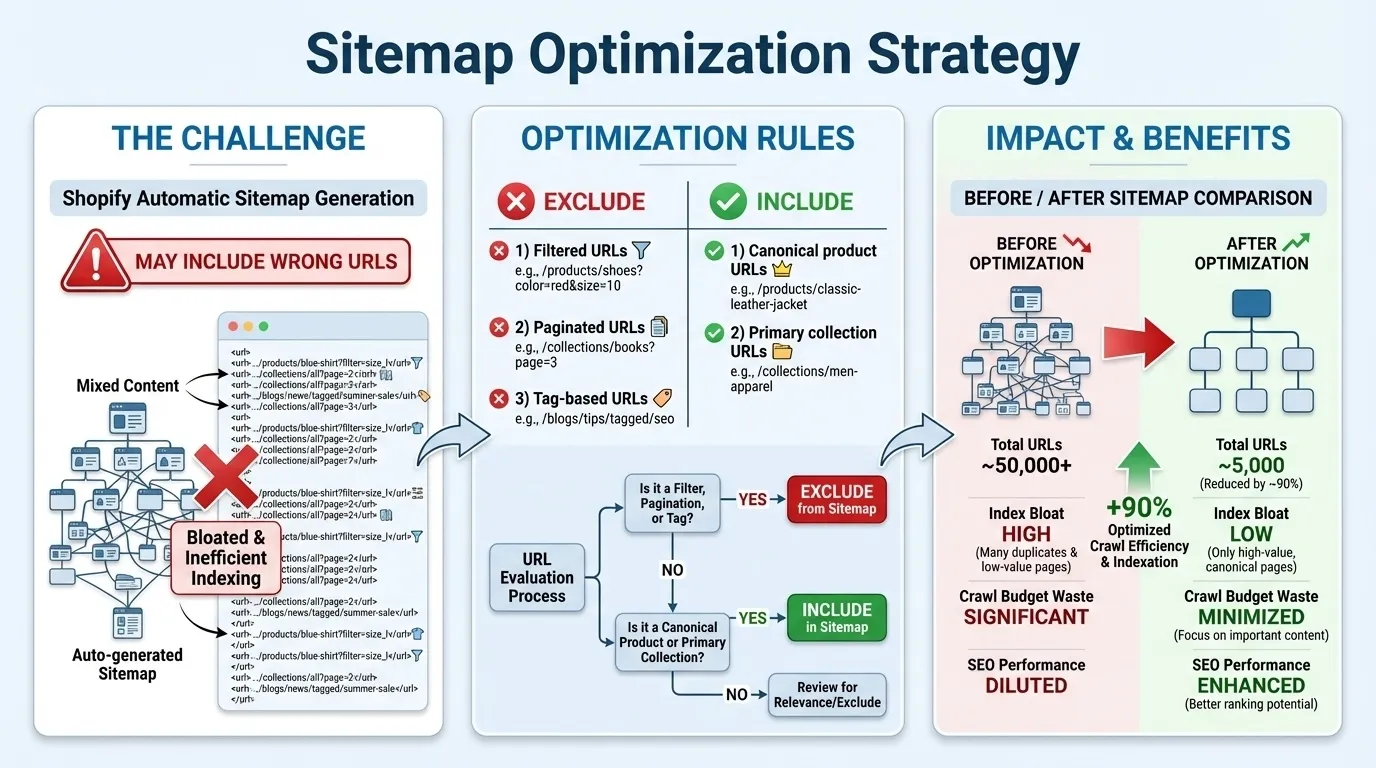
Shopify automatically generates a sitemap, but it may include URLs that should not be indexed.
Ensure Your Sitemap Contains Only:
- Canonical product URLs
- Primary collection URLs
- No filtered, paginated, or tag-based URLs
A clean sitemap is crucial for accurate indexing and strong SEO performance, ensuring your SEO services strategy delivers maximum visibility and search engine efficiency.
7. Improve Crawl Efficiency and Internal Linking
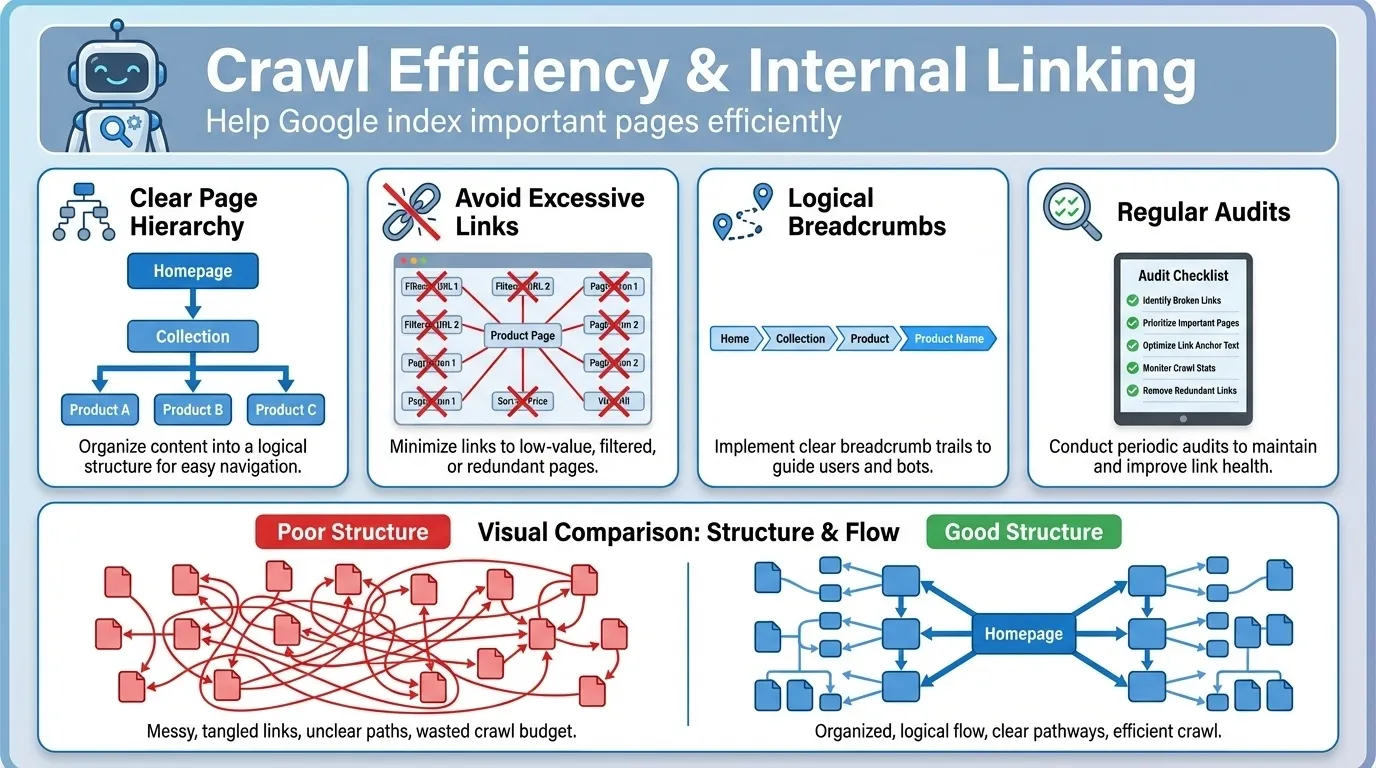
The more efficiently your site is crawled, the better Googlebot can index your important pages.
Best Practices
- Maintain a clear page hierarchy: Homepage → Collection → Product.
- Avoid excessive internal linking to filtered URLs or pagination.
- Ensure logical and relevant breadcrumb navigation.
- Regularly audit internal linking to reinforce priority pages.
A clear, intuitive internal linking structure helps Google understand your site’s layout.
Shopify Technical SEO Checklist (Action Table)
Here’s a quick reference table to help you prioritise and implement the fixes. This action table breaks down each issue, its corresponding fix, and its priority level, making it easy to take actionable steps to optimise your store’s SEO.
| Area | Issue | Fix | Priority |
| Variants | Indexed variant URLs | Canonical to the main product | High |
| Filters | Indexable faceted URLs | Noindex | High |
| Collections | Duplicate product paths | Canonical fix | High |
| Sitemap | Non-canonical URLs included | Clean sitemap | Medium |
| Index Bloat | Thin tag pages | Noindex | High |
By following this checklist and addressing each identified issue, you’ll improve your store’s technical health and lay a solid foundation for better rankings. Addressing these SEO elements will not only help search engines crawl and index your site more effectively but also enhance user experience and overall store performance.
Tools to Audit Your Shopify Technical SEO
The following tools help you identify and address critical issues, including indexing, duplicate content, page speed, and more, ensuring your store is fully optimised for search engines.
| Tool | Purpose | How It Helps Shopify SEO |
| Google Search Console | Monitor indexing status, crawl errors, and coverage reports | Identifies indexing issues, coverage problems, and helps optimise crawl stats for Shopify stores. |
| Screaming Frog | Website crawler for identifying broken links, duplicate content, missing tags, and technical issues | Crawls your Shopify store to detect duplicate content, broken links, improper canonicals, and more. |
| Ahrefs / Semrush | SEO audit tools for backlinks, site health, and keyword performance | Provides deep insights into backlinks, technical health, and improvements in keyword rankings. |
| Google PageSpeed Insights | Analyses page speed and suggests improvements | Speeds up your store’s performance, which is a ranking factor and improves user experience. |
| Shopify Admin | Internal dashboard for managing themes, apps, and SEO settings | Keeps your Shopify store optimised by identifying issues within the theme, apps, and settings that affect SEO. |
Regular audits using these tools will ensure your Shopify store remains technically sound, improves visibility, and delivers a better user experience.
Common Shopify Technical SEO Mistakes to Avoid
These mistakes can hinder your site’s search performance, making it harder to rank and drive organic traffic. In this section, we’ll highlight the most frequent Shopify technical SEO mistakes and explain how to avoid them for better optimisation.
1. Letting Filters Index Automatically
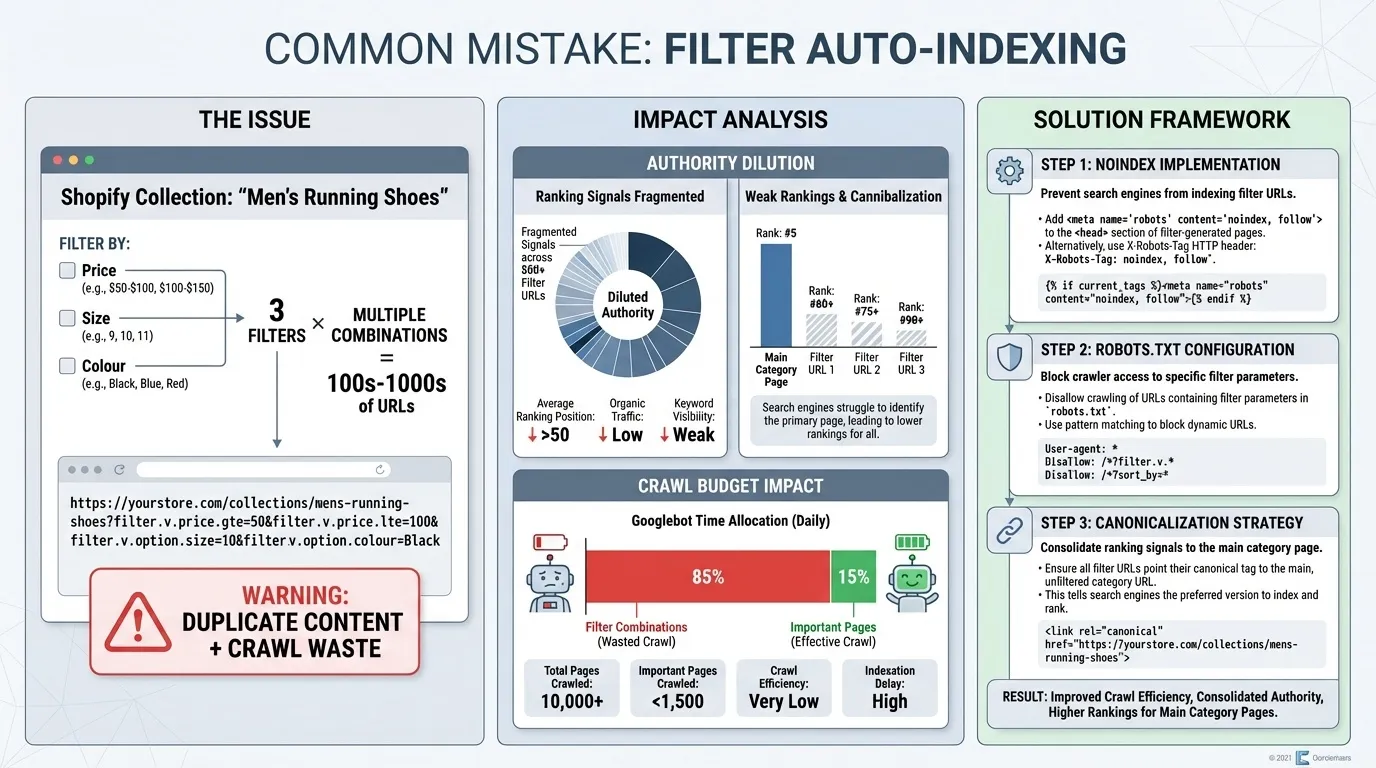
Shopify allows users to add filters to collections, such as filtering by price, size, or colour. While these filters are helpful for customers, they can generate an infinite number of URL combinations (e.g., /collections/shoes?filter.v.price=50-100), each treated as a separate page by Google.
These filtered URLs can lead to duplicate content and a wasted crawl budget, as search engines may index hundreds or thousands of near-identical pages.
Why It Hurts SEO
- Dilutes authority: When Google sees multiple URLs with the same content, it’s unsure which version to rank. This results in split ranking signals, reducing the likelihood that any one page will rank well.
- Crawl budget waste: Googlebot can waste its crawl budget by indexing hundreds of non-essential filtered pages, leaving your important pages, such as product and category pages, under-crawled.
How to Fix It
- Apply noindex to filtered URLs that don’t offer significant unique content.
- Block crawling of unimportant parameters by adding them to your robots.txt file.
- Use static pages for popular filters that need to be indexed (e.g., a “Sale” page) instead of letting Shopify generate dynamic filtered URLs.
2. Relying Only on Canonicals
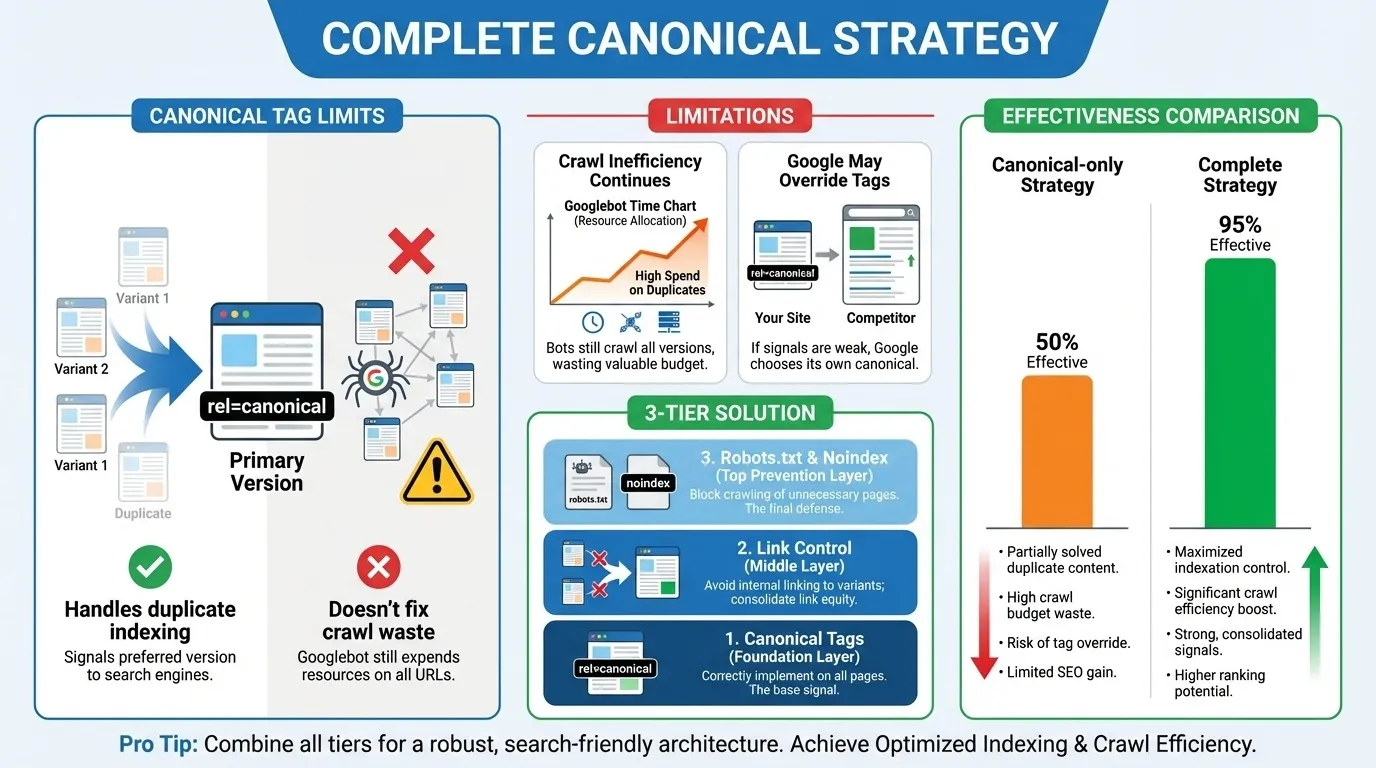
Canonical tags tell search engines which version of a page is the “primary” one when there are multiple versions (such as a product available in different colours or sizes).
While canonical tags are vital for handling duplicate content, relying solely on them without addressing the root cause (e.g., internal links to variant URLs or filtered pages) won’t resolve the issue.

Why It Hurts SEO
- Doesn’t solve crawl issues: Canonicals only address duplicate content indexing. They don’t fix the crawl inefficiency caused by duplicate pages. If a search engine is crawling these pages, it’s still wasting time on low-priority content.
- Can be ignored by Google: In some cases, Google may ignore the canonical tag if it deems the page to have unique content. If this happens, the duplicated content might still compete for rankings.
How to Fix It
- Ensure canonical tags are used correctly throughout your Shopify store, especially on product variants and filtered collection pages.
- Control internal linking: Don’t link directly to variant pages or filters. Instead, link to the main product URL to guide search engines and users.
- Use robots.txt or noindex meta tags, where applicable, to prevent Googlebot from crawling unnecessary pages.
3. Ignoring Internal Linking
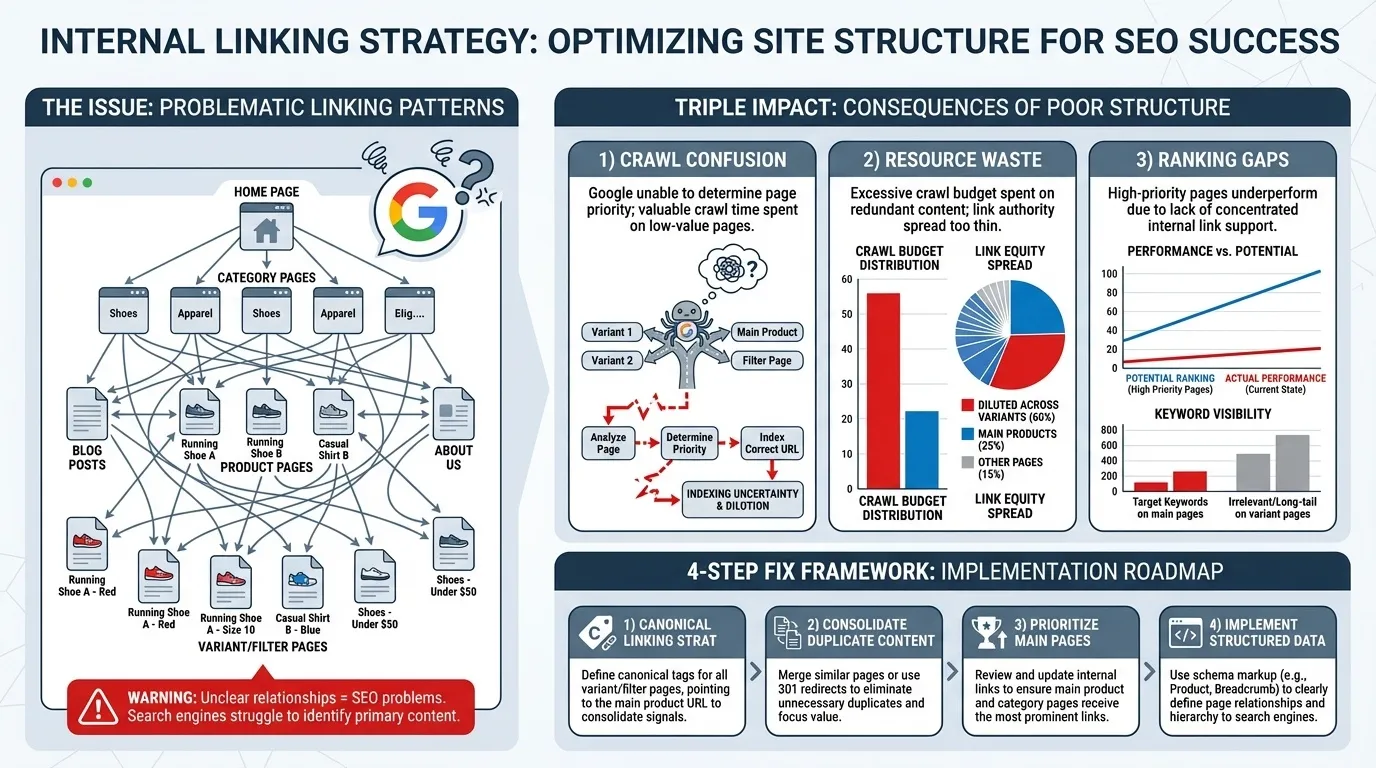
Internal linking refers to how pages on your site link to one another. When internal links are unclear, excessive, or lead to duplicate URLs, it can confuse search engines.
For example, if both the main product page and its variant pages are linked from multiple internal pages, Google might not know which page to prioritise. Similarly, linking to filtered URLs can spread signals thin and confuse search engines.
Why It Hurts SEO
- Crawl confusion: Search engines rely on internal linking to infer relationships between pages. If you link to both duplicate product pages and variants, it makes it harder for Google to determine which page is the most important.
- Crawl budget inefficiency: Linking to duplicate pages (like filtered URLs) wastes crawl budget and dilutes link equity across too many pages.
- Missed ranking opportunities: If internal links aren’t properly directed towards high-priority pages (such as best-selling products or key collections), you risk losing rankings for those pages.
How to Fix It
- Be intentional with your links: Link to the canonical version of the page (e.g., the main product URL, not variants or filters).
- Minimise internal links to filtered URLs or pagination pages.
- Use breadcrumb navigation that reflects the main product and category hierarchy to help Google understand your site’s structure.
- Regularly audit your internal linking structure using tools like Screaming Frog to ensure there are no unnecessary duplicate links.
4. Leaving Tag Pages Open for Indexing
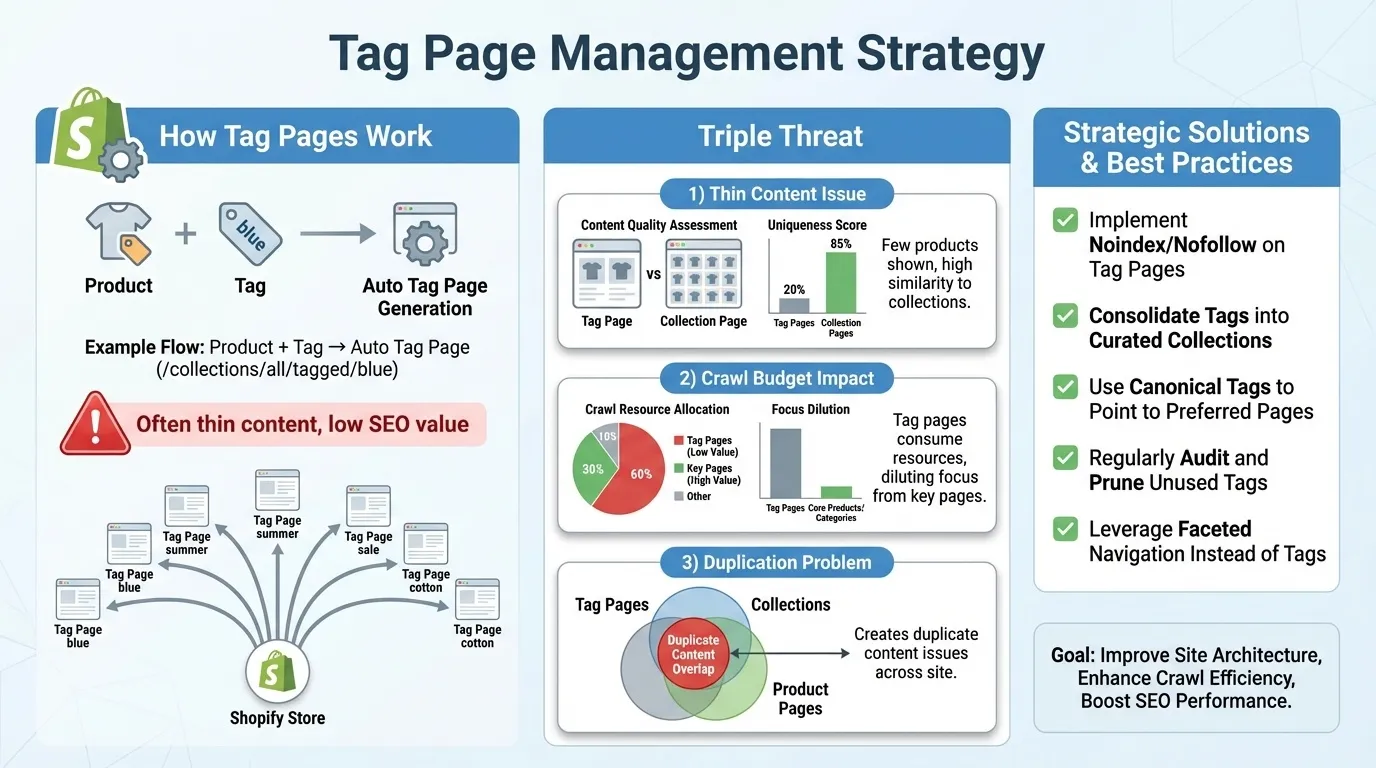
Tag pages are automatically generated on Shopify when you assign tags to products. For example, a product tagged with “blue” will have a URL like /collections/all/tagged/blue.
While tags are useful for organising products, many tag pages don’t offer unique or valuable content for search engines. These pages often contain thin content that doesn’t add much value to your store’s overall SEO.
Why It Hurts SEO
- Low-value pages: Tag pages can become thin content if they display only a few products or are too similar to other pages (e.g., collections).
- Crawl waste: If tag pages are indexed, they can consume valuable crawl budget and dilute the focus of your key product pages and categories.
- Duplication: Tag pages often overlap with collections or product pages, leading to duplicate content and harming your store’s SEO.
How to Fix It
- Use noindex on tag pages that don’t provide significant content or value to the user.
- Avoid linking to tag pages from your main navigation or other high-authority pages unless they are truly valuable for users.
- Focus on creating unique landing pages for high-value tags, or, if necessary, consolidate tag pages into collection pages.
5. Creating Multiple Similar Collections
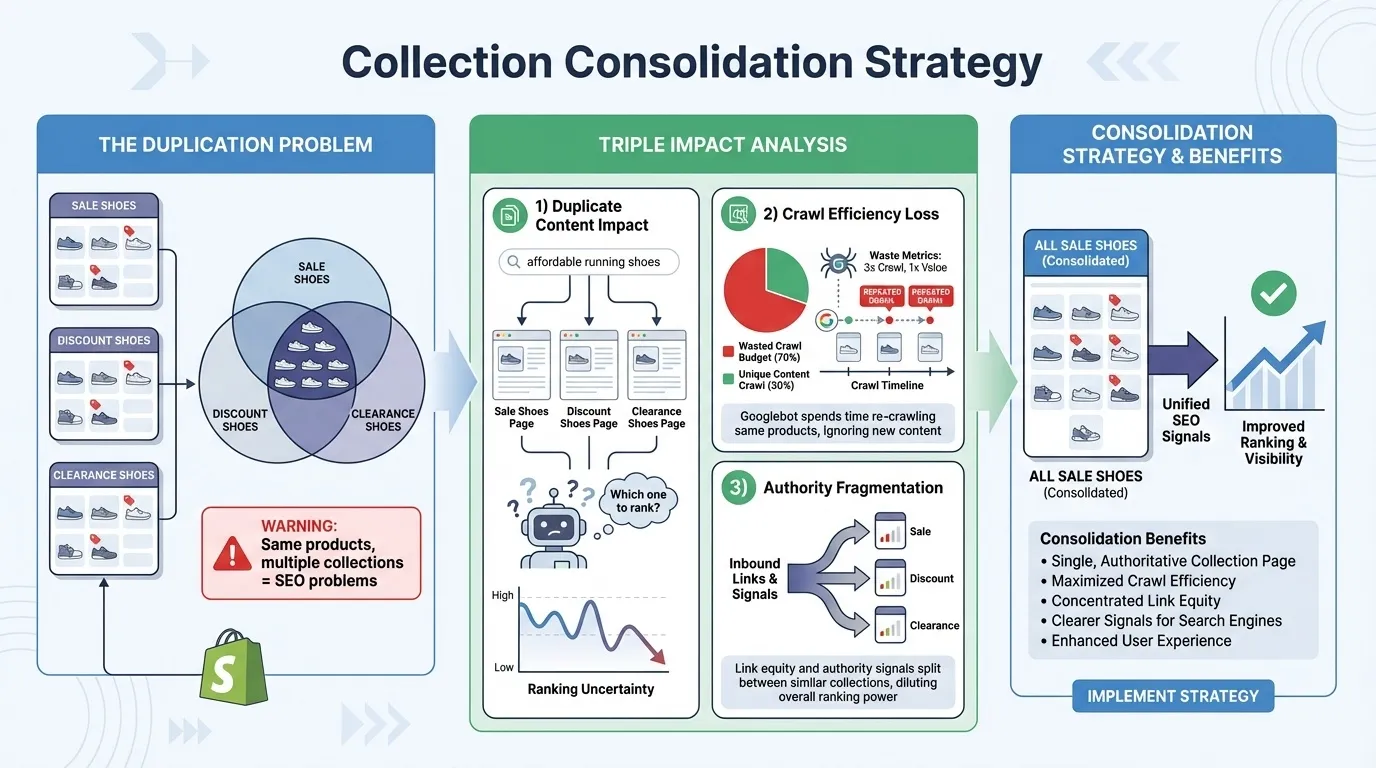
In Shopify, collections are used to group related products. However, multiple similar collections (such as “Sale Shoes” and “Discount Shoes”) can lead to duplication, confusion, and wasted crawl budget if they contain the same or very similar products.
Why It Hurts SEO
- Duplicate content: Shopify can create duplicate or near-duplicate product pages across multiple collections, making it unclear to search engines which page should rank for a given query.
- Crawl inefficiency: If the same products are listed in multiple collections, Googlebot might crawl the same pages repeatedly, wasting crawl budget on near-identical content.
- Weakened SEO signals: If Google detects multiple similar collections, it may distribute link equity among them, making it harder for any single collection to rank well.
How to Fix It
- Combine similar collections into a single collection, and use filters to display different variants (e.g., “Sale Shoes” should be the only collection, with filters for price, colour, size, etc.).
- Apply canonical tags to ensure Google recognises the preferred version of a collection.
- Audit your collections regularly and remove or consolidate any unnecessary collections that don’t add value.
Each fix mentioned here addresses foundational SEO issues that, when neglected, can significantly impact rankings, traffic, and user experience. Be proactive with technical SEO, and your Shopify store will have a much stronger chance of competing in search results.
Fix Technical SEO Before Scaling Traffic
It’s tempting to pour more budget into ads, publish more blog posts, or chase the next keyword opportunity. But if your Shopify store has unresolved technical issues, you are essentially pouring water into a leaking bucket.
Paid traffic can bring visitors. Content can attract impressions. But neither can compensate for duplicate URLs, crawl waste, or fragmented ranking signals. If search engines are unsure which pages to prioritise, your growth will always feel harder than it should.
Technical SEO is not the glamorous part of marketing. It sits behind the scenes. Yet it determines whether your efforts compound or stall.
When your Shopify store has:
- Clean canonical structures
- Controlled filters and variants
- A lean, focused index
- Strong internal linking
You create clarity for search engines. And clarity leads to stronger rankings, more stable traffic, and higher conversions. Fix the foundation first. Then scale. That is how sustainable organic growth is built.

If you’re ready to address the technical issues holding back your store, our expert team at MediaOne is here to help. Get in touch today to learn how we can help you build a solid SEO foundation and scale your traffic efficiently. Contact us to get started!
Frequently Asked Questions
What is a canonical tag in Shopify?
A canonical tag helps Google understand which version of a page to index, consolidating ranking signals to the main product or category page.
How do I handle duplicate product URLs in Shopify?
Ensure you set up canonical tags that point to the main product URL, and avoid linking to variant- or collection-based URLs.
Can I use Shopify’s built-in SEO features for all my SEO needs?
Shopify’s built-in SEO features help, but you’ll need to address technical issues such as duplicate content, filters, and index bloat manually.
How often should I audit my Shopify SEO?
We recommend conducting a full technical SEO audit at least every 3–6 months, especially if you’re expanding your store.