| AI Summary
Project management software helps teams organise tasks, assign responsibilities and track deadlines. The right choice depends on the work involved, the people using it and the full cost of running it. Trello supports visual task tracking, Jira supports software development, and platforms such as Asana, ClickUp and monday.com cover broader team workflows. Singapore businesses should compare plan limits, integrations and permissions, then test shortlisted tools on a real project before buying. |
A project starts with a deadline. Then the brief changes, a designer waits for feedback, and the latest update disappears into a chat thread. By Friday, someone is asking which version to use.

Project management software gives that work a shared home. However, a long feature list tells you little about whether people will update tasks, find decisions or finish approvals without extra chasing.
The right tool matches your team size, project type and budget. This guide compares eleven options through everyday work. A scorecard and an example in Singapore dollars help turn the comparison into a buying decision.
Key Takeaways
- Free plans can support ongoing work when their limits match the team’s needs.
- A paid seat, guest account and read-only account can have different billing rules.
- Setup, training, add-ons and migration belong in the first-year budget.
- A pilot should test delayed work, approvals and handovers alongside routine tasks.
- Selection scores help organise a decision; they do not predict results.
What Is Project Management Software, and When Is a Free Plan Enough?
Project management software helps people plan, organise and monitor work in one shared system. A task usually has an owner, a due date, a status and space for supporting information. Larger systems add schedules, budgets, workload views and reports across several projects.
A bakery opening an online store might create tasks for product photography, checkout testing and delivery information. The photographer sees the deadline, while the developer sees which images are ready. Each person knows what happens next.
What features does a team actually need?
Most teams can begin with five essentials:
- Task ownership and deadlines.
- A shared list, board or calendar.
- Comments and links to working files.
- Reminders for approaching or missed dates.
- Permissions controlling who can view or change work.
Extra features should solve a recurring problem. A dependency records that one task must finish before another can begin. A Gantt chart displays tasks across a timeline. Both help with work that has a required order, such as testing a website before launch.
When can a free plan support ongoing work?
A free plan can be enough for a small team with straightforward projects. User numbers alone do not decide this; storage, reporting, automation and access restrictions also count.

A three-person consultancy may need only assignments and due dates. Another three-person business may need client permissions and detailed billing records.
Free access can also differ from a temporary trial. A trial may expose paid features that disappear later. The team’s evaluation should therefore use the plan it expects to keep.
When has a spreadsheet become difficult to manage?
Spreadsheets remain suitable for calculations and simple trackers. Problems arise when a task’s supporting information spreads across email, chat and several files.
Repeated requests for updates, missed handovers and uncertainty about ownership are stronger reasons to change systems than company size. A shared tracker that already works does not need replacing simply because another business uses an app.
Benefits of Project Management Software for Teams
Project management software can make responsibilities, delays and workload easier to see. The benefits depend on accurate updates and agreed working habits.
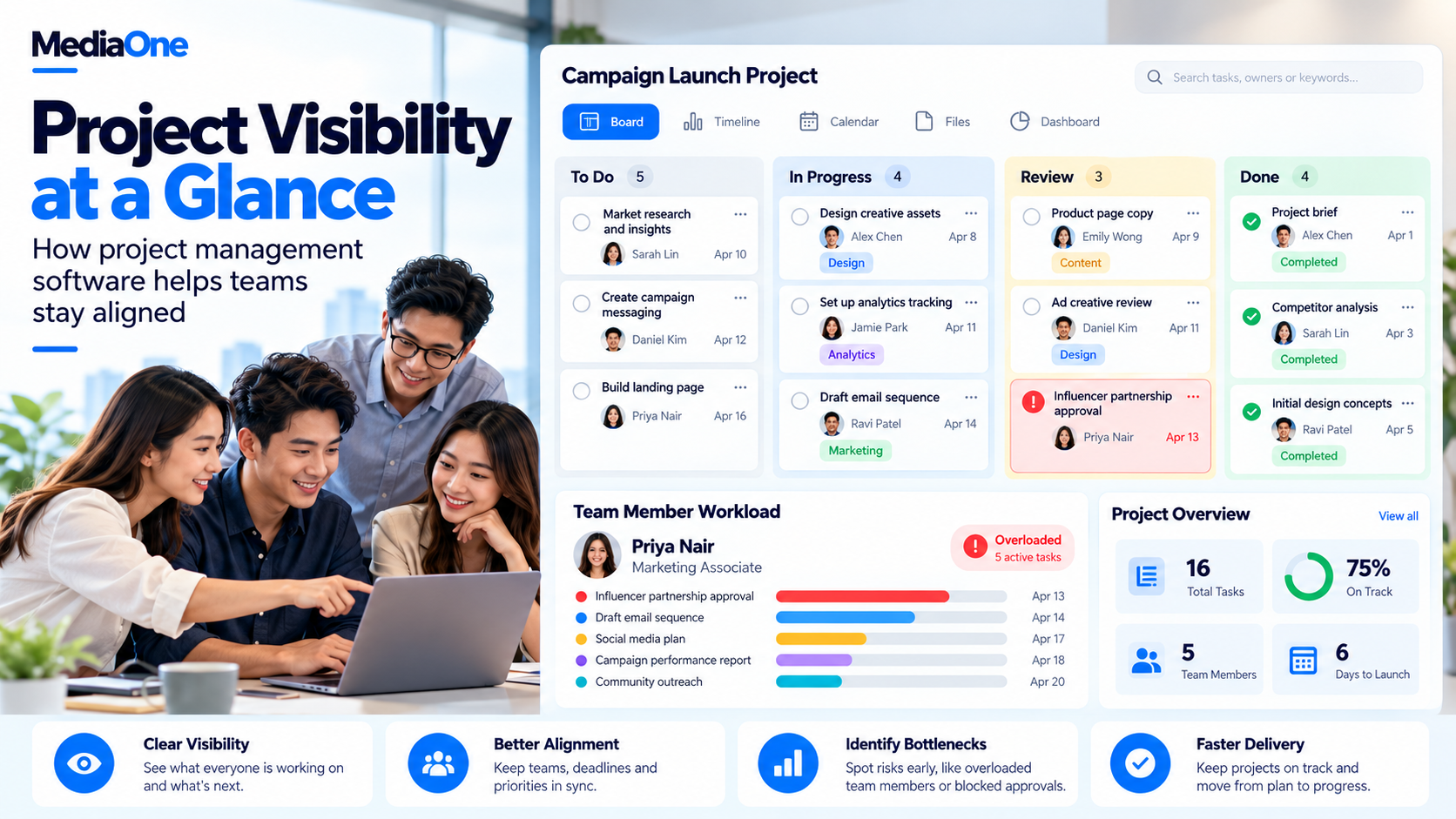
A task record brings the brief, working files, comments and latest status together. Colleagues can see what has happened before asking for another update.
For a digital marketing team, that could mean tracking an advertisement from copywriting through design and approval. The next person can identify the latest approved version.
Meetings can then focus on decisions and obstacles. A board still needs updating; an untouched task list cannot tell a manager whether work has moved forward.
Workload views expose scheduling problems
Task counts can hide differences in effort. Five short reviews may take less time than one video edit.
Workload planning adds estimated hours, availability and deadlines to the picture. A manager can then see that the person with three assignments already has a full week.
Estimates should include meetings, leave and internal duties. A forty-hour working week does not automatically provide forty hours for project delivery.
Time and budget records explain overruns
Time tracking helps service businesses compare planned effort with actual effort. A project sold as twenty hours may need thirty because revisions keep returning.
That information supports better estimates and earlier conversations about additional work. It can also reveal whether approval delays or repeated corrections consume the budget.
A content marketing manager could use these records to distinguish writing time from review time. The result is a more accurate production schedule, provided staff record their hours consistently.
Project Management Software Compared by Team Need
The options below cover different working styles. Their published features provide a starting point for selection; the recommendations are based on the tasks a team needs to complete.
The comparison uses official product and pricing information. A team trial provides the evidence for a final choice.
Which tools should different teams shortlist?
| Team need | Options to compare | Main test |
| Visual tracking for a small team | Trello, ProProfs Project | Owners and deadlines remain easy to find |
| Flexible workflows across functions | ClickUp, monday.com | Different teams can work without duplicating updates |
| Projects connected to business goals | Asana | Managers can relate project progress to objectives |
| Software development | Jira, ClickUp | Backlogs and development work stay connected |
| Requests passing between departments | Wrike, Asana | Handover responsibilities remain visible |
| Client work, hours and budgets | Teamwork.com, Zoho Projects | Delivery records support the required reporting |
| Spreadsheet-style project records | Smartsheet | Imported data and formulas behave as expected |
| Project discussions and shared updates | Basecamp | Decisions and files remain easy to retrieve |
ProProfs Project: Small-Team Task Tracking and Billing
ProProfs Project combines assignments, project views, time records and invoicing. Its project tracking features support comparing estimated hours with recorded hours, which suits businesses connecting delivery work to client charges.
The pricing structure includes a free small-team plan and a paid business option. The relevant comparison is the whole account cost alongside the functions the business needs.
One assignment followed through completion and into a time report can test both delivery and billing needs.
ClickUp: Custom Workflows Across Different Teams
ClickUp supports custom fields, statuses, documents and several project views. Its plan comparison separates access to features such as native time tracking, workload tools and automation.
This flexibility suits teams with different processes, such as designers handling creative requests while developers track technical tasks.
Administration deserves attention: someone needs to maintain shared fields, templates and permissions. A trial should begin with one simple workflow. Extra views can follow once the team understands the basics, avoiding a workspace where every department creates a different name for the same status.
Asana: Project Coordination and Business Goals
Asana supports project tasks and coordination, while higher plans add capabilities such as portfolios, goals and workload management. Its pricing and feature comparison also identifies where built-in time tracking becomes available.
A business coordinating several campaigns may value this connection to wider objectives.
Plan selection determines access to those functions. An entry-level subscription should not be priced as though it includes every leadership reporting feature. The pilot should include both a contributor updating work and a manager viewing progress across projects.
monday.com: Visual Boards for Team Workflows
monday work management uses configurable boards and offers features such as timelines, dashboards, automations and integrations across its subscription plans.
That makes it a candidate for teams organising repeatable processes, such as campaign requests or supplier onboarding.
The exact product and plan need attention. monday.com offers several products, so a sales-related feature may belong to a different subscription. Teams should also examine automation allowances and dashboard limits. The trial should demonstrate a complete handover between two roles without anyone copying the same update into another board.
Jira: Backlogs and Software Development
Jira supports software teams organising work through backlogs and development cycles. Atlassian’s Scrum board features connect planned work with sprints, which are short periods allocated to completing selected tasks.

Participation needs testing for developers and colleagues outside engineering. Detailed workflows can help technical delivery while adding steps for occasional users. A pilot should include one piece of work from request through testing, alongside the repository connections the team expects to use.
Trello: Visual Boards for Straightforward Projects
Trello organises work into cards and lists. A team can move an assignment through stages such as To Do, In Progress and Done.
The Trello plan comparison shows how additional views, administration controls and automation allowances vary by subscription.
A small business managing recurring tasks may find that board structure sufficient. Teams needing detailed financial reports should test the complete reporting setup, including any separate applications. Trello extensions, called Power-Ups, can introduce extra subscriptions. A low board price therefore needs comparing with the cost of the whole working arrangement.
Wrike: Requests and Work Across Departments
Wrike combines project views, dashboards and request-management features within its work management offering.
A business handling requests that pass between marketing, operations and other departments can consider it when assignments need a defined sequence.
Handover quality deserves particular attention. A request should reach the correct person with enough information to start. The trial should include an incomplete request, a returned task and an overdue response. Those situations reveal more about coordination than a sample project where every assignment arrives complete and on time.
Zoho Projects: Delivery Work Within a Connected System
Zoho Projects includes project planning and offers time logs, budgets and workflow features across its plan levels.
Businesses already using Zoho applications have a reason to examine how project records connect with their existing systems. Those connections still need testing for the exact applications and subscriptions involved.
A client assignment provides a practical test: the team should create the project, record effort and produce the report it needs. Separate modules, permissions or add-ons may affect the result, so an advertised connection should be demonstrated through an actual task.
Smartsheet: Grid-Based Planning and Reporting
Smartsheet combines grid-style records with project views, formulas, reports and dashboards. Its pricing comparison distinguishes core capabilities from higher-plan features and additional products.
Teams accustomed to spreadsheet layouts may find this familiar, particularly when they track many fields for each project.
Existing data needs a transfer test. A sample import should preserve the required dates, owners and calculations. Familiar rows do not guarantee identical formula behaviour. Member roles and additional reporting requirements also need examining before the business treats its existing spreadsheet process as fully transferred.
Basecamp brings together to-dos, discussions, files, schedules and check-ins. Its current plans use fixed account prices with package limits, including project and storage allowances.
A team losing decisions across several conversations can consider this project-centred approach.
Reporting requirements deserve a separate assessment alongside communication features. A pilot should include a decision, its supporting file and the resulting assignment. Another person should be able to retrieve all three without asking the original participants. Financial planning requirements deserve their own demonstration.
Teamwork.com: Client Projects, Capacity and Budgets
Teamwork.com focuses on service delivery, with project views, time tracking and capacity-related capabilities across its subscription plans.
An agency or consultancy can consider it when client work needs connecting to hours, availability and financial records.
Reporting and controls need matching to the subscription level. Teamwork.com’s official plan comparison lists user minimums and feature availability. A client project followed through planning, time entry and reporting gives finance and delivery leads the same example to assess.
How to Choose Project Management Software
A shortlist becomes easier to assess when the team agrees on its requirements before looking at demonstrations. Three candidates are usually enough for a manageable comparison.
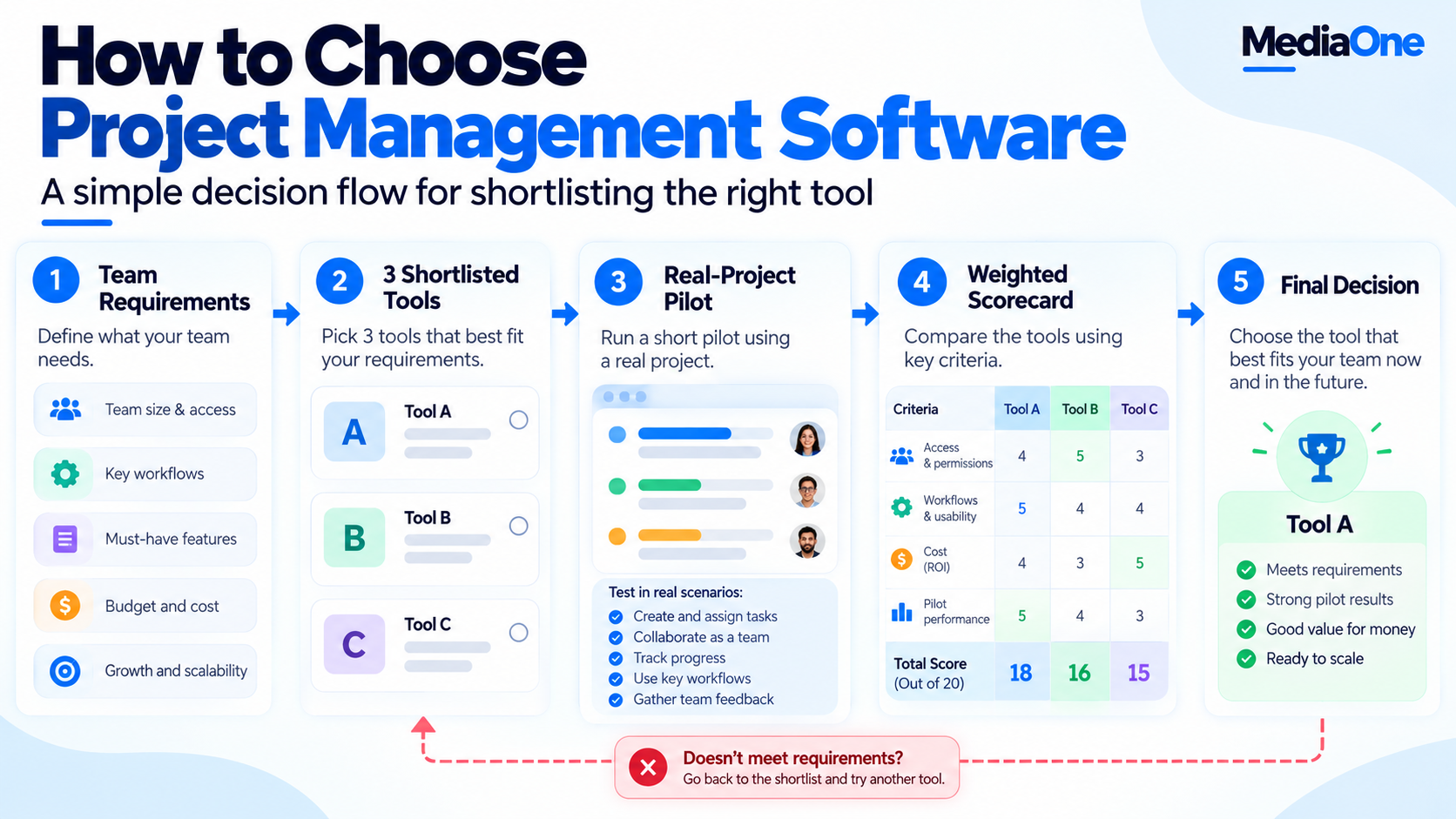
Team size and working habits set the requirements
User counts should include employees, freelancers, clients and occasional reviewers. Their access needs can differ.
A website project scope might require a developer to change tasks, a client to approve work and a director to view progress. Each role needs different permissions.
The team can then identify essential functions, acceptable workarounds and features it can leave out. A required approval record deserves more weight than an attractive dashboard nobody needs.
A selection scorecard makes trade-offs visible
The following weights are a suggested decision aid. Each business can adjust them before scoring.
| Criterion | Weight | Evidence to examine |
| Team access and everyday usability | 25% | People can find and update their work |
| Project requirements | 25% | Essential tasks and reports work |
| Total first-year cost | 30% | Subscription and operating costs are affordable |
| Pilot performance | 20% | Real assignments move through the agreed process |
Each criterion receives a score from one to five. The weighted result equals each score multiplied by its weight, with the results added together.
For example, scores of four, five, three and four produce 3.95 out of five. A missing essential requirement should still rule out a tool, regardless of its total.
A real-project pilot tests everyday use
A two-week pilot is a suggested starting period. Work with longer approval cycles may need more time.
The project should include a normal assignment, a deadline change, an approval and a handover. Success measures can include:
- Required tasks have owners and dates.
- Colleagues can find the latest approved file.
- Managers can identify delayed work.
- Routine updates require less chasing.
- Essential reports can be produced.
Daily logins alone do not prove success. A weekly reviewer may use the platform appropriately without opening it every morning.
Integrations should remove a specific manual step
A listed integration tells only part of the story. The team needs to know what information moves, in which direction and how often.
A content scheduler may publish an approved post while the project tool manages its preparation. The connection should prevent duplicate updates or a missed handover.
Similarly, content marketing platforms may already manage briefs and approvals. The new tool should have a defined job within that arrangement.
How Much Does Project Management Software Really Cost?
The first-year cost includes the subscription, setup, training, migration, integrations and ongoing administration. No single component is always the largest.
Pricing models change the comparison
Per-user pricing can work well when the business needs a small number of paid accounts. A fixed account price may become more attractive as participation grows.
However, project limits, storage and paid additions can affect either model. Annual billing may lower the monthly equivalent while requiring a larger upfront payment.
The bill should reflect the actual number of chargeable users and the selected billing term. Any foreign-currency price also needs converting into Singapore dollars, including payment charges and applicable taxes.
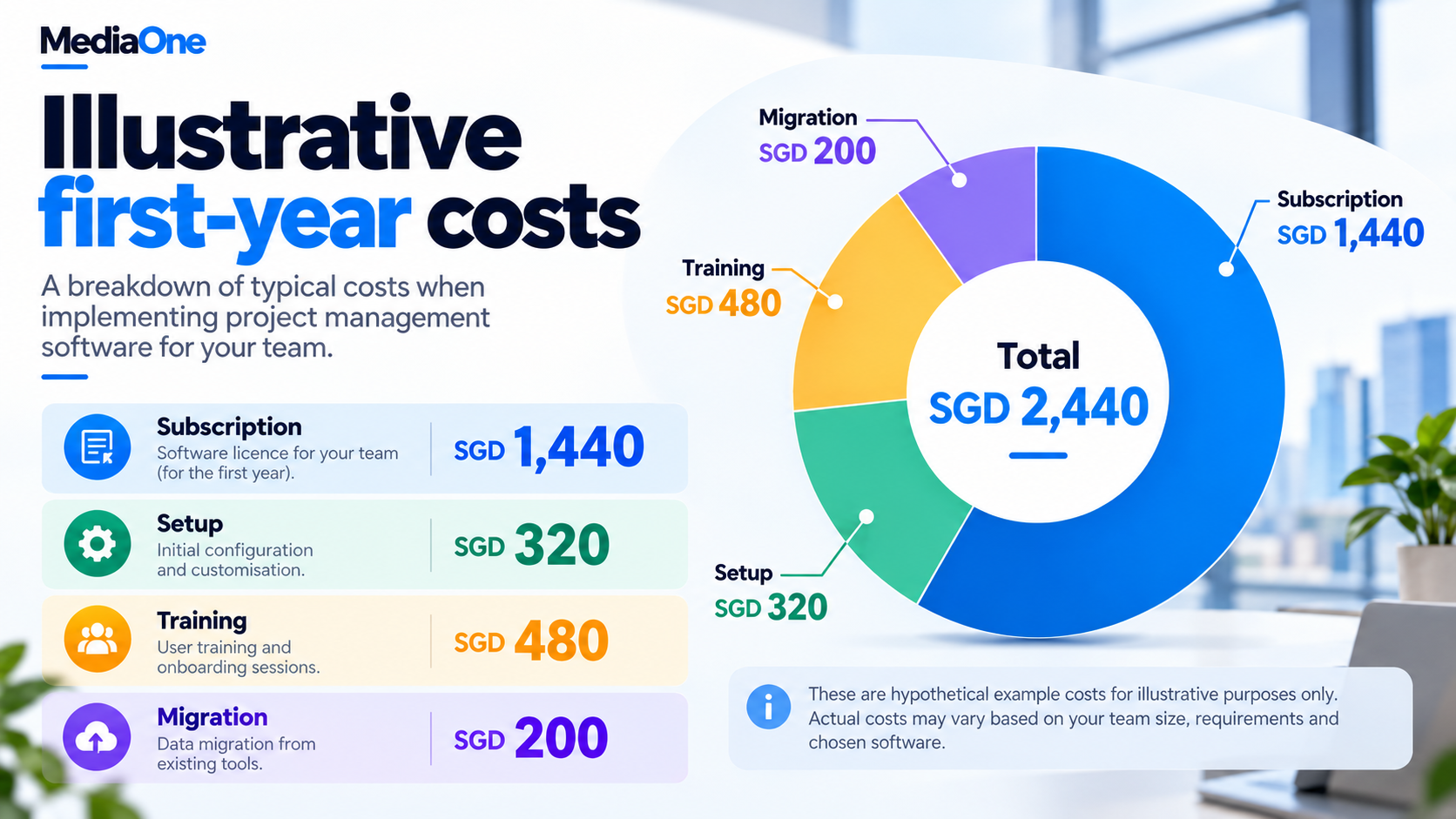
A six-person cost example
The following figures are hypothetical Singapore-dollar amounts, with any taxes and foreign-currency charges excluded.


| First-year item | Calculation | Cost |
| Subscription | Six paid seats × S$20 × twelve months | S$1,440 |
| Initial setup | Eight hours × S$40 | S$320 |
| Staff training | Six people × two hours × S$40 | S$480 |
| Data migration | Five hours × S$40 | S$200 |
| First-year total | Subscription plus setup, training and migration | S$2,440 |
The subscription averages SGD 120 per month. The complete first-year cost averages about SGD 203 per month.
The hourly rate represents an assumed internal cost, not a vendor charge. This distinction helps the business recognise staff time without confusing it with cash paid for software.
The renewal bill needs its own check
Renewal costs may change when the team adds users, exceeds allowances or moves to another plan.
The buying record should show billing frequency, additional charges, renewal terms, seat reductions and any difference between promotional and renewal prices.
How to Introduce the Tool Without Disrupting Work
A manageable introduction gives people enough structure to begin without forcing every historical project into the new system.
One owner maintains the workspace
A named administrator maintains templates, permissions and status labels, with a backup owner covering absences.
The team should also agree what “Done” means. For an article, completion might include editing, approval and publication. In an AI content creation workflow, a generated draft still needs the required review before the task reaches that status.
Current work takes priority during migration
A sample import can expose broken dates, missing attachments or changed assignments before the full move.
Active projects deserve attention first. Historical work can remain in an accessible archive where appropriate.
A social media marketing plan may continue using its publishing platform while the project tool takes responsibility for briefs, design and approval. Everyone should know where each type of update belongs.
Access controls protect project information
Permissions should reflect each person’s role. A client reviewing one project should have access to the records needed for that project.
The buying assessment should cover account security, access removal, storage locations and the vendor’s data-handling terms. The selected tool should support the business’s security procedures.
Choosing Project Management Software Your Team Can Keep Using
The buying decision should end with a written agreement on the selected plan, who will maintain it and what the first month should achieve.
A thirty-day review can compare actual costs and working habits with the pilot results. If a process still requires repeated chasing, the team can adjust the template, responsibility or notification before expanding the system.
For businesses whose delivery problems extend into campaign planning, a conversation with MediaOne can connect marketing objectives with execution needs.
Frequently Asked Questions
Does project management software replace a CRM?
Project management software organises delivery work. A CRM manages relationships with prospects and customers, including contact records and sales activity. A business may use both, with a handover from a won sale to a delivery project. Overlapping features do not remove the need to decide which system owns each record.
Can two businesses collaborate while using different tools?
Two businesses can agree on a shared project space or exchange selected updates through an integration. The arrangement needs one agreed source for deadlines and approvals. Otherwise, changes can appear in one system while the other business continues working from an older record.
Can project management software work without internet access?
Offline support varies by product, device and feature. A mobile application does not automatically provide full offline editing. Teams working at locations with unreliable connections should check whether tasks, attachments and comments remain accessible and how changes synchronise once the connection returns.
What is the difference between a project and a portfolio?
A project contains work aimed at a particular result, such as launching a website. A portfolio groups several projects so managers can review priorities, progress and available resources together. A business managing one launch may have little need for portfolio reporting.
Is AI essential in project management software?
AI is optional for basic task planning and coordination. Summaries or draft task lists may save time, but staff still need to check their accuracy. A buying decision should examine whether the feature reduces a specific workload and whether its data terms and additional charges are acceptable.