| AI Summary
A content marketing platform helps teams coordinate content planning, production, approvals, distribution and performance measurement. The right platform depends on the workflow problem you need to solve, not the longest feature list. Small teams may be able to work effectively with a content management system (CMS) and lightweight collaboration tools, while larger or distributed teams often need stronger workflow, governance and integration capabilities. Singapore organisations should also review how platforms handle personal data, overseas transfers and access controls under the Personal Data Protection Act (PDPA). |
Content marketing platforms have become essential infrastructure for organisations managing multiple writers, publications and distribution channels. Yet the market conflates what these platforms actually do with what they should do, leaving buyers confused between workflow tools, analytics dashboards and AI writing assistants. This guide clarifies the distinctions and selection criteria. You will learn what these platforms are built for, which categories exist, how to match one to your team size and budget, and what to audit before you commit money and time. The intent is practical: by the end, you should know whether you need a platform at all, and if so, which type fits your constraints.

Key Takeaways
- Content marketing platforms help teams manage planning, creation, approvals, distribution and performance measurement across multiple contributors and channels.
- The right platform depends on your main bottleneck, such as workflow management, content governance, production, distribution or analytics.
- Integration with your existing CMS, CRM, analytics and other business tools is critical when comparing platforms.
- Singapore organisations should also review total cost of ownership, data handling and overseas personal data transfers under the Personal Data Protection Act (PDPA).
What Content Marketing Platforms Actually Do (And What They Don’t)
A content marketing platform coordinates how your team plans, writes and publishes content. It sits between your strategy (which software cannot substitute for strategic decision-making) and your published output (which your CMS usually handles). What it does in that middle space is organised, tracked work that moves through clear steps.
Here is the working definition to keep in mind:
A content marketing platform is software that plans, coordinates, governs, or measures content production across more than one contributor, channel, or workflow stage.
Note what that definition excludes. A tool that only formats a blog post is not a platform. A CMS that only stores and publishes finished pages is not a platform. The difference is coordination and governance, and that is the axis most buyers get wrong.
Core Functions Across the Market
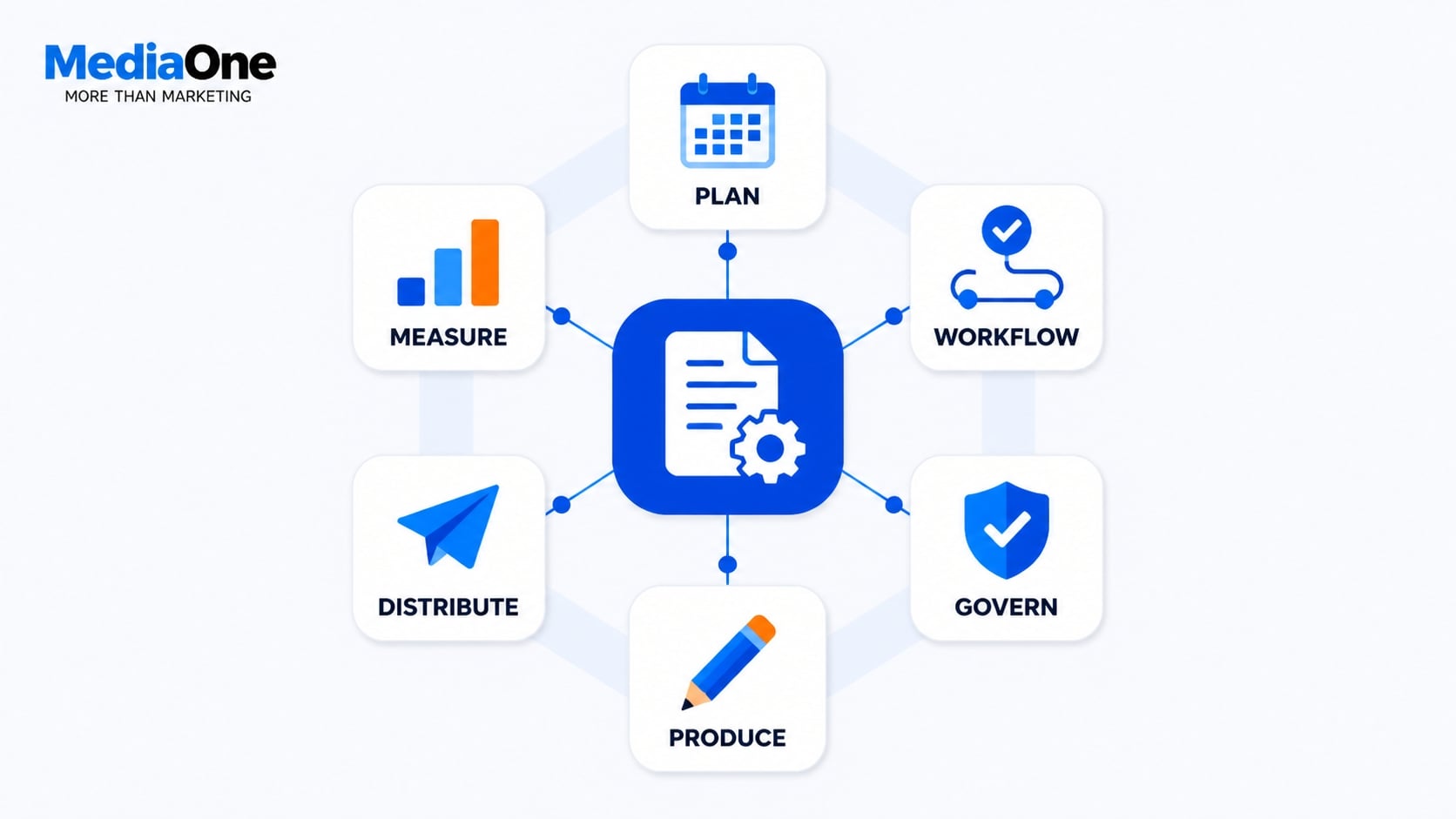 Strip away the branding and every credible platform in this market is doing some combination of six jobs. Most platforms specialise in two to four of these functions.
- Planning and calendaring: intake requests, assign owners, sequence work against deadlines, flag collisions across campaigns.
- Workflow and approvals: route drafts through legal, brand, or subject-matter review with an audit trail of who changed what and when.
- Governance and brand control: enforce brand guidelines across all writers and departments using templates, tone rules, locked sections, asset libraries, and terminology checks.
- Production and optimisation: briefs, AI drafting, SEO guidance, readability scoring, structured data checks.
- Distribution: push to multiple channels (CMS, social, email, syndication partners) with scheduling and versioning.
- Measurement: attribution from content to pipeline, performance benchmarking, content decay alerts.
The honest test of any platform is which of these six it owns versus which it delegates. A platform that claims all six but does three natively and three poorly is a frequent source of inefficiency and wasted licence spend.
What Gets Confused: Platforms vs. Tools vs. Suites
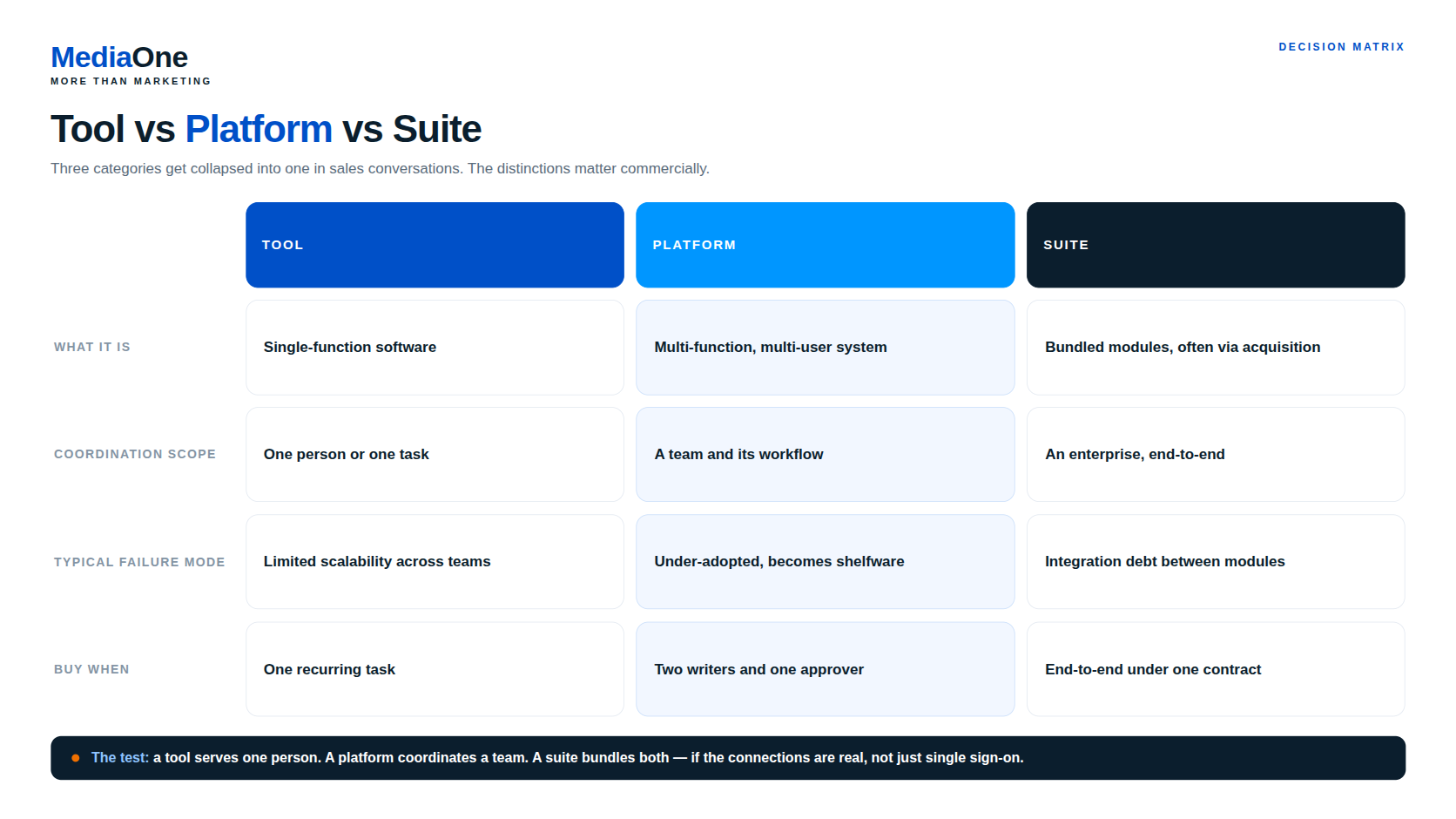
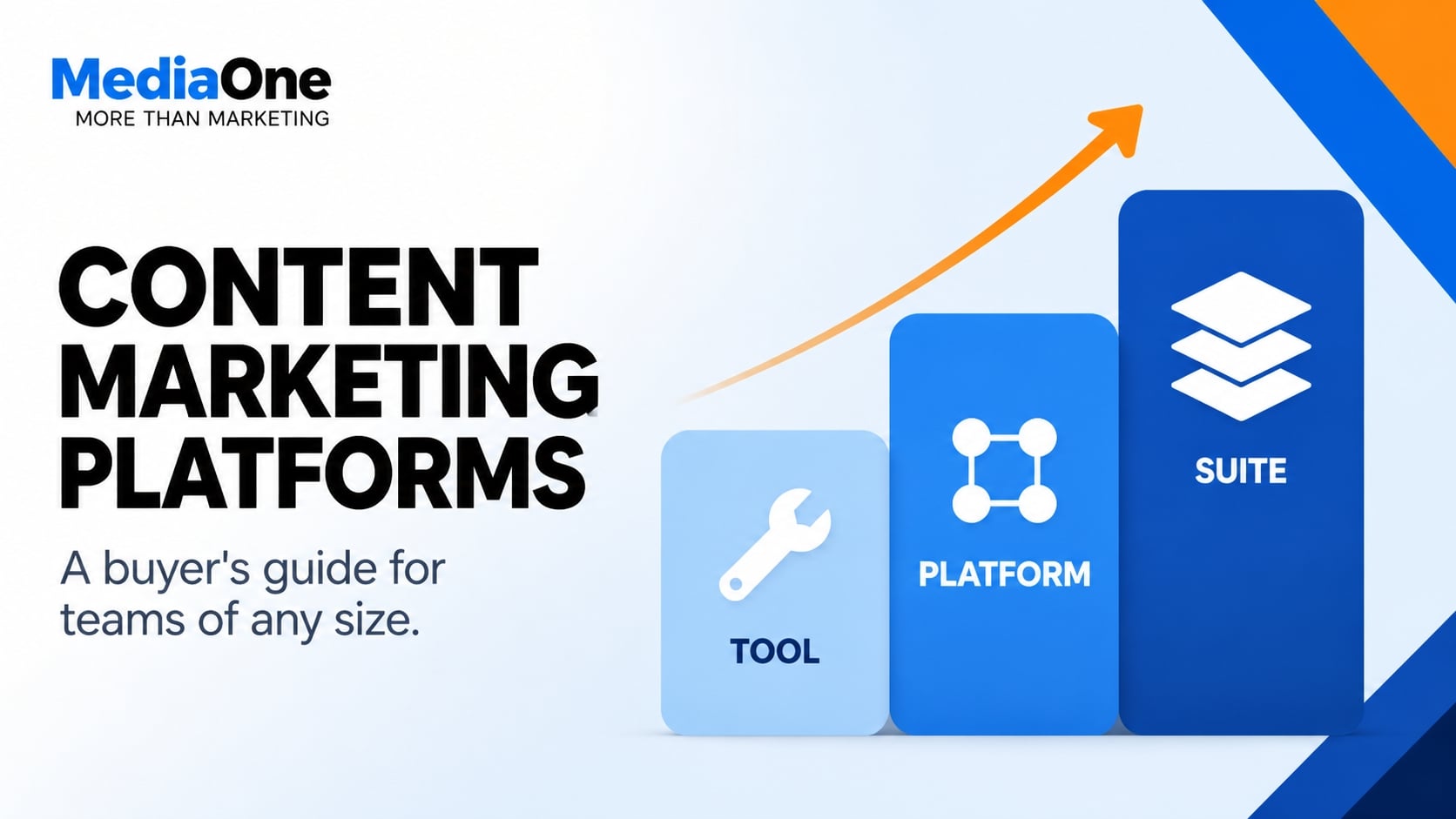
Three categories get collapsed into one another in sales conversations, and the distinctions matter commercially.
A tool solves one problem for one person: an SEO extension, a headline grader, a caption generator. Cheap, fast, and genuinely useful in small doses.
A platform coordinates a team. It assumes multiple contributors, at least one approver, and a repeatable workflow. The moment you have two writers and a legal reviewer, you have a workflow problem, and tools stop helping.
A suite is what you buy when a vendor has acquired several platforms and stitched them under one contract. Suites are sold as “one throat to choke.” In practice, integration depth between modules varies considerably, so the suite is only worth it if the connections are real, not just single sign-on.
Where They Sit in Your Tech Stack
The placement question determines whether your platform investment compounds or creates a second source of truth. Content marketing platforms sit in a specific architectural position, and moving them breaks things.
Think of the stack in four layers, bottom to top:
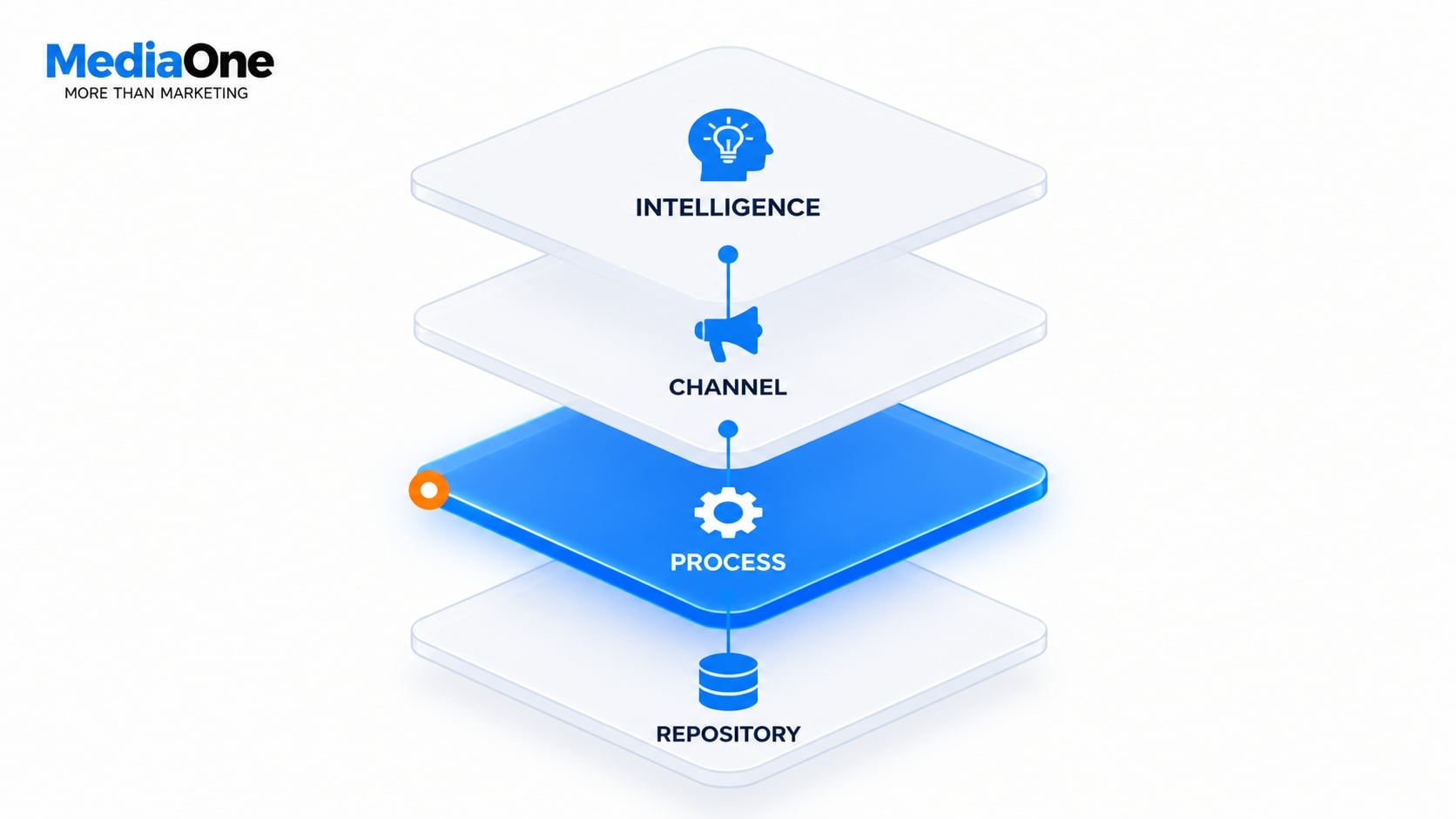
- Repository layer: CMS, DAM, headless content stores. This is where finished, versioned content lives. Never the platform’s job to own it.
- Process layer: this is where content marketing platforms sit. Planning, workflow, governance, optimisation, measurement.
- Channel layer: social schedulers, email platforms, ad tools. The platform pushes to these; it does not replace them.
- Intelligence layer: analytics, CRM, attribution tools. The platform feeds these and reads back performance signal.
The rule to apply: a content marketing platform should never become your system of record for published content. Do not let the platform become where you store final content. Use your website CMS for that. If it does, you have accidentally built a second CMS, and your team will spend its time reconciling two versions of the truth rather than producing.
This is why integration capacity outranks feature parity in almost every buying decision. A platform with average features and clean APIs into your CMS, DAM, and analytics will outperform a feature-rich platform that traps your content in a silo. We cover how to test that integration capacity in the comparison section.
Data Residency and Regional Compliance
One critical consideration for teams working across Singapore, Australia, and India: check where the process layer stores drafts and metadata, not just where the CMS publishes final content.
Under Singapore law, specifically the Personal Data Protection Act (PDPA), personal data in a draft remains protected personal data. This includes interview notes, customer names, employee information, or any identifying details. If drafts contain personal data and the platform processes or stores that data overseas, assess the arrangement under the PDPA’s Transfer Limitation Obligation.
Consult your organisation’s data protection officer or legal team. The Personal Data Protection Commission does not pre-approve platform configurations, so verification of your vendor’s data storage location and access controls is your responsibility.
When evaluating platforms for Singapore-based teams, confirm:
- Where drafts and collaboration metadata are stored (region-specific data centre)
- Whether the vendor can commit to storage within approved geographies
- What audit trails and access logs the platform maintains
- The vendor’s data retention and deletion policies
Platform Comparison: Feature Parity, Pricing and Gaps
| Platform | Core strength | Typical price (annual) | Best for | Key limitation |
|---|---|---|---|---|
| Contently | Performance analytics and workflow | £4,500–18,000 | Content agencies and publishers | Weaker governance controls |
| Sharepoint + custom workflows | Governance and compliance | £2,000–8,000 per org | Regulated enterprises | Limited workflow automation |
| Notion + integrations | Planning and calendaring | £300–2,000 | Early-stage and lean teams | Not a workflow engine |
| HubSpot Content Hub | Distribution and CRM alignment | £3,000–12,000 | Marketing teams using HubSpot | Weak governance features |
| Marketo or Pardot | Campaign planning and tracking | £5,000–25,000 | B2B marketers | Not a writer-facing platform |
All pricing is indicative and subject to change. Confirm current licensing and implementation costs with vendors.
Hidden Costs: Implementation, Training and Data Migration
Most organisations underestimate the true cost of a platform beyond the annual licence. Budget for:
Implementation: 2 weeks to 4 months, depending on team size and integration requirements. Early-stage teams typically need 2–3 weeks; enterprise implementations often require 2–4 months for API configuration, workflow design, and data migration.
Training: 4–16 hours per writer, depending on platform complexity and your team’s technical proficiency.
Data migration: If you are moving projects, assets, or approval history from another system, budget 1–2 weeks for mapping and import.
Total cost of ownership (TCO): licence cost plus implementation and training often doubles the first-year expense. Plan accordingly.
Integration Capacity: How Well They Play With Your Existing Stack
Before committing to a platform, audit its integration capability. Test:
- API availability: Does the vendor publish REST or GraphQL APIs for your CMS, DAM, and analytics?
- Native connectors: How many tools does it integrate with out of the box (Salesforce, HubSpot, Google Analytics)?
- Data flow direction: Can the platform push to your CMS? Can it read performance data back from your analytics tool?
- Latency and sync frequency: How often does data sync, and what is the acceptable lag?
A platform with weak APIs but excellent native connectors might work if all your tools are on the vendor’s approved list. A platform with strong APIs but few native connectors requires custom development.
Red Flags and Common Implementation Failures
Over-Engineering for Your Team Size
Do not buy an enterprise platform for a five-person team. The overhead of configuration, role management, and integration will exceed the value. Start small and scale up when the current tool breaks.
Adopting Without a Content Strategy
Platforms organise work; they do not create strategy. Before selecting a platform, define: what types of content do you publish, who approves them, and what success looks like. A platform will automate that process, but it cannot invent it.
Underestimating Change Management and User Adoption
The most common reason platforms fail is that your team is unlikely to adopt them if adoption is not managed actively. Plan for training, ongoing support, and a 3-month stabilisation period before you expect efficiency gains.
Chasing AI Features Without Editorial Governance
Many platforms now bundle generative AI drafting. Do not buy for the AI feature alone. Clarify how AI outputs will be reviewed, who is accountable for accuracy, and what your editorial standards are before deployment.
The Five Core Categories of Content Marketing Platforms
Content marketing platforms cluster into distinct categories based on what problem they solve first. This guide clarifies the distinctions and selection criteria. Understanding this taxonomy helps you avoid paying for capabilities your organisation does not require, and ensures you’re comparing apples to apples when you evaluate vendors.
The categories are not mutually exclusive: some platforms span two or three. However, each platform has a primary function, and that determines whether it fits your bottleneck. Most platforms specialise in two to four of these functions.
Enterprise Content Governance and Workflow Platforms
These platforms exist to control how content moves from idea through publication, especially across large, distributed teams. They enforce approval chains, version control, compliance sign-off and role-based access.
Core problems they solve: preventing unauthorised publication, enforcing brand guidelines across all writers and departments, auditing who changed what and when, and managing handoffs between writers, editors, designers and legal teams.
When this category matters: You have more than 10 content creators, multiple departments contributing to the same content calendar, or regulatory requirements (financial services, healthcare, legal) that demand documented approval trails. A global team spanning Singapore, Sydney and Mumbai needs visibility into what is in flight across time zones.
What you are paying for: Workflow automation (conditional routing to the right reviewer based on content type or sensitivity), audit logs (who approved what, when and why), role-based permissions (a regional manager sees only APAC content, not global strategy), and integration with publishing backends so approved content moves automatically to your website or content management system.
Examples of platforms built around this function include specialised workflow layers such as Frame.io for video or Gather Content for editorial teams. These tools help teams organise tracked work that moves through clear approval steps.
Implementation reality: Setting up governance requires defining your approval matrix first. Rushing into the platform without documenting “who approves what type of content” leads to adoption failure: reviewers see “another system to check” rather than “clarity on my job.” Implementation timelines vary by organisation size and complexity. Budget several weeks for a 20-person team to map workflows, configure roles and train reviewers.
Content Performance and Analytics Platforms
These platforms ingest data from your website, search console, social channels and email systems, then surface what content is actually working: engagement depth, conversion contribution, traffic trends and audience behaviour.
Core problems they solve: moving past vanity metrics (page views) to understand which content drives business outcomes, identifying content gaps and decay (pages losing traffic), and proving content ROI to stakeholders who control budget.
When this category matters: You publish regularly and need to justify your content spend to finance or leadership, or you want to optimise existing content rather than just produce more.
What you are paying for: Dashboards that combine traffic, engagement and conversion data in one view (not flipping between Google Analytics, Search Console and your content management system). Decay alerts that flag content losing traction. Attribution models that connect content touchpoints to revenue or lead generation. Competitive benchmarking so you see how your content performs against industry standards.
Platforms like HubSpot and Semrush bundle analytics into their broader suites. Specialised tools include content-specific solutions built specifically for editorial analytics.
Implementation reality: These platforms are only useful if your tracking is clean. If your content management system does not tag content by topic, pillar or author, the platform cannot segment the data effectively. Expect several weeks to audit and clean tagging before analysis becomes actionable.
AI-Assisted Content Creation and Optimisation Platforms
These platforms use generative AI to draft content, optimise copy for search intent, suggest headlines, generate variants for A/B testing and identify SEO gaps. They sit closest to the writer’s workflow.
Core problems they solve: scaling content production without hiring proportionally, reducing time to draft for high-volume templates (product descriptions, social captions, email), and removing blank-page paralysis for junior writers.
When this category matters: Your production target exceeds your team’s manual output, you publish repetitive content formats (e-commerce product pages, blog post templates), or you want to automate low-value copy tasks so writers focus on strategy and original research.
What you are paying for: Prompt templates keyed to your brand voice, integration with your content management system so drafts populate directly, SEO recommendations (keyword gaps, competitor topic analysis), A/B test variant generation, and sometimes generative capabilities tuned to your industry (for example, financial disclaimers for fintech).
Platforms in this category include Copy.ai, Jasper, Anyword and the AI modules within Semrush and HubSpot. Other organisations build custom layers using OpenAI’s API, though APIs are technically tools rather than platforms, as they lack workflow, publishing or governance layers.
Implementation reality: AI platforms require rigorous prompting and fact-checking. A junior writer using an AI platform without editorial review can publish inaccurate content rapidly. In reported implementations, organisations that succeed build a human review step into their workflow and treat the platform as a drafting accelerator, not a publication button. The technology is genuinely useful for outline generation, repurposing and variant testing. Software cannot substitute for strategic decision-making, and writers remain responsible for accuracy, brand consistency and editorial judgment.
Content Distribution and Multi-Channel Publishing Platforms
These platforms manage getting finished content to multiple destinations (website, email, social, YouTube, LinkedIn, apps) from a single source, often with channel-specific formatting and scheduling.
Core problems they solve: avoiding manual copy-paste across platforms, maintaining consistent messaging across channels, scheduling content in advance across multiple time zones (critical for Asia-Pacific teams managing Singapore, Sydney and India simultaneously), and measuring cross-channel performance.
When this category matters: You publish to five or more channels, you have content repurposing workflows (for example, a blog post becomes email, social series and video script), or you want to schedule publication across multiple regions at optimal local times.
What you are paying for: Unified content calendar, channel-specific formatting (a blog excerpt looks different from a LinkedIn snippet), scheduling across time zones with time-zone-aware defaults, basic social listening (mentions, shares, comments), and asset management (video, images, PDFs stored centrally with version control).
Platforms include Hootsuite, Buffer, Later and the distribution layers within HubSpot and Semrush. Some organisations use Zapier or Make as a lighter-weight distribution layer between their content management system and distribution channels.
Implementation reality: These platforms work best when your content exists in a single source of truth (usually your content management system). If you maintain a content calendar in Airtable and publish from there, a distribution platform will not reduce friction. Do not let the platform become where you store final content: use your website for that. The highest return comes from using distribution platforms for email, owned channels and web first, then using social as amplification.
Content Planning and Ideation Platforms
These platforms help teams brainstorm, prioritise and manage content ideas and plans at a strategic level. They surface audience research, competitive gaps, trending topics and historical content performance, then translate that into editorial calendars.
Core problems they solve: moving from intuition-based content planning to data-informed editorial strategies, identifying content gaps relative to your competition, and aligning writers, editors and stakeholders around a shared plan.

When this category matters: Your team disagrees on editorial priorities, you want to move beyond annual planning into quarterly strategic refreshes, or you need to justify why you are investing in topic X instead of topic Y to leadership.
What you are paying for: Topic research and competitive gap analysis (what topics your competitors cover that you do not), audience intent data (what keywords and questions your audience is searching for), trend detection (emerging topics in your industry), and strategy templates so non-strategists can contribute ideas.
Platforms include Semrush’s Content Marketing Platform, Moz’s Keyword Explorer, content plus AI platforms like Jasper or Surfer, and planning tools like CoSchedule. Some organisations still use Notion or Airtable templates with manual research.
Implementation reality: Planning platforms only add value if your team actually uses the insights. If you purchase a tool that identifies audience search behaviour but your current writers do not shift their editorial focus, you have paid for reports nobody acts on. Success requires pairing the platform with quarterly editorial reviews where findings are translated into assignments.
Matching Platforms to Your Primary Bottleneck
The table below maps these categories to the most common business constraint:
| Your Primary Bottleneck | Category to Prioritise | Not Yet Necessary |
|---|---|---|
| Content approval and compliance across teams | Enterprise Governance and Workflow | Analytics or AI creation |
| Too much manual work publishing to multiple channels | Distribution and Publishing | Planning or governance |
| Unclear which content drives results | Performance and Analytics | Creation tools or governance |
| Content production cannot scale to meet demand | AI-Assisted Creation | Analytics or planning |
| Team cannot agree on what to create | Content Planning and Ideation | Governance or distribution |
Most organisations find themselves in multiple bottlenecks. If you are scaling from 3 to 10 writers while also publishing across 8 channels, you might need distribution first, then governance. If you are mature but losing visibility into ROI, analytics sits first. The mistake is assuming a single platform solves everything: you are more likely buying one category now and a second category in 12 to 18 months.
How to Choose: Decision Framework by Business Stage and Budget
Content marketing platforms help teams manage their writing process. Platform selection often fails because it assumes a single buyer. A three-person content team in Singapore and a 200-writer distributed enterprise do not have the same problem, so they should not buy the same category of platform.
This guide clarifies the distinctions and selection criteria. The core thesis: buy for the bottleneck you have now, with a platform that can survive your next 12 months of growth. Do not buy for the team you hope to be in three years.
| Your Stage | Primary Bottleneck | Platform Category to Prioritise | Realistic Annual Budget |
|---|---|---|---|
| Under 5 writers | Output and consistency | AI-assisted creation and lightweight planning | S$1,500–S$8,000 |
| 5–50 writers | Coordination and visibility | Workflow and analytics | S$15,000–S$120,000 |
| Large or distributed teams | Governance and integration | Enterprise governance platforms | S$150,000+ |
| Distributed / APAC | Data sovereignty, time zones | Everything above, plus regional compliance | Varies by entity count |
Use this table as your starting point, then read the section for your stage.
Note: Platform costs vary significantly by vendor, seat count, features, implementation requirements and contract structure. Compare total cost of ownership rather than relying on a general annual budget range.
Early-Stage Teams (Under 5 Writers): What Matters Most
At this stage, your bottleneck is output, not orchestration. You do not have a workflow problem. You have a “we need to publish more, better, faster” problem.
What to prioritise:
- Speed from idea to draft. AI-assisted tools reduce first-draft production time. Semrush’s content toolkit and Surfer SEO both let a small team produce optimised drafts without a dedicated strategist.
- One place for the calendar. Free or low-cost tools such as Notion, Trello or Airtable handle this until roughly five writers. Do not pay for enterprise workflow software.
- Analytics you will actually read. Google Search Console and GA4 are free and sufficient. Add a paid analytics platform only when you are publishing more than 10 pieces a month and cannot trace performance manually.
What to ignore: governance features, approval chains, multi-brand management and single sign-on. You will pay for them and your team is unlikely to adopt them.
For a small team, prioritise low-cost tools that solve a specific workflow problem. Avoid paying for enterprise governance, advanced permissions or integrations that your team does not currently need.
The trap: buying an enterprise suite “to grow into”. You will pay for two years of unused seats, then migrate when the platform does not fit how you actually work. This pattern shows up repeatedly in Gartner’s marketing technology research, which has tracked consolidation pressure across the martech stack.
Growth-Stage Organisations (5–50 Writers): Scaling Without Chaos
This is where platform selection actually matters. Between five and fifty writers, informal coordination breaks. You get duplicate topics, inconsistent tone, missed deadlines, and no clear picture of what is working.
Your bottleneck is coordination, so buy coordination.
| Symptom You Recognise | What You Need | Category |
|---|---|---|
| Two writers covering the same topic | Central planning and content calendar | Planning and ideation platform |
| Inconsistent brand voice | Style guide enforcement and templates | Governance and workflow |
| Cannot tell which content drives pipeline | Attribution and performance tracking | Content analytics |
| Publishing takes days of manual handoffs | Automated workflow and approvals | Workflow platform |
Practical thresholds to apply:
At 10 writers, you need a shared editorial calendar with role-based access. Free tools stop working at this scale.
As the number of contributors and reviewers grows, formal approval workflows and version control become increasingly important. Without these, you will publish something unapproved or create duplicate work.
CRM integration becomes valuable when your team needs to connect content activity with leads, opportunities and revenue. This is the point where content analytics justifies its price.
At this stage, pricing depends heavily on seat count, workflow features, analytics capabilities and integrations. Compare current vendor pricing and implementation costs before committing to a platform.
The strategy point: software cannot substitute for strategic decision-making. Forrester’s research on content operations has consistently found that organisations with documented content strategy outperform those without it by a wide margin, regardless of which tools they use. Read a guide to content strategy fundamentals before you sign a growth-stage contract.
Enterprise and Distributed Teams: Governance and Integration
For large or distributed content teams, governance, auditability and integration become increasingly important. These needs are especially important when teams operate across multiple departments or markets, manage regulated content, require localisation, use formal approval chains, need role-based access, or depend on complex integrations.
Non-negotiable requirements at this scale:

- SSO and role-based permissions. Segment by region, brand, business unit and seniority.
- Audit trails. Document who changed what, when, and who approved it. Compliance teams will ask for this record.
- API and webhook depth. Your platform must talk to your CMS, CRM, DAM and analytics stack without custom middleware every time.
- Localisation workflows. Manage translation handoffs, regional variants, and locale-specific approval.
Integration is the real cost. A platform that does not integrate cleanly costs more in engineering time than the licence itself. Include implementation and integration costs in your total cost of ownership, especially when the platform needs to connect with your CMS, CRM, DAM or analytics stack. This reflects the pattern across enterprise content platform deployments, not vendor marketing.
Governance is not bureaucracy. At 50+ writers, an unpublished draft that contradicts a live page is a genuine brand risk. Approval chains exist because the alternative is public inconsistency.
A caution on AI at this scale: AI features without editorial governance produce volume, not quality. Successful implementations establish governance first, then layer in AI acceleration. Reverse that order and you scale your mistakes.
Regional vs. Global Considerations for Asia-Pacific Teams
If your team spans Singapore, Australia and India, the decision framework above still applies. However, three APAC-specific factors change the maths.
- Data residency and compliance.
Singapore’s Personal Data Protection Act (PDPA) applies to personal data handled by organisations covered by the Act, including personal data contained in drafts and other working documents. If a content marketing platform transfers personal data outside Singapore, the organisation must comply with the PDPA’s Transfer Limitation Obligation and ensure comparable protection for the transferred data. Australia and India have their own privacy requirements, so regional teams should assess the rules that apply in each market.
- Pricing and currency.
Most platforms price in USD with annual upfront billing. For APAC teams this means foreign exchange exposure, potential GST implications on imported services, and a procurement cycle that does not match US billing calendars. Ask vendors directly: do you bill in local currency, what is your APAC entity structure, and does pricing vary by region? Answers vary widely and are rarely published.
- Time zones and support.
A platform with US-only support hours is effectively offline during Singapore and India working days. For a distributed APAC team, support coverage is a selection criterion, not a footnote. Check whether the vendor has APAC support staff, and what the actual response SLA is.
Decision rule: if more than 30% of your writers sit outside the vendor’s support time zones, factor support latency into your total cost. It shows up as lost days, not line items.
Platform Comparison: Feature Parity, Pricing and Gaps
Comparison Table: Major Platforms by Core Strength
Most organisations evaluating content marketing platforms run into the same problem: feature lists do not tell you which tool will actually work for your constraints. A platform that excels at governance might be overkill for a five-person team. One optimised for distribution could leave editorial workflows in chaos. This guide clarifies the distinctions and selection criteria.
The table below maps real platforms against their strongest category, typical pricing band, and the critical gap that matters most for your decision. These are based on published pricing, vendor documentation and documented implementations.
| Platform | Core Strength | Best For | Typical Annual Cost (Team of 10) | Critical Gap | Integration Depth |
|---|---|---|---|---|---|
| Contentful | Headless CMS and API-first content delivery | Omnichannel publishing, multi-site management | $24K–$60K+ | Editorial workflow tools are less developed | Best-in-class APIs; limited native editorial UI |
| HubSpot Content Hub | Performance tracking and CRM alignment | Sales-enablement content, demand generation | $3K–$15K | Governance features are weak; AI assistance feels generic | Strong CRM and analytics integration; limited third-party support |
| Siteimprove | Compliance, SEO and accessibility auditing | Regulated sectors, multi-site governance | $15K–$40K | Content creation tools are minimal | Deep CMS and DAM integration; reporting built-in |
| Sprinklr | Social distribution and customer listening | Multi-brand, always-on publishing | $30K–$100K+ | Expensive for small teams; interface is dated | Strong social and CRM APIs; complex initial setup |
| monday.com + Zapier | Lightweight workflow and customisation | Lean teams prioritising flexibility | $2K–$8K | No native publishing tools; integration requires setup | Excellent Zapier support; requires manual assembly |
| Canto | Digital asset management and brand control | Distributed teams, asset reuse | $5K–$20K | Content creation workflow outside the platform | Strong DAM APIs; limited editorial workflow |
| Notion (with templates) | Centralised reference and lightweight publishing | Startup teams, internal documentation | $500–$2K | Not a publishing platform; content export is difficult | APIs exist but offer limited scope |
| Webflow | Visual publishing and SEO | Design-led content sites, e-commerce blogs | $6K–$36K+ | Collaboration becomes difficult at scale | Excellent form, CMS and API integrations |
How to read this table: If your primary challenge is that content exists across five systems with no centralised location, start with the Integration Depth column. If you are scaling from three to fifteen writers, examine the Critical Gap: you may be paying for capabilities your team does not yet need, which often signals a platform that will feel cumbersome at smaller scales.
Hidden Costs: Implementation, Training and Data Migration
Licence fees (monthly or annual payments) typically account for 30–40% of the total cost of implementing a platform over its first two years. Most organisations absorb the remainder through labour, additional tooling and rework, yet rarely attribute these costs to the platform decision.

Implementation and setup costs vary significantly by platform category. Governance and workflow platforms (such as Contentful or enterprise Siteimprove) require 2–4 months of configuration: custom field design, template creation, integration with your existing publishing systems, and staging before writers access a live environment. Budget 300–800 hours of internal or agency time. For a smaller team of ten using HubSpot Content Hub, setup might require 40–80 hours.
Data migration is frequently where timelines extend. If you are moving content from WordPress, Drupal or a legacy CMS, you face two strategic choices: migrate the existing content as-is, or rationalise it? Rationalising (archiving outdated material, consolidating duplicates, revising orphaned pages) adds 2–4 weeks. Migrating everything adds technical complexity but preserves your historical backlog. Expect 200–600 hours depending on volume and content quality. Many organisations underestimate this phase by 50%.
User adoption training often determines implementation success. A platform with a steep learning curve consumes adoption time in week one. If your writers attend training on a Friday afternoon and work independently on Monday, adoption rates decline sharply. Budget time for:
- Initial group training (2–3 hours, delivered one or two times)
- One-to-one hands-on mentoring (30 minutes per writer)
- Documentation or video guides specific to your workflows (8–16 hours)
- Support availability such as office hours or a dedicated Slack channel during month one (2–4 hours weekly)
Organisations that treat training as a human resources task alone often see 50% of their investment lost to avoidable rework.
Ongoing support and feature refinement. Once the platform is live, content systems require continuous adjustment. Reporting dashboards need modification. Workflows require changes as team structures evolve. Custom integrations may break following vendor API updates. Budget 20–30% of first-year setup costs annually for maintenance and enhancements.
Total cost calculation for years one and two:
(Annual licence) + (Setup hours × loaded hourly cost) + (Migration hours × loaded hourly cost) + (Training hours × loaded hourly cost) + (Contingency buffer, 15%)
For a team of ten evaluating Contentful at $40,000 annually: setup costs ($40K plus 500 hours at $75 per hour = $37.5K) plus migration ($400 hours = $30K) plus training ($40 hours = $3K) plus 15% contingency equals approximately $160,500 over the first year. This illustrates why smaller teams often choose Webflow or HubSpot instead; the total investment aligns better with their operational capacity.
Integration Capacity: How Well They Play With Your Existing Stack
A content platform does not operate in isolation. You use Google Analytics for traffic measurement, Zapier for automating alerts, Slack for team messaging, a CMS for publishing, a digital asset management system for images, and your marketing automation platform for audience segmentation. A platform that does not connect to these systems forces manual data transfer or creates information silos.
Integration depth exists on a spectrum. Some platforms (Sprinklr, HubSpot) embed first-party integrations directly into the core product. Moving content from HubSpot Content Hub to HubSpot CRM or pulling CRM data into content workflows feels seamless. Others (Contentful, monday.com) provide APIs and webhooks, allowing the platform to connect with almost any system, but setup demands engineering expertise or a middleware service like Zapier or Make.
Native integrations and API-driven approaches serve different needs at scale. A small team using HubSpot gains immediate benefits from built-in Slack alerts, native analytics and CRM synchronisation. A publishing organisation using Contentful values the API model because it manages multiple content management systems, analytics platforms and internal tools simultaneously. The flexibility justifies the setup investment.
Verify integration support for your critical systems first. If you publish to Shopify, WordPress and a custom mobile application, Contentful’s multi-channel APIs are essential. If you are moving content from a legacy CMS to a new one, confirm the platform exports content cleanly in JSON, CSV or database formats so your migration remains reversible.
Single points of failure warrant attention. If your content platform becomes unavailable, can you still publish to your website? If integrations rely on webhooks to update Slack or trigger analytics jobs, what occurs if the connection fails? Teams that depend on real-time synchronisation between platforms (where platform A publishes and platform B immediately indexes it) should test failure recovery scenarios before launch.
Regional data residency and compliance influence integration choices. If you operate as a Singapore organisation subject to the Personal Data Protection Act, ensure your chosen platform and all integrated tools support data storage within Southeast Asia or maintain credible data processing agreements. Moving data between regions (for example, across the EU for GDPR or internationally for PDPA compliance) introduces latency and integration complexity. Siteimprove, HubSpot and Contentful all offer regional hosting options, but smaller platforms may not. Verify compliance capabilities before making a commitment. Consult your organisation’s data protection officer or legal team; the Personal Data Protection Commission does not pre-approve platform configurations.
Broken integrations compound over time. An integration that functions correctly in a test environment may fail under production load and silently break data pipelines. A writer publishes content believing it is live on the website, but the webhook fails and the site does not update. These failures often remain undetected for hours or even days. Include integration testing in your pre-launch checklist to validate that critical connections perform reliably under expected traffic and data volumes.
Red Flags and Common Implementation Failures
Content marketing platforms fail not because of features, but because organisations adopt them without the context or discipline to use them. The following sections map the most common failure modes, each tied to a specific decision or oversight that happens before, during or just after implementation.
Over-Engineering for Your Team Size
The most expensive content marketing platform mistake is buying for the team you hope to have, not the team you have now.
A five-person editorial team does not need workflow approval chains, role-based access controls, content calendar synchronisation across seventeen regional offices, or AI-assisted bulk publishing. Yet teams regularly acquire enterprise-grade platforms because vendors position them as scalable investments or because the platform ranks highly in analyst reports that assume a different customer profile entirely.
Over-engineering creates friction in three measurable ways. First, onboarding takes longer. A platform designed for 200 users across three continents has more configuration options, permission models and integrations to set up than a team of five writers will ever need. Implementation timelines expand accordingly. Second, feature bloat becomes daily noise. Writers spend time navigating panels and settings designed for use cases that do not apply to them. Third, cost per writer per month rises sharply. A platform that costs USD 2,000 per month for a ten-person team is USD 200 per person. The same platform for a two-person team is USD 1,000 per person and includes features your organisation does not require.
Test this: audit your actual workflow for the next two weeks. Count the number of people who need to approve content before publication. Count how many publication channels you actually use, not channels you might use. Count the number of languages or regional variants you publish. Map the integrations your platform claims you need against the tools you use today. If you have fewer than five people in any of these categories, a mid-market platform will cost more to maintain than it will save in productivity.
For small teams, the practical threshold is this: if you can fit your entire editorial calendar into a shared spreadsheet and your approval chain into email, a dedicated platform is overhead, not leverage.
Adopting Without a Content Strategy
Platforms are vessels. They enforce structure, but they cannot create strategy.
Teams that lack a documented content strategy before platform adoption almost always fail at implementation. They inherit the platform’s model, which may not fit their market, audience or business goals, and then blame the software when their content underperforms.
A real strategy answers these questions before you select a platform: What is the primary goal of your content? Is it lead generation, brand awareness, thought leadership or product education? Who are the three to five core audiences? What formats and channels deliver the most value (blog, video, email, social, guides, case studies)? How often does content need to be updated? Who owns governance of voice, brand and accuracy? How is content performance measured?
If you cannot answer these questions without reference to a platform, the platform will not answer them for you. Email and shared spreadsheets will serve your team perfectly well until you have clarity on what content you are actually producing and why.
Organisations with a formal content strategy see measurable improvements in outcomes. Platform adoption adds no value if the underlying strategy is unclear. In fact, enforcing an unclear strategy at scale through a platform amplifies waste.
Before platform evaluation, invest in strategy workshops with editorial leadership, product teams and business stakeholders. A two-week strategy exercise costs less than three months of platform fees for a system you do not fully use.
Underestimating Change Management and User Adoption
Even the best platform fails if writers do not use it.
Change management is not a training session. It is the deliberate design of how people will move from their old workflow, whether email, shared folders or ad hoc documents, to the new platform. Without this, writers default to their old tools in parallel, creating duplicate work, version confusion and abandoned platform features.
Three specific adoption failures appear consistently across implementations.
First, leadership does not model usage. If the content director or editorial manager does not visibly use the platform for their own work (not just administrative oversight), writers perceive it as management overhead rather than a tool for them. Adoption rates suffer when this disconnect exists.
Second, no power users are trained first. Implementation teams often roll platforms out all at once to the entire team. Instead, identify two to three writers who are naturally curious about tools and change. Train them deeply before launch. They become the internal reference and can troubleshoot peer questions without relying on vendor support.
Third, early wins are not celebrated. If the first month of platform use feels like slowdown because writers are learning the interface while deadlines stay the same, friction accumulates fast. Deliberately create space in the first four weeks for slower content velocity. Highlight one concrete thing the platform made easier. Make it visible.

A practical adoption timeline staggers rollout to reduce cognitive load. Week one, power users only. Week two, 50% of the team. Week three, full team on editorial features only (defer reporting and automation). Week four, add reporting. This gives each cohort a peer group to troubleshoot with.
Plan for 25% of your implementation timeline to be change management, not just technical setup. If vendors quote implementation timelines, assume a significant portion of that is helping your team actually adopt the platform.
Chasing AI Features Without Editorial Governance
AI-assisted content creation is now a standard feature across most platforms. Organisations often adopt platforms primarily for these AI capabilities, then discover they have no process to govern what the AI produces.
This creates two failure modes. First, output quality varies wildly because there is no human editorial standard applied before publication. The AI generates a headline suggestion; someone publishes it without reviewing whether it matches brand voice or audience needs. Second, legal and compliance risk accumulates silently. If your content touches regulated topics such as financial advice, healthcare or legal information, AI-generated content without explicit human review can violate disclosure requirements or create liability.
Vendor marketing positions AI as a force multiplier. The reality is that AI generates drafts at speed, but editorial review does not accelerate. If your team currently publishes 20 pieces per month and takes 40 hours of editorial time, the AI can generate candidate pieces more quickly, but your 40 hours of editorial capacity still exists. The constraint has not moved.
Governance means this: before you enable AI drafting in your platform, write down who reviews AI output, what criteria they use, what gets flagged for further work and what gets rejected. Make this process explicit in your platform permissions and workflow. Document the editorial standard so it is consistent across writers.
A useful checkpoint: disable AI features for the first 30 days of platform use. Establish that the platform improves your workflow without it. Then add AI features only once your team is fluent in the platform itself. This prevents AI adoption from becoming a distraction during change management.
Data Residency and Compliance Considerations
Singapore organisations using content marketing platforms should check how vendors store, process and transfer personal data.
The Personal Data Protection Act (PDPA) does not generally require personal data to remain physically in Singapore. However, organisations transferring personal data overseas must comply with the Transfer Limitation Obligation. This requires transferred personal data to receive a standard of protection comparable to that provided under the PDPA.
Before selecting a platform, confirm:
- where personal data is stored and processed
- whether personal data is transferred outside Singapore
- which vendors or subprocessors may access the data
- what contractual safeguards apply to overseas transfers
- what access controls and audit logs are available
- how the vendor handles data retention and deletion
Organisations should also check whether industry-specific rules or internal policies impose additional data-location or security requirements.
Next Steps: Route Your Team, Then Run a Trial
You now have the routing table, the category definitions and the failure modes. The next move is a 30-day trial against two or three shortlisted vendors matched to your stage.
Run each trial against your own content: one live campaign, your real approval chain and your own integrations. Score each platform against the six core functions. If it cannot plan, route, govern, produce, distribute and measure without workarounds, you have your answer before you sign anything.
During the trial, prioritise integration testing. Connect the platform to the tools your team actually uses today. Test the approval workflow with your real team size and review cycles. Do not test in isolation. Real-world friction appears only when the platform touches your actual systems and people.
After the trial, gather structured feedback from three groups: writers who used the platform daily, your editorial manager and your technical team or IT administrator. Ask each: Would you recommend we adopt this? What created friction? What surprised you as easier than expected? Record specific examples, not general impressions.
This guide clarifies the distinctions and selection criteria. The choice of platform depends on your team size, your existing content strategy and your willingness to invest in adoption. Software cannot substitute for strategic decision-making. It amplifies clarity where it exists, and it amplifies confusion where it does not.
Start with your team’s actual bottleneck. Start with the workflow you have today. Then select the platform that removes friction from that specific workflow, not the platform that promises to solve every problem you might face in five years.