Google reviews can influence whether a potential customer calls you, visits your store, requests a quotation or chooses a competitor.

They also matter for local visibility. Google says local results are mainly determined by relevance, distance, and prominence, and that review quantity and positive ratings can contribute to prominence.
That makes Google reviews more than a reputation metric. For local businesses, they sit at the intersection of:
- Local SEO
- Customer trust
- Conversion rate optimisation
- Reputation management
- Customer experience
- Word-of-mouth marketing
But getting more reviews is not about chasing five-star ratings or asking only your happiest customers.
The objective is to build a repeatable system that makes it easy for genuine customers to share genuine experiences.
This guide explains how to do that.
Key Takeaways
- Google reviews can support local visibility, trust and conversion, but they must reflect genuine customer experiences.
- Remove friction by sending customers directly to Google’s review form through a review link or QR code.
- Ask at logical moments when the customer has completed an experience and has enough information to give meaningful feedback.
- Do not offer discounts, prizes, gifts or other incentives in exchange for Google reviews.
- Do not selectively ask only customers you believe will leave positive reviews.
- Respond to both positive and negative reviews because prospective customers read the conversation, not just the star rating.
- Track review velocity, average rating, response rate, review themes and resulting enquiries, rather than obsessing over total review count alone.
- Build review generation into your operational workflow instead of relying on occasional campaigns.
Why Google Reviews Matter for Local Businesses
Google reviews affect two important moments in the customer journey:
- Can customers find you?
- Do they trust you enough to choose you?
Reviews Can Support Local Search Visibility
Google explains that local ranking depends primarily on relevance, distance and prominence.
Prominence reflects how well known a business is. Google specifically notes that information such as links, reviews and positive ratings can influence this factor.
This does not mean that simply accumulating reviews guarantees a top-three Google Maps position.
A business still needs:
- A complete Google Business Profile
- Accurate categories
- Consistent business information
- A relevant website
- Local landing pages where appropriate
- Strong local backlinks and citations
- Accurate opening hours
- Quality photos
- Competitive proximity to the searcher
Reviews complement those signals rather than replacing them.
Reviews Reduce Purchase Anxiety
Potential customers cannot inspect a service before buying it.

That is particularly important for businesses such as:
- Dentists
- Lawyers
- Renovation contractors
- Tuition centres
- Restaurants
- Clinics
- Accountants
- Hair salons
- Car workshops
- Digital agencies
Reviews substitute for some of the information customers cannot obtain directly.
A detailed review might tell them:
The contractor arrived on time, explained the quotation clearly and completed the work without unexpected charges.
That says far more than a five-star icon alone.
BrightLocal’s 2025 consumer research found that consumers still examine the details of customer experiences rather than relying on headline ratings. Its survey also found that 96% of respondents were at least open to writing a business review.
That creates an important opportunity.
Many customers are willing to review businesses.
Businesses simply make the process unnecessarily difficult.
What Google Actually Allows When Asking for Reviews
Before building a review-generation programme, understand Google’s rules.
This is where many businesses unintentionally create risk.
You Can Ask Customers for Reviews
Google explicitly allows businesses to encourage customers to leave reviews based on genuine experiences.
Google even provides businesses with dedicated review links and QR codes that can be shared through:
- Receipts
- Thank-you emails
- Chat conversations
- In-store displays
- Other customer communication channels
You Cannot Pay or Reward Customers for Reviews
Google prohibits incentives offered in exchange for reviews.
That includes:
- Cash
- Discounts
- Gift cards
- Free products
- Free services
- Loyalty rewards
- Contest or raffle entries
- Benefits offered for changing a review
- Benefits offered for removing a negative review
This is important because many outdated review-generation guides still recommend raffles or giveaways.
Do not use them for Google reviews.
Do Not Review-Gate Customers
Review gating means filtering customers before asking for a public review.
For example:
- Send customers a satisfaction survey.
- Ask people who select 5/5 to leave a Google review.
- Send unhappy customers somewhere private instead.
That attempts to systematically suppress negative feedback.
Google’s policies prohibit selectively soliciting positive reviews or discouraging negative ones.
You can survey customers.
You can resolve customer complaints.
But your public review request should not be conditional on whether they appear likely to leave five stars.
How to Get Your Google Review Link and QR Code
Removing friction is one of the simplest ways to increase review submissions.
Do not ask customers to:
- Open Google.
- Search your company.
- Find your profile.
- Open the reviews tab.
- Locate the review button.
Send them directly there.
Google provides a review link and QR code through your Business Profile.
How to Create Your Google Review Link
On a desktop browser:
- Sign in to the Google account managing your Business Profile.
- Search for your business on Google.
- Open Read Reviews.
- Select Get more reviews.
- Copy your review link.
- Download the provided QR code if required.
Google currently states that you should generate the built-in review QR code using a computer browser rather than a mobile device.
Once created, store this URL somewhere your entire team can access it.
For example:
company.com/internal/google-review-link
You can then use it across every appropriate customer touchpoint.
Where to Put Your Google Review Link
The best review request is usually the one customers can complete immediately.
Consider including your review link or QR code in:
| Customer touchpoint | Recommended method |
|---|---|
| Purchase receipt | QR code |
| Thank-you email | Direct review button |
| Invoice confirmation | Text link |
| Completed support ticket | Email or chat link |
| Restaurant table | QR code |
| Checkout counter | QR code display |
| Appointment follow-up | Email or permitted message |
| Delivery confirmation | Review button |
| WhatsApp conversation | Direct link |
| Customer portal | Review CTA |
| Email signature | Small review link |
| Post-service handover | QR code or link |

Google itself recommends using review links or QR codes on receipts, in thank-you emails, at the end of chat interactions and within physical premises.
Do Not Overdo It
A review request should feel like a natural end to the customer experience.
Putting five review buttons on every page creates fatigue.
A better principle is:
One clear request at the right moment beats ten passive reminders.
The Best Time to Ask for a Google Review
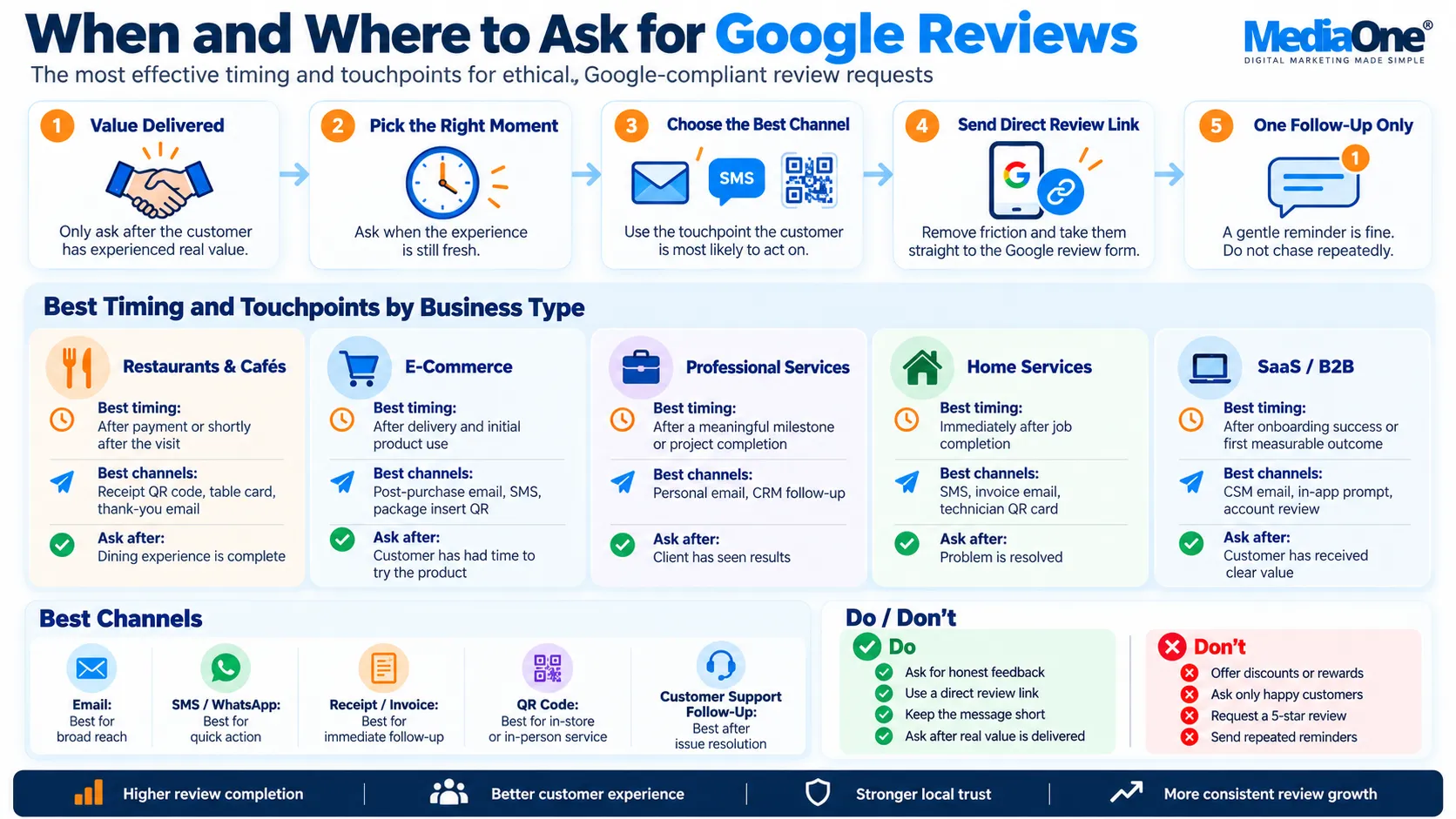
No universal “24-hour rule” works for every industry.
The correct timing depends on when the customer has received enough value to evaluate you fairly.
Restaurants and Cafés
Ask:
- After payment
- On digital receipts
- Through a QR code near the exit
- In a post-visit loyalty email
Do not ask halfway through the meal.
E-Commerce
Ask after the customer has actually received and used the product.
For example:
- Commodity item: 3–7 days after delivery
- Skincare: 10–21 days later
- Electronics: 7–14 days later
- Furniture: after successful delivery and installation
Professional Services
Ask after a meaningful milestone.
Examples:
- After completing a consultation
- After successful project delivery
- After filing a tax return
- After resolving a matter
- After a strategy engagement
Home Services
The natural trigger is job completion.
Examples:
- Plumbing repair completed
- Air-conditioning servicing completed
- Renovation handover completed
- Electrical fault resolved
SaaS and B2B
Do not ask immediately after signup.
Better moments include:
- Successful onboarding
- First measurable outcome
- Project completion
- Renewal
- Positive support resolution
- Customer milestone
The principle is simple:
Ask after value has been delivered, not merely after money has changed hands.
Build a Repeatable Google Review Workflow
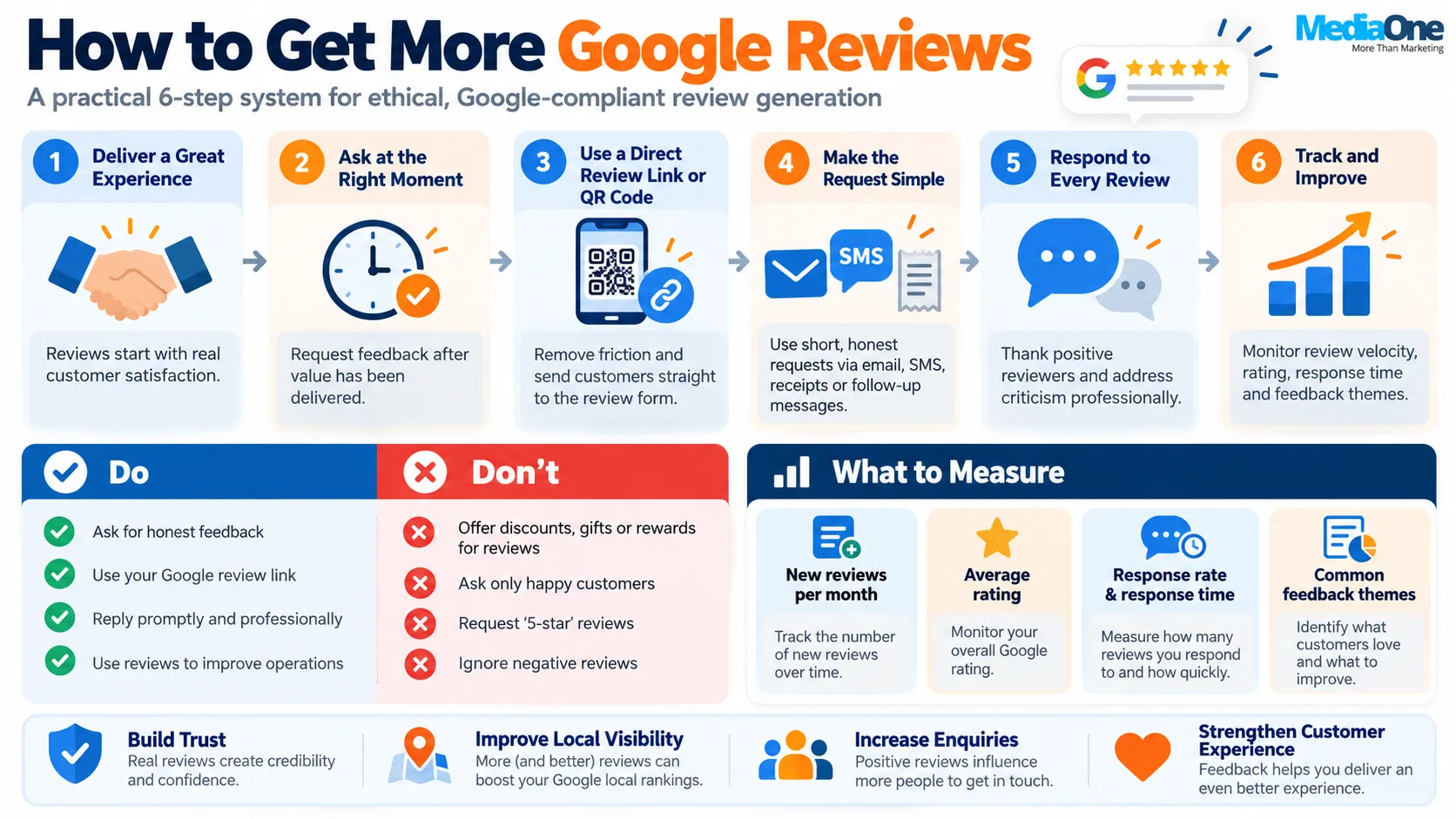
Businesses that generate reviews consistently usually do not rely on employees remembering to ask.
They build the request into their workflow.
A Simple Review Generation System
Step 1: Customer completes an experience
A purchase, project, appointment or service interaction finishes.
↓
Step 2: Trigger the request
Your CRM, booking system, point-of-sale platform or team member initiates the review request.
↓
Step 3: Send one low-friction request
Include your direct Google review link.
↓
Step 4: Send one reasonable reminder
If appropriate and permitted, remind customers who did not respond.
↓
Step 5: Stop
Do not repeatedly chase people for a review.
↓
Step 6: Monitor new reviews
Route reviews to the person responsible for customer experience.
↓
Step 7: Respond
Thank positive reviewers and address criticism professionally.
This turns reviews into an operational system, not a monthly marketing task.
Google Review Request Templates
Do not tell customers what rating to leave.
Do not say:
“Please leave us a five-star review.”
Instead, ask for an honest review.
Simple Email Request
Subject: How was your experience with [Business Name]?
Hi [Name],
Thank you for choosing [Business Name].
If you have a moment, we would appreciate your honest feedback about your experience. Your review helps other customers understand what to expect and helps our team improve.
[Leave a Google Review]
Thank you,
[Name]
Short SMS or WhatsApp Request
Hi [Name], thanks for choosing [Business Name]. If you have a moment, we’d appreciate your honest feedback about your experience:
[Google Review Link]
Thank you.
Professional Services Version
Hi [Name],
Thank you again for working with us on [project/service].
If you feel comfortable sharing your experience, we would appreciate an honest Google review. Feedback like yours helps prospective clients understand what working with us is actually like.
[Review Link]
Thank you for your trust.
In-Person Script
A staff member might simply say:
“If you found the service helpful, we’d really appreciate an honest Google review. There’s a QR code on your receipt if you’d like to leave one.”
That is enough.
Do not hover over the customer while they complete it.
Google specifically warns businesses not to pressure people to write reviews while on the premises.
Make Your Review Requests More Effective
1. Explain Why the Review Matters
Instead of:
Leave us a review.
Try:
Your feedback helps other local customers understand what to expect from us.
This gives customers a reason to participate without influencing what they write.
2. Personalise the Request
Compare:
Dear Customer, please review us.
with:
Hi Sarah, thanks for visiting us for your colour appointment yesterday.
The second feels like a genuine continuation of the customer experience.
Automation does not have to feel automated.
3. Reduce the Number of Clicks
Every extra action creates abandonment.
Ideally:
Message → Google review form
not:
Message → website → testimonial page → Google profile → reviews tab → write review
4. Make Mobile the Default
Most customers receiving SMS, WhatsApp or email requests will open them on smartphones.
Test your entire review journey yourself.
If it takes more than a few seconds to understand what to do, simplify it.
How Different Industries Should Approach Google Reviews
Restaurants
Focus on:
- Table QR codes
- Receipt QR codes
- Reservation follow-ups
- Delivery packaging
- Customer service recovery
Reviews often contain useful natural-language phrases such as specific dishes, location information and service experiences.
Do not script these phrases for customers.
Let them arise naturally.
Clinics and Healthcare
Be especially careful about privacy.
A healthcare provider should never reveal information in its response that unnecessarily confirms someone’s medical relationship or treatment.
A generic response may be safer:
Thank you for taking the time to share your feedback. We appreciate it.
Avoid:
We’re glad your knee surgery went well.
Professional Services
Trust matters more than raw review volume.
Detailed reviews discussing:
- Communication
- Expertise
- Responsiveness
- Transparency
- Problem solving
can be particularly persuasive.
Home Services
Speed and reliability often dominate customer decisions.
Encourage customers to describe their experience naturally rather than asking them to insert target keywords.
Hotels and Hospitality
Operationally, review volume can be high.
Build requests into:
- Checkout
- Post-stay emails
- Guest Wi-Fi portals where appropriate
- Loyalty programmes, without tying benefits to the act of reviewing
Multi-Location Businesses
Each location should build its own authentic review profile.
Do not funnel all reviews to headquarters if customers transact with individual branches.
Track:
- Reviews per location
- Average rating
- Response time
- Themes in complaints
- Reviews per 100 customers
This allows management to identify operational differences between branches.
How to Respond to Positive Google Reviews
A response shows both the reviewer and future readers that someone is listening.
Google recommends replying to reviews to show that customer feedback matters.
Avoid copy-pasting exactly the same response every time.
Weak Response
Thanks for your five-star review!
Better Response
Thank you, Sarah. We’re glad the installation process went smoothly and that the team was able to answer your questions. We appreciate you taking the time to share your experience.
Keep responses:
- Genuine
- Specific
- Concise
- Professional
You do not need to write an essay.
How to Respond to Negative Google Reviews
Negative reviews are inevitable.
A company with hundreds of customers and no criticism may actually appear less credible than one with an overwhelmingly positive but realistic review history.
Your objective is not to win an argument.
It is to show future customers that you handle problems responsibly.
The Four-Part Response Framework
1. Acknowledge
Thank you for sharing your feedback.
2. Recognise the concern.
We’re sorry the experience did not meet your expectations.
3. Move the discussion offline
We’d like to understand what happened and see whether we can help resolve it.
4. Provide a route forward
Please contact our team at [contact method] so we can investigate.
Example
Thank you for your feedback. We’re sorry your experience did not meet the standard we aim to provide. We’d like to understand what happened and review this with the team. Please contact us at [contact details] so we can investigate and assist.
What Not to Do
Do not:
- Attack the reviewer
- Reveal private customer information
- Accuse them publicly of lying without evidence
- Threaten legal action casually
- Write a 900-word rebuttal
- Offer compensation in return for removing the review
Google explicitly prohibits incentivising someone to revise or remove a negative review.
What to Do About Fake or Malicious Reviews
Not every negative review should be removed.
Google does not remove reviews merely because a business disagrees with them.
However, reviews may violate policy if they involve issues such as:
- Fake experiences
- Conflicts of interest
- Spam
- Harassment
- Impersonation
- Irrelevant content
- Rating manipulation
Google says Maps contributions should reflect genuine experiences, and you can report policy-violating content for review.
Recommended Process
- Take screenshots.
- Preserve customer and transaction records.
- Check whether the review clearly breaches Google’s policy.
- Report it through the appropriate Business Profile process.
- Avoid repeatedly flagging legitimate criticism simply because you dislike it.
- Respond professionally if the review remains public.
Avoid Sudden, Artificial Review Spikes
Imagine a business normally receives:
- 4 reviews in January
- 6 in February
- 5 in March
Then suddenly receives 300 reviews in two days after running a campaign.
Even genuine businesses should avoid systems designed to manufacture unnatural review behaviour.
Google explicitly identifies unusual contribution patterns associated with rating manipulation as potentially problematic.
A better strategy is always-on review generation.
You want customers to review you naturally throughout the year.
Think:
5 + 7 + 6 + 8 + 5 reviews
rather than:
0 + 0 + 0 + 0 + 100
Consistency is more operationally sustainable anyway.
Google Reviews and Local SEO: What Actually Matters?
Avoid reducing local SEO to “get more reviews”.
Google’s own documentation describes three broad local ranking pillars:
Relevance
How closely your business matches the query.
Improve this through:
- Correct primary category
- Relevant secondary categories
- Accurate services
- Complete business description
- Relevant website content
Distance
How far the business is from the searcher’s location.
You cannot optimise your way around geography entirely.
Prominence
How established and well-known the business appears.
Signals can include:
- Reviews
- Ratings
- Links
- General web presence
- Brand authority
The practical lesson is:
Reviews strengthen local SEO, but reviews alone do not create local SEO.
Review Quantity vs Review Quality vs Review Recency
Businesses often ask which matters most.
The useful answer is all three serve different purposes.
| Factor | Why it matters |
|---|---|
| Review quantity | Builds evidence and confidence |
| Average rating | Creates an immediate quality signal |
| Recency | Shows the business is still active |
| Review detail | Helps customers evaluate actual experiences |
| Owner responses | Shows active reputation management |
| Review diversity | Makes the profile appear more representative |
Do not optimise one while ignoring the others.
A business with:
4.8 stars from 420 reviews
may be compelling.
But so might:
4.7 stars from 85 detailed, recent reviews
The context matters.
Google’s displayed review score is the average of published ratings, although changes to the displayed score may take time after new reviews are posted.
Use Review Content to Improve Your Business
The biggest missed opportunity is treating reviews purely as marketing collateral.
They are also customer research.
Export or categorise review themes such as:
- Staff friendliness
- Waiting time
- Price
- Communication
- Product quality
- Delivery
- Responsiveness
- Cleanliness
- Parking
- Professionalism
Then measure frequency.
Example
Suppose your last 100 reviews include:
| Theme | Positive mentions | Negative mentions |
|---|---|---|
| Staff friendliness | 38 | 2 |
| Response speed | 21 | 8 |
| Pricing transparency | 17 | 11 |
| Product quality | 34 | 3 |
| Waiting time | 6 | 14 |
The most important finding may not be your 4.6-star average.
It may be:
Waiting time is now your biggest recurring customer-experience problem.
Fixing that could improve:
- Reviews
- Repeat purchases
- Referrals
- Conversion
- Staff workload
Reviews become more valuable when operations teams use them, not just marketers.
Metrics to Track for Your Google Review Programme
1. New Reviews Per Month
Basic review velocity.
2. Reviews Per 100 Customers
More useful for comparing periods with different sales volumes.
Formula:
New Google reviews ÷ completed customers × 100
3. Average Rating
Track direction rather than obsessing over tiny monthly changes.
4. Owner Response Rate
Percentage of reviews receiving a response.
5. Median Response Time
How quickly reviews receive replies.
6. Review Sentiment Themes
What are customers repeatedly praising or criticising?
7. Local Search Actions
Monitor Business Profile and website activity such as:
- Calls
- Website visits
- Direction requests
- Enquiries
- Bookings
8. Lead-to-Customer Conversion Rate
If local visibility increases but customers do not convert, reviews may not be your actual bottleneck.
A Simple Review Performance Dashboard
| KPI | Current | Previous Period | Direction |
|---|---|---|---|
| New reviews | 28 | 19 | ↑ |
| Average rating | 4.7 | 4.6 | ↑ |
| Response rate | 96% | 74% | ↑ |
| Median response time | 11 hrs | 31 hrs | ↑ |
| Reviews per 100 customers | 9.2 | 6.4 | ↑ |
| Negative review share | 7% | 11% | ↓ |
This is far more actionable than simply reporting:
“We have 487 Google reviews.”
Tools for Automating Review Requests
You may not need specialised software initially.
Basic Setup
Use:

- Google Business Profile review link
- Email automation
- CRM
- Booking platform
- POS
- WhatsApp workflow
- Spreadsheet tracking
Growing Business
Add:
- Automated event triggers
- Customer segmentation
- Review monitoring
- Shared response workflows
- Escalation rules
Multi-Location Business
Look for software supporting:
- Location-level dashboards
- Role permissions
- Response templates
- Escalation
- Sentiment analysis
- Review alerts
- Centralised reporting
- CRM or POS integration
The software matters less than the workflow.
An expensive review platform cannot fix a poor customer experience.

Google Reviews and Singapore’s PDPA
Singapore businesses also need to consider how they use customer data when sending review requests.
The PDPA’s Do Not Call provisions generally restrict marketing messages sent to Singapore telephone numbers registered with the DNC Registry unless an exception or valid consent applies. Businesses sending marketing messages must also observe applicable identification and opt-out requirements.
However, not every service-related communication is automatically a marketing message.
For example, PDPC guidance recognises exclusions and exceptions for certain service-related communications and some ongoing customer relationships.
For review campaigns, businesses should therefore:
- Determine whether the message is promotional or purely service-related.
- Use customer data only for appropriate purposes.
- Maintain proper consent records where required.
- Honour applicable opt-outs.
- Avoid bundling aggressive promotional content into a supposedly transactional review request.
- Review PDPC guidance when implementing large-scale SMS or WhatsApp workflows.
For higher-risk or high-volume campaigns, obtain appropriate legal or data-protection advice rather than relying on a generic review template.
Common Google Review Mistakes
Mistake 1: Asking Only Happy Customers
This creates review gating risk.
Ask customers neutrally for honest feedback.
Mistake 2: Offering a Reward
Do not exchange discounts, prizes, loyalty points or benefits for Google reviews.
Mistake 3: Asking for Five Stars
Ask for a review, not a predetermined rating.
Mistake 4: Making Customers Search for Your Profile
Give them the direct link.
Mistake 5: Asking Too Early
Let customers experience the product or service first.
Mistake 6: Asking Too Late
The experience becomes less memorable over time.
Mistake 7: Ignoring Negative Reviews
Silence may appear indifferent.
Mistake 8: Copy-Pasting Robotic Responses
Templates are useful starting points, not finished replies.
Mistake 9: Treating Reviews as an SEO Hack
Reviews are primarily evidence of real customer experiences.
If the underlying service is poor, review tactics will eventually expose it rather than solve it.
A 30-Day Google Review Improvement Plan
Week 1: Fix the Foundation
- Claim and verify the Google Business Profile.
- Check categories.
- Correct opening hours.
- Confirm phone number and website.
- Upload current photos.
- Generate your Google review link and QR code.
- Record your baseline review metrics.
Week 2: Add Review Requests to Customer Journeys
Choose 2–3 appropriate triggers:
- Purchase completion
- Job completion
- Appointment follow-up
- Customer support resolution
Create neutral review-request templates.
Week 3: Build Review Management
Assign responsibility for:
- New-review alerts
- Responses
- Negative-review escalation
- Policy-violating review reporting
Create internal response guidelines.
Week 4: Measure and Improve
Review:
- Number of requests sent
- Number of reviews received
- Review-to-customer ratio
- Average rating
- Response time
- Common feedback themes
Then fix the weakest part of the system.
Google Review Generation Checklist
Before launching your programme, confirm:
- Your Google Business Profile is claimed and complete.
- Your direct Google review link works.
- Your QR code works on multiple phones.
- Review requests ask for honest feedback.
- No incentives are offered.
- You are not selectively asking only happy customers.
- Your request arrives after you’ve delivered meaningful value.
- Customers can reach the review form in one click or scan.
- Your team monitors new reviews.
- Negative reviews have an escalation process.
- Responses protect customer privacy.
- Review performance is measured monthly.
- Feedback themes are shared with operations.
- We have considered Singapore messaging and data-protection requirements where applicable.
FAQ
How do I get more Google reviews?
Create a direct Google review link or QR code and incorporate it into natural customer touchpoints such as receipts, thank-you emails, completed service interactions and post-purchase communications. Keep the request simple and ask customers for honest feedback rather than a specific star rating.
Can I offer customers a discount for leaving a Google review?
No. Google prohibits incentives such as payments, discounts, free products or services in exchange for reviews. Incentivised reviews may be removed and can lead to restrictions on the Business Profile.
Can I ask only satisfied customers for Google reviews?
Businesses should not selectively solicit positive reviews while directing dissatisfied customers elsewhere. Google considers this a form of rating manipulation. Ask customers neutrally for genuine feedback.
How do I create a Google review QR code?
Open your Business Profile on a desktop browser, select Read Reviews, choose Get more reviews, and use Google’s provided review link or QR code. Google says the built-in QR code is currently generated through a computer browser.
Do Google reviews improve local SEO?
They can contribute. Google states that local ranking is primarily based on relevance, distance and prominence, and that reviews and positive ratings can contribute to prominence. Reviews should therefore form one part of a broader local SEO strategy.
Should businesses respond to every Google review?
Responding to reviews is generally worthwhile, especially when the review contains meaningful feedback or criticism. Responses show that you monitor customer feedback and give prospective customers additional context.
Can I remove a negative Google review?
You cannot remove a legitimate review simply because it is negative. Reviews that violate Google’s policies, such as fake engagement, spam, harassment or other prohibited content, can be reported for assessment.
How often should I ask customers for reviews?
Ask after a meaningful customer experience rather than on an arbitrary schedule. For transactional businesses, that may be after each completed purchase or visit. For longer service relationships, ask after a milestone, successful project, renewal or completed engagement.
Conclusion
The best way to get more Google reviews is not to manipulate ratings.
It is to make genuine feedback easy.
Build a repeatable system:
Deliver value → ask at the right moment → provide a direct review link → respond thoughtfully → analyse the feedback → improve the customer experience.
That creates a reinforcing loop.
Better experiences generate stronger reviews. Stronger reviews increase trust. Greater trust can improve enquiry and conversion performance. Customer feedback then shows you what to improve next.
Google reviews therefore should not sit only within the marketing department.
They are a measurable record of how customers experience the business.
Treat them accordingly.