Voice search has moved from novelty to necessity. Users increasingly turn to voice assistants when searching on mobile devices, with the shift most pronounced in mobile-dominant markets. Most websites remain built for typing, not speaking.

When someone says “best pizza near me” into their phone, Google’s voice assistant does not return the same results as the typed query “best pizza restaurant nearby.” Voice search prioritises conversational phrasing, featured snippets, local signals and mobile speed in ways that traditional keyword optimisation misses.
This guide gives you the practical framework: why voice queries demand a different approach, which technical foundations matter most, and how to structure content so voice assistants pick your pages first. Voice search optimisation isn’t a separate discipline from SEO; it’s a different approach to the same foundations. The same foundations apply, but they rank differently, with position zero mattering more than position one.
Published: 4 October 2026 | Last Updated: 4 October 2026
Key Takeaways
- Voice queries use natural questions. People speak in full sentences and context, not keyword fragments. Answer the complete question.
- Featured snippets drive voice answers. Position zero matters more than position one in voice results.
- Local intent is strong in voice. Your Google Business Profile completeness drives visibility as much as website optimisation does.
- Mobile speed and mobile-first indexing apply. Voice queries are almost always mobile searches.
- Schema markup and clear structure matter. Voice assistants need structured data to extract and read answers.
- Measure voice traffic separately. Track snippet wins and voice-driven conversions apart from organic clicks.
What Is Voice Search Optimisation and Why It Matters in 2026
Voice search optimisation (VSO) is the practice of tailoring your content and technical infrastructure so voice assistants can find, understand and read out your pages when users speak a query. Traditional SEO targets keyword phrases. VSO targets natural questions and conversational language because that is how people speak.
The shift matters because voice traffic behaves differently. Voice users want an immediate, specific answer rather than a page to browse. If your page is not structured for that, Google Assistant, Alexa or Siri reads a competitor’s answer instead. Voice queries skew heavily mobile and local. Ignoring the channel means losing visibility exactly when users are ready to act.
The shift from typing to speaking
Typing produces shorthand. Speaking produces full thoughts.
A user might type “best restaurants near me” but say, “What is a suitable restaurant within walking distance that serves vegan food and has availability tonight?”
Three practical realities follow.
Voice queries are longer than typed queries. They use everyday grammar rather than keyword fragments. And they embed context, location, time and immediate intent, almost always implying “now” or “near me”.
This approach changes what you publish. Pages built only for short-tail terms like “vegan restaurants” will lose voice queries to pages that answer the fuller question: “Where can I find vegan restaurants open tonight with good reviews near me?”
Adoption has been faster in Asia-Pacific markets. Voice assistants are becoming the primary search interface for a growing share of smartphone users. Sites that ignored the migration saw traffic plateau while voice-optimised competitors absorbed the volume.
How voice assistants interpret queries differently
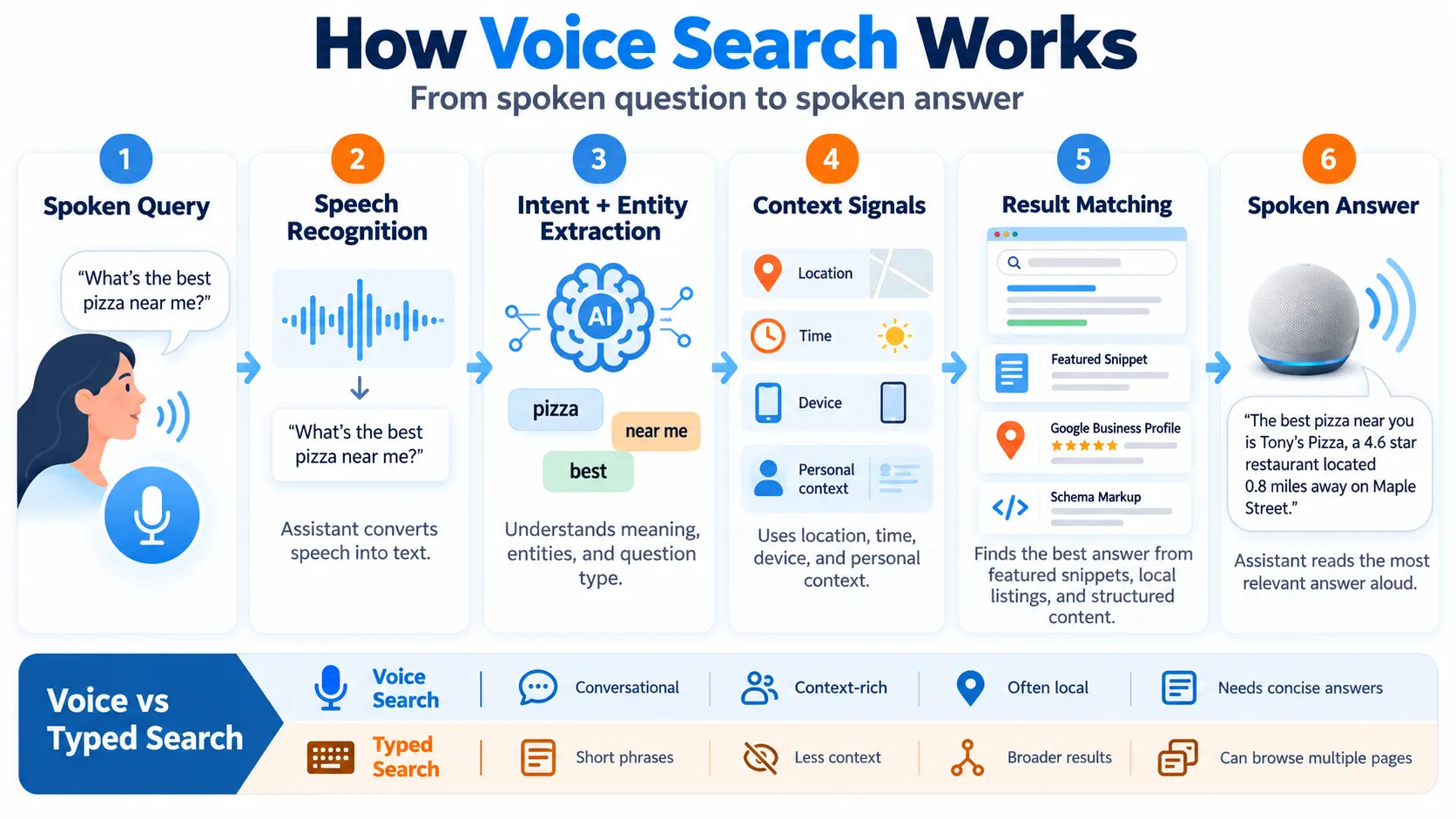
Voice assistants rely on natural language processing (NLP) to convert speech into intent. This process differs from keyword matching.
Type “coffee shop hours Monday”, and Google’s text algorithm looks for near-exact keyword matches. A voice assistant transcribes the same words, then adds analysis: it extracts entities (coffee shop, Monday) and intent (hours of operation). Then it searches for pages that answer the underlying question: “When is this coffee shop open on Monday?”
The consequence is concrete. A page titled “Our Coffee Shop Hours” containing “Mondays: 7am to 6pm” outranks a page holding the exact phrase “coffee shop hours Monday” buried in dense prose. The assistant needs a clear, structured answer it can read aloud.
Three further distinctions matter:
- Snippet dependency. Featured snippet content is selected for voice answers far more often than position one results. Multiple voice assistant studies document these findings.
- Contextual bias. Ask “What is open now?” and the assistant weighs your location, the current time and your history. A local business 2 miles away with accurate hours can outrank a national chain 10 miles away.
- E-E-A-T sensitivity. When two pages answer identically, the assistant favours the one with clearer author credentials, professional design and stronger reviews. For health, financial or legal queries, authority is the tiebreaker.
Search volume trends for voice queries
Voice query volume has grown steadily. Mobile-first markets show the strongest adoption. Voice queries tend to be longer and more conversational than typed queries. Many voice searches begin with question words: who, what, where, when, why or how.
| Trend | Current Status | Why It Matters |
|---|---|---|
| Mobile voice share | Growing in most mature markets | Mobile-first indexing is your ranking page |
| Question format | The majority of voice searches use question phrasing | Write answers to questions, not keyword lists |
| Local intent | Most voice searches include a location component | Google Business Profile completeness is critical |
| Commercial intent | Voice queries are increasingly transactional | Voice traffic is no longer informational only |
| Platform diversity | Google dominates, but Alexa is strong in retail | Optimise for Google first, then Alexa if relevant |
How Voice Search Works Differently From Text Search
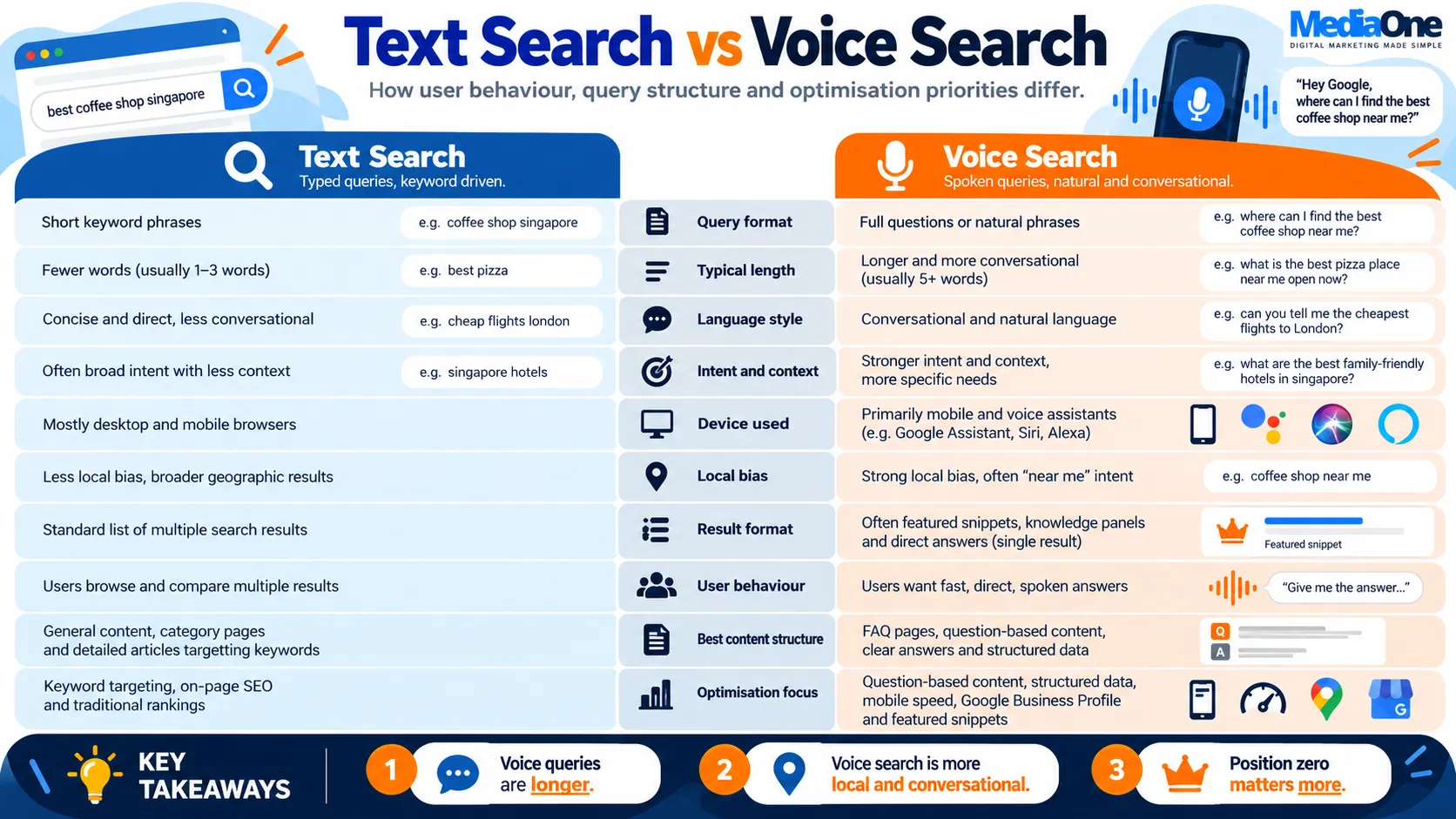
Conversational language vs keyword phrases
Text search rewards keyword matching. Voice search rewards natural language.
A text search might be for “best Italian restaurant Singapore delivery under $20.” A voice search for the same intent sounds like, “Can I get Italian food delivered to my house in Toa Payoh for under twenty dollars?”
The difference is critical. Your page does not need the exact phrase “delivery under $20”. It needs a clear answer to the underlying question. Structure matters more than exact wording.
Write your content as if you are answering someone in conversation. Use full sentences. Use “you” and “your”. Use question headings. Use short paragraphs with one idea each.
Intent matching in natural language
Voice assistants extract intent from context, not keywords alone.
“Open now” means the assistant applies your current location and time. “Near me” means within a certain radius. “Best” means the assistant weighs ratings, reviews and relevance together.
Two consequences follow. First, your local data must be accurate and complete. Incorrect hours or a missing phone number costs you voice traffic. Second, your content must state facts clearly. Voice assistants can’t read buried information.
The role of featured snippets and position zero
Featured snippets are the boxed answers that appear above organic results on Google search.
For voice search, featured snippet content is read aloud. If your page is not in a featured snippet, it does not get read aloud, even if you rank at position one.
This inverts the traditional SEO hierarchy. Position one matters for clicks. Position zero matters for voice traffic.
Local search bias in voice queries
Voice queries carry local intent far more often than text queries.
This is partly because voice is mobile. Mobile users search when they are out. They want to know what is near them right now. Local business signals become the primary ranking factor.
Your Google Business Profile is not optional for voice traffic. It is as important as your website. Keep your hours accurate, your categories precise, and your phone number current.
Core Voice Search Optimisation Strategies
Voice search optimisation is built on three pillars: technical foundations, content structure, and ongoing measurement.
Technical optimisation for voice search
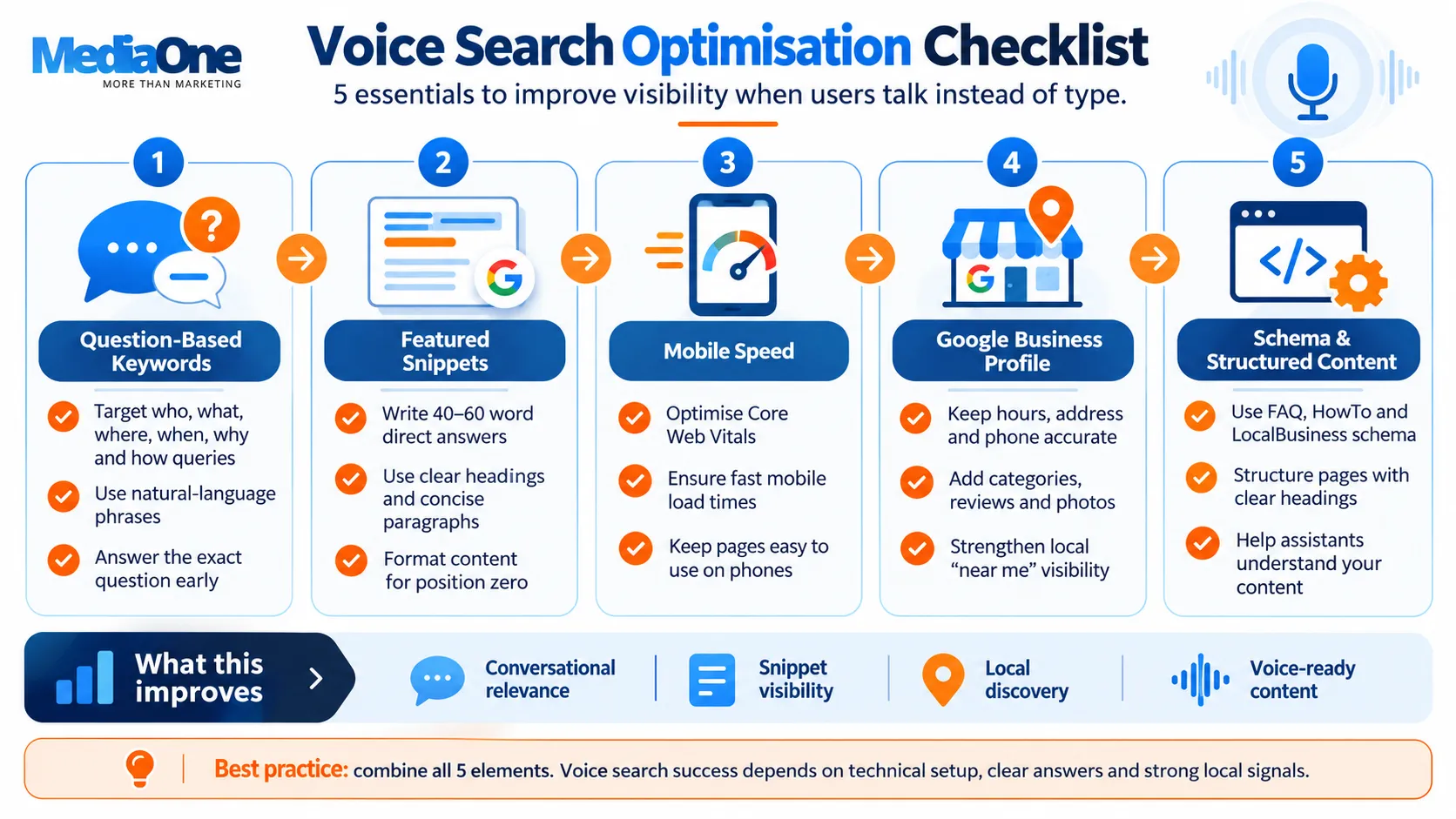
Your website must be fast, mobile-friendly and properly marked up.
Mobile speed. Voice queries are mobile queries. A page that loads slowly on mobile will not rank for voice. Test your site on Google PageSpeed Insights. Aim for a mobile score above 80.
Mobile-first indexing. Google crawls and ranks your mobile page, not your desktop page. Ensure your mobile page includes all the content on your desktop page. Check Google Search Console for indexing issues.
Schema markup. Schema tells search engines what your content is about. Use the FAQ schema for questions and answers. Use the HowTo schema for step-by-step guides. Use the LocalBusiness schema for your address, hours and phone number. Validate your schema with Google’s Rich Results Test.
Site architecture. Use a clear heading hierarchy. Use descriptive page titles. Use internal links to guide both users and assistants through your site. Avoid deep URL structures. A page three clicks from home is harder for voice assistants to find.
Content strategy for voice-first audiences
Write content that answers complete questions, not fragments.
Answer questions directly. Lead with the answer. Then explain further. A featured snippet of 40 to 60 words is ideal for voice.
Use natural language. Write as you speak. Use contractions. Use short sentences. Avoid jargon unless you are certain your audience uses it.
Structure answers clearly. Use numbered lists for steps. Use bullet points for options. Use bold text to highlight key terms. Voice assistants can parse structure. They struggle with dense prose.
Target question keywords. Research questions your audience asks. Google Search Console shows which queries bring traffic. Answer People Also Ask questions on Google. Write content that answers those questions directly.
How Voice Search Works Differently From Text Search
The gap between voice and text behaviour is wider than many practitioners think. A person typing uses shorthand: “best coffee near me” or “plumber Manchester”. The same person speaking asks a full question: “Where can I obtain a good coffee near me right now?”
That shift from keyword phrase to conversational utterance changes everything downstream: ranking factors, content structure, snippet requirements and the geographic bias of results.
Conversational language vs keyword phrases
Voice queries are spoken as complete sentences. Users speak in full thoughts because that is how speech works. Text queries are fragmented because typing is slower and more deliberate.

Voice queries average 7 to 10 words. Text queries average 3 to 5 words. Someone typing might search for “voice search optimisation tips.” Speaking, they might ask, “What are the best ways to optimise my website for voice search?”

Voice queries also carry filler words, repetitions and conversational markers (“I’m looking for…”, “Can you tell me…”). Assistants filter those out when matching intent, but your content should still read like natural speech. Keyword-dense prose ranks lower because it does not resemble the query it is trying to match.
What to do about it: Write content that answers the complete question, not just the keyword. A section titled “Voice Search Optimisation Tips” should open with a sentence that answers the implicit “what are”. For example: “The best ways to optimise your website for voice search include improving page load speed, targeting question-based keywords, and optimising your Google Business Profile.”
Intent matching in natural language
Both voice and text search aim to match intent. Voice assistants use different signals because voice queries arrive with more linguistic context.
Type “flu symptoms” and the engine must guess between a medical definition, a self-diagnosis tool and urgent care nearby, using URL authority, freshness, and click signals. Ask “What are the symptoms of the flu?” and the intent is explicit. The assistant matches directly to content that begins with “The symptoms of the flu include…” or to structured data that answers that exact question.
The practical effect is that voice assistants are more literal. Direct, early answers get selected. Answers buried deep in prose get skipped.
What to do about it: Lead with the answer. If your page answers the question, “How long does a typical flu infection last?”, the first sentence should state it clearly. Most people recover from the flu in one to two weeks, though some experience complications that last longer. This satisfies voice intent immediately and still serves text readers.
Voice intent matching also favours content already sitting in featured snippets, knowledge panels and rich results. Those formats are structured for extraction and attribution. A page that ranks well in text but appears in no rich results is less likely to win voice traffic.
The role of featured snippets and position zero
Featured snippets are disproportionately important for voice. Research indicates that voice answers come from featured snippets far more often than they appear in overall search results.
The reason is practical: assistants need one concise passage they can read aloud and attribute. Ranking first in text means little for voice if your result is not selected as the snippet. A page ranking second or third in text can dominate voice if its content is structured to win the snippet. You do not need to outrank competitors everywhere; you only need to answer the question better in a snippet-eligible format.
What to do about it: Find queries in your niche where a snippet already exists. Write a clearer, more complete answer in the same format. If you are writing about plumbing repair costs, look at the current snippet for “How much does it cost to fix a leak?” and beat it with a tighter paragraph, list or table. That single change can move you from position five in text to owning the voice answer.
Assistants prefer paragraphs and definitions over lists because they read naturally aloud. A 40- to 60-word paragraph will be read more often than a 20-item list.
Local search bias in voice queries
Voice queries carry a strong local bias. Voice searches are typically made on mobile in real time. Someone asks, “Where’s the nearest petrol station?” or “What restaurants are open now near me?” while already trying to act. That shapes both the results that appear and the information that gets prioritised.
A Tiong Bahru plumbing company can rank for voice searches in Tiong Bahru, even if a larger Kallang-based competitor has greater domain authority. The local signal overrides broader domain strength.
What to do about it: Treat your Google Business Profile as a ranking asset. Voice results weight opening hours, phone number, address, photos and reviews heavily. A sparse profile loses voice traffic to a complete one even when the website ranks higher in text.
Build location-specific landing pages if you serve multiple cities or postcodes, and mark them up with LocalBusiness structured data. Recent reviews and high ratings get priority. A 4.8-star business with fresh reviews will be recommended ahead of a 4.2-star rival that has served the market longer.
Core Voice Search Optimisation Strategies
The foundation rests on five interconnected practices: targeting question-based keywords, capturing long-tail conversational terms, fixing speed and mobile responsiveness, claiming your Google Business Profile, and structuring content for rich results. Each addresses how people speak rather than how they type.
Optimise for question-based keywords
Voice queries are fundamentally interrogative. Most voice searches are phrased as direct questions, unlike typed searches where questions are less common.
Start by auditing your content for question patterns. Pull real queries from Google Search Console, filter for questions and identify gaps. Voice queries contain interrogative words. Map them to your topic areas:
| Question type | Example query | Content to build |
|---|---|---|
| Who | “Who is the best plumber in Manchester?” | Team bios with real credentials |
| What | “What is the difference between PVC and copper pipes?” | Comparison guides |
| When | “When should I replace my boiler?” | Maintenance timeline guides |
| Where | “Where can I find an emergency electrician near me?” | Location pages with Business Profile |
| Why | “Why is my heating system making noise?” | Troubleshooting guides |
| How | “How do I bleed my radiators?” | Step-by-step how-to guides |
Rewrite headings around the interrogative. “When Should You Service Your Boiler?” outperforms “Boiler Maintenance” for both assistant matching and user clicks.
Target long-tail and conversational search terms.
Long-tail keywords are the primary battleground for voice. Voice searches average 5 to 7 words; typed searches average 2 to 3 words.
Tools like Digimetrics.ai, SEMrush and Moz include voice keyword filters that surface question variants. Researching “boiler repairs” should also capture:
- “What should I do if my boiler won’t turn on?”
- “Is it cheaper to repair or replace a boiler?”
- “How much does an emergency boiler repair cost in my area?”
Individual volumes are low. Collective traffic is significant, and the intent is stronger. Someone asking, “Is it cheaper to repair or replace?” is further down the decision funnel than someone typing “boiler repairs.”
Build content clusters around this structure. Create one authority page on “Common Electrical Problems and Solutions,” then satellite pages for each specific question in your voice keyword data. Read your body copy aloud before publishing. If it sounds overly formal or keyword-dense, please rewrite it.
Improve page load speed and mobile responsiveness.
Voice search is mobile-first by definition. Queries happen on phones, smart speakers and car systems. Google’s mobile-first indexing means your mobile version is your primary ranking version.

Speed affects voice rankings directly. Core Web Vitals form a ranking factor across all search types, and the connection is tighter for voice because users expect instant answers. A site that loads in 3 seconds ranks higher than one that loads in 5 seconds, assuming everything else is the same.
The usual culprits:
- Unoptimised images (use WebP, compress aggressively)
- Render-blocking JavaScript (defer non-critical scripts)
- Oversized CSS files (split into modules)
- Third-party scripts (ads, chat, analytics) blocking render
Test on real devices, not just emulators. Touch targets need at least 44×44 pixels. Set a minimum base font size of 16px with generous line spacing, as assistants pull answers from snippets, and snippet text that breaks awkwardly on mobile performs poorly.
Claim and optimise your Google Business Profile
For voice, your Business Profile is as important as your website. When someone asks, “Where is the nearest plumber?” Google pulls from the Business Profile database before crawling the broader web.
Claim and verify the profile first. Then complete every field: business name, category, primary address, service areas, a dedicated phone line, website URL, business hours including holiday variations, high-quality photos, and a 750-character description written in natural language.
Maintenance matters as much as setup. Do update hours or service areas within 24 hours of any change. Google notices stale profiles and deprioritises them in search results. Collect reviews actively and aim for at least 20 to 30. After each job, please send a simple email request and respond to every review within a week.
Structure content for rich snippets and knowledge panels
Featured snippets and knowledge panels are the primary source of voice answers. They come in three formats: definitions, lists and tables. Match the format to the question.
Definitions. For the answer to “What is the difference between a combi boiler and a system boiler?” in one clear 40- to 60-word passage directly under the H2:
A combi boiler heats water on demand and supplies both heating and hot water from a single unit, saving space. A system boiler requires a separate hot water cylinder but distributes heat more evenly across larger homes.
Lists. For “What are the signs your boiler needs servicing?”, use 4 to 6 bullet points, each 1 to 2 sentences long.
Tables. Comparison tables with columns for cost, efficiency, best-for and cons appear frequently in voice results. Format them cleanly with short cell content.
Technical Optimisation for Voice Search
Technical voice optimisation rests on three pillars: structured data so engines understand your content, discoverability through snippets and Core Web Vitals, and accessibility through semantic HTML. These foundations work because they serve voice assistants and text engines alike.
Implement schema markup (FAQ, HowTo, LocalBusiness).
Schema tells search engines what your content means. Three types deliver the highest return for voice.
FAQPage schema feeds answers to the assistant directly. Mark up question-and-answer pairs, and Google can extract them without rewriting. A user asking, “How do I reset my Wi-Fi router?” hears your answer if you have marked it up correctly. Use at least three pairs, because assistants typically surface FAQ schema more reliably with multiple entries. See the Schema.org FAQPage documentation for the exact format. Validate your markup with Google’s Rich Results Test before publishing.
The HowTo schema works for procedural content. Step-by-step guides marked up this way let assistants understand the sequence and pull concise instructions for commands like “Tell me how to change my car’s oil.” Use numbered steps with descriptions under 60 words each.
LocalBusiness schema is essential for geographically bound businesses. Mark up name, address, phone number, opening hours and service areas. When someone asks, “Where is the nearest dentist?” assistants match their location to your LocalBusiness markup first. Include serviceArea to define your coverage region and telephone for voice bookings.
Optimise for featured snippets
Snippets and voice are closely linked. The format you choose should follow the query type.
| Snippet format | Best for | Voice behaviour |
|---|---|---|
| Paragraph | Definition queries | Read aloud in full; keep to 40–60 words |
| List | Instructional queries | Read sequentially; items must be self-contained |
| Table | Comparison queries | Rarely read aloud; wins snippet placement |
| Definition | Terminology queries | Picked up readily; use bold formatting |
To compete for snippets, audit the top 10 results for your target query and note which format currently wins. Restructure your content to match that format, but make it more concise and better sourced. Start with a direct definition rather than background context. Keep your answer under 60 words per paragraph and three to five words per list item.
Ensure mobile-first indexing readiness.
Google now ranks pages on their mobile version. If your mobile page is slower or missing content, you lose voice visibility.
Assess readiness with Google’s Mobile-Friendly Test, then review Core Web Vitals in Google Search Console under the Core Web Vitals report. Pages rated “poor” lose voice visibility.
| Metric | What it measures | Target |
|---|---|---|
| Largest Contentful Paint (LCP) | Speed of largest element load | Under 2.5 seconds |
| Cumulative Layout Shift (CLS) | Layout instability during load | Under 0.1 |
| Interaction to Next Paint (INP) | Page responsiveness to user input | Under 100 milliseconds |
Speed matters more for voice than text. Voice users are often driving or multitasking and cannot wait. Beyond 3 seconds, voice traffic drops significantly.
Improve site architecture and internal linking.
Assistants crawl your site the same way text search engines do. Architecture determines how fast they discover and understand your content.
Keep a clear hierarchy: home page, category pages, then articles. Do not bury voice-optimised content three or four levels deep in your site. Deeper pages receive less crawl budget and less authority.
Link deliberately. Point to your voice-optimised FAQ and HowTo pages from your homepage, category pages and related articles, using descriptive anchor text like “[how to optimise for voice search](#core-voice-search-optimisation-strategies)” instead of “Click here”. Add breadcrumb navigation with a breadcrumb schema so assistants can parse site structure. Every voice-optimised page should receive at least two internal links, which signals it is core content.
Test voice accessibility features.
Voice search optimisation overlaps with web accessibility. Screen readers, voice navigation tools and assistants all depend on clean HTML, descriptive labels and semantic markup.
Test with a screen reader. NVDA (free, Windows) and JAWS (paid, cross-platform) simulate how assistants parse a page. Use semantic HTML: use heading tags instead of styled divs and button elements instead of clickable divs Label every form field with a descriptive label element.
Then test with actual voice commands. Ask Google Assistant, Siri or Alexa the questions your page should answer and listen to the response. If it sounds confusing, awkward or incomplete, restructure it. Write descriptive alt text too, because assistants read it even though they cannot see images.
Content Strategy for Voice-First Audiences
The gap between how people write and how they speak is the core tension in voice search optimisation. Your content must answer both the typed fragment and the spoken question without sounding forced.
Write in a natural, conversational tone.
Assistants read your content aloud. If sentences sound formal, stilted or keyword-heavy when spoken, they feel wrong to the listener and reduce your chance of being selected as an answer. Read your draft aloud. If you stumble, the assistant will too. Use short sentences under 20 words. Replace corporate phrases like “materialise”, “disproportionately”, and “consolidation” with plain words: “happen”, “far more”, “merged”.
Use questions and answers as a native structure. If your content is a guide, include a question at the start of each section: “How do you change a flat tyre?” Rather than “Steps for changing a flat tyre”, this phrasing matches the way people ask voice assistants.
Include contractions. “Do not” sounds formal; “don’t” sounds natural. Use “you” and “your” to address the reader directly. Avoid passive constructions like “answers get skipped”. Instead, write active voice: “The assistant skips your answer.”

When you mention numbers, spell them out if under ten: “five steps” instead of “5 steps”. For statistics, round to whole numbers where possible. Voice users process numbers differently than readers; precision matters less than clarity.
Finish each major section with a summary sentence. Not a paragraph, one sentence that restates the takeaway. This helps voice assistants extract the key point when they clip your content for an answer.
Frequently Asked Questions
What is voice search optimisation?
Voice search optimisation is the process of structuring your website, content and local business information so voice assistants can understand and surface your pages when users speak a query.
How is voice search different from text search?
Voice searches are usually longer, more conversational and more specific. They often include context such as location, timing and intent, while typed searches tend to use shorter keyword phrases.
Why are featured snippets important for voice search?
Voice assistants often rely on concise, structured answers that already appear in featured snippets. Winning position zero can therefore be more valuable for voice visibility than ranking first organically.
What keywords should I target for voice search?
Focus on natural-language, long-tail and question-based queries. Terms beginning with who, what, when, where, why and how are especially useful because they closely match spoken search behaviour.
Does local SEO affect voice search rankings?
Yes. Many voice searches have local intent, especially queries containing “near me”, “open now” or service-related terms. An accurate and complete Google Business Profile is essential for local voice visibility.
Does schema markup help with voice search?
Yes. Structured data helps search engines understand your content’s meaning and format. FAQ, HowTo and LocalBusiness schema can make relevant information easier for assistants to identify and extract.
How important is mobile speed for voice search?
Critical. Voice searches frequently happen on mobile devices, so slow-loading or poorly optimised mobile pages can reduce visibility. Strong Core Web Vitals and mobile usability support both voice and traditional SEO.
How can I optimise my content for voice search?
Answer questions directly, use conversational language, structure content with clear headings and short paragraphs, and provide concise answers near the top of relevant sections. Write in a way that sounds natural when read aloud.