A bounce is often described as a visit that leaves without a second click, but that shorthand can mislead Singapore website owners using GA4. A person can read one article, register as engaged and leave without being counted as a bounce. A high bounce rate therefore calls for investigation, not automatic redesign.

When visitors leave quickly, the cause may be a mismatch between what a search result or advertisement promises and what a page delivers. Slow mobile loading, confusing layouts and unclear next steps can interrupt a useful visit.
The right response depends on the page’s purpose, source, device and the actions you want visitors to take.
Key Takeaways
- A high bounce rate is a symptom, not a verdict. Judge each page against its type and purpose.
- Compare by page type. A single-answer blog post and a product page serve different needs, so the same number may mean different things.
- Diagnose before you fix. Segment by landing page, traffic source and device, then match cause to fix.
- Prioritise mobile speed. If mobile visitors struggle, check load time and thumb-reachable calls to action first.
- Test one fix at a time and use four weeks as an initial review window, extending it if traffic is limited.
Why a Single Bounce Target Misleads
Most advice on bounce rate starts with a target number, such as ‘below 40%’. A visitor who reads the one thing they came for and leaves has not necessarily failed. A single-purpose landing page can generate enquiries without sending people to another page, which is why digital marketing teams should judge each page on its purpose rather than a generic benchmark. The best measure is whether the page did its job for the visitor who arrived.
A high bounce rate may signal a mismatch between what a page promises and what a visitor finds. A relevant headline and first screen give visitors a reason to stay; slow loading or no sensible next step can drive them away. Improving bounce rates means aligning intent, speed and next steps, from the website design of each screen to the content that follows.
Work out the diagnostic-first. Identify which page, traffic source and device produce the problem, then confirm your analytics measures it correctly. The Bounce Diagnostic Matrix sorts high-traffic pages into four groups so you know which to edit first.
Rule of thumb: do not optimise solely to lower bounce rate when a page answers one question well. Act when engagement or intended actions fall short.

Bounce Rate Definition, Benchmarks and Bounce Rate vs. Exit Rate
The Bounce Rate Formula
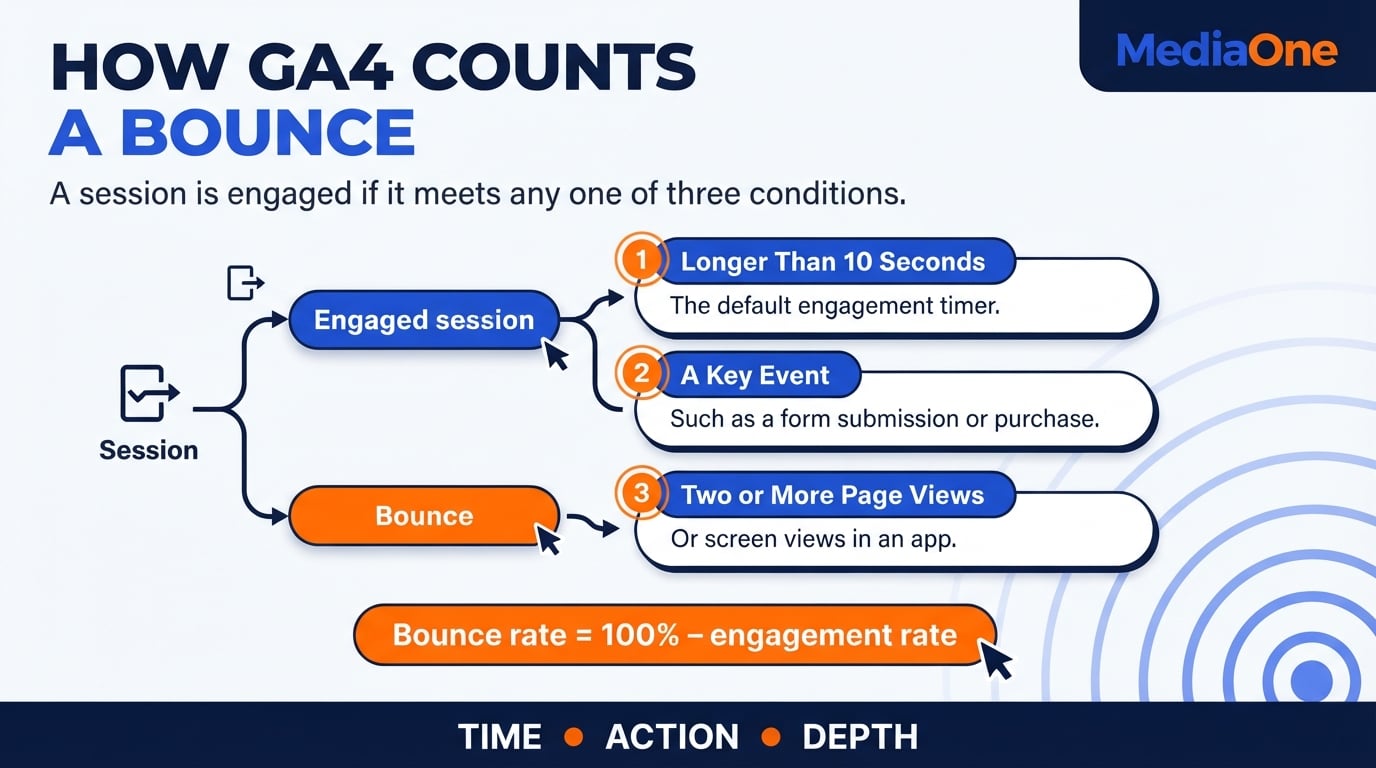
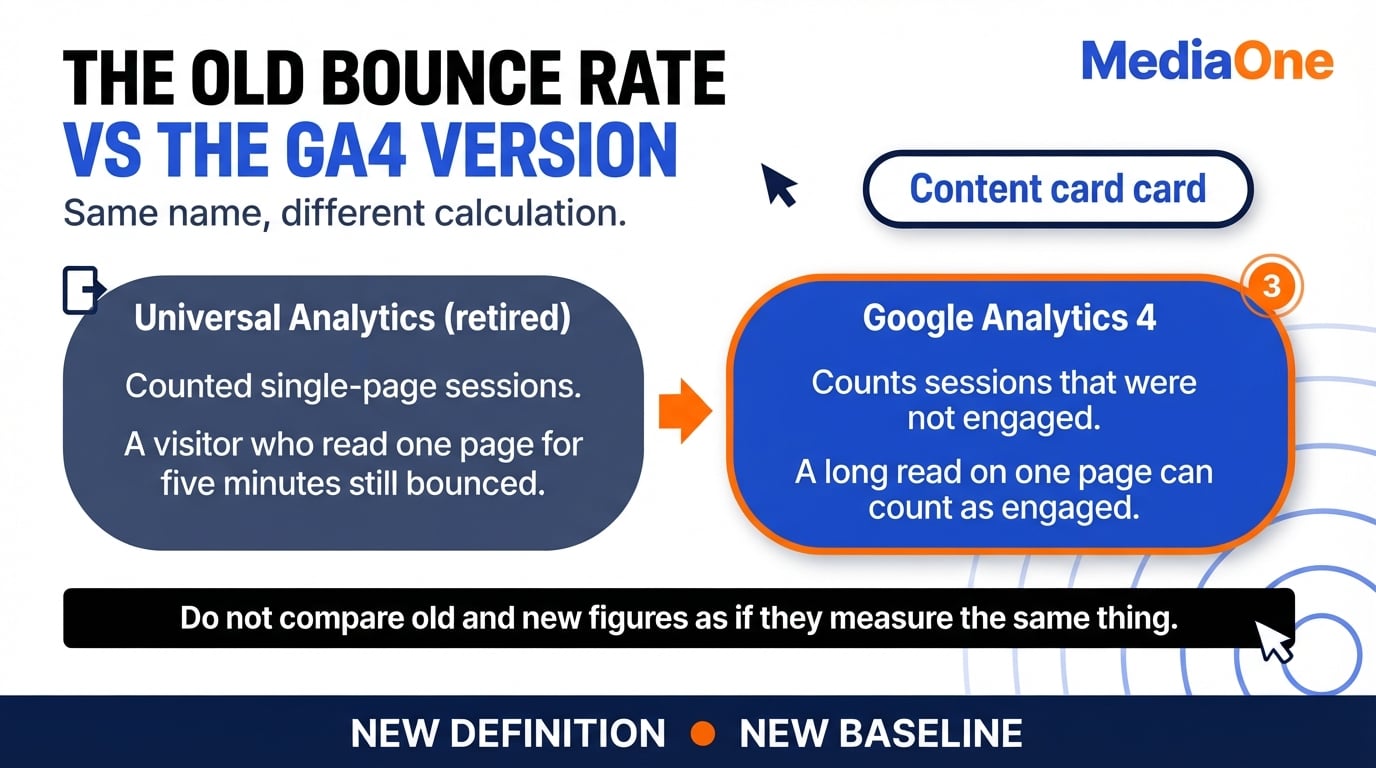
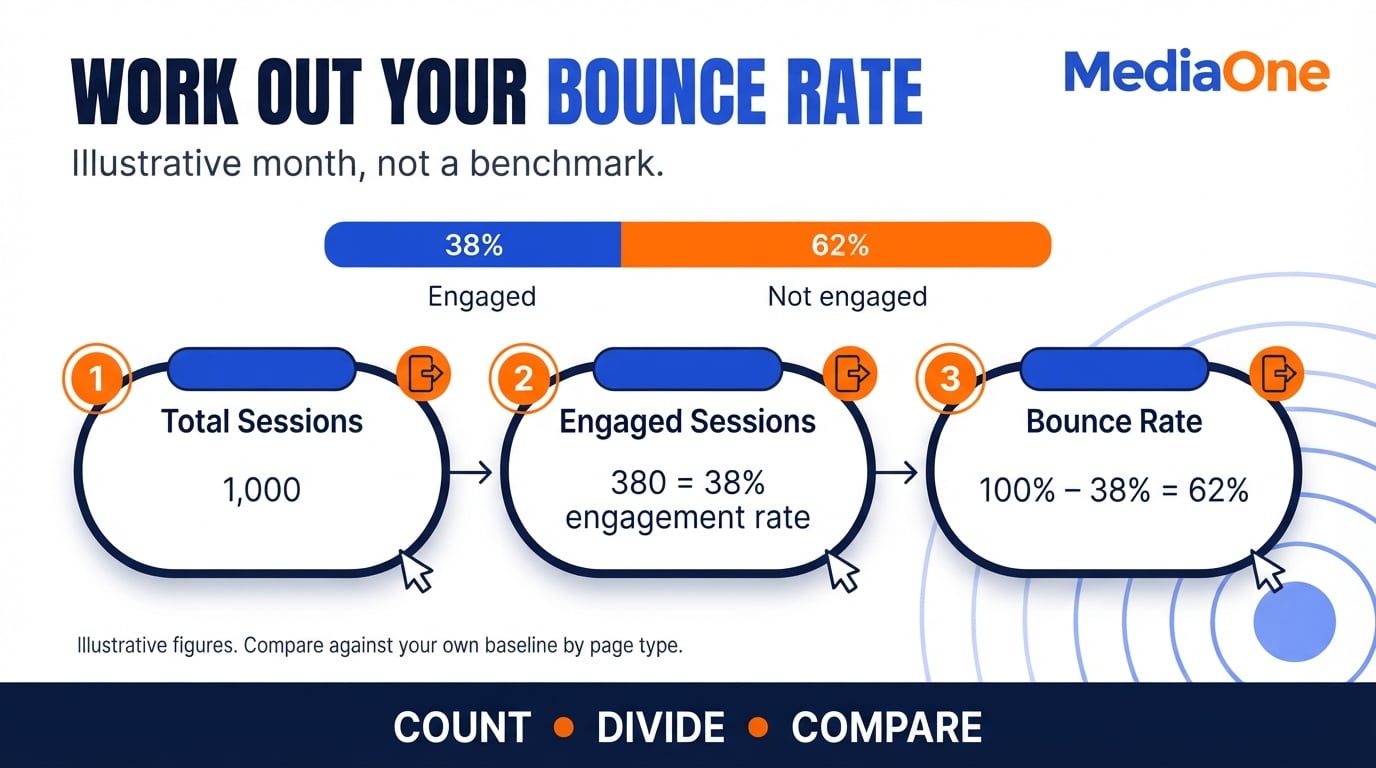
In Google Analytics 4 (GA4), bounce rate is the share of sessions that are not engaged. It equals non-engaged sessions divided by total sessions, multiplied by 100. For example, if a site records 1,000 sessions and 400 are non-engaged, its bounce rate is 40%. These figures are illustrative, not a benchmark.
In GA4, bounce rate equals 100% minus engagement rate. A session is engaged if it lasts longer than 10 seconds by default, includes two or more page or screen views, or triggers a key event. The time threshold is configurable, so check settings before comparing reports. See Google’s GA4 guidance on engagement rate and bounce rate.
A single-page visit is not automatically a bounce in GA4.
Typical Bounce Rate Ranges by Site Type
Benchmarks vary by page purpose and measurement system. Published ranges for different platforms are not always directly comparable with GA4, so use the table below to choose an appropriate comparison group rather than chase a fixed percentage.
| Site Type | What to Compare Before Deciding |
| Content sites | Articles with similar topics, search intent and traffic sources |
| Lead generation | Comparable landing pages and completed lead events |
| Portals and service sites | Service pages by enquiry type and source |
| Ecommerce and retail | Product, category and checkout pages separately |
Single-purpose landing pages may have few onward clicks, which can be reasonable when a visitor has found an answer. A high figure needs investigation when meaningful actions are missing, not simply because it exceeds an industry average.
Judging a Good Bounce Rate for Your Own Site
A single industry benchmark misleads. Compare each page against its own type and traffic source. A paid landing page and an organic guide should not share a target. Review the bounce rate of each page in your website analytics, grouped by its traffic source, including social media referrals.
Published benchmark figures can serve as a prompt to investigate, but their samples, dates and bounce definitions may differ from yours. Compare trends within a consistent GA4 setup, alongside key events and the results the page was built to produce.
Bounce Rate vs. Exit Rate
| Metric | What It Counts | Where Measured | Act on It When You Ask… |
| Bounce rate | Sessions that do not meet GA4 engagement criteria | Entry page or landing-page group | Did the visitor engage after arriving? |
| Exit rate | Share of page views that were the last in a session | Any page | Where do visitors leave the path through the site? |
Use bounce rate to judge entry-page engagement. Use exit rate to find where a visit ends, including pages reached after several views. They answer different questions and should not be treated as interchangeable.
Diagnosing the Causes of High Bounce Rate
A high bounce rate shows that visitors did not meet your recorded engagement criteria, not why. Before you change anything, work out which of three causes may be responsible. A useful comparison accounts for page type and traffic source, so judge the number against its own segment.
Why Users Bounce
Start by checking three plausible sources:
- Mismatch with intent. The first screen does not deliver the promise of the search or ad. This is easy to miss when ads and landing pages are managed separately.
- Friction on arrival. Slow loading, cramped mobile layouts, confusing navigation or thin content make people give up. For a Singapore visitor on an MRT ride, a mobile issue may be more apparent than in a desktop test.
- Interruption. Intrusive pop-ups and full-screen interstitials block the first view and can prompt visitors to leave.
Symptom-to-Cause Diagnostic Table
The pattern of the bounce narrows down the cause:
| Symptom | Likely Cause | First Check |
| High bounce on mobile only | Speed or layout on small screens | Mobile load time and tap targets |
| High bounce on paid traffic only | Ad promise does not match the page | Compare ad copy with the landing page headline |
| High bounce on one page type | Template problem | Check the shared template, not individual pages |
| High exits after long, engaged sessions | Visitor found the answer and left | Compare exit rate with key events and onward clicks |
If none of these patterns fits, check your measurement before you blame the page. A long, engaged GA4 session cannot also be a bounce under the same settings.
Using Analytics to Find the Page and Segment
Averages hide problems. In Google Analytics, use the Landing page report and an Exploration to compare source, device and country. A page may fail for one segment despite looking average overall. Note the page, segment and rate. See our Google Analytics strategies for Singapore teams.
[IMAGE: Illustrative GA4 landing-page comparison segmented by traffic source and device, using clearly labelled sample figures.]
Session recordings show what the numbers cannot. Tools such as Hotjar can help identify where visitors stop scrolling and which elements draw attention. Review sessions from the weakest segment before forming a theory, and do not infer every visitor’s intent from a handful of recordings.
Audit analytics cookies too. The Personal Data Protection Commission’s guidance on online activities covers the Personal Data Protection Act’s application when cookies collect personal data. Review each tool’s disclosures and applicable consent requirements.
Fixing Site Speed and Page Loading
Slow pages can push visitors away before they read a word, so speed is usually the first thing to check on your website. For Singapore visitors using phones, test mobile performance as well as desktop broadband, since a desktop result may not reveal the same friction.
Page Loading Speed Optimisation
Start by measuring. Run key pages through Google PageSpeed Insights or Lighthouse, then tackle the largest delay. Core Web Vitals cover three aspects: Largest Contentful Paint (LCP) measures when the largest visible content element appears, Interaction to Next Paint (INP) measures responsiveness, and Cumulative Layout Shift (CLS) measures visual stability.
Google’s Core Web Vitals guidance sets good thresholds of LCP at 2.5 seconds or less, INP at 200 milliseconds or less and CLS at 0.1 or less, assessed at the 75th percentile of visits. Check mobile field data and lab results. Common fixes include:
- Compress and resize images to the size they display at, and serve modern formats such as WebP where supported.
- Defer non-critical scripts so content renders before chat widgets or tracking tags load.
- Reduce third-party tags. Remove analytics, advertising or social media pixels you no longer use, and review what your Google Analytics setup is actually loading.

An illustrative mobile landing page with a 3 MB hero image could improve once the image is compressed and a chat widget is deferred. Retest on a mobile profile after each change, because fixes that look fine on desktop may have little effect on visitors’ handsets.
Engaging Images and Video Without Slowing the Page
Visuals help a reader stay, but only if they do not block the first screen. Lazy loading defers offscreen images until a visitor scrolls towards them; the main image visible on arrival should load promptly. Video can load on interaction, such as a play click. Every image should carry information, because decorative images cost load time without earning attention. Our website page speed guide covers how to test the bottleneck before changing a template.
Fix the loading issue your actual visitors experience, not simply the lowest lab score.
Improving Structure, Calls to Action and User Experience
Some high bounce rates come from a page that promises one thing and then offers nothing for the next step. The fixes below work on the second half of the visit, once the promise has landed.
Internal Linking and Site Structure
Every page should link to the next logical page on your website, using anchor text that names the destination. ‘Compare our three hosting plans’ tells the reader what they will find. ‘Click here’ does not. Keep key content easy to reach from the landing page, so users can move through your content marketing without getting lost. Review how readers actually move through the site in Google Analytics to spot dead ends.
Relevant Calls to Action
Place the next step where the reader’s interest peaks, usually after they have read the answer. A single contextual link after a relevant paragraph can be easier to follow than a repeated ‘Contact us’ banner. For a landing page with one main action, make that action easy to reach and track the corresponding key event before deciding the page has failed.
Maximising User Experience
Visitors scan before they read. Use a clear heading every few paragraphs, short sections and the direct answer in the first screen. On Singapore sites, keep buttons within thumb reach for mobile users. If your store accepts PayNow, show it alongside accepted cards near the cart. Related advice appears in our guide to ecommerce website UX, speed and checkout.
Pop-up Timing and UX Disruption
A pop-up that appears on arrival blocks the content the visitor came for and may prompt a quick exit. Exit-intent pop-ups can be less disruptive than timed pop-ups that interrupt reading, although the result depends on the offer and device. On mobile, avoid promotional interstitials that cover the first view and make the page difficult to use. A short checklist helps:
- Show the offer only after the visitor has engaged with the content.
- Make the close button easy to tap and never trap the visitor.
- Limit how often the same visitor sees the pop-up.
- Check the data and consent settings that power the pop-up against your privacy policy and the Personal Data Protection Act.
A useful next step should be relevant and easy to reach after the page answers the visitor’s question.
The Bounce Diagnostic Matrix
Pages fail for different reasons, so the fix depends on the problem. Plot each high-traffic page on two axes:
- Promise clarity. Do the headline, meta description and first screen confirm what the visitor came for?
- Next-step availability. Is there a relevant link, call to action or internal route after the first view?
| Quadrant | Promise Clarity | Next-Step Availability | Prescribed Fix | Singapore Example |
| A | Clear | Available | Leave largely alone. Check speed only. | A paid mobile visitor reads a clear answer on a Singapore retail page and finds a size guide below it. |
| B | Clear | Missing | Add one relevant next step after the answer. | A visitor on a Singapore service page gets the answer but has no link to book or enquire. |
| C | Unclear | Available | Rewrite the headline and first screen to match intent. | A paid mobile visitor searching for a specific product lands on a generic category page. |
| D | Unclear | Missing | Edit first. Fix the promise, then add a next step. | A social visitor lands on a broad blog page with no clear answer and no onward link. |
Start with Quadrant D pages where both the promise and next step are weak, then consider traffic and business value before editing.
Rank by estimated excess non-engaged sessions, not just percentage gaps. In an illustrative comparison, a page at 65% bounce on 3,000 sessions versus a 40% baseline has 750 excess non-engaged sessions. Another at 95% on 400 sessions versus a 70% baseline has 100. Both gaps are 25 percentage points, but the first page has 7.5 times as many excess non-engaged sessions. This estimate does not predict recovered visits. Review it monthly as traffic shifts.
Use the matrix to decide the fix, then traffic volume and business value to decide the order.
A Step-by-Step Plan to Reduce Bounce Rate
Bounce rate projects become harder to evaluate when they start with editing instead of measuring. Work through these steps in order.
- Baseline the metric. Check that analytics tags fire correctly on every template of your website before you touch a page.
- Segment it. Split bounce rate by landing page, traffic source, device and country. For example, a 60% site average could hide a 90% rate on paid mobile traffic. These figures are illustrative.
- Pick the three worst pages by traffic value. Rank pages by sessions multiplied by the gap between their bounce rate and a relevant, comparable baseline.
- Diagnose each page with the Bounce Diagnostic Matrix. Score it on promise clarity and next-step availability, then assign it to one of four quadrants.
- Apply one fix at a time. Changing speed, headline and layout together makes it difficult to know what worked.
- Measure for four weeks. Compare like-for-like traffic sources before declaring a result. Treat four weeks as an initial review period, and gather more data if session counts are low or traffic mix changes.
Checklist
- Analytics tags verified on all templates
- Bounce rate segmented by page, source, device and country
- Three priority pages chosen by traffic value
- Each page scored on promise clarity and next-step availability
- One change logged per page, with a start date
- Results reviewed after four weeks against the same traffic mix
Weigh the Cost Before You Edit
Not every bounce is worth fixing. As an illustrative comparison, a 95% rate on a page with 40 monthly sessions may warrant less attention than a 65% rate on a page with 8,000. Multiply the excess bounce-rate percentage by sessions to estimate excess non-engaged sessions, not visitors you will automatically recover. Weigh these estimates against the design effort and business value of each fix.
Measurement Hygiene Before You Start
Shopify’s fourth-quarter 2025 survey of 500 established merchants in six markets found that fewer than half tracked traffic, average order value or conversion rate, as its ecommerce KPI guide reports. Singapore was not in the sample, so check your own key events and tags before relying on bounce rate.


A bounce rate improvement only counts as progress when the actions your page was built to produce are measured too.
Conclusion and Summary
A high bounce rate may mean a page’s promise does not match what visitors find from their search. Diagnose by page and segment, compare against a suitable baseline for that page type, then address the specific issue, whether speed, intent match, structure or pop-ups.
The Bounce Diagnostic Matrix shows where to start. Pages failing on both promise and next step should be reviewed first if they also have enough traffic and business value to justify the work.
Lower bounce rates are useful when they reflect meaningful engagement or intended actions, so measure those outcomes, not the number alone.
Frequently Asked Questions
What is a good bounce rate for a website?
There is no single benchmark. A content guide, lead-generation page and product page often produce different engagement patterns, and third-party tools may define a bounce differently from GA4. Compare each page with similar pages in your own data and check relevant key events before adopting a target.
Is a high bounce rate always bad?
No. A visitor who reads one article, finds the answer and leaves may have succeeded, and GA4 can count that visit as engaged if it passes the engagement threshold. A high figure calls for investigation when the page should have led to a next step, such as a purchase, a sign-up or a further read, but did not.
What is the difference between bounce rate and exit rate?
In GA4, bounce rate counts sessions that did not meet engagement criteria. Exit rate describes the proportion of page views that were the last in a session, including visits involving several pages. A page can have a low bounce rate and a high exit rate, so use both to understand how visits end.
How do I reduce bounce rate on a blog or landing page?
First check whether the page meets the visitor’s intent and whether its single call to action is recorded as a key event. Improve mobile speed, clarify the headline and add one relevant internal link or next step, then compare similar traffic over an initial four-week period.
Does page speed affect bounce rate?
Yes. A slow page can lose a visitor before its useful content appears, particularly on a mobile connection. Compress images, defer non-critical scripts and inspect Core Web Vitals before deciding which loading issue to fix first.
Should I use pop-ups to reduce bounce rate?
Only with care. A pop-up shown on arrival may interrupt the first view, while an offer shown after engagement can be less disruptive. Test it against engagement, key events and bounce rate over a comparable period before keeping it.