A Singapore tuition centre needs to update its timetable each term, while a design agency might maintain dozens of client websites with different approval processes. Both need web design tools, but the same platform may suit one and frustrate the other. The deciding question is who will make routine changes after launch, from updating opening hours to replacing a campaign banner. A tool that looks impressive during the initial build can become expensive if each small edit requires outside help.

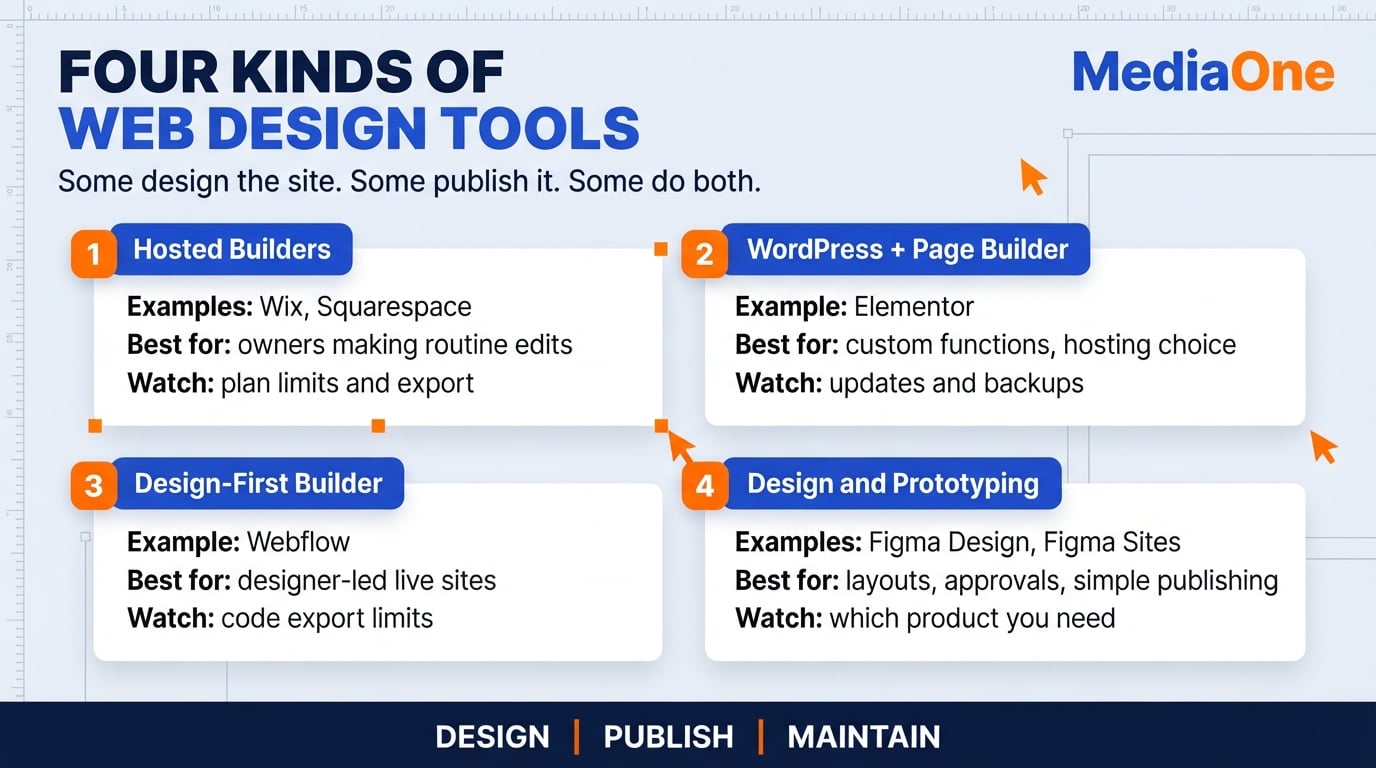
Hosted builders such as Wix and Squarespace combine visual editing with managed hosting. WordPress with a page builder offers a broader choice of themes and plugins, with ongoing maintenance to plan for. Webflow gives experienced designers detailed layout control, while Figma Design supports planning and prototypes and Figma Sites can publish websites.
The right choice depends on editing skills, the site’s actual requirements, its full annual cost and how easily content can move elsewhere. Testing one ordinary update in each candidate tool reveals more than comparing feature lists alone.
Key Takeaways
- Match the tool to the person editing the site. Wix or Squarespace can suit an owner making routine changes without technical help.
- Separate design tools from publishing tools. Figma Design is useful for layouts, prototypes and approvals. Webflow and WordPress can run live sites, while Figma Sites also supports publishing.
- Balance WordPress flexibility against upkeep. WordPress with Elementor can support customised websites and wider hosting choices, but someone must manage plugin updates, backups, compatibility checks and security.
- Check what leaving the platform involves. WordPress can export content, while Webflow’s code export has limits around CMS content, forms and ecommerce functionality.
- Compare a full year of costs, not a promotional headline. Include renewals, hosting, domain registration, paid templates, plugins, team seats, GST where applicable and support.
- Use the Maintainer-First Decision Matrix before signing. Score each tool on editing fit, required design control, budget fit, export options and handover.
How to Choose the Right Tool
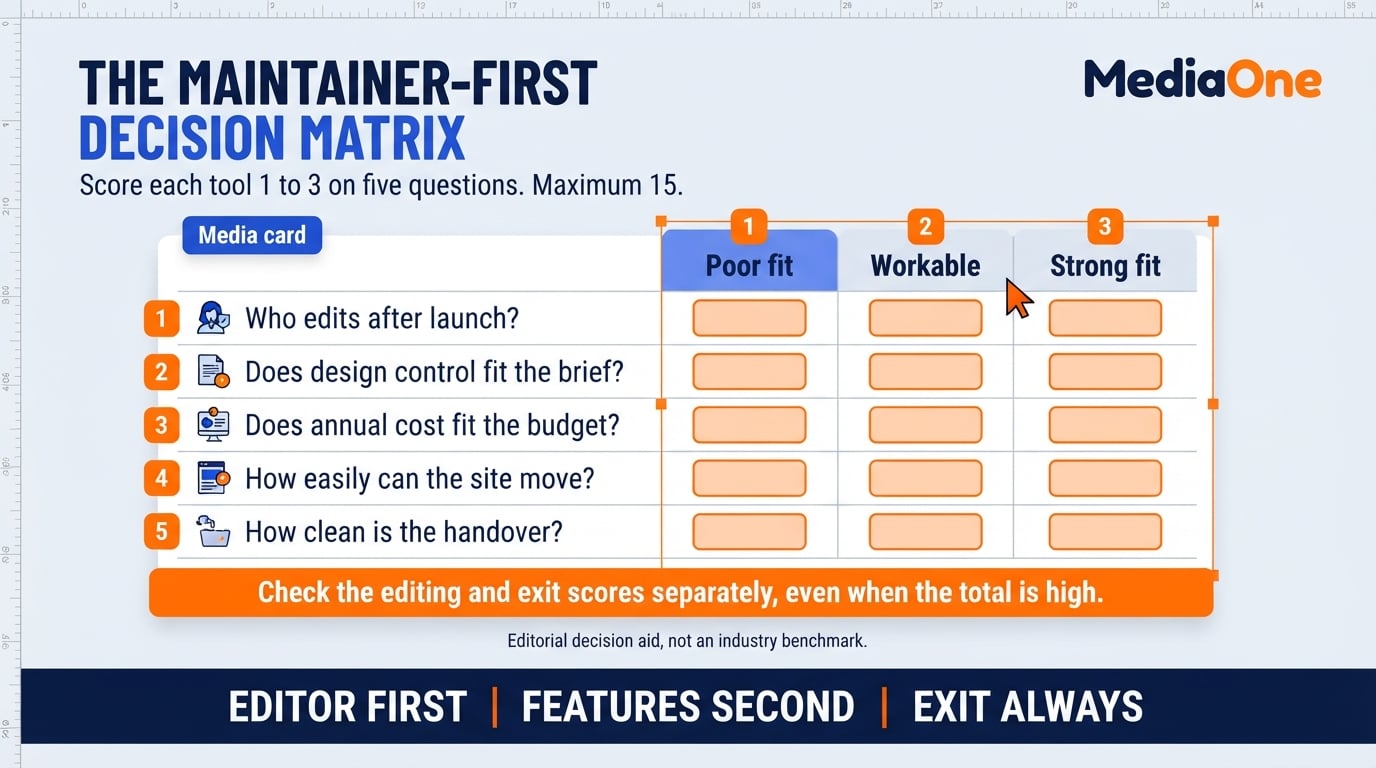
The Maintainer-First Decision Matrix offers a practical way to compare tools in a spreadsheet. It is an editorial decision aid, not a validated industry scoring standard. Rather than rewarding features your team may never use, it weighs who will update the site, the design flexibility required, ongoing cost, portability and handover.
A useful starting point depends on the person doing the work:
- Business owner: Try a hosted builder such as Wix or Squarespace and make a real update yourself. Confirm that you can edit menus, opening hours, promotions and contact details without hiring a developer. Hosting is normally included, but domain charges and plan limits vary.
- Designer: Compare Webflow for building and publishing custom layouts with Figma Design for screen design and client approval. Figma Sites can also publish websites, so test its current capabilities separately from Figma Design before choosing the workflow.
- Agency: Standardise the tools your team can support, not simply the tools your designers prefer. Test reusable components, collaborator permissions, client editing access and how an incoming agency would take over a live project.
Feature-list rankings often hide recurring work. A tool may be easy to build in but awkward for a Singapore owner changing a promotion every Friday. Repeating that task during a trial, then checking annual costs and what happens when you leave, exposes the trade-offs earlier.
Web Design Tools Overview and Categories
Website tools fall into four useful groups: hosted builders, content management systems, design-first site builders and prototyping software. The distinction is practical. Some tools publish and host a finished site; others help a team agree on how that site should look before anyone builds it. Judge each group by the work you need to complete and the skills available after launch.
Website Builders for Beginners
Hosted website builders typically combine a visual editor, managed hosting and domain-connection tools. Wix offers a permanent free starting option, while other providers may offer time-limited trials; neither arrangement automatically includes a custom domain. You choose a template, edit page sections and publish within the platform. Before paying, try replacing the home-page image, adjusting the menu and checking the mobile preview. This template-led model suits owners who need to update pages without writing code.
The trade-off is control. You work inside the layouts and integrations the platform supports, so complex data structures or unusual booking flows may require workarounds. For a café or tuition centre updating a menu or timetable, that limit may be acceptable. Before choosing a provider, confirm which features are available on the paid plan, how forms deliver enquiries and whether the owner retains control of the domain.
WordPress and Its Page Builder Plugins
Self-hosted WordPress is a content management system installed with a hosting provider. A theme controls the design, while plugins such as Elementor can add drag-and-drop page editing. Its wide developer and plugin ecosystem supports sites that need functions beyond standard templates, but those choices create more components to maintain. An owner should confirm whether the selected page builder lets them change everyday content without touching settings or code.
WordPress itself is free software, but hosting, a domain, premium themes or plugins and professional help can add recurring costs. Agree who owns backups and routine updates before launch.
WordPress stores content in its database, while themes and plugins add files and settings. Plugin or theme updates can occasionally affect a layout, so budget for backups, compatibility checks and updates on a staging copy before publishing changes. WordPress’s content export tool can download posts and pages as XML; moving an entire site also requires attention to media, themes, plugins and databases.
Choose this route when you want hosting flexibility and room to customise, and have a realistic maintenance plan. Selecting a host gives you influence over infrastructure, not direct control over its uptime. Check the service level agreement, backup policy, support hours and what the web designer will hand over when the project ends.

Visual Web Builders for Designers (Webflow)
Webflow combines a visual site builder with publishing, hosting and content-management options. Its layout, spacing and interaction controls appeal to designers who want more freedom than a template-led editor usually offers. The learning curve is steeper, so the client handover needs care: demonstrate how to edit ordinary text, images and collection items without changing the design system.
Portability needs its own check. Under Webflow’s code export rules, eligible paid Workspace plans can export HTML, CSS, JavaScript and assets, but the export does not include working CMS collections, ecommerce functionality or form processing. That makes code export useful for static pages, not an automatic migration of a live business website.
Design and Prototyping Tools (Figma and Adobe XD)
Figma Design and Figma Sites. Figma Design is used to create screens, clickable prototypes and design systems for approval and developer handover. Figma Sites is a separate product that can turn design work into published webpages. It entered open beta in 2025, and Figma states that publishing with Figma Sites requires a paid plan. Teams should test current site-management and export needs rather than treating every Figma design file as a deployable site.
Adobe XD. Adobe XD remains relevant to teams maintaining existing design files, but it is a weak starting point for a new workflow. Adobe confirms it is in maintenance mode, meaning no ongoing feature development. Before committing to any design tool, check how easily colleagues and developers can open, review and continue the work.
Where Each Category Fits in a Workflow
These categories overlap, but they are not interchangeable. A small team might approve screens in Figma Design, then create the live site in Wix, Webflow or WordPress. Another team might publish a simpler site directly with Figma Sites. Decide whether the immediate job is to plan a design, publish a working site or maintain a site month after month, and test the relevant workflow before choosing.
Key Features and Evaluation Criteria for Choosing Web Design Software
Feature lists are useful only when they describe work your team needs to do. The deciding factor for a small business is who can keep the website updated after launch. A powerful tool still fails the brief if the owner cannot change a business-hours notice or repair a broken contact form. The criteria below put maintenance first, followed by design fit, hosting, cost and exit risk.
Ask the proposed maintainer to complete three ordinary tasks in the editor: change a headline, adjust a contact form and check the mobile layout. A free plan or trial is useful for this test, although some publishing or collaboration functions may require payment. Designers and agencies should repeat the test with the client account they intend to hand over. That reveals whether routine changes depend on specialist access.
A Shortlist by Category
Choose by the actual task, not the name on the software subscription:
- Wix or Squarespace: sensible options for an owner who wants a visual editor and managed hosting. Check booking, payment and export requirements before paying.
- WordPress with Elementor: a flexible route for a business expecting custom functions or different hosting options, provided someone owns updates and backups.
- Webflow: a strong candidate for designer-led live websites, with client editing permissions and code-export limits to examine closely.
- Figma Design or Figma Sites: useful for prototypes and design systems, or for publishing through the separate Sites product. Test live-site requirements before replacing a full CMS.
For a broader comparison of DIY tools and agency delivery, see MediaOne’s website builder service comparison for Singapore.
Free Versus Paid Tiers
Free plans, trials and paid tiers differ substantially by product. A free account may let you test the editor without permitting publication on a custom domain, while self-hosted WordPress is free software that still needs paid hosting. Evaluate the plan that can actually run your business site, not just the lowest advertised price.
| Tool type | Free or trial tier | Paid tier | What to check before paying |
| Hosted builders (for example Wix) | A limited editor or free branded site, depending on provider | Custom domain, paid features and managed hosting vary by plan | Renewal rate, branding, forms and ownership of the domain |
| Self-hosted WordPress with Elementor | Free core software and some free plugins, with hosting arranged separately | Hosting, premium add-ons and maintenance may be paid | Full yearly stack and who handles updates and security |
| Webflow | A free starting workspace or trial-level site features | Paid publishing and workspace capabilities vary | Site plan versus Workspace plan and code-export rights |
| Figma Design and Figma Sites | Design and site-drafting features can be tried without paid publishing | Paid plan required to publish with Figma Sites | Which product, seat type and publishing rights you need |
Confirm current features and billing terms on each vendor’s own pricing page before purchase. MediaOne’s comparison of free web design tools in 2026 is useful for narrowing a shortlist, but the vendor’s checkout terms govern the actual subscription. Record the renewal price and any per-seat charges in the matrix.
Must-Have Features Checklist
Before comparing tools, confirm each one meets this baseline:
- Visual editing without code: the maintainer can change text, images and layouts in a live preview, without needing a web designer.
- Mobile-responsive templates: pages reflow correctly on phones and stay usable without zooming or horizontal scrolling.
- SEO controls: page titles, meta descriptions, image alt text and redirects are editable; on WordPress, a plugin may provide some controls.
- Contact and booking forms: enquiries reach the business email or a customer relationship management (CRM) system, the software that tracks customer contacts, without manual copying.
- Custom domain and HTTPS: confirm domain connection, certificate provision and any additional fees before launching.
- Portable content: confirm which pages, media, structured data and functionality you can export, and in what format.
- Version history or undo: mistakes can be reversed without rebuilding the page.
- Payment or e-commerce integration, if you sell: check which payment providers and marketplace links are supported. Test the checkout flow on a staging site, a private copy of the live site, before launch.
Treat editing access, secure publishing and content portability as requirements to test, not promises to assume. A tool may still fit an internal prototype without these features, but a customer-facing business site needs a clear owner for each. Ask for a live demonstration of anything essential that is not obvious from the product documentation.
Scoring Framework: Weighing Ease of Use, Control, Hosting and Support
The matrix is an editorial decision aid, not a validated benchmark. Score each candidate from 1 (poor fit) to 3 (strong fit) against the actual project brief. A capable but unnecessarily technical tool should not automatically score higher for design control, and cheaper is not automatically better if it cannot support the required functions.
| Question | Score 1 | Score 2 | Score 3 |
| Who edits content after launch? | Intended maintainer cannot edit without help | Maintainer needs occasional support | Maintainer can complete routine edits alone |
| Does design control fit the brief? | Required layouts cannot be built | Requirements need workarounds | Required layouts work without fragile fixes |
| Does annual cost fit the budget? | Exceeds the approved budget | Fits only after reducing features | Fits including renewals and maintenance |
| How easily can the site move? | Content is inaccessible or locked | Some content exports; rebuild is needed | Usable exports and a documented migration path |
| How does it handle handoff? | Access or ownership cannot transfer cleanly | Manual instructions and shared access | Clear permissions, training and documented handover |
To use the matrix, follow three steps:
- Score each shortlisted tool against the same business requirements and yearly budget.
- Total the scores, then inspect the weakest category. A score of 12 out of 15 is not proof that a particular kind of platform is best; it is a prompt to compare trade-offs.
- Check the maintainer and exit scores separately. A tool that cannot be edited or left without major expense may be unsuitable even when its total is high.
Support is a sixth factor the matrix does not score, but it matters when something breaks. Check the vendor’s response times and whether a local partner could take over if needed.
Worked Example: Scoring Two Tools
Consider a Singapore tuition centre choosing between a hosted builder and WordPress with Elementor. The owner updates the timetable every term and has no designer on staff.
| Question | Hosted builder | WordPress with Elementor |
| Who edits content after launch? | 3, owner can edit timetable | 2, owner needs occasional technical help |
| Does design control fit the brief? | 3, required pages fit template | 3, required pages fit chosen builder |
| Does annual cost fit the budget? | 3, illustrative budget fit | 2, maintenance adds to cost |
| How easily can the site move? | 2, content export is limited | 3, content and hosting can be migrated with work |
| How does it handle handoff? | 3, clear owner access | 2, documented plugin and hosting handoff needed |
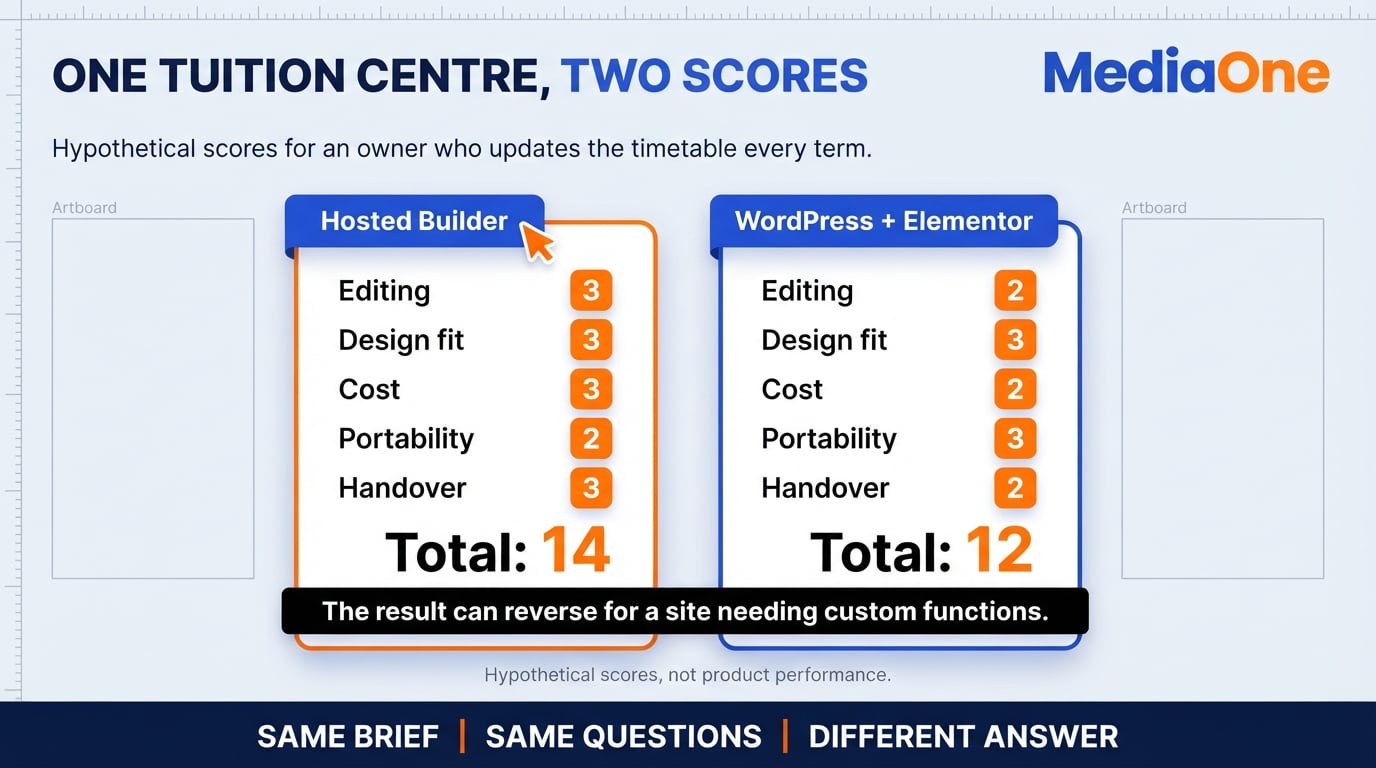
The scores are hypothetical, based on the tuition centre’s requirements rather than measured product performance. Here the hosted builder scores 14 and the WordPress option 12, mainly because the owner wants to make routine changes independently. The outcome could reverse for a different site that needs custom functions, migration options or in-house technical support.
Uptime, Hosting and Performance Expectations
Hosting is often included with a hosted builder, while self-hosted WordPress requires a separate provider. If a vendor offers an uptime target, read the service level agreement (SLA) for exclusions, support procedures and any service credit. As an illustration, a 99.9% monthly availability target permits about 43 minutes of downtime in a 30-day month before exclusions. A booking site should assess the impact of missed enquiries rather than relying on the headline percentage alone.
When comparing plans, ask:
- Is hosting included, and what is the renewal price?
- Where are the servers, and does location affect your customers’ load times?
- Are automated backups included, and how long are they kept?
- Is a service credit offered if the stated uptime is missed?
Test one real page on a phone as well as on a desktop, including navigation, forms and page loading. Google PageSpeed Insights can identify performance problems, although a score alone does not describe every visitor’s experience. A template that is already slow before images, embeds and third-party scripts are added deserves closer review. MediaOne’s website page speed testing checklist explains how to isolate the cause before making changes.
Recommended Next Steps
Write down who will edit the website each month and the three changes they are likeliest to make. An owner who updates a timetable and contact form may prefer a hosted builder; a designer-led team building custom page templates may compare Webflow with WordPress and other CMS options. The answer is not a universal ranking. It is the platform that fits the next year of work.
Next, score two or three candidates against the matrix and run a small trial: build a real page, connect a form, view it on mobile and change one menu item or opening hour. Try the handover from the account the owner will actually use. If publishing requires an upgrade, test the editor first and include that charge in the budget. Ask the supplier to demonstrate backups and how you would export your content if the relationship ended.
Finally, add up the full annual cost, including domain renewal, hosting, paid plugins, premium templates, collaborator seats and maintenance. For illustration only, a S25monthlyplancostsS300 a year before other charges. Compare like-for-like functionality and the renewal price, not an introductory offer. If your team needs outside support for setup or ongoing updates, a professional website design handover should define ownership and editing responsibilities clearly.
Frequently Asked Questions
Are free web design tools good enough for a business website?
A free tool may be sufficient to test pages or run a small personal site, but a commercial launch needs a closer check. Some free tiers require vendor branding or restrict domains, forms or publishing. Confirm what a paid plan adds and whether you can move the content later.
Which web design tool is best for beginners?
A hosted builder such as Wix or Squarespace is a sensible starting point for a non-technical owner, but it depends on the site’s needs. Try changing a headline, replacing an image and testing the form before subscribing. A designer who needs custom interactions may prefer Webflow.
Is WordPress still the most popular option?
WordPress remains a widely used content management system with a large community of developers and plugins. Its strengths are flexibility and the ability to choose hosting, while its trade-offs include updates, backups and plugin compatibility. Popularity alone should not decide whether it suits your team’s editing skills.
How much should a small business expect to pay for web design software?
Costs vary by tool, site features and who handles maintenance, so a universal starting price would mislead. Calculate twelve months of plan fees, domain renewals, hosting, paid add-ons, team seats and support in Singapore dollars. Ask whether the quote includes GST and what changes after the introductory term.
Do I need to learn Figma before building a website?
No. Figma Design is useful for prototypes and collaborative design, but beginners can publish with a website builder without learning it first. Figma Sites can also publish webpages, which is different from handing a Figma Design prototype to a developer. Adobe XD is in maintenance mode and is better treated as a legacy tool.
What should I check before committing to a website builder?
Confirm the editing workflow, total renewal cost, hosting terms and what can be exported. Test a mobile page and an enquiry form using the permissions the real maintainer will have. If the provider promises uptime or support response times, read the service agreement and any exclusions.