
| AI Summary
Google Keyword Planner helps Singapore businesses find search terms, review estimated demand and prepare Google Ads campaigns. Its figures need context: search volume does not equal website traffic, advertiser competition does not measure SEO difficulty, and forecasts do not promise sales. A practical workflow combines local settings, relevant keyword groups, realistic budgets and results from the business’s own website and campaigns. |
Google Keyword Planner is a keyword research tool within Google Ads. Singapore businesses can use it to discover keywords, review estimated monthly searches and forecast advertising results. Research starts with Singapore location settings and relevant seed terms. Search volume ranges indicate approximate demand; they are not exact counts of customers or guaranteed clicks.
Key Takeaways
- Singapore location settings keep research focused on the market the business serves.
- Customer intent helps separate buying searches from research, recruitment and unrelated requests.
- Volume ranges and rounded estimates support comparisons without proving exact demand.
- Ad groups, match types and negative keywords connect keyword research with campaign decisions.
- Conversion tracking and sales records show whether keyword choices produce worthwhile enquiries.
Google Keyword Planner can help a business answer a practical question: which searches deserve its time and advertising budget? A Singapore bakery might research birthday cakes, wedding cakes and cake delivery. Each phrase suggests a different need. A large search figure alone cannot tell the bakery which orders it can fulfil profitably.
The process below explains how to access the tool, research local keywords, interpret its numbers and build an advertising plan. Examples are illustrative and do not represent measured Singapore search volumes or client results.
What Is Google Keyword Planner?
Google Keyword Planner is Google Ads’ keyword research and planning tool. Its main jobs are finding keyword ideas and estimating potential advertising activity. The two starting options serve different tasks:
| Option | Main purpose | Example |
| Discover new keywords | Expand a starting topic or website into related terms | A bakery explores birthday cake searches |
| Get search volume and forecasts | Assess an existing keyword list and prepare a plan | The bakery compares selected cake delivery terms |
The tool can support both advertising and content planning. However, its advertising measures need separate interpretation when the goal is organic search traffic. A business using keyword analysis can combine search data with customer needs, service coverage and the pages already on its website.
What the tool cannot tell a business
Keyword Planner cannot decide whether a customer will trust a company, accept its prices or complete a purchase. Its data also does not establish:
- The difficulty of earning an organic ranking.
- The number of unique buyers behind a search estimate.
- The quality of enquiries a campaign will receive.
- The profit a keyword will produce.
A keyword list is a starting point for business decisions. Product knowledge and campaign evidence complete the picture.
How to Access Google Keyword Planner
Google’s current Keyword Planner access requirements state that account setup, including billing information, must be completed to access basic features such as keyword suggestions. The tool itself has no separate subscription fee.
Billing setup and campaign spending are separate decisions. An account holder should check campaign status and payment settings before completing any onboarding process that creates ads.
The usual menu route is:
- The account holder signs in to Google Ads.
- The Tools menu contains the Planning section.
- Keyword Planner opens the research options.
- Discover new keywords begins a new research session.
Menu labels may change as Google updates the interface. The feature name remains the best reference when the layout differs.
Why account access does not promise exact volumes
A working account does not justify describing every displayed number as exact. Some accounts display broad search volume ranges. Other views may show more detailed estimates, but those figures still describe estimated search activity.
Billing details or a particular spending amount should never be presented as a guaranteed method of obtaining exact counts. The research record should preserve whatever the account actually displays.
How to Set Up Keyword Research for Singapore
Research settings determine which market the numbers describe. A Singapore business needs a local research view before comparing keywords.
Google’s keyword refinement controls include location, language, network and date settings, alongside filters for narrowing keyword ideas. A practical starting setup looks like this:
| Setting | Starting choice | Reason |
| Location | Singapore | Research reflects the intended country |
| Language | The language being researched | Separate research supports different audiences |
| Search network | Google for an initial baseline | Network changes can affect comparisons |
| Date range | A consistent period across lists | Comparable periods reduce misleading conclusions |
A company serving other countries should keep separate research views. A combined regional total can hide whether demand exists in Singapore itself.
Local wording and language
Singapore customers may describe the same service in different ways. An air-conditioning business might research “aircon servicing”, “air conditioning maintenance” and “aircon chemical wash”.
Those phrases should remain separate until the business understands their intent. Maintenance and repair requests can involve different jobs, prices and urgency.
Multilingual research also needs more than translated keywords. A Mandarin-language campaign, for example, needs relevant wording, ads, landing pages and customer support. The settings below form a research record that another team member can reproduce.

How to Find Relevant Keyword Ideas
A focused research session begins with what the business sells and the problems its customers describe. A birthday cake shop could start with:
- Birthday cake delivery.
- Custom birthday cake.
- Same-day cake delivery.
- Kids’ birthday cake.
A company that cannot provide same-day delivery should leave that service out of its advertising shortlist, even if the phrase attracts interest.
Seed terms from customer conversations
Customer emails, enquiry forms and sales calls often reveal wording that a service menu misses. A customer might ask for a “small cake for six people” while the bakery describes its product by diameter. Both descriptions can inform research.
A simple worksheet can record three sources:
| Source | Example wording | Research use |
| Product catalogue | Custom birthday cake | Core product |
| Customer enquiry | Cake delivery tomorrow | Timing requirement |
| Sales conversation | Cake for six people | Size or occasion |
The business can test these phrases separately, then compare which ideas the tool returns.
Website-based ideas
Website input can expand a research session using a relevant page or domain.
A business’s own service page provides a sensible starting point. A publicly available competitor page may also reveal related ideas, but the results do not expose that company’s private campaign performance.
The website option works best when the selected page closely matches the research topic. A broad homepage may introduce unrelated categories.
Keyword filters and exclusions
A long list becomes easier to assess when unrelated themes are removed. A bakery selling finished cakes might exclude ideas about baking courses, equipment and recipes. A cake-decorating school could keep those same terms because its offer differs.
Volume filters need restraint. A strict minimum can remove specialist searches before anyone checks whether they describe valuable orders. A shorter list of relevant terms is easier to test than hundreds of phrases with uncertain purpose.
How to Choose Keywords by Customer Intent
Search intent describes what someone wants to do. The same topic can produce searches for learning, comparing and buying. For a bakery, these searches belong to different tasks:
| Keyword example | Likely need | Suitable destination |
| How to store a birthday cake | Product care information | Storage guide |
| Custom cake prices Singapore | Price comparison | Pricing or product page |
| Birthday cake delivery tomorrow | Near-term order | Delivery and ordering page |
| Cake decorator jobs | Employment | Careers page, if relevant |
A business’s keyword intent analysis should connect each phrase with a page that answers the request. A buying phrase does not automatically become a profitable keyword. Delivery coverage, stock, price and response time still influence the outcome.
Search results as a second check
A manual search can help the editor or advertiser understand what Google currently shows for a phrase. The review can note:
- Whether results mainly contain shops, guides or directories.
- Whether local businesses appear.
- Which questions the pages answer.
- Whether the business can provide the expected service.
Search results vary by context, so one observation is a sample. The exercise helps assess the type of page a customer may expect.
How to Read Search Volume Ranges Honestly
A search volume range describes a band of estimated activity. A display such as “1K–10K” does not identify the exact number within that band.
Two terms in the same range cannot be ranked confidently by volume alone. The research sheet should record “same displayed band” when no stronger evidence exists.
A range also should not become a precise figure through arithmetic. The midpoint of 1,000 and 10,000 is 5,500, but that calculation does not reveal measured demand.
What average monthly searches means
Google’s historical keyword statistics describe average monthly searches for a keyword and close variants within the selected settings. The figure represents searches, not unique people, and averaging can conceal monthly peaks.
A person researching a cake may search several times before ordering. Some searchers may never buy. Search volume therefore cannot be labelled “potential customers” without further evidence.
The same caution applies to rounded estimates. A displayed number is planning data, even when it looks more detailed than a range.
Why similar keyword totals can overlap
Related phrases can reflect overlapping demand. Close variants make it risky to add every row and call the result a total addressable audience.
A spreadsheet containing “birthday cake Singapore” and “birthday cakes Singapore” should preserve both research observations without assuming they represent separate groups of people.
A sound interpretation records the limits alongside the figures:
- The displayed range or estimate.
- The selected country and network.
- The research period.
- Any likely overlap between terms.
- The date the information was collected.
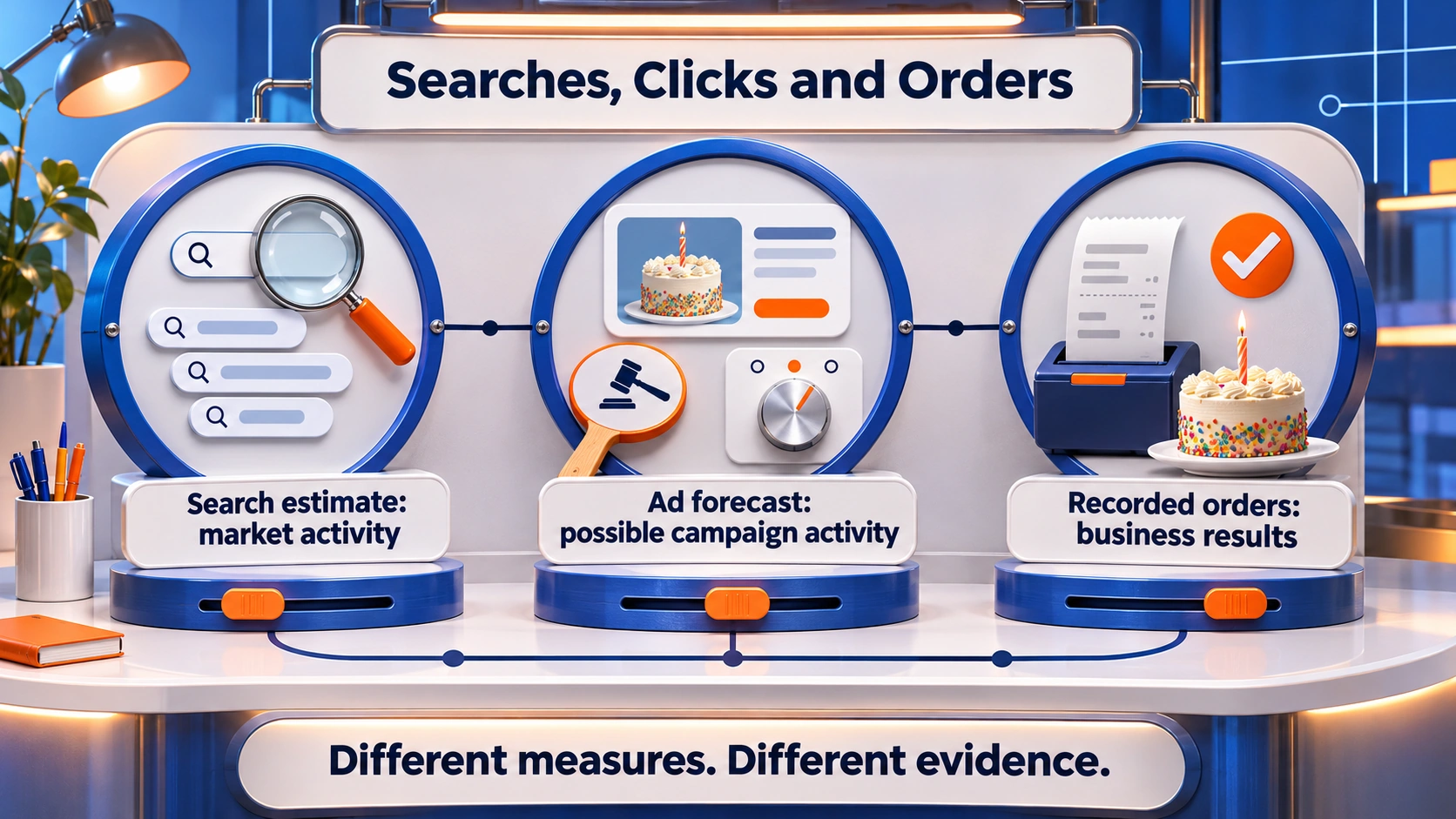
The distinction between searches, advertising activity and business results prevents the most common reporting errors.
What Competition, Bid Ranges and Trends Mean
Keyword Planner contains several measures that answer different questions. A single “best keyword” score would hide those differences.
| Measure | What it helps assess | What it does not establish |
| Average monthly searches | Approximate search activity | Unique buyers or site visits |
| Competition | Relative advertiser activity | Organic ranking difficulty |
| Top-of-page bid ranges | Historical bidding context | A guaranteed position or future CPC |
| Monthly trends | Changes across time | The reason demand changed |
Google’s explanations of competition and bid statistics relate to advertising. Organic SEO requires a separate assessment of search results and competing pages.
High advertising competition and SEO
A high competition label means advertisers are active around the keyword. A company should not translate that label into “too difficult for SEO”.
The reverse also needs care. Low advertising competition does not prove that organic rankings will be easy to earn. The choice between Google Ads and SEO depends on timing, costs, existing visibility and the business’s ability to convert visitors.
Seasonal searches
An annual average may hide demand around celebrations, school events or booking periods. A cake business can compare monthly patterns before planning stock and promotions.
A separate Google Trends check can add context. Google’s explanation of Trends data states that its values show relative interest on a 0–100 scale. A score of 100 is not 100 searches.
A sudden increase deserves investigation before it becomes a larger advertising commitment.
How to Build Ad Groups and Choose Match Types
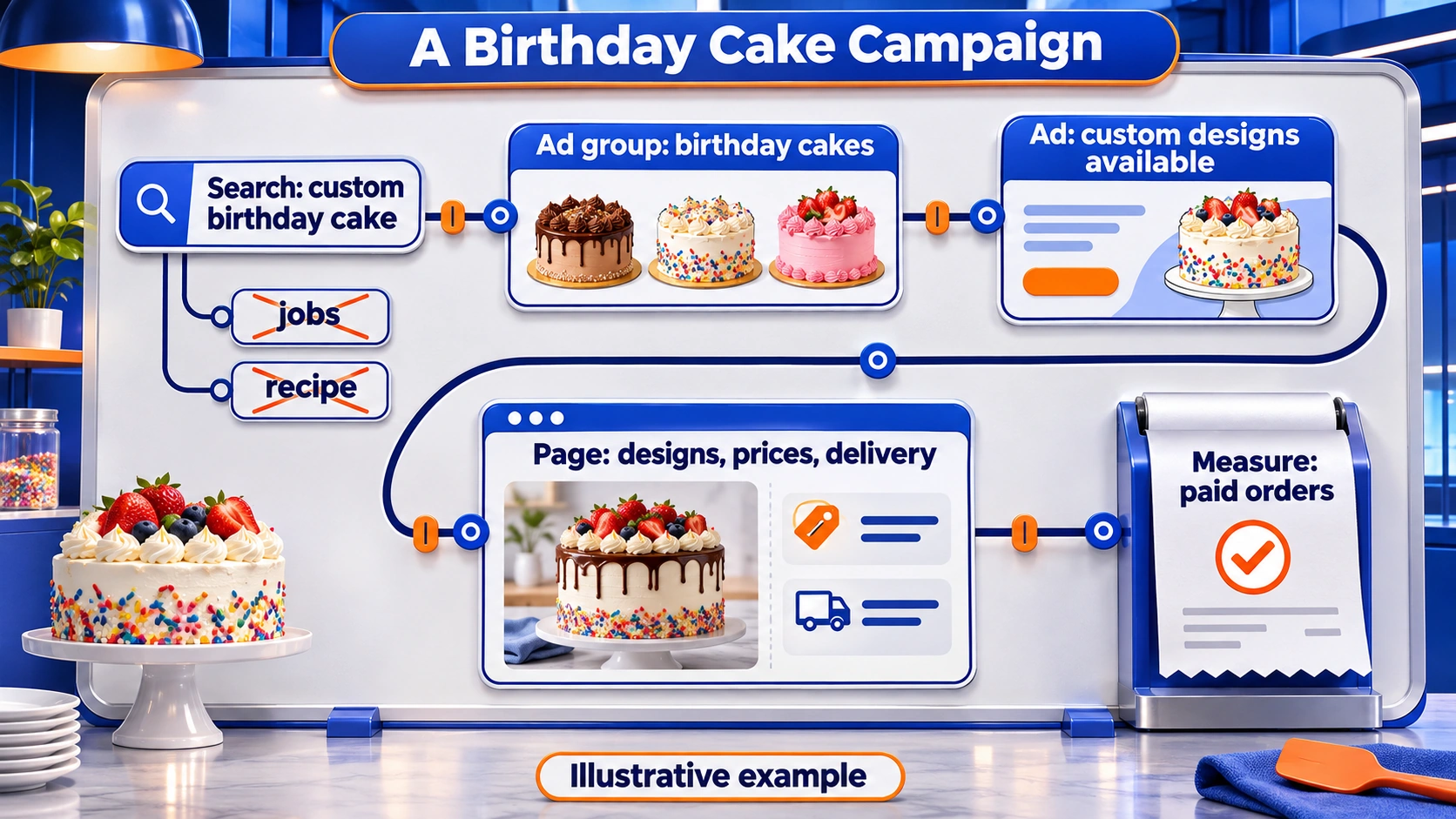
An ad group brings related keywords together with relevant ads. A shared customer need provides a stronger grouping rule than similar spelling.
A bakery might organise its plan like this:
| Ad group | Example keywords | Landing page focus |
| Birthday cakes | Custom birthday cake, kids’ birthday cake | Birthday designs and ordering |
| Wedding cakes | Wedding cake Singapore, wedding cake consultation | Wedding portfolio and enquiry |
| Delivery | Cake delivery Singapore, next-day cake delivery | Delivery terms and available products |
A customer searching for wedding cakes needs information that a general cupcake page may not provide.
Broad, phrase and exact match
Google’s keyword matching options describe how keywords can match searches:
- Broad match: Related searches may qualify, including wording beyond the keyword’s direct meaning.
- Phrase match: Searches may qualify when they include the keyword’s meaning.
- Exact match: Searches may qualify when they share the keyword’s meaning or intent.
Exact match does not require identical wording. Google also stresses the role of Smart Bidding with broad match.
Match selection should reflect the campaign’s goals, tracking and capacity for review. A small team may prefer a narrower initial test while it checks enquiry quality.
Negative keywords
Negative keywords exclude unwanted searches. Their value depends on the offer.
A bakery selling cakes may exclude “jobs” and “recipe”. The word “free” needs more care if the company offers free delivery, because a broad exclusion could block relevant searches.
Google’s process for finding negative keyword ideas uses actual search terms from campaigns. Negative match rules differ from positive keyword matching.
How to Use Forecasts for Ad Budget Planning
A forecast estimates possible campaign activity under selected conditions. Google’s forecast documentation explains that bids, budgets, seasonality and historical ad quality can affect the estimates.
A forecast is best treated as a scenario. The business can compare what happens when its planned budget or keyword selection changes.
A research sheet should distinguish forecast figures from assumptions supplied by the team. An assumed sales rate is not a Google prediction.
An illustrative budget calculation
A bakery considering S$600 in advertising spend might test several possible outcomes. The figures below demonstrate the calculation only.
| Scenario | Assumed average CPC | Calculated clicks | Assumed enquiry rate | Calculated enquiries |
| A | S$2 | 300 | 2% | 6 |
| B | S$3 | 200 | 4% | 8 |
| C | S$4 | 150 | 4% | 6 |
The formula is budget divided by average CPC for clicks, followed by clicks multiplied by enquiry rate.
An enquiry still needs to become a paid order. Profit assessment also requires product costs, delivery costs and the value of completed sales.
Campaign settings beyond the planner
The planner’s research location does not replace campaign location checks.
Google’s advanced location options distinguish people in or regularly in a location from people showing interest in it. A local delivery business should review which option supports its service area.
The relationship between keywords, ads and landing pages also affects eligibility and placement through Ad Rank. A higher bid alone does not guarantee the desired position.
A completed plan connects the customer’s request to an order process the business can fulfil.
How to Check Keyword Choices After Launch
Campaign results reveal what research estimates cannot: which reported searches produce enquiries and orders for the business.
Google’s search terms report shows reported searches that triggered ads. Some low-activity terms are omitted for privacy, so the report is not a complete record of every query.
A review can group findings by action:
| Finding | Possible response |
| Unrelated searches | Appropriate negative keywords |
| Relevant clicks without enquiries | Landing page and tracking review |
| Enquiries outside delivery coverage | Location and delivery-message review |
| Relevant enquiries without orders | Price, availability and follow-up review |
A small amount of data needs cautious interpretation. One sale or one expensive click cannot establish a dependable pattern.
Conversion tracking and sales quality
Reliable Google Ads conversion tracking helps connect advertising activity with actions such as completed purchases or enquiries.
The business also needs a shared definition of success. A newsletter sign-up and a paid cake order should not be reported as equivalent outcomes.
A planned PPC advertising test can record spending limits, review dates and the evidence needed before expansion. Ongoing PPC campaign reviews can then address keyword relevance, page performance and sales quality together.
How Keyword Planner Supports SEO Content
Keyword Planner can reveal customer topics, but a content plan needs more than a volume column.
A bakery may need one birthday cake category page supported by storage, portion-size and delivery information. Every keyword variation does not require a separate page.
A content worksheet can record:
- The customer’s main question.
- The page that should answer it.
- Supporting questions for that page.
- Existing information that needs improvement.
- The business action the page supports.
The Search Console Performance report adds evidence about the site’s own search impressions, clicks and queries. Those figures describe its visibility; they do not represent the whole market.
Google Keyword Planner as a Practical Campaign Starting Point
Google Keyword Planner helps businesses organise keyword ideas, assess estimated demand and prepare advertising scenarios. Singapore settings, customer intent and honest reporting make those plans easier to assess. Actual enquiries and orders provide the evidence for later decisions.
At MediaOne, we connect keyword research with ads, landing pages and measurement through our Google Ads management services. We can help your business develop a campaign plan around its services, budget and customer goals.
FAQs About Google Keyword Planner
Can Google Keyword Planner reveal a competitor’s advertising budget?
Google Keyword Planner does not reveal a competitor’s private budget, bids or sales. Website-based research can generate related keyword ideas, but those suggestions should not be presented as proof of the competitor’s advertising strategy.
Why does a keyword sometimes have no available data?
A missing figure can reflect insufficient data under the selected settings. The absence of a displayed estimate does not prove that nobody searches for the topic. Customer enquiries and the business’s own search records can provide additional context.
Google Keyword Planner is designed for Google Ads search planning. Its figures should not be described as search demand within Instagram, TikTok or LinkedIn. Research for those platforms needs evidence from the relevant platform and audience.
Should brand searches be reported separately?
Brand and non-brand keywords should have separate reporting groups when the goal is understanding demand. Someone searching for a company by name already knows it, while a general service search may introduce a new prospect. Combining both can hide differences in performance.
What should a team keep with a keyword export?
A research export should include its collection date, location, language, network and selected period. Team notes can also record service exclusions and intended pages. Those details help a later reviewer understand why the list was created and whether comparisons remain valid.