| AI Summary
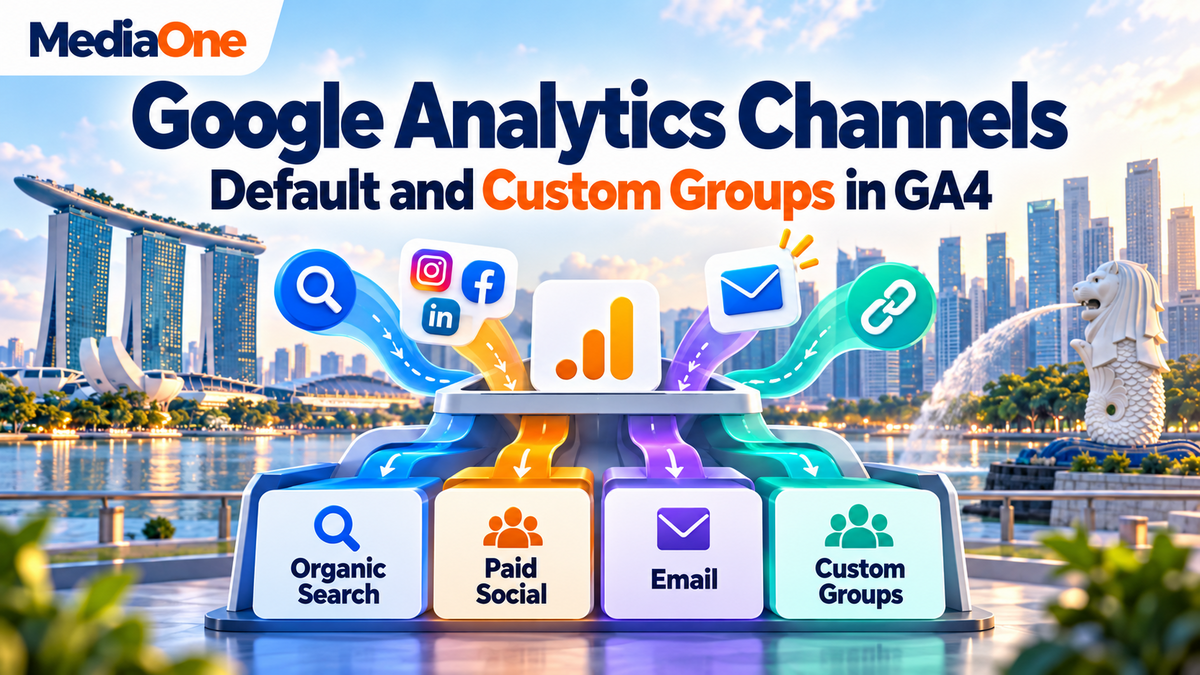
Google Analytics channels group website traffic into categories such as Organic Search, Paid Social and Email. GA4 provides default categories, custom groups for business reporting, and a primary group that records the chosen definitions over time. This guide explains how to check those reports, build channel rules, investigate missing source information and compare marketing results without confusing traffic labels with sales performance. |
Google Analytics channels are categories that organise traffic by how visitors reach a website or app. GA4 assigns channels using rules based on traffic-source information. Default channel groups follow Google’s definitions, while custom channel groups let businesses create their own categories for reporting.

Key Takeaways
- A channel name summarises traffic; source and medium reveal the details behind it.
- Unassigned means no channel rule matched. The “(other)” row combines data because a reporting table reached its row limit.
- Standard GA4 properties allow two custom groups, with up to 50 channels per group.
- Custom reporting rules can apply to past data. Changes to the primary group take effect going forwards.
- Recognised AI assistant referrals now have a dedicated default channel.
- Budget decisions need campaign costs and business results alongside traffic totals.
Google Analytics channels help answer a basic marketing question: which activities bring people to the website, and what happens after they arrive?
The answer becomes harder when reports use different channel definitions. A paid campaign might appear in an unexpected row. A messaging link might lose its source information. Two colleagues might compare reports that count different things.
For a Singapore business running search ads, social campaigns and WhatsApp promotions, those differences can affect the monthly discussion about spending. The first task is to understand the labels behind the totals.
The sections below explain how default and custom channel groupings work in practice, with examples of the checks that support better reporting.
What Are Google Analytics Channels in GA4?
A channel is a category for traffic from related sources. Organic Search groups visits from unpaid search results. Email groups traffic identified as coming from email campaigns.
Three terms help explain the process:
| Term | What it describes | Example |
| Source | Where the traffic came from | |
| Medium | The type of marketing traffic | paid_social |
| Channel | The broader reporting category | Paid Social |
The source and medium provide detail. The channel puts related traffic together so the report stays readable.
A business running Facebook and LinkedIn ads might review Paid Social first, then examine each source separately. That avoids treating every platform as a separate marketing category in the opening report.
Which Default Channels Does GA4 Include?
Google’s default channel definitions cover categories including Organic Search, Paid Search, Organic Social, Paid Social, Email, Referral, Direct, Display and Cross-network.
The list also includes shopping, video, affiliate, audio, messaging and AI categories. GA4 has separate channels for paid and organic activity across several platforms.
| Channel | What it generally represents |
| Organic Search | Visits from unpaid search results |
| Paid Search | Visits from search ads |
| Organic Social | Visits from unpaid social links |
| Paid Social | Visits from social ads |
| Visits identified as email traffic | |
| Referral | Visits through non-ad links on other websites |
| Cross-network | Visits from ads running across multiple networks |
These examples are not the complete channel list. Google can update its definitions, so a fixed count of channels would make the article age quickly.
Google Ads traffic also depends on campaign and network information. A Google Ads visit does not always belong in Paid Search.
What Does Direct Traffic Mean?
Direct does not prove that someone typed the website address.

Google’s explanation of (direct) / (none) traffic includes visits without an identifiable referral source. Untagged links in documents or messages can contribute to this category.
A large Direct total therefore needs context before a team treats it as evidence of brand awareness.
Where Can You Find Channel Groupings in GA4?
The Traffic acquisition report shows where sessions originate. A session is a period of activity on the website or app.
The usual report location is Reports → Acquisition → Traffic acquisition. The dimension menu above the table lets the reader select Session default channel group.
A dimension is simply a label used to divide the report into rows. Sessions, engagement and revenue are metrics: the numbers beside those labels.
For a closer look, Session source / medium can show the values behind a channel. This is often the most helpful next view when a total looks unusual.
Why Do User and Session Reports Show Different Results?
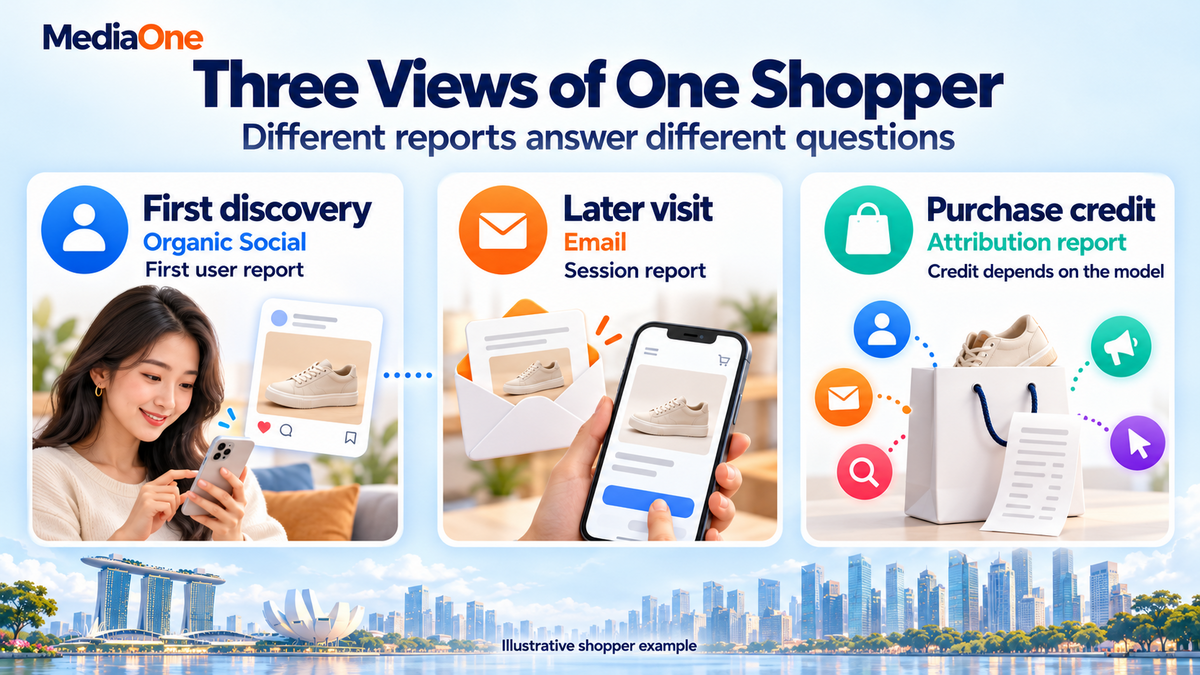
Google’s traffic-source scopes distinguish how someone first arrived, how a session began, and how credit is assigned to a key event.
| Dimension | The question it answers |
| First user default channel group | Which channel first brought this user? |
| Session default channel group | Which channel brought this session? |
| Default channel group, in an event-scoped attribution report | Which channels receive credit for the selected action? |
A hypothetical shopper discovers a retailer through Instagram, then returns later through a tagged email.
The first-user report describes the original acquisition. The session report describes the later visit. Those reports answer different questions, so their totals should not be presented as interchangeable.
A data-driven SEO framework needs the same discipline: channel comparisons should use the same scope, dates and business outcome.
Why Do Unassigned, “(other)” and “(not set)” Appear?
These labels describe different reporting conditions. A single fix will not address all three.
Unassigned Means No Channel Rule Matched
Unassigned appears when the available traffic information does not match another channel definition. An unusual medium value can leave identifiable campaign traffic outside the expected category. The source might still be visible even though the channel is Unassigned.
A review should begin with the affected source, medium and campaign values. The team can then decide whether the campaign tags need correction or whether a custom category serves the reporting need.
Missing tags do not always create Unassigned traffic. Some visits appear as Direct or another recognised category.
“(other)” Means Reporting Rows Were Combined
Google’s explanation of the “(other)” row describes a reporting limit. When a table needs more rows than it can hold, Analytics combines less common values.
Reports with many combinations of labels are more likely to encounter this issue. A channel report combined with detailed page URLs and other dimensions can become much larger than its opening view suggests.
A simpler report can help establish whether the extra detail caused the problem. Changing campaign tags alone does not resolve a table’s row limit.
“(not set)” Means a Dimension Lacks Information
Google uses “(not set)” when information is unavailable for a dimension. The cause depends on the field being reported.
For example, missing campaign details call for a different investigation from a missing landing-page value.
| Label | First check |
| Unassigned | Source and medium against channel rules |
| “(other)” | Report complexity and the data-quality indicator |
| “(not set)” | Which dimension lacks information |
Low engagement alongside high revenue deserves investigation, but that combination alone does not prove tracking failed. A diagnosis needs evidence from the actual setup.
Default vs Custom Channel Groupings: What Changes?
The default group gives teams a shared reference. A custom group adds categories that reflect their reporting needs.
Google’s channel-group resource definitions distinguish the system-defined group from custom rules. The default group’s definitions cannot be edited.
| Group | Who defines it? | Main purpose |
| Default | A common reference for traffic categories | |
| Custom | The business | Categories for its own reporting |
| Primary | The property’s selected group | An ongoing record using the chosen definitions |
A custom “WhatsApp Campaigns” category could help a business compare messaging promotions with email. A “Partner Referrals” category could separate selected partnerships from other referring websites.
Neither category creates extra visitors. The rules change how collected traffic is organised.
The naming decision should support a recurring business question. A group with dozens of narrowly named rows can make reporting harder to follow.
For example, individual campaigns usually belong in the campaign dimension. A channel called “June Offer Version Three” adds little value when that detail already exists elsewhere.
How Can You Create a Custom Channel Group in GA4?
Custom groups work best when the team agrees on the categories before opening the settings.
A short specification might state: “WhatsApp Campaigns includes links our team distributes through WhatsApp with the agreed source and medium.” That sentence gives the rule an intended meaning.
Custom Group Limits and Setup
Google’s custom channel group documentation lists these limits:
| Property | Custom groups allowed | Channels per group |
| Standard GA4 | 2 | 50 |
| Analytics 360 | 5 | 50 |
These group allowances sit alongside the predefined group.
An Editor or Administrator can follow this sequence:
- Channel settings: Admin → Data display → Channel groups.
- Starting group: Create a new group from the default group or copy an existing group.
- Group name: Add a name and description.
- Channel definitions: Add or edit the required conditions.
- Rule order: Reorder channels where necessary.
- Saved group: Save the group and select its dimension in a compatible report.
How Should Channel Rules Be Written?
Conditions can combine fields such as source, medium and campaign. The rules can require several conditions together, or accept alternatives.
An illustrative WhatsApp definition could require:
- Source: exactly matches whatsapp.
- Medium: exactly matches messaging.
The rule describes links deliberately tagged with those values. It does not identify every visit that may have originated in a WhatsApp conversation.
A source condition alone could include campaigns with different purposes. Adding a medium or campaign condition narrows the category when the business needs that distinction.
Specific rules should appear above broader rules because the first matching channel wins.
A “Partner Referral” rule placed below a general Referral rule may never capture the traffic intended for it. The order should reflect the categories the team wants to separate.
A Small Test Set Helps Check the Rules
A test sheet can list examples the category should include and examples it should exclude. This gives the reviewer something concrete to check after saving.
For the illustrative WhatsApp rule above:

| Source / medium | Expected custom category |
| whatsapp / messaging | WhatsApp Campaigns |
| whatsapp / email | Outside WhatsApp Campaigns |
| newsletter / email | Outside WhatsApp Campaigns |
The second row checks whether both conditions are required. A rule that accepts either condition could capture traffic the team intended to keep elsewhere.
Existing report rows can provide the test cases. A campaign with no matching historical traffic needs a controlled link test before routine reporting begins.
The result should match the written definition. An attractive channel name cannot compensate for a condition that captures the wrong activity.

What Happens to Historical Reports?
Custom channel groups can categorise historical data in reports. The primary group behaves differently: a newly selected definition applies going forwards.
An edited custom report can therefore show different historical channel totals. That does not mean the website attracted different visitors in the past.
A saved monthly export preserves what the team reported at that time. A change log should record the editor, date, reason and affected categories.
A short note such as “Partner links separated from Referral” is enough to explain a later comparison.
How Should Singapore Businesses Group Campaign Traffic?
Singapore examples should come from the business’s actual campaigns. A platform name alone does not establish whether traffic is paid, organic or a partnership.
The table below contains illustrative tagging choices for links leading to the business’s own website.
| Activity | Example source / medium | Reporting approach |
| Facebook ad | facebook / paid_social | Check Paid Social classification |
| LinkedIn ad | linkedin / paid_social | Check Paid Social classification |
| Email newsletter | newsletter / email | Review within Email |
| WhatsApp promotion | whatsapp / messaging | Create a custom category if needed |
| Marketplace promotion linking to the website | seller_promo / partner | Define a custom category for that promotion |
The final row does not suggest that every marketplace link uses those values. It shows a tagging plan for a link the business controls and is allowed to publish.
Consistent UTMs Make Reports Easier to Check
UTM parameters are labels added to a campaign link. Google’s campaign URL parameters include source, medium and campaign, with optional fields for details such as creative variations.
An illustrative messaging campaign could use:
?utm_source=whatsapp&utm_medium=messaging&utm_campaign=customer_offer
The source identifies WhatsApp. The medium describes messaging. The campaign name identifies the promotion.
A shared naming sheet helps prevent separate teams from using different values for the same activity. Lower-case names and agreed separators make that sheet easier to maintain.
Campaign naming also strengthens social media reporting because each link can retain the platform and promotion details needed for comparison.
The tagging check should include the final destination after redirects. A correctly labelled original link achieves little if a later step removes its parameters.
Marketplace Sales Need Separate Evidence
A visit from a marketplace to the company website is different from a sale completed inside Shopee or Lazada. A channel group can organise website traffic that GA4 receives. It does not automatically import a marketplace’s orders.
For that reason, marketplace reports and website reports should remain identifiable in the business dashboard. Their relationship needs evidence before anyone adds their totals together.
AI Assistant Traffic Already Has a Default Channel
Google introduced a dedicated AI Assistant channel in its May 2026 Analytics update. Recognised assistant referrals can receive the medium ai-assistant.
Google’s definitions distinguish these visits from Google AI Overviews and AI Mode traffic, which fall under Organic Search.
A custom AI category is therefore an optional reporting choice. It should solve a specific need, such as examining selected sources separately.
GA4 measures recorded visits. A citation that produces no website visit will not appear as referral traffic.

How Can Channel Reports Support Marketing Decisions?
A channel table becomes more valuable when it connects visits with actions and costs.
Traffic totals describe volume. They cannot establish whether the campaign attracted suitable customers, generated profitable orders or helped a sales team close enquiries.
Which Metrics Belong in the Comparison?
A practical review can include the following measures:
| Measure | What it helps the team assess |
| Sessions | The volume of recorded visits |
| Engagement rate | The share of sessions meeting engagement criteria |
| Selected key event | The action the business wants to measure |
| Session key event rate | The share of sessions containing that action |
| Purchase revenue | Recorded sales value for ecommerce activity |
| Campaign cost | The spending associated with the activity |
| Qualified leads or completed sales | Outcomes checked against business records |
Google’s engagement rate definition uses engaged sessions. By default, a session qualifies when it lasts longer than ten seconds, includes a key event, or has at least two page or screen views.
That makes engagement a diagnostic measure. A high rate alone does not establish commercial success.
MediaOne’s explanation of bounce rate provides related context for evaluating visits that do not meet those criteria.
Key Events Should Reflect the Business Goal
Google defines a key event as an action important to the business.
A retailer might focus on purchases. A service business might track a completed enquiry form. An enquiry is still different from an accepted sales opportunity.
A report combining several key events can hide that distinction. One channel might generate many brochure downloads while another generates fewer appointment requests.
The selected event should remain the same across channel comparisons. The event should also fire at the intended moment, so failed submissions do not appear as completed enquiries.
A customer relationship management process can connect those enquiries with later sales outcomes.
What Would a 50% Drop in Paid Social Mean?
Consider a hypothetical business whose reported Paid Social sessions fall from 2,000 to 1,000.
The report needs three checks before the team changes spending:
- Comparable reporting: The dates, filters, scope and channel dimension match.
- Source detail: Facebook and LinkedIn source/medium values show whether labels changed.
- Campaign activity: Spending, clicks and landing-page availability show whether fewer visits were expected.
Suppose another 1,000 sessions now appear under an unfamiliar medium in Unassigned. That supports a classification investigation.

It does not, by itself, prove that all missing social traffic moved there. The campaigns and timing must support the explanation.
A corrected classification may explain part of the difference. Actual campaign performance still needs a separate assessment.
Costs and Attribution Add Context
An illustrative campaign costing S$1,200 and producing 30 qualified leads has a cost per lead of S$40.
That example is arithmetic, not a benchmark. The business still needs to assess lead quality, sales and delivery costs.
Revenue also needs a consistent meaning. A hypothetical channel producing S5,000insaleshasnotnecessarilygeneratedS5,000 in profit. Advertising, product and service delivery costs still affect the result.
A zero-revenue row needs context too. For a business that closes contracts after a phone call, the website may record the enquiry while the sales system records the eventual income. The reporting process should connect those stages before the team judges the channel’s financial contribution.
Google’s key event attribution report also shows recorded interactions before an action. Those interactions can help explain why a channel appears earlier in the buying process.
Channel grouping answers how traffic is categorised. Attribution answers how credit is distributed. Google’s attribution settings affect event-scoped credit, while user- and session-scoped traffic dimensions remain unaffected.
A Google Ads campaign review should account for those distinctions before changing budgets.
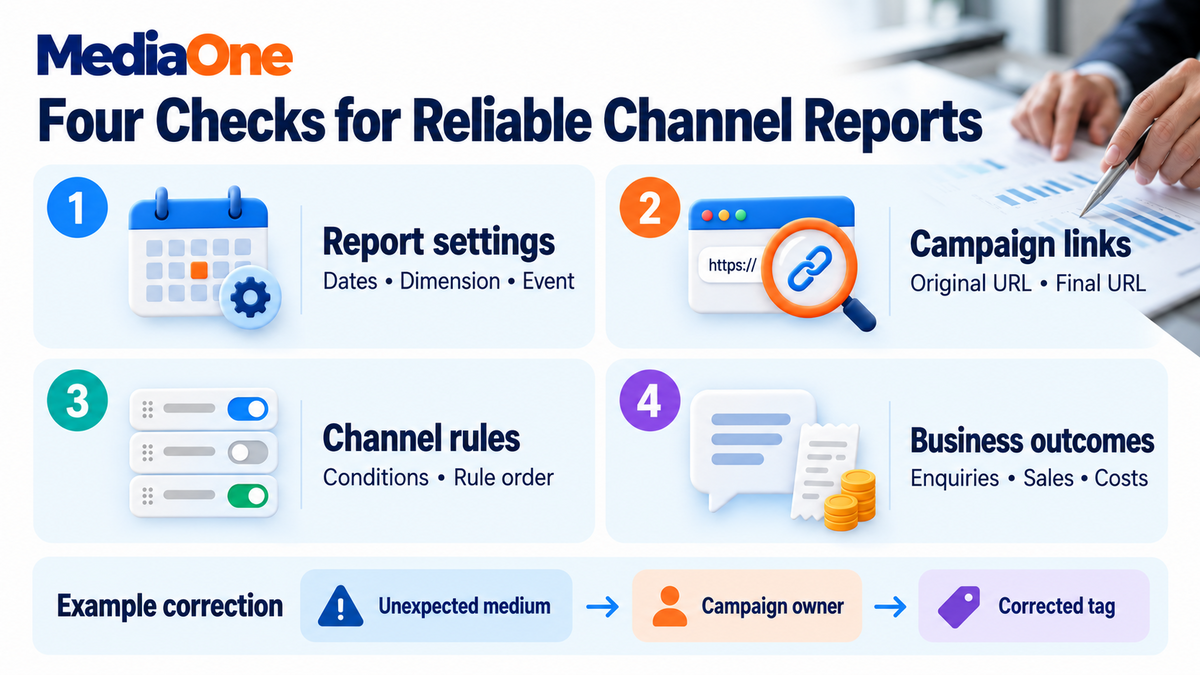
What Should a Channel Grouping Audit Include?
A quarterly audit provides a repeatable review. Additional checks are sensible after a campaign launch, website change or unexpected reporting movement.
The audit should produce a short list of findings and actions. A growing spreadsheet of unexplained issues does little to improve the next report.
Reporting Baseline
The saved baseline should record:
- The property and date range.
- The exact channel dimension.
- The selected business event.
- Any filters or comparisons.
- The current grouping definitions.
A comparison needs these details because two screenshots can look similar while describing different populations.
Campaign Link Checks
A sample should cover active paid, email, messaging and partner links.
The reviewer checks the original URL, final landing URL and reported source/medium values. Any mismatch should identify the responsible campaign, so the correction reaches the right person.
A naming error affecting one campaign needs a targeted correction. A repeated error across several teams may justify a shared tagging template.
Classification and Outcome Checks
Default and custom reports should cover the same period and use compatible measures. Any differences need an explanation tied to specific rules.
Review priorities should reflect business exposure. An unexplained category containing paid campaign traffic deserves attention even when its percentage of all sessions looks small.
No universal Unassigned percentage proves that a property is healthy or broken. The source details and consequences determine the next step.
Conclusion: Google Analytics Channels for Better Marketing Reporting
Google Analytics channels support better decisions when their definitions match the question being asked. A reliable report connects the category with its source details, selected action and business outcome.
MediaOne can help businesses connect campaign planning with performance reporting. A marketing consultation gives the team a starting point to discuss reporting gaps, campaign measurement and the decisions the dashboard needs to support.
FAQs about Google Analytics Channels
Can GA4 channel totals be compared directly with universal analytics?
GA4 and Universal Analytics use different measurement systems and reporting definitions. Older exported reports can provide historical context, but identical channel names do not guarantee comparable totals. Google’s migration reference explains the differences. A long-term chart should label the change in measurement system.
Why might Google Ads and GA4 show different conversion totals?
Differences can arise from counting settings, attribution windows and reporting dates. For example, an ad interaction and a later purchase can belong to different reporting periods. Google explains these measurement differences. The comparison should first establish that both products measure the same action and period.
Do custom channel groups appear automatically in BigQuery Exports?
Custom channel groups are not included in the GA4 BigQuery Export schema. An analyst needs to reproduce the required grouping logic separately when building those reports. A written rule specification helps keep the warehouse version aligned with the categories used inside Analytics.
The report may be absent from the property’s published navigation. An Editor or Administrator can add it back through report customisation. The missing menu item alone does not establish that the website has stopped collecting traffic data.