Customer relationship management (CRM) is a shared record of every interaction with customers. It helps the right person follow up at the right time.

A CRM works when the team logs its work consistently, not because of its feature list. Define the process first, then choose the tool. The Five-Question CRM Fit Test shows whether a lightweight tool, a mid-tier platform or a full suite suits your business, and how well each supports customer service and customer satisfaction.
Key Takeaways
- Define your process first. A CRM only works if staff keep records current.
- Choose the right fit. Match software to team size, workflows and reporting needs.
- Capture every channel. Include WhatsApp and phone enquiries, not just email.
- Compare total costs. Budget for setup, training and administration, not just subscriptions.
- Prioritise adoption. Assign data ownership and measure progress from day one.
What Is Customer Relationship Management (CRM)?
Customer relationship management is the process of managing interactions with customers and prospects. A CRM system stores contact details, purchase history, enquiries and follow-up activity in one place. Team members can then continue conversations without asking customers to repeat themselves, which supports consistent customer service.
Very small businesses may manage this with a spreadsheet. Dedicated CRM software becomes easier to manage as more people handle customer relationships, and it can help a company keep every customer conversation on one shared record.
How a CRM System Stores and Connects Customer Data
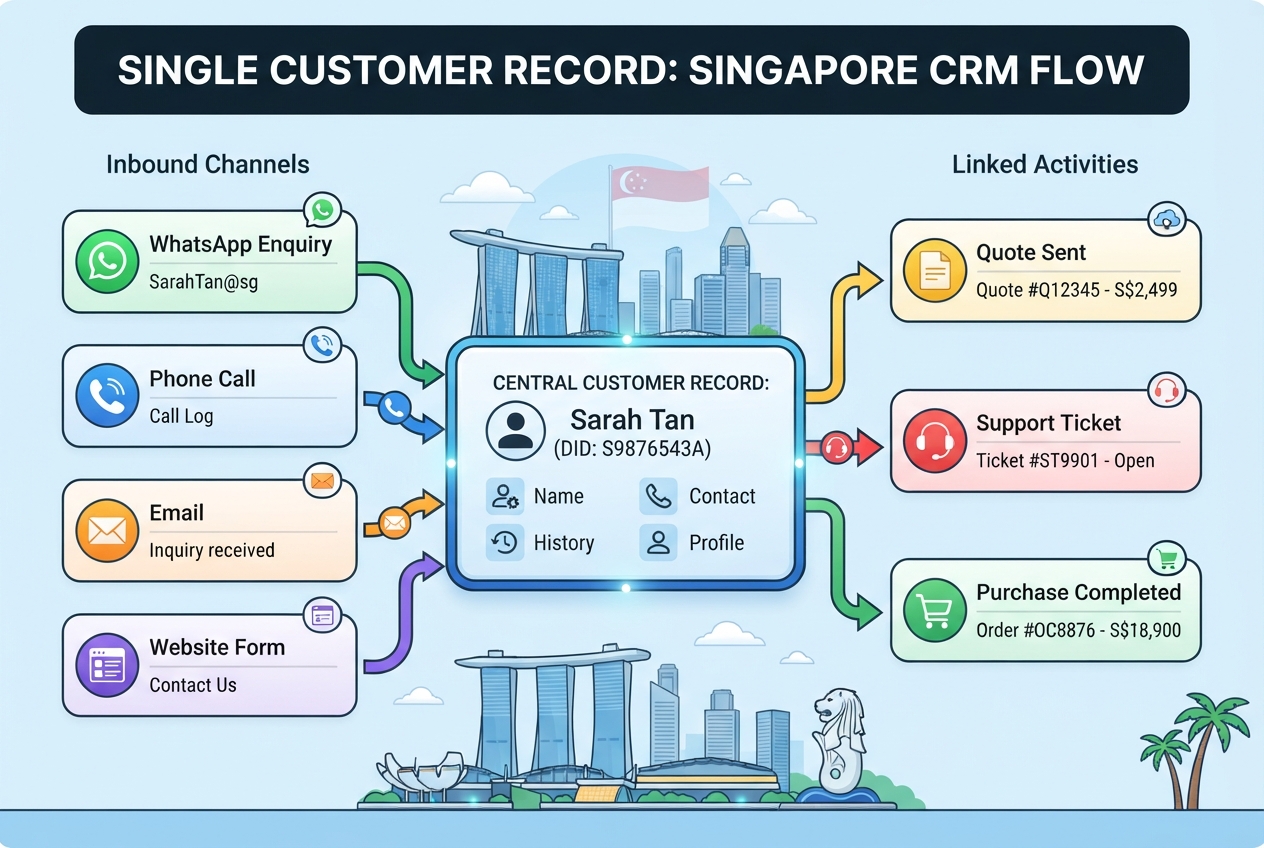
A customer relationship management creates a central record for each customer or prospect. It links activities such as calls, emails, meetings, quotations, support tickets and purchases to that record.
As explained in Integrate.io’s customer relationship management glossary, customer data can come from many channels and systems. Its practical value lies in connecting that information, so employees see a customer’s history without repeated questions and can help customers faster.
How CRM Supports Sales-Led and Service-Led Businesses
Sales-led businesses use customer relationship management software to manage leads, track deals and forecast revenue. Service-led businesses, such as clinics and equipment servicing firms, use it to record enquiries, schedule appointments and keep service histories.
For Singapore businesses that take enquiries through WhatsApp, check whether the CRM can capture those conversations through a supported integration. Otherwise, important interactions stay in individual phones and accounts, and the company’s shared record stays incomplete.
Request a demonstration and test the workflows your team will actually use. Include how an enquiry moves from first contact to follow-up and, where relevant, to a completed sale.
The Core Functions and Features of a CRM
CRM software typically combines customer data management, sales and marketing automation, customer service tools and reporting. The exact features depend on the provider and subscription plan.
Customer Data Management: One View of Every Customer
A central customer record helps employees review past interactions and keep communication consistent. Zendesk discusses the value of a unified customer view in its CRM guide. When comparing providers, ask how well each system collects and reconciles customer information from the channels your team uses.
In Singapore, this may mean checking how the platform handles WhatsApp and phone enquiries alongside email and website leads. Decide which interactions must be recorded before buying software.
CRM in Sales
Sales is where a CRM most often pays back its cost. The core job is pipeline design: agree on a short list of stages, define what qualifies a lead for each stage, and record the next action on every open deal. A clear pipeline lets managers forecast revenue and spot stalled deals.
A sales CRM needs contact details, the enquiry source, the stage, the value, the next follow-up date and a short note on what the customer asked for.
To connect sales activities with the wider customer journey, businesses can align their CRM pipeline with a lead generation funnel, tracking how prospects progress from initial awareness to qualification and conversion.
Example workflow: a WhatsApp enquiry arrives, and the sales team member creates a lead with its source. After a conversation, they move it to “qualified”, attach the quote and set a follow-up date. Anyone covering that customer sees the same history.
CRM in Marketing
Marketing and CRM work best when campaign data flows into the pipeline. The CRM can record which campaign produced each lead, group contacts into segments such as past buyers or lapsed enquiries, and rank leads by engagement. Campaign tracking then shows which sources produce sales, not just clicks.
When CRM records are connected to email marketing campaigns, teams can use these insights to personalise follow-ups, deliver relevant messages to specific contact segments and measure how campaigns contribute to customer engagement and conversions.
CRM data also supports lead nurturing for prospects who are not ready to buy by helping teams deliver relevant content and follow-ups throughout the buying journey.
The main requirement is consistent source tagging. If one person records a Facebook advertisement lead as “social” and another records it as “online”, the campaign report becomes unreliable. Agree on source names before launching campaigns.
HubSpot publishes research and resources on marketing automation in its marketing resources. Check any performance statistic against the original study, including its sample, date and definition of automation, before relying on it.
Sales and Marketing Automation
Automation can handle repetitive tasks such as assigning leads, creating follow-up reminders and triggering campaign workflows. It cuts manual work only when the underlying records and rules are reliable.
Businesses considering more advanced automation can explore how an AI marketing strategy uses audience segmentation, personalisation and performance data to guide marketing decisions.
Poor data creates risk. A workflow that sends the same message to duplicate contacts can frustrate customers. Start with a simple process and test it before expanding.



CRM in Customer Service
Service features record tickets, enquiries and feedback against the same customer record that sales uses. A support agent can then see a recent sale, an open quotation or a previous complaint before replying.
Feedback only adds value when someone acts on it. Lego’s customer community is one example of a business building its strategy around user input. Close the loop, because a feedback form nobody reads adds no value.
Analytics Dashboards and Reporting
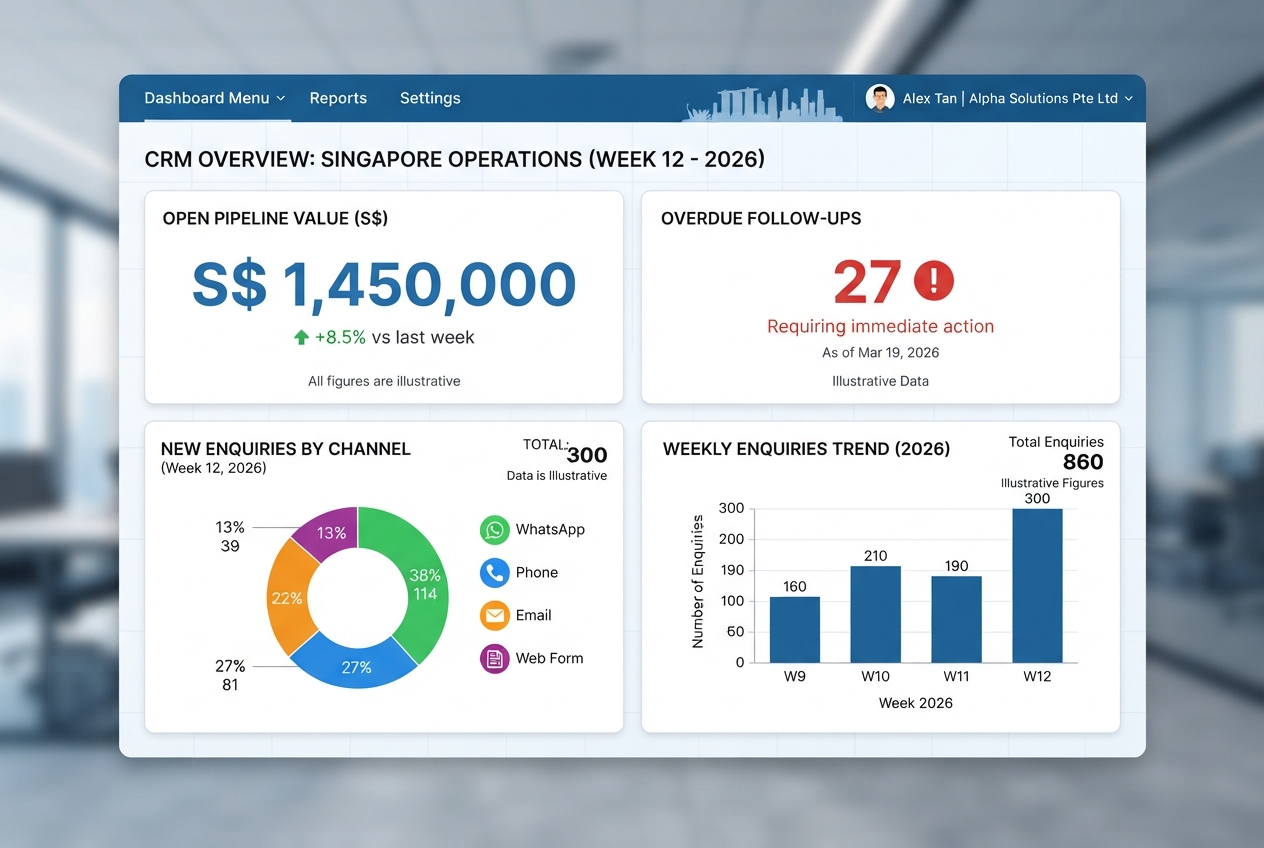
Dashboards turn stored data into decisions. Keep the weekly view small: pipeline value, overdue follow-ups and new enquiries by channel.
For a fuller view of where website visitors originate, review Google Analytics channels alongside CRM records to compare traffic sources with meaningful enquiries and conversions.
Why Businesses Need a CRM: Benefits and Measurable Returns
A CRM supports three areas: keeping existing customers, lowering the cost of winning new ones, and giving the team facts to base decisions on. The returns depend on the team using the CRM every day, and a well-run company treats that daily habit as part of the investment.
Customer Retention and Loyalty
A Zippia study cited by Productive reported a 47% increase in customer retention and satisfaction among companies that implemented CRM systems, as summarised in Productive’s client relationship management guide. This is a reported association, not proof that the software caused the gain. Check the original study for its sample and date before quoting it.
When every enquiry, complaint and renewal date sits in one record, fewer items fall through the cracks. Service teams can help customers faster because they respond with full history, which strengthens the overall customer experience. Keeping that history in one place also helps the business maintain stronger customer relationships over time.
Sales Efficiency and Acquisition Cost
Centralised records give the team the history of each lead, so they can reach potential customers faster. Pipeline reporting then shows which channels produce leads worth pursuing, turning scattered information into a clearer view of where sales effort pays off.
CRM reporting can also help businesses evaluate online lead generation by showing which sources produce qualified prospects and which progress into paying customers.
Integrate.io reports that the Boston Red Sox achieved 8x faster data and 15% more conversions after adopting a CRM, as described in its CRM glossary. This is one organisation’s reported result, not a guaranteed outcome.
Usability: The Logging Burden
Daily logging effort is often the deciding factor. In one case published by Close, a team of callers made up to 150 calls a day. After switching tools, the same process took two clicks instead of up to 14 to log each call, according to its article on what a CRM is.
Read this as one vendor’s reported result. If logging takes too many steps, staff skip it, and the database stops being trustworthy.
Worked Example: Estimating Your Own Time Saving
Use this template before choosing a tool:
- Our team makes ___ calls a day.
- Logging one call currently takes ___ steps.
- Estimated time saved per day is ___.
Multiply the calls by the steps saved per call. This shows whether a tool change is worth the migration effort.
Two Common Mistakes That Make CRM Projects Fail
Most CRM projects fail because the business bought a tool before deciding how its team would use it. Two mistakes account for many failures among small and mid-sized firms.
1. Buying Tools Before Defining the Process
A CRM records what your team does. If nobody has written down what a qualified lead looks like, who follows up and how fast, the software cannot enforce any of it. Map the workflow on paper first, then choose a customer relationship management solution that fits it.
2. Poor Data Quality and Incomplete Records
Every CRM is only as useful as the records inside it. Duplicate contacts, unlogged calls and WhatsApp enquiries create blind spots, and they weaken the customer information your team relies on. Sample ten recent customers and check whether their calls, messages and orders all appear against one record.
Capturing everything may not be realistic for a team of three. Start with the two channels that generate most of your revenue, often WhatsApp and phone, and expand once those are consistently logged. A more capable CRM will not fix a poorly defined process. It will amplify whatever habits already exist.
Tool Categories: Lightweight, Mid-Tier and Full Suite
CRM products fall broadly into three groups:
| Tool category | Typical user | Typical features | Typical cost structure |
|---|---|---|---|
| Lightweight tool | A small team or a single seller | Contact records, simple pipeline, basic reminders | Low per-user subscription, minimal setup |
| Mid-tier platform | A growing team across sales and service | Pipeline reporting, messaging integrations, automation rules | Per-user subscription plus integration and training time |
| Full suite | Several departments sharing one customer record | Advanced reporting, marketing and service modules, custom workflows | Higher subscription, substantial setup and administration |
Per-user pricing varies widely. Zendesk’s CRM guide cites US$8 to US$100 a month per user, a 2021 figure that will have changed since. Convert US$ quotes into S$ at the current rate and confirm prices with the vendor, since help from a vendor’s sales team can clarify which tier suits your potential customers’ enquiry volume.
The Five-Question CRM Fit Test
This is an internal decision aid, not an industry standard. Score each question from 1 (no), 2 (partly) or 3 (yes):
- Do enquiries arrive through more than two channels? Email alone scores 1. WhatsApp, phone, social and web together score 3.
- Will at least two people need to see the same customer record? One salesperson scores 1. A whole sales and service team scores 3.
- Can someone name the owner of data quality? No one scores 1. A named person with a review routine scores 3.
- Do you need pipeline or revenue reporting beyond a simple list? A list is enough scores 1. Tracking stage progress and response times scores 3.
- Can you spend time on setup, integration and training, not just the subscription? Under two hours a week scores 1. A dedicated part-time administrator scores 3.
| Total score | What it points to |
|---|---|
| 5 to 8 | A lightweight tool |
| 9 to 12 | A mid-tier platform |
| 13 to 15 | A full suite |
Total Cost of Ownership: A Budget Template
The subscription is only part of the cost. Budget for each line:
- Licence fees for your users, in S$ per month: ___
- One-off setup and data migration: ___
- Integrations, such as WhatsApp or the website form: ___
- Training for every user, including time away from sales or service: ___
- Administration time per week for data review and reports: ___
Worked calculation (placeholder amounts only, not real prices): for 8 users at a monthly rate per seat, plus a one-off setup fee, an integration fee and a training fee, the first-year total can be worked out and compared across quotes.
Ask each vendor for a quote covering all five lines, and trial the tool with your own enquiry data before committing.
Adoption: Starter Metrics Before Any Dashboard
Adoption is the main reason CRM projects stall. Productive’s client relationship management guide recommends three starter metrics:
- Percentage of records fully filled in. Track source, owner, stage and next action.
- Number of overdue tasks. Count follow-ups past their due date each week.
- Time from lead to kickoff. Measure from first enquiry to first meaningful action.
Review these weekly, agree who owns data quality, and add dashboards only once these basics are stable. Define what a “logged” interaction means so the team shares one understanding.
Automation Risk and Clean Data
Automated follow-ups depend on accurate records. A duplicate contact can receive the same campaign twice, or a customer who has already bought can be chased for a sale. Clean duplicates, confirm each contact’s lifecycle stage and test every workflow on a small group first.
Choose the tool that fits your defined process, the channels you must capture and the adoption plan you can sustain. Run a short pilot on your two most important channels, track the three starter metrics, and expand once the records are reliable.
WhatsApp-First Logging for Singapore Teams

Many Singapore businesses take enquiries on WhatsApp, which makes it the most important channel to capture. The standard app suits individual use, so a team sharing one number can lose track of who replied. Running WhatsApp at scale usually means the WhatsApp Business app or the WhatsApp Business Platform, which involves setup and approval through an approved provider. Check the current WhatsApp Business Platform documentation from Meta and confirm which option your CRM connects to before building the workflow.
Our view is that logging discipline matters more than tool choice. A cheap tool that the team logs into daily beats an expensive one that sits unused. A sensible workflow runs as follows:
- A WhatsApp enquiry is logged against a contact record within the same working day.
- The team member who replies tags the enquiry with its source and product interest.
- A follow-up date is set for any open quote.
- The deal moves through named stages until it is won or lost.
- Feedback from the closed customer is recorded, so the next service call starts with full history.
A Phased CRM Implementation Roadmap
- Map one workflow end to end, such as a WhatsApp enquiry to a closed deal.
- Clean contacts and remove duplicates before import.
- Configure only the required fields and stages.
- Pilot with one team for four weeks, then adjust.
- Roll out company-wide with a named data quality owner.
What Successful CRM Implementation Looks Like After Go-Live
Success shows up as logged activity, not software usage. Check weekly whether calls and WhatsApp conversations with customers are recorded within the same working day. When they are not, the cause is usually an unclear rule, not a weak tool. Captured data only helps a business when someone uses it to act on customer feedback and support requests across every CRM system the team relies on.
Making Customer Relationship Management Work for Your Business
A customer relationship management (CRM) system delivers value when it supports a clear sales process, accurate data and consistent follow-ups. Before choosing a CRM, complete the Five-Question CRM Fit Test, assign responsibility for data management and identify the metrics your team will review weekly. These steps will help you select software that fits your business needs without paying for unnecessary features.
Next, map all lead capture channels, including WhatsApp, phone calls, email and website enquiries, to ensure every potential customer is recorded. Choose three to five key sales metrics to monitor weekly, then request quotes in S$ and compare the total cost of ownership. Before committing, ask shortlisted vendors to demonstrate their software using your own sales scenarios to ensure it suits your workflow and budget.
Frequently Asked Questions
What is the difference between a CRM and customer relationship management?
Customer relationship management is the practice of managing every interaction with customers and prospects. A CRM is the software that supports it. Decide how you will win, serve and keep customers first, then choose a system to record and act on that plan. Businesses that treat the software as the strategy often end up with an expensive database nobody updates.
How much does a CRM cost for a small business in Singapore?
Prices depend on the vendor, number of users and features, and this guide does not quote local price points. Request quotes in S$ from several vendors and compare total cost of ownership, including setup, data migration, integrations, training and staff admin time, not just the monthly licence fee.
How long does a CRM implementation usually take?
The timeline depends on team size, the number of workflows you migrate and how quickly you agree on sales stages, data fields and record owners. Settle those decisions before configuring anything, because they set the pace more than the software does.
Can a CRM help with customer retention as well as sales?
Yes. A CRM stores purchase history, service requests and feedback in one record, so your team can spot at-risk accounts and follow up before a customer leaves. A Zippia study reported that companies implementing CRM systems saw a 47% increase in customer retention and satisfaction, as cited by Productive. Treat this as a reported association, not proof that the software alone caused the gain.
Do I need a CRM if I only have a few customers?
Not always. With a handful of clients and one person handling every relationship, a well-kept spreadsheet may suffice. Consider a CRM once several people share customer work, enquiries are scattered across WhatsApp, email and phone, or follow-ups keep slipping.