| AI Summary
A Content Delivery Network helps websites deliver files through servers spread across different locations. Its value depends on where visitors live, what content can be cached and how the service handles updates. This article explains the delivery process, compares hosting with CDN services, and shows how to assess costs and providers. It also covers the checks that prevent outdated pages, broken transactions and blocked search crawlers. |
A Content Delivery Network (CDN) is a network of servers that delivers website content from locations closer to visitors. It stores reusable copies of files, such as images and stylesheets, to reduce delivery delays and origin server load. Results depend on caching rules, network coverage and website design.

Key Takeaways
- Cacheable content and visitor location help determine whether a CDN will improve delivery.
- Request counts and transferred data measure different things; bandwidth estimates need byte-based figures.
- Personal accounts, baskets and checkout need rules that prevent shared caching of private content.
- Regional tests reveal more than a provider’s total server count.
- Launch checks should cover content updates, transactions and search access alongside loading speed.
A website can load quickly in your office while customers overseas wait for its images. A campaign can also send more visitors than your hosting normally handles. A CDN can help with both situations, but the outcome depends on the website behind it.
For a Singapore business, the first step is understanding which visitors experience delays and which files cause them. That makes a CDN part of a measured website improvement plan. The following sections explain what to inspect before choosing a service and how to judge the result after launch.
What Is a Content Delivery Network?
A Content Delivery Network keeps reusable copies of website content across multiple locations. A visitor can receive those copies without every request returning to the website’s main server, called the origin.
A warehouse comparison helps. The origin holds the master stock, while regional warehouses keep items customers request often. A nearby warehouse can send an item sooner, provided it has the correct version available.
Website files follow similar rules. Images, fonts, scripts and stylesheets often work well because many visitors request identical files. A customer’s order history needs different treatment because it belongs to that person.
Static and dynamic content
The CDN model described by AWS supports both static and dynamic delivery. Static content can often be reused; dynamic requests may still need the origin to produce a response.
A CDN therefore supports the website’s delivery system. It does not remove the need for sound hosting, efficient code or working customer services.
How Does a CDN Deliver Website Content?
A CDN receives requests for the content it handles and decides how to answer them. The process depends on whether a suitable cached copy already exists.
What happens during a request?
- The visitor’s browser requests a page or file through a hostname connected to the CDN.
- The network routes the request to an available edge location.
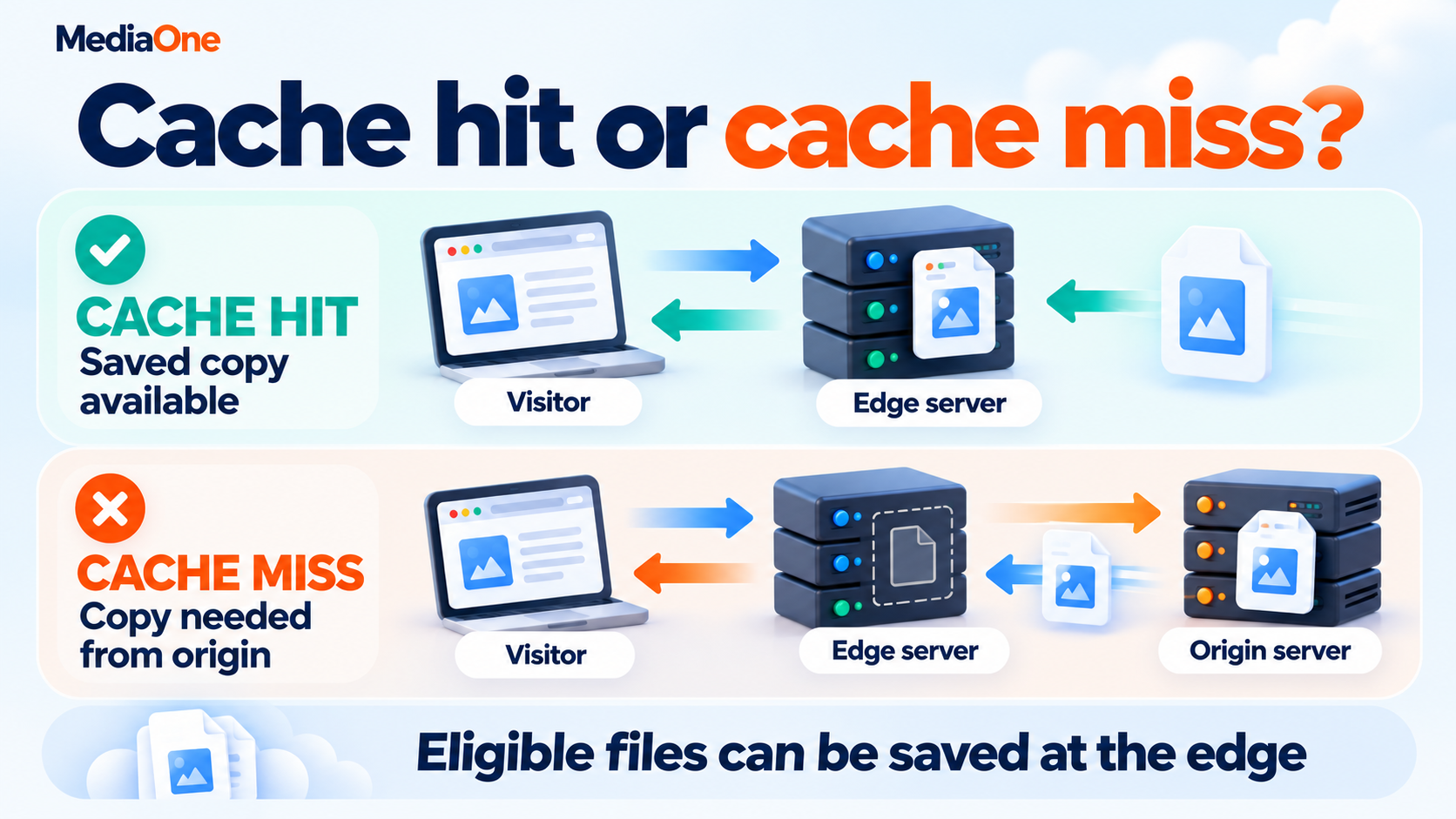
- The edge checks whether it has a reusable copy that matches the request.
- A cache hit returns that copy to the visitor.
- A cache miss requires a fetch from another cache layer or the origin; eligible responses can then be stored.
An edge server handles requests near visitors. A point of presence, or PoP, is a location containing network equipment and servers. Several edge servers may operate within one PoP.
Why the closest city does not always win

Routing takes account of network conditions, capacity and availability. The geographically closest server may not offer the quickest connection, so a map of server locations cannot establish performance by itself.
DNS, the system that translates website names into network addresses, can help direct traffic. Some providers also use network routing methods to reach an appropriate edge. The approach varies across services.
Google’s explanation of content delivery networks describes how nearby servers, caching and network improvements can reduce delivery time. Actual results still require tests from the regions your customers use.
Which CDN Components Should a Business Understand?
A CDN includes delivery locations, storage and management tools. These parts affect the service your team will operate after the initial setup.
| Component | What it does | What to check |
| Origin server | Holds source files and runs the application | Capacity, response time and access restrictions |
| Edge servers and PoPs | Deliver content through distributed locations | Performance in customer regions |
| Cache storage | Keeps reusable responses | Eligibility rules and storage limits |
| Origin shield | Adds a cache layer before the origin | Available features and additional charges |
| Management dashboard | Controls settings and updates | Staff access and change records |
| Logs and analytics | Show requests, errors and cache behaviour | Reporting detail and retention |
An origin shield can reduce repeated origin fetches when multiple locations need the same file. AWS documents how its service consolidates some simultaneous requests, which can help during busy periods.

That feature has less value when most requests need unique responses. A small site may also have enough origin capacity without an extra cache layer. The requirement should follow an observed problem and the cost of solving it.
How Should CDN Caching Rules Work?
Caching rules decide what can be stored, who can reuse it and how long it remains fresh. Poor rules can show an old promotion or expose personalised content to another visitor.
Cache hits, misses and bypasses
A hit means the cache answered the request. A miss means it needed content from elsewhere. A bypass means the service deliberately skipped caching, often because a rule excludes that response.
A lower hit ratio does not automatically indicate a fault. An account area should behave differently from an image library. Reports become more meaningful when each content type has its own results.
HTTP caching also distinguishes shared caches from private browser caches. A CDN cache may serve many people, so content suitable for one customer’s browser may be unsuitable for shared storage.
Time to live and content updates
Time to live, or TTL, describes a freshness period. After that period, a cache may need to check with the origin before reusing a response. A file may also leave the cache earlier, so TTL does not promise a minimum storage time.
The Cache-Control header communicates caching instructions. The distinction between no-cache and no-store is important: no-cache requires validation before reuse, while no-store instructs caches not to store the response.
| Content type | Practical starting approach | Update concern |
| Scripts and stylesheets with versioned filenames | Longer freshness periods | A release must reference the new filenames |
| Public images and fonts | Longer periods when updates are infrequent | Replaced files need a new URL or purge |
| Public HTML | Shorter periods where freshness is important | Published edits must reach visitors |
| Account, basket and checkout responses | Exclusion from shared caching | Personal information must remain separate |
| Public API responses | Rules based on how quickly the data changes | Outdated data may affect decisions |
These approaches need testing against the application. A pricing page updated daily needs different rules from a permanent product manual.
Cache keys and page variations
A cache key identifies which saved response matches a request. Depending on the configuration, it can include the URL and selected request details.
A shop showing prices in Singapore dollars and Australian dollars provides a practical example. The cache must keep the relevant versions separate. Otherwise, a visitor could receive the wrong currency display.
Extra variations can also reduce reuse. A tracking parameter that does not change page content may create unnecessary copies if the cache treats every value separately. Parameters that control products, languages or prices need different treatment.
Testing page variations
A test should confirm which details change the actual response. Removing variations without understanding them can trade a better hit ratio for incorrect content.
Purging and versioned files
A targeted cache purge removes selected cached copies before they would normally expire. Targeted purges let unchanged files remain available while an edited page refreshes.
Versioned filenames offer another option. A stylesheet named site-v2.css has a different address from site-v1.css, so browsers can request the new file. The page referencing it must update too.

A CDN purge does not erase copies already stored in visitors’ browsers. That distinction becomes important when a design update appears for some customers but remains absent for others.
What Benefits Can a CDN Provide?
A CDN can improve delivery speed, reduce origin work and help handle demand. Each benefit depends on the website’s content and the service configuration.
Faster loading for distant visitors
Shorter network journeys can reduce waiting time. Cached HTML can also reduce time to first byte, the wait for the response to begin arriving. An image-only CDN may improve image delivery while leaving the initial page response unchanged.
A website page speed assessment can identify whether delays come from delivery, server processing or page content. That distinction prevents a business from paying for a network change when oversized files or slow code cause the problem.
Less work during campaigns and downloads
Repeated requests for the same files can be answered away from the origin. This can help with product launches, downloadable catalogues and pages receiving campaign traffic.
Microsoft’s overview of CDN use cases includes public files, video delivery and demand surges. Services that deliver video still need suitable encoding and playback arrangements; a CDN alone does not create a streaming platform.
Better support for website performance work
Google’s Core Web Vitals measure loading, responsiveness and visual stability. A CDN may help deliver the main image sooner, but it cannot independently resolve every cause of slow interactions or moving page elements.
A programme to improve Core Web Vitals should therefore include images, scripts and page layout. Google’s LCP optimisation process examines the full loading sequence, including when the browser discovers the main resource.
Google also states that good page experience does not guarantee top search positions. A CDN purchase cannot promise higher rankings or more sales.
How Much Origin Traffic Could a CDN Remove?
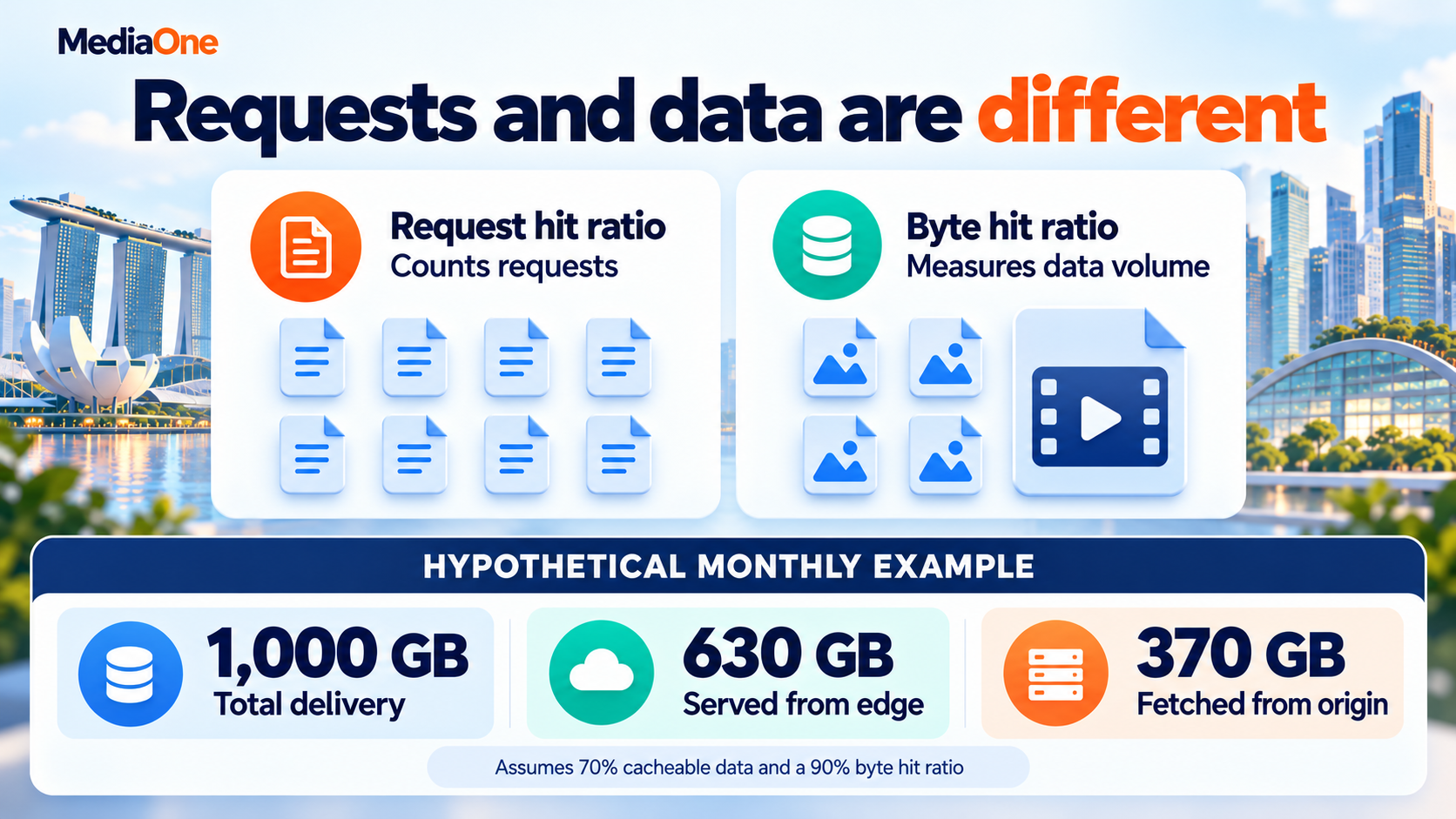
A bandwidth estimate needs the amount of data transferred, usually measured in bytes. Counting requests alone can produce a misleading result because a small icon and a video download have different sizes.
A worked bandwidth example
The following example is hypothetical and assumes unchanged traffic and file sizes:
| Monthly data before the CDN | Amount |
| Total origin delivery | 1,000 GB |
| Cacheable portion by data volume | 700 GB |
| Uncacheable portion | 300 GB |
| Cacheable data served from the edge at a 90% byte hit ratio | 630 GB |
| Cacheable data still fetched from the origin | 70 GB |
| Estimated remaining origin delivery | 370 GB |
Under these assumptions, the CDN avoids 630 GB of origin delivery, or 63%. That is an estimate of data transfer avoided, not a guaranteed reduction in the hosting bill.
The calculation excludes overhead and assumes the byte hit ratio applies consistently. Revalidation traffic, additional cache layers and changes in demand can affect the real result.
Request savings and bandwidth savings differ
Request hit ratio measures the share of requests answered from cache. Byte hit ratio measures the share of data volume answered from cache. Both help, but they answer different questions.
A site may cache thousands of tiny icons while repeatedly fetching a few large files. Its request hit ratio can look strong even when origin bandwidth remains high.
A sensible cost review includes:
- Origin transfer charges that actually decrease with lower usage.
- CDN delivery and request fees.
- Minimum charges, support and optional features.
- Setup work and ongoing maintenance.
- Any hosting fees that remain fixed.
A flat-rate hosting plan may cost the same after traffic falls. A CDN can still improve performance, but the financial case should not rely on savings the invoice will never show.
How Does a CDN Differ From Web Hosting?
Web hosting provides the environment that stores a website and runs its application. A CDN distributes delivery across its network. A site can use both, and some hosting platforms already include CDN services.
A web hosting assessment should establish what the existing package provides before another service is added. Two overlapping delivery layers can complicate troubleshooting and content updates.

| Question | Hosting without a CDN | Hosting with a CDN |
| Where do reusable files come from? | Usually the hosting server | Edge caches when available |
| Where does application processing happen? | The hosting environment | Usually the origin, unless edge processing is configured |
| Who manages content freshness? | The application and browser rules | Those layers plus CDN rules |
| What costs need review? | Hosting, resources and transfer | Hosting plus CDN usage and features |
A CDN cannot repair a failing database or replace backups. A managed platform may combine hosting, caching and other services, so comparisons should examine the actual package instead of the label.
How Do You Choose the Right CDN Provider?
A shortlist should reflect the website’s audience, content and operating needs. The largest network is not automatically the best choice for a particular business.
Regional performance and traffic needs
A Singapore retailer serving Malaysia and Australia needs tests across those markets. A result from an office connection in Singapore cannot describe every customer’s experience.
A comparison should include:
- Representative pages, images and downloads.
- Mobile and desktop connections.
- Cached requests and requests that need the origin.
- Normal periods and expected campaign demand.
- Errors as well as response times.
An online store should also include the customer actions that support ecommerce SEO, such as reaching product details and moving through category pages. Delivery speed has little value if essential content fails to load.
A simple provider score
An illustrative score can organise the evidence. A business might assign performance 30%, security 25%, capacity 15%, support 10% and cost 20%. Each provider receives a score from one to five for every area.
A provider scoring 4, 5, 3, 4 and 3 respectively would receive:
(4 × 0.30) + (5 × 0.25) + (3 × 0.15) + (4 × 0.10) + (3 × 0.20) = 3.9 out of 5.
Those weights are an example, not an industry benchmark. A missing essential requirement, such as safe handling of account pages, should disqualify an option regardless of its total.
Features, support and account ownership
A provider comparison becomes easier when every candidate answers the same questions.
| Area | Evidence to request |
| Performance | Tests from customer regions using representative content |
| Caching | Rules for cookies, query strings, private responses and purges |
| Capacity | Limits and behaviour during traffic surges |
| Security | Included controls and features requiring payment |
| Support | Contact options, response targets and escalation process |
| Ownership | Business-controlled account, permissions and export access |
| Cost | Estimate covering delivery, requests, add-ons and support |
Account ownership deserves attention before an agency or developer creates the service. The business should retain access to billing, settings and recovery details if a supplier changes.
Service commitments and exit arrangements
A service level agreement, or SLA, defines a provider’s commitment under stated conditions. A headline uptime percentage does not describe every part of the customer’s website.
The review should identify what counts as downtime, exclusions, monitoring methods and how credits are claimed. An available CDN cannot make a broken checkout application work.
An outage test should also distinguish public content from live services. Some configurations can keep serving saved public pages when the origin fails. Account access, stock checks or payments may still stop because they depend on working application systems.
Planning for outages and provider changes
An availability plan should name which pages remain accessible, how long older content may be shown and who handles recovery. A cached contact page can preserve a way for customers to reach the business during a fault. It cannot confirm a new booking by itself.
Exit arrangements should cover configuration records, DNS changes and data exports. A lower monthly fee may lose its appeal if changing providers later requires extensive rebuilding.
What Security and Data Risks Need Attention?
A CDN can filter traffic before it reaches the origin, depending on the plan and setup. Distributed denial-of-service protection, web application firewalls and bot controls have different roles and coverage.
Denial-of-service protection includes application and network measures. OWASP explains that attacks can exhaust application resources as well as network capacity. A CDN therefore forms one part of a broader security approach.
A review should cover:
- Origin access controls that prevent avoidable bypasses.
- Security rules that allow legitimate customers to complete actions.
- Restricted staff permissions and protected administrator accounts.
- Logs containing IP addresses, cookies or other visitor data.
- Retention periods, processing locations and supplier access.
These checks belong alongside routine website security measures, including updates and backups. A provider’s security feature list does not establish that the website has been configured safely.
Which Checks Should Happen Before and After Launch?
A CDN launch should show that delivery improved without damaging customer tasks. A short acceptance checklist keeps the assessment tied to the website’s purpose.
Before launch
The team needs baseline results for important pages and visitor regions. A technical SEO audit can record crawling, indexing and response issues before new delivery rules change the picture.
The preparation should establish:
- Pages and files included in the rollout.
- Private responses excluded from shared caching.
- Current performance, error rates and origin usage.
- A tested process for publishing and purging updates.
- A named owner and rollback procedure.
Cold caches and launch demand
A newly published page may not exist in any edge cache. The first requests still depend on the origin, even when later visits receive cached copies. A large catalogue launch can therefore create substantial origin demand before caches fill.
Cache warming means requesting selected public files before expected demand arrives. A planned campaign might warm its landing page, main images and downloadable brochure. The team should verify that those requests reach the intended regions and actually create reusable entries.
Warming every URL can create unnecessary load, especially when a catalogue contains many rarely visited items. The priority should follow the campaign and expected customer activity. A full-cache purge just before a promotion can also remove the copies the campaign needs. A targeted update process reduces that avoidable restart.
During launch
A controlled rollout makes faults easier to isolate. Testers should cover enquiries, account access, search, baskets and payments where those features exist.
An edited page should display the new text after the planned purge. Separate test accounts should retain their own information. Campaign links should still record expected analytics data.
Google’s account of CDNs and crawling explains that overprotective security rules can block wanted crawlers. Search Console tests and CDN logs can help identify access problems during launch.
After launch
A review should compare similar pages, regions, devices and traffic conditions. One fast test is insufficient evidence of a lasting improvement.
| Check | What the result should establish |
| Delivery speed | Important pages improved for intended visitors |
| Cache behaviour | Public content is reused and private content remains excluded |
| Origin demand | Requests and data transfer changed as expected |
| Customer tasks | Forms, logins and transactions still work |
| Search access | Crawlers can reach pages and required resources |
| Billing | Actual charges match the assumptions |
A planned redesign should include these checks within the website relaunch process. Repeating them after major releases helps catch settings that no longer match the site.

Choosing a Content Delivery Network Around Your Website’s Needs
A Content Delivery Network earns its place when measured improvements justify its cost and upkeep. Audience locations, caching rules and customer tasks provide the evidence for that decision.
MediaOne’s website design and development services connect performance work with usability and search requirements. A website consultation with our team can help identify which delivery or website improvements deserve attention first.
FAQs About Content Delivery Network
Does WordPress need a plugin to use a CDN?
A plugin is not always necessary. Some hosting or network services handle delivery outside WordPress, while other setups use a plugin to connect files and settings. The WordPress performance handbook describes caching and content offloading as parts of a wider optimisation process.
Will a CDN change the business’s email service?
Website delivery and email routing are separate. A nameserver change can affect email if existing mail records are omitted or changed. Cloudflare’s DNS proxy settings distinguish proxied website records from DNS-only records, including MX records used for email.
Why do fonts sometimes stop working after a CDN change?
Fonts served from another domain may need permission for the browser to load them. Cross-Origin Resource Sharing, or CORS, controls relevant permissions. A browser console error can help identify missing headers or another loading fault; the CDN itself may still be delivering the file.