| AI Summary
These website security tips for Singapore SMEs focus on preventing cyberattacks, protecting customer data and maintaining website availability. Essential measures include strong passwords, multi-factor authentication, HTTPS, timely software updates, web application firewalls and tested backups. Businesses should also monitor suspicious activity, conduct regular security audits and comply with Singapore’s Personal Data Protection Act (PDPA). Start with a one-hour website security audit to identify and prioritise vulnerabilities. |
A compromised website can disrupt customer enquiries, expose personal data and damage your business reputation. Singapore SMEs face security threats from stolen passwords, outdated software and malicious website activity.

These website security tips for Singapore SMEs explain how to protect your website without a dedicated cybersecurity team. We begin with a one-hour security audit, then cover the essential safeguards and recovery procedures businesses should implement in 2026.
Key Takeaways
- Secure website access. Use strong, unique passwords and enable multi-factor authentication (MFA) for administrator accounts.
- Protect website communications. Install a valid Transport Layer Security (TLS) certificate and ensure your website uses HTTPS.
- Keep software updated. Patch security vulnerabilities promptly. Do not wait for the next monthly maintenance session.
- Maintain reliable backups. Follow the 3-2-1 backup principle and test restoration procedures regularly.
- Monitor suspicious activity. Review login attempts, unexpected website changes and security alerts.
- Prepare for security incidents. Establish recovery procedures and understand Singapore’s Personal Data Protection Act (PDPA) requirements.
One-Hour Website Security Audit
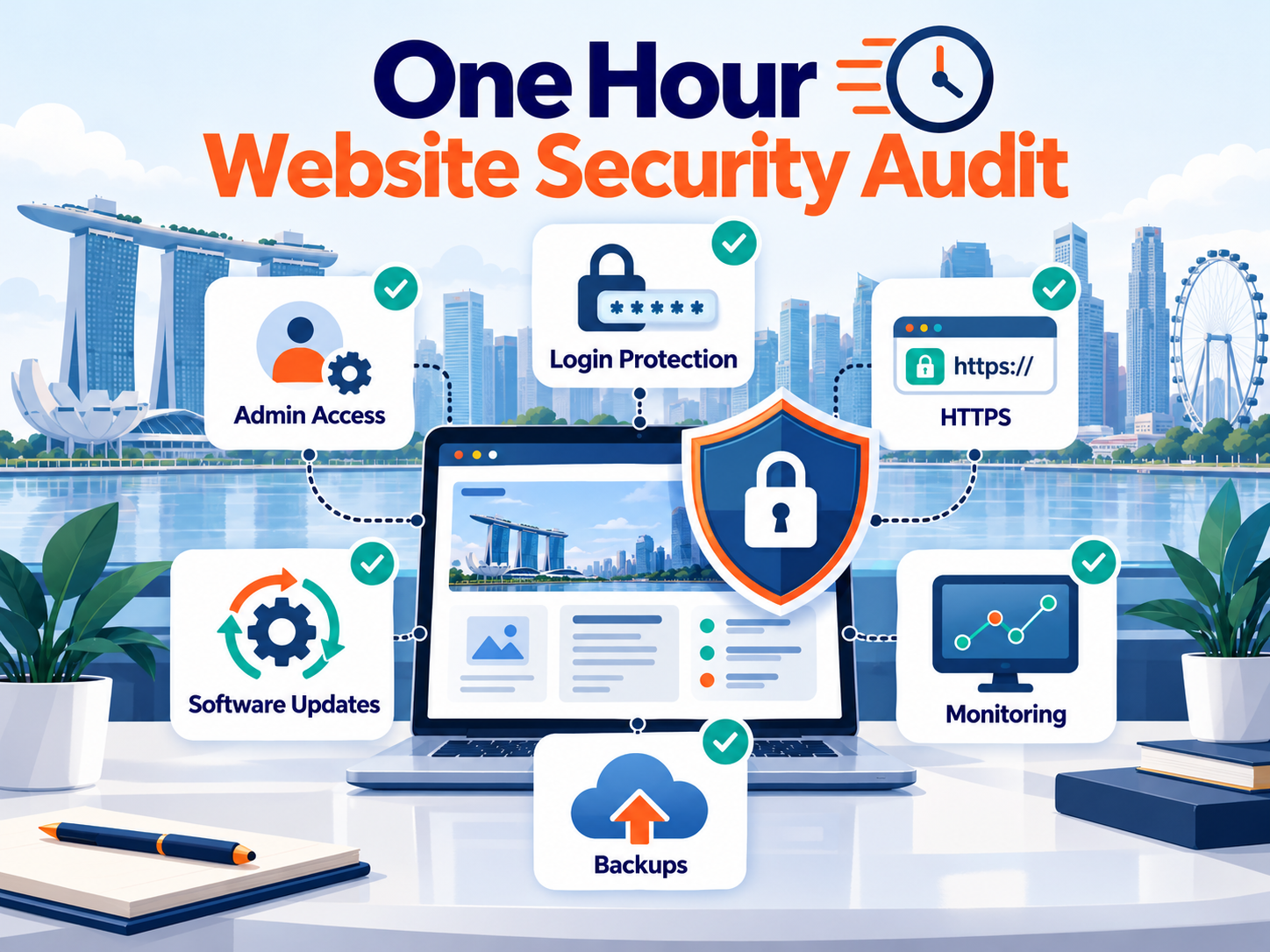
Before investing in additional security tools, check whether your website has the basic protections in place. This initial audit helps identify common weaknesses that attackers may exploit.
Allow approximately ten minutes for each check. Record issues requiring further investigation or technical assistance.
| Security check | What to verify | Where to check |
| Administrator access | No unnecessary admin accounts; unique credentials; MFA enabled | Content management system (CMS) and hosting dashboard |
| Login protection | Rate limiting and bot protection are active | Security plugin or firewall settings |
| HTTPS | Valid TLS certificate; HTTP redirects to HTTPS | Browser and hosting dashboard |
| Software security | CMS, plugins, themes and server software are supported and patched | CMS and hosting dashboard |
| Backups | Recent website and database backups exist in a separate location | Hosting backup system or cloud storage |
| Monitoring | Security and website availability alerts are configured | Hosting provider, security tools and Google Search Console |

What should you fix first? Prioritise compromised credentials, missing administrator authentication, unsupported software and exposed sensitive information. These weaknesses can create immediate security risks.
Singapore businesses can also use the CSA Internet Hygiene Portal to assess publicly visible website, domain and email security settings. The audit is a starting point. It does not replace vulnerability testing or a professional assessment when the website handles sensitive information.
Why Website Security Matters for Singapore SMEs
Business websites support customer enquiries, online transactions and daily operations. A successful cyberattack can interrupt these activities and expose confidential business information.
The Cyber Security Agency of Singapore (CSA) warns that attackers may exploit weak credentials, unpatched vulnerabilities and insecure website configurations. Its website security advisory identifies common attack methods and recommends practical measures to reduce exposure.
Common threats to business websites
Website attacks vary in complexity. Some target administrator accounts, while others exploit application vulnerabilities or weaknesses in server configurations.

| Threat | How it works | Potential impact |
| Brute-force attack | Repeatedly guesses account passwords | Unauthorised access |
| Credential stuffing | Uses stolen login details from previous breaches | Account takeover |
| Malware injection | Inserts malicious code into website files | Data theft or harmful redirects |
| SQL injection | Exploits vulnerable database queries | Unauthorised data access |
| Cross-site scripting (XSS) | Inserts malicious scripts into web pages | Session theft or harmful browser activity |
| Website defacement | Changes website content without permission | Reputation damage |
| Distributed denial-of-service (DDoS) | Overwhelms a website with malicious traffic | Website downtime |
Businesses using content management systems such as WordPress must also monitor plugins and themes. Vulnerable third-party components can provide attackers with an entry point.
How website security affects SEO
A compromised website may display spam pages, redirect visitors or distribute harmful content. These incidents can also damage its search performance.
According to Google Search Central, malware and phishing incidents can trigger browser warnings that discourage visitors from accessing affected websites. The resulting traffic loss varies by incident. There is no reliable universal percentage that applies to every compromised site.
We recommend monitoring the Security Issues report in Google Search Console. It can help identify certain detected threats and provides guidance on requesting a review after resolving them.
Control Website Access With Strong Authentication
Website access controls prevent unauthorised users from changing website content or accessing administrative settings. For Singapore SMEs, securing administrator accounts should be a priority because these accounts often have extensive permissions.
Use strong and unique passwords
Each administrator should have a separate account with a unique password. Avoid sharing credentials among employees or reusing passwords from other services.
The current NIST Digital Identity Guidelines require passwords used as the sole authentication factor to contain at least 15 characters. Passwords used as part of MFA may have a minimum of eight characters under those guidelines.
We recommend generating unique passwords of at least 16 characters where supported. Use a reputable password manager to store them securely.
Do not rely on predictable passwords containing the company name or website domain. Replace credentials immediately if there is evidence of compromise.
Enable multi-factor authentication
Multi-factor authentication requires an additional verification step during login. It reduces the risk that a stolen password alone will allow an attacker to access an account. Enable MFA for website administrators, editors and hosting accounts.
Where supported, choose phishing-resistant methods such as passkeys or security keys. Authenticator applications are another option when stronger methods are unavailable.
For WordPress websites, compatible authentication plugins or hosting identity controls can provide MFA functionality. Store recovery codes securely and restrict access to authorised personnel.
Limit brute-force login attempts
Automated attacks can repeatedly submit password combinations or reuse credentials exposed in unrelated breaches. Rate limiting, bot detection and suspicious-login alerts help reduce these risks. Where practical, configure protections at both the account and network levels.
Avoid relying exclusively on IP address blocking. Distributed attacks can originate from many different addresses.
We recommend testing login protection settings before applying them broadly. Excessive account lockouts may prevent legitimate employees from accessing the website.
Restrict administrator permissions
Give each employee only the access required for their responsibilities. This approach follows the principle of least privilege. For example, a content writer generally needs publishing permissions but not access to hosting settings or payment integrations.
Review user roles whenever responsibilities change. Remove accounts belonging to former employees and contractors promptly. For WordPress websites, administrators can review assigned permissions under Users → All Users.
Protect Website Communications With HTTPS
Hypertext Transfer Protocol Secure (HTTPS) encrypts information exchanged between a visitor’s browser and a website server. It uses Transport Layer Security to protect communications and authenticate the server’s identity.
Why HTTPS matters
Without HTTPS, information transmitted over an unencrypted connection may be exposed to interception or modification. This is particularly important for websites collecting contact details, login credentials or payment-related information. Even basic brochure websites should use HTTPS, especially when they contain enquiry forms.
However, HTTPS does not guarantee that a website is free from malware or fraudulent content. It protects the connection rather than verifying the trustworthiness of everything hosted on the site.
Install and maintain a valid TLS certificate
Many hosting providers support free certificates from Let’s Encrypt, a nonprofit certificate authority that supports automated issuance and renewal.
After enabling HTTPS, verify that:
- The certificate is valid for the correct domain.
- HTTP URLs redirect to their HTTPS equivalents.
- Images, scripts and forms load securely.
- Certificate renewal is automated and monitored.
- Internal links and canonical URLs use HTTPS.
Do not use the presence of a padlock as your only verification method.
Google Chrome replaced its traditional address-bar padlock with a site-controls icon beginning with Chrome 117 in 2023. The Chromium team’s explanation also clarifies that an encrypted connection does not necessarily mean a website is trustworthy.
Keep Website Software, Plugins and Themes Updated
Outdated software can expose websites to known security vulnerabilities. Once security flaws become public, attackers may develop automated methods to identify affected installations. Regular patching reduces exposure, although it cannot eliminate every possible vulnerability.
Prioritise security updates
For WordPress websites, review the CMS core, plugins, themes and underlying PHP environment. WordPress supports automatic updates for individual plugins and themes. Its official documentation explains how administrators can configure these settings.
We recommend the following maintenance process:
- Review available updates. Check the CMS dashboard, hosting notifications and relevant security advisories.
- Identify security fixes. Prioritise critical vulnerabilities and weaknesses known to be actively exploited.
- Create a recovery point. Confirm that recent website and database backups are available.
- Test significant changes. Use a staging environment when updates may affect checkout, forms or essential functionality.
- Apply updates and verify functionality. Check key pages, user logins and business integrations after deployment.
A monthly maintenance review is useful for routine tasks. However, urgent security patches should be addressed promptly rather than waiting for the next scheduled session.
Remove unused plugins and files
Every installed extension adds software that requires maintenance. Delete plugins and themes that are no longer needed. Before removing unfamiliar components, verify that they do not support essential website features. We also recommend reviewing old installation files, exposed backup archives and unnecessary administrator accounts.
Hiding software version numbers may reduce casual information disclosure, but it does not fix security vulnerabilities. Removing unused components and applying patches remain stronger measures.
Secure website server configurations
Website security extends beyond the CMS dashboard. Review file permissions, administrative connections and access to configuration files. Restrict sensitive information to authorised users and processes. Avoid leaving database exports, backup archives or credentials inside publicly accessible directories.
Where applicable, use encrypted administrative connections such as Secure Shell (SSH) or Secure File Transfer Protocol (SFTP). Google’s malware prevention guidance also recommends keeping software current and reviewing website security configurations.
Add Firewall, Bot and DDoS Protection
Secure passwords and updated software provide important safeguards. Websites may still need additional protection against malicious requests and disruptive traffic.
Web application firewalls
A web application firewall (WAF) examines incoming web requests and can block traffic matching suspicious patterns. Depending on its configuration, it may help prevent common attacks involving SQL injection, cross-site scripting and malicious requests. We recommend considering a managed WAF for websites with customer accounts, booking systems or online checkout functionality.
A firewall does not repair vulnerabilities in website code. Its rules also require ongoing maintenance to avoid blocking legitimate users.
Security plugins and hosting controls
Security plugins can provide malware scanning, login protection and file-change alerts. Hosting providers may offer additional safeguards, including server firewalls and restricted file permissions.
Evaluate existing protections before installing another security tool. Overlapping functions can cause conflicts or create unnecessary complexity. For smaller WordPress websites, a maintained security plugin combined with appropriate hosting controls may provide a practical starting point.
DDoS protection
A distributed denial-of-service attack attempts to make an online service unavailable by overwhelming it with traffic or requests. Content delivery networks (CDNs) and specialised mitigation services can help filter or absorb certain attacks.
Check whether your hosting provider includes DDoS protection. Coverage and response capabilities vary between services. For e-commerce businesses, website availability deserves particular attention because downtime can interrupt transactions.
Protect Website Data With Reliable Backups
Backups support recovery after accidental changes, technical failures and destructive security incidents. However, a backup is only useful when its contents are recoverable and the business understands how to restore them.
Follow the 3-2-1 backup principle
The 3-2-1 approach provides a practical foundation for website data protection.
- Three copies: Maintain the live data and two backup copies.
- Two storage types or systems: Avoid depending entirely on one storage environment.
- One offsite copy: Keep at least one backup separate from the primary website infrastructure.
For additional ransomware protection, consider an offline or immutable backup that attackers cannot easily modify or delete. Protect backup access with strong authentication and appropriate permissions.
Set backup frequency according to business needs
Backup frequency should reflect how often information changes and how much data the business can afford to lose. A brochure website updated occasionally may require daily or weekly backups. An e-commerce website processing frequent orders may need substantially more frequent protection.
We recommend defining two recovery measures:
Recovery Point Objective (RPO): The maximum acceptable amount of data loss, measured in time.
Recovery Time Objective (RTO): The target time for restoring essential website operations.
For example, a business that cannot afford to lose an hour of orders needs a recovery arrangement capable of meeting that requirement. A daily backup alone would not be sufficient.
Test website restoration
Schedule periodic recovery tests. Quarterly testing is a practical starting point for many smaller businesses, while critical systems may require more frequent checks.
Restore a backup to a separate environment and verify that essential functions work. Test customer forms, administrative access and relevant business integrations before considering the recovery successful. For a broader maintenance schedule, see our website maintenance guide.
Monitor Your Website for Security Problems
Regular monitoring helps identify suspicious activity before it causes prolonged disruption. Assign responsibility for reviewing security notifications and responding to unexpected website changes.
Monitor administrator activity
Review authentication logs for unfamiliar login attempts, unexpected account creation and changes to administrator permissions. File integrity monitoring can identify modifications to important website files.
Not every change indicates an attack. Compare alerts with scheduled maintenance activities before deciding whether further investigation is necessary.
Use Google Search Console
Google Search Console provides a Security Issues report that may identify detected malware, hacked content or deceptive pages. Enable notifications and investigate unfamiliar indexed URLs, unexpected redirects or sudden changes in search behaviour.
A clean report does not guarantee that a website is secure. Combine Search Console monitoring with hosting logs and appropriate security tools.
Check externally visible security settings
Singapore SMEs can use CSA’s Internet Hygiene Portal to review aspects of their internet-facing security configuration. This can be useful for businesses relying on external website developers or managed hosting providers.
We recommend documenting identified issues and assigning responsibility for corrective action.
Website Security and Singapore’s PDPA Requirements
Website security can also involve legal responsibilities when a business collects or processes personal data. Under Singapore’s Personal Data Protection Act (PDPA), the Protection Obligation requires organisations to make reasonable security arrangements for personal data in their possession or under their control.
The Personal Data Protection Commission (PDPC) explains the requirements for protecting personal data against unauthorised access, collection, use and disclosure.
What this means for business websites
An enquiry form may collect names, telephone numbers and email addresses. Online stores may also maintain customer accounts and purchase histories.
Businesses should protect this information according to its sensitivity and the potential consequences of unauthorised access. We recommend limiting access to customer records and securing data transfers. Review third-party access to personal information regularly.
Avoid collecting unnecessary personal data. Establish retention and disposal procedures based on legitimate business and legal requirements.
When must a data breach be reported?
Not every website security incident automatically requires notification to the PDPC. Under Singapore’s mandatory data breach notification rules, a personal data breach is notifiable if it is likely to result in significant harm to affected individuals or is of significant scale. A breach involving the personal data of 500 or more individuals meets the significant-scale threshold.
Organisations must take reasonable and expeditious steps to assess whether a breach is notifiable, generally within 30 calendar days after having credible grounds to believe that it occurred. Once a breach is determined to be notifiable, the organisation must notify the PDPC as soon as practicable and no later than three calendar days after that determination.
Notification to affected individuals is required in applicable cases, particularly where significant harm is likely. A breach meeting only the significant-scale threshold does not automatically require individual notification. These rules are explained in the PDPC Data Breach Management Guide.
We recommend documenting incident-response responsibilities before a breach occurs. Assign someone to coordinate technical investigation, data protection assessment and any necessary notifications.
Which Website Security Measures Should Singapore SMEs Prioritise?
The appropriate security setup depends on the website’s functionality and the consequences of a breach. Every business website needs secure access, supported software, HTTPS and recoverable backups. Additional controls should reflect the sensitivity of its data and the importance of continuous availability.
| Website type | Essential protections | Additional priorities |
| Corporate or brochure website | MFA, HTTPS, updates and backups | Form protection and change monitoring |
| E-commerce website | All baseline protections | WAF, payment security, frequent backups and transaction monitoring |
| Booking website | All baseline protections | Customer data controls, login throttling and recovery testing |
| Membership website | All baseline protections | Strong user authentication, session protection and account monitoring |
| Custom web application | All baseline protections | Secure code reviews, vulnerability testing and application monitoring |
A brochure website generally requires a simpler security setup than a store processing frequent transactions. We would prioritise transaction continuity and recovery testing for e-commerce businesses.
Membership websites should give particular attention to customer account protection and personal data access. This risk-based approach helps SMEs allocate security resources where failures would have the greatest impact.
What Should You Do If Your Website Is Hacked?
Even well-maintained websites can experience security incidents. A documented response plan helps reduce disruption and supports a safer recovery.
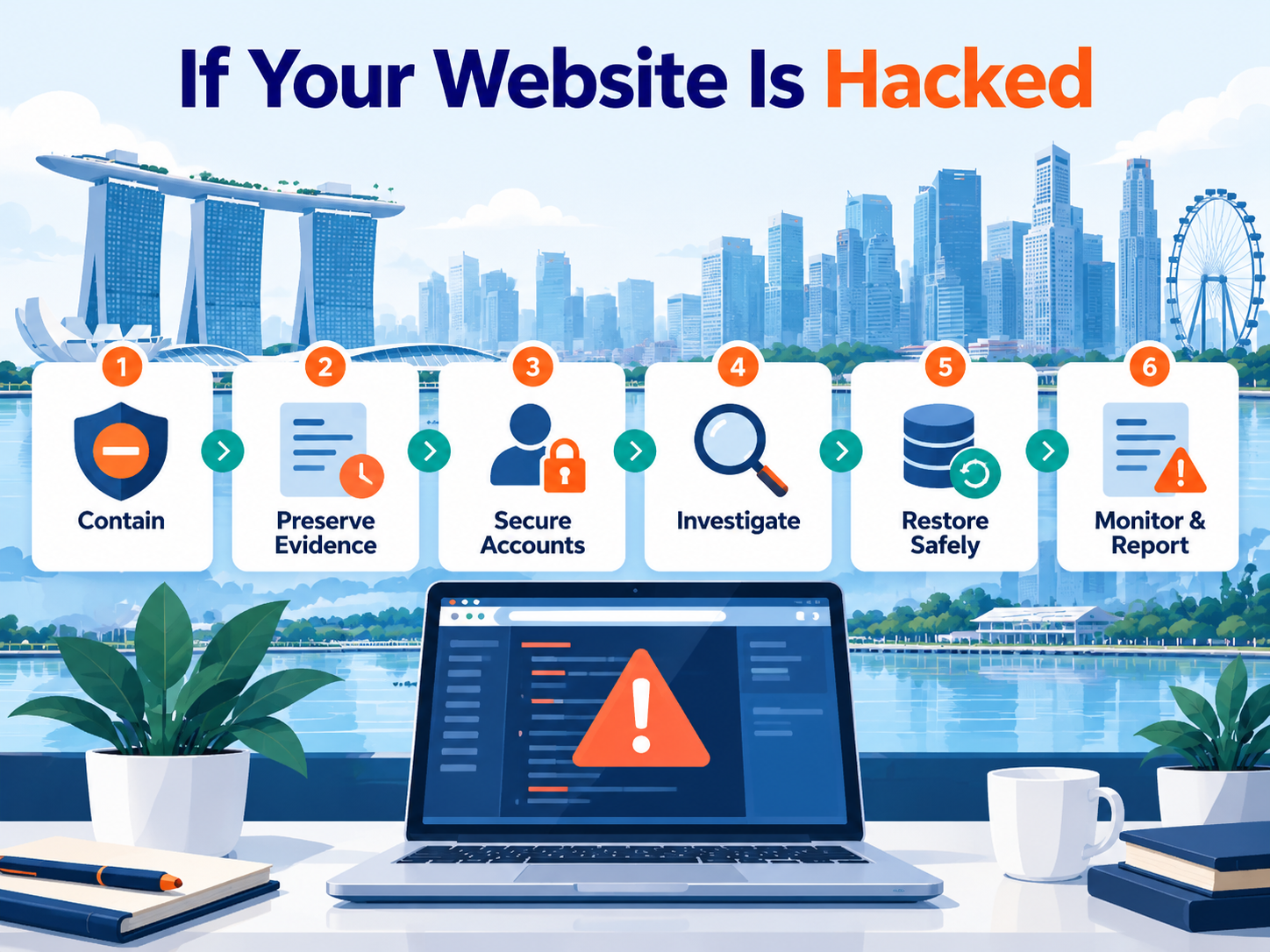
CSA provides incident-response resources covering malware, ransomware and other common threats. If you suspect your website has been compromised, follow these steps:
- Contain the incident. Contact your hosting provider or security team. Isolate affected systems or temporarily restrict access where necessary.
- Preserve evidence. Retain relevant logs and incident details before making extensive changes. Investigators may need this information to identify the cause.
- Secure affected accounts. Disable unauthorised accounts and reset compromised credentials from a trusted device. Review access permissions and authentication methods.
- Investigate the vulnerability. Check outdated software, modified files and hosting access. Identify the original weakness before restoration.
- Restore safely. Recover from a verified clean backup or rebuild affected components. Test essential functions before returning the website to normal operation.
- Monitor and assess reporting duties. Watch for recurring suspicious activity. Determine whether personal data was affected and whether notification obligations apply.
Singapore organisations can report relevant cybersecurity incidents through SingCERT Cyber Aid. Suspected cybercrime may also warrant a police report.
If Google has flagged the website, resolve the identified security issue before requesting a review through Search Console. Avoid restoring a backup without fixing the original vulnerability. Otherwise, the website may become compromised again.
Frequently Asked Questions
How often should Singapore SMEs update website software and plugins?
Check for available updates regularly and apply critical security patches promptly. Monthly maintenance reviews are useful for routine tasks, but urgent fixes should not wait. Test significant updates when necessary to prevent disruption.


Does my website need an SSL certificate if it does not collect payments?
Yes. HTTPS protects information exchanged between visitors and the website, including ordinary contact form submissions. A valid TLS certificate supports encrypted communications but does not guarantee that the website is free from threats.
What is the best way to prevent brute-force login attacks?
Use long, unique passwords and enable MFA for privileged accounts. Add login rate limiting, bot protection and monitoring to reduce automated attempts. No single measure can eliminate every attack.
Is a WordPress security plugin enough to protect my website?
No. Security plugins provide useful monitoring and protection, but they cannot replace secure hosting, software updates and tested backups. We recommend combining compatible security controls rather than relying on one plugin.
How can I tell if my website has been hacked?
Warning signs include unexpected redirects, unfamiliar administrator accounts, unauthorised content changes and browser security alerts. Review hosting logs and Google Search Console for further evidence. Investigate suspected compromises promptly.
Does the PDPA require every hacked website to be reported?
No. Mandatory PDPC notification applies to personal data breaches meeting the relevant legal criteria. Businesses must assess suspected data breaches and report them when notification requirements are triggered.
How often should a business website be backed up?
Backup frequency should reflect how frequently business data changes and how much loss the organisation can tolerate. Transactional websites may need frequent backups, while simpler websites may require less frequent copies. Regular restoration testing is essential.
Protect Your Singapore Business Website With the Right Security Measures
Effective website security starts with strong access controls, updated software, HTTPS and reliable backups. Regular monitoring and incident-response planning complete the foundation. Our HTTPS SEO guide explains how to secure website connections while protecting search visibility.
For Singapore SMEs, we recommend starting with the one-hour security audit and fixing the highest-risk weaknesses first. Businesses handling customer accounts, bookings or online payments should apply additional controls suited to their operations.
Review your security measures regularly as your website grows. Our website maintenance guide provides a practical framework for software updates, security monitoring and recovery testing. A consistent maintenance process helps protect customer information, business operations and long-term website performance.