
| AI Summary
HTTPS SEO is about how serving your website over HTTPS affects search visibility, and how to move from HTTP without losing rankings. Google has treated HTTPS as a lightweight ranking signal since 2014, so it removes a competitive disadvantage rather than delivering a large ranking boost. The bigger risk is a poorly managed migration, where broken redirects, mixed content and expired certificates cause indexation delays and wasted crawl budget. This guide covers certificate choice, a step-by-step migration sequence and a 6–8 week monitoring plan. |
HTTPS SEO is the practice of serving your website securely over HTTPS and making sure the switch from HTTP does not harm your search visibility. HTTPS is the secure version of the protocol that moves data between a browser and a web server. The “S” stands for Secure, and it means every request and response is encrypted before it leaves your device.
Here is the short answer to the question most people arrive with: Yes, HTTPS affects SEO, but only modestly. Google confirmed HTTPS as a lightweight ranking signal in 2014, and it still groups HTTPS with the page experience factors site owners are encouraged to get right. It will not lift a thin page above a strong one. HTTPS eliminates a competitive disadvantage rather than providing direct ranking advantage. Sites without HTTPS now compete with a handicap, especially in sectors where users hand over personal data.
This guide treats HTTPS as what it actually is for most site owners: table stakes and a migration risk, not a growth lever. The real SEO danger is not the missing padlock, it is the ranking loss that follows a botched switch. You will find a pre-migration audit, a numbered migration sequence, and a monitoring workflow that catches indexation drops inside the first four weeks, before they calcify into permanent losses.
Key definition: HTTPS (Hypertext Transfer Protocol Secure) uses encryption called TLS (Transport Layer Security), the modern successor to SSL. TLS is the current standard; SSL is no longer used. When someone says “TLS certificate”, they mean the encrypted connection layer that secures your data.
Key Takeaways
- HTTPS SEO is about avoiding a disadvantage, not gaining a big boost. Google confirmed HTTPS as a lightweight ranking signal in 2014, so it will not lift a weak page above a strong one.
- The real SEO risk is a badly handled migration. Broken redirects, mixed content and expired certificates can cause indexation delays and wasted crawl budget.
- A free DV certificate is enough for most sites, but renewal must be automated. Publicly trusted certificates are now capped at 200 days, and the limit keeps shrinking towards 47 days in 2029.
- Migrate with single-hop 301 redirects, HTTPS canonicals and sitemaps, then monitor for 6 to 8 weeks. Chrome 154, scheduled for October 2026, will warn users before they open public sites without HTTPS.
Understanding HTTPS: What It Is and How It Works
What HTTPS does:
- Encrypts all data passing between your browser and the website’s server
- Verifies the website’s identity through a trusted third party
- Detects tampering or modification of data in transit
- Displays a padlock icon in the browser address bar
- Protects user credentials, payment information and form submissions
What actually changes when you move from HTTP to HTTPS
HTTP (Hypertext Transfer Protocol) is the basic protocol used to transfer data between your browser and a website’s server. It does not encrypt this data. An attacker with network access can intercept unencrypted credentials and sensitive data, including passwords, credit card numbers and form submissions.
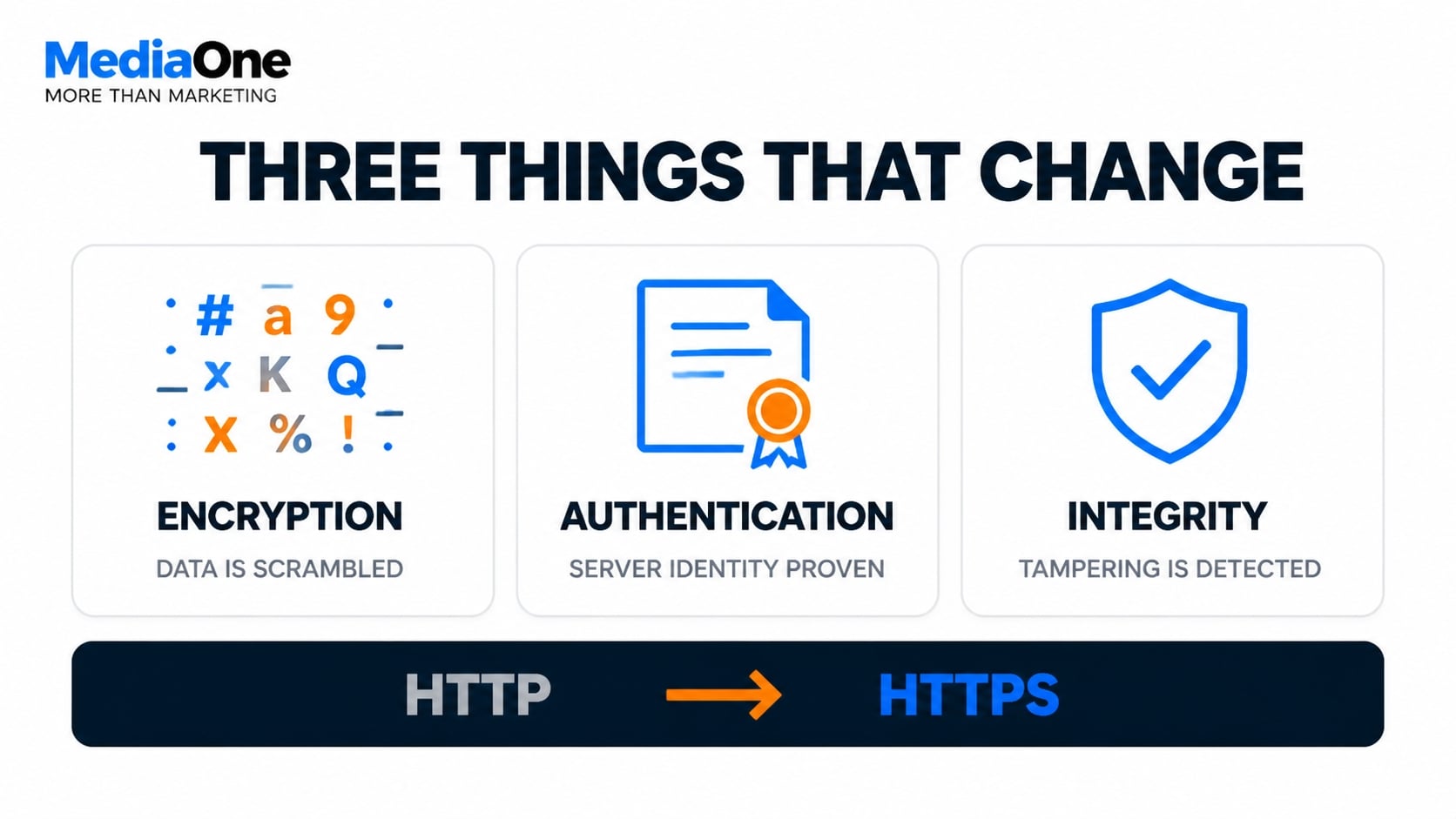
HTTPS wraps that same HTTP protocol inside an encryption layer. Three things happen at once when you enable it:
- Encryption. Data in transit is scrambled. An attacker on the same network sees ciphertext, not your login credentials or payment details.
- Authentication. The TLS certificate proves the server is who it claims to be. Your browser verifies this against a list of trusted Certificate Authorities.
- Integrity. Tampering in transit is detectable. If someone injects code into the response, the connection fails rather than serving a corrupted page.
Without encryption, anyone positioned between the user and the server can read and modify traffic. That includes public Wi-Fi operators, internet service providers and anyone with access to unsecured network traffic.
The TLS handshake that sets this up takes milliseconds. Your browser checks a certificate against a trusted list. If the site passes verification, you see a padlock in the address bar. If it fails, you see a warning message. This small latency matters for the performance section later in this guide.
The distinction matters for SEO because search engines treat the two protocols as separate. An HTTP page and its HTTPS equivalent are technically different URLs. Without proper redirects, you risk splitting authority between two versions of the same content.
Why Google treats HTTPS as a ranking signal
Google announced HTTPS as a ranking signal in August 2014, describing it at the time as a “very lightweight” factor, as documented in Google’s original Search Central blog announcement. Google announced in 2016 that Chrome would label HTTP pages as “Not Secure”, starting with pages that collect passwords or payment details and extending to all HTTP pages from 2018. From Chrome 154, scheduled for October 2026, Chrome will also warn users before opening a public site that does not support HTTPS.
The ranking logic is straightforward. Google wants to return results users can trust. A secure page is a measurable trust signal that costs the search engine nothing to check, so it sits among the 200-plus factors in the ranking system rather than acting as a switch.
A TLS certificate also signals that a site has been validated by a trusted third-party authority (a Certificate Authority, or CA). This chain of trust tells search engines and browsers that the site operator has passed basic identity checks and is committed to user security.

Google’s algorithm includes HTTPS as a confirmed ranking factor. Secure sites also see improved click-through rates and lower bounce rates, which send positive engagement signals back to the search engine. Modern browsers amplify this effect. Chrome, Firefox, Safari and Edge all label non-HTTPS sites as “Not Secure” to users. Some browsers even block certain functionality on unencrypted connections. This user-facing friction means non-HTTPS sites face behavioural headwinds that HTTPS sites do not, creating a compounding advantage in organic performance.
The practical takeaway
Treat HTTPS as table stakes rather than a growth lever. If you run an e-commerce store, a healthcare site, or anything that collects personal data, it is non-negotiable for both SEO and legal compliance. In Singapore, regulated sectors such as finance and healthcare have specific requirements under MAS and MOH guidelines. If you run a content site, it is still worth doing, because browser warnings cost you click-through rate even when your rankings hold.
Does HTTPS Affect SEO? What the Ranking Signal Actually Does
How Google’s algorithm weighs HTTPS in rankings
Google confirmed HTTPS as a ranking signal in 2014 and has maintained that status consistently through 2024. However, it is an incremental signal, not a tiebreaker between high-quality and low-quality sites. When two pages are equal in content quality, relevance and authority, the HTTPS version will rank slightly higher.
The competitive advantage emerges at scale. Sites with full HTTPS implementation across all pages enjoy a cumulative benefit: pages load faster under modern HTTPS protocols such as HTTP/2 and HTTP/3, and users stay longer on trusted, padlock-signed pages. This compounds into modest ranking gains over months.
The effect is strongest in sectors with high transaction value. A competitive query for “business bank account” or “health insurance quote” will almost always return HTTPS results in the top ten. In those niches, the security expectation is high and user behaviour compounds the ranking signal. Insurance, legal services and subscription models also benefit because visitor confidence drives conversion and return visits.
For content-only sites such as news, blogs and reference material without transaction points, HTTPS still ranks as a minor advantage but does not offset poor content or low authority. The ranking boost is real but modest: modest competitive advantage in competitive queries if all else is equal.
The impact of mixed content on SEO performance
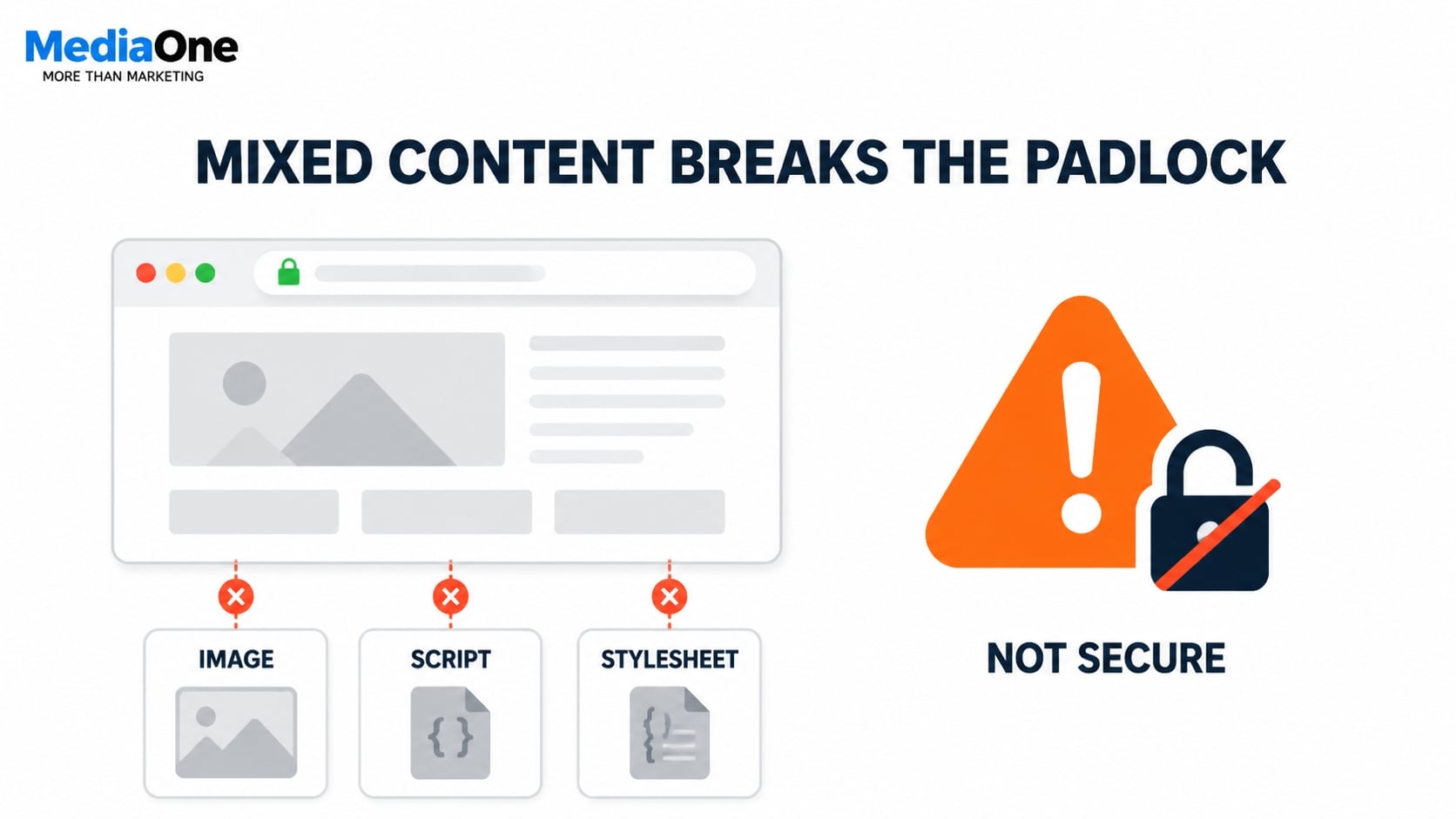
Mixed content occurs when a page served over HTTPS loads resources from HTTP sources. These resources include images, stylesheets, JavaScript and iframes. The browser’s security model treats this as a trust violation.
The padlock disappears. A warning badge appears. Scripts may fail to execute. This behaviour is described in the MDN Web Docs guidance on mixed content.
From an SEO perspective, mixed content creates direct harms. Browser warnings degrade user experience and click-through rate. Users see “Not Secure” labels and abandon pages before fully engaging with content. Mixed content also blocks certain scripts in some browsers, preventing analytics tags and tracking pixels from loading. This breaks conversion measurement and site monitoring.
For example, if your site is HTTPS but your hero image comes from an external HTTP URL, that image will not display correctly. Google’s crawler sees incomplete page rendering, and indexation quality suffers.
If HTTP resources load slowly or timeout, page rendering blocks. This increases Time to First Byte and harms Core Web Vitals scores. Google Search Console flags these pages as having security issues, creating noise in your coverage reports and delaying recrawl cycles.
Mixed content is particularly common after migration when developers update the protocol but miss embedded third-party scripts, analytics tags or CDN-hosted assets. A full mixed-content audit is mandatory before going live.
HTTPS adoption trends among top-ranking sites
Current data from 2024 shows HTTPS adoption rates among leading sites in competitive search results are substantial across English-language markets. Based on reported industry surveys, adoption is highest in finance, e-commerce and healthcare verticals. The correlation between HTTPS adoption and high rankings is strong, though causation is complex. Sites ranking well tend to adopt HTTPS because they are mature, well-resourced properties that prioritise security. Within a cohort of equally authoritative sites, HTTPS versions consistently outrank HTTP.
| Market type | HTTPS adoption in top-ranking sites | Implication for HTTP sites |
|---|---|---|
| North America and Western Europe | Very high | HTTP creates significant competitive disadvantage |
| Asia-Pacific, Latin America, Africa | Substantial | Narrowing window to migrate before market shift |
| Finance, e-commerce, healthcare | Near universal | HTTP sites rank lower than HTTPS competitors in these fields |
The practical implication is clear: remaining on HTTP creates competitive risk. Not because HTTPS alone ranks, but because most competitors within five to ten positions likely have HTTPS, and their incremental ranking advantage compounds with every month of delay.
SSL/TLS Certificates: Types, Selection and Implementation
Types of TLS certificates and their SEO implications
Not all TLS certificates are created equal. The type you choose affects trust signalling, browser compatibility and, indirectly, your SEO performance.
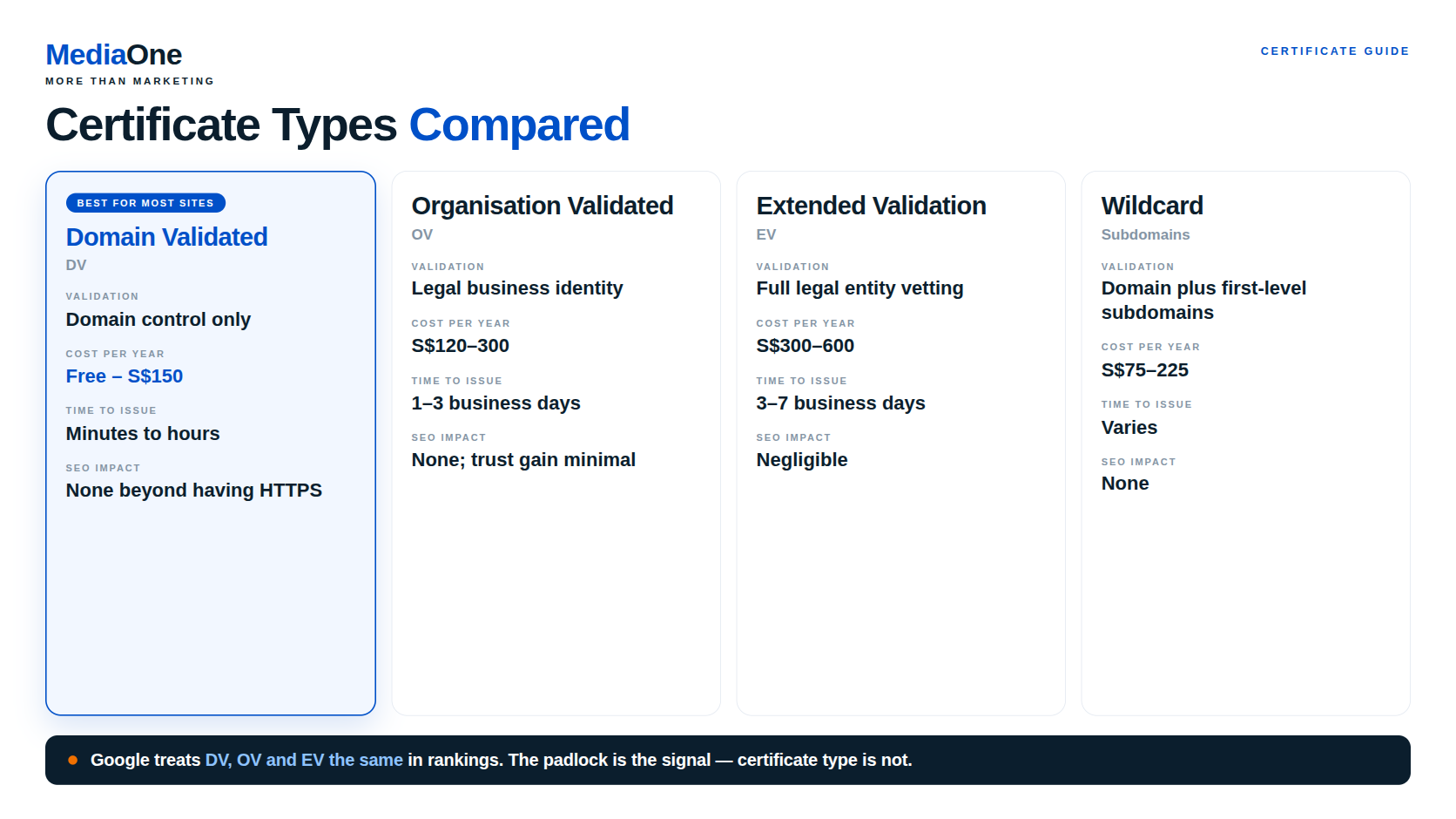
For SEO purposes, Domain Validated certificates are the practical choice for most sites. The padlock itself is the primary trust signal; certificate type is a secondary, indirect factor. Google treats DV, OV and EV certificates the same in rankings.
| Certificate type | Validation | Typical cost per year | Time to issue | SEO impact |
|---|---|---|---|---|
| Domain Validated (DV) | Domain control only | Free to SGD 150 | Minutes to hours | None beyond having HTTPS |
| Organisation Validated (OV) | Legal business identity | SGD 120–300 | 1–3 business days | None; trust gain is minimal |
| Extended Validation (EV) | Full legal entity vetting | SGD 300–600 | 3–7 business days | Negligible |
| Wildcard | Domain plus first-level subdomains | SGD 75–225 | Varies | None |
A note on EV certificates: Historically, EV certificates triggered a green address bar with your organisation name displayed prominently in major browsers. Safari removed the EV indicator in 2018, and Chrome and Firefox followed in 2019. For regulated sectors (banking, insurance, healthcare), EV remains valuable for compliance and audit trails under guidelines from MAS (Monetary Authority of Singapore) for financial institutions and MOH (Ministry of Health) for healthcare providers, but its SEO benefit is now negligible.
Wildcard and multi-domain certificates reduce management overhead but function identically to single-domain certificates for SEO. The choice depends on infrastructure and budget, not search rankings.
Role of CAs in trust chains: When you install a certificate from a given CA, your browser verifies that the CA itself is trusted. This forms a chain: your site’s certificate, then the CA’s intermediate certificate, then a root certificate embedded in the browser. If the chain breaks or the CA is untrusted, browsers display warnings. Users leave, and crawlers may hesitate to continue. Misconfigured chains slow down TLS handshakes, delaying page loads.
Free versus paid options: Let’s Encrypt issues DV certificates at no cost, automatically, via the ACME protocol. Renewal occurs every 90 days, either manually or automatically via tools like Certbot. Let’s Encrypt certificates are trusted by 99% of browsers and Google’s crawlers, with zero SEO disadvantage. Paid CAs (Sectigo, DigiCert, GlobalSign) offer faster support, longer validity periods (1–3 years versus 90 days), and OV/EV validation services.
Reputation and browser compatibility: All major CAs are trusted across modern browsers. Obscure or recently established CAs sometimes face compatibility issues on older systems. If your audience includes users on older Android devices or legacy Windows systems, use widely established CAs: Sectigo, DigiCert, GlobalSign, Comodo or GeoTrust. For modern audiences on current browsers, any publicly listed CA works equally well.
How certificate quality affects indexation speed: A misconfigured certificate chain or expired intermediate certificate slows TLS handshakes by 200–500 milliseconds per connection. Googlebot, crawling thousands of pages, accumulates these delays. If your certificate is broken, Googlebot may retry or abandon pages, reducing crawl efficiency. Certificate quality matters more than CA prestige: a broken Sectigo certificate performs worse than a correctly configured Let’s Encrypt certificate.
For most sites, Let’s Encrypt is the right choice: it is free, widely trusted, automatically renewable and trusted by Google. Use a paid CA only if you need OV validation for user trust, require multi-year validity for infrastructure reasons, or operate in a regulated environment requiring audit trails from an established CA.
Certificate installation and configuration best practices
Three configuration layers matter for SEO: the certificate itself, the TLS handshake, and connection pooling.
Avoid handshake delays with keep-alive. When a browser or crawler connects to your HTTPS site, it performs a TLS handshake, typically 100–200 milliseconds per new connection. Configure your server to reuse connections. In Apache, enable mod_ssl and set KeepAlive On and MaxKeepAliveRequests 100. In Nginx, set keepalive_timeout 65 in the http block. For certificate chains, ensure your server sends the full chain: your certificate, the intermediate certificate, and optionally the root. Test your chain using SSL Labs. A warning about a missing chain indicates a configuration error to fix before launch.
Enable HTTP/2 for connection efficiency. HTTP/2 multiplexes multiple requests over a single connection. Instead of opening six parallel connections for six resources, HTTP/2 sends all six over one connection simultaneously, eliminating TLS handshake overhead for every resource after the first. In Nginx 1.25.1 or later, add http2 on; to your HTTPS server block. In Apache, enable mod_http2 and set Protocols h2 http/1.1. For sites serving many static assets, HTTP/2 under HTTPS reduces page load time by 15–25% compared to HTTP/1.1 over HTTPS. Core Web Vitals improve as a result, indirectly helping SEO.
Protocol versions and cipher suites: Use TLS 1.2 or TLS 1.3 exclusively. Disable older protocols (SSL, TLS 1.0, TLS 1.1) to prevent downgrade attacks and improve connection speed. TLS 1.3, released in 2018, reduces handshake time to a single round trip and is supported by all modern browsers and crawlers.
Avoid certificate pinning on public websites. Pinning tells a client to accept only a specific certificate or CA, rejecting all others. Used incorrectly, it can lock out legitimate crawlers or cause outages when you renew. Avoid certificate pinning on public websites. The older HPKP header has been deprecated and removed from modern browsers. For SEO, avoid pinning unless your threat model explicitly requires it.
Test the configuration after installation. Use SSL Labs to verify your certificate chain, protocol versions and cipher suites. Aim for an A+ grade. Use a browser developer console Network tab to confirm HTTP/2 is active by checking the Protocol column for h2 or h2c. Use curl with a timing format file to measure handshake duration. Acceptable handshake time is under 100 milliseconds on a modern server. If your handshake exceeds 200 milliseconds, investigate certificate chain completeness or server CPU load.
Migrating to HTTPS: Step-by-Step Implementation for SEO Safety
A poorly planned HTTPS migration can trigger indexation drops, lost rankings and crawl errors that take months to recover from. The difference between a seamless transition and an SEO disaster comes down to preparation and monitoring.
Pre-migration checklist
Before touching your TLS certificate or server configuration, you need a clear picture of what you’re migrating.
- Audit your existing HTTP infrastructure. Use a crawling tool such as Screaming Frog or Semrush to map every page. Note the total page count, identify indexation status in Google Search Console, and record your current organic traffic baseline by device, location and keyword. Check server logs for the past 30 days to identify which pages receive the most crawl activity; these deserve extra attention.
- Identify third-party content and embedded resources. List every external dependency: CDN-hosted images, fonts loaded from Google Fonts, analytics scripts, advertising pixels, chat widgets, payment processors and embedded videos. Each will need to load over HTTPS post-migration or trigger mixed content warnings. Browser Developer Tools (Network tab) and tools like Mixed Content Scanner can automate detection.
- Set up a staging environment. Create an exact copy of your production site with HTTPS enabled. Test the entire workflow here first: certificate installation, redirect configuration, link updates and content testing.
- Back up your configuration and robots.txt. Save a copy of your current robots.txt, .htaccess (or server configuration file), canonical tags and XML sitemaps. If the migration encounters unexpected issues, you will need these files to roll back safely.
Core migration steps
Follow these steps in sequence. Skipping or reordering them increases the risk of ranking loss.
- Obtain and install your TLS certificate. Purchase or request a free certificate from a trusted certification authority (CA). If you are on shared hosting, many providers include a free Let’s Encrypt certificate. Install the certificate on your web server and test it with SSL Labs to ensure it is valid, trusted by browsers and properly configured for your domain.
- Update all internal links to HTTPS URLs. Search your entire codebase and content management system for internal links pointing to http://yoursite.com and replace them with https://yoursite.com. This includes navigation menus, sidebar links, footer links, in-text hyperlinks, related posts modules and Schema markup JSON-LD scripts. For WordPress sites, plugins such as Better Search Replace automate this across posts, pages and custom fields.
- Configure 301 permanent redirects. Set up a permanent redirect from every HTTP page to its HTTPS equivalent. For Apache servers, add this to your .htaccess file in the site root:
RewriteEngine On
RewriteCond %{HTTPS} off
RewriteRule ^(.*)$ https://%{HTTP_HOST}%{REQUEST_URI} [L,R=301]
For Nginx, add this to your server block configuration:
if ($scheme != “https”) { rewrite ^/(.*)$ https://$server_name/$1 permanent; }
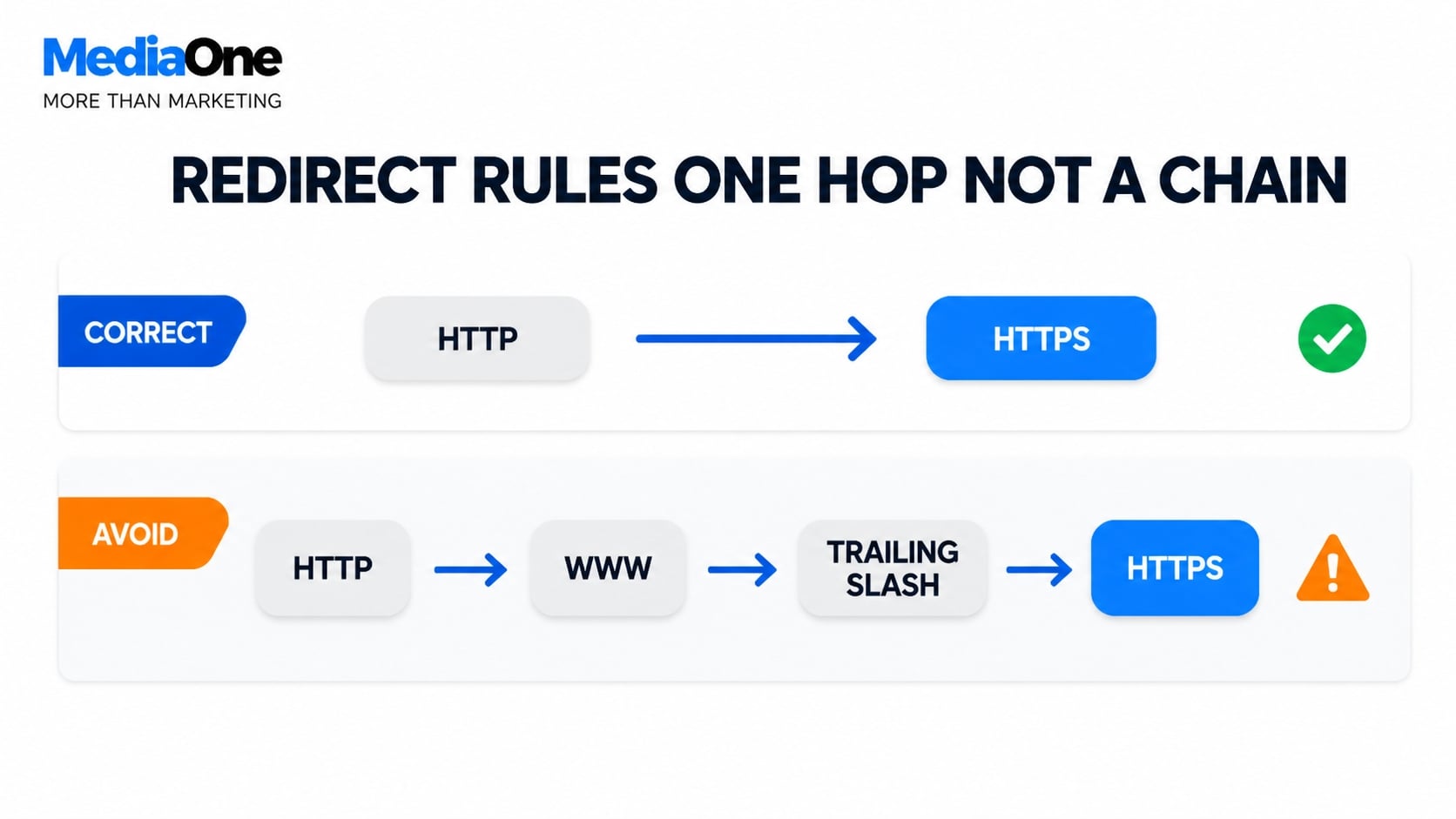
Do not use 302 temporary redirects. They tell search engines the HTTP version still exists, so they will not transfer ranking authority to HTTPS. Avoid redirect chains (HTTP to HTTPS to www to non-www); each hop wastes crawl budget and delays indexation. Redirect directly to the final HTTPS URL in one step.
- Update canonical tags to point to HTTPS versions. On every page, update the <link rel=”canonical”> tag to point to the HTTPS version:
<link rel=”canonical” href=”https://yoursite.com/page/”>
For self-referential canonicals (the most common pattern), the canonical on the HTTPS page should point to itself. Where a page exists in multiple languages, each HTTPS language version should keep a self-referencing canonical and be linked through hreflang annotations that also use HTTPS URLs. (Google Search Central)
- Test all pages for mixed content using browser developer tools. Open Developer Tools in Chrome, Firefox or Edge and go to the Console tab. Load 10-20 representative pages across different templates. Warnings like “This page was loaded over HTTPS, but requested an insecure resource from…” indicate mixed content. Update each insecure resource to HTTPS. If an external resource does not support HTTPS, contact the provider or find an alternative.
- Update your XML sitemaps with HTTPS URLs. Edit your primary XML sitemap and change all <loc> entries from HTTP to HTTPS:
<url>
<loc>https://yoursite.com/page/</loc>
<lastmod>2025-01-15</lastmod>
</url>
Update sitemaps for news, video or images too. Submit the new HTTPS sitemap to Google Search Console. You can leave the old HTTP sitemap in place initially, but within a few weeks, remove it to avoid confusion.
- Update robots.txt with HTTPS protocol references. If your robots.txt contains absolute URLs, ensure they use HTTPS:
Sitemap: https://yoursite.com/sitemap.xml
Relative URLs need no changes. Upload the updated robots.txt to both the root of your HTTP and HTTPS domains. Google will read the HTTPS version as authoritative.
Post-migration SEO tasks
The migration is not complete when the last page goes live. The following 4-6 weeks are critical for monitoring and fixing issues before they cause lasting ranking damage.
Register the HTTPS property in Google Search Console. Add the HTTPS version of your site as a new property and verify ownership (DNS record, HTML tag, Google Analytics or Search Console property). In the HTTPS property, check the Links report and confirm that Google is discovering links to your HTTPS pages. Within 2-4 weeks, links that pointed to the HTTP version should transfer. If a high-authority external link still points to HTTP after 6 weeks, contact the site owner and ask them to update it.
Monitor crawl errors and indexation weekly for the first month. Track total pages crawled per day (should stabilise at or above your pre-migration rate), crawl errors (should remain near zero) and coverage. If crawl errors spike, especially “Not Found” errors on HTTPS URLs, it usually indicates a broken redirect or server misconfiguration. If indexation stalls, verify that your robots.txt is not blocking HTTPS pages, your certificate is valid and not expired, and mixed-content warnings are not preventing crawling.
Verify HTTP to HTTPS redirects are functioning correctly. Use a redirect checker tool to test at least 50 URLs across different sections. Each should return a 301 status and redirect to the HTTPS equivalent without intermediate hops. In server logs, confirm that Google’s crawler is following redirects: GET requests to HTTP URLs returning 301 status codes, followed by GET requests to the HTTPS equivalents.

Test Core Web Vitals under HTTPS. Run your HTTPS pages through Google PageSpeed Insights and monitor Largest Contentful Paint (LCP), Interaction to Next Paint (INP, which replaced First Input Delay) and Cumulative Layout Shift (CLS). A 50-100ms increase in Time to First Byte (TTFB) is typical after migration; anything larger suggests a server or network configuration issue. If Core Web Vitals have degraded, enable HTTP/2 or HTTP/3, make sure the server sends the full certificate chain, and optimise TTFB with server-side caching or a CDN.
Check for organic traffic regression. Set up a GA4 segment that isolates organic search traffic and track it daily for 6-8 weeks. A temporary dip of 1-5% immediately after migration is normal and usually recovers within 3-4 weeks. If traffic drops more than 10%, investigate these common causes:
| Symptom | Likely Cause | First Check |
|---|---|---|
| Sharp traffic drop with “page not found” errors | HTTP redirects not firing | Server redirect configuration |
| Pages excluded from index or rendering broken | Mixed content or robots.txt block | Console warnings and robots.txt |
| Click-through rate decline with rankings intact | Browser security warnings deterring users | Padlock status in a live browser |
| Slow recovery beyond 8 weeks | Indexation or crawl issues | Search Console coverage and crawl stats |
Compare organic traffic, sessions and conversions for the same period last year to control for seasonal variation. Use the Search Console Performance report to check whether click-through rate and average ranking position have changed.
Summary: HTTPS as a Foundation for Modern SEO
HTTPS is a confirmed ranking signal with measurable but incremental impact. It eliminates a competitive disadvantage rather than providing direct ranking advantage. The real SEO stakes sit in the migration: incomplete redirects, mixed content and expired certificates cause indexation delays and crawl-budget waste that cost far more traffic than the ranking signal ever returns.

In regulated sectors such as finance and healthcare, HTTPS adoption is mandatory under frameworks including MAS and MOH guidelines in Singapore. Regardless of sector, HTTPS protects user data and builds trust with visitors.
The playbook in short:

- Audit your HTTP infrastructure and back up your configuration files.
- Obtain a certificate. For most sites, free Domain Validated (DV) from Let’s Encrypt is sufficient.
- Redirect every HTTP URL to its HTTPS equivalent with a single 301 hop. No chains, no 302s.
- Update internal links to HTTPS and fix mixed content before going live.
- Monitor indexation, crawl errors and organic traffic for 6-8 weeks post-migration.
Frequently Asked Questions About HTTPS SEO
What is HTTPS SEO?
HTTPS SEO covers how serving your website over HTTPS affects your search visibility. It also covers how to move from HTTP to HTTPS without losing rankings. The ranking benefit is small, so most of the work is in getting the migration right.
Is HTTPS a Google ranking factor?
Yes, but only a lightweight one. Google confirmed HTTPS as a ranking signal in 2014 and still treats it as part of good page experience. It will not lift a weak page above a strong one. Its main value is removing a competitive disadvantage.
Does moving from HTTP to HTTPS hurt SEO?
It does not have to. Use one-hop 301 redirects, update your canonical tags and sitemaps, and fix any mixed content. Some short-term ranking fluctuation can still happen, so monitor your traffic and indexation for the first 6 to 8 weeks.
Do I need a paid SSL certificate for SEO?
No. Google does not list certificate type as a ranking consideration. A free Domain Validated (DV) certificate, such as one from Let’s Encrypt, is enough for most sites. Paid certificates mainly offer extra validation checks and support.
What is mixed content, and why does it matter?
Mixed content happens when an HTTPS page loads images, scripts or stylesheets over HTTP. Browsers may show warnings or block those resources. This can break page features and give visitors a poor experience.
How long do TLS certificates last now?
Publicly trusted certificates have been capped at 200 days since March 2026. The cap falls to 100 days in March 2027 and 47 days in March 2029. Set up automatic renewal so a certificate never expires unnoticed.
Will Chrome warn visitors about HTTP sites?
Yes. Chrome has labelled HTTP pages “Not Secure” since 2018. From Chrome 154, scheduled for October 2026, it will also warn users before opening public sites that do not support HTTPS. Visitors may leave before your page even loads.
Should I use a 301 or 302 redirect for HTTPS?
Use a 301 permanent redirect. It tells search engines that the HTTPS URL is the permanent version of the page. Send each HTTP URL straight to its final HTTPS address in one step, with no redirect chains.