| AI Summary
Ecommerce SEO is the practice of optimising product pages, category pages and site structure so they rank for high-intent shopping searches and turn visitors into buyers. This guide covers the technical foundations, including site architecture, Core Web Vitals, mobile-first indexing and Product schema. It then shows how to map keywords to search intent, write product and category page copy, manage variants and faceted navigation, and use reviews to build trust. It closes with content and link building, internal linking, measurement, localisation for Singapore stores and the most common mistakes. |
E-commerce SEO sits at the intersection of technical precision and commercial outcome. Unlike content marketing, where a blog post succeeds by answering a question, e-commerce SEO must simultaneously satisfy search engines and convert visitors into buyers. This means optimising for keywords where users are ready to purchase, while ensuring your site loads quickly, displays trust signals, and makes checkout frictionless.
The stakes are substantial. Click-through rates typically decrease significantly as search positions move lower. But a well-optimised page that loads slowly or buries stock information below the fold will lose conversions, even if rankings remain strong. E-commerce SEO requires balancing competing demands: keyword difficulty, technical architecture, conversion psychology, and user experience all matter equally.
This guide walks through every layer: from site structure and page speed to product descriptions and review management. Whether you operate a 100-product boutique or a 50,000-SKU catalogue, the principles remain the same. Start with technical foundations, map keywords to user intent, and then optimise for both search engines and humans.
Key Takeaways
- Target keywords by buying intent, and match each query to the right page type, whether that is a product page, a category page or a buying guide.
- Fix the technical basics first, including crawlability, mobile experience, Core Web Vitals and Product schema that matches what shoppers see on the page.
- Write original product and category copy, and manage variants, filters and out-of-stock pages so they do not create thin or duplicate pages.
- Build trust with genuine reviews and strong internal linking, and track revenue per organic session alongside rankings and traffic.
What E-commerce SEO Is and Why It Differs from Standard Web SEO
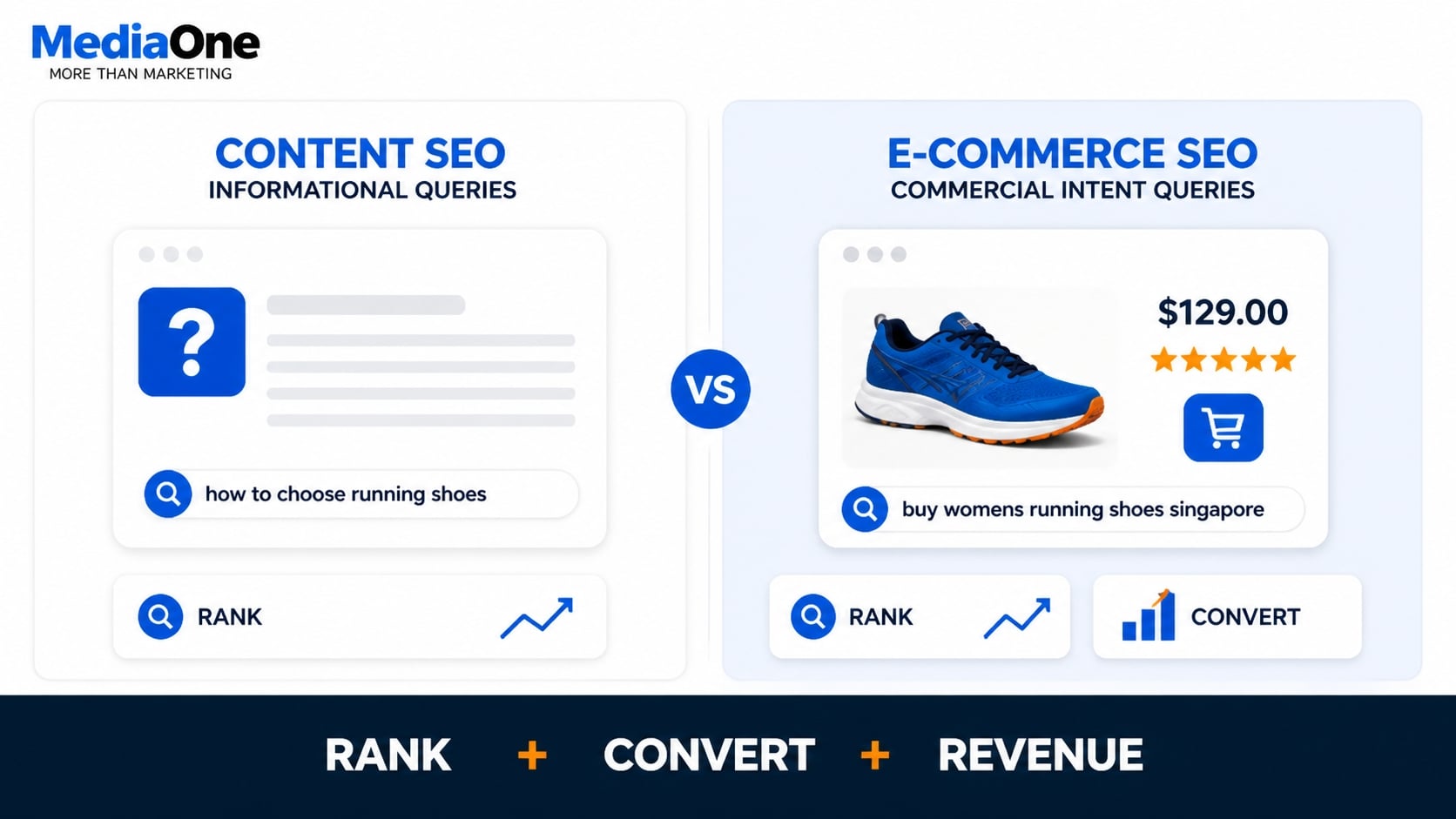
E-commerce SEO is the practice of optimising product pages, category pages, and navigational structures so that search engines rank them highly for commercial-intent queries. Users make these searches when they’re ready to compare, evaluate, or purchase: “women’s size 6 running shoes Singapore”, “best budget office chair under $200”, and “where to buy sustainable cotton T-shirts”.
E-commerce SEO differs from content SEO, which optimises blog posts and guides for informational queries, because it must address two specific problems. The page must rank well enough to drive traffic, but it must also convert that traffic into revenue. A page that ranks for an expensive, high-intent keyword but converts at a lower rate generates less revenue than one that ranks lower but converts at a higher rate. Conversion rates vary significantly by industry and intent, so testing and iteration are essential.
Why E-commerce Search Behaviour Differs
E-commerce searchers behave distinctly from general web users. They use highly specific product queries with built-in intent signals.
They search for product attributes: “women’s size 6”, “waterproof”, “under $80”. They use comparison modifiers: “vs”, “best”, “cheapest”, “alternatives to”. They often include location: “running shoes Singapore”, “sustainable fashion Australia”. They expect rapid load times, clear pricing, stock status, and trust signals (reviews, return policies, shipping information) to be visible on the page itself without extra clicks.
This behaviour requires structural and on-page optimisation that generic SEO frameworks tend to overlook. A general SEO best practice like “write long-form content” does not apply to a product detail page. Product descriptions should be scannable, benefit-focused, and action-oriented. Category pages need faceted filters, not essay-length introductions.
The Volume-to-Conversion Trade-off
High-volume product keywords often have low intent specificity and poor conversion rates.

A Singapore online retailer ranking for “shoes” generates thousands of monthly visitors but converts at a much lower rate because the query is too broad. The searcher might want running shoes, safety shoes, or formal shoes at various price points.
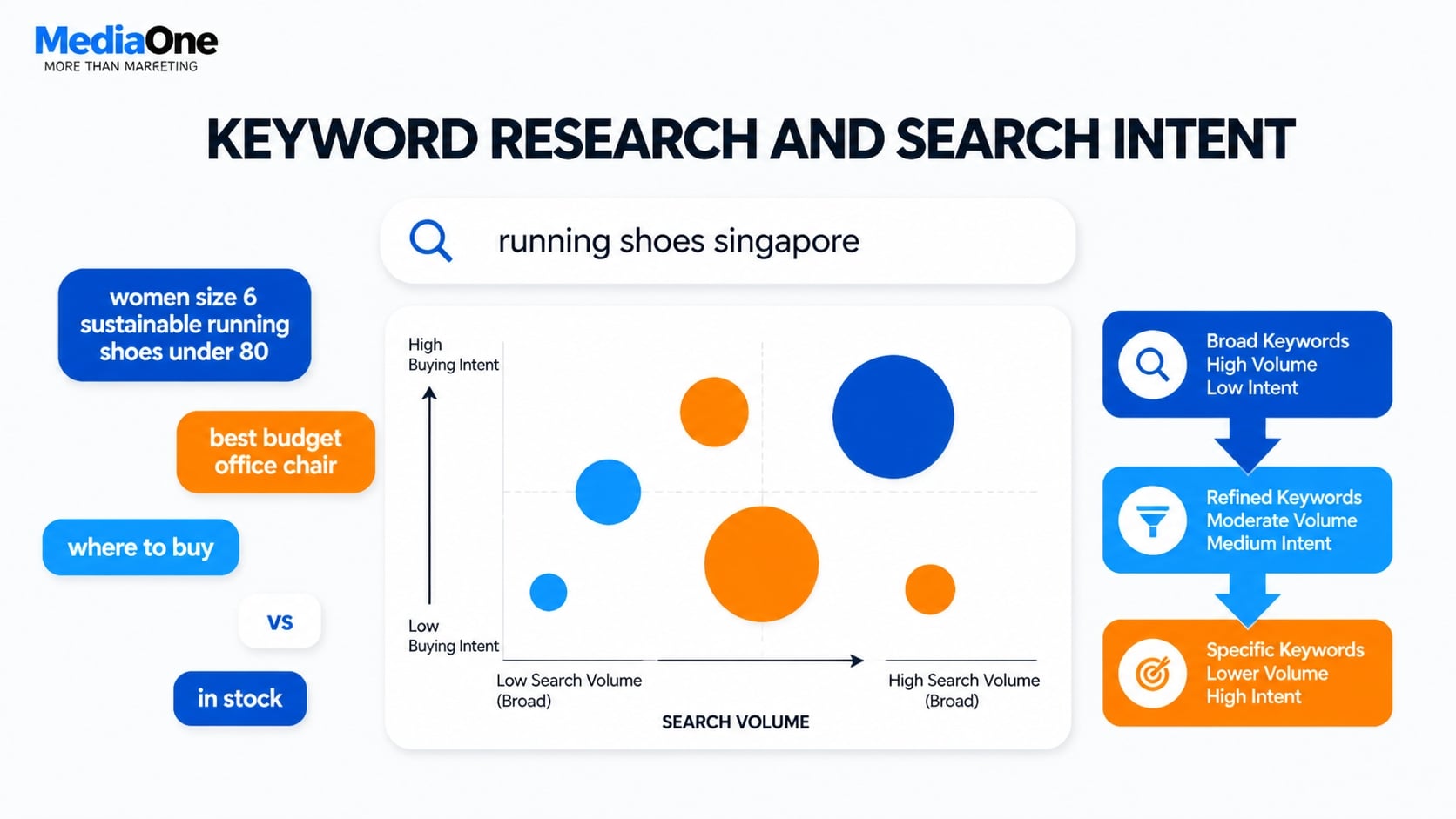
Ranking for “women’s size 6 sustainable running shoes under $80 Singapore” captures fewer searches, typically around 50 monthly, but those users are much closer to purchase. Conversion rates tend to be higher because the query signals exactly what the user wants.
E-commerce SEO practitioners must weigh keyword difficulty, search volume, and conversion probability. A keyword with 500 monthly searches and 40% keyword difficulty might deliver more revenue than one with 5,000 searches and 65% difficulty if your conversion rate on the former is higher.
This fundamental tension separates e-commerce SEO from pure content strategy.
Technical SEO Foundations for E-commerce Stores
Site Architecture and Product Crawlability
Search engines must navigate your product catalogue efficiently. A flat, well-organised URL hierarchy outperforms deeply nested ones.
Use this approach: domain.com/category/product-name.
A shoe retailer should structure URLs as example.com/running-shoes/womens-size-6-nike-air-max rather than example.com/footwear/athletic/mens/running/nike/air-max. Flat architectures allow Google to crawl more products within the same crawl budget. Google crawls within a given timeframe; efficient site structure maximises the number of product pages indexed.
- Implement XML sitemaps that list all product URLs.
- Prioritise high-converting products by updating them more frequently.
- Exclude low-stock or duplicate variant URLs from the sitemap to avoid wasting crawl budgets.
Use canonical tags to consolidate product variants onto a single URL. If the same T-shirt is available in blue, red, and green, use a canonical tag on the red and green pages pointing to blue:
link rel=”canonical” href=”https://example.com/product/tshirt-blue”
This consolidates ranking authority onto one URL instead of splitting it across three thin pages.
Page Speed and Core Web Vitals
Google’s ranking algorithm explicitly weights page experience metrics. Page speed influences rankings and directly impacts user experience and completion rates.
- Largest Contentful Paint (LCP) measures when the main product image loads. This refers to the time it takes for the largest visible element on the page to render. Aim for under 2.5 seconds. Use image compression (WebP format, lazy loading for below-the-fold content) and serve images from a content delivery network (CDN). Individual product images should not exceed 100 kilobytes.
- Cumulative Layout Shift (CLS) measures how much the page moves as it renders. This metric captures visual instability as page elements load. Prevent UI elements like filters, ratings, or “add to cart” buttons from sliding around as JavaScript loads. Set explicit widths and heights on image containers. Aim for a CLS below 0.1.
- Interaction to Next Paint (INP) measures responsiveness when users interact with buttons, dropdowns, or filters. Target under 200 milliseconds. Minimise render-blocking JavaScript and defer any non-critical code. A slow “add to cart” button reduces conversion rates and harms the user experience.
Use Google PageSpeed Insights and WebPageTest to diagnose problems. These tools identify specific bottlenecks, such as render-blocking CSS, uncompressed images, and slow third-party scripts, then suggest fixes.
Mobile-First Indexing and Responsive Design
Google crawls and ranks primarily using the mobile version of your site. If your mobile experience differs from desktop, Google indexes the mobile version.
Responsive design is essential because mobile-first indexing prioritises the mobile experience. Test that product filters, image galleries, reviews, checkout flows, and trust signals function correctly on phones. Mobile users tolerate slow loads and intrusive pop-ups far less than desktop users.
A specific e-commerce problem is pop-ups. A full-screen discount pop-up on mobile reduces conversion rate and signals negatively under Google’s page experience update. If you use pop-ups, make them closeable with one tap and show them only to returning visitors, not to first-time visitors.
Structured Data Markup (Schema)
Implement schema.org markup for three key elements:
- ProductSchema tells search engines the name, description, image, price, availability, and review rating.
- OfferSchema specifies price, currency, and stock status (in stock, out of stock, pre-order).
- AggregateRatingSchema communicates the star rating, number of reviews, and review count.
Correct schema implementation allows rich snippets to appear in search results: star ratings, price, and stock status. Pages with visible ratings and pricing in search results typically get higher visibility than pages without these elements.
Use Google’s Rich Results Test to validate your markup. Incorrect markup either doesn’t appear or triggers manual action penalties.
For Singapore-based e-commerce platforms, ensure product descriptions, pricing, and availability data are accurate and current. Additionally, ensure pricing, shipping, and return policies comply with the Consumer Protection (Fair Trading) Act.
Keyword Research and Search Intent Mapping for Product Pages
Identifying Commercial and Transactional Keywords
E-commerce keyword research begins by filtering for commercial intent. Use tools like Ahrefs, SEMrush, or MediaOne’s Digimetrics to identify keywords where the top-ranking pages are product listings or shopping results, not blog posts or informational pages. Note that these tools provide estimates; actual search volume and difficulty vary by region and market.
Look for commercial modifiers: “buy”, “price”, “review”, “best”, “where to buy”, “in stock”, “sale”, and “coupon”. Compare search volume against keyword difficulty. In e-commerce, aim for keywords with at least 100 monthly searches in your target market; anything lower won’t generate enough traffic.
Prioritise keywords with 20–50 difficulty if you are new to SEO, or 50–70 difficulty if your domain has existing authority.
Avoid low-intent keywords. “Shoes” has massive volume but poor conversion because intent is unclear. The searcher might want running shoes, formal shoes, or safety shoes at any price point. Avoid investing heavily in these keywords until you have established authority for more specific queries.
Long-Tail and Attribute-Based Queries
High-volume keywords rarely convert. Users searching “blue jeans” might buy or might be researching. Users searching “women’s high-waist blue jeans size 10 petite” are much closer to purchase.
Build a keyword map that includes product attributes: size, colour, material, brand, price range. Include use-case descriptors: “waterproof”, “lightweight”, “sustainable”, and “vegan”. Include comparison terms: “versus”, alternative product names, “best alternative to [competitor]”.
For a Singapore online fashion retailer, “best sustainable cotton T-shirts for work” captures far more qualified traffic than “T-shirts”. The long-tail keyword signals intent, attributes, and use case. Users clicking that search result land on a highly relevant page. Conversion rates tend to be higher than generic keywords.
Build a spreadsheet of 50–100 long-tail keywords for each product category. This becomes your content roadmap.
Competitor Keyword Gap Analysis
Identify keywords your competitors rank for, but you don’t. Use SEMrush or Ahrefs’ competitor analysis tools to pull top-ranking keywords for rival e-commerce sites in your niche.
Prioritise gaps where you have the product inventory to meet the query. If a competitor ranks for “affordable leather handbags Singapore” with a category page and you stock that inventory, that keyword represents an addressable opportunity. If you don’t stock that product type, skip it.
Look for keyword clusters: groups of related keywords that a single page or content piece could serve. For example, “women’s running shoes under $100”, “budget running shoes for women in Singapore”, and “cheap running trainers for women” all target the same audience. Create one strong page that targets all three variants using natural language variation.
Search Intent and Page Type Matching
Not all commercial keywords require a product detail page. Map queries to page types.
| Query | Search Intent (Why People Search) |
| Product-specific queries (“Nike Air Max 90 men’s”) | For product detail pages |
| Category or type queries (“running shoes under $100”) | For category pages with filters showing multiple options |
| Comparison queries (“Nike versus Adidas running shoes”) | Buying guides or comparison tables that link to product pages |
| Question-based queries (“how to choose running shoes”) | Need educational content that links to products |
Mismatched page types create friction. Ranking for “best budget running shoes” but landing the user on a single $120 shoe page reduces conversion rate. Instead, create a category filter page showing all running shoes under $100, or write a buying guide listing the top five options.
For Singapore audiences, localise the currency (SGD), language, and shipping terms. Include local payment methods, regional return policies, and local trust signals relevant to the market.
On-Page Optimisation for Product Pages
Title Tags and Meta Descriptions with Conversion Signals
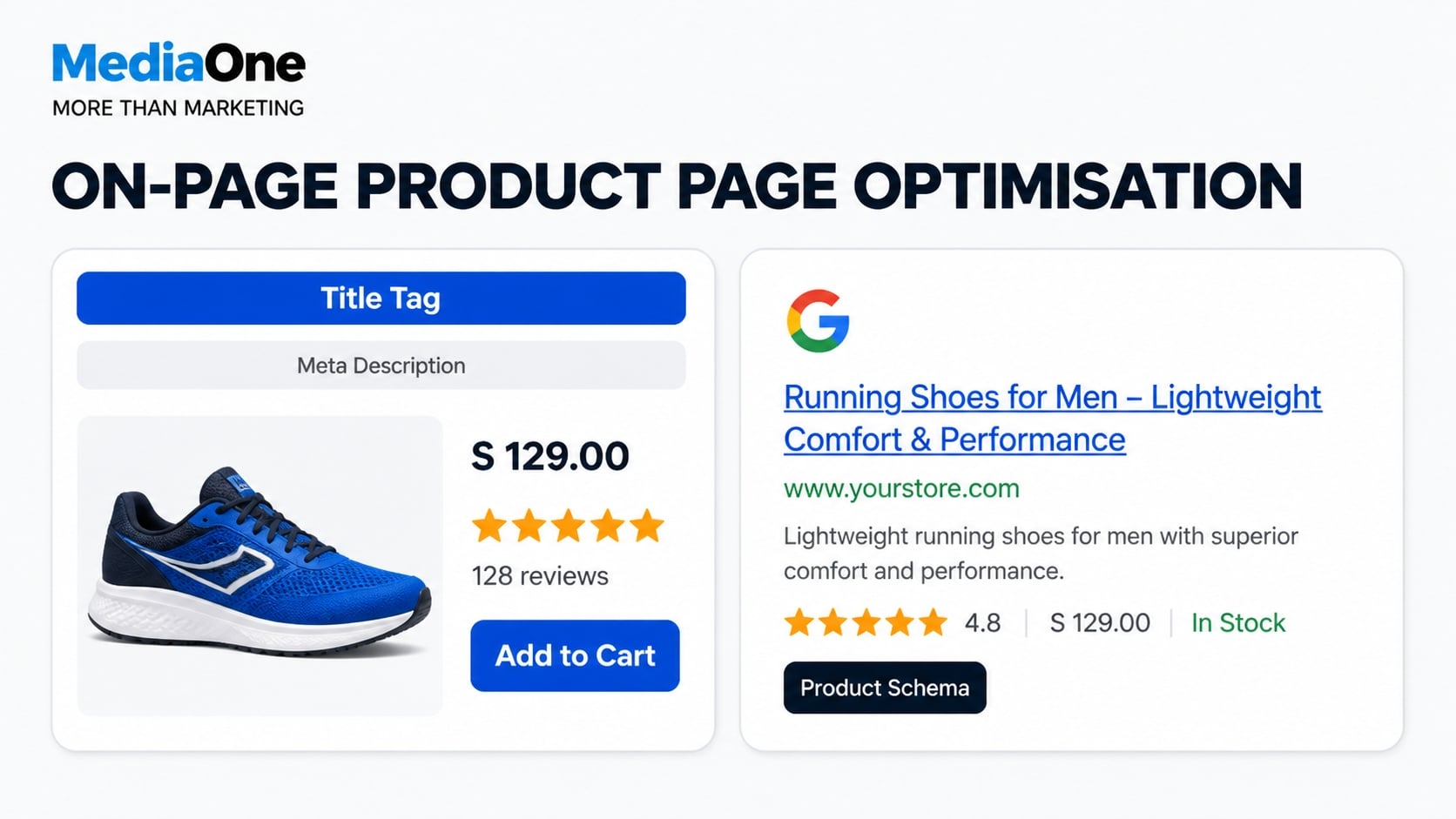
Your title tag is one of the most important on-page elements for a product page, because it shapes how the result appears in search and whether shoppers click. Google recommends making it descriptive and concise, and aiming for roughly 60 characters so it is less likely to be cut off. Include the main keyword, the product name and, where relevant, a benefit such as price or delivery.
Poor example: “Blue Cotton T-Shirt | MyStore”
Stronger example: “Men’s Organic Cotton T-Shirt, Navy, $34.99 | Free Delivery”
The stronger version includes the product type (keyword), colour, price, and shipping benefit. Users reading this description understand exactly what they are buying and why it merits a click. When targeting Singapore audiences, localise the currency to Singapore dollars and mention delivery terms that are relevant to the market.
Meta descriptions are about 155 characters and don’t directly influence rankings, but they strongly affect click-through rates. Include stock status, unique selling points, or discount signals.
Example: “Premium organic cotton tee, sustainably made. In stock. Free delivery on orders over $75.
Product Description Writing for Humans and Algorithms
Avoid copying the manufacturer’s copy. Write for the user first, then optimise for search algorithms.
A strong product description answers these core questions: What is the product? What problem does it solve? Who is it for? What are the key features and benefits, not just specifications? What sets it apart from alternatives?
Structure the description in three layers:
- Opening sentence. Lead with the primary keyword and main benefit. Example: This waterproof hiking boot keeps your feet dry on wet terrain and offers arch support for all-day comfort.
- Key features. Use bullet points for scannability. Include actual measurements, material composition, and weight. For clothing, add fabric percentages and care instructions. For outdoor gear, include weather ratings. Numbers are more trustworthy than vague claims.
- Use-case scenarios. Add two or three short phrases showing where and how someone would use this product. “Ideal for fell walking in the Lake District” or “Perfect for office wear under professional trousers” helps searchers visualise themselves using the product.
Aim for 150–300 words total. Use natural keyword variations. Repeat the primary keyword no more than two or three times per 100 words; otherwise the text reads as stuffed, which harms user experience and conversion rates.
Image Optimisation and Alt Text
Product images are both ranking signals and conversion drivers. Multiple, high-quality images improve user confidence and purchase intent.
Optimise filenames using descriptive, keyword-relevant names. Instead of “IMG_001.jpg”, use “womens-size-6-sustainable-running-shoes-blue.jpg”.
Write alt text that accurately describes the image and includes product attributes: “Women’s blue sustainable running shoe, size 6, side view.” Alt text helps Google Image Search and assistive technology users navigate your pages.
Compress file size without sacrificing quality; individual product images should not exceed 100KB each. Use modern formats like WebP for faster loading.
Include multiple angles (front, side, and back), lifestyle shots showing the product in use, and close-ups of key details such as stitching or materials. Google Image Search is a major traffic source for e-commerce sites; well-optimised images rank independently and drive conversions.
Handling Duplicate Content from Variants
Products available in multiple colours, sizes, or materials create a risk of duplicate content. Use canonical tags to consolidate variants and tell search engines which version should rank.
If you have separate pages for blue, red, and green T-shirts, set canonical tags on the red and green pages pointing to blue:
link rel=”canonical” href=”https://example.com/product/tshirt-blue”
This signals to search engines that the blue version is the primary page and should receive ranking authority. Incorrect implementation can harm rankings, so test thoroughly before deploying.
Alternatively, use parameterised URLs such as example.com/product/tshirt?colour=blue&size=m. Specify in Google Search Console that “colour” and “size” parameters create variations of the same page, not separate indexable pages.

Category Page Optimisation
Category pages often rank for high-volume, lower-intent keywords and serve as traffic entry points. Optimise them as unique pages, not thin aggregations of product listings.
Write a 150–200 word category introduction that answers these questions: What are these products? Why should someone buy one? What should they look for when choosing? This content should be unique per category and can rank independently in search results.
Include user-generated content or third-party reviews aggregated at the category level. Displaying “Average rating: 4.3 out of 5 across 2,400 reviews” builds trust signals that influence both rankings and conversion rates.
Use faceted filters such as size, price, colour, and brand with clean URLs that remain indexable. Avoid creating a separate indexed page for every filter combination; this creates thin content and wastes crawl budget (the number of pages Google crawls within a given timeframe).
Faceted navigation improves user experience but increases duplicate-content risk. Manage this with three techniques.
First, use robots.txt or meta robots tags to prevent the crawling of non-canonical filter combinations. Second, apply rel=”nofollow” to secondary filter URLs so link equity does not split across duplicate pages. Third, use parameter handling in Google Search Console to tell Google which parameters create separate pages and which do not.
Example: size=6&colour=blue and shoes? colour=blue&size=6 is the same page. Consolidate to one canonical version so Google does not treat them as duplicates.
Test your implementation using Google Search Console’s URL Inspection tool. Submit a filtered category page and verify that it is indexed correctly and maintains the proper relationship with the parent category.
Reviews, Ratings, and User-Generated Content
Impact of Reviews on Rankings and Conversion
Product reviews serve a dual purpose: improving search visibility and driving conversions.

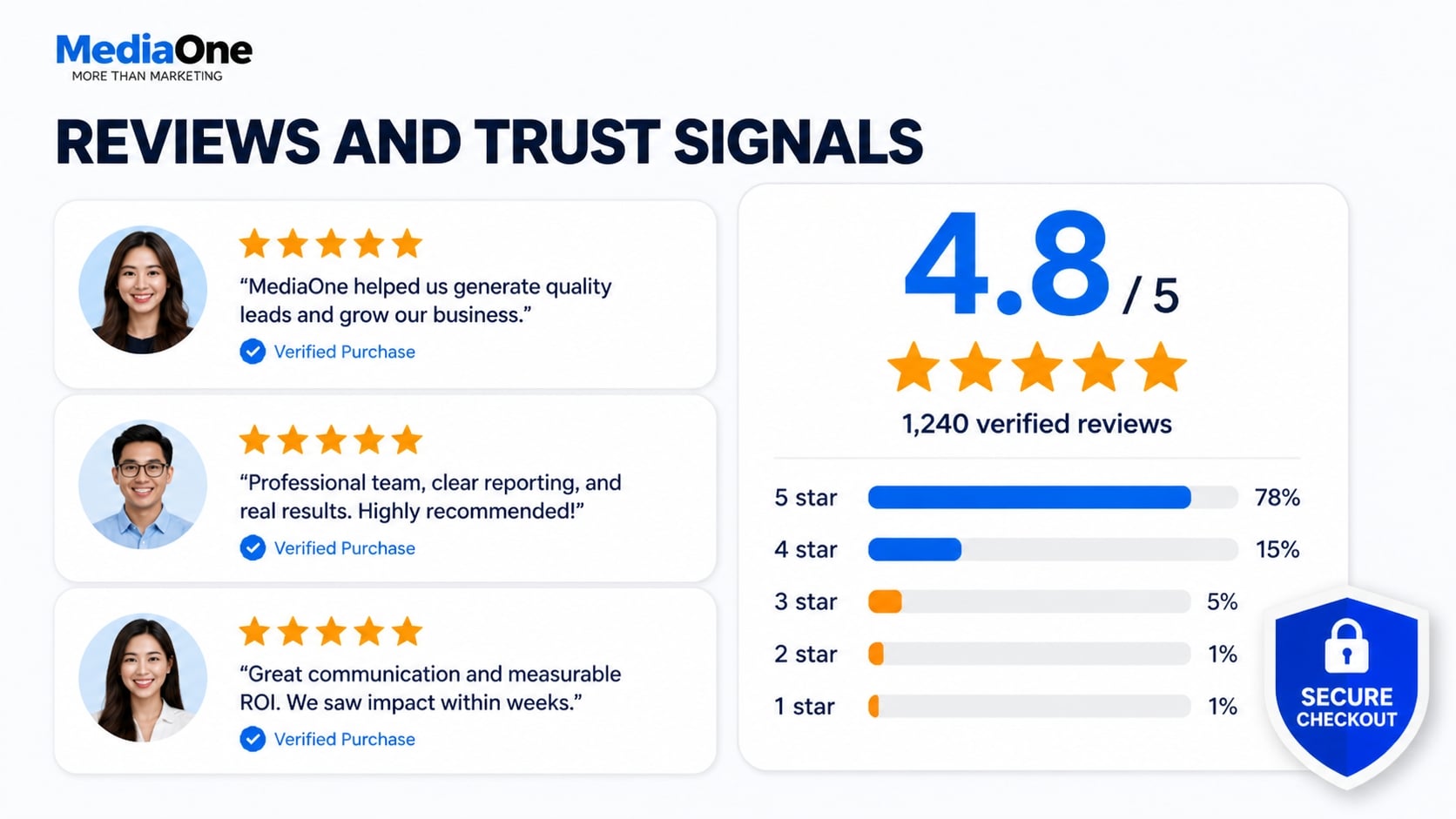
For search engines: review text is crawlable, keyword-rich content that adds length and topicality to product pages. Star ratings displayed as rich snippets in search results may improve visibility and click-through rates. Google’s helpful-content algorithm also favours pages with substantive, authentic reviews that demonstrate real user experience.

For conversion: consumer trust in product reviews is high. Pages with 20 or more reviews typically convert at higher rates than pages with fewer reviews. Encourage reviews immediately after purchase. Send a review request email three to five days after delivery, when the product is top-of-mind. Make the review form visible and mobile-friendly. Respond publicly to negative reviews; this approach shows engagement and gives you a chance to address concerns constructively.
Review Aggregation and Schema Implementation
Implement the AggregateRating schema correctly. This structured data markup tells Google the average star rating and number of reviews, allowing rich snippets to display in search results.
Display the aggregated rating and count prominently on the page. This data appears in search snippets and builds trust signals that influence purchase decisions.
Validate your markup using Google’s Rich Results Test tool. An incorrect schema may fail to appear in search results or trigger manual action penalties. Keep product descriptions, pricing, and availability data accurate and up to date.
When collecting and displaying reviews, comply with the Personal Data Protection Act (PDPA) if you operate in Singapore or collect data from Singapore users. Obtain explicit consent before collecting personal data through review forms, and provide clear privacy statements. Store review data securely and allow users to request access or deletion of their information.
Review Quantity and Freshness
Pages with 20 or more reviews tend to rank higher than pages with fewer reviews. However, review freshness matters equally. Recent reviews signal active engagement and ongoing customer satisfaction. Prioritise collecting reviews within the first 14 days after purchase.
Implement a review request workflow: send an immediate email after purchase confirmation, a follow-up three to five days after delivery, and a final reminder on day 10 if the user has not yet reviewed. Response rates typically range from 5 to 15 per cent depending on industry and product price point.
For new products with few reviews, feature customer reviews from pre-launch testing or early adopters. As you accumulate 20 or more reviews, the rating becomes both a ranking signal and a conversion lever.
Technical Architecture for Large Product Catalogues
Pagination and Infinite Scroll
Large product listings present crawlability challenges. Avoid infinite scroll for search engine optimisation; instead, use numbered pagination.
Use rel=”next” and rel=”prev” tags to signal to Google how pages relate:
link rel=”next” href=”https://example.com/shoes?page=2″
link rel=”prev” href=”https://example.com/shoes?page=1″
This tells Google that page 2 is a continuation of page 1, not a separate entity. Limit category pages to two or three levels deep; anything deeper should be accessed via filters, not hierarchical navigation.
Test pagination by submitting pages 2, 3, and 4 of category pages to Google Search Console and confirming they index whilst maintaining relationship signals.
Managing Stock Status and Crawl Budget
Out-of-stock products waste crawl budget. You have three options.
Set out-of-stock pages to noindex but keep them followed, which removes them from search results without breaking the site’s internal linking structure.
Alternatively, use the availability schema to signal stock status without de-indexing:
span itemprop=”availability” content=”https://schema.org/OutOfStock”Out of stock/span
Google will index the page but understand it is temporarily unavailable.
For stores with tens of thousands of SKUs, prioritise the crawl budget. Increase crawl frequency for high-converting products (top 10 per cent by revenue) and decrease it for low-margin or low-volume items. After 30 days out of stock, redirect dead product links to the relevant category page to avoid 404 errors that waste crawl budget.
Hreflang and Geo-Targeting
If you operate multiple regional stores covering different countries, use hreflang tags to specify which version serves which market.
link rel=”alternate” hreflang=”en-Singapore” href=”https://Singapore.example.com/product”
link rel=”alternate” hreflang=”en-GB” href=”https://Singapore.example.com/product”
link rel=”alternate” hreflang=”x-default” href=”https://example.com/product”
This prevents duplicate content penalties and ensures that users in each region see region-specific pricing and shipping information. For Singapore audiences, use hreflang=”en-Singapore” and localise pricing in Singapore Dollars, payment methods (such as PayNow and credit card), and delivery terms. Google respects hreflang signals and serves the correct regional version to users based on their location and language preferences.
Test hreflang implementation using Google Search Console’s Hreflang Audit tool. Incorrect implementation, such as missing reverse tags or inconsistent URLs, can trigger de-indexing.
Content Strategies Beyond Product Descriptions
Buying Guides and Comparison Content
Create supplementary content that ranks for high-intent comparison queries and drives traffic to product pages.
Examples include “How to Choose Running Shoes: A Buyer’s Guide” (links to five to ten relevant running shoe product pages) and “Nike vs Adidas: Which Running Shoe Brand Wins?” (side-by-side comparison with unique analysis). Include curated product roundups such as “Best Budget Running Shoes Under $100” with explanations of why each option suits different needs.
This content captures searchers earlier in the consideration phase. A user searching “how to choose running shoes” is not yet ready to buy a specific product; they are researching options. Your guide educates them, then links internally to relevant product pages, moving them closer to purchase intent.
This strategy also builds internal linking authority. Buying guides can earn external backlinks from blogs, media, and review sites, and those links pass authority back to product pages through internal links.
Questions and Answer Content
Implement a Q&A section on product pages. Capture frequent customer questions and answer them in 40–60 words.
Examples:
- What is the difference between this shoe’s gel cushioning and foam?
- Can I machine-wash this item?
- What is your return policy?
This content is crawlable and keyword-rich and improves dwell time on the page. Google’s People Also Ask feature pulls from this content; appearing there drives additional clicks from searchers with similar questions.
Use customer service data or product reviews to identify genuine questions. If multiple customers ask the same question, it merits a dedicated answer on the product page.
Ensure that your answer content, pricing information, and return policies comply with the Consumer Protection (Fair Trading) Act to build consumer trust and avoid misleading claims.
How-To and Use-Case Content
Create blog posts that demonstrate product use or solve problems your products address. Link back to product pages naturally within the content.
Examples: “Five Stretches to Prevent Running Injuries” (links to orthopaedic running shoes) or “How to Pack for a Weekend Hike” (links to backpack, hiking boots, weatherproof jacket).
These posts rank for informational queries and funnel users toward commercial intent. They don’t drive immediate conversions, but they warm up cold traffic and build topical authority in your niche.
Aim for one how-to or guide post per month. Link to three to five relevant products per post using natural anchor text, not aggressive sales language.
Link Building for E-commerce Sites
Product-Level Link Acquisition
Unlike SaaS or media sites, e-commerce sites struggle to earn backlinks to individual product pages. Most backlinks go to brand pages, category pages, or blog content. Building links directly to products requires different strategies than content-driven link acquisition.
Effective product-level link-building tactics include:
- Reach out to relevant product reviewers and influencers within your category. Send them your product with a clear request to review and link back. This works best when the reviewer has an existing audience and has reviewed similar products.
- Submit your products to industry awards and design competitions. Award sites and announcement pages typically link to winners, providing both authority and brand visibility.
- Launch newsjacking campaigns when your product category trends in the news. Pitch journalists and bloggers with a unique angle tied to current events.
- Build relationships with complementary brands. Cross-promote products through mutual backlinks where relevant.
Track which products earn inbound links. These become your strongest SEO performers and warrant continued investment in review generation, user-generated content, and marketing amplification.
Category-Level Authority Building
Category pages benefit significantly from authoritative backlinks. Unlike product pages, category pages function as hub content and attract links more readily.
Build category-level links through:
- Original research: publish a study on product preferences, market trends, or consumer behaviour within your category. Release as a press release and pitch relevant industry websites, journalists, and bloggers to link and cite your findings.
- Free competitive benchmarking tools: create an interactive tool (for example, “Compare Running Shoe Brands by Price, Weight, Comfort Ratings and Sustainability”). Promote across industry forums and product comparison sites.
- Expert contributions: write guest posts on industry blogs and publications. Link back to your category page as supporting evidence where contextually relevant.
- Customer review aggregation pages: compile and showcase verified reviews across your category, making your category page a destination for shoppers seeking consensus.
Internal links pass ranking authority throughout your site and establish a clear information hierarchy for both users and search engines.
Implement a structured internal linking strategy:
- From your homepage, link to 5–10 highest-priority category pages.
- From category pages, link to 10–15 top-performing product pages.
- From product pages, link to related products, parent category pages, and relevant buying guides using descriptive anchor text.
- From blog content and buying guides, link naturally to product pages using specific, descriptive anchor text (for example, “men’s sustainable running shoes” rather than “click here”).
Avoid excessive internal linking. Keep outbound internal links per page below 100 to preserve crawl efficiency and avoid diluting page authority. Use only descriptive anchor text that tells users and search engines what they will find.
Test your internal linking structure using Screaming Frog. This tool crawls your site and identifies internal link patterns, orphaned pages (pages with no internal links pointing to them), and anchor text distribution.
Measuring and Iterating on E-commerce SEO Performance
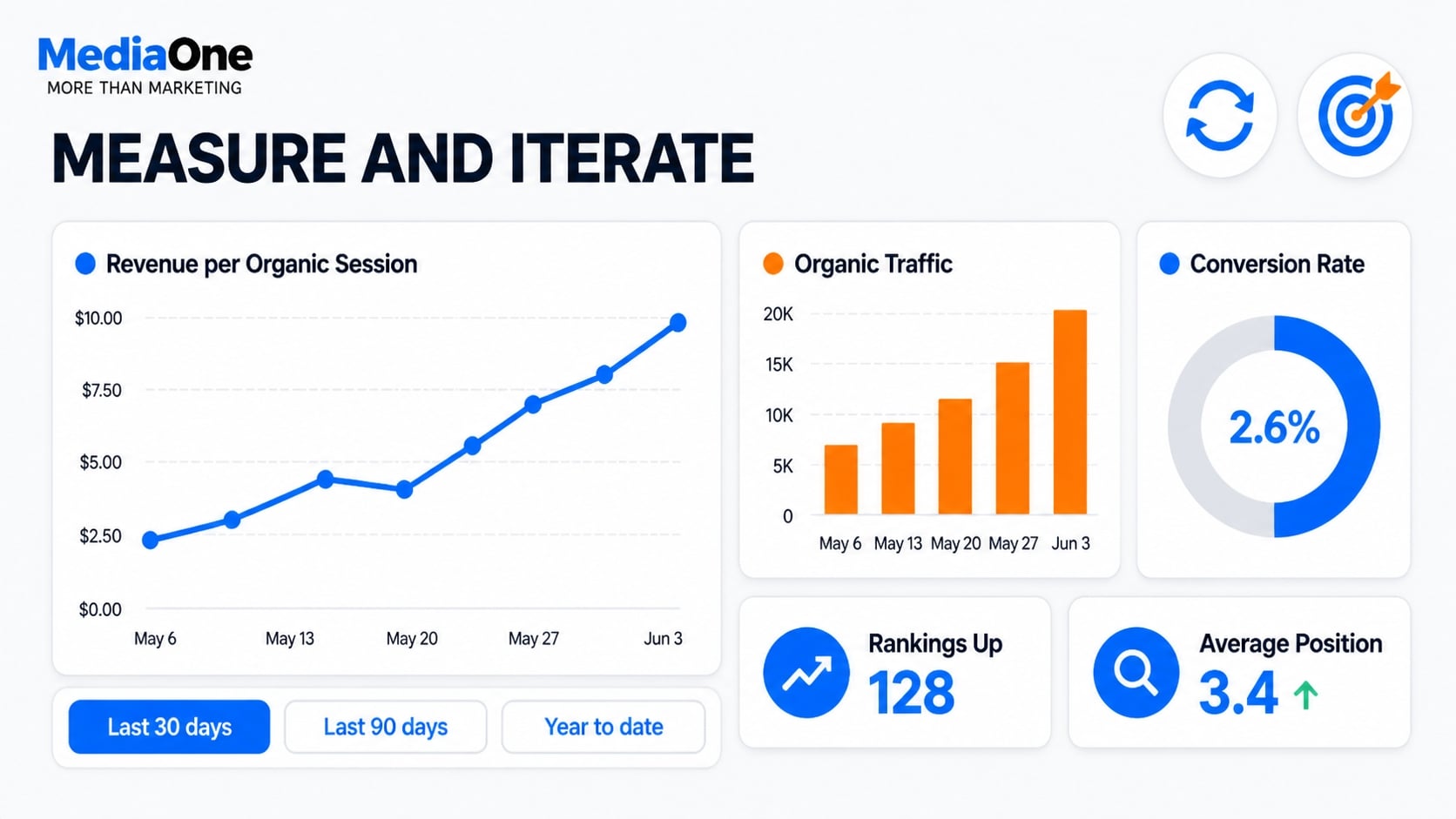
Key Performance Indicators Beyond Rankings
E-commerce SEO success extends far beyond keyword rankings.
Track these core metrics:
- Organic traffic to product pages: measure month-over-month growth in sessions and users.
- Conversion rate from organic traffic: compare to your paid search baseline. Organic conversion rates typically exceed paid cold traffic due to higher intent and brand exposure.
- Average order value from organic users: calculate revenue per session, not just traffic volume.
- Return rate: high-quality organic traffic should have lower return rates than paid traffic, indicating better-matched customer acquisition.
The ultimate performance metric is revenue per organic session, which directly ties SEO effort to business ROI.
Use Google Analytics 4 to segment organic traffic by product category, landing page type, and user behaviour. Set up conversion tracking that ties revenue back to the originating organic session so you understand which keywords and pages generate actual profit.
Keyword Tracking and Opportunity Analysis
Monitor keyword positions weekly or biweekly using your chosen SEO tools. Note that these tools provide estimated search volume and difficulty scores; actual search volume and ranking difficulty vary by region and search intent.
Prioritise optimisation efforts strategically:
- Keywords in positions 4–10 are closest to ranking in the top 3. Small optimisations often move these keywords higher with lower effort.
- Keywords with high search volume but low impressions indicate you are on the search results page but not ranking high enough to capture significant clicks. These are quick wins.
- Newly ranking keywords represent unexpected wins. Analyse which content patterns or topics led to these rankings, then replicate the approach for similar topics.
Set up automated alerts for keywords that drop from positions 1–3. Investigate the cause: algorithm update, competitor improvement, or content decay. Re-optimise or refresh the content immediately to recover your ranking.
Seasonal and Event-Based Optimisation
E-commerce demand follows predictable seasonal patterns. Plan your SEO calendar around peak seasons. 3 months in advance to allow enough time to optimise.
Key seasonal windows include:
- Q4 (November–December): gift-giving queries peak. Optimise for gift guides, gift bundles, and seasonal products.
- January: New Year’s resolution keywords spike. Prepare content around fitness, wellness, and self-improvement products.
- Spring and summer: seasonal clothing and outdoor equipment queries increase. Optimise for seasonal product pages and category landing pages.
- Black Friday and Cyber Monday: prepare discount-specific landing pages and product filters 4–6 weeks prior. Create dedicated content around deal keywords.
Maintain a forward-looking content calendar that accounts for these seasonal peaks.
Localisation and International E-commerce SEO
Multi-Region Site Structures
For retailers operating across multiple markets, choose an appropriate site structure. Each approach carries different SEO and technical trade-offs.
| Structure | Example | SEO Benefit | Trade-off |
|---|---|---|---|
| Subdomains | Singapore.example.com, de.example.com | Strong geo-targeting control via Search Console | Splits link authority across separate domains |
| Subdirectories | example.com/Singapore/, example.com/de/ | Consolidates authority across regions | Less precise geo-targeting control |
| Separate domains | example.com.sg, example.de | Most precise geo-targeting | Highest cost; splits authority significantly |
Subdirectories are generally easiest to manage for SEO because they consolidate ranking authority under a single domain. Subdomains offer better geo-targeting control but split authority. Separate domains are most expensive but work well when regional markets have distinct product inventories or pricing.
Always use hreflang tags to prevent duplicate content penalties across regional versions.
Localised Content and Pricing
Translation alone is insufficient. Localise comprehensively for each target market.
Localisation checklist:
- Display local currency (GBP, EUR, SGD for Singapore) and adjust pricing accordingly.
- Show market-specific shipping costs, return policies, and delivery timeframes.
- Offer local payment methods: different regions have strong preferences (Klarna and Apple Pay in Singapore; PayNow and bank transfer in Singapore).
- Use local imagery and terminology: “hiking in the Lake District” for Singapore audiences versus “hiking in the Swiss Alps” for Alpine regions.
- Ensure all product details (sizes, weight measurements, and colour names) reflect local standards.
Localised content ranks better and converts at higher rates than direct translations do.
Language and Search Behaviour Differences
Search behaviour varies significantly by language and region.
British English uses “trainers” for shoes, “lorry” for truck, and “postcode” for postal code. European users often search in their native language first, which means that German, French, and Dutch long-tail keywords require separate optimisation. Product categories show regional preferences: shoe sizing, clothing fit, and product features vary substantially across markets.
Conduct keyword research separately for each target market. Do not rely on global keyword lists or assume search behaviour transfers across regions.
Common E-commerce SEO Mistakes and How to Avoid Them
Thin Product Descriptions and Duplicate Manufacturer Copy
Copying product descriptions directly from manufacturers creates thin, duplicate content that doesn’t differentiate your store or rank competitively.
Write original descriptions for every product. Answer the questions shoppers actually ask about the product. Highlight benefits and unique attributes. Include relevant keywords naturally without forcing them. Aim for 150–300 unique words per product page. Differentiate your store through distinct voice, perspective, and value proposition.
Ensure all product information (pricing, availability, return policies) is accurate and current, as per Consumer Protection (Fair Trading) Act requirements for transparent commerce.
Ignoring Mobile User Experience
Optimising the desktop experience first while treating mobile as secondary results in slow load times, broken filters, dysfunctional sorting options, and checkout friction.
Adopt mobile-first design throughout. Test all functionality on actual mobile devices and slow network connections. Prioritise page speed on 3G and 4G networks where many users shop. Use Google’s Mobile-Friendly Test and PageSpeed Insights to identify and fix issues.
Indexing Every Product Variant Separately
Creating separate pages for every size, colour, and SKU dilutes ranking authority across thin, nearly-identical pages.
Consolidate variants onto a single product page. Use canonical tags to indicate the primary version. Display variants as dropdown menus or visual swatches. This concentrates ranking authority on a single page and improves user experience by reducing choice complexity and page bloat.
Neglecting Internal Linking
Treating product pages as isolated landing pages without cross-linking to related products, categories, or buying guides wastes significant ranking potential and fails to guide users toward related purchases.
Link strategically throughout your site. From category pages, link to top-performing products. From product pages, link to related items and relevant category pages. From buying guides and comparison content, link to recommended products using descriptive anchor text. Aim for 3–5 purposeful internal links per product page.
Review Data and PDPC Compliance
When collecting customer reviews and ratings, ensure compliance with the Personal Data Protection Act (PDPC). Collect customer consent before publishing reviews that include names or contact details. Provide clear privacy notices explaining how review data will be used and stored. Allow customers to request deletion of their review data.
Implement review schema markup accurately. Ensure all product descriptions, pricing, and availability data in schema markup match your live product pages to avoid misleading search results.
Turn E-commerce SEO Into Measurable Growth
E-commerce SEO works best when technical performance, search intent, product content, and user experience are treated as one connected strategy. From improving crawlability and Core Web Vitals to optimising product pages, managing variants, building internal links, and tracking revenue from organic search, each part contributes to how effectively your store attracts and converts the right shoppers.
The goal is not simply to rank more product pages. It is to make it easier for search engines to understand your catalogue and for customers to find, evaluate, and purchase the products they need.
If your e-commerce site is struggling with rankings, organic traffic, or conversions, start by identifying the technical and content gaps limiting its performance. A structured SEO strategy can help turn those gaps into opportunities for sustainable organic growth.
Ready to Improve Your E-commerce SEO?
Get in touch with MediaOne for a free SEO audit and quote. We can assess your website, identify opportunities, and help you build an e-commerce SEO strategy aligned with your business goals.
Contact MediaOne for a Free Audit & Quote
Frequently Asked Questions
How long does it typically take for a new product page to rank in Google?
Most new product pages take 4–12 weeks to acquire initial rankings if your e-commerce domain has already established authority. High-authority sites may rank within 2–4 weeks. The timeframe depends on keyword difficulty, competition intensity, and your site’s backlink profile. Pages without backlinks rank more slowly than pages with inbound links. Consistent optimisation and patience are essential.
Should I create optimised product pages for every item in my catalogue, or focus on bestsellers first?
Focus on bestsellers and high-margin products first. Create unique, thoroughly optimised pages for your top 50–100 products. For lower-volume SKUs, use product variants on category pages or consolidate them into variant dropdowns on primary product pages. This approach concentrates your crawl budget where conversion potential is highest.
Can I rank for commercial and transactional keywords without a large content budget?
Yes, if your technical foundation is solid and your inventory matches search intent. Product pages themselves function as content. Focus on on-page optimisation: write original descriptions, optimise images with descriptive alt text, and implement schema markup. Build a strong internal linking structure and encourage customer reviews. As you grow, invest in buying guides and comparison content that link back to products.
How do I prevent competitors from outranking me?
Competitive advantage comes from unique product inventory, better pricing, and superior user experience. Make your site faster, mobile-optimised, and easier to navigate than your competitors’. Create differentiated content: original descriptions, authentic customer reviews, and expert advice that competitors cannot easily copy. Target longer, less-competitive keywords where search intent aligns precisely with your inventory.
Should I invest in Google Shopping ads or focus on organic SEO?
Invest in both. Google Shopping ads capture immediate high-intent traffic and generate quick conversions. Organic SEO builds long-term, sustainable traffic at a lower cost-per-click over months and years. Ads and organic rankings reinforce each other, creating multiple touchpoints for shoppers. Allocate your budget to both channels to maximise visibility and conversions.
What is the single biggest e-commerce SEO mistake?
Neglecting technical SEO foundations. Poor page speed, broken XML sitemaps, unmanaged duplicate content from variants, and missing or incorrect schema markup cost far more rankings than weak copywriting ever could. First, audit your technical foundation. Fix crawlability, indexation, and Core Web Vitals before investing heavily in content creation.
How important are product reviews for e-commerce SEO?
Reviews serve dual purposes: they provide ranking signals (Google weighs review quantity, freshness, and average rating), and they improve conversion rate significantly. Pages with recent, numerous reviews rank higher and convert better. Encourage verified purchase reviews, respond to negative feedback professionally, and display star ratings prominently.
What e-commerce platform is best for SEO: Shopify, WooCommerce, or a custom build?
Each platform handles SEO differently. Shopify provides solid defaults for canonical tags, structured data, and mobile optimisation, but it offers less customisation. WooCommerce (self-hosted) gives you more control over technical SEO but requires active management. Custom builds offer maximum flexibility but demand significant technical expertise. Choose based on your technical skills and customisation needs. All platforms can rank well with the right optimisation.
How do I handle product variants (size, colour, SKU) without hurting my SEO?
Consolidate variants onto a single product page with dropdown menus or visual swatches. Use canonical tags to indicate the primary version. Avoid creating separate pages for each variant. This approach concentrates ranking authority and improves user experience.
Should I optimise for voice search differently in E-commerce?
Voice search queries tend to be longer and more conversational. Target question-based keywords (for example, “what are the best waterproof running shoes for women?”). Write FAQ sections answering common product questions. Use natural language in product descriptions. Ensure your site loads quickly and displays well on mobile, as voice searches are predominantly mobile-based.
How do I measure ROI from e-commerce SEO?
Track revenue per organic session in Google Analytics 4. Compare the organic conversion rate to the paid search baseline. Calculate customer lifetime value for organic customers. Measure organic traffic growth month-over-month. The ultimate metric is incremental revenue attributed to organic search, not just traffic volume or rankings.
How often should I update product descriptions for SEO?
Update descriptions when product features change, when you add new customer reviews, or when you identify ranking opportunities for new keywords. Refreshing evergreen descriptions every 6–12 months signals freshness to search engines. Always prioritise accuracy: ensure pricing, availability, and specifications remain current.