Technical SEO can feel overwhelming, especially as algorithms and AI features continue to evolve. What worked a few years ago might not work today. Still, one thing remains essential: your XML sitemap.
Think of your website as a massive library. Without a catalogue, even the most enthusiastic librarian (Googlebot) would get lost trying to find your best books. An XML sitemap is a catalogue. It’s a roadmap that tells search engines exactly where your content is, when it was last updated, and how important it is relative to other pages.
In 2026, search has changed. With AI-driven search and smarter crawlers, having a clean, optimised sitemap is now a must-have, not just a nice-to-have.
If you want your site to show up in search results, a solid sitemap is essential. Whether you have a small blog or a large e-commerce site, this guide covers what you need to know to get your sitemap right this year.
What is an XML Sitemap?
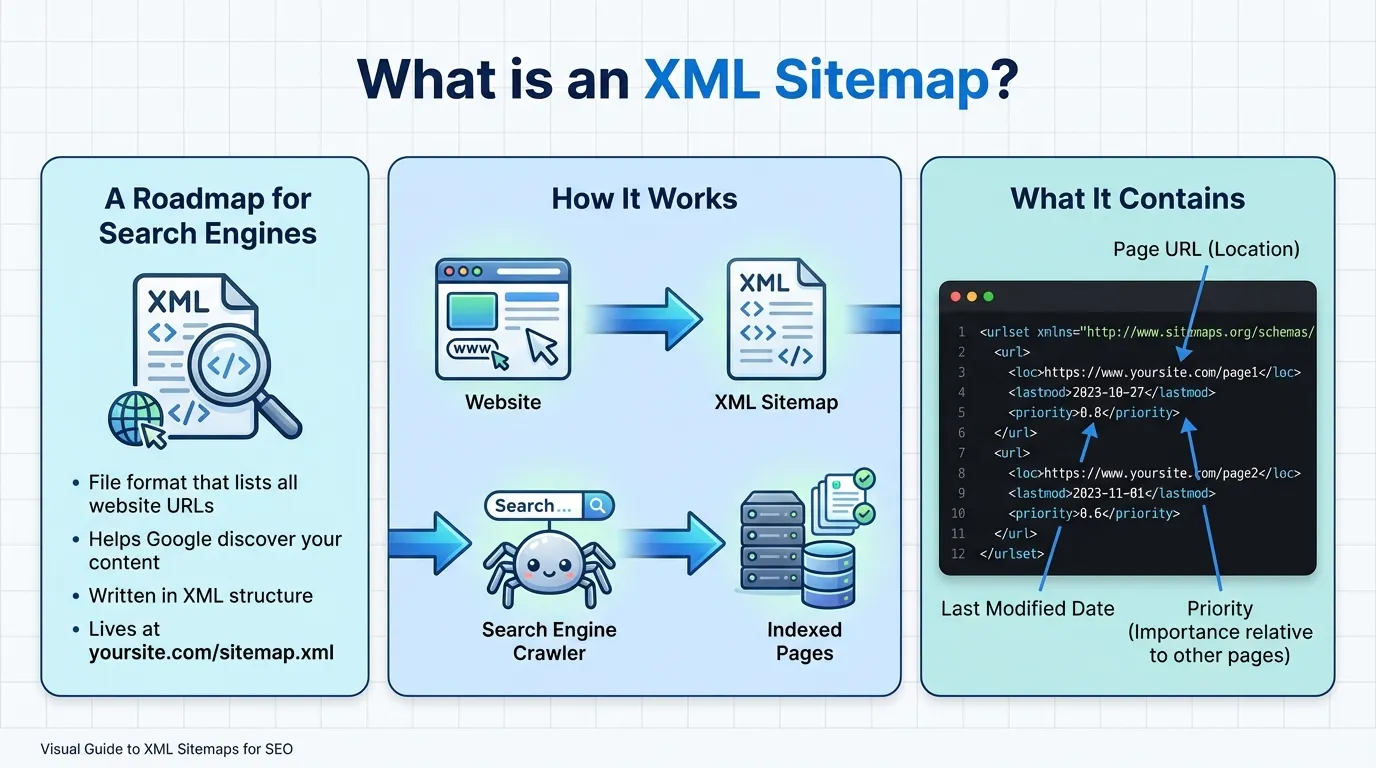
An XML sitemap is a file on your website that works like a roadmap for search engines. It lists your key pages, posts, videos, and other content, along with details such as when each was last updated and its relative importance.
Unlike a human-readable HTML sitemap, an XML sitemap is designed for search engines such as Google, Bing, and DuckDuckGo.
The main goal is to help search engines quickly find and index your content so none of your important pages are missed. This is especially helpful for large sites, sites with complex navigation, or new websites that don’t yet have many links.
Why XML Sitemaps Matter More Than Ever in 2026

You might be wondering, “Are sitemaps really still necessary? Isn’t Google smart enough to find my pages on its own?”
Google is smart, but depending only on its ability to find your pages is risky.
With millions of new pages going live every day, your content can easily get lost without a clear sitemap.
Here’s why having an optimised XML sitemap matters more than ever:
- Crawl Budget Efficiency: Search engines don’t have infinite resources. They allocate a specific “crawl budget” to your site. A sitemap helps them spend that budget wisely, focusing on your most essential pages rather than getting stuck in loops or low-value archives.
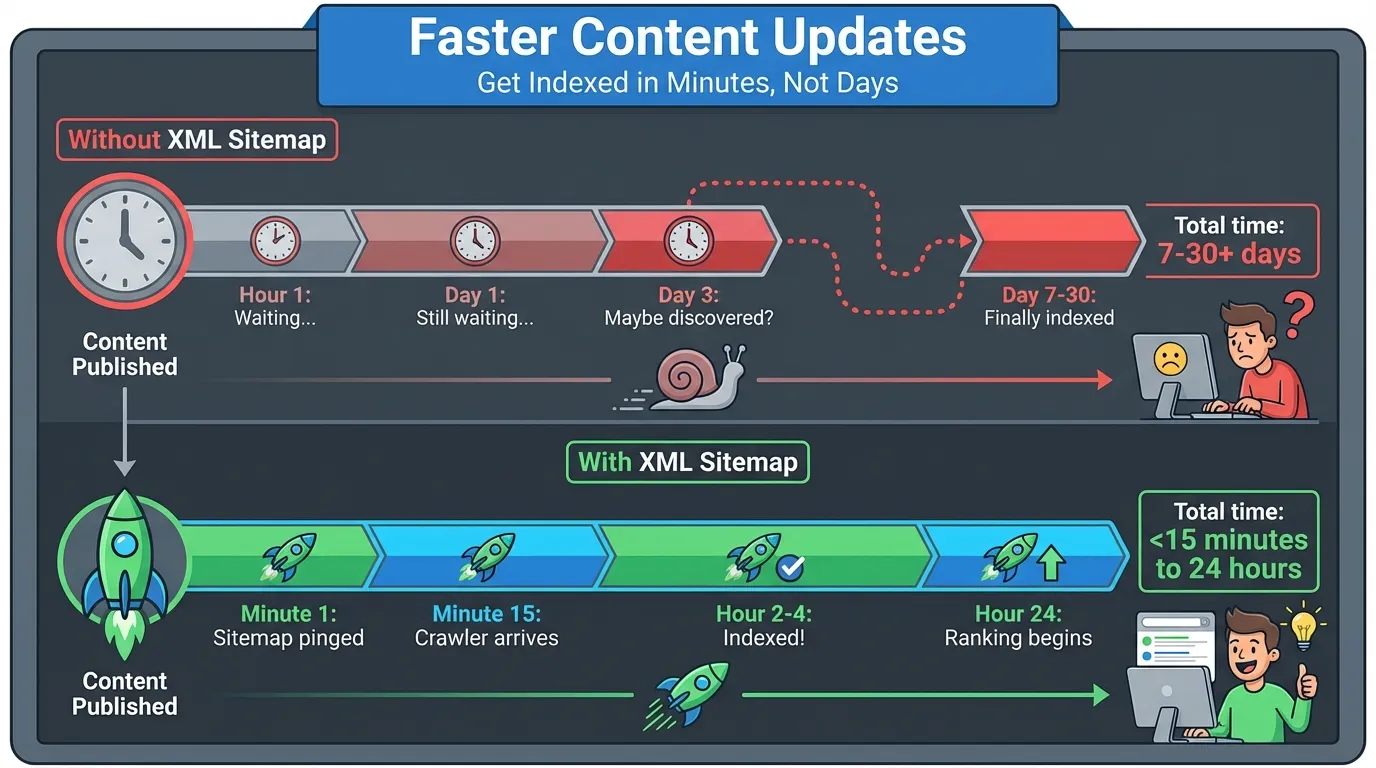
- Faster Indexing for New Content: In the age of real-time information, speed is currency. Sitemaps let you notify search engines immediately when you publish or update content, drastically reducing the time it takes for your content to appear in search results.
- AI Overview Optimisation: With the rise of AI-generated answers in search, structured data and clear site architecture are critical. Sitemaps provide a clean structure that AI models need to understand the relationships between your pages.
- Handling Orphan Pages: It’s easy for pages to become isolated (orphaned) when no internal links are pointing to them. A sitemap ensures these pages are still discoverable.
If you are serious about your online visibility, partnering with a reputable digital marketing company can help you navigate these technical complexities effectively.
The Core Benefits of Sitemap SEO
A strong sitemap strategy is more than a technical detail, it can directly impact your results. In 2026, with AI and crawl efficiency shaping success, the benefits of sitemap SEO are clear.
1. Improved Organic Visibility
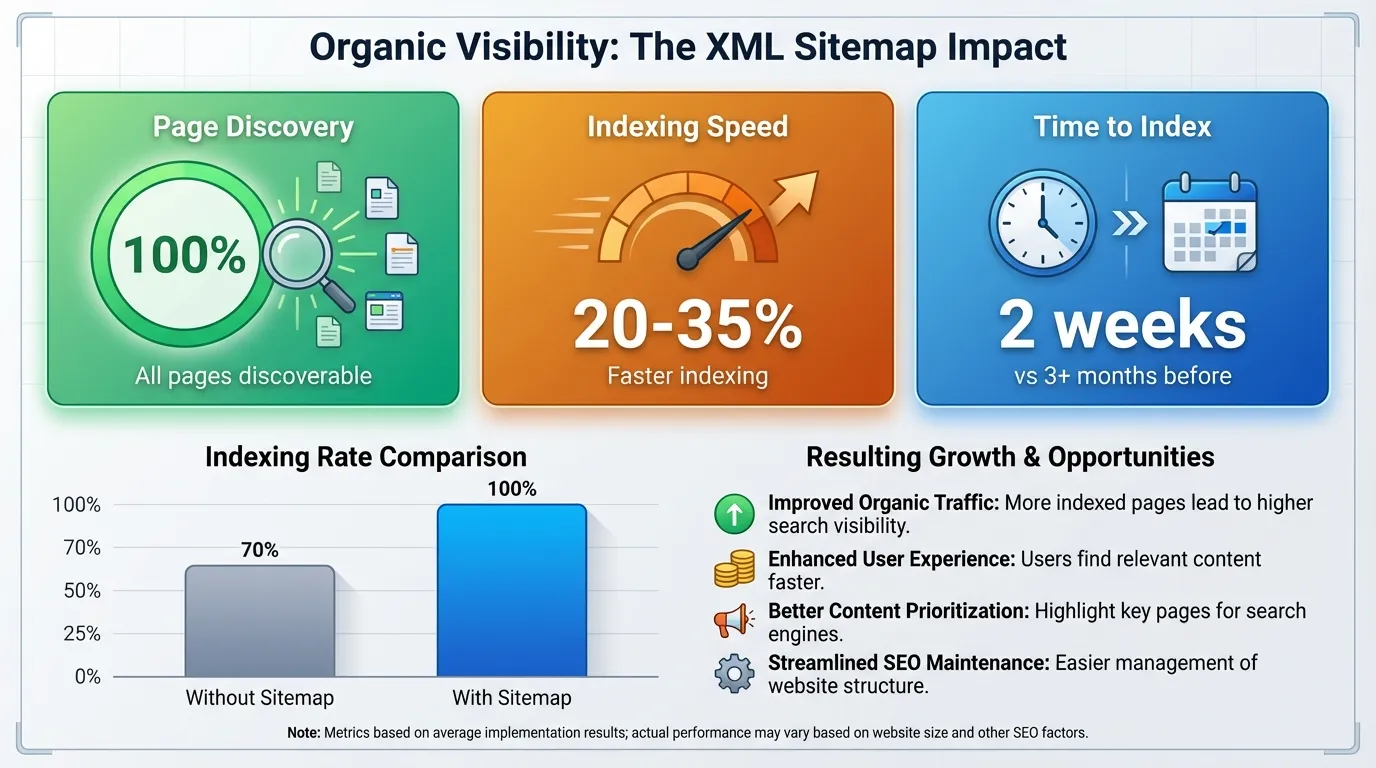
If Google can’t find a page, it can’t rank it. Internal links help, but sitemaps give search engines a direct list of your important pages, making sure nothing gets missed.
Recent data from enterprise-level audits suggests that sites with optimised sitemaps experience 20-35% faster indexing of new content than those relying solely on discovery crawling.
This works because you’re telling Google exactly which URLs to crawl, so it doesn’t waste time on things like session IDs or duplicate pages.
Consider a real-world scenario: An e-commerce site launches 10,000 new product pages for a seasonal sale. Without a sitemap, these pages might sit as “orphans” deep within the site architecture, waiting weeks to be discovered. With a correctly submitted sitemap, Googlebot receives an immediate signal.
We have seen cases where Product X appeared in search results within 48 hours of sitemap submission, generating 500+ monthly visits that would have otherwise been lost revenue.
2. Better User Experience (Indirectly)

Even though an XML sitemap is for search engines, building and updating one helps you review your site’s structure, which usually leads to a better experience for your visitors.
To create a clean sitemap, you must perform an audit process:
- Identify all canonical URLs.
- Check HTTP response codes (200 OK vs. 404 or 5xx).
- Find and fix redirect chains.
- Discover broken links.
During this process, you might find hidden issues in your site’s foundation. For example, you could discover that important category pages are redirecting through several steps, slowing things down for users.
Or you might discover 404 errors on pages you thought were live. A recent mini case study revealed that a client discovered 127 broken internal links during a sitemap audit.
Fixing these issues not only cleaned up the sitemap but also improved average page load time by almost a second, which is important for both user experience and SEO.
3. Enhanced Media Discovery
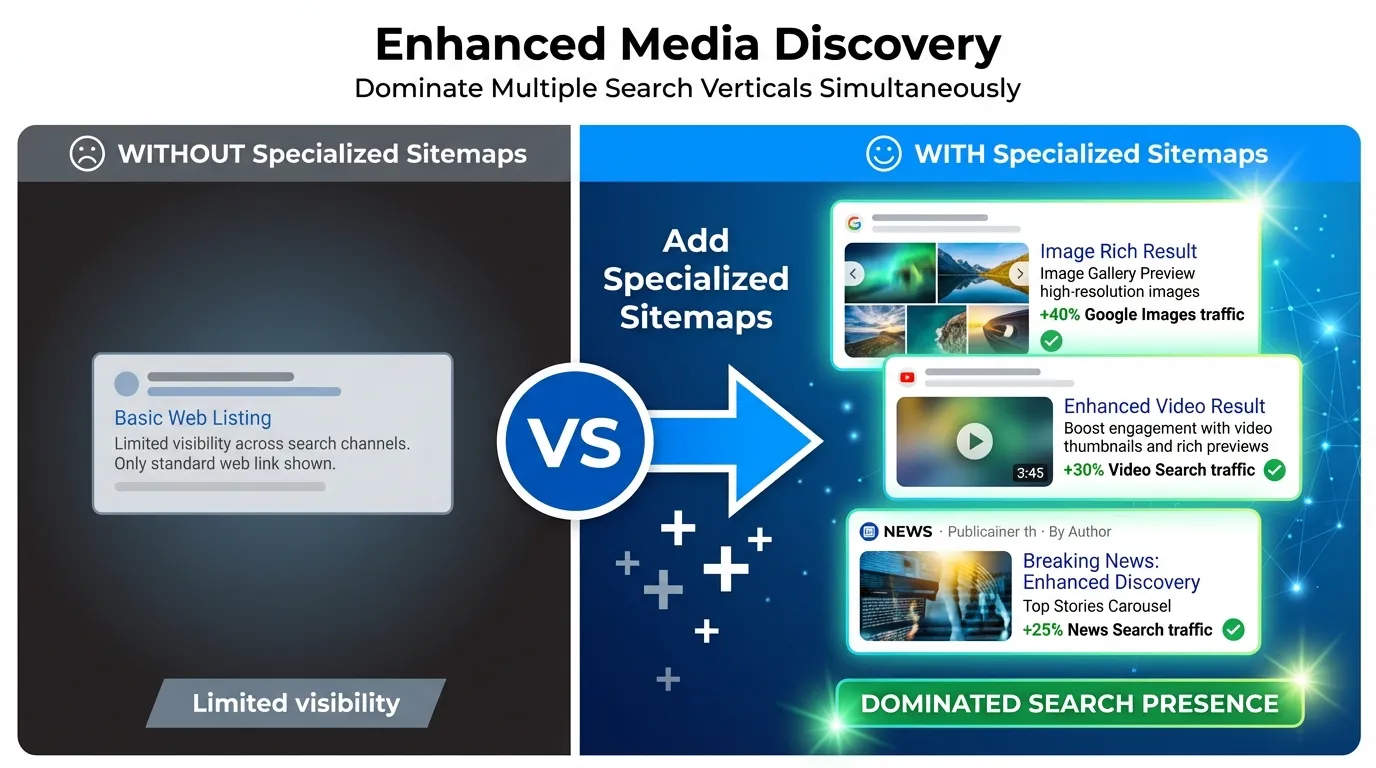
Search in 2026 is about more than just text links. People search using images, videos, and news. Specialised sitemaps help you show up in these areas, which can make up a big part of your Google traffic.
- Image Sitemaps: Essential for e-commerce. By submitting image sitemaps with proper title and caption metadata, you help Google understand the context of your product photos. One fashion retailer reported a 40% increase in Google Images traffic after implementing a dedicated image sitemap extension.
- Video Sitemaps: These let you set the video thumbnail, duration, and description. This helps you get rich results like video carousels and featured snippets, which usually get more clicks than regular text links.
- News Sitemaps: If you publish news, this is a must. It tells Google News your articles are fresh, so they get picked up as soon as they go live.
4. Detailed Reporting & Diagnostics
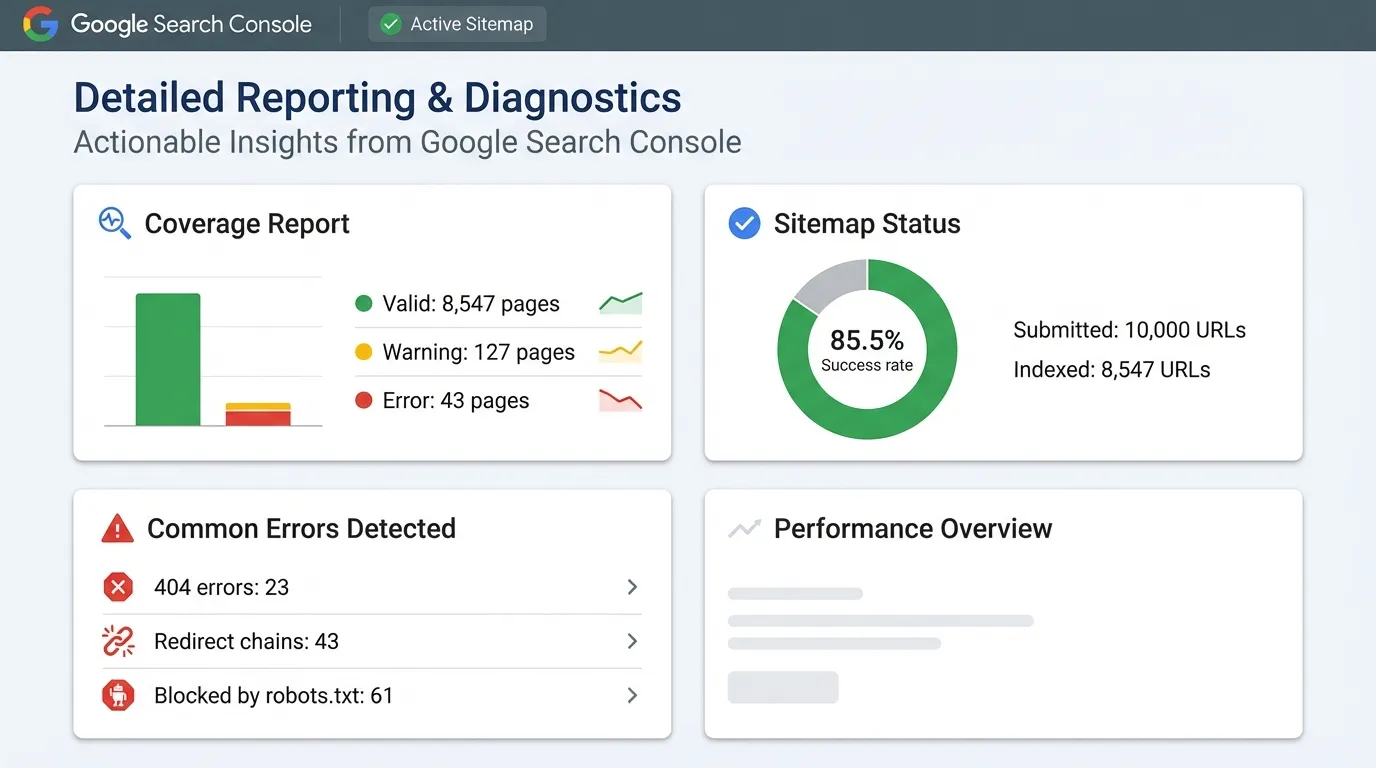
A significant benefit of sitemap SEO is the feedback you get from Google Search Console. When you submit a sitemap, you can see detailed reports showing how Google sees your pages.
You can filter reports by your submitted sitemaps, making it easier to spot and fix important errors right away:
- “Submitted URL not found (404)”: You are telling Google to index a broken page.
- “Submitted URL marked ‘noindex'”: You are sending conflicting signals (index this, but don’t index this).
- “Submitted URL seems to be a Soft 404”: Your content is too thin or irrelevant.
These insights help you make better decisions. For example, if you see many pages marked as ‘Discovered – currently not indexed,’ it means Google found them but doesn’t consider them valuable yet. This is a sign to improve your internal links or content quality.
5. Competitive Advantage
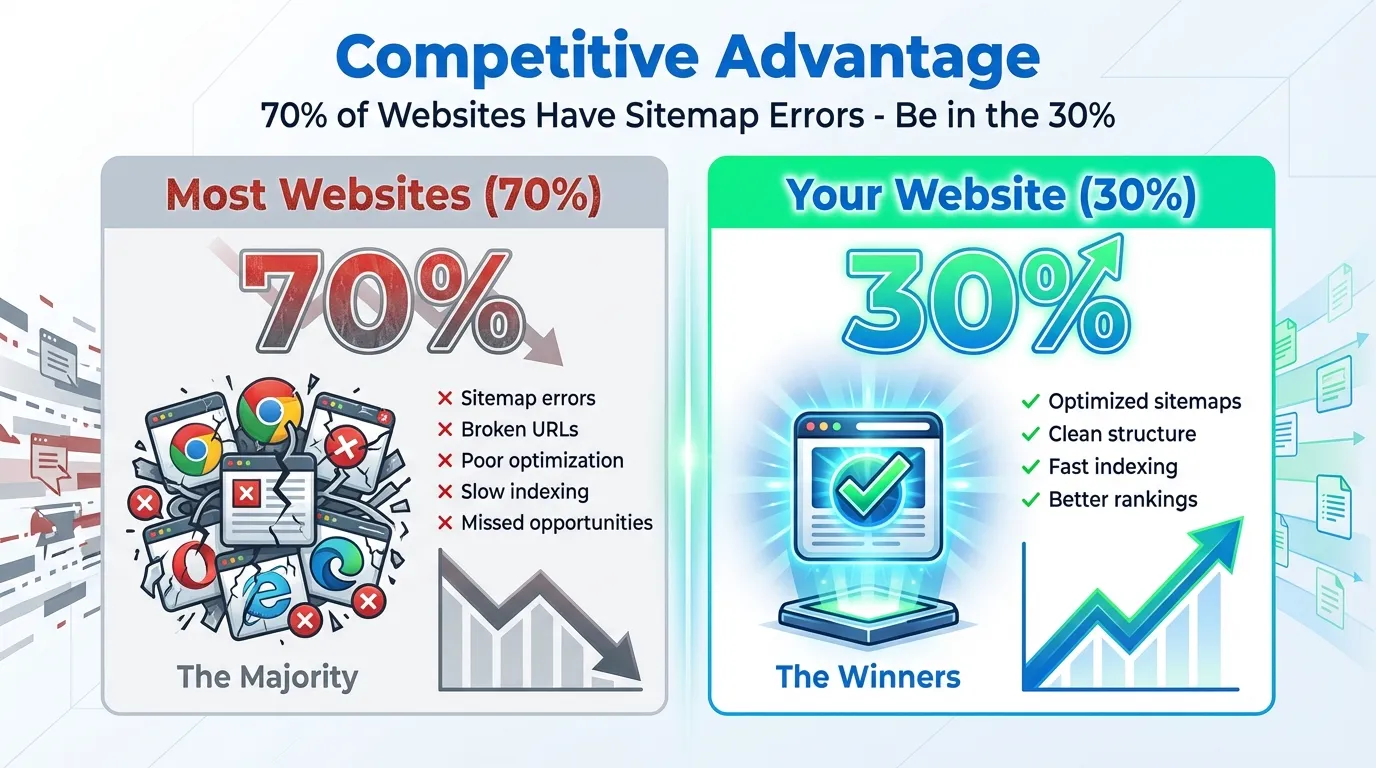
Many websites still have sitemap errors, from broken links to outdated URLs. Keeping your sitemap clean and error-free signals to Google that your site is well-maintained and trustworthy.
In competitive industries, having a clean sitemap can give you the edge. If two sites have similar content, the one that’s easier for search engines to crawl often comes out on top.
A clean sitemap can help your pages get indexed for important keywords before your competitors.
6. Mobile-First Indexing Support

With Google’s index being mobile-first, the crawler that matters most is the smartphone bot. Sitemaps help ensure that your mobile URLs (if separate) or your responsive pages are properly queued for mobile crawling.
If your site uses complex JavaScript menus that don’t work well on mobile, search engines might miss some pages. An XML sitemap gives mobile crawlers a direct list of URLs, so your mobile visibility doesn’t suffer.
7. Faster Content Updates
For news sites, blogs, and e-commerce stores, keeping content fresh is key. The <lastmod> tag in your sitemap tells Google when a page was last updated. Make sure to update this tag whenever you change the page’s content so Google knows to recrawl it.
We’ve seen news sites get articles indexed in under 15 minutes after updating their sitemap, compared to hours or days without it. For e-commerce, this means out-of-stock products disappear from search faster and restocked items show up right away.
XML Sitemap Best Practices: 12 Actionable Tips for 2026
Ready to improve your sitemap? Here are the best practices to follow this year.
1. Include Only “Indexable” Pages
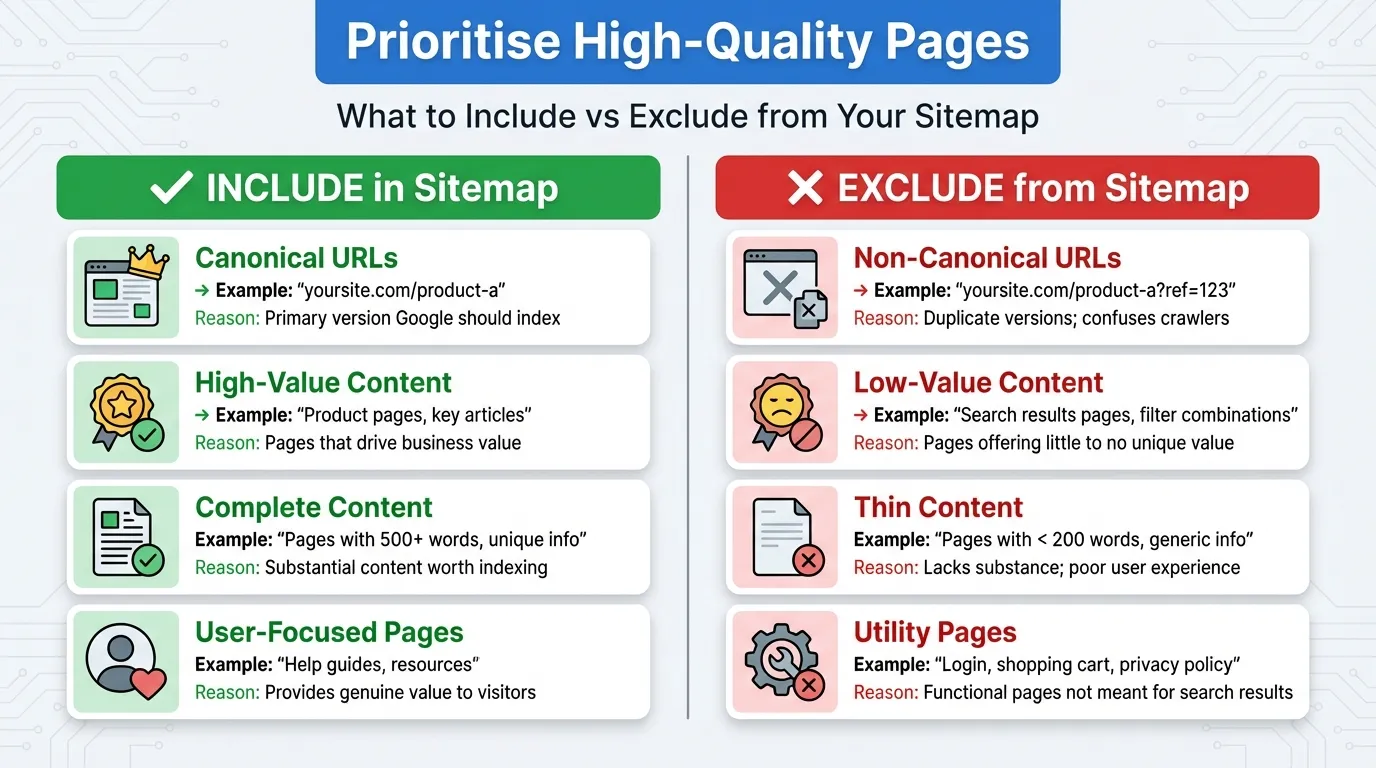
This is the golden rule of sitemap SEO: only include URLs you actually want search engines to show in results. Exclude:
- Pages with noindex tags
- Redirected URLs (301, 302, etc.)
- 404 or broken pages
- Canonicalised pages (URLs that point to another “master” version)
- Paginated pages, unless they provide unique content
- Utility pages like carts, wishlists, login forms, or admin panels
Example:
- Include: https://example.com/blog/seo-tips-2026
- Exclude: https://example.com/login, https://example.com/cart, https://example.com/old-page-404
Pros:
- Focuses on the crawl budget on valuable pages.
- Reduces risk of duplicate content or indexing low-value pages.
Cons:
- Requires ongoing maintenance; a new “noindex” page could accidentally end up in the sitemap.
- Might exclude pages that are borderline valuable but temporarily marked noindex.
Including unnecessary URLs can confuse search engines, waste crawl budget, and weaken the SEO value of your key pages.
2. Use Dynamic Sitemaps
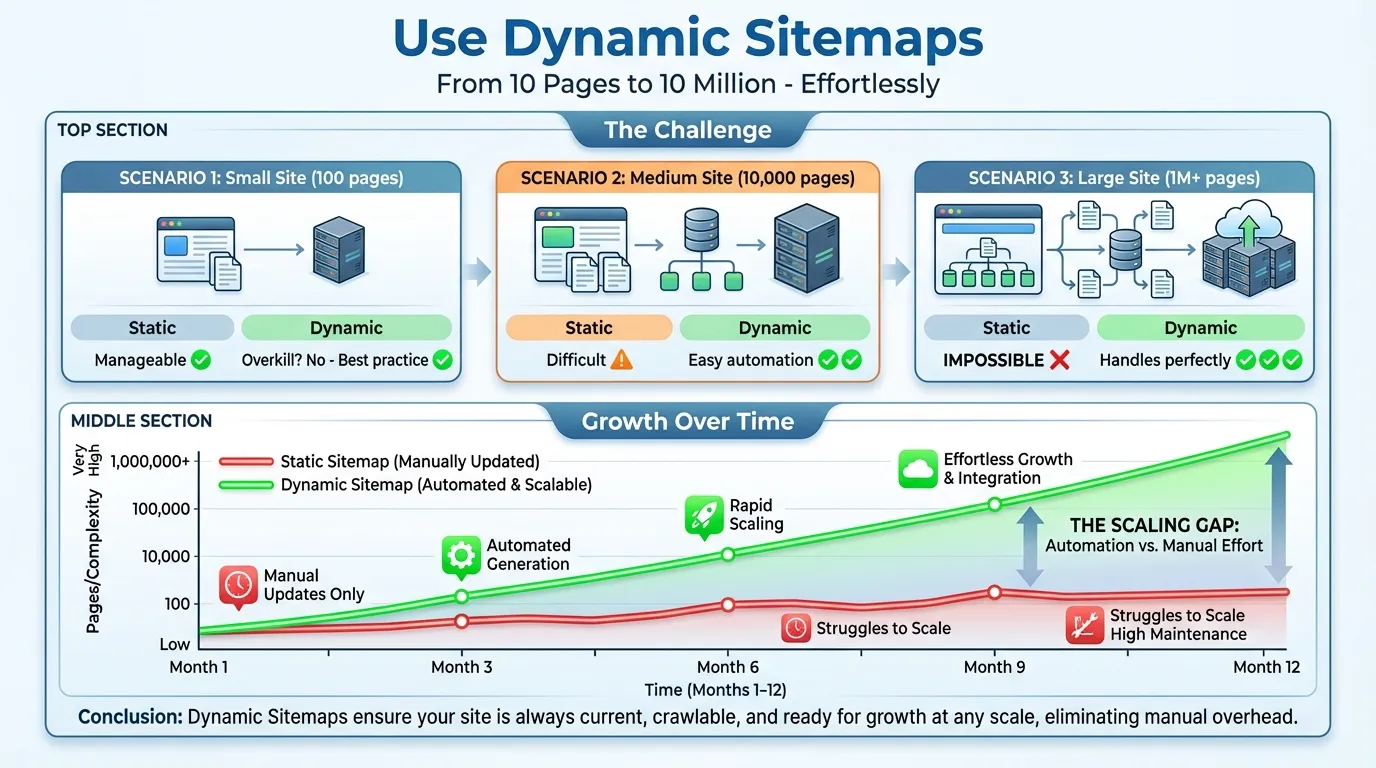
You no longer need to upload a static sitemap file by hand. In 2026, your sitemap should update automatically whenever you add, change, or remove a page.
- CMS Users: Platforms like WordPress, Shopify, or Webflow can generate dynamic sitemaps via plugins or native settings.
- Custom Sites: Developers should implement a script that regenerates the sitemap in real-time or periodically, ensuring search engines always see the latest version.
Example:
- WordPress: Yoast SEO plugin auto-updates the sitemap when a new post is published.
- Custom site: A cron job regenerates sitemap.xml every night to reflect new products.
Pros:
- Always up-to-date without manual intervention.
- Reduces errors caused by forgotten sitemap updates.
Cons:
- Requires a CMS plugin or developer setup.
- Dynamic sitemaps can be buggy if your CMS generates invalid URLs.
If your site is custom-built, ask your developers to set up an auto-updating sitemap.
3. Structure with Sitemap Indices
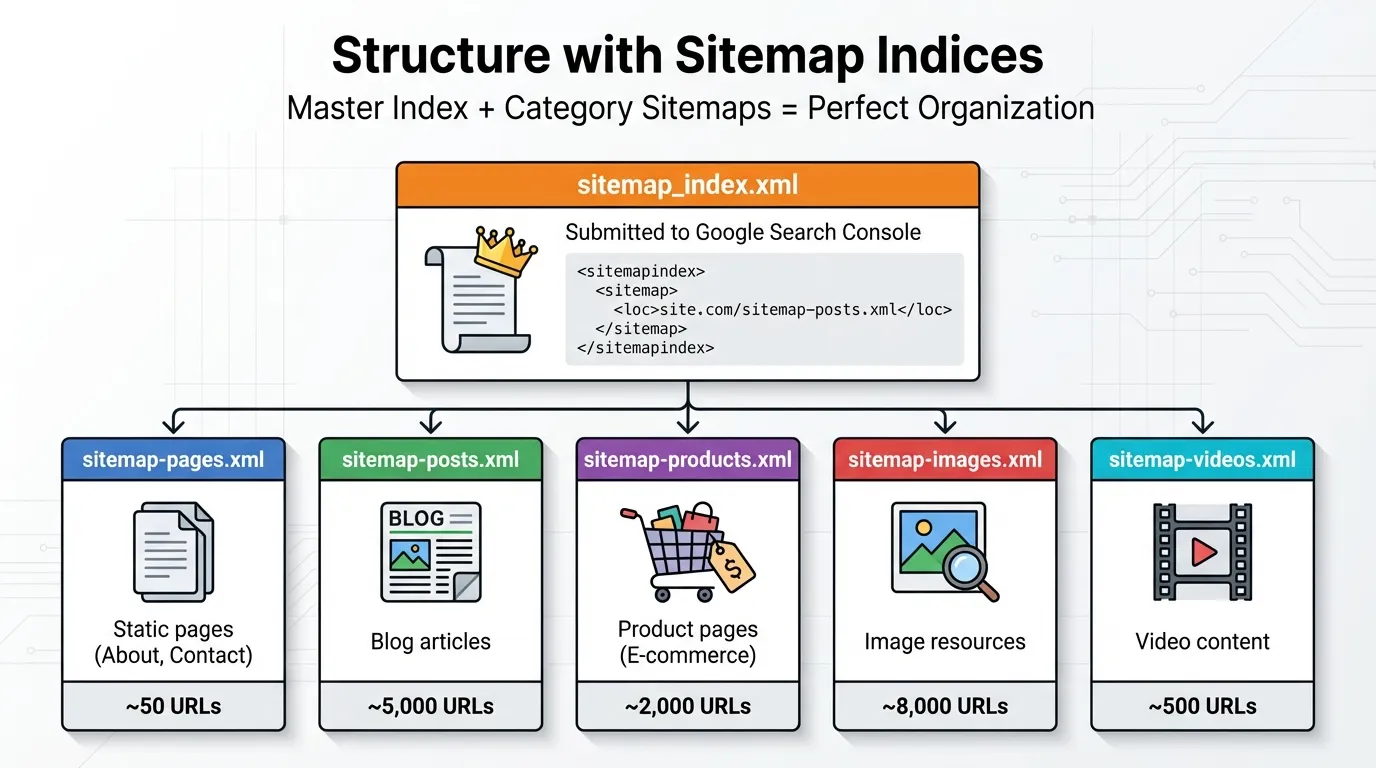
If your website has more than 50,000 URLs or your sitemap file is over 50MB, split it into smaller files. Use a sitemap index file to organise them so search engines can easily find everything. For example:
<sitemapindex xmlns=”http://www.sitemaps.org/schemas/sitemap/0.9″>
<sitemap>
<loc>https://www.example.com/sitemap-posts.xml</loc>
<lastmod>2026-01-15T12:00:00+00:00</lastmod>
</sitemap>
<sitemap>
<loc>https://www.example.com/sitemap-products.xml</loc>
<lastmod>2026-01-14T10:00:00+00:00</lastmod>
</sitemap>
</sitemapindex>
Use:
- sitemap_posts.xml for blog posts
- sitemap_products.xml for e-commerce items
- sitemap_index.xml points to both
Pros:
- Always up-to-date without manual intervention.
- Reduces errors caused by forgotten sitemap updates.
Cons:
- Requires a CMS plugin or developer setup.
- Dynamic sitemaps can be buggy if your CMS generates invalid URLs.
Even for smaller sites, creating separate sitemaps for blog posts, pages, and products can help you spot indexing issues faster in Google Search Console.
4. Prioritise High-Quality Pages
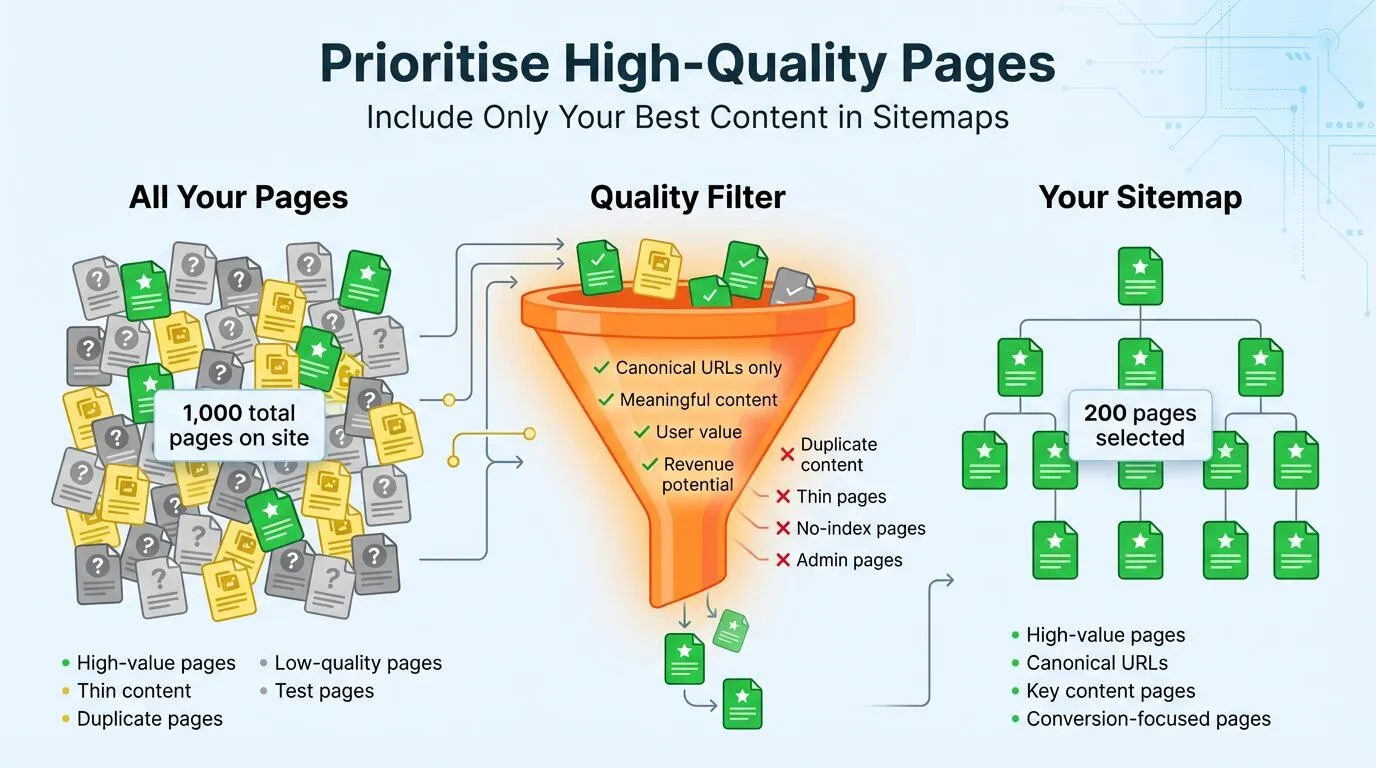
Google may ignore the <priority> tag, but you should still focus your sitemap on your most important pages, like main landing pages and pillar content, and keep them error-free.
The <priority> tag may not carry much weight today, but your sitemap should still focus on high-value content:
- Main landing pages
- Pillar content
- Resource guides
Example:
- Include main landing pages like https://example.com/seo-services
- Exclude thin or outdated content like https://example.com/old-event
Pros:
- Highlights important content for search engines.
- Encourages focus on SEO value rather than volume.
Cons:
- <priority> tag is largely ignored by Google.
- Could lead to neglecting smaller, supporting pages that still add value.
Avoid adding low-quality or thin content to your sitemap.
5. Leverage the <lastmod> Tag Correctly
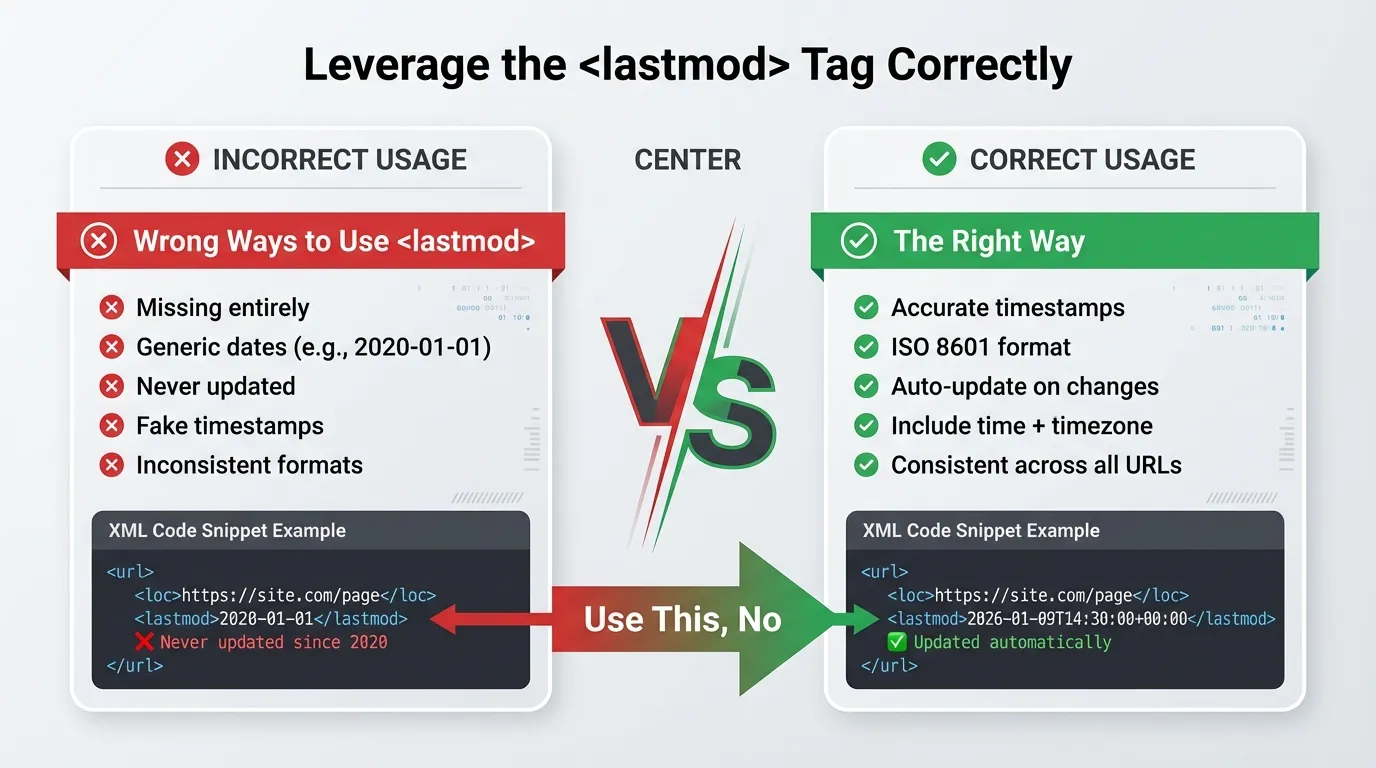
The <lastmod> tag shows search engines when a page was last updated. Only change this date if you’ve made real updates to the content. Faking the date can hurt your rankings.
Example:
<url>
<loc>https://example.com/seo-tips</loc>
<lastmod>2026-01-19T15:00:00+00:00</lastmod>
</url>
Only update <lastmod> when real changes are made.
Pros:
- Helps search engines know which pages were updated.
- Can speed up reindexing for changed content.
Cons:
- Falsely updating the date may be considered manipulative.
- Requires a process to ensure accuracy when content changes.
6. Keep File Sizes Small
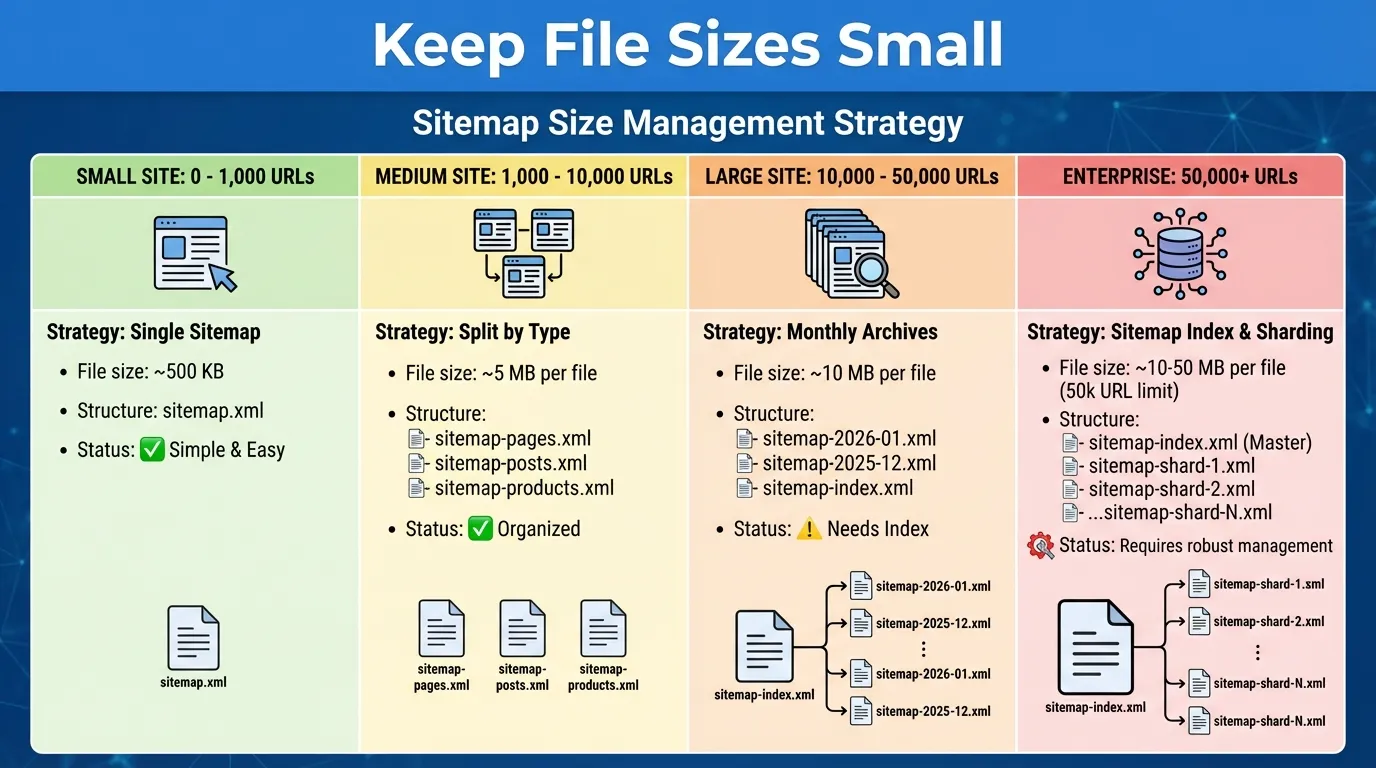
Google limits sitemaps to 50,000 URLs or 50MB per file. In practice, keeping your files smaller, around 10,000 URLs, helps them process faster and reduces errors.
Example:
- Sites with 30,000 product pages: split into 3 sitemaps of 10,000 URLs each.
Pros:
- Ensures Google processes your sitemap quickly.
- Reduces risk of sitemap parsing errors.
Cons:
- Splitting sitemaps too aggressively can add overhead.
Requires proper index management for multiple files.
7. Reference Sitemaps in Robots.txt

Your robots.txt file is the first thing crawlers check. Be sure to add your sitemap’s location at the bottom of this file.
Example:
User-agent: *
Disallow: /admin/
Sitemap: https://example.com/sitemap_index.xml
Pros:
- Ensures search engines can find your sitemap even without Search Console.
- Simple to implement.
Cons:
- Must be updated if the sitemap location changes.
- Only a pointer. Doesn’t guarantee indexing.
This way, even search engines that don’t use Search Console can find your sitemap.
8. Use Specialised Sitemaps for Rich Media

If your site uses a lot of images or video, like a portfolio or news site, a standard sitemap isn’t enough.
Example:
- Image sitemap: sitemap_images.xml with <image:image> tags
- Video sitemap: sitemap_videos.xml with <video:duration> and <video:thumbnail_loc>
Pros:
- Helps images and videos appear in Google Image and Video search results.
- Provides metadata like thumbnails, duration, and licenses.
Cons:
- Extra work to maintain separate sitemaps.
- Requires accurate metadata to avoid errors.
Use Image Sitemaps and Video Sitemaps to add details like video duration, thumbnails, and licenses. This can help you show up more often in Google Images and Video search.
9. Hreflang Sitemaps for International SEO
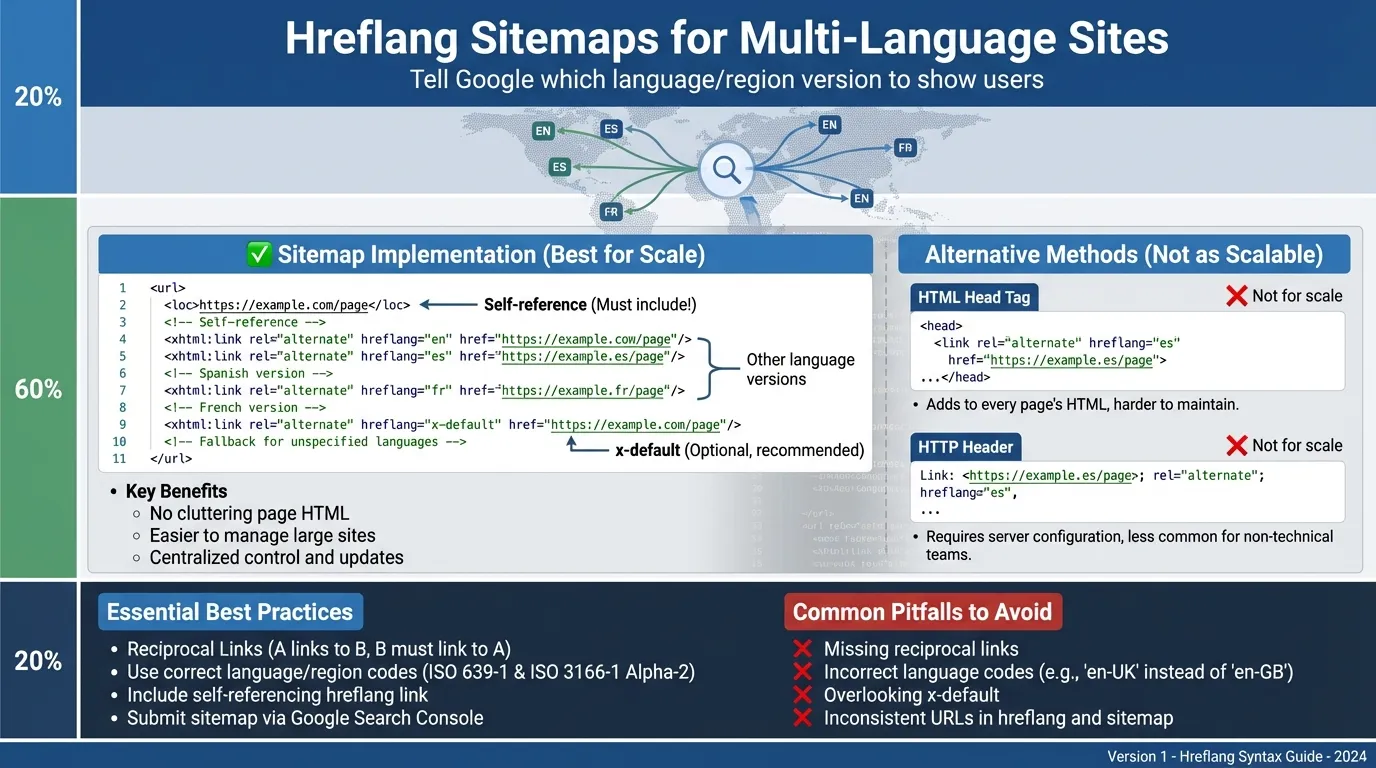
If your site supports multiple languages or regions, adding hreflang tags in the HTML can slow down page load times.
A better way is to add hreflang tags directly in your XML sitemap. This keeps your code simple and helps Google show the right language to each user.
Example:
<url>
<loc>https://example.com/en/seo-tips</loc>
<xhtml:link rel=”alternate” hreflang=”fr” href=”https://example.com/fr/seo-tips”/>
</url>
Pros:
- Reduces page load issues compared to inline hreflang tags.
- Ensures Google serves the correct language or regional version.
Cons:
- Must be precise; incorrect hreflang can cause indexing issues.
- Adds an extra layer of sitemap management.
10. Avoid Orphaned Pages in Sitemaps
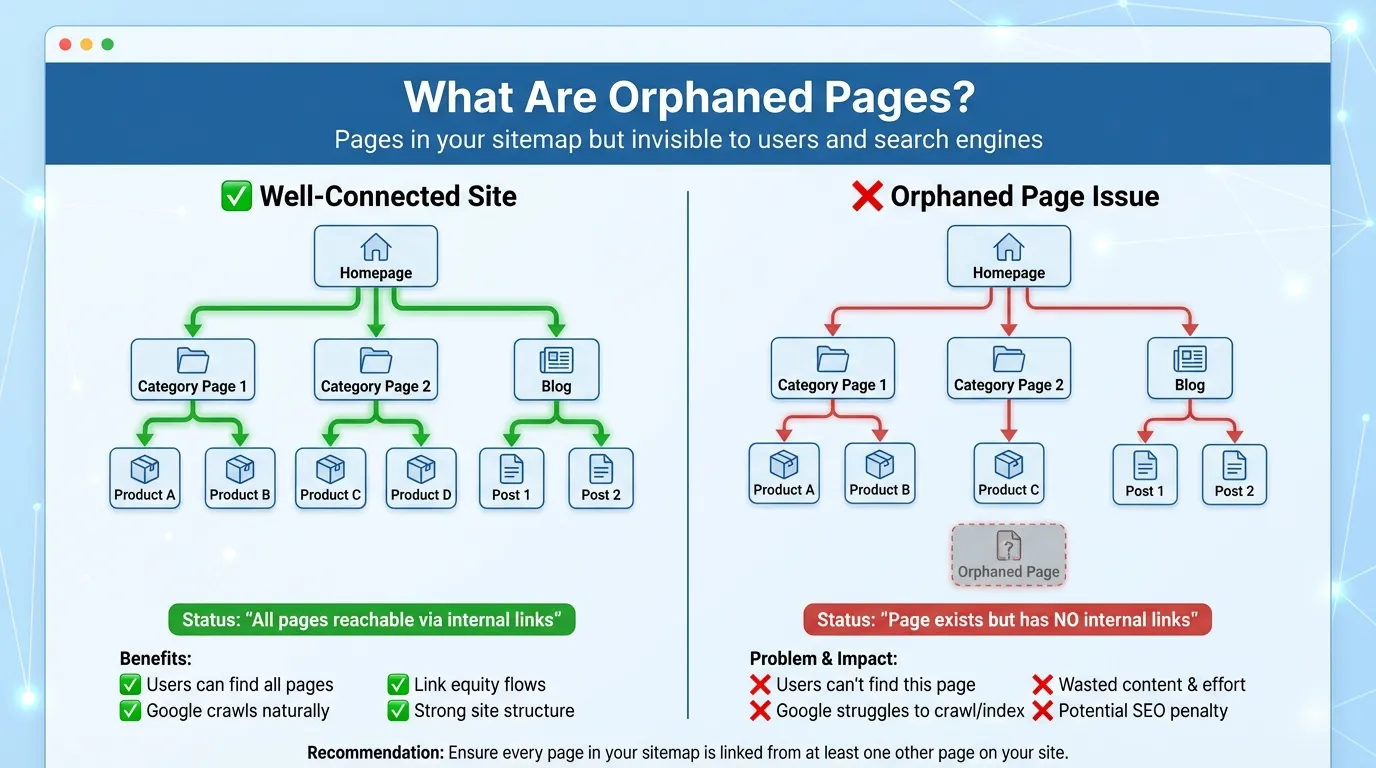
A page in your sitemap still needs internal links. Google may ignore pages with no inbound links, so make sure every URL in your sitemap has at least one internal link.
Example:
- Page in sitemap: https://example.com/new-guide
- Ensure at least one internal link from the blog or the main menu.
Pros:
- Improves internal linking and ensures all pages are discoverable.
- Helps search engines understand site structure.
Cons:
- Requires ongoing review of internal links.
- Orphaned pages might still appear if linked externally.
11. Audit Regularly
Update your sitemaps regularly. Broken links can accumulate over time, so run a monthly audit with tools like Screaming Frog or Sitebulb to ensure your sitemap matches your live site.
12. Submit to Bing Webmaster Tools
Google is the biggest search engine, but Bing still matters. It powers Yahoo, DuckDuckGo, and even some AI tools, so you don’t want to miss out on that traffic.
To reach this audience, submit your sitemap to Bing Webmaster Tools. This helps Bing crawl and index your site, improving your visibility.
Example:
- Submit https://example.com/sitemap_index.xml in Bing Webmaster Tools.
- Check reports for crawl errors and indexing issues monthly.
Pros:
- Expands reach to Bing, Yahoo, DuckDuckGo users.
- Provides additional crawl and performance insights.
Cons:
- Extra step beyond Google Search Console.
- Bing traffic may be smaller for some niches.
Bing Webmaster Tools also gives you useful reports on crawl errors, keyword performance, and SEO tips for Bing’s search.
Checking these reports regularly can reveal opportunities you might miss in Google Search Console, giving you an edge across multiple search engines.
Common XML Sitemap Mistakes to Avoid
Even experienced SEOs make mistakes. Here are some common pitfalls to avoid with your sitemap:
- Including Utility URLs: Never include “Add to Cart,” “Filter results,” or session-ID-based URLs. These create duplicate content issues.
- Inconsistent Protocols: Mixing http and https URLs. In 2026, everything should be https.
- Leaving Non-Canonical URLs: If Page A has a canonical tag pointing to Page B, only Page B should be in the sitemap. Including Page A sends conflicting signals to Google.
- Ignoring Search Console Errors: Google tells you exactly what’s wrong in the “Sitemaps” report. Ignoring “Couldn’t Fetch” or “Sitemap contains errors” alerts is a recipe for disaster.
If you find these technical nuances overwhelming, it might be time to consult a top SEO agency to handle your technical infrastructure professionally.
How to Create and Submit Your XML Sitemap
An XML sitemap is a roadmap for search engines. It shows them which pages are on your site and how everything is organised.
Submitting a sitemap helps ensure your content is discovered, indexed, and ranked more efficiently. Here’s a step-by-step guide to creating and submitting one.
Step 1: Generating the File
- For CMS Users (WordPress, Shopify, Wix): Most modern platforms generate a sitemap automatically at yourdomain.com/sitemap.xml. For WordPress, plugins like Yoast SEO or RankMath allow you to fine-tune which pages, posts, and categories are included or excluded, giving you more control over what search engines see.
- For custom sites, use tools like XML-Sitemaps.com for small sites or Screaming Frog for bigger ones to make a static XML file. If your site changes often, ask a developer to set up a dynamic sitemap so search engines always see the latest version.
Step 2: Validation
Before you submit your sitemap, check it for errors with an XML Sitemap Validator. Even small mistakes, like a missing bracket or a bad URL, can stop search engines from reading it. Validation makes sure your sitemap works as it should.
Step 3: Submission
- Log in to Google Search Console.
- Navigate to Sitemaps in the left-hand menu.
- Enter your sitemap URL (e.g., sitemap_index.xml).
- Click Submit.
You should see a ‘Success’ status soon. If there are errors, click to view the details and correct them before resubmitting. Keep submitting your sitemap and monitoring its status to ensure your site remains fully indexed as it grows.
Advanced XML Sitemap Tips for Large Enterprise Websites
If you manage a site with millions of pages, like a large e-commerce store or news site, you’ll need a different approach.
- Dynamic Segmentation: Split your sitemaps by logical sections such as product categories, regions, or publication dates.
- Example: For an e-commerce store, create separate sitemaps, such as sitemap-products-electronics-2026-01.xml or sitemap-products-home-appliances-2026-01.xml. This allows you to monitor indexing by category and quickly identify if Google is missing products from a specific section or month.
- Remove Old News for Timely Indexing: For news sites, Google News sitemaps should focus on fresh content to improve discoverability. Only include articles from the past 48 hours. Move older articles to your standard sitemap.
- Example: A news outlet might keep news-sitemap-2026-01-19.xml for articles published today and yesterday, while older content lives in archive-sitemap-2026.xml. This prevents Google News from re-crawling outdated content, conserving crawl resources.
- Crawl Budget Management: Large sites often have limited crawl budgets. Prioritise your most important pages by placing them in a dedicated sitemap submitted first. Low-value or duplicate pages can be placed in separate sitemaps with lower priority.
- Example: An online marketplace could submit sitemap-top-products.xml first, containing best-selling items, while sitemap-all-products.xml includes every product. This ensures high-priority pages are crawled and indexed faster.
- Include Only Canonical URLs: Avoid submitting duplicate or non-canonical URLs. Google may waste crawl budget crawling pages that won’t rank.
- Example: For an e-commerce site, ensure that URLs with session IDs, tracking parameters, or filter combinations are excluded from your sitemap and only canonical product URLs are listed.
- Use Sitemap Index Files for Scalability: For sites with thousands of URLs, use sitemap index files to group multiple sitemaps. Each sitemap can contain up to 50,000 URLs or 50MB uncompressed.
- Example: sitemap-index.xml could reference sitemap-products-1.xml, sitemap-products-2.xml, and sitemap-products-3.xml. This keeps your sitemap organised and ensures search engines can process it efficiently.
- Regular Sitemap Audits: Schedule regular audits to detect broken links, redirects, or missing pages. Keeping sitemaps clean improves crawl efficiency and indexing speed. Use tools like Screaming Frog or Sitebulb to generate automated reports on sitemap health, flagging any pages returning 4xx/5xx errors or noindex tags.
The Future of XML Sitemaps
Looking ahead, sitemaps will continue to evolve. Here’s what to watch for:
- API Submission Standard: Move from passive crawling to actively pushing URLs via indexing APIs. This ensures new or updated content is discovered and indexed quickly, which is crucial for high-velocity content like job postings or events. Active submission improves crawl efficiency by directing search engines to your most important pages. Over time, it reduces delays and ensures timely visibility in search results.
- Visual Content Focus: Include detailed metadata for images and videos in your sitemap, such as titles, descriptions, and captions. This helps search engines understand the content context and improves discoverability in visual and AI-driven search platforms like Google Lens.
- Properly structured visual data can also enhance rich results and featured snippets. Optimising for visual content ensures multimedia is not overlooked in indexing.
- Sustainability Signals: Efficient sitemap design reduces server load and bandwidth usage, supporting greener web practices. Streamlined sitemaps focus crawlers on high-value pages while avoiding unnecessary requests.
As eco-friendly web standards grow, search engines may increasingly consider resource-efficient sites as a positive signal. Over time, sustainability could even become a minor ranking factor.
Make Your XML Sitemap Work For You
Your XML sitemap is like the heartbeat of your website’s technical health. Without it, even your best content can get lost online.
By following these best practices, you can boost your organic visibility. Your new products could be indexed in minutes, and your crawl budget will go to the pages that matter most. That’s the real value of a clean, optimised sitemap.
Technical SEO can get complicated quickly. Managing sitemap files, resolving Search Console errors, and managing crawl budgets for large sites require attention to detail. Even a small mistake can prevent your best pages from appearing in search results.
You don’t have to handle all this alone. A sitemap is just one part of your site’s foundation. Our team can help you build a technical setup that grows with your business.
Don’t let technical issues keep your rankings down. Your content should be seen. Let’s make sure Google can find it. Contact MediaOne to schedule a technical SEO audit.
Frequently Asked Questions
Which sitemap generator tools do you recommend?
For WordPress sites, Yoast SEO, RankMath, and AIOSEO automatically generate and update sitemaps. Small businesses can use free tools like XML-Sitemaps.com, while enterprise sites benefit from the advanced features of the Screaming Frog SEO Spider. Choose based on your CMS platform, site size, and technical requirements.
How often should I be updating my sitemap?
Ideally, your sitemap should update automatically in real-time whenever you publish, edit, or delete content.
E-commerce sites with frequent inventory changes need daily automation, while blogs can update weekly. Manual updates work for static sites that rarely change, but automation prevents indexing delays and saves time.
How do I handle sitemaps for e-commerce sites with thousands of products?
Split your sitemap into multiple files using a Sitemap Index, and separate products, categories, and brands into organised files.
Exclude filtered URLs, such as/products/shoes?color=red&size=10, which creates duplicate content issues. Only include canonical product pages and high-value category pages to maximise crawl budget efficiency.
Do I still need a sitemap if I use IndexNow or API submission?
Yes, absolutely! They serve different purposes and work best together. IndexNow is like sending a text message about a single page update, while your sitemap provides a complete map of your site’s structure.
Sitemaps remain essential for comprehensive crawling, historical data, and supporting search engines that don’t use IndexNow.
How should I implement hreflang for my multilingual website?
For sites with 100+ language/region combinations, implementing hreflang tags in your XML sitemap is more scalable than adding them to every page’s HTML header.
Use the <xhtml: link> tag within each URL entry to declare all language variants, ensuring reciprocal linking between versions. This approach centralises international SEO management and makes bulk updates significantly easier.