WordPress powers a massive portion of the internet. According to W3Techs, WordPress powers 43% of all websites globally, making it the most widely used CMS. It is the go-to choice for both bloggers and business owners.
As such, there are WordPress-specific SEO practices that are widely used across industries. If you’re not adopting any of these SEO tips, you lag behind the competition that does.
But these days, an SEO focus won’t cut it. To build WordPress websites for SEO, you need to focus on two things. First, you need traditional search engine optimisation to rank on search engine results pages. Second, you need generative engine optimisation to appear in Google’s AI overviews and other AI-driven search tools.
Traditional search results are now partnered with AI summaries and AI-generated answers. So, to achieve visibility for your business, you’d want to appease both search engine algorithms and AI crawlers. If you do not adapt, you risk losing your place in the search rankings.
This guide will comprehensively cover how you can do that.
Key Takeaways
- Prioritise Performance with a Fast Theme: Selecting a lightweight, mobile-responsive theme is the foundation of your site’s technical SEO and user experience. Use tools like Google’s Pagespeed Insights to ensure your chosen theme scores high on Core Web Vitals.
- Leverage WordPress SEO Tools: Plugins like Yoast SEO generate XML sitemaps and add Schema markup for AI visibility.
- Optimise URL Structure for Clarity: Changing your permalinks to the “Post Name” setting makes your URLs descriptive and easier for both humans and crawlers to understand.
- Boost Speed Through Technical Optimisation: Speed is a critical ranking factor, and a snappy site reduces bounce rates while improving crawlability.
- Adopt a GEO-First Content Strategy: Focusing on helpful, factual content ensures you remain visible as search evolves from traditional lists to AI-driven responses.
Ideal WordPress Settings and Setup for SEO and GEO
Your site’s SEO can be determined even before you write a single word.
The way you configure your WordPress website determines how well it performs. If your foundation is weak, your search engine rankings will suffer.
Proper Theme Selection
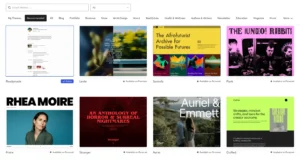
Many people pick a theme because it looks pretty. This is a mistake, as you can always easily change its appearance afterwards.
You need an SEO-friendly WordPress theme that prioritises performance.
- Look for a mobile-optimised theme — one with a responsive design. Most users now access the web via phones. Google uses mobile-first indexing, so a site that looks bad on a phone will never rank well, even on desktops. Be sure to check how the theme will render on various devices — at least a PC and a mobile phone.
- Avoid WordPress themes that are clunky and bloated. These themes will have unnecessary code and CSS that will slow down your site’s speed.
- Test the theme speed before committing. Use a helpful tool like Google’s Pagespeed Insights to measure the theme’s core web vitals.
- Check the cumulative layout shift of the theme. This ensures elements do not jump around during page load.
You can find many great theme options in the WordPress repository. Make sure to try multiple themes before settling on one you want to build your site on.
Remember, once you’ve built your site on a specific theme, it can be difficult to migrate your layout to another theme. So choose wisely.
Use Post Name Permalinks
WordPress allows you to change your URL structure. By default, it will use a string of random numbers and letters for your posts and pages.
Ideally, a page about baking would look like “yoursite.com/blog/baking/10-easy-steps-on-how-to-bake-bread” instead of “yoursite.com/?p=123.” The latter is more akin to a spammy affiliate link.
This is bad for search engine optimisation. You want your URLs to be descriptive and easy to read. They tell both human visitors and crawlers what the page will be about. To do that,
- From the main WordPress dashboard, click on ‘Settings‘ in the left menu
- Select ‘Permalinks‘
- Choose the ‘Post name‘ radio box option
- Save changes.
This helps both users and search engines quickly understand the topic of your page. It also makes your links look more trustworthy, especially if they will be shared with your email list or on social media.
Install Yoast SEO Plugin

Yoast SEO is a popular and powerful choice for WordPress users. Its features include:
- The “Green Dot”: This assesses your content’s SEO and readability, suggesting improvements where necessary.
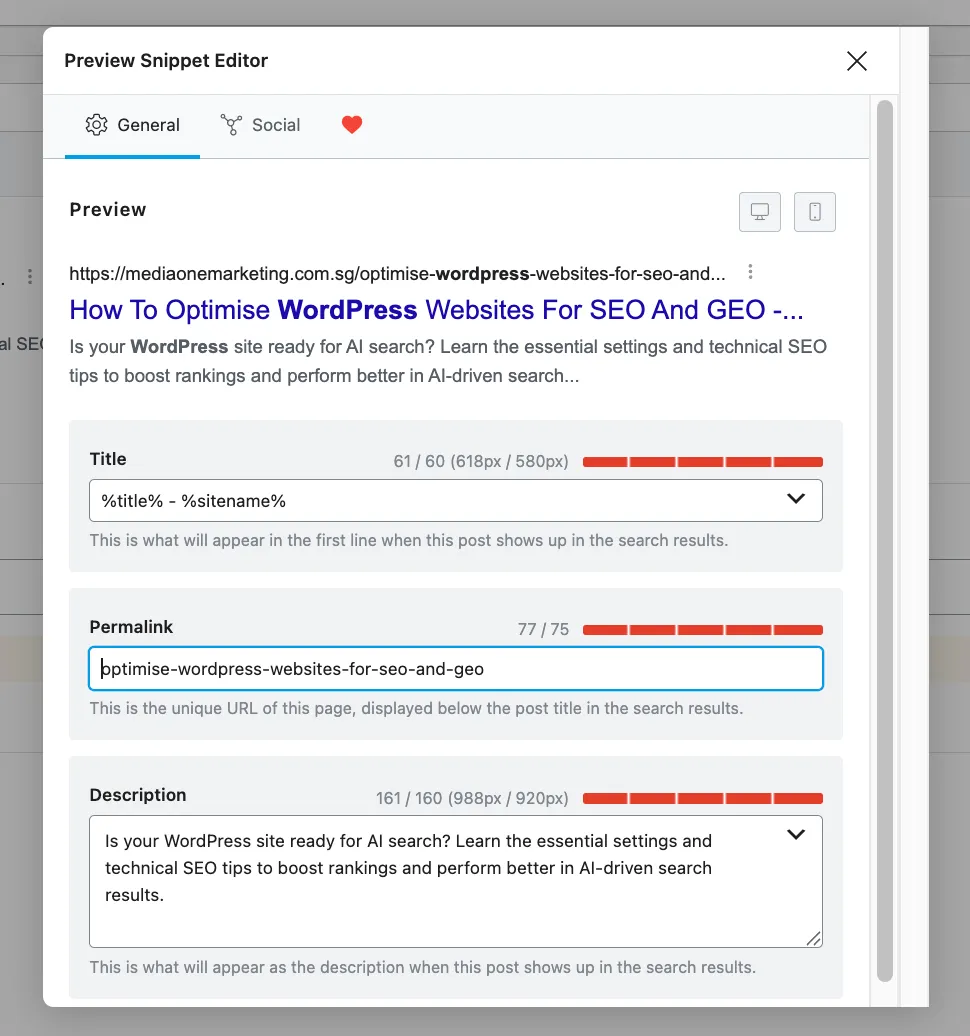
- SERP Snippet Editor: This allows you to customise how your page looks in search results. You can write your own meta descriptions and titles.
- XML Sitemap: An XML sitemap lists all your pages, giving search engines a map of your content.
- Breadcrumbs: This helps users and bots navigate your site. It shows the path from the home page to the current post.
- Schema Markup: Yoast helps you add structured data to your site. This is vital for generative engine optimisation (GEO) and tells AI tools exactly what your content is about.
- Social Media Integration: You can control how your posts look when shared on Facebook or X.
- Internal Link Suggestions: It helps you identify where you can add internal links to keep users on your site longer.
- LLMs.txt Generation: An LLMs.txt file helps large language models, such as ChatGPT, better crawl and understand your site’s context.
These are only a few of the features that Yoast SEO, or any SEO plugin for WordPress, would have.
Make sure to fully explore the plugin you’re using, as you will often discover useful tools your site needs that you otherwise didn’t know you needed.
Set Hyperlinks to Open in New Tab
When you add hyperlinks to your content, whether internal or outbound, you should set them to open in a new tab.
If a user clicks a link set to open in a new tab, that user stays on your site. As a result, your bounce rate stays low and improves the time on page.
This is especially important when you have external links throughout your content—you wouldn’t want users “clicking off” from your blog piece.
By setting hyperlinks to open in a new tab, it maintains the site they’re on, reducing friction with the visitor experience.
Utilise Folders
A clear hierarchy is essential for a successful SEO strategy. You should use categories and folders to organise your content. This allows crawlers to understand the relationship between topics on your WordPress site — under which pillars each topic falls.
For example, if you run a pet blog, your structure should look like yoursite.com/blog/cats/is-catnip-harmful-to-cats.
This signals to Google and AI crawlers that the post belongs to the “cats” category within the “blog” section.
On-Page Optimisation Tips for Content on WordPress
On-page SEO is the process of optimising individual blog posts and pages to improve search engine visibility. It is where you put your keyword research into action.
Understanding the Anatomy of a WordPress Post
Each post has several key areas that impact SEO. Give ample attention to each of these features, and you’ll craft optimised, crawlable pieces of content every time.
The anatomy of a WordPress post includes:
Title

The title of your post will also serve as your H1 tag. It is the most important piece of text on the page, as it summarises what the piece is about. Much like a news headline.
Some tips when crafting the title include:
- The WordPress title should contain your target keyword.
- Make sure it is catchy but honest.
- If your title promises one thing and the content delivers another, users will leave.
URL

Keep your URL short and descriptive. Use hyphens to separate words, though WordPress will already automatically do this.
Some tips when crafting the URL of the page is:
- Do not use stop words like “and” or “the” unless they are part of the keyword.
- A clean URL is easier for search engines to index.
- Ensure there are breadcrumbs in the URL to indicate where in the content hierarchy the content resides.
- Make sure the URL is something you’re confident pasting and showing in its entirety on social media or email newsletters
Body
The body is the heart of your blog content. It’s the content itself.
Some tips when writing the body of the content include:
- Your content needs to be helpful and high-quality, in line with Google’s EEAT standards.
- Focus on answering the user’s question. Don’t waffle on with irrelevant categories. This can harm your SEO.
- Include a clear summary at the top of your content for the crawlers. These summaries could be through a table of contents or a bulleted Key Takeaways section.
- Avoid fluff that does not add value to the reader.
Meta Description

Meta descriptions appear beneath the large blue Title text in the SERP.
Think of them as a tagline to a brand name. Or the first few words of your email showing just beneath the subject line.
A good meta description acts like an advert for your page. It should tell the user exactly what they will learn before they even click through your SERP listing.
Meta tags also describe to crawlers what the content will be about.
Understanding Headers and Header Hierarchy
Headers help break up your text. They make it easier for people to skim your content. They also help search engines understand the structure of your information.
You should only have one H1 tag per page.
Use H2 tags for your main sections.
If you have sub-points within those sections, use H3 tags. Then H4 tags, and so on.
This hierarchy creates a logical flow. For example, an H2 could be “Best WordPress SEO Tools,” and the H3s under it could be “Yoast SEO” and “Google Search Console.”
Another H2 could be “Best SEO Agencies,” then the H3s underneath would be “MediaOne” and “Hashmeta.”
Understanding Your Keywords
It’s crucial to place keywords in the meta tags and body of your content. Algorithms crawl your content and track specific keywords to better understand the piece’s topical direction.
However, before webmasters and bloggers can begin placing keywords in their WordPress content, they must first perform keyword research. This allows them to appear for search terms relevant to their audience.
Keyword research is the foundation of any successful SEO strategy. But that’s an article for another day, as it can get analytical with metrics and involves an in-depth understanding of the searcher’s intent.
An SEO agency can help you out with keyword research in order to inform your SEO and marketing strategy. SEO agencies have access to professional tools and data that can give you a competitive edge in your niche.
Include Relevant and Helpful Facts Based on the Search Intent
GEO involves including relevant and helpful facts throughout your content to increase the likelihood of appearing in AI summaries and prompts.
To do that, it helps to include an FAQ section in your content. This acts as a “shooting gallery,” targeting various relevant questions and answering them with prompt, punchy, helpful responses.
The goal is to appear as a source on AI summaries and responses, allowing your site to generate traffic from these AI tools.
How to Make the WordPress Site Load Faster

Site speed is a major ranking factor for Google. After all, Google and AI tools curate speedy experiences for their users. As such, they prioritise online, available, and snappy sites over those that load more slowly.
Slow sites also have a harder time being indexed by search engines, which can decrease your likelihood of ranking. Plus, visitors are more likely to bounce from a slow site — people expect speed and responsiveness in today’s digital age.
The tips below will help your WordPress site load faster.
Enable Caching
Caching creates a static version of your web pages. This means the server does not have to “build” the page every time a user visits.
It serves the saved version instead of the visitor’s browser cache. So the next time they visit the site, the browser will simply retrieve the files from the cache, as opposed to redownloading them from the server, which is much faster.
There are many WordPress plugins available that can handle this for you with a few clicks. You can enable this with a plugin such as WP Rocket or W3 Total Cache.
Optimise HTML
Your site’s code can often be messy.
Optimising your HTML involves removing unnecessary spaces, comments, and characters. This is called minification. It reduces the file size, allowing the browser to download and process the page more quickly.
This will require coding knowledge, checking under the hood of your WordPress theme. However, site optimisation plugins should make these as easy as ticking a checkbox.
Optimise CSS
Just like HTML, your CSS files can be minified.
Minifying a WordPress CSS involves stripping away all unnecessary characters from your stylesheet’s source code—such as whitespace, indentation, newlines, and comments—without changing how the code functions.
These elements are only there to make the code readable for humans, for collaboration’s sake. Removing them creates a much smaller, “denser” file that the browser can download and process significantly faster.
Enable Lazy Loading
Lazy loading is a clever trick. It tells the browser to load images only when the user scrolls to them.
If you have a long blog post with twenty images, the browser does not need to download all of them at once before loading the first fold.
Lazy loading makes the initial page load feel much faster. WordPress has lazy loading built in, so users won’t need to do much in this regard.
Upgrade to a CDN
If your blog or business caters to an international audience, you want readers to experience consistent page load speed, regardless of their location.
A Content Delivery Network (CDN) stores copies of your site on servers all over the world.
When a user in London visits your Singapore-based site, the CDN serves the data from a server near London. This significantly reduces the physical distance the data has to travel. It is a must-have for websites with a global audience.
You can upgrade to a CDN by using an elevated hosting solution, like Cloudflare.
However, if you’re a local business with a brick-and-mortar store, a CDN won’t be as useful. Be sure to consult with a local SEO agency on ideal WordPress practices for your local presence.
Media Tips for WordPress Users
Images and videos make your blog posts more engaging. However, they are often the biggest cause of slow load times. You must manage your media carefully.
Use Captivating Images

People are visual creatures. Also, AI crawlers can “see” images and interpret them.
So, use high-quality, relevant images to support the content on your site. If you are writing about products, include a clear image of the product.
Images should be well-composed to capture attention. Think about using the rule of thirds or centring your subject.
For recipe websites, the main photo should be mouth-watering. High engagement improves search rankings because it signals to Google that your content is valuable.
Provide an Alt Text to Images
Search engines cannot “see” images in the same way humans do. They rely on alt text to understand what an image depicts.
Your alt text should be a clear, concise description of the image. If the photo is of a chocolate cake, the alt text should be “Slices of moist chocolate cake on a white plate.”
Alt text is also vital for accessibility, as screen readers use it to describe images to visually impaired users.
Use Lossy Compression for Images
Raw images from a camera are too large for the web. You must compress them.
Lossy compression removes some data from the image to significantly reduce file size. In most cases, the human eye cannot see the difference. However, the speed gained from loading the significantly smaller size will be noticeable.
Use .webp Image Format
Move away from JPEG and PNG. The .webp format is the modern standard for the web.
It provides superior compression and quality compared to JPEG and PNG, allowing a site to load much faster than if those formats were used. There are many WordPress plugins that can automatically convert your existing library to this format, such as ‘Converter for Media’ and ‘QuickWebP.’
Get in Touch with an SEO Agency Today
Optimising a WordPress website for both SEO and GEO is a full-time job. It requires a mix of technical skill, creative writing, and constant monitoring. But you do not have to do it alone. If you want to see a real increase in your search rankings and more organic traffic, it is time to call in the experts.
MediaOne is a leading SEO agency in Singapore. We handle everything from your initial technical SEO audit to your long-term GEO strategy. We know how to make search engines see the value of your services.
Do not let your competitors take your spot on the SERPs. Get in touch with MediaOne today. Let us help you turn your WordPress site into a powerful marketing engine that dominates both traditional and AI search. Contact us today!
Frequently Asked Questions
Does using too many WordPress plugins hurt my SEO?
Yes, having an excessive number of active plugins can slow down your site and create code conflicts that hinder search engine crawlers. It is best to stick to essential, high-quality plugins and regularly delete any that you are not actively using to maintain optimal performance. Rule of thumb: Avoid redundant plugins.
How often should I update my old WordPress blog posts?
You should aim to audit and update your top-performing content at least once every six to twelve months to ensure facts are current and links are still active. Freshness is a ranking signal, and updated content is more likely to be picked up by AI engines for recent summaries.
Is it better to host my own videos on WordPress or embed them from YouTube?
It is almost better to embed videos from a third-party host like YouTube or Vimeo to save server bandwidth and keep your site speed high.
What is the difference between a Category and a Tag in WordPress SEO?
Categories are meant for broad grouping of your topics (like a table of contents), while tags are for specific details (like an index).
Should I use a dedicated Security plugin to help my SEO?
While security is not a direct ranking factor, Google will quickly blacklist and de-rank any site that is flagged for malware or hacking. Using a plugin like Wordfence or Sucuri protects your reputation and ensures your search presence remains stable.
Can I use AI to write my WordPress blog posts without being penalised?
Google rewards high-quality, helpful content regardless of how it is produced, but purely AI-generated text often lacks the unique insights needed for high EEAT scores. You should always use AI as a starting point and have a human editor add personal experience and brand-specific value before publishing.