
| AI Summary
LSI keywords are an SEO label for words and phrases related to a main topic. The name comes from latent semantic indexing, a technique researchers developed to find patterns in collections of documents. Google has said that LSI keywords are not a ranking signal. Its public documentation describes systems such as RankBrain, neural matching and BERT, which help it make sense of searches and web pages. Singapore marketers can use related terms to find questions their pages leave unanswered. A topical coverage audit shows which answers to add, which to expand and which belong on another page. |
LSI keywords are related words and phrases that some SEO tools suggest for a topic. They are not a Google ranking signal. Related terms can still help editors spot missing answers. For example, a guide to accounting software may need to explain invoicing, expense tracking and bank feeds.
Key Takeaways
- A term suggested by several sources is worth checking. A question raised by one customer can deserve the same attention if the answer affects a buying decision.
- A content gap has a practical cost. If readers cannot tell what a feature does, what they need to set it up or whether it applies to them, the page may need a fuller answer.
- Singapore keyword research works best when local terms change the advice. A phrase like “PayNow QR on invoices” can lead to a more specific answer than a generic section on getting paid.
- The three labels in a topical coverage audit are Covered, Partly covered and Missing. Each label points to a different editing decision.
Your SEO report says to add “bank feeds”, “GST” and “payroll” to a guide about accounting software. The first two could help a reader compare products. Payroll might need only one line if the software connects to a separate payroll tool. The list gives you three terms, but it leaves you to decide what each one is doing on the page.
That decision is the heart of this guide. We’ll unpack the search myth, then use an example from Singapore to show how a keyword list can turn into better questions, more complete answers and a shorter list of edits.
What Are LSI Keywords?
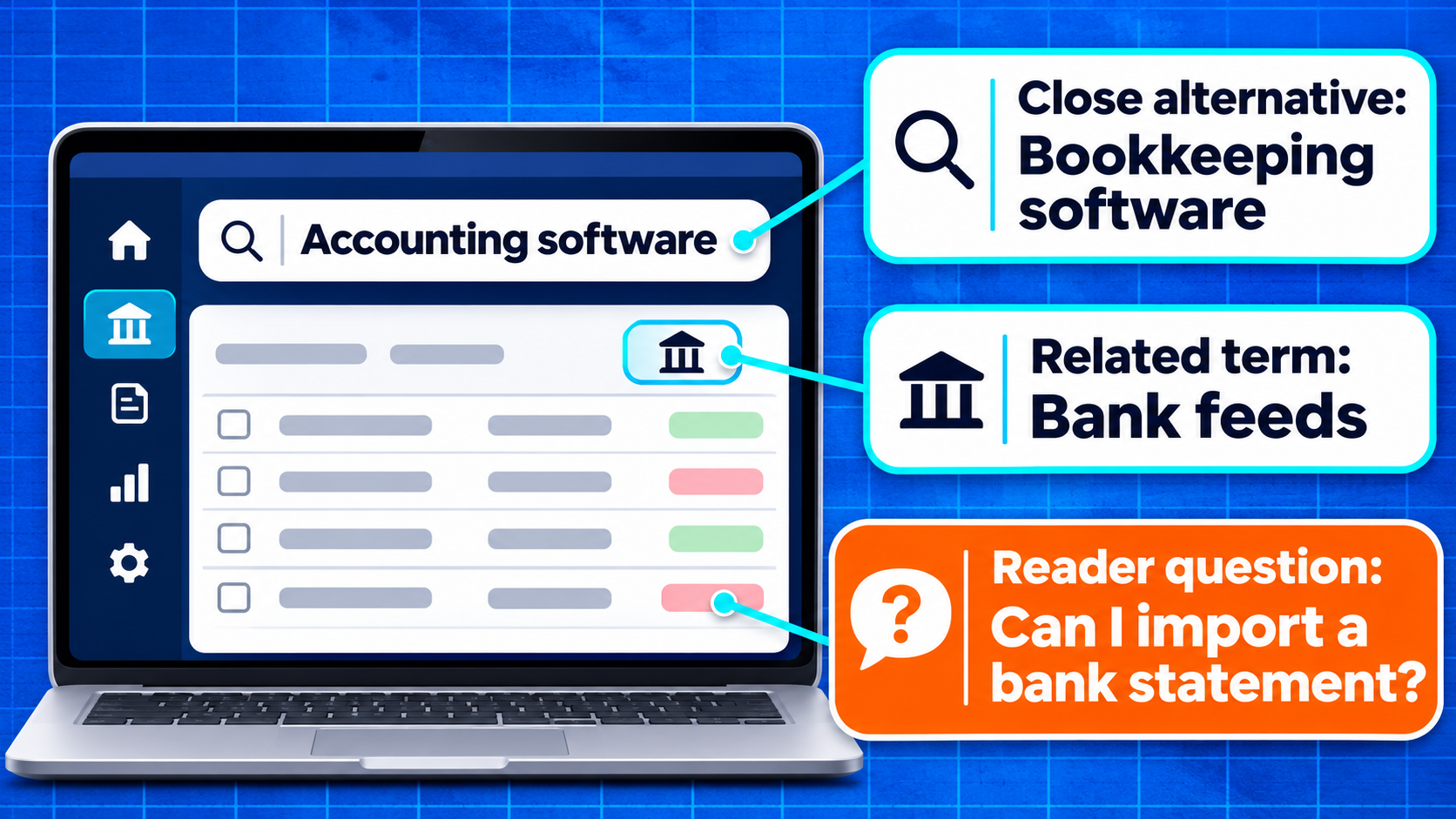
In SEO, LSI keywords usually means phrases that a tool or writer considers related to a main keyword. An SEO tool might group “accounting software” with “bookkeeping software”, “invoices” and “bank feeds”. The grouping can give a writer ideas. The label tells you little about how the tool found them or whether readers need each topic on that page.
The name comes from the original research on latent semantic indexing, published in 1990. The researchers used maths to find patterns in how words appeared across a collection of documents. Those patterns could help a system find documents related to a search even when the documents and the query used different words. In this context, latent refers to a relationship that becomes visible through the pattern.
These three kinds of suggestions each tell you something different. Synonyms or close alternatives help you recognise when readers use different names for a similar thing. Related terms point to ideas you may need to explain. Questions tell you what someone wants to know about those ideas.
| Type | Example | What it tells an editor |
| Close alternative | Accounting software and bookkeeping software | Some readers may use either phrase to describe the product they want. |
| Related term | Bank feeds | Readers may need to know how bank transactions get into the software. |
| Specific question | Can I import a bank statement without a live feed? | The guide may need to explain what happens when a bank connection is unavailable. |
A writer can mention “bank feeds” in a list of features and still leave the reader unsure how the feature works. A short explanation can do more. It could explain that a bank feed brings transaction data into the software and that a buyer should check whether their bank is supported. Now the reader has something to look for when comparing products.
The terms also have limits. A buyer may use “bookkeeping software” and “accounting software” to mean the same thing in a broad search. In a product comparison, one tool might only record transactions while another also helps prepare reports. An editor can explain that difference when it affects the purchase, then use the wording that best describes each product.
What Does Google Say About LSI Keywords?
Google’s John Mueller addressed LSI keywords directly in 2019, saying the SEO concept did not exist. The practical answer is straightforward. Google has no LSI keyword ranking signal for marketers to optimise against. A third-party tool may propose phrases related to a page, but a score from that tool reflects the tool’s own rules.
How Google understands words in context
Google’s guide to Search ranking systems explains several ways the search engine handles language. RankBrain helps Google connect words with concepts. Neural matching helps match the ideas in searches with the ideas in pages. BERT helps Google understand how the words in a phrase work together to express meaning and intent. Each description is about understanding language in context.
Think about these two searches: “change invoice date before sending” and “change invoice date after sending”. The words overlap, but the timing changes the job. Someone in the first case wants to edit a draft. Someone in the second may need to know what their software lets them do once a customer already has the invoice. A help page that joins both cases in one vague paragraph would leave both readers with work to do.
A related phrase earns its place where it helps explain something. “Bank feeds” can sit in a feature table. “Importing bank statements” can be a heading when the page gives the steps. Plain wording in an image description should tell the reader what the image shows, as Google’s image SEO documentation explains. The same term may belong in several places if each use helps a reader understand that part of the page.
An awkward sentence often shows where a phrase has been forced in. “Our Singapore accounting software supports Singapore business accounting, bookkeeping software and accounting services” leaves readers unsure what the product actually does. “The software tracks expenses and creates invoices for small businesses” gives them two things they can check.
Repeating words to try to influence rankings can cross into keyword stuffing under Google’s spam policies. An ethical SEO review can catch patterns like this across several pages.
How to Find Related Terms Singapore Readers Use
A search query gives you a clue about what someone wants to do. “Accounting software for small businesses in Singapore” suggests a buyer comparing options. “How to import a bank statement” suggests someone trying to finish a task. Your keyword analysis starts with that difference because it tells you what kind of page and level of detail the reader expects.
Search results show the kind of answer readers may expect
A Singapore search for your main phrase can help you see whether the results are mainly guides, product pages, comparisons or setup instructions. The formats tell you more than a word list does. A comparison may need selection criteria and examples. A setup page may need a short list of what the reader should have ready and what to do if a step fails.
People Also Ask questions and related searches, when shown, can surface wording you missed. A question such as “Can accounting software accept PayNow?” is a starting point. It could refer to displaying a QR code, collecting payment or matching the payment to the invoice. Those are different tasks. The page can spell out the difference and tell readers what to check with the provider.
Tools and customer questions add different evidence
Every source has a limit. Keyword tools group phrasing, support conversations capture specific problems, and search data tells you what people typed before seeing a page. A shortlist from several sources lets you see both recurring questions and details that one source missed.
| Source | What to collect | How to use it |
| Google Keyword Planner | Ideas and search estimates with Singapore selected | Group phrases that describe the same need. Its Google Ads estimates give you a sense of demand. |
| Google Search Console’s Performance report | Queries for your page, filtered to Singapore | Find searches for which the page already appears and check whether the page gives a direct answer. |
| Sales emails, support tickets and enquiry forms | Words people use when comparing options or asking for help | Record the question and what the person was trying to do. Leave out personal details. |
| Related searches and results pages | Repeated questions, formats and examples | Check what readers see across several relevant results and add gaps to your draft review. |
A language model can help group a long list for a keyword or content brief. An editor still needs to check any suggested question against sources such as a search result, actual enquiries or reliable product documentation. If the model claims a phrase has a certain search volume, the estimate needs a separate source.
Singapore examples work when the location changes the answer
A local phrase is worth keeping when it affects a reader’s decision. “PayNow QR on invoices” can lead to a check of payment options. “GST invoice fields” could send an editor to the relevant official requirements before writing. Adding “Singapore” to a general heading about changing an invoice colour would contribute little if the steps are the same everywhere.
Location has a bigger role for a business with a physical service area. A buyer looking for help setting up software on site may need to know which areas a provider covers or whether an appointment is necessary. That kind of information can belong in a local SEO plan because it answers a question that changes whether someone can book.
How to Run a Topical Coverage Audit
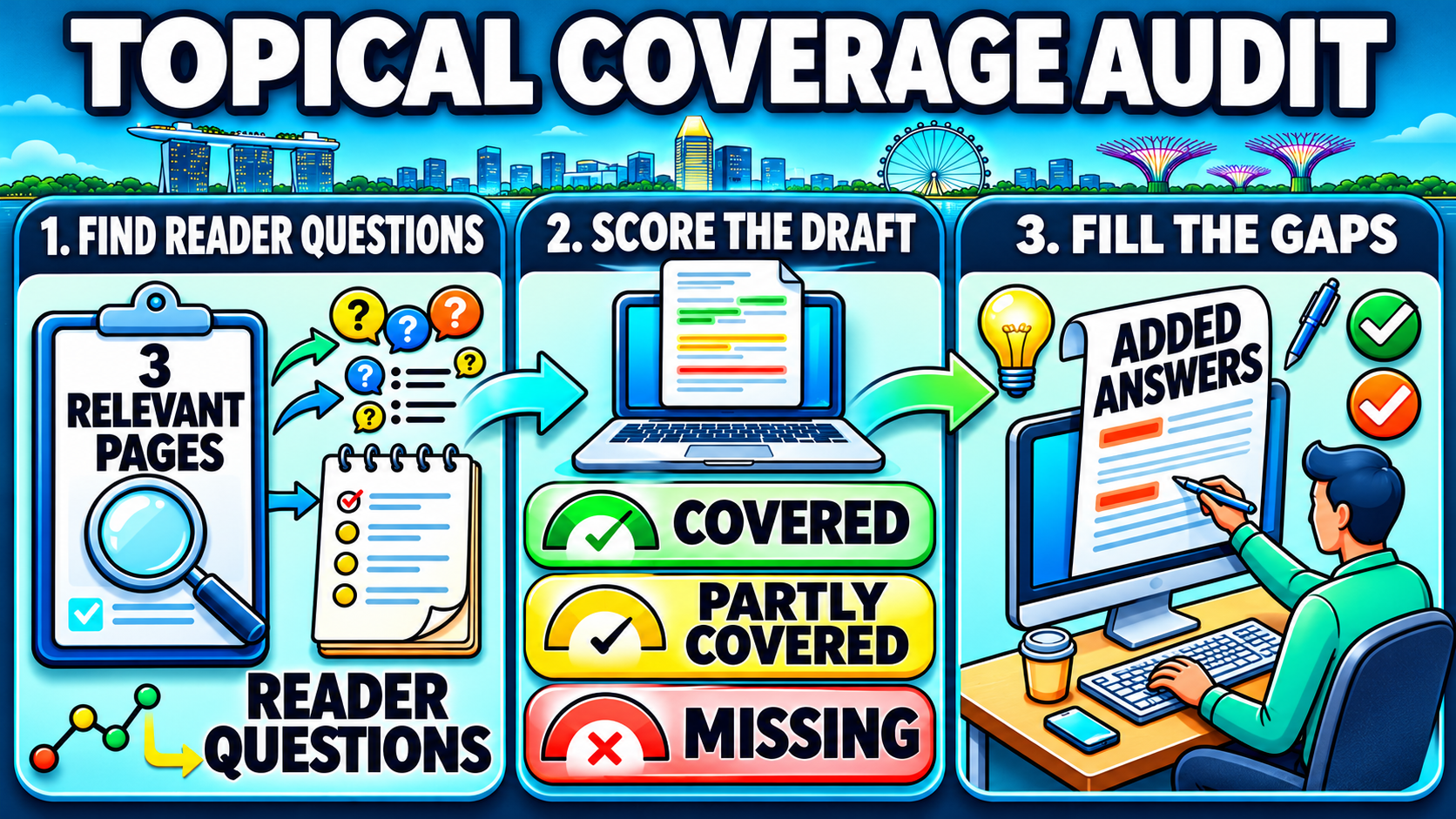
A topical coverage audit compares a draft with the questions its readers need answered. One page and a short table are enough to start. Each row in the table should name a question or decision, record what the page already says and specify the edit if any work is needed.
1. Pick three pages that serve the same need
Start with the main search phrase and select three relevant organic results you can inspect. A guide for first-time buyers will teach you more about writing another buying guide than a login page or an advanced user manual will. The three closest pages may sit at different positions in the results.
The search pages give you examples to work from. Your business can add firsthand knowledge such as a question customers ask during a demo or a setup issue the support team often handles. That detail can improve an answer even if it appears on only one of the pages you reviewed.
2. Turn topics into questions and score your draft
A list that says “bank feeds, invoice, payments” leaves several decisions open. Questions are easier to check. “What can I do if my bank isn’t supported?” tells you whether a list of bank feed features covers enough. On a buying guide, a short note about checking CSV imports before choosing software may be enough.
| Reader question | Status | Editorial action |
| Can I send invoices from the software? | Covered | Keep the explanation of how to create and send an invoice. |
| What if my bank isn’t supported? | Partly covered | Add a note about checking whether the product supports CSV imports. |
| Can customers pay by PayNow QR? | Missing | Explain what to check for QR display, payment collection and invoice matching. |
| Can I run payroll in the same tool? | Partly covered | Clarify whether payroll is built in or needs a separate product. |
A Covered answer gives the reader enough to act or decide. A Partly covered answer mentions the topic but omits a step, example or condition the reader needs. A Missing answer leaves a relevant question unanswered. A topic can also sit outside the page’s purpose. A payroll migration checklist, for instance, would take a first-time accounting software buyer away from the comparison.
3. Fill the gaps that affect decisions first
A missing payment option may block a sale. An unclear bank import option may leave a buyer unsure how much work setup will take. Both deserve attention before a minor wording change. If you have only an hour to edit, start with the question that affects the reader’s next step and give it a direct answer.
Some gaps take a line. Others need a comparison table, an example or a separate page. Google’s people-first content questions offer a practical check here. Can a reader finish the page knowing enough to do what they came to do? If the answer depends on a product feature you cannot verify, explain what a buyer should check without claiming the feature is available.
How to Turn Content Gaps Into Better Answers
A gap list is ready for editing when each item has a job. A question about whether the software supports a reader’s bank belongs near the explanation of bank feeds. If the page already has a comparison table, a short line under the table may answer it. A full section makes sense when readers need to compare several options or follow a set of steps.
Give the short answer where readers need it
A section on accepting payments could open with the answer a buyer needs. “A PayNow QR code on an invoice gives the customer a way to pay. The software’s invoice matching feature determines whether it can connect that payment to the right invoice.” The next few sentences can explain what a buyer should check in a demo. They might ask the provider to show an invoice with a QR code and what happens after a payment arrives.
This approach also makes on-page SEO decisions easier. A heading can name the task, a short opening can answer the question and a table can show the options if the reader needs to compare them. The format follows the information. An editor can keep a direct answer as a paragraph when a table would add extra work for the reader.
Give detailed follow-up tasks their own space
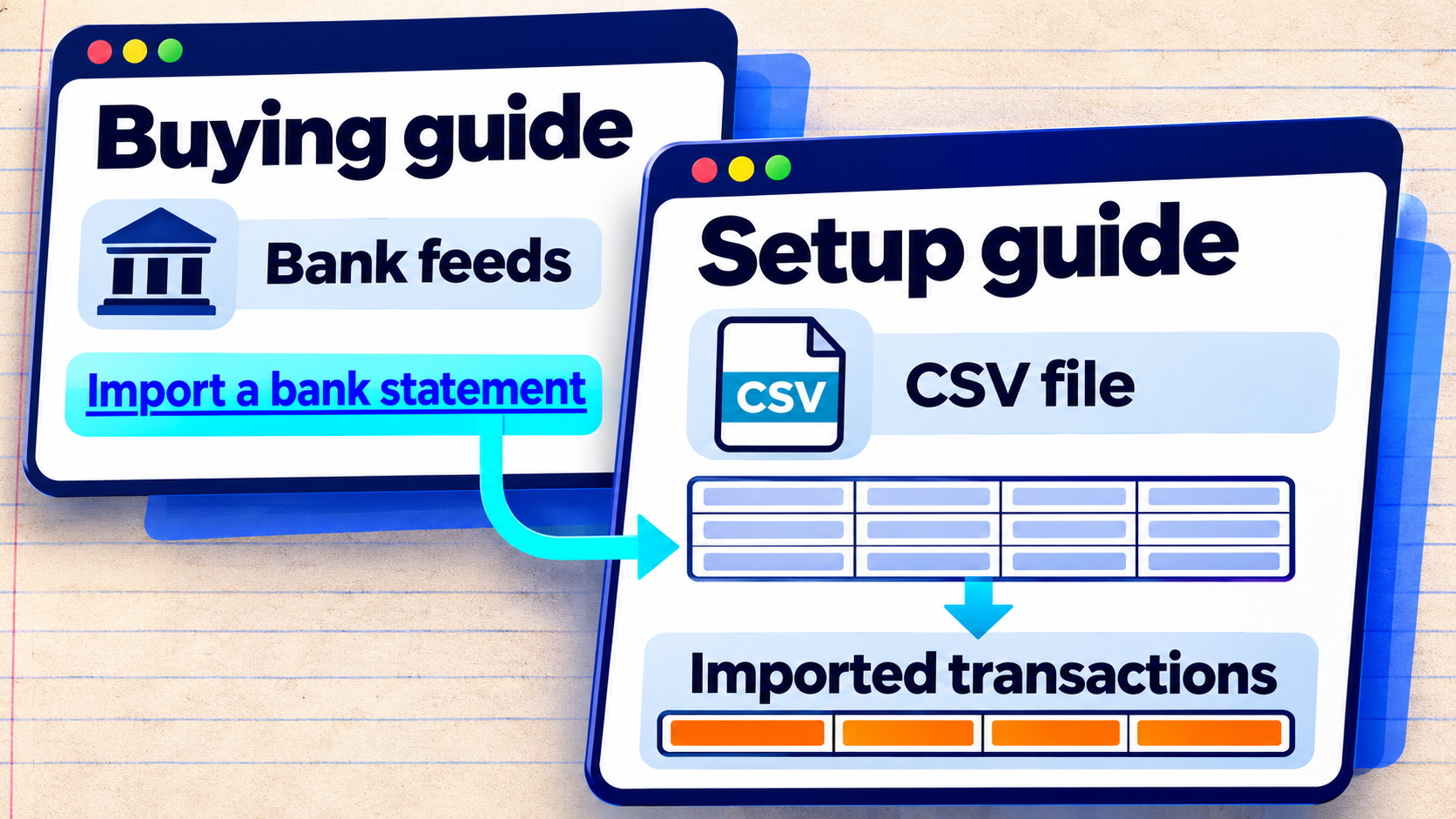
A buying guide can explain that buyers should check which banks an accounting tool supports and whether spreadsheet imports are available. A separate help page can show how to prepare a CSV, match the columns and review imported transactions. These two pages serve people at different stages. The first helps them choose software. The second helps them finish a job once they have it.
An internal linking strategy helps connect those stages. The buying guide could say that some teams use a CSV and link the words “import a bank statement” to the setup guide. That sentence still answers the buying question, and the link gives readers who need instructions a place to continue.
Review the changes after publication
A simple record helps the team remember what changed and why. Note the date, the questions you answered and any new internal links. Once the page has enough impressions to compare periods, its Search Console report can show whether it appears for searches about bank statement imports or PayNow payments.
Click and impression trends can guide another review. A change in either figure can have several causes, including demand, changes to the results page or edits on other sites.
Sales and support teams can add context that search data may miss. If prospective buyers keep asking whether payments will match invoices on their own, the page might need a more specific example. If sales calls move on to questions about setup, the buyer’s guide may already be doing what it should.
What About Google AI Overviews?
Google’s documentation on AI features in Search says AI Overviews and AI Mode follow the same SEO fundamentals as regular Search. An eligible page can appear as a supporting link if it is indexed and can appear in Search with a snippet. Google has no extra markup requirement for these features, and eligibility does not guarantee that a page will appear.
If an AI Overview appears during your research, look at the sub-questions it brings together and check its supporting links before using a claim. An answer about invoice payments may combine how a customer scans a QR code with how the business matches the payment to its records. A guide can use that distinction to explain the two tasks even if it only needs a few sentences.
Evidence still belongs beside the claim it supports. A feature claim can link to product documentation. A step from a product demo can name what the writer saw and under what conditions. An example made up to explain a process should be labelled as an example. A reader who lands directly on that section can then understand the answer without having read the whole guide.
How to Close Content Gaps in SEO
LSI keywords are an SEO label, while latent semantic indexing is a research technique. A topical coverage audit gives Singapore marketers a way to choose what goes into a page. The priority is the question that affects what a reader will do next, such as choosing a product, checking a feature or preparing for setup.
At MediaOne, we use search intent and content audits to see where a page leaves readers with unanswered questions. Our SEO services in Singapore can help you review a priority page and decide which answers to add, expand or link to.
FAQs About LSI Keywords
Can an SEO tool call its suggestions LSI keywords?
Yes. A tool can use that label for phrases it groups together. Its documentation may show whether the tool draws from search results, competing pages or its own database. That method tells you what the list can help with. For example, phrases drawn from ranking pages can help you find topics those pages cover. The list does not reveal which words Google expects to see.
Google ignores the meta keywords tag for web search, as its SEO Starter Guide explains. A CMS may still offer the field. An editor can spend that time on the page title and description, where the wording can tell a potential reader what the page covers.
Can an SEO tool’s content score drop after a good edit?
Yes. A score can drop when an editor removes a phrase or section the tool expects to see. If the edit gives readers a more accurate answer or removes a digression, that lower score may be acceptable. The editor can check the tool’s specific suggestion and ask what information a reader would lose if the original wording stayed out.
What if two pages on the same site use similar keywords?
Two pages can share vocabulary if they help readers do different things. A product comparison and an invoice setup guide may both mention accounting software and invoicing. If two pages answer the same question for the same audience, check whether readers would be better served by one fuller page. The page titles and search queries can help you see how much the two pages overlap.
Exact phrasing can be useful when it identifies a product, a feature or a common name. In other cases, ordinary phrasing is easier to read. Someone may type “bank feed CSV import accounting software” into a search box. A page can explain the same idea with “Some accounting tools let you import bank transactions from a CSV file.” Google describes several systems that help it understand relationships between words, concepts and searches.