
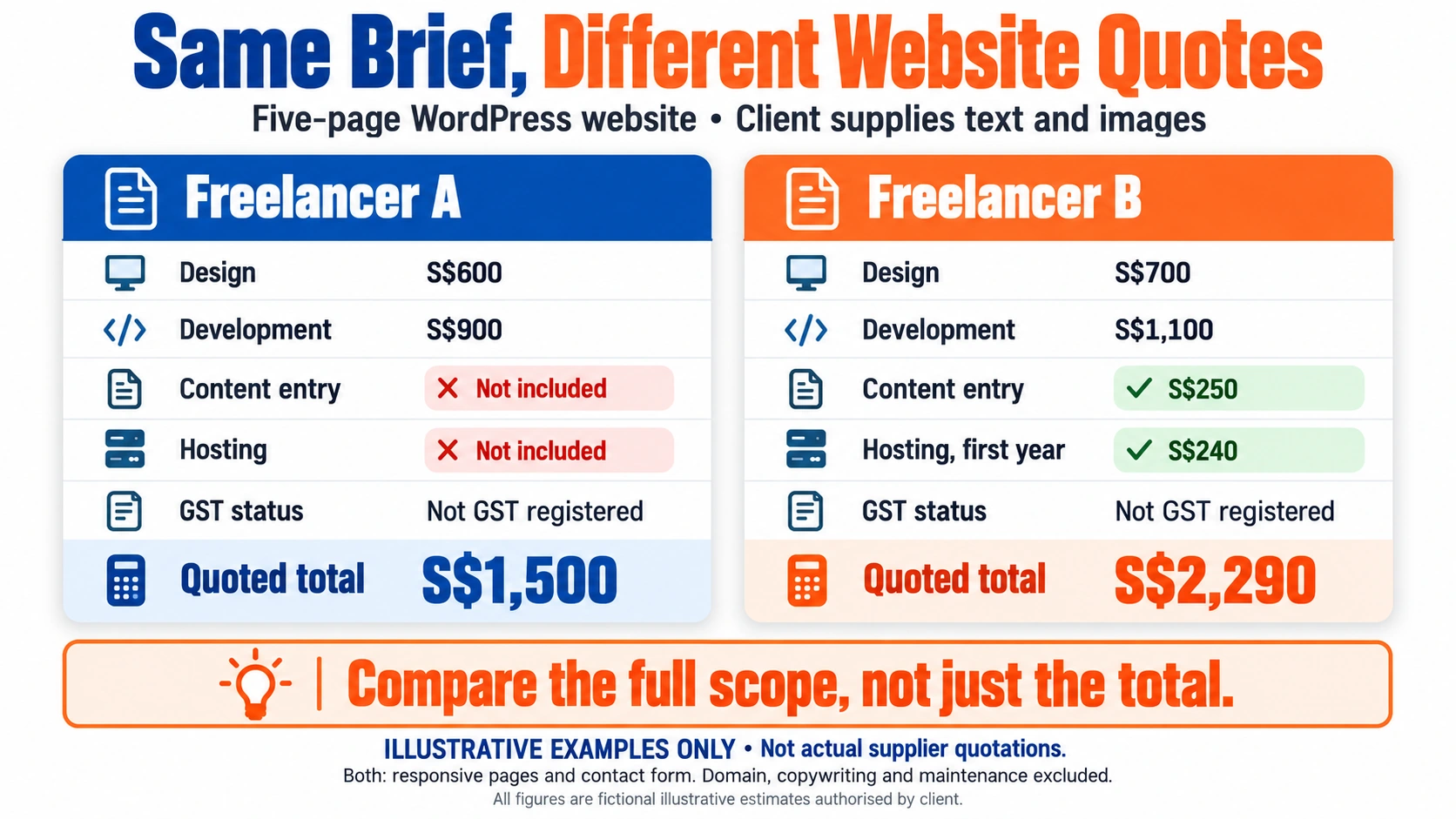
Most business owners who ask what a website costs in Singapore receive quotes that look far apart. They often assume some providers are overcharging. In most cases, the providers are describing different products. One quote covers a five-page template site with no content entry. Another covers a custom build with copywriting and a year of support. Before any price comparison makes sense, you need to know what each number includes.

This guide explains how web developer costs in Singapore are structured. It covers what drives the final figure and where the recurring costs sit. It also sets out a method for comparing proposals line by line. The main argument is that scope drives price more than the hourly rate. A clear brief lowers your spend and makes every proposal easier to compare.
Key Takeaways
- Indicative costs in Singapore: Basic business websites are commonly quoted from around S$1,000 to S$3,000. Template-based WordPress or Shopify builds range from roughly S$2,000 to S$8,000. Custom or e-commerce builds start at S$8,000 and go up from there. These are indicative ranges, not final prices.
- Scope decides the price: Two quotes for “a website” can differ several-fold because they describe different products. A written brief before you ask for prices is one of the most effective ways to lower your cost.
- Compare three-year totals, not headline fees: Hosting, domain, software licences, maintenance and content work are often left out of a starting price. Add them up over three years before comparing proposals.
- Check whether GST is included: GST at 9% has applied since 1 January 2024, and it can shift the comparison by about 9%. Confirm whether each quote includes or excludes it.
- Use the Quote Comparability Matrix: List every proposal against the same eight rows: pages and templates, design, CMS and licence, hosting, domain, content entry, post-launch support, and GST status. Treat any blank row as a cost to confirm, not as zero.
- Freelancers, agencies and in-house hires differ: Freelancers are usually cheapest for small, well-defined projects. Agencies offer continuity and accountability. An in-house hire is a salary cost, not a project fee.
Quick Answer: What Does a Web Developer Cost in Singapore?
Most small Singapore businesses should expect a template-based WordPress or Shopify business site, because it covers their core needs at a manageable cost. The typical web developer cost in Singapore ranges as follows:
- Basic business website: roughly S$1,000 to S$3,000
- WordPress or template-based business site: roughly S$2,000 to S$8,000
- Custom website: about S$8,000 to S$30,000 or more
- E-commerce store: about S$2,500 to S$15,000 or more
- Redesign of an existing site: around S$3,000 to S$15,000
These are indicative ranges, not fixed prices. Scope, number of pages, design customisation, integrations and content work set the final quotation. Two quotes for “a website” can differ several-fold.
Indicative Pricing Table
| Website type | Typical scope | Indicative project cost in SGD | Main exclusions to check |
|---|---|---|---|
| Basic business website | Five to eight pages on a template, contact form, basic SEO setup | S$1,000 to S$3,000 | Domain, hosting, content writing, photography, post-launch edits |
| WordPress business site | Custom theme or premium theme, up to around 15 pages, blog, forms | S$2,000 to S$8,000 | Premium plugin licences, hosting, maintenance, copywriting |
| Custom website | Bespoke design and development, custom features, CMS integration | S$8,000 to S$30,000+ | Hosting, ongoing maintenance, third-party API fees, content entry |
| Ecommerce website | Product catalogue, cart, checkout, payment and shipping integration | S$2,500 to S$15,000+ | Platform subscription, transaction fees, product data entry, PayNow or logistics integration |
| Redesign of an existing site | New design and rebuild, content migration, SEO redirects | S$3,000 to S$15,000 | Content migration labour, copywriting, redirect mapping, staging environment fees |
Sources and how the ranges were compiled: The ranges are indicative estimates. They draw on published package pages and quotation practice among Singapore web agencies and freelance platforms. Verify platform fees on the Shopify pricing page and the WordPress.com pricing page. Check domain fees on the SGNIC website, as these figures change over time. Confirm the GST treatment of each quote with the Inland Revenue Authority of Singapore), which sets the 9% rate that has applied since 1 January 2024.
What You Are Paying For: Anatomy of a Website Quote
Two quotations for “a website” can differ in several ways. The reason is usually scope, not skill. The quotes often describe different products. One provider may price a five-page template site where you supply the copy. Another may price a custom build that includes content creation, revision rounds and a year of support.

Before you compare numbers, find out what sits inside each line item.
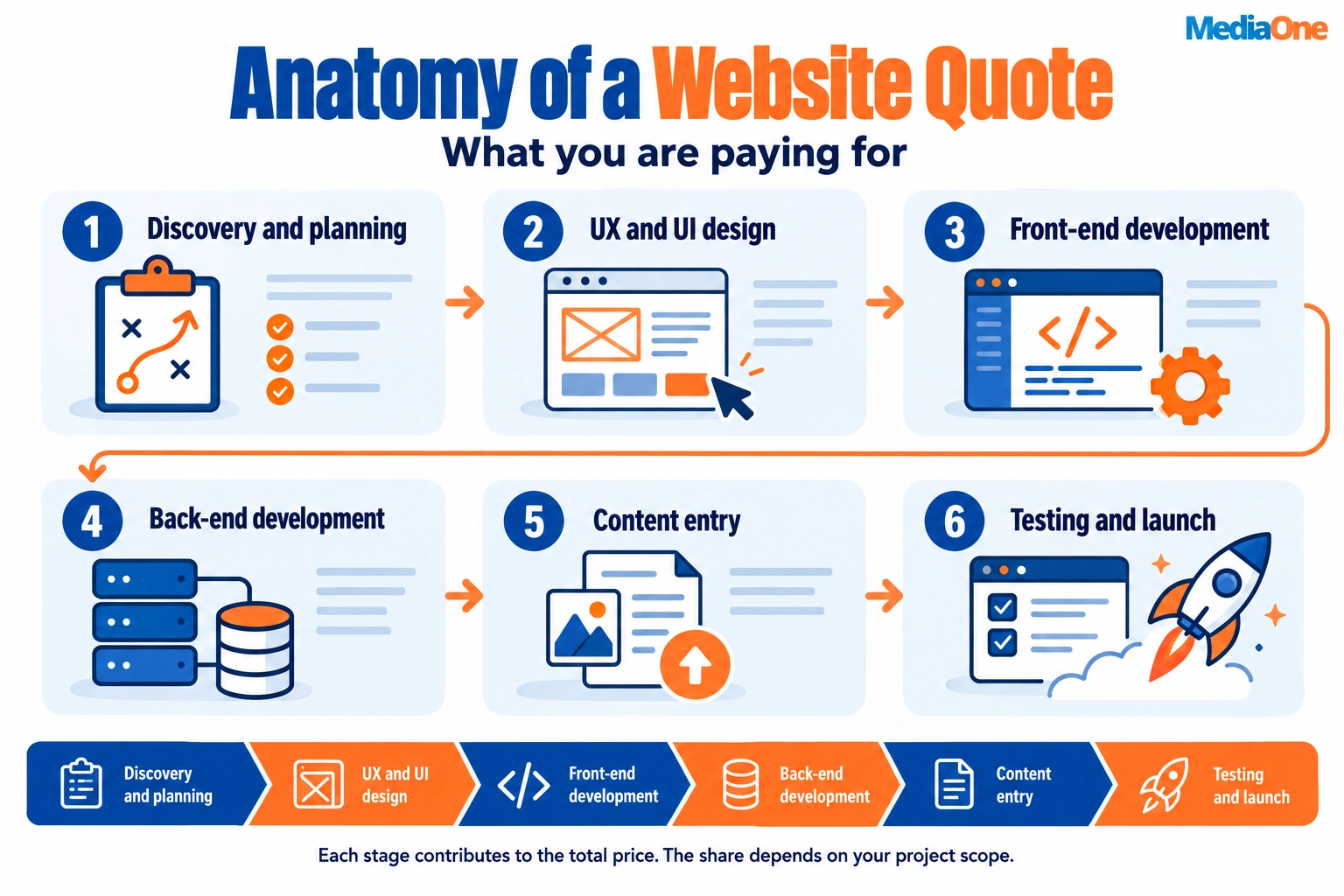
A typical quote is built from six components. Each one accounts for part of the final price.
| Component | What it covers | Where it shows up in the price |
|---|---|---|
| Discovery and planning | Goals, sitemap, feature list, technical requirements | Often a small fixed fee or folded into the first milestone |
| UX and UI design | Wireframes, page layouts, visual design, mobile layouts | Usually the first large block after planning |
| Front-end development | Templates, layouts, interactive elements, responsiveness | Scales with the number of unique page designs |
| Back-end development | Content management setup, forms, integrations, databases, payments | Scales with custom functionality and integrations |
| Content entry | Uploading text, images, product data and page setup | Frequently priced per page or per product, or left to you |
| Testing, launch and project management | Browser and device checks, domain connection, go-live, coordination | Often a fixed percentage or a set project management fee |
Template-based projects skip much of the custom design and back-end work. Their quotes focus on configuration and content entry. Custom builds reverse that balance. When you read a quote, find each of the six components and ask how many hours or pages are behind each one. A quote that lists only “web design and development” as one line gives you nothing to compare.
Design, Development and Content: Where the Money Goes
The split between design, development and content varies by provider. For a custom business website, design and development usually take the largest share, with content and project management making up the rest. For a template-based site, configuration and content entry can take more effort than the design.
The line items most often underestimated are:
- Content entry and copywriting. Many quotes assume you will supply finished text, images and product descriptions. If you do not have them ready, a provider may charge per page or per product to create them. Otherwise, the project stalls. E-commerce stores with hundreds of products carry the heaviest load, because each product needs photos, a description and pricing entered.
- Revision rounds. A quote may include two rounds of revisions. Providers often bill additional rounds at an hourly or per-round rate. Ask how many rounds are included at each stage, not just overall.
- Integrations. Connecting a site to a payment gateway, booking system, CRM, or shipping provider can add a noticeable block of development time. Verify whether the quote names each integration.
- Testing across devices. A quote that says “responsive design” should state which devices and browsers are tested before launch.
- Post-launch fixes. Bugs found in the first few weeks may or may not be covered. Confirm whether a warranty period applies and how long it lasts.
If a provider’s breakdown details design and development but reduces content and testing to one vague line, treat that as a gap to close before you sign.
Hidden and Recurring Costs
The build fee is only part of what a website costs to run. Headline quotes often leave out the recurring items below or list them in small print.
Domain name. Registration fees are set by the registry and accredited registrars. For .sg domains, please verify current pricing with SGNIC, the registry for the .sg namespace. Individual registrars set the prices for generic domains such as .com. Compare renewal prices, not introductory prices, which may be lower only in the first year.

Hosting. Hosting fees depend on traffic, storage and the level of performance and support you need. Shared hosting is the cheapest but limits performance. Managed WordPress and e-commerce platform hosting is usually bundled into platform subscriptions. Could you please confirm if hosting is included in the build quote, and if so, for how long?
SSL certificate. An SSL certificate enables HTTPS, which browsers expect for any site that collects information. Many hosts include a free certificate. Some providers charge for premium certificates or for installation, so confirm this is covered.
Premium plugins and licences. WordPress itself is free, but many business features rely on paid plugins or themes. Templates, page builders, form tools and SEO plugins often carry annual licence fees. Ecommerce features and premium themes are common examples.
Platform subscriptions. If you choose a hosted builder, the subscription is the core recurring cost. Prices change, so check the current pricing on each platform’s official pages. Examples include:
- WordPress.com plans
- Shopify plans for Singapore
- Wix plans
These pages list prices in SGD or USD depending on the market and plan. Plans also differ in transaction fees and feature limits. Record the date you checked each page, because subscription prices change.
Payment gateway and platform fees. Ecommerce sites pay transaction fees to payment processors on each sale. Some platforms add their transaction charge on top of the subscription. These fees come out of your revenue rather than appearing on your developer’s invoice, so include them in your planning. Check each provider’s current fee schedule before you choose a platform.
Local payment methods. PayNow is a must-have payment method for selling to customers in Singapore. Confirm that your platform supports it and whether it adds a fee before you commit.
GST treatment. Singapore’s Goods and Services Tax is charged at 9%, effective from 1 January 2024, according to the Inland Revenue Authority of Singapore). GST applies to a developer’s quote only if the provider is GST-registered. Check the current registration threshold on the IRAS GST registration page/registration before assuming a provider must charge it.
A quote marked “excluding GST” can cost about 9% more than the headline figure once tax is added. Ask every provider whether the quote includes or excludes GST. Compare quotes on the same basis.
Summary for planning. Build a simple annual budget line for recurring costs. Include domain renewal, hosting, SSL (if not included), licences, platform subscription and a maintenance allowance. Add these together and multiply by the number of years you plan to keep the site. Then add that total to the build quote. Use that three-year total, rather than the one-off fee, to compare proposals.
Freelancer, Agency or In-House: Choosing Who to Hire
Most businesses in Singapore commission a website from one of three sources: a freelancer, a web agency, or an in-house team. Each has a different cost profile. The cheapest hourly rate rarely means the lowest total cost, so the comparison below focuses on the factors that matter most once a site is live and something needs fixing.
| Factor | Freelancer | Web agency | In-house team |
|---|---|---|---|
| Upfront project cost | Usually lowest | Usually highest | Not a project fee (salaried cost) |
| Speed to start | Often fast, depends on availability | Scheduled around other clients | Depends on recruitment and onboarding |
| Consistency of output | Varies with the individual | More standardised process and quality checks | High once the team knows your business |
| Accountability | Direct, but one person to rely on | Contracted team and account manager | Direct line management |
| Key-person risk | High (one person holds the knowledge) | Lower (work is shared across staff) | Medium (depends on team size) |
| Handover and continuity | Needs deliberate documentation | Usually defined in the contract | Built into daily operations |
Salaries for in-house staff are a different cost model. Hiring an employee means paying ongoing payroll, CPF, benefits and tools whether or not a project is running. This guide focuses on commissioning a project, so the in-house option is covered here only for comparison.
When a Freelancer Makes Sense
A freelancer is usually the right choice when the brief is clear, the scope is contained, and the business can work with a single point of contact. Consider a freelancer when:
- The project is a single site or a small set of pages. For example, a five- to ten-page business site built on a WordPress, Shopify or Wix template.
- The scope fits a fixed brief. That means defined pages, a named template and a set number of revision rounds.
- You have someone internal who can manage content. This person makes decisions quickly, so the developer does not need to run the project.
- The budget sits below the level where agency overheads make sense. For most small business sites, this is the case.
- The work is not mission critical. A short delay or a single unavailable week should not stop revenue.
Before hiring a freelancer, ask for a portfolio of live sites, at least two references you can contact, and written confirmation of who owns the code, the domain and the content. Hold the domain and hosting accounts in your name, not the developer’s. This protects you if the working relationship ends.
Freelancers become a poor fit when the project grows beyond one person’s capacity. A site that needs custom integrations, payment gateways, inventory sync and a design system is usually better handled by a team.
When an Agency Is Worth the Premium
An agency costs more per project but spreads risk across several people. It is worth the extra cost when:
- The site is a revenue channel. For an ecommerce store or lead generation site, downtime and slow fixes cost real sales, so a contracted support line matters.
- The project involves multiple components. Design, development, copywriting, product data entry, search engine setup and third-party integrations all need coordinating.
- You need a defined process and a named account manager. Look for milestones, sign-off stages and documented testing before launch.
- You cannot afford key-person risk. If the person who built the site leaves or falls sick, an agency has other staff who can carry on the work.
- The project needs custom design or non-template functionality that a single freelancer would take much longer to deliver.
When comparing agencies, check whether the quote includes post-launch support, how many revision rounds are included, who writes and enters the content, and what service level applies to urgent fixes. A premium is only justified if you write these terms into the contract. A higher price with no defined support can cost more than a freelancer in practice.
Checkpoint for your decision: if the project would lose money or reputation for every week it stays broken, lean towards an agency with a support contract. If a broken site would only inconvenience you, a freelancer with clear handover terms is usually sufficient.
Budget by Goal: What Each Price Range Realistically Gets
A quote alone tells you little. The same S$ figure can buy a site that goes live quickly or one that needs a rebuild within a couple of years, depending on what sits underneath it. Each budget tier sets a ceiling on design, functionality and how easily the site can change. Those ceilings matter more than the price itself.
The useful question is not “What does S$X get me?” but “Where will this site hit its limit, and what happens when I reach it?” The two main build approaches are compared below on exactly that basis.
WordPress and Template-Based Sites
Most small Singapore businesses start here, and for good reason. A template-based build uses an existing theme and a content management system (CMS), so the developer’s time goes into setup, configuration and content entry rather than custom design from scratch. Platform plan prices are published openly. WordPress.com, Shopify and Wix all list their plans on their official pages. Check these when you get a quote, because they change.
What you typically get:
- A site of roughly five to fifteen standard pages
- A theme with limited layout options
- Standard contact forms, galleries and basic search engine setup
- A few hours of training or a handover document
Where the ceiling sits:
- Design: You can adjust colours, fonts and layout within the theme. Anything that departs from the theme’s structure usually means custom code, which moves you into the next tier.
- Functionality: Booking, membership, multi-currency pricing or complex product configuration often need paid plugins or add-ons. Each carries its own licence fee, often annual, and some stop working if the plugin isn’t updated.
- Scale: Template sites handle a moderate product catalogue well. Huge catalogues, heavy traffic spikes or complex filtering can slow the site or force a platform change.
The maintenance implication is the part most quotes skip. A template site is only as secure as its weakest plugin. Core software, theme and plugin updates are recurring work. An unmaintained WordPress site is one of the most common ways small business sites get compromised. Budget for updates from day one, not as an afterthought once the site is live. Ask whether the quoted price includes any update support and for how long.
Template builds are also cheaper to maintain in developer-hours. Updating a standard theme and a handful of plugins usually takes a short, predictable session. A custom build needs more time per update cycle because each change must be tested against bespoke code and integrations. Ask the developer to estimate hours per update cycle, and compare that figure across the quotes you receive.
A practical rule: if your plans for the next two years involve only a few pages, a blog and an enquiry form, a template build is usually the lower-cost route. If they involve integrations, custom workflows or a large catalogue, the template route may cost more over time than the quote suggests.
Custom and Ecommerce Builds
A custom build starts without a pre-made theme or with a framework heavily modified for your requirements. An ecommerce build adds a shopping cart, payment handling, and inventory and shipping logic. Both cost more up front. The trade-off is that the site is built around your business rather than around a template’s assumptions.
What drives the price?
- Integrations: Connecting to a warehouse system, accounting software, a customer relationship management (CRM) tool, or a booking engine requires development hours for each connection, plus testing on both sides. Ask which integrations are in scope and whether the other system’s application programming interface (API) access costs extra.
- Payments: Local buyers expect PayNow. PayNow is a must-have payment method for selling to customers in Singapore, and it is typically offered alongside cards. Each payment gateway involves setup, testing and transaction fees set by the provider. Confirm the current rates on the provider’s own published pricing page before modelling your margins.
- Inventory and product data: Variant handling, stock sync across channels and bulk product import each add build effort. Product data entry is often the largest hidden labour cost, and it is frequently left to the client unless the quote says otherwise.
- Shipping and logistics: Local delivery rules, courier rate calculation and multi-warehouse logic add complexity that a standard template does not handle.
Scalability is what you are really buying. A custom build designed for growth costs more now but avoids a rebuild later. A rebuild brings its own costs: lost search rankings during migration, data transfer, and the time spent learning a new system. These can exceed the price gap between a template and a custom build. Ask the developer how the architecture will handle ten times your current order volume. Ask what happens to the site if you change the payment provider or add a second sales channel.
Where custom work is worth it: when your revenue depends on a specific workflow that templates cannot support, when you need integrations that define your operations, or when you expect to outgrow a template within about two years. Where it is not worth it: when your needs are standard, and a template covers them, the extra build cost buys flexibility you will not use.
Decision Framework: Matching Budget to Goal
| Your situation | Likely fit | What to confirm before signing | The main risk is if you choose wrong |
|---|---|---|---|
| Brochure site, few pages, low change rate | Template-based | Update and plugin support, domain and hosting inclusion | Paying for custom work you will not use |
| Small catalogue, standard payments | Template ecommerce | Plugin licence costs, transaction fees, product data entry | Hitting plugin limits within a year |
| Booking, membership or multi-step workflows | Custom or heavily extended template | Integration scope, who owns the code, post-launch fixes | Costly rebuild when the workflow outgrows the template |
| Multi-channel sales with inventory sync | Custom ecommerce | Integration list, API access costs, scalability testing | Stock errors and manual reconciliation |
| Unsure of future needs | Template now, with a planned review | Data export options, migration cost estimate | Lock-in if the platform cannot export your data |
The last row deserves emphasis. Whatever you build, confirm in writing that you can export your content, product data and customer records. Migration cost is a real line item. A template site with no export path can make switching expensive, whatever the original build cost.
How to Compare Quotations Fairly
Most quotes for the same website look far apart because they describe different products. One provider prices a template with five pages and no content entry. Another price is a custom build with a content migration and twelve months of support. Before you compare any two proposals, put them against the same eight rows. This guide calls that the Quote Comparability Matrix. Any row a provider leaves blank is a cost to confirm, not zero.
- Pages and templates. List the number of pages, the page types (home, service, product, blog, contact) and whether each uses a template layout or a custom design. A quote for “a five-page website” and a quote for “a custom five-page website” are not the same product.
- Design approach. State whether the design uses a premium theme, a stock template with light customisation, or a bespoke design from a designer. Note how many design concepts and revision rounds are included. Ask what happens to the design if you change direction mid-project.
- CMS and licence. Record the platform (WordPress, Shopify, Wix or a custom build). Verify whether any plugin, theme or app licence is paid in the one-off fee or billed each year. Ecommerce platforms often charge a monthly subscription that does not appear in the build quote.
- Hosting. Confirm whether hosting is included, for how long, and at what renewal price. A first-year hosting discount can make a quote look cheaper than it is over three years.
- Domain. Check whether the domain is bundled. Domain registration fees for .sg and .com names are set by the registry or accredited registrars, so the renewal cost is predictable and should be shown separately. The SGNIC website lists the .sg registration rules.
- Content entry and creation. Establish who writes the copy, sources the photography, enters product data and uploads the pages. This task is often the largest hidden labour in a project. A quote that says “content entry included” may mean you supply finished text and images in a set format.
- Post-launch support. Note the length of any warranty or bug-fix period, the response time, and whether a monthly maintenance retainer is available and priced.
- GST status. Ask whether the quoted figure includes GST. Singapore’s GST rate has been 9% since 1 January 2024 (Inland Revenue Authority of Singapore). On a S$10,000 quote, the gap between a GST-inclusive and a GST-exclusive figure is S$900. That gap can change which proposal looks cheapest.
Once every row is filled in, add up a three-year total for each proposal:
Three-year total = one-off fee + (monthly recurring costs × 36) + GST adjustment
A fill-in version looks like this:
Quote A: S$____ one-off, GST, hosting, maintenance, content entry, domain.
Run the same template across every proposal, and the comparison becomes a table you can read in a minute.
A starting price such as “from S$1,500” is a headline figure for a narrow package. It is not the final cost of your project. Use the matrix to determine the real number.
Worked Example: Two Quotes Side by Side
Imagine two quotes for a five-page service business site. Quote A is S$3,000 one-off, with hosting excluded and a S$150 monthly maintenance retainer. Quote B is S$4,200 one-off, with hosting, domain and maintenance bundled at S$80 per month. Quote A looks cheaper on the first invoice. Over three years, Quote A’s recurring cost alone is S$150 × 36 = S$5,400, before hosting and domain. Quote B’s recurring cost is S$80 × 36 = S$2,880. Once you confirm the bundled items match your needs, Quote B’s three-year total is the lower figure.
Questions to Ask Before You Sign
- Could you please confirm in writing whether the price is GST-inclusive or exclusive?
- Which pages and features are fixed, and what does a change outside scope cost?
- Who applies plugin and software updates, how often, and are they tested on a staging copy first?
- Who owns the domain, hosting account, source code, design files and content at the end of the project?
- Who will do the work, and who do I contact if that person leaves?
- What are the costs of the first renewal of hosting and the domain?
Red Flags in a Proposal
Some warning signs show up repeatedly in weak or misleading proposals. None proves a provider is dishonest, but each is a reason to ask a direct question before you sign.
- A low one-off fee with no recurring costs stated. If hosting, licences, domain and maintenance are missing, ask for a written three-year cost estimate.
- No mention of GST. Please clarify whether the figure is GST-inclusive or exclusive, and provide the answer in writing.
- “Unlimited revisions” with no definition. Ask what counts as a revision, how many rounds are included, and what a change outside scope costs.
- Vague scope. Phrases such as “full website design” or “SEO-ready” with no page list or deliverables. Ask for a page-by-page scope and a list of deliverables.
- No ownership terms. If the proposal does nIf the proposal does not specify who will own the source code, design files, and content at the end of the project, please ask before agreeing.main, hosting account and content.
- Payment in full upfront. A common pattern is a deposit followed by payments at set milestones, such as design approval, build completion and launch. Be cautious of demands for the full amount before any work starts.
- No named person or team. Ask who will do the work, whether they are freelancers or employees, and who you contact if the developer leaves.
- Costs that depend on a template you have not seen. Ask for a demo or staging link before you commit to a template-based package.
When you spot one of these, ask for a revised quote that answers the question in writing. A provider who is open about scope will usually do this quickly. A provider who avoids the question has told you something useful.
Maintenance, Hosting and Ongoing Costs
The number that surprises most buyers is not the build fee. It is what the site costs in years two and three. A quote that looks cheap on day one can cost more over three years than a higher build price that includes everything. Include recurring costs in every comparison from the start.
The Recurring Cost Categories
Every live website carries some combination of these costs:
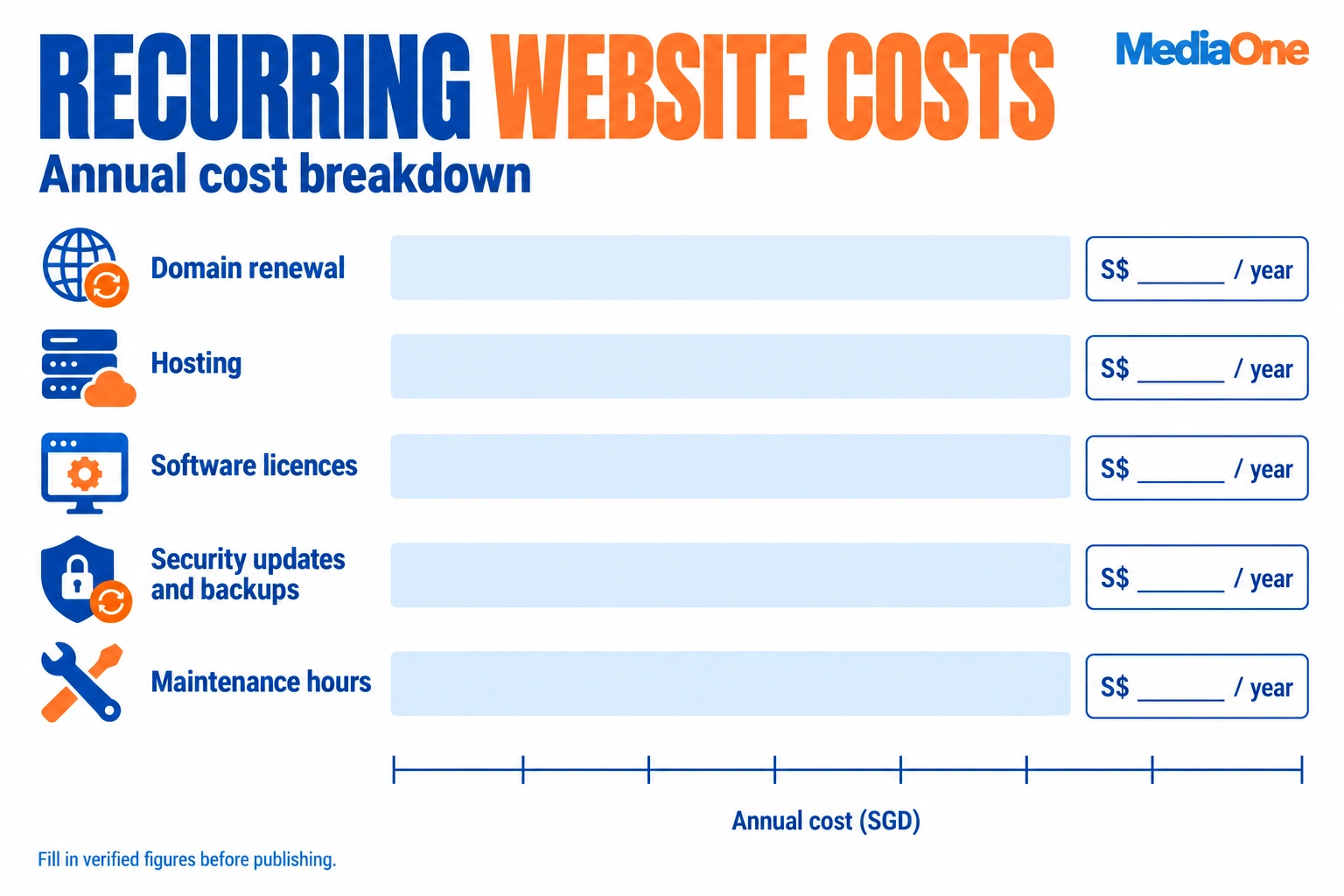
- Domain registration. A .sg or .com domain is renewed annually. Check the registry or accredited registrar for current fees when you buy, as renewal prices can differ from first-year promotional prices.
- Hosting. Shared, managed WordPress and cloud hosting are priced very differently. Shared hosting suits a small brochure site. A managed plan with backups, security monitoring and a staging copy is usually the safer choice for a business site.
- Platform subscriptions. Shopify, Wix and WordPress.com plans are billed monthly or annually. Higher tiers unlock features such as ecommerce checkout, advanced SEO controls or custom domains. Check the official pricing pages when you compare, since plan names and inclusions change.
- Premium plugins and software licences. A self-hosted WordPress site often needs paid plugins for forms, ecommerce, security or page building. Each licence may renew yearly.
- Maintenance retainer. Security updates, plugin and core software upgrades, uptime monitoring, and restore-from-backup work usually fall under a monthly or annual retainer.
- Content changes. Every edit beyond the retainer’s allowance is billed separately, often hourly.
How Many Hours of Maintenance Does It Take?
Maintenance is billed by time, so it helps to know how much time each update cycle takes. A typical cycle for a small template-based WordPress site covers core, theme and plugin updates, a backup check, a staging test, uptime and security checks, and a short review. For a small template site, that is typically a few hours per cycle. A custom build with more plugins, custom code or ecommerce integrations takes longer, because each update may require testing against custom code and payment flows.
Custom and template efforts mainly differ in how much unique code needs testing and maintenance. Template sites reuse proven components, so fixes are usually straightforward. Custom builds need developer time for bespoke functions, API connections and back-end logic, and that work continues after launch. Please ask each provider to provide the expected hours per monthly cycle and the hourly rate for work outside the retainer.
Security Updates and Backups
Security updates are the cost most often left out of a quote. WordPress core, themes and plugins release patches regularly, and an unpatched plugin is one of the most common routes into a small business site. Ask every provider three direct questions:

- Who applies updates, how often, and are they tested on a staging copy first?
- Are backups taken daily, and how many restore points are kept?
- Who is responsible if the site is compromised, and what does recovery cost?
If a provider cannot answer these questions clearly, you will have to manage the site yourself.
Indicative Annual Ranges
The table below gives an indicative guide for a small- to medium-sized Singapore business site in its first years. These are estimates built from the published platform and registry pricing above, not quotations, and they assume the stated scope. Re-check prices at the time of purchase.
| Cost item | Assumption | Indicative annual cost (SGD) |
|---|---|---|
| Domain (.sg or .com) | One domain, renewed yearly | Check SGNIC or registrar at purchase |
| Shared or managed hosting | Small brochure site, shared plan | Varies by plan and provider |
| Managed WordPress hosting | Backups, staging, security monitoring | Higher than shared hosting; compare plan tiers |
| Platform subscription (Shopify, Wix, WordPress.com) | Plan needed for e-commerce or custom domain | Check the official pricing page for the current tier |
| Premium plugins or licences | Two to three paid plugins | Varies; many renew yearly |
| Maintenance retainer | Monthly updates, backups, uptime checks | Commonly quoted monthly; ask for the annual total |
Most buyers should budget for the domain, hosting, one or two licences and a maintenance retainer, then add a contingency for content changes. Multiply the monthly retainer by 12 and add the other lines to reach an annual figure you can compare across proposals.
Why the Three-Year Total Is the Right Comparison
Put every quote on a three-year basis:
Three-year total = one-off build fee + (monthly recurring costs × 36) + annual recurring costs × 3 + GST adjustment (if the quote excludes GST)

Using the worked example above, a S$3,000 build with a S$150 monthly retainer and no hosting comes to S$8,400 over three years before hosting and domain. A S$4,200 build with hosting, domain and an S$80 monthly retainer included comes to S$7,080. The cheaper build fee turned out to be the more expensive option.
Assumptions to State in Any Budget
Any ongoing cost estimate depends on assumptions that should be written down: the number of pages, whether the site uses a template or a custom build, the number of content edits per month, whether there is an ecommerce catalogue, and whether GST applies. Change one assumption and the total will change. That is why you can’t compare two budgets built on different scopes directly.
Conclusion
The cost of commissioning a website in Singapore depends more on the decisions you make before asking for a quote than on the developer you choose. Two proposals for “a website” can differ severalfold because they describe different products. One may be a five-page template build with hosting bundled. The other may be a custom site with content entry, integrations and a year of support. Comparing them based on the headline figure alone tells you very little.
Start by defining what the site must do. Decide how many pages it needs, whether it sells online, which systems it must connect to, and who will update the content. Then choose the build model that fits that scope, whether a template-based site, a custom build or a platform such as Shopify or WordPress. Finally, compare proposals on the same basis, not on the price printed at the top.
Use the Quote Comparability Matrix from the section above as your working tool. List each proposal against the same eight rows: pages and templates, design approach, CMS and licence, hosting, domain, content entry, post-launch support and GST status. Treat any blank row as a cost to confirm, not as zero. Next, add up the one-off fee and the recurring costs over three years. If the quote doesn’t include GST, make the necessary adjustments. That three-year figure, not the starting price, is the number to compare.
Your next step is to write a one-page brief. Cover your page list, your sales or lead goals, your content owner and how much recurring cost you can carry. Please send the same brief to every developer you approach. Their proposals will then describe the same product, making the comparison fair.
How much does a basic website cost in Singapore?
A basic informational website from a Singapore freelancer or small agency typically starts from around S$1,000 to S$3,000 when built on a template. These figures are based on published packages checked in November 2026. Custom builds cost more. Scope, page count and content work decide the final figure, so treat any starting price as the floor, not the total.
Is a freelance web developer cheaper than an agency in Singapore?
Usually, yes, at the build stage. Freelancers often quote lower one-off fees because their overheads are smaller. Agencies usually cost more but add project management, design depth, testing and continuity if a key person leaves. Compare the full three-year cost and who is accountable for fixes, not just the headline fee.
Is GST included in web development quotes?
Not always. The Inland Revenue Authority of Singapore sets GST at 9% from 1 January 2024. Some providers quote GST-inclusive prices, while others add GST on top. Ask each provider to state whether its figure includes GST, because the difference can shift the comparison by about 9%.
Do I have to pay yearly for a website?
Most websites carry recurring costs. Budget for the domain name, which renews yearly, plus hosting, an SSL certificate (if not bundled), and any paid plugins or platform subscriptions. Maintenance such as security updates and backups is optional but advisable. Total these figures across three years when comparing quotes.
How long does it typically take to build a website in Singapore?
A basic template-based site often takes two to four weeks once content is ready. Custom websites and ecommerce stores commonly take two to six months, depending on design revisions, integrations and how quickly you supply content and product data. Delays are most often caused by late content, not by development itself.
Are there government grants for website development in Singapore?
Funding schemes change, and this article has not verified any scheme as currently open for website development. Check official government sites for current eligibility, application windows and funding caps before you commit to a provider or sign a contract.