For most small Singapore businesses, the best SEO CMS is a mainstream, managed platform your team can configure. WordPress, Shopify and Webflow are the usual shortlist. Choose the platform your editors can maintain, and then confirm it meets the scorecard below.

Controls matter more than the platform. Page rendering, title tags, URL structure and redirects are SEO decisions, not publishing preferences. A popular content management system that your team controls will usually outperform a stronger platform nobody maintains. Headless builds need engineers to maintain them, so weigh that against your team’s flexibility before committing.
Search drives most online discovery. SEO.com reports that 68% of all online experiences begin with a Google Search, and HoboHost notes that mobile searches account for more than 60% of online traffic. Mobile traffic grew from 3% in 2010 to 58.5% in 2025, according to Digital Information World. Check how each platform handles mobile rendering, and use Core Web Vitals tools to measure page speed and stability across every page of your website.
Key Takeaways
- Controls matter more than the CMS. Metadata, URLs, redirects and rendering decide performance more than the platform brand.
- WordPress is the default. It powers over 43% of the web, with more than 59,000 plugins. Plugin quality and updates decide whether it helps.
- Headless adds hidden costs. Front-end rendering work can outweigh subscription prices.
- Score before you choose. Rate each platform 1 to 5 on six SEO controls. Disqualify any score below 3 for rendering or URL control.
- Plan migrations around URLs. Lost traffic usually comes from changed URLs without redirects, not the new platform.
What a CMS Actually Does for SEO
A content management system does not rank pages. It decides what a search engine receives when it requests a URL and how easily a team can change the signals that describe that URL. Platforms with strong analytics and clear key features make it easier for teams to monitor and adjust these signals. A well-built website depends on this control.
Features a CMS provides for SEO
A CMS does two jobs for search engines.
1. Output. A crawler needs the page’s content, links and metadata in the HTML it receives. Server-rendered platforms such as WordPress and Drupal deliver these elements by default. JavaScript-heavy front ends can hide content from some crawlers, so test rendering on any candidate before you commit.
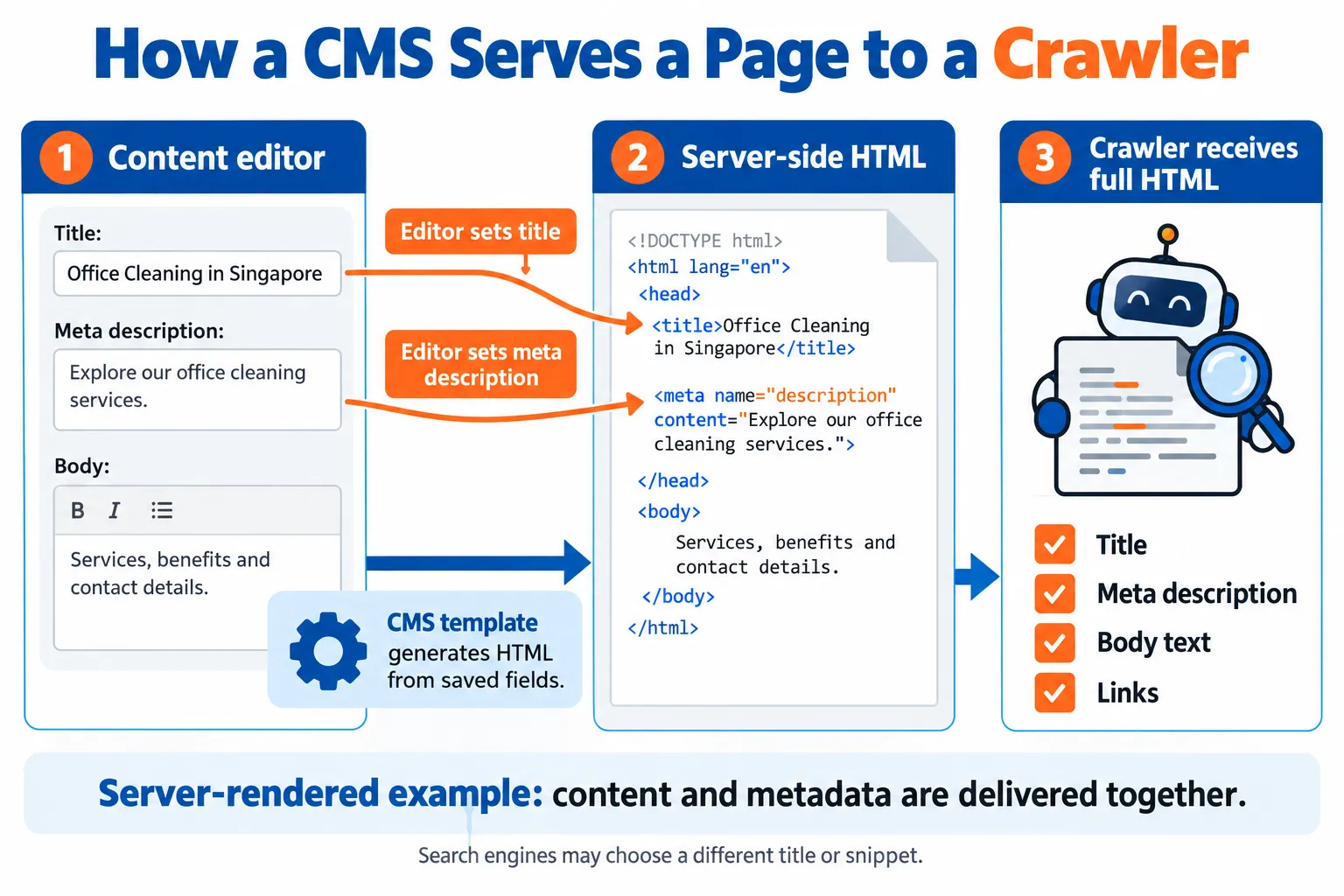
2. Workflow. A CMS that makes drafting and setting metadata quick gets more pages indexed. Strong content modelling, which defines reusable fields for each page type, lets small businesses publish consistently without rebuilding templates. Well-designed fields also add flexibility, so you can introduce new page types without disrupting existing ones.
SEO controls and metadata management
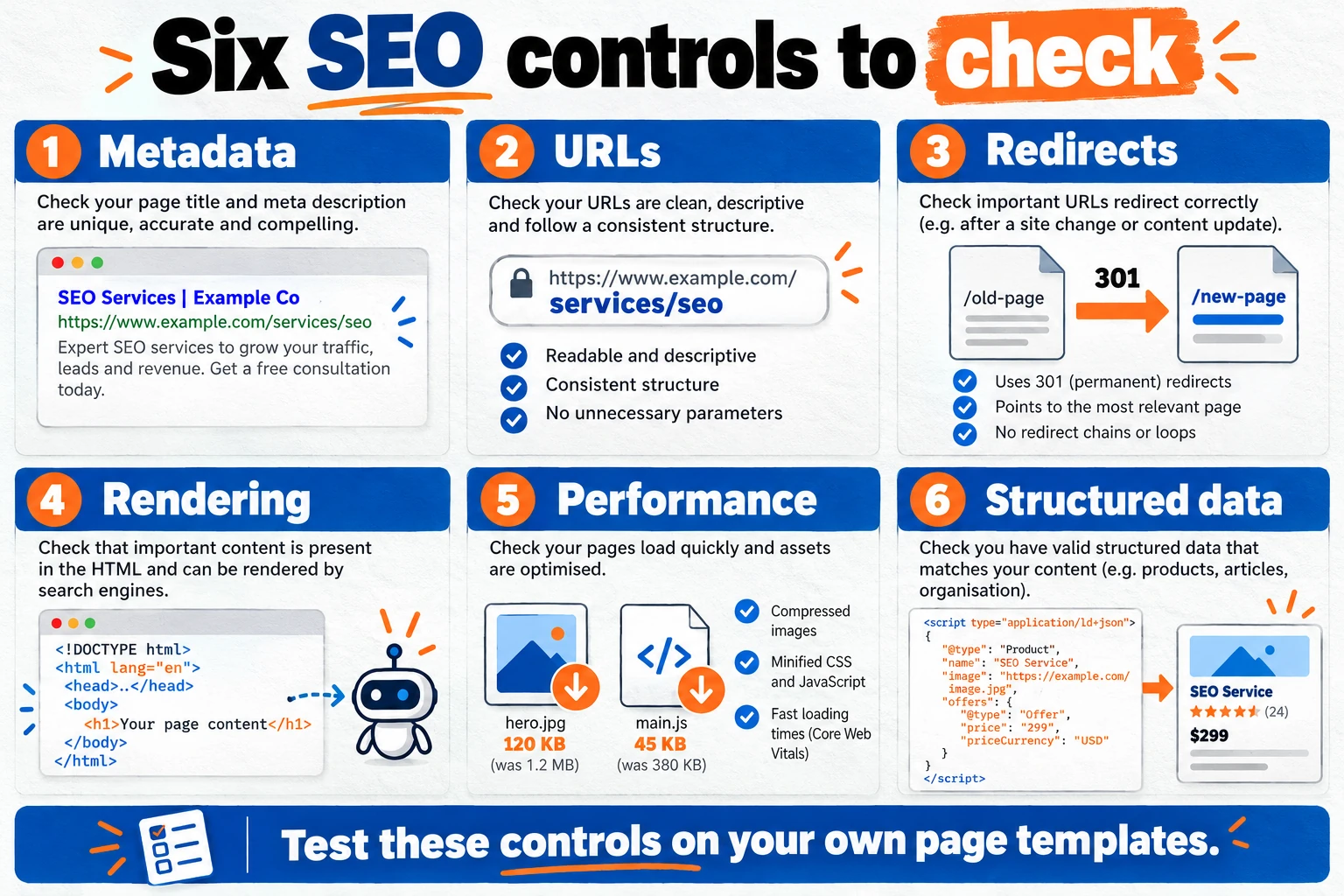
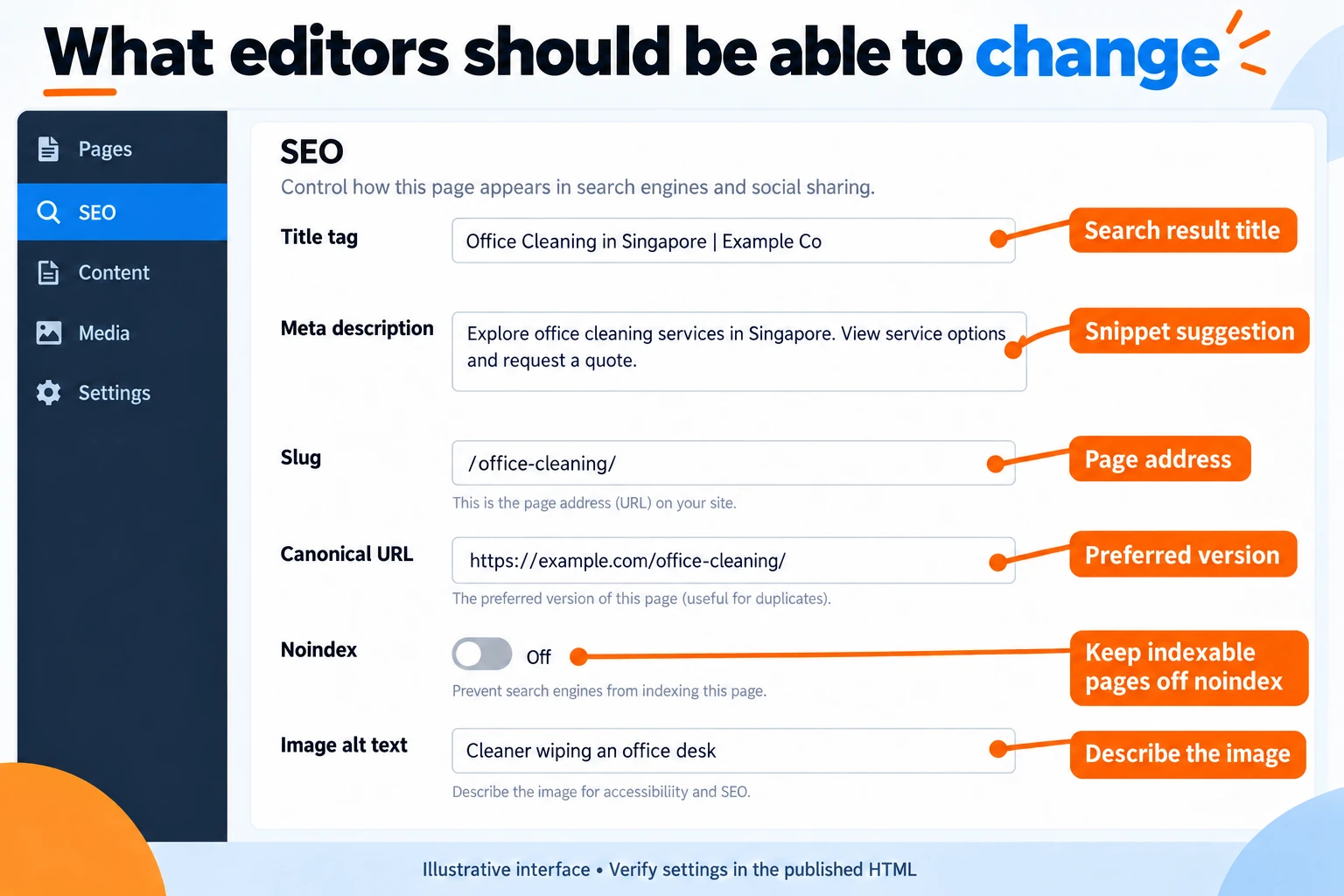
Every serious candidate should expose these features to editors without requiring code:
- Title tag and meta description, set per page, with a visible character count
- Canonical URL, so duplicate pages point to the preferred version
- Robots directives, such as noindex, for thin pages like internal search results
- Open Graph and social image fields, which control how shared links appear
- Image alt text fields, which describe images to search engines and screen readers
The practical test: can a content editor change the title and noindex setting on a single page without involving a developer? If not, every metadata change becomes a bottleneck. The best platforms include these built-in controls rather than relying on third-party plug-ins.
How a CMS supports technical SEO
Page speed and Core Web Vitals, the user-experience measures Google uses, depend on how images are served, how many scripts load and where the site is hosted. Google treats performance as one signal among many, so a fast site does not guarantee rankings.
Most mainstream platforms generate XML sitemaps automatically, but related-post widgets and category archives can create thousands of low-value URLs, which wastes crawl budget. Teams can use built-in tools to review these URLs and exclude the ones that add nothing.

A CMS cannot fix slow infrastructure, weak content or poor site structure. Its job is to make the right settings easy to apply.
Checklist: Evaluating a CMS Against SEO Requirements
Most CMS comparisons end with a feature list, which shows what a platform can do, not whether your team can do the SEO work on it. This scorecard rates each candidate on six controls, weights them by how much your website depends on each, and serves as a shortlist tool rather than a verdict. The best shortlist starts by checking which key features your team will use every week, not which ones look impressive in a demo.
Step 1: Score each control from 1 to 5
Rate every candidate on these six controls:
- Metadata editing per page. Can a non-developer change the title tag, meta description and canonical URL without a code change?
- URL and slug control. Can you set slugs, edit them after publishing, and maintain a consistent folder structure?
- Redirect management. Is there a native redirect manager or a dependable plugin? Redirects send visitors and search engines from an old URL to a new one.
- Server-side or pre-rendered output. Does the platform deliver full HTML to crawlers, or does content depend on client-side JavaScript? A page that crawlers cannot read may not be indexed.
- Image and script performance tools. Can you compress images, enable lazy loading, control third-party scripts, and add alt text (a brief description of an image) in the editor?
- Structured data support. Can you add schema markup (code that labels content such as products or reviews) per page or per content type? Structured data relies on sound content modelling, so check whether the platform allows you to define content types that map cleanly to the schema.
A score of 1 means the control is missing or needs a developer for every change. A score of 5 means a trained editor can handle it in the normal publishing flow.
Step 2: Weight the controls for your site
Give each control a weight from 1 to 3 based on how much organic growth depends on it:
| Your site type | Weight heavily | Weight lightly |
|---|---|---|
| Catalogue or e-commerce | URL control, redirects, structured data | Metadata depth for editorial posts |
| Content publisher | Metadata, rendering, structured data | Complex URL rules |
| Local service business | Metadata, page speed, mobile rendering | Multi-level URL hierarchies |
| Enterprise with many teams | Redirects, rendering, governance | Plugin variety |
Multiply each score by its weight, add the results and record a total for each platform.
Worked example. A Singapore catalogue business compares two platforms. Platform A scores 4 on URL control (weight 3), 3 on redirects (weight 3), 4 on structured data (weight 2) and 5 on metadata (weight 1), for a total of 34. Platform B scores 5 on URL control (weight 3), 4 on redirects (weight 3), 2 on structured data (weight 2) and 3 on metadata (weight 1), also 34. The tie is decided by whether the team can maintain Platform B’s structured data without a developer.
Step 3: Apply the disqualification rule
Check rendering (control 4) and URL control (control 2) first. Any platform scoring below 3 on either is disqualified for organic-led growth, however strong its other features.
Scores show capability. Costs show sustainability. For each shortlisted platform, add:
- Subscription or licence fees from the vendor’s current pricing page.
- Plugin or app costs. Premium themes typically range from $30 to $100, according to innomedia.sg, and plugins add to that.
- Front-end development time for any headless option.
- Maintenance hours for updates, plugin conflicts and security patches. Multiply monthly hours by your hourly rate for the annual cost.
For Singapore budgets, convert listed prices at the current exchange rate. For example, the ECB reference rate on 26 October 2026 was S$1.4327 to €1, so a plan listed at €90.75 a month is about S$130 a month before tax.
Step 5: Run the diagnostic
If one constraint dominates, use this table to choose the control to prioritise:
| If your main constraint is | Prioritise | Why |
|---|---|---|
| Limited developer time | Metadata and redirect control (controls 1 and 3) | Editors can fix SEO without a ticket |
| Slow mobile pages | Rendering and performance tools (controls 4 and 5) | Mobile traffic grew from 3% in 2010 to 58.5% in 2025 |
| Thousands of product URLs | URL control and redirects (controls 2 and 3) | Migration and URL errors can hurt rankings quickly |
| Heavy structured content | Structured data support (control 6) | Rich results depend on consistent markup |
| Tight budget | Total cost of ownership, including maintenance | A cheap platform that needs constant fixing costs more |
How to read your result
A platform that passes the disqualification rule and leads on weighted scores is a strong fit. If two platforms score within a few points, choose the one your team can maintain, usually the one your editors already know how to configure. Use performance data from your analytics to guide the final weighting, since those figures reflect your actual traffic rather than general market trends. Compare the named controls, such as URL control and metadata editing, against how your team will use them day to day, and choose the option that holds up under your real workload, not the one with the longest feature list.
Top CMS Platforms for SEO Compared

The best CMS for SEO is the one your team can set up correctly and keep running. It is rarely the one with the longest feature list. Google ranks pages, not platforms, so a well-configured site on a modest platform can outrank a poorly set-up site on a premium one. Compare the key features of each platform against what your team can realistically maintain.
Quick verdict: Choose WordPress if your team publishes content often and wants full control of metadata. Choose Shopify if you sell products and want SEO handled for you. Choose Webflow if a designer or marketer needs to build and edit landing pages without a developer.
| Use case | Best platform type | Why |
|---|---|---|
| Publisher | WordPress | Editable slugs and a large plugin ecosystem |
| Store | Shopify | Built-in product and collection SEO |
| Marketing team | Webflow | Direct control of meta tags without a developer |
| Enterprise | Drupal or headless CMS | Consistent content types across many teams and languages |
| Platform | Best fit | Main SEO strength | Main limitation |
|---|---|---|---|
| WordPress | Content-led websites with in-house or freelance support | Editable slugs, large plugin ecosystem | Plugin maintenance and security |
| Drupal | Large websites with many contributors and languages | Consistent content types and metadata | Higher build cost and developer need |
| Shopify | Product-led online stores | Built-in product and collection SEO | Fixed URL patterns |
| Webflow | Designer-led marketing websites | Direct control of meta tags and semantic HTML | Complex content models are harder to manage |
WordPress overview
WordPress.org powers over 43% of the web, according to Strapi’s CMS guide. That reach gives you a large pool of developers who already know how to set titles, redirects and sitemaps. Most SEO capability arrives through add-ons. Careful plugin selection gives fine-grained control, while careless selection adds weight to every page.
WordPress SEO capabilities and security
WordPress comes with clean templates, editable slugs and basic metadata fields. Most teams add one SEO plugin to manage meta titles, descriptions, canonical tags (the preferred URL for duplicate pages), robots directives and structured data.
Maintenance decides WordPress security. A compromised site can be injected with spam pages or hidden links, which search engines may penalise. Keep core, themes and plugins updated on a fixed schedule, delete unused plugins rather than just deactivating them, and choose hosting with malware scanning and automatic backups.
Drupal enterprise SEO features
Drupal is built around content types, fields and taxonomies (categories and tags). A product, location or case study therefore carries consistent metadata across the website. Planning these structures through content modelling before the build keeps that metadata consistent as the site grows.
The main limitation is implementation. A Drupal build usually needs experienced developers, so total cost of ownership sits well above the software price. It suits a Singapore enterprise with a dedicated web team and multilingual content but rarely works for a two-person marketing team.
Shopify e-commerce SEO
Shopify handles product pages, collections, meta fields and basic sitemaps (files that list your pages for search engines) by default. The main constraint is URL structure. Product URLs follow a fixed path pattern, so you can’t restructure categories as freely as in WordPress. Check the current workaround in Shopify’s help centre before planning a restructure.
Advanced schema and bulk redirects often come from third-party apps. Each app adds cost and can slow pages.
Webflow CMS SEO capabilities
Webflow gives designers and marketers direct control over title tags, meta descriptions, alt text, canonical settings and semantic HTML, so changes rarely need a developer. It suits a Singapore marketing team that wants to publish landing pages without waiting for one. Its limits appear with complex content models, where large, interlinked databases are harder to manage than in Drupal or a headless setup. Test a sample build before committing.
Headless CMS for SEO: When Decoupling Helps and When It Hurts
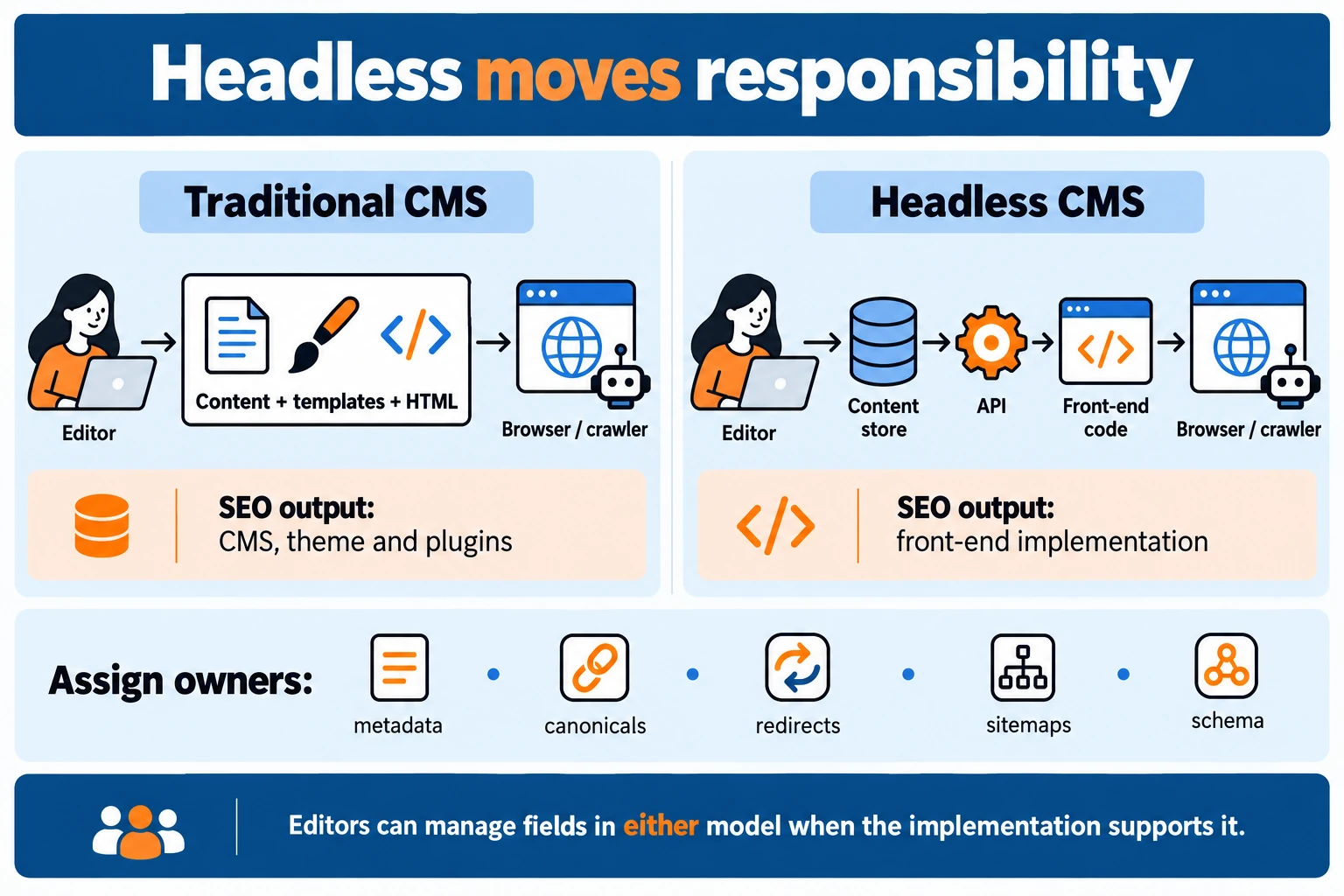
A headless CMS separates content storage from the front end that displays it. For SEO, that separation is neither a benefit nor a penalty by default. It moves responsibility. Rendering, metadata output, redirects and sitemaps stop being handled by the CMS and become the job of whoever builds the site. At that point, most headless projects gain or lose search visibility, and the front-end design decides which way a project goes.
Headless CMS platform comparison
Entry prices vary widely, and the starting figure rarely reflects the real cost of a crawlable site. The table uses the starting prices listed in Prismic‘s guide, converted at an ECB reference rate of S$1.4327 to €1 on 26 October 2026. Confirm current figures with each vendor before budgeting.
| Platform | Listed starting price | Approximate starting cost in S$ |
|---|---|---|
| Prismic | from $10/month | about S$14/month |
| Ghost | from $15/month | about S$20/month |
| Strapi | from $45/month | about S$61/month |
| Storyblok | from €90.75/month | about S$132/month |
| Contentful | from $300/month | about S$405/month |
Hosting is the second variable. Strapi Cloud offers managed hosting with automatic scaling, backups and a 99.9% uptime SLA. An SLA figure alone does not guarantee rankings. The subscription is the smallest line in the budget. Front-end development and rendering setup cost more.
Headless CMS considerations
Rendering approach and SEO. Search engines must read your content in the HTML they receive. Google’s Search Central documentation on JavaScript SEO explains that content appearing only after client-side scripts run can be indexed later or less completely. Three approaches are common:

- Static site generation (SSG) builds pages ahead of time. It is fast and crawl-friendly, but content changes need a rebuild unless you add incremental updates.
- Server-side rendering (SSR) generates each page on request, keeping content fresh but increasing server load.
- Incremental static regeneration (ISR) pre-builds pages and refreshes them in the background.
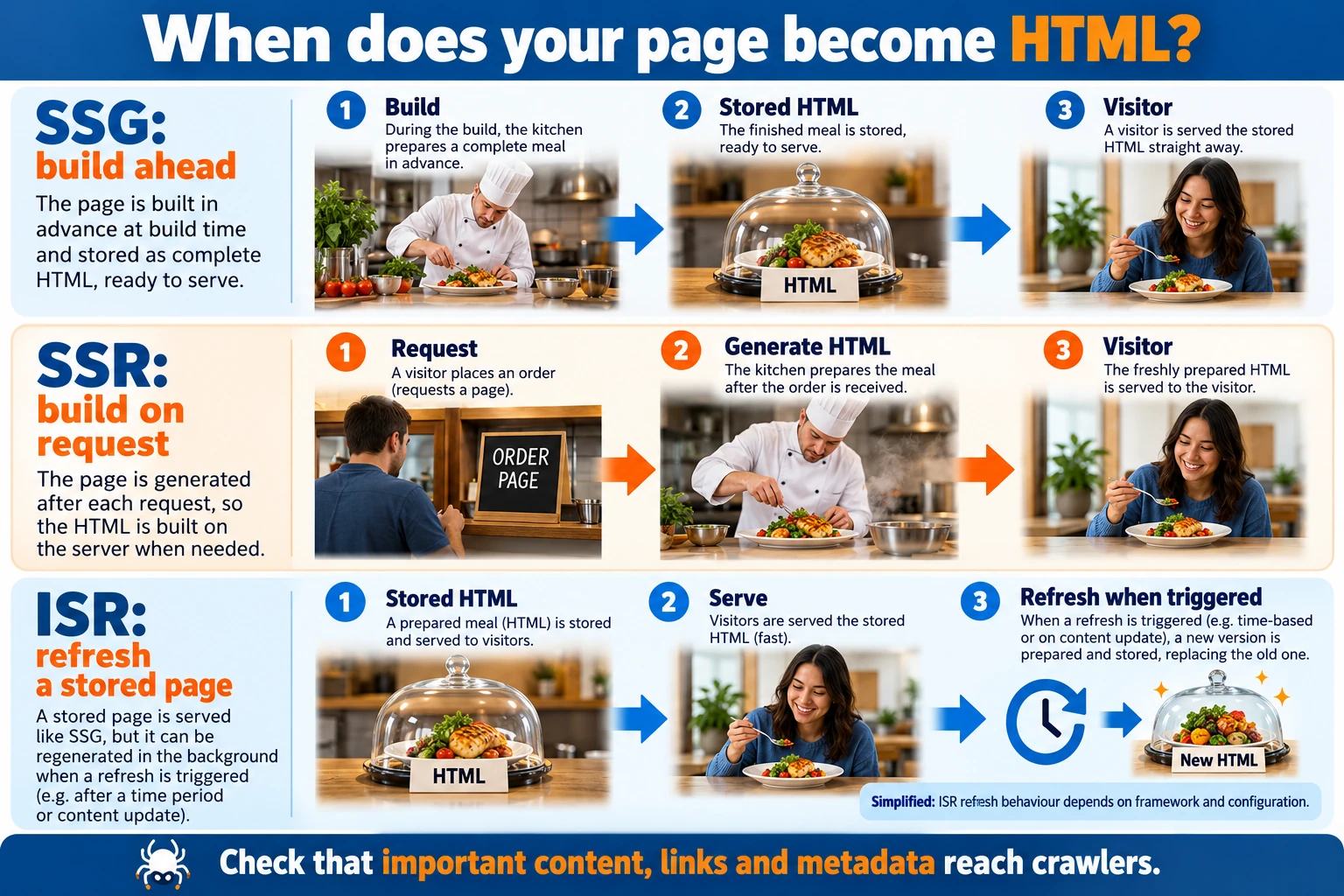
If a front end ships an empty HTML shell, crawlers may index the page late or incompletely. View the page source to check what the server returns.
Developer dependency. In a traditional CMS, an editor can usually set a meta title, a canonical tag or a redirect. In a headless setup, code must read those fields and place them in the page head. Check which SEO fields each platform offers before you commit, and confirm how each field appears in the final page.
| SEO task | Traditional CMS | Headless CMS |
|---|---|---|
| Meta titles and descriptions | Editor, per page | The developer builds the field and template |
| XML sitemaps | Usually automatic | The developer configures generation |
| Redirects | Editor or plugin | The developer maintains a redirect file or service |
| Canonical tags | Editor or plugin | Developer logic per route |
| Structured data | Plugin or theme | The developer writes schema output |
Before choosing headless, confirm your developers can own these tasks for as long as the website runs, not only at launch.
WordPress vs. headless CMS for SEO
| Criterion | WordPress | Headless CMS |
|---|---|---|
| Control for editors | High: metadata and URLs editable per page | Depends on how the front end was built |
| Speed potential | Depends on hosting, theme and plugins | High when statically generated |
| Cost profile | Low licence cost, plugin and maintenance spend | Higher build cost, lower ongoing plugin risk |
| Team skills needed | Marketing and light technical ability | Developers for build and rendering |
WordPress.org powers over 43% of the web, supported by more than 50,000 plugins. Conflicting or outdated plugins slow pages and create crawl problems. A headless website avoids that class of problem but brings its own: a front-end bug can strip metadata from every page at once.
Choosing a headless CMS for SEO in 2026
Work through these questions before shortlisting any platform:
- Who will build and maintain the front end? If the answer is an agency on a one-off contract, plan for an ongoing retainer or internal ownership.
- Does the front end support SSG, SSR or ISR? Confirm which rendering mode the framework uses for your key templates.
- Who owns redirects and URL changes? Name the person before launch, not after traffic drops.
- Can editors change metadata without a developer? If yes, confirm the field is rendered into the page head.
- What does the uptime guarantee cover? Ask whether the SLA applies to the CMS API, the hosted front end, or both.
- What does the price exclude? Ask for the cost of extra seats, asset storage, API requests and support tiers, and which features sit only in higher plans. Also review the analytics and reporting included in each tier. Compare each tier’s key features, not just its price, before deciding.
Editorial teams that publish frequently without in-house developers will usually get better results from a traditional CMS, or a headless option with a strong visual editor. Developer-led organisations with a multi-channel website are better placed to take on headless. Choose the platform your team can keep correct after launch. An SEO setup that breaks in month six will cost more than any subscription difference.
Conclusion and Summary
The best CMS for SEO is the one your teams can configure and maintain. Rankings depend on page titles, URLs, redirects and speed, not on the software’s name. Google’s documentation on ranking signals supports this, evaluating content and technical delivery rather than the producing software.
Before you sign, rate each candidate from 1 to 5 on metadata editing, URL control, redirects, rendering, performance and structured data. Disqualify any platform scoring below 3 on rendering or URL control.
Then take three actions:
- Score your shortlist and confirm that non-developers can edit metadata and redirects using built-in tools.
- Price the full cost, including plugin upkeep or front-end development for headless builds.
- Map every existing URL and redirect before migrating, and use analytics to confirm traffic holds after launch.
Frequently Asked Questions
Is WordPress still the best CMS for SEO in 2026?
WordPress remains a practical choice for most business sites because skilled developers and SEO specialists are easy to find. According to Elementor’s platform guide, WordPress.org powers over 43% of the web. Its SEO strength depends on the plugins you install and how well you maintain them. Plugin counts change over time, so check the current figure before you rely on it.
Do headless CMS platforms rank better than traditional CMS platforms?
Not automatically. Headless setups rank well when they use static generation or server-side rendering, with metadata, redirects and sitemaps set up deliberately. Google’s Search Central documentation makes clear that search engines evaluate the rendered page.
Which CMS is best for e-commerce SEO?
For most online stores, Shopify is the simplest route, with product pages, sitemaps and checkout built in. WordPress with WooCommerce offers more control but needs more maintenance.

Can I change CMS without losing search rankings?
Yes, with careful planning. Map every old URL to its new address, set up 301 redirects, and check Google Search Console before and after the move.
How much does a CMS cost for a small business in Singapore?
Headless options start at roughly US$10 per month for Prismic and US$45 per month for Strapi, while Contentful starts at US$300 per month. Confirm current prices on each vendor’s pricing page before committing.