An ecommerce website is your owned digital storefront. Unlike selling on Lazada or Shopee, it puts you in control of branding, customer data and pricing. You’re not paying 5-8% per sale to a marketplace, and you build a direct relationship with buyers that no platform can take away.

For Singapore merchants, this shift matters. Internet penetration sits at 92%, and post-pandemic shopping habits have stuck. Competing against regional giants requires a professional online presence you own. This guide walks you through choosing a platform, building product pages that sell, handling payments and compliance, and the logistics that keep customers happy. By the end, you’ll know exactly what to launch with and what mistakes to avoid.
- An owned ecommerce website gives you control over branding, customer data and profit margins that marketplace platforms (Shopee, Lazada) don’t provide. Marketplace commissions (5–8% per sale) erode margins significantly; a self-hosted site typically costs S$50–500/month instead.
- Your site must include fast product pages (under 2 seconds to load), secure payment options (credit cards, digital wallets, BNPL), mobile responsiveness (70% of Singapore’s ecommerce traffic is mobile) and real-time inventory management to convert browsers into buyers and prevent costly overselling.
- Choose Shopify (S$29–299/month, no-code, fastest launch) for speed to market, WooCommerce (free plugin, S$5–50/month hosting, requires technical skill) for customisation, or headless commerce (Medusa, BigCommerce) if you plan to sell across web, app and social channels simultaneously.
- Comply with Singapore’s PDPA regulations from day one: obtain explicit consent before collecting customer data, display transparent privacy policies and use SSL encryption on all pages. Non-compliance carries fines up to S$1 million and destroys customer trust faster than any marketing can repair it.
- Measure success via conversion rate (2–4% benchmark for Singapore), customer acquisition cost versus lifetime value (target 3:1 ratio), cart abandonment recovery (email reminders within 2–4 hours recover 20–30% of lost sales) and return rates (5–10% for apparel, 1–3% for electronics).
- Launch with fundamentals, not perfection: fast load times, clear product descriptions, professional images and reliable shipping matter far more than feature bloat. Plan for 6–12 months to profitability, reinvest early revenue into paid ads and email marketing, and test weekly rather than redesign annually.
Key Takeaways
- An ecommerce website is a merchant-owned online storefront that gives you control over branding, customer data and profit margins that marketplace platforms (Shopee, Lazada) do not.
- Owned ecommerce sites typically cost S$50–500/month to operate but save S$6,000–9,600 annually compared to paying 5–8% marketplace commissions on the same sales volume.
- Your site must include product search, secure payment gateways (card, wallet, BNPL), mobile responsiveness, real-time inventory, SSL encryption and PDPA compliance to meet customer and legal expectations.
- Shopify launches fastest (1–2 weeks) for beginners; WooCommerce offers more customisation but demands technical skill or a developer hire.
- Core metrics to track are conversion rate (2–4% benchmark), average order value (S$80–200), customer acquisition cost, and cart abandonment rate (70% baseline; recover 20–30% via email).
- Singapore ecommerce sellers must comply with PDPA (personal data), PCI DSS (payment security), the Consumer Protection Act (returns), and GST if turnover exceeds S$1 million.
- Logistics partnerships (Ninja Van, Singapore Post, J&T) are critical; 3PL fulfilment (S$2–5 per item) becomes cost-effective above 100 orders/month.

What Is an Ecommerce Website, and Why Does It Matter in 2026?
Definition and Core Function
An ecommerce website is a digital storefront where customers browse, compare and purchase goods or services online. Unlike social commerce or marketplace platforms (Shopee, Lazada), an ecommerce site is owned and operated directly by the merchant, giving full control over branding, customer data and pricing strategy.
The key distinction matters: on your own platform, you decide how products appear, which payment methods to accept, when to run promotions and what customer information to collect. You build an email list you own. You set prices without algorithmic interference. A marketplace, by contrast, enforces templates, controls the customer relationship and takes a commission on every sale.
Why Singaporean Businesses Are Moving Online
Singapore’s high internet penetration and preference for online shopping make ecommerce essential. Post-pandemic behaviour has stuck: Singaporeans expect to browse and buy online across categories from groceries to luxury goods. Local merchants competing with regional players from Thailand, Malaysia and Indonesia need a professional, localised online presence to survive.
An owned ecommerce platform cuts dependency on marketplace commissions. Lazada and Shopee charge 3-8% per transaction, plus advertising costs if you want visibility. For an S$10,000 monthly revenue business, that translates to S$3,600-9,600 annually going to the platform. Running your own site costs S$50-500 per month in hosting and tools, a fraction of what marketplace fees consume.
Control over data is equally critical. Marketplaces share limited analytics. Your own platform captures first-party customer data: email addresses, purchase history, browsing behaviour and cart items. This data fuels targeted marketing campaigns, repeat-purchase automation and product development decisions that marketplaces simply won’t share with you.
Singapore’s regulatory environment also favours owned platforms. The Personal Data Protection Act applies regardless of channel, but owning your site means you enforce compliance directly rather than relying on a marketplace’s policies. You control SSL encryption, password security and audit trails.
Key Differences Between Owned Ecommerce Sites and Marketplace Platforms
Control and Branding
Owned ecommerce sites give you complete control over the customer experience. You set your colours, fonts, messaging and checkout flow. You decide which products appear on your homepage and how you position them.
Marketplace platforms (Lazada, Shopee) enforce rigid templates and styling rules. Your shop looks like every other seller’s on the platform. You cannot change the checkout experience or add custom fields. Customers see Lazada branding more prominently than yours.
More importantly, you own your customer relationships on your own site. Every email address, phone number and purchase history belongs to you. You can email customers directly about new products, sales or loyalty offers. On Lazada or Shopee, the platform owns that data. You cannot contact your buyers once they leave the marketplace. This lock-in costs you repeat sales.
Costs and Margins
Marketplace commissions are silent profit killers. Lazada and Shopee charge 5 to 8 percent per sale, sometimes more for certain categories. On a S$100 order, you hand over S$5 to S$8 before you’ve even shipped anything.
An owned ecommerce platform costs far less. Shopify runs S$50 to 300 per month depending on your plan. WooCommerce hosting sits at S$5 to 50 monthly. Add payment processing fees (typically 2.2 percent plus a small fixed fee per transaction), and you’re still ahead.

The math is stark. Run an S$10,000 per month revenue business:
- Marketplace route: S$500 to 800 commission monthly = S$6,000 to 9,600 annually
- Owned platform: S$200 to 400 platform and payment fees monthly = S$2,400 to 4,800 annually
That’s S$3,000 to 5,200 extra profit per year, or capital to reinvest in paid ads and product photography. Scale to S$50,000 monthly revenue, and the annual difference exceeds S$30,000.
Data and Insights
Marketplaces give you a dashboard showing sales and basic customer counts. Your own platform captures everything: which products each visitor browsed, how long they stayed on each page, whether they added items to cart, what device they used, what time of day they shop, and their full purchase history.
This data fuels targeted marketing that marketplaces cannot match. You know your best customers by name and behaviour. Email them about products similar to what they’ve bought before. Retarget browsing behaviour with Pinterest or Facebook ads showing items they viewed.
Marketplaces share aggregate analytics only. You see “10 visitors today”, not who they are or what they looked at. This information asymmetry keeps marketplace sellers dependent on the platform’s recommendation engine, where visibility equals success and algorithm changes mean crisis.
On your own platform, you build a moat around your business. Customer data compounds into better decisions, stronger targeting and higher repeat-purchase rates. A Shopify or WooCommerce merchant with 5,000 customers in their email database can outcompete a larger marketplace seller with anonymous traffic.
Essential Features Your Ecommerce Website Must Have
Your ecommerce platform lives or dies on functionality. A beautiful storefront means nothing if customers can’t find products, trust your payment system or complete checkout on their phones. Below are the core features that separate thriving Singapore ecommerce sites from abandoned ones.
Product Catalogue and Search
Your product catalogue is your inventory on display. It needs three elements working together: high-quality visuals, detailed information and intelligent filtering.
Start with images. Show each product from at least three angles: front, back and side. Include a lifestyle shot showing the item in use or worn on a person. All primary images must be at least 1000×1000 pixels to enable zoom functionality. Compressed, low-res photos trigger immediate distrust and drive returns.
Write descriptions that sell. Don’t list specs alone. Connect them to customer outcomes. Instead of “Water-resistant material”, write “Stays dry through Singapore’s afternoon downpours, tested in 100% humidity conditions.” Mention dimensions, materials, care instructions and fit. Use bullet points for scannability. Include the product weight and dimensions in your catalogue database so customers can see this before purchase.
Filtering options reduce bounce rates significantly. Let customers narrow by size, colour, price range, brand and rating. If you sell apparel, include size guides with measurements. When a shopper can’t find their size in 10 seconds, they leave.
Page speed matters more than you think. Product pages should load in under 2 seconds on mobile 4G connections. Use a Content Delivery Network (CDN) like Cloudflare to serve images from servers geographically close to your Singapore customers. Compress images with tools like TinyPNG before uploading. Google PageSpeed Insights is free and shows exactly what’s slowing your site.
Secure Payment Gateway Integration
Singapore customers expect multiple payment options. Offering only credit cards costs you 15-20% of potential sales.
Integrate these payment methods at minimum:
- Credit and debit cards (Visa, Mastercard)
- Digital wallets (Apple Pay, Google Pay, GCash, Alipay)
- Bank transfers (local DBS, OCBC, UOB)
- Buy-now-pay-later services (Atome, Kredivo, Sezzle)
Leading payment gateways in Singapore include Stripe, Adyen and 2Checkout (Verifone). All three handle PCI DSS compliance automatically, meaning you don’t store customer card data on your servers. They tokenise card details, encrypt them and return tokens your platform uses for future charges.
PCI DSS (Payment Card Industry Data Security Standard) compliance is non-negotiable. If you accept cards, you must meet this standard or face fines up to S$1 million if you breach it. Use a PCI-compliant gateway and never store full card numbers in your database. Most SaaS platforms like Shopify and WooCommerce handle this out of the box.
Test your payment flow weekly on real devices. A checkout that works on your desktop browser may fail on Android. Abandoned transactions often stem from payment errors, not customer hesitation.
Mobile Responsiveness
Over 70% of ecommerce traffic in Singapore originates from mobile devices. Your site must work flawlessly on screens 320 pixels wide (small phones) up to tablets.
Build mobile-first. Design for the smallest screen first, then scale up. This approach forces you to prioritise what matters most. Buttons and tappable elements must be at least 48×48 pixels. Text should be readable without zooming (minimum 16px font size). Avoid layouts that work only on desktop.
Checkout on mobile must complete in three taps or fewer. Remove unnecessary form fields. Ask for name, email, address and payment info only. Phone number is optional. Auto-fill postcode fields if your platform supports it. Progress indicators show customers how many steps remain.
Test on real devices, not browser emulators. An iPhone simulator doesn’t replicate the experience of typing on a real phone keypad or holding a device at arm’s length in bright sunlight. Borrow devices from colleagues or use cloud testing services like BrowserStack.
Inventory and Order Management
Overselling is a death blow to customer trust. If you confirm an order for an item with zero stock, you’ve just created a refund and negative review.
Implement real-time inventory tracking. When a customer purchases, your stock count drops instantly. If you sell through multiple channels (your website, TikTok Shop, Shopee), all channels must share the same inventory database. APIs (application programming interfaces) connect your ecommerce platform to your warehouse or supplier system and sync stock levels every hour.
Automate order workflows to reduce manual errors and save time. When an order arrives:
- The customer receives instant email confirmation with the order number and expected delivery date.
- Your warehouse is alerted to pick and pack
- When shipped, the customer gets a tracking link automatically
- After delivery, send a follow-up asking for a review
- If the customer initiates a return, automatically email a prepaid shipping label
Platforms like Shopify and WooCommerce have built-in order management. Third-party tools like Printful handle fulfilment entirely if you use dropshipping. For high volumes, hire a 3PL (third-party logistics) provider to manage picking, packing and shipping.
SSL Certificate and Data Security
Every ecommerce site must use HTTPS encryption, indicated by a padlock icon in the browser address bar. This encrypts data between your customer’s browser and your server, protecting credit card numbers, addresses and passwords.
An SSL/TLS certificate costs S$0–100 per year depending on your provider. Most hosting companies include one free. If you’re on Shopify, it’s included. If you’re on WooCommerce, Let’s Encrypt provides free certificates.
Beyond encryption, comply with Singapore’s Personal Data Protection Act. This law governs how you collect, use and store customer data.
Your privacy policy must clearly state:
- What personal data you collect (name, email, purchase history, browsing behaviour)
- Why you collect it (order processing, marketing, analytics)
- How long you keep it (typically 1-3 years after last purchase)
- Who you share it with (payment processors, shipping carriers, analytics tools)
- How customers can request access or deletion
Require explicit opt-in consent before sending marketing emails. A pre-ticked checkbox is a violation. Violating PDPA carries fines up to S$1 million and reputational damage.
Encrypt customer passwords using industry-standard algorithms. Never store passwords in plain text. Use bcrypt or Argon2, which modern platforms handle automatically.
Customer Accounts and Login
Allowing customers to create accounts dramatically improves lifetime value. Registered users spend 2–3 times more than one-time guest shoppers.
Account features to include:
- Saved addresses (shipping and billing, selectable at checkout)
- Order history (customers can reorder previously bought items with one click)
- Wishlist (customers can add items to save for later and receive price-drop alerts)
- Email preferences (customers control which marketing emails they receive)
Don’t force account creation. Offer it as optional. Many customers want to buy once and move on. Forcing registration increases cart abandonment. The best flow: guest checkout option at the top, with “or create an account” below.
Passwords should require at least 12 characters and a mix of letters, numbers and symbols. Offer a “forgot password” flow that emails a reset link valid for 30 minutes.
Consider single sign-on (SSO) options: login with Google, Facebook or Apple. This eliminates password friction and still captures customer email for your database.
Choosing the Right Ecommerce Platform for Your Business
Your platform choice shapes everything: how fast you launch, how much you pay per sale, and how much control you keep. Singapore merchants face three main categories, each with different trade-offs.
SaaS Platforms (Shopify, BigCommerce, WooCommerce)
Shopify dominates Singapore’s ecommerce scene for good reason. At S$29–299/month depending on your plan, you get hosting, SSL, automatic security updates and a 24/7 support team. No coding required. Most merchants launch a functional store in 2–3 days.
The catch: transaction fees. Outside Shopify Payments, you pay 2.2% + S$0.30 per order. On Shopify Payments itself (which processes via banks like DBS and OCBC), rates drop to 1.6% + S$0.30. For a S$1,000 order, that’s S$16–22. On 100 orders/month at S$50 average value, you’ll pay S$160–220 in fees alone.
Shopify’s app ecosystem is its strength. Integrations with Ninja Van, J&T and Singapore Post ship labels directly. Email tools like Klaviyo connect for abandoned cart campaigns. Analytics dashboards track conversion rate and AOV without extra setup. Choose Shopify if you value speed to market and don’t want to manage servers.
WooCommerce takes a different path. The plugin itself is free, but you must handle everything else: hosting (S$5–50/month), security patches, backups and plugin maintenance. A basic WooCommerce site demands moderate technical skill; adding custom features (inventory syncing with suppliers, multi-currency pricing) requires a developer or coding knowledge.
The upside: you own your data entirely, pay no per-transaction fees to a platform, and can modify your storefront without restrictions. Many Singapore agencies and freelancers work in WooCommerce, so hiring help is easy. WooCommerce powers 35%+ of all ecommerce sites globally, so templates and tutorials abound.
Choose WooCommerce if you’re comfortable with WordPress, plan to invest in custom features, or work with an agency that uses it. Avoid it if you need hands-off management.
Self-Hosted Open-Source Platforms
Magento and OpenCart give absolute control but demand serious commitment. You manage your own server, security patches, SSL certificates and database backups. Hosting runs S$50–200+/month on reliable providers like SiteGround or AWS. A developer build ranges S$5,000–20,000.
Magento scales to high volume (Singapore’s largest retailers use it) but is overkill for stores under S$50,000/month revenue. OpenCart is simpler but has a smaller community than Shopify or WooCommerce.
Choose open-source platforms only if you have a technical co-founder or a committed developer on staff. Otherwise, operational burden will drain your time.
Headless Commerce
Headless architecture decouples your storefront from your backend inventory system. Platforms like Medusa, BigCommerce Headless, and Shopify Plus enable you to build custom front-ends for web, mobile app, social storefronts and in-store kiosks all feeding one database.
A Singapore fashion brand using headless can show the same S$80 dress on their website, their Instagram Shop, their TikTok store and a physical pop-up, all with live inventory. Stock sells out on TikTok? It vanishes from the website instantly.
Headless requires more engineering. Development costs S$15,000–50,000+. Start headless only if you’re already doing S$100,000+/month and need omnichannel at scale.
Quick Platform Comparison
| Platform | Setup Time | Cost (Monthly) | Technical Skill | Transaction Fees | Best For |
|---|---|---|---|---|---|
| Shopify | 2-3 days | S$29-299 + apps | None | 1.6-2.2% + S$0.30 | Fast launch, no-code |
| WooCommerce | 1-2 weeks | S$5-50 | Moderate | None | Custom features, control |
| Magento | 4-8 weeks | S$50-200+ | High | None | Enterprise scale |
| OpenCart | 2-3 weeks | S$50-100 | Moderate | None | Simple, lean setup |
| Headless | 6-12 weeks | S$100-500+ | Very high | Varies | Omnichannel, growth |
How to Decide
Start by asking: how fast do you need to sell? Shopify launches in days. If you’re testing a product idea, take it. You can migrate later.

Next: do you have development skills or a budget for a developer? WooCommerce scales with your technical depth and investment. Shopify scales with apps and time.
Finally: do you need to own customer data and modify checkout? Shopify owns your customer relationship but locks you into its fees. WooCommerce and open-source platforms give you full ownership but demand ongoing management.
For most Singapore merchants starting out, Shopify wins on speed and support. Once you hit S$100,000/month revenue and want to optimise margins, migrating to WooCommerce or a custom platform becomes attractive. Headless should only enter your roadmap when you’re selling across five or more channels simultaneously.
The wrong platform won’t kill your business, but the right one will save you hundreds of hours and thousands of dollars in the first year.
Building Your Product Pages to Convert
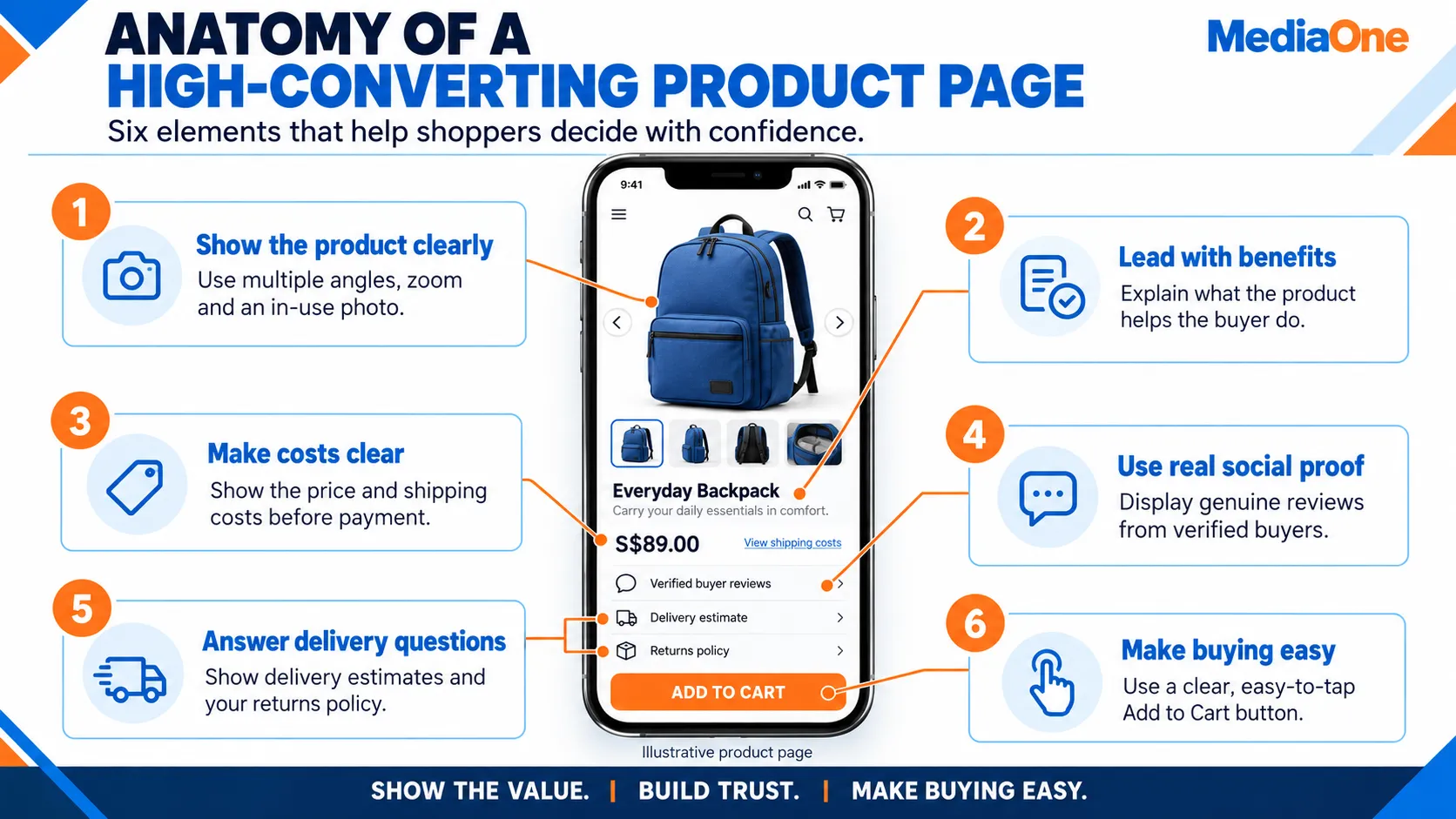
Your product page is where browsers become buyers. A well-designed page answers every question a customer has before checkout and builds enough trust to close the sale. Three elements make the difference: compelling copy, visual proof and transparent pricing.
Copywriting That Closes Sales
The words on your product page should focus on what the item does for the customer, not just what it is.
Compare these two approaches:
Feature-led: “Water-resistant strap, durable nylon construction”
Benefit-led: “Keeps your watch safe in tropical downpours. Tested in Singapore’s humidity and daily wear. Won’t crack or fade after 18 months.”
The second version answers the question running through a customer’s mind: “Will this hold up?” It paints a picture of the product solving a real problem.
Use specific, sensory language. Instead of “soft fabric”, write “brushed cotton that feels like worn linen on your wrist.” Instead of “lightweight”, write “weighs 140g, lighter than a phone.”
Social proof is your second converter. Include real customer reviews with ratings, not vague testimonials. Display a purchase count (“427 sold this month”) or a verified-buyer badge. If your product has been featured in a publication, say so with a link. A single five-star review with a photo of the product in use beats ten generic five-star reviews without comments.
Keep the copy scannable. Use short paragraphs (2–3 sentences each) and bullet points for specs. Most mobile shoppers skim; long blocks of text lose them.
High-Quality Photography and Video
Product photos are the closest thing a remote customer gets to holding the item. Invest here.
Shoot at least three angles: front, side and back. Include a detail shot that shows texture, stitching or material up close. Add an in-context photo showing the product worn, in use or next to a familiar object for scale. If you sell jewellery, show it on a model’s hand and wrist. If you sell a water bottle, show it being held and poured.
Thumbnail images must be at least 1000×1000 pixels. This allows customers to zoom in and inspect details without pixelation. Use a clean, contrasting background (white or light grey works for most products). Avoid busy or branded backgrounds that distract from the item.
Video is a conversion lever many merchants skip. A 15–30 second video showing the product in motion, the feel of fabric or how a mechanism works boosts conversion by 40% on average, according to Wistia data on ecommerce video. You don’t need a studio. A smartphone, natural light and a simple tripod will do. Film someone unboxing the item, folding it, wearing it or using it. Edit lightly and upload to your product page and social media.
Compress all images before upload. Use TinyPNG or ImageOptim to reduce file size without visible quality loss. Every kilobyte counts on mobile. Slow image loads kill conversions faster than almost anything else.
Clear Pricing and Trust Signals
Transparent pricing and policies remove friction when it matters most.
Display the final price upfront, not a base price that changes in the cart. If shipping varies by location, show an estimated range or a real-time calculator. If you charge tax, include it in the total before the customer enters checkout. Hidden fees are the number-one reason carts are abandoned.
Add trust badges above the “Add to Cart” button. These don’t need to be fancy: a small green SSL lock icon, a PDPA compliance statement, or a “30-day money-back guarantee” label all tell browsers this store is safe. Trustwave and Norton Secured badges cost money but carry weight with cautious shoppers.
Spell out your return and refund policy on the product page itself, not buried in a footer. Singapore’s Consumer Protection (Fair Trading) Act requires sellers to allow cancellation within 5 working days if goods don’t match the description. State your policy clearly: “Free returns within 14 days. No questions asked.”
Include expected delivery dates. A customer in Ang Mo Kio needs to know if the item ships in 1 day or 7 days. Mention which courier you use (Singapore Post, Ninja Van, J&T) so they can plan. Real delivery timelines build credibility.
If your product is in stock, say so. Phrases like “Only 3 left in stock” or a green “In Stock” badge reduce buyer hesitation. If items are pre-order or made-to-order, state the expected fulfilment date upfront.
Each of these three layers (copy, visuals, transparency) works together. Strong copy with weak photos won’t convert. Clear pricing with vague product images will fail. Deploy all three, test them with real visitors, and refine based on which products convert fastest.
Essential Ecommerce Marketing to Drive Traffic and Sales
A beautiful website means nothing if no one visits it. You need a traffic engine that runs 24/7. Three channels dominate for Singapore ecommerce merchants: paid search, social media ads and email marketing.
Paid Search (Google Ads)
Google Search Ads put your products in front of customers who are already hunting for what you sell. Someone typing “black leather watch Singapore” is far more likely to buy than a cold social media follower.
Set a daily budget of S$10 to S$30 when starting out. Google’s automated bidding will spend within that cap and show your ads only to high-intent searches. Track the cost per click (CPC) and cost per acquisition (CPA). If your average order value is S$100 and your CPA sits at S$20, that’s a strong signal to scale the budget. If CPA climbs to S$60, pause and refine keywords.
Use Shopping Ads (product listing ads) if you have 50+ products. Google pulls images and prices from your product feed, showing customers exactly what you sell before they click. This format converts 2 to 3 times better than text ads for ecommerce.
Small merchants underuse remarketing, but it’s devastatingly effective. Tag everyone who visits your site. Then, show them ads on Google and other websites for the next 30 days. Someone who viewed your S$80 watch but didn’t buy is far more likely to convert on a second touchpoint.
Social Media Ads (Facebook, Instagram, TikTok)
Facebook and Instagram Ads let you target by interest, behaviour and demographics. A fashion merchant can show ads only to women aged 25–40 in Singapore who follow luxury brands.
Start with a small budget (S$5 to S$10 per day) and test five different creative angles. Use photos and video of actual customers wearing or using your products, not polished stock photos. Show the problem you solve (“Tired of cheap watch straps breaking?”) before showing the solution.
TikTok Shop is growing fast for Singapore merchants. If you sell fashion, beauty or lifestyle items, TikTok’s younger audience (mostly under 35) offers massive reach. Start with organic content (building a small audience by posting 3 to 5 times weekly), then layer paid ads once you find content that resonates.
Avoid broad targeting. The larger your audience, the lower your conversion. Narrow is better. Show ads only to people who have engaged with your brand before or people who share interests with your best customers.
Email Marketing and Retention
Email delivers the highest return on investment of any marketing channel. Research shows email returns approximately S$45 for every S$1 spent.
Capture emails from day one. Offer an incentive: “Sign up to get 10% off your first order.” Place a sign-up form on every page: homepage, product pages and checkout. Exit-intent popups (triggered when a visitor moves to leave) capture 5 to 10% of otherwise lost visitors.
Segment your email list by behaviour. Customers who bought jewellery should receive different recommendations than those who bought apparel. Customers who haven’t purchased in 60 days get a win-back campaign. Customers who browse but don’t buy get a cart recovery sequence.
Automate key sequences:
- Welcome series: Three emails over 5 days introducing your brand, showing your best-selling products and reinforcing your guarantee. Aim for 40 to 50% open rate on welcome emails.
- Cart abandonment: Email within 2 to 4 hours of cart abandonment, showing the exact items left behind. Recovers 20 to 30% of abandoned carts.
- Post-purchase: Order confirmation, shipping notification, delivery notification, and a review request. These emails have the highest open rates (70%+) because customers expect them.
- Win-back: 60 days after last purchase, send a special offer to inactive customers. Re-engage 5 to 10% of dormant accounts monthly.
Tools like Klaviyo, Mailchimp and Brevo (formerly Sendinblue) handle automation and segmentation. Shopify integrates directly; WooCommerce requires an app. Test subject lines constantly. Personalised subject lines (using customer first names) lift open rates by 20% or more.
Logistics, Shipping and Fulfilment in Singapore
Shipping delays are the number-one cause of returns and negative reviews in ecommerce. Your customers don’t care how beautiful your site is if their order arrives a week late.
Choosing a Courier Partner
Singapore has three dominant last-mile carriers: Singapore Post, Ninja Van and J&T Express.
Singapore Post is the national carrier, most trusted for reliability. Delivery within Singapore takes 1 to 3 working days. Rates are moderate (S$3 to S$8 depending on weight). It’s the best choice for high-value items or first-time sellers building a reputation.
Ninja Van offers the fastest delivery in Singapore (same-day or next-day for metro areas) at competitive rates (S$2 to S$6). Their app shows real-time tracking. Downside: coverage outside the metro is slower, and customer service can lag during peak season.
J&T Express is the cheapest (S$1.50 to S$4) and offers good coverage, but reliability varies more than competitors. Use J&T for low-value items or to reduce shipping costs if speed is negotiable.

Integrate all three into your ecommerce platform using APIs. Show customers different delivery speed and cost options at checkout. Most merchants negotiate tiered rates with couriers based on monthly volume (100 parcels = better rate than 10 parcels).
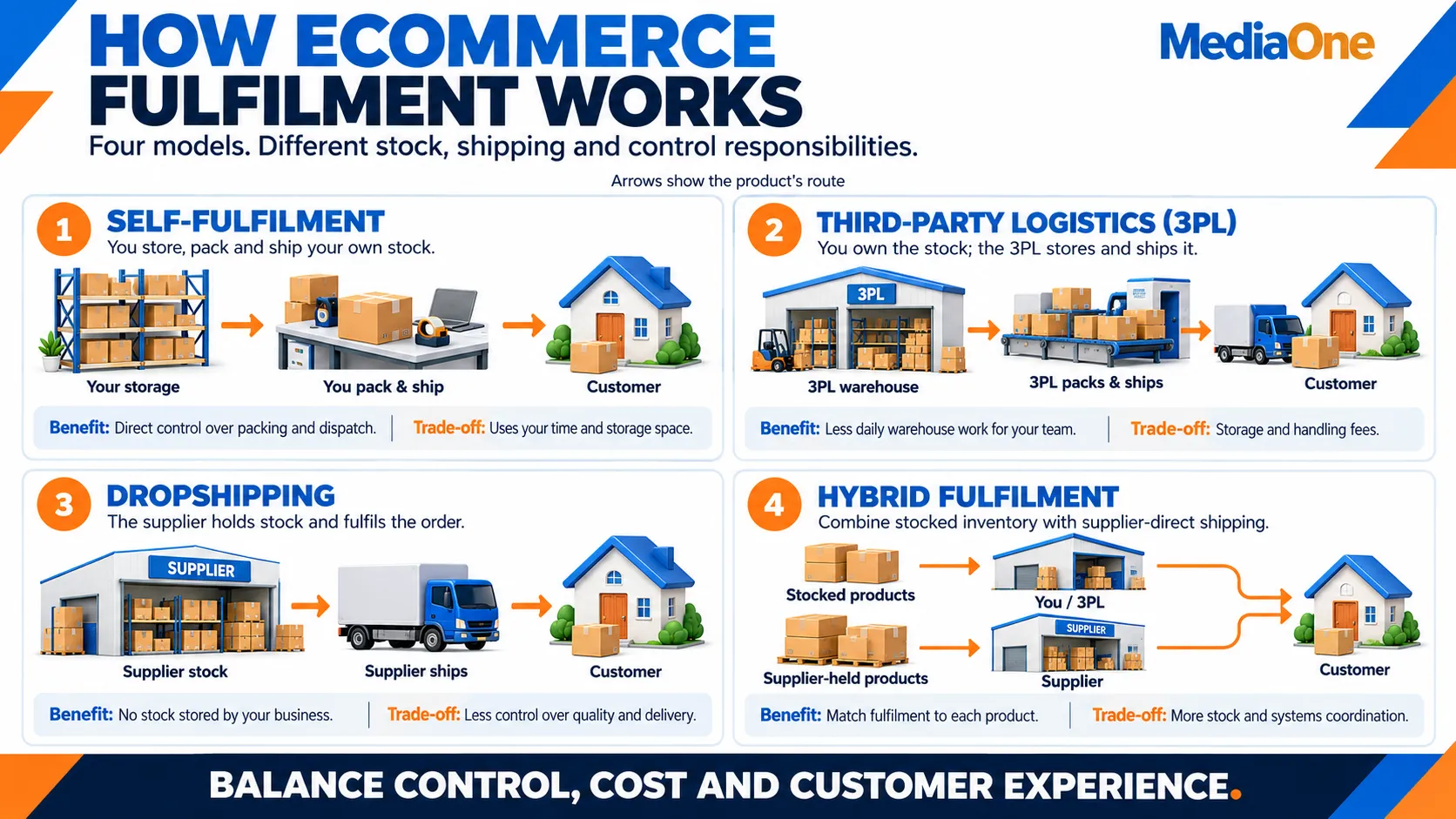
Fulfilment Models
Self-fulfilment works up to 50 orders per month. You pick, pack and ship from home or a small office. Cost is your time only. Problems: slow, error-prone, doesn’t scale.
Third-party logistics (3PL) warehouses your inventory and handles picking, packing and shipping. Most Singapore 3PLs charge S$2 to S$5 per item shipped, plus storage fees (typically S$0.50 to S$1.50 per cubic metre per month). Becomes cost-effective above 100 orders per month. Examples: Redbox, Log Centre, Schenker.
Dropshipping eliminates inventory entirely. Your supplier ships directly to customers. You never touch the product. Margin is lower (typically 20 to 30% vs. 50 to 70% for self-fulfilment) because suppliers take their cut. Use dropshipping to test new products or markets without capital risk.
Hybrid model is smartest as you scale. For high-volume products (your best sellers), you stock and fulfil yourself or via 3PL. Slow-movers and new products come from dropshipping suppliers. This balances margin and risk.
Shipping Costs and Margins
Absorb shipping or pass it to customers? Most Singapore ecommerce sites offer free shipping above a threshold (S$60 to S$80 minimum order) and charge it for smaller orders. This strategy boosts average order value (customers add items to reach the free shipping threshold) while protecting margin on small orders.
Calculate your break-even point. If your average order is S$60 and Singapore Post charges S$4 to ship it, you need at least S$64 in revenue. If your product cost is S$25 and fees (payment processor, platform) take S$3, your gross margin is S$32. Subtract S$4 shipping and you’re left with S$28 net, roughly a 47% margin. That’s healthy.
If you charge shipping, show the exact cost at checkout before payment. “Free shipping to Singapore” or “S$4 flat rate” is clearer than “Shipping calculated at checkout”, which triggers cart abandonment.
Returns and Reverse Logistics
Singapore’s Consumer Protection Act allows customers to cancel orders within 5 working days if goods don’t match the description. Most merchants extend this to 14 days to build goodwill.
When a customer initiates a return, automatically email them a prepaid shipping label. This removes friction and initially increases return rates, but it shows fairness. Most customers who return are one-time buyers anyway; making returns easy doesn’t cost repeat sales.
Set clear conditions: items must be unused, original packaging intact, and tags attached (for apparel). Restocking fees (10 to 20%) apply to some categories. Document your policy clearly on your website.
Track return rates by product. If returns exceed 10% on a specific item, investigate. This could be sizing issues, quality problems, or misleading product photos. Fix it; high returns kill profitability.
Legal, Compliance and Payment Regulations
Operating an ecommerce business in Singapore requires compliance with several laws. Non-compliance risks fines up to S$1 million and criminal liability.
Personal Data Protection Act (PDPA)
The PDPA governs how you collect, use and store customer data. Every ecommerce site must comply.
Core requirements:
- Collect data only for stated, legitimate purposes (order processing, marketing, customer service)
- Obtain explicit, informed consent before collecting data. Pre-ticked email signup boxes violate this.
- Publish a privacy policy explaining what data you collect, why, how long you keep it and who you share it with
- Encrypt all data in transit (HTTPS) and at rest (database encryption).
- Let customers request access to their data or ask for deletion within 30 days
- Notify customers within 30 days if their data is breached
Penalties for violation: up to S$1 million fine and up to 2 years imprisonment. The PDPC (Personal Data Protection Commission) actively investigates complaints.
Payment Card Industry Data Security Standard (PCI DSS)
If you accept credit or debit cards, you must meet PCI DSS standards. These ensure customer card data is encrypted and secure.
In practice, this means:
- Never store full card numbers on your server. Use a PCI-compliant payment gateway (Stripe, Adyen, 2Checkout) that tokenises cards
- Use HTTPS encryption on all pages (not just checkout)
- Maintain a firewall and keep software up to date
- Do not transmit card data via email or unencrypted channels
Most SaaS platforms like Shopify handle PCI compliance automatically. If you use WooCommerce or custom code, hire a developer to audit for compliance. A PCI breach can result in fines exceeding S$1 million and loss of payment processing ability.
Consumer Protection (Fair Trading) Act
This Act protects consumers from unfair or deceptive trading practices. For ecommerce, key rules:
- Goods must match their description. Photos and copy must be accurate.
- Prices must be transparent. Display the final total before checkout, not a base price that changes in cart.
- Customers can cancel orders within 5 working days if goods don’t match the description (similar to EU’s 14-day rule, but shorter).
- Refunds must be processed within 30 days.
- Display your business name, address and contact information prominently on your site.
Violations can result in warnings, fines up to S$200,000 and orders to pay compensation to affected consumers.
Goods and Services Tax (GST)
GST applies once your annual turnover exceeds S$1 million. At that point, you must:
- Register with IRAS (Inland Revenue Authority of Singapore)
- Charge 9% GST on taxable supplies (most goods and services)
- Keep detailed records of sales and expenses
- File GST returns quarterly
- Pay GST owed to IRAS monthly or quarterly
If you sell goods imported into Singapore, GST rules vary. Consult an accountant before you approach the S$1 million threshold. Late registration incurs penalties and interest.
Business Registration and Licenses
Register your business with ACRA (Accounting and Corporate Regulatory Authority) if you operate as a sole proprietor, partnership or company. This is a simple online process (S$0 to S$300 depending on structure) and takes 1 to 2 days.
Certain product categories require additional licenses:
- Food or beverages: HSA (Health Sciences Authority) license
- Alcohol: specific permits from the Ministry of Trade and Industry
- Medicines or supplements: HSA approval
- Cosmetics or skincare: HSA and industry-specific approvals
If you sell restricted items, check licensing requirements before launching.
Measuring Success: Key Metrics to Track
Data tells you what’s working and what’s bleeding money. Track these metrics weekly using Google Analytics 4 or your platform’s built-in dashboard.
Core Metrics
Conversion rate is the percentage of visitors who buy. Formula: (Orders ÷ Visitors) × 100. Singapore’s ecommerce benchmark is 2 to 4%. If you’re at 1%, improve product photos and page speed. If you’re at 5% or above, scale traffic spend.
Average order value (AOV) measures how much customers spend per transaction. Formula: Total revenue ÷ Number of orders. Singapore average is S$80 to S$200, depending on the category. Increase AOV by bundling products (“Buy two, get 10% off”), upselling at checkout (“Add X for S$15 more”) and showing related items on product pages.
Customer acquisition cost (CAC) is how much you spend on ads to acquire one customer. Formula: Total marketing spend ÷ Number of new customers. If CAC is S$20 and average order value is S$100, you have S$80 gross margin after acquisition. That’s strong. If CAC climbs to S$80, pause ads and optimise conversion rate first.
Customer lifetime value (LTV) is the total profit you expect from a customer over their lifetime. Rough formula: AOV × Average orders per customer per year × Gross margin % × Years as customer. If LTV is S$300 and CAC is S$100, target a 3:1 minimum ratio. That gives you room to invest in acquisition and still profit.
Cart abandonment rate measures visitors who add items but don’t check out. The benchmark is 70% (meaning 70% of carts are abandoned). That sounds terrible, but it’s normal. Email recovery captures 20 to 30% of these, recovering S$5,000 to S$10,000 monthly for a store with S$50,000 revenue.
Return rate is the percentage of orders returned. Benchmark varies: apparel 5 to 10%, electronics 1 to 3%, books under 1%. High return rates signal product issues (sizing, quality) or misleading marketing. Investigate fast.
Build a simple dashboard tracking these metrics weekly. Plot them in a spreadsheet. Look for trends: is conversion climbing or falling? Is AOV stable? When CAC rises, dig into which ads or keywords drive the most expensive clicks and pause them.
Traffic Metrics
Total visits tells you how many people land on your site. Aim to grow this 10 to 20% monthly in your first year through paid ads, SEO and social media. Benchmark for a new store: S$100 to S$500/month ad spend yields 2,000 to 10,000 monthly visits.
Traffic source breaks down where visitors come from: organic (search), paid (ads), social, email, direct. Most new stores are 80% paid, 20% organic initially. As you build content and SEO, organic should climb to 30-50% by month 12.
Bounce rate is the percentage of visitors who leave without taking action. A high bounce rate (above 70%) signals poor landing page relevance or slow load times. If someone clicks an ad for “men’s leather watches” but lands on your homepage (not a leather watch page), they bounce. Use targeted landing pages for ads.
Pages per session and Time on site show engagement. If visitors spend under 30 seconds on your site, your value proposition isn’t clear or pages load too slowly. If pages per session is under 1.5, product discovery is broken; add related item suggestions and better navigation.
Email Metrics
Open rate is the percentage of delivered emails recorded as opened. If it falls below your usual performance, test subject lines, sender names and sending frequency. Compare against current benchmarks for your sector, as Apple Mail Privacy Protection can inflate recorded opens.
Click rate measures the percentage of recipients who click a link in your email. If clicks are low, improve product relevance, simplify the layout and make the main call to action clear. Enable bot filtering where available to improve reporting accuracy.
Email conversion rate measures the percentage of recipients whose purchases are attributed to an email within your chosen tracking window. If clicks are healthy but purchases are low, check the landing page, delivery charges, product availability and checkout experience.
Revenue per recipient is attributed campaign revenue divided by the number of recipients. For example, S$500 from 1,000 recipients equals S$0.50 per recipient. Use this metric to compare the sales performance of different offers and audience segments.
Unsubscribe and spam complaint rates measure how many recipients opt out or report your emails as spam. If either rises, review targeting, content relevance and sending frequency. Bounce rate tracks failed deliveries; investigate increases and suppress invalid addresses.
Review these metrics weekly. Compare promotional campaigns, welcome emails and abandoned-cart reminders separately, using consistent tracking settings.
Frequently Asked Questions About Building an Ecommerce Website
Which ecommerce platform should I choose for my business?
Shopify includes hosting, while WooCommerce is an open-source WordPress platform. Based on those differences, consider Shopify for a managed setup and WooCommerce for greater control over hosting and customisation. Compare your required integrations, maintenance responsibilities and total operating costs before choosing.
What costs should I budget for when building an ecommerce website?
Budget for website design, product photography, content, a domain, hosting or platform subscriptions, payment processing and ongoing maintenance. Paid apps and integrations can add recurring costs. For reference, Shopify Basic lists S$29 per month when billed annually for its platform subscription. Ask developers for an itemised quote covering setup and ongoing expenses.
What features does an ecommerce website need before launch?
Prioritise mobile-friendly navigation, clear product descriptions, quality images, accurate stock availability, secure payments and a straightforward checkout. Display delivery charges, estimated delivery times, return policies and customer support details clearly. Complete test purchases on both mobile and desktop, including checking order confirmations and refund processing.
Which payment methods should a Singapore ecommerce website offer?
Consider credit and debit cards, Apple Pay, Google Pay and PayNow where your gateway supports them. Shopify Payments supports Apple Pay and Google Pay in Singapore, while Stripe offers PayNow integration. Check platform compatibility, processing fees, settlement times and refund handling before activating each method.
Should I build my own website if I already sell on Shopee or Lazada?
An owned website gives you more control over your branding, product presentation and customer experience. You can use marketplaces alongside it to reach additional shoppers. If you sell through multiple channels, keep stock availability, pricing and fulfilment processes coordinated to avoid overselling and conflicting information.
How can I reduce shopping cart abandonment?
Show shipping charges and delivery estimates before customers reach the payment stage. Offer guest checkout, remove unnecessary form fields and test for payment errors on mobile devices. Use checkout analytics to identify where shoppers leave, then fix the largest points of friction. Make returns and customer support information easy to find.
What is a good ecommerce website conversion rate?
A useful target depends on your product category, pricing and traffic sources. For a session-based purchase conversion rate, divide sessions that completed checkout by total sessions, then multiply by 100. For example, 50 purchasing sessions from 2,500 sessions equals 2%. Compare similar traffic segments and track improvement against your own baseline.
How do I attract customers to a new ecommerce website?
Start with clear product and category pages that match what customers search for. Test paid search for relevant buying queries, use social content to demonstrate products, and build an email list with permission. Send visitors to relevant product pages and judge each channel by acquisition cost, sales and profit.