
| AI Summary
This web hosting guide explains shared, VPS, dedicated, cloud and reseller hosting, along with the performance, security, support and cost factors to check before choosing a provider. Hosting requirements should be based on measured workload and technical needs rather than fixed visitor thresholds. Singapore businesses should also assess data-transfer arrangements and whether their hosting setup supports applicable PDPA obligations. |
This web hosting guide helps you choose the right hosting setup based on performance, reliability, technical requirements and cost. With hundreds of providers, changing prices and conflicting marketing claims, choosing a web host can quickly become confusing. Poor hosting can slow your website, cause avoidable downtime and create problems when you eventually need to migrate.

We explain the five main hosting types, the factors that affect speed and uptime, and the hidden costs to check before signing up. Whether you are launching a small blog or managing a business-critical website, this guide will help you compare your options and choose hosting that fits your current needs and future growth.
Note: Prices shown in GBP for international reference; Singapore providers may offer different rates in SGD. Figures are indicative as of 2024 and vary by provider, region and currency.
Key Takeaways
- Web hosting is not one product. Shared hosting, VPS, dedicated servers, cloud and reseller hosting each suit different traffic levels, budgets and technical skill. Most sites start with shared; few need dedicated.
- Speed and uptime require investment. The cheapest host typically oversells resources, leading to slowdowns and downtime. Budget £5–10 per month minimum (approximately SGD $10–20) for reliable performance on a small site.
- Your choice depends on three factors: traffic volume, technical skill and growth forecast. A blog with 5,000 monthly visitors has entirely different hosting needs than an e-commerce store hitting 200,000 visits per month.
- Migration is possible without downtime, but only if you plan it. Most mistakes stem from poor DNS timing, incomplete backups or not testing the new host beforehand.
- Compliance matters for your region. If you serve customers in Singapore, Australia or the EU, check where your host stores data and whether it meets PDPA, Privacy Act or GDPR rules.
- Test support before you commit. A fast, knowledgeable support team is worth the extra cost when your site goes down at 2 a.m. Read recent reviews and ask a presale question to gauge response time.
What You Will Learn
By the end of this guide, you will be able to:
- Identify which hosting type matches your current traffic and budget.
- Spot performance trade-offs and genuine red flags before you sign a contract.
- Assess support quality without waiting for an outage to test it.
- Avoid three hidden costs that blindside most small-site owners.
- Compare providers using a practical checklist, not just star ratings.
- Plan a risk-free migration if you need to switch hosts later.
Understanding Web Hosting Fundamentals
What web hosting actually does
Web hosting is the service that makes your website accessible on the internet. A hosting provider rents server space (physical or virtual computer hardware) that stores your website files, databases and email. When someone types your domain name into a browser, their request travels across the internet to the hosting provider’s data centre, which retrieves your files and sends them back to display on their screen.
Web hosting operates similarly to renting physical retail space: you own the business but lease the infrastructure. You pay monthly or annually for that space. The provider maintains the building’s security, electricity and internet connection.
The host also does work behind the scenes. They run 24/7 monitoring to detect hardware failures. They manage backups so your data survives a server crash. They distribute traffic across multiple machines to prevent any single server from becoming overwhelmed.
Without hosting, your website exists only on your personal computer. Hosting makes it live, public and accessible to anyone with internet access at any time of day.
The five main hosting types

Shared hosting is the entry point for most new websites. Your site lives on the same physical server as hundreds or thousands of other websites. You share the server’s CPU, RAM and disk space with those neighbours. It is cheap (often £3–8 per month, approximately SGD $6–16) because costs are divided among many users.
The trade-off is significant. If one neighbour’s site receives heavy traffic or is poorly coded, it can slow your site down. CPU throttling (the host slows your site if it uses too much processing power) is common on crowded shared servers. Your hosting provider manages all server maintenance, backups and security, so technical skill is not required.
Virtual Private Server (VPS) hosting carves a single physical server into multiple isolated virtual machines. Each customer gets their own slice with guaranteed resources: a specific amount of CPU, RAM and storage that is not shared. Your site cannot experience downtime caused by a neighbour’s traffic spike. VPS costs more (typically £8–30 per month, approximately SGD $16–60) but offers better performance and stability than shared hosting. You usually have root access and can install custom software, though this means more responsibility for updates and security.
Dedicated server hosting assigns an entire physical server to you alone. No neighbours. No resource competition. You can run any software you want and tune the server precisely for your application. The cost is significant (from £50–500+ per month, depending on hardware specifications). Dedicated hosting makes sense for high-traffic sites, resource-intensive applications or compliance-heavy industries where data isolation is critical. The provider manages the hardware; you manage the operating system and applications (unless you pay extra for fully managed service).
Cloud hosting distributes your website across multiple connected servers rather than a single machine. If one server fails, your site automatically continues on another. You pay for only the resources you actually use, and the system scales automatically during traffic spikes. This flexibility makes cloud hosting attractive for businesses with unpredictable traffic or rapid growth. Major providers include Amazon Web Services, Google Cloud and Microsoft Azure. These are cloud platforms; you typically use managed services (App Engine, Lambda) rather than bare servers. Costs scale with usage, so unexpected spikes can create bill shock if not monitored.
Reseller hosting lets you buy hosting in bulk and resell it to your own clients under your own brand. You act as a middleman between the hosting provider and your customers. This model works for web agencies, consultants or entrepreneurs who manage multiple client sites. The hosting provider handles the infrastructure; you handle customer support and billing.
The choice between these options depends on your traffic volume, technical skill, budget and growth trajectory.

How hosting affects speed, uptime and search ranking
Speed matters for search rankings. Page load time influences search rankings. Sites that load quickly rank better than slow competitors. Hosting affects speed in multiple ways. Shared hosting with oversold resources (too many sites per server) leads to slow response times. A VPS or cloud host with adequate CPU and RAM serves pages faster.
Server location also matters: a UK visitor experiences lower latency (the time it takes for data to travel) connecting to a server in London than one in Singapore. Your audience’s geography should guide your data-centre choice. If you serve primarily Singapore customers, select a host with data centres in Singapore or Asia-Pacific regions.
Storage type is measurable. NVMe SSDs (solid-state drives) retrieve data significantly faster than older SATA hard drives. Reputable hosts use NVMe by default now. Some hosts also offer caching technology (like Redis or Memcached) that stores frequently accessed data in ultra-fast memory, cutting response times further.
Uptime directly affects searchability and revenue. If your site is offline, visitors cannot reach it. Google cannot crawl it. Repeated downtime hurts ranking. Hosting providers back their stability with Service Level Agreements (SLAs). A provider might claim “99.9% uptime”, which means your site can be down a maximum of approximately 43 minutes per month. Note: actual uptime varies by provider and SLA terms. In practice, reputable hosts rarely hit that threshold. Shared hosting on budget providers often delivers 98–99% uptime; premium VPS and dedicated hosts achieve 99.5–99.99%.
Downtime also has direct business cost. An e-commerce site may experience significant revenue impact during downtime. A SaaS tool losing uptime damages customer trust. Hosting reliability directly correlates with revenue protection.
Search engine crawling depends on availability. Googlebot crawls your site periodically to index new content. If your site is frequently offline, Googlebot receives crawl errors. This delays indexing of new pages and can cause already-indexed content to drop out of the search results. Consistent availability helps Google trust that your site is stable and worth ranking.
Hosting also affects user experience metrics that search engines monitor. Page responsiveness and visual stability depend on server response time, which is directly influenced by hosting performance. An underpowered host increases these metrics and lowers rankings.
The hosting tier you choose trades cost against performance. Shared hosting suits small sites with under 10,000 monthly visitors where ranking competition is light. High-traffic sites competing for competitive keywords benefit measurably from VPS, cloud or dedicated hosting, where guaranteed resources deliver faster load times and better performance.
Shared hosting remains the entry point for most websites because it solves a fundamental problem: cost. You pay SGD $15–50 per month to run a live website, and the provider manages server maintenance, security patches and infrastructure tasks. For a small business website, local blog or portfolio site with fewer than 20,000 monthly visitors, shared hosting delivers adequate performance at a fraction of the cost of dedicated infrastructure.
The model works because your site shares server resources with dozens or hundreds of other websites. The host divides CPU time, RAM and storage across users, which distributes operational costs. You pay only for the slice you actually occupy. This arrangement suits sites with predictable, moderate traffic. Monthly expenditure remains stable whether you receive 5,000 or 15,000 visitors that month.
Managed shared hosting, where the host handles updates and backups, is especially practical if you lack in-house technical staff. It removes the need to learn server administration. You focus on your content and business; the host maintains server operations and infrastructure.

Note: Prices shown in SGD for Singapore context; consult local providers for current rates, or convert from GBP using current exchange rates if sourcing international hosts.
Real performance trade-offs: CPU throttling, noisy neighbours and resource limits
Shared hosting carries genuine limitations that become visible once your site grows. The most common is CPU throttling (the host slows your site if it uses too much processing power to protect other users). If your site consumes excessive processing power, the host automatically restricts it. Your pages slow down or temporarily become unreachable during traffic spikes. This is by design, not malice.
The “noisy neighbour” problem is equally real. One site on your shared server might run a resource-intensive script, launch a marketing campaign, or suffer a denial-of-service attack. That activity can degrade performance across the entire server. You have no visibility into what other users are doing and no direct way to isolate yourself from their problems. Quality varies significantly between hosting providers; some implement stricter resource isolation than others.
Resource caps create hard ceilings. Most shared hosts limit you to 50 GB–200 GB storage, 1–5 GB RAM allocation and monthly bandwidth quotas of 100 GB–1 TB. Exceed these limits and your host may suspend your site until the next billing cycle or charge overage fees. Unlike cloud hosting, you cannot request additional resources mid-month without changing plans.
Database performance suffers under contention. If multiple sites query a shared MySQL server simultaneously, response times degrade. This becomes noticeable on data-heavy sites like membership platforms or e-commerce stores with large product catalogues.
Several concrete signals indicate it is time to upgrade.
Traffic volume. Traffic volume that triggers performance concerns varies based on site complexity and hosting resources. Performance monitoring tools like Google PageSpeed Insights or GTmetrix will flag server-response times above 600 milliseconds, which indicates resource contention.
Load times during traffic spikes. If your site regularly takes 4+ seconds to load during peak hours or times out during product launches or media coverage, shared hosting cannot meet demand. VPS or cloud hosting scales better under variable load. Monitor your server response time, not total page load time, during your busiest day of the week. If it exceeds 1 second, upgrade planning should begin.
Application complexity. Shared hosts typically limit you to standard PHP versions, WordPress and basic databases. If you need to run Node.js, Python application servers, custom scheduled tasks, or advanced database features (PostgreSQL with specific extensions, for example), shared hosting imposes technical barriers. Managed VPS or dedicated servers lift these restrictions.
Resource limit warnings. Hosts send warnings when you approach storage caps, bandwidth quotas or CPU thresholds. One warning is normal. Repeated warnings every few months signal that you have outgrown the plan.
Cost versus performance. If your host is charging SGD $75–150 per month to keep your overloaded shared site online through repeated upsells and overage fees, the marginal cost of moving to a SGD $100–150 per month managed VPS becomes negligible. You gain real isolation, better performance and no surprise throttling.
Decision framework: Measure your peak monthly traffic and site complexity. If traffic is under 20,000 visitors and stable, shared hosting is cost-appropriate. If it ranges 20,000–50,000 and growing, test performance under load before renewing. If it exceeds 50,000 or is growing 50% year-on-year, plan a migration to VPS or cloud hosting within the next quarter.
Virtual Private Server (VPS) Hosting: Control Without the Full Cost
A VPS sits between shared hosting and a dedicated server. You share physical hardware with other customers, but the server is divided into isolated partitions. Each partition has its own operating system, resources and root access. For most growing sites, this is where shared hosting’s constraints become painful and dedicated servers feel like overkill.
How VPS isolation protects your site
In shared hosting, one customer’s runaway script or sudden traffic spike can degrade performance for everyone on the same server. The host divides CPU, RAM and disk space across hundreds of accounts, with no hard limit preventing one user from consuming resources others depend on.
A VPS uses virtualisation to create isolated containers. Your allocation of CPU cores, RAM and storage is yours alone. If another VPS on the same physical machine reaches maximum capacity, you still receive your guaranteed slice. Web hosting operates similarly to renting physical retail space: you own the business but lease the infrastructure. The isolation carries real consequences. A neighbour’s DDoS attack will not affect your uptime. A competitor’s poorly coded plugin will not slow your database queries. You also gain root access (on Linux) or administrator rights (on Windows), meaning you can install custom software, adjust kernel settings or configure firewalls exactly as you need.
For e-commerce sites, SaaS applications or anything handling customer data, this isolation is worth the jump in cost. Shared hosting’s resource contention becomes a bottleneck you cannot control. A VPS removes that uncertainty.
Managed vs. unmanaged VPS
The VPS market divides into two camps: managed and unmanaged. This choice determines how much technical work lands on your shoulders.
Unmanaged VPS means you rent the server and nothing else. The host provides the hardware, uptime and networking. You handle everything else: operating system updates, security patches, software installation, backups and troubleshooting. This is cheaper, often half the price of managed. It suits developers and system administrators who want full control and have the time to maintain it.
Managed VPS includes proactive monitoring, automatic updates, security patches, backup management and technical support for server-level issues. The host’s team handles restarts, disk space monitoring and emergency response. You focus on your application, not the underlying server. The trade-off is cost (typically 2 to 3 times more than unmanaged) and slightly less control over kernel parameters and custom configurations.
Most small-business owners and agencies choose managed. The time cost of learning Linux command-line administration and responding to security updates outweighs the monthly savings. If you lack system administration experience, managed VPS is the pragmatic choice.
Some providers offer semi-managed solutions: they handle OS updates and backups but leave application-level support to you. These sit at a middle price point and suit teams with basic server knowledge.
Scaling a VPS: when and how to add resources
VPS scaling happens two ways: vertical (adding CPU, RAM or disk to your existing server) and horizontal (adding more VPS instances and load-balancing between them).
Vertical scaling is the default approach. You notice slowness under load, contact your host, and they add another CPU core or 2 GB of RAM. Most hosts can do this in minutes, especially on cloud VPS. Cost increments are predictable: adding one core might cost SGD $15–30 per month extra.
Watch for these signals that vertical scaling is needed:
- Load times exceed 2 seconds during peak traffic
- Server CPU usage regularly hits 80% or higher
- Database queries slow when multiple concurrent requests arrive
- Automated monitoring alerts on memory pressure
For sites reaching 50,000 to 100,000 monthly visitors, a properly sized VPS can handle traffic without scaling. Beyond that, either add resources or switch architecture.
Horizontal scaling, adding multiple servers, is more complex but necessary if you need high availability. You split traffic between two or three VPS instances behind a load balancer. One failure no longer causes downtime. This costs more but eliminates single points of failure. Most growing platforms eventually move here.
The practical threshold is around 100,000 to 200,000 monthly visitors, or if you cannot tolerate any downtime. Until then, vertical scaling on one managed VPS is simpler and cheaper.
Cost scales non-linearly. A base VPS with 2 GB RAM costs SGD $60–90 per month. Doubling to 4 GB costs SGD $90–120, not SGD $120–180. Annual contracts offer 20 to 30% discounts over monthly billing. For long-term projects, commit annually and test the host’s support first with a monthly trial.
Prices vary by provider, region and currency. Figures shown in SGD are indicative as of 2024; consult current host pricing for accurate rates.
Dedicated Server Hosting: Full Control for High-Traffic and Enterprise Sites
Dedicated server hosting provides an entire physical server for your exclusive use, with no shared resources and complete administrative control. This comes at a premium: typically £60–300+ per month (indicative as of 2024; prices vary by provider, region and currency) depending on hardware specifications and data centre location. However, for sites handling high volumes of monthly visitors or subject to regulatory requirements, the cost becomes justified quickly.

When dedicated hosting justifies the cost
Traffic volume is the clearest trigger. Once you consistently exceed approximately 500,000 to 1,000,000 monthly visitors, shared and even managed VPS hosting begin to strain under load. Your site faces resource contention where CPU, memory and input/output compete with other tenants on the same physical machine. Page load times increase. Dedicated server hosting eliminates this bottleneck entirely because you own the entire server.
Security and isolation matter significantly for regulated industries. If you handle payment card data (PCI DSS compliance), health information (with similar standards in Singapore and Australia), or personal financial data governed by Singapore’s Personal Data Protection Act (PDPA) or Australia’s Privacy Act, a dedicated server offers clear compliance advantages. No other website operates on the same machine, eliminating cross-contamination risk, preventing shared database server vulnerabilities, and maintaining cleaner audit trails for regulatory review.
Customisation requirements justify dedicated hardware as well. High-frequency trading platforms, real-time data processing systems, and machine learning inference at scale all demand specific CPU architectures, GPU access or unusual input/output patterns that shared resources cannot safely accommodate.
Performance commitments for enterprise clients often require dedicated infrastructure. If you guarantee 99.95% uptime or sub-100 millisecond response times to paying customers, you cannot rely on a shared neighbour’s traffic spike causing downtime on your site.
Run the mathematics honestly. A dedicated server costs approximately 10 times a mid-range managed VPS. If your business experiences significant revenue impact during downtime, or if slower performance compared to competitors costs you 5 per cent of revenue, the dedicated server investment pays for itself. Without that pressure, it remains expensive overhead.
Colocation vs. hosted dedicated servers
Two distinct paths exist for dedicated hardware: colocation and hosted dedicated servers.
With colocation, you purchase or lease your own physical server and place it in a data centre facility. You own the hardware; the data centre provides power, cooling, bandwidth and physical security. Monthly costs typically range from £40–80 for rack space and connectivity (in Asia-Pacific, commonly Singapore, Sydney or Mumbai locations).
Advantages include full control over every component, retention of the machine across multiple provider contracts, and avoidance of vendor lock-in. Disadvantages are significant: you must purchase hardware upfront (typically £2,000–10,000+), manage repairs yourself (sending a technician to the data centre incurs substantial costs), and assume the risk if the data centre experiences failure.
With hosted dedicated servers, the provider owns the physical machine and you rent it as-is. Monthly costs typically range from £100–300 depending on hardware specifications. You pay for hardware, power and support in a single bundle.
Advantages include no capital expenditure, hardware faults remain the provider’s liability, and you can upgrade or downgrade hardware within days. Disadvantages are that you cannot customise beyond the provider’s available menu, hardware refresh occurs on their schedule, and pricing resets when your contract renews.
For most businesses, hosted dedicated servers prove more practical. Capital expenditure on bare metal creates balance-sheet complexity, and colocation only makes financial sense if you require highly specific, expensive hardware (custom GPU clusters or specialised storage arrays) that would remain underutilised in a shared data centre.
Data centre location matters significantly in Asia-Pacific. If your audience is Singapore-based, a Singapore data centre (such as Equinix Singapore or Digital Realty) reduces latency to 5–10 milliseconds. For Australia-wide traffic, Sydney data centres (Equinix Sydney, AussieBB) perform better. India-facing applications benefit from Mumbai locations (Sify, Airspan). Multi-region deployment across two or three locations is standard for enterprise operations: one primary location, one backup for disaster recovery, and one for geographic distribution. Verify that the provider’s Service Level Agreement covers your chosen region and includes documented disaster recovery procedures.
Bare-metal servers and custom hardware configurations
Bare-metal provisioning has simplified dedicated hardware selection considerably. Instead of negotiating custom builds with a sales team, you select a pre-configured template from an available menu.
Typical options include:
CPU selection: Intel Xeon (reliable and widely supported), AMD EPYC (higher core counts per pound sterling and better price-to-performance ratio), or ARM-based systems (Ampere, Graviton) for cloud-native workloads. Match your software stack accordingly. Legacy enterprise software runs more safely on Intel Xeon, whilst containerised applications and database clusters often run more cost-effectively on AMD or ARM processors.
Memory capacity: ranging from 32 gigabytes to 1 terabyte or more. A useful guideline is that your active working dataset (the hot data your application actively uses) should fit entirely in RAM. If it does not, disk input/output becomes your primary bottleneck regardless of CPU speed. Databases especially benefit from oversized memory; PostgreSQL or MySQL with 256+ gigabytes can cache entire datasets in memory.
Storage type: NVMe SSD (5,000+ megabytes per second random read, near-zero latency) versus SAS SSD (1,500–3,000 megabytes per second, still fast but less expensive) versus SATA hard disk drive (cost-effective, slower, suitable only for archival storage). For transactional databases or real-time workloads, NVMe is mandatory. For static content or backups, SATA proves adequate. Hybrid configurations exist: NVMe for actively used data, larger SAS or SATA pools for warm or cold storage tiers.
Network bandwidth: 1 gigabit per second (entry-level, sufficient for most business websites), 10 gigabit per second (for data transfer-heavy workloads or inter-server replication), 100 gigabit per second (specialist use such as high-frequency trading or scientific computing). Most standard websites never saturate 1 gigabit per second connectivity.
GPU acceleration: if you process machine learning inference, encode video, or run computational finance models, GPUs (NVIDIA A100, H100 or AMD MI300) dramatically accelerate specific tasks. Without a workload designed for GPU acceleration, the cost adds no value.
Avoid over-specifying your hardware configuration. A common mistake is renting a 64-core server with 512 gigabytes of memory for a WordPress site that requires only 4 cores and 16 gigabytes. Cloud hosting’s pay-as-you-go model suits variable workloads; dedicated servers suit predictable, stable, high-volume workloads. If your CPU and memory usage fluctuate significantly month to month, cloud hosting or VPS hosting scales more efficiently. If usage remains stable and high, dedicated hardware amortises cost effectively over time.
Most providers (Linode Bare Metal, Hetzner, AWS EC2 Bare Metal instances) permit you to resize or swap servers within 30 days. Test your workload first, then adjust your configuration afterwards.
Cloud Hosting and Auto-Scaling: Paying Only for What You Use
Cloud hosting distributes your website across multiple interconnected servers instead of a single physical machine. This architecture delivers automatic scaling, high availability and pay-as-you-go pricing. If your traffic is unpredictable or growing rapidly, cloud hosting absorbs spikes without manual intervention or unexpected cost increases.
Cloud hosting operates by spreading your application across a cluster of servers. Traffic peaks are handled by temporarily spinning up additional compute instances. You pay only for what you use, measured in minutes or hours.
This model sounds ideal. In practice, cost can surprise you significantly.
Most cloud providers (AWS, Google Cloud, Azure) charge for multiple elements:
- Compute instances: per hour or per second of CPU time
- Bandwidth egress: transferring data out of the data centre to the internet (typically £0.07–0.12 per gigabyte); incoming data is usually free
- Storage: database storage, file storage, backups, all charged separately
- Data transfer: moving data between services or across data centres
A traffic spike that appears profitable (100,000 new visitors) becomes expensive if those visitors download large files, trigger API calls, or generate backups. An e-commerce site running a checkout process on AWS might pay approximately £0.05 per transaction in bandwidth alone, plus compute costs.
The underlying problem is often architectural. Many development teams design for a single server initially, then transfer the application to cloud without optimising for cloud cost structure. APIs that make 100 requests per page load become expensive quickly. Large database scans across multiple instances multiply compute costs.
To maintain reasonable cloud costs, optimise your architecture from the beginning:
- Cache content aggressively to reduce database queries and API calls
- Compress and minimise files to reduce bandwidth costs
- Use Content Delivery Networks (CDNs) to cache static content closer to users
- Right-size instances appropriately; auto-scaling works in both directions and removes idle instances when load decreases
- Monitor spending in real-time using provider budget alerts
A properly optimised cloud architecture serving 100,000 monthly visitors might cost £40–80 per month. A poorly optimised equivalent can cost £200–500+ monthly. The difference is not the cloud platform itself but rather the design and optimisation approach.
Managed cloud platforms vs. infrastructure-as-a-service (IaaS)
Cloud hosting splits into two distinct tiers: managed platforms and raw infrastructure.
Managed platforms (Heroku, Vercel, Netlify, Firebase) handle scaling, backups and server management automatically. You deploy your code, and the platform manages the rest. These services cost more (Heroku begins at approximately £7 per month for one dyno, scaling to £50+ monthly) but require minimal infrastructure knowledge. They suit small teams or early-stage startups.
Infrastructure-as-a-Service (IaaS) (AWS EC2, Google Compute Engine, Azure VMs) provides raw servers that you manage yourself. You assume responsibility for configuration, updates, backups and auto-scaling rule creation. This approach costs less than managed platforms at scale but requires DevOps expertise. It suits teams with in-house infrastructure knowledge or those prioritising cost control.
For most small businesses without dedicated DevOps staff, managed platforms offer practical advantages. The higher per-unit cost is justified by saved time and reduced operational burden. If you have in-house engineering expertise and need cost control, raw IaaS is cheaper but demands more maintenance.
Cost comparison: serverless functions vs. traditional cloud instances
Serverless computing (AWS Lambda, Google Cloud Functions) extends cloud economics further. You write functions that execute in response to specific events: a file upload, a database change, or an API request. You pay only for execution time, measured in milliseconds.
Serverless proves radically cost-effective for certain workloads:
- Image processing: expensive operations run only when images arrive
- Scheduled tasks: cron jobs cost pennies instead of running 24 hours daily on a server
- Event-driven APIs: each request processes on-demand rather than requiring constant server operation
However, serverless has genuine constraints:
- Cold starts: the first function invocation can take 1–5 seconds (creating latency spikes)
- Execution limits vary by provider and function type. Standard AWS Lambda functions support up to 15 minutes, while Google Cloud second-generation HTTP functions can run for up to 60 minutes.
- Debugging difficulty: logs scatter across multiple cloud platform services
- Local testing challenges: development environments do not mirror production accurately
Hybrid approaches work effectively: serverless for background jobs and event handlers, traditional cloud instances for web frontends requiring fast, consistent response times.
Essential Features Every Host Should Offer
Before evaluating specific providers, verify these baseline features are included or available.
Uptime SLA and monitoring
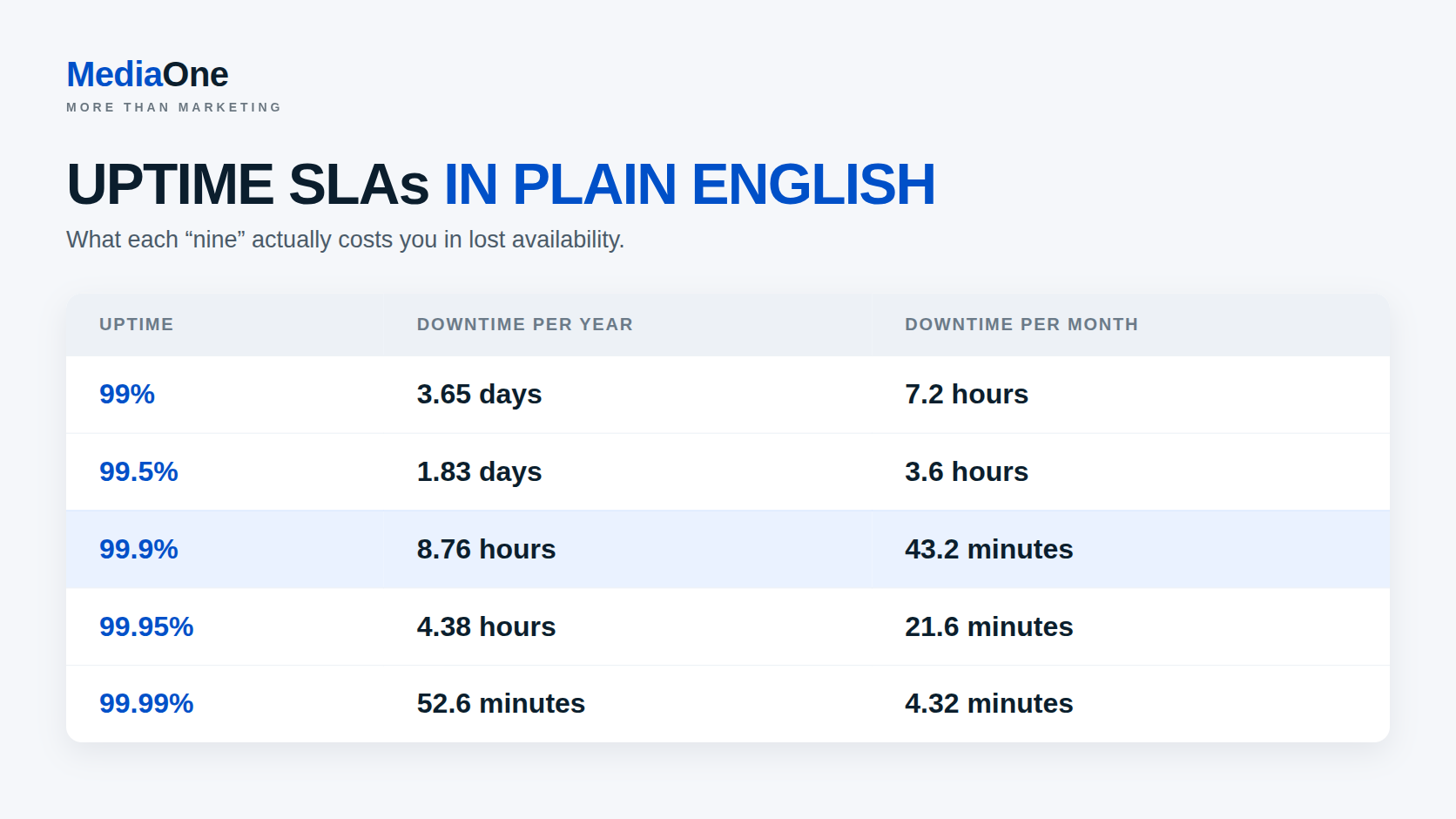
A Service Level Agreement (SLA) commits the host to a specific uptime percentage. Providers commonly claim 99.5% to 99.99%. For a 365-day year and approximately 30-day month:
-
- 99% = about 87.6 hours per year / 7.2 hours per 30-day month
- 99.5% = about 43.8 hours per year / 3.6 hours per month
- 99.9% = about 8.76 hours per year / 43.2 minutes per month
- 99.95% = about 4.38 hours per year / 21.6 minutes per month
- 99.99% = about 52.6 minutes per year / 4.32 minutes per month
Note: actual uptime varies by provider and SLA terms. Shared hosts typically guarantee 99% or 99.5%. VPS and dedicated hosts usually promise 99.9% or higher. Cloud platforms often offer 99.99%.
The SLA should also specify what happens if they miss the target. Legitimate hosts offer service credits (a refund or discount) if uptime falls below the threshold. Check what percentage they refund: 10% is minimal protection; 30% or higher shows confidence in their infrastructure.
Automated monitoring matters equally. You should receive email alerts if your site experiences downtime. Many hosts offer free uptime monitoring tools (integration with Pingdom or UptimeRobot) to verify their claims independently.
Automatic backups and disaster recovery
Hosting is worthless if your data disappears. Every provider should offer automatic daily or weekly backups. Verify these key details:
- Backup frequency: daily minimum; hourly is preferable for mission-critical sites.
- Retention period: how long backups are kept. Thirty days is standard; ninety days or longer is better.
- Restore speed: can you restore a backup in minutes, or does it require hours?
- Backup location: are backups stored on-site only (vulnerable to data centre failure) or replicated to separate locations?
- Restore cost: some hosts charge fees to restore from backup. Avoid these hosts.
Test a restore before you need one. Most hosts offer free restore testing on new accounts.
For mission-critical sites, demand redundancy across multiple data centres. Your primary and backup servers should be geographically separated so one data centre failure does not compromise both.
SSL/TLS certificates and security
HTTPS (encrypted connections) is now mandatory. Google ranks HTTP sites lower, and browsers flag them as “not secure”. Every host should include free SSL certificates (via Let’s Encrypt or similar) with automatic renewal.
Verify what else is included:
- DDoS protection: basic protection against denial-of-service attacks. More robust options are typically paid add-ons.
- Malware scanning: automated scans for infected files.
- Firewall: basic WAF (Web Application Firewall) to filter malicious requests.
- Two-factor authentication: for your hosting account, not passwords alone.
These are now standard expectations. If a host does not offer free SSL or basic malware scanning, choose a different provider.
Email hosting and spam filtering
Even static websites often need email (contact forms, notifications). Verify:
- Email accounts included: how many mailboxes does your plan allow?
- Spam filtering: does the host filter spam automatically, or do you configure it?
- Backup MX records: if the host’s mail server fails, can mail still arrive via backup routing?
- POP3/IMAP access: can you check email on your phone or desktop client, or only via web interface?
Free email from your hosting provider is convenient but often unreliable. Many businesses prefer email from a dedicated provider (Office 365, Google Workspace) and use hosting email only as a fallback.
Database and CMS support
If you use WordPress, Drupal, Joomla or another CMS, the host should support it explicitly. Verify:
- One-click installation: does the host automate CMS setup, or do you install manually?
- PHP/database versions: which PHP versions are supported? Which MySQL or PostgreSQL versions?
- Performance: does the host tune database settings for CMS workloads, or is it generic shared hosting?
WordPress hosting that is optimised for WordPress (caching, pre-tuned settings, dedicated support) noticeably outperforms generic shared hosting. If WordPress is your platform, choose a host that specialises in it.
Performance Factors That Matter: Speed, Server Location and Infrastructure
Hosting performance depends on multiple technical factors beyond just CPU and RAM.
Server location and latency
A server in London serves UK visitors faster than one in Singapore because data travels shorter physical distance. Latency (the delay in data transmission) is measurable. UK to London latency is typically 5–15 milliseconds; UK to Singapore is 150–200 milliseconds.
For global audiences, no single location is optimal. The practical solution is:
- Primary server in your largest audience location. If 80% of your traffic is UK-based, host in London.
- CDN (Content Delivery Network) for static content. Services like Cloudflare, Akamai or AWS CloudFront cache your images, CSS and JavaScript in data centres worldwide. A UK user requesting your site hosted in Singapore still gets static files from a nearby CDN edge server in milliseconds.

CDNs do not eliminate the need for a well-located primary server; they cannot accelerate dynamic, personalised content. However, they dramatically reduce latency for static assets, which typically comprise 70% or more of page weight.
Caching technology: server-side versus browser caching
Caching stores frequently accessed data in faster storage so repeated requests avoid re-computing or re-fetching it.
Server-side caching (Redis, Memcached, database query caching) keeps frequently used data in RAM. A WordPress site with caching enabled serves cached pages in 50–100 milliseconds. Without caching, the same page might require 500–1,000 milliseconds because it re-renders from scratch.
Browser caching tells visitors’ browsers to save static files locally, so returning visitors do not re-download them. Most hosting control panels (cPanel, Plesk) let you set cache headers via .htaccess or user interface controls.
Many hosts include caching technology in managed packages. Shared hosting often bundles popular options (WP Super Cache for WordPress, for example). VPS and dedicated hosts typically expect you to install and configure caching yourself, unless you opt for managed service.
CDN and caching work together: the CDN handles geographic distribution of static files; caching accelerates dynamic page generation on your origin server.
Database performance and query optimisation
Shared hosting databases (usually a single MySQL or PostgreSQL server serving hundreds of sites) become slow under concurrent queries. If two sites query the shared database simultaneously, both queries compete for CPU time and resources.
A VPS or dedicated server isolates your database, guaranteeing it exclusive access to a reserved allocation of resources. However, isolation alone does not solve performance problems; queries themselves must be efficient.
Common mistakes:
- No database indexing: queries on unindexed columns scan entire tables instead of using fast lookup.
- N+1 query problems: fetching a list of items, then running a separate query for each item’s details. One hundred items mean 101 queries instead of two.
- Unoptimised joins: joining tables across millions of rows without proper indexes.
- Missing connection pooling: each request opens a new database connection instead of reusing existing ones.
Most hosting providers, even shared hosts, provide access to query logs and performance analysis tools. Use them. A few poorly optimised queries often degrade performance more than undersised hardware.
Measure baseline response time. Ask your host: “What is the median query time under typical load?” Anything exceeding 100 milliseconds suggests indexing or query design problems.
Hidden Costs and Contract Traps to Avoid

Hosting pricing appears simple on the surface. Hidden costs compound and transform bargains into overpriced decisions. Prices vary by provider, region and currency. Figures mentioned here are indicative as of 2024.
Renewal pricing versus introductory rates
The oldest hosting trap: attract customers with a promotional first-year price, then raise rates significantly at renewal.
Example: Shared hosting advertised at SGD 4 per month on the first year. Renewal: SGD 12 per month. Over three years, you pay SGD 48 plus SGD 144 plus SGD 144 = SGD 336, not the lower first-year rate would suggest.
Always check renewal rates before signing. Most hosts bury this information in terms of service or reveal it only after you enter payment details. Ask presale support directly: “What will this plan cost after the first year?” If they will not answer, assume higher renewal costs.
Smart buyers commit to annual or multi-year plans at the promotional rate, then evaluate alternatives before renewal if prices increase. You gain negotiating leverage: switching during the renewal window is easier than mid-contract.
Domain registration and transfer fees
Many hosts bundle domain registration or offer discounts on first-year .com domains (often SGD 1.50–3 for year one). Renewal typically costs SGD 12–17 per year.
More importantly, some hosts make domain transfers expensive or slow. Verify:
- Can you transfer your domain out without paying additional fees?
- Does the host unlock domains automatically, or require manual requests?
- Are transfer times documented, or vague (“we process transfers quickly”)?
Consider keeping domain registration separate from your hosting provider if you want independent control over the domain. Compare current ICANN-accredited registrars for pricing, transfer policies, security and support. You maintain control and avoid scenarios where moving your site means losing your domain because the host refuses cooperation.
Bandwidth overage charges and data transfer limits
Cheap shared hosting often includes limited bandwidth (100 GB or 200 GB per month). If you exceed it, hosts either suspend your site or charge per-gigabyte overage fees (typically SGD 0.75–3 per GB).
A site receiving 50,000 uncompressed monthly visitors could easily consume 300–500 GB of bandwidth if you are not optimising images, using CDN, or enabling caching. That SGD 4 per month hosting plan suddenly costs SGD 225–750 in overages.
Cloud hosting has similar traps: egress bandwidth (data leaving the data centre) is charged separately. A video hosting site or file-download service can accumulate substantial bills if unmonitored.
Always check the bandwidth policy: Is it truly unlimited, or limited with overage charges? If limited, is the limit realistic for your traffic? If cloud-based, does egress bandwidth cost apply to CDN delivery?
Setup fees, maintenance fees and “extra” services
Some hosts charge one-time setup fees (SGD 15–75) even for automated shared hosting. These accumulate if you host multiple sites.
Annual “maintenance fees” disguised as renewal charges are red flags. Reputable hosts do not charge separately for maintaining your site operations and infrastructure.
Upsell services bundled at extra cost:
- Advanced SSL certificates (EV, wildcard) when free options suffice.
- Daily backups when weekly backups are included.
- Site migration services, which you can complete yourself in hours.
- Website builder or security scans, available cheaper as standalone services.
Add up all the “extras” your prospective host wants to sell you. If the total comes to 50% more than the base plan, you are being upsold. A good host includes the essentials; extras should be genuinely optional.
Exit costs and data portability
Some hosts charge early-termination fees if you cancel before your contract expires. Others make data export difficult, hoping you will stay rather than endure migration work.
Before signing, confirm:
- Are there early-termination penalties, and what are they?
- Can you export your website files, databases and email without paying?
- Does the host provide a backup download option, or only charge for manual exports?
- Is there a grace period to cancel without penalty (typically thirty days)?
A host that makes exit difficult is not worth trusting. You should be able to leave cleanly and quickly.
Evaluating Hosting Providers: What to Check Before Signing
Not all hosts are equal. Use this framework to compare options systematically.
Support quality: testing responsiveness and expertise
Hosting support matters most when everything breaks. Slow or incompetent support can damage your revenue and operational continuity.
Test support before buying:
- Send a presale question via chat or email (ask something technical, not “how much does this cost?”).
- Note response time. Under 2 hours is good; under 30 minutes is excellent.
- Evaluate the answer. Did they understand your question, or give a generic response?
- Ask a follow-up. Do they remember the context, or treat you like a new customer again?
Check support availability:
- Is support 24/7, or only during business hours?
- Is phone support included, or email only?
- Is there a knowledge base or ticket system you can use later?
Read recent reviews with scepticism: Five-star reviews from account creation date suggest fabricated feedback. Look for detailed, critical reviews mentioning specific problems. “Support was slow during server maintenance” is more credible than “worst host ever”.
For mission-critical sites, request named support contacts or premium support options. Shared hosting’s generic support is adequate for blogs; business sites require dedicated reliability.
Reputation and red flags
Check complaint histories: Trustpilot, Web Host Talk forums, and Reddit (r/webhosting) show patterns. One negative review is noise; dozens of complaints about unexpected downtime or vanished support teams are signals.
Red flags to investigate:
- Frequent ownership changes or rebrandings. If a host changes names every 2 years, investigate why (usually: operational difficulties, rebranding to remove negative reputation).
- Aggressive marketing with unrealistic claims. “Unlimited everything for £1.99 per month” is unsustainable. Unlimited storage does not exist; providers oversell and rely on most customers using minimal space.
- No published SLA or vague uptime promises. Reputable hosts post specific SLAs with refund policies.
- No transparency on data centre locations. If a host declines to disclose where your data is stored, assume potential compliance risks.
- High refund refusal rates. If a host’s terms make refunds nearly impossible, you have limited recourse.
Performance benchmarks and real-world testing
Avoid hosts that do not offer free trials. A 30-day money-back guarantee costs the host little and lets you test performance realistically.
Deploy a test site and measure:
- Page load times under normal load (use WebPageTest or GTmetrix).
- Server response time (TTFB, Time To First Byte). Under 200 milliseconds is good; under 100 milliseconds is excellent.
- Uptime monitoring for a week. Use free tools like UptimeRobot or Pingdom to verify claims.
- Database query times on a realistic workload.
Do not rely on the host’s demo or benchmark results. Test with your own code and realistic data.
Common Issues, Troubleshooting and When to Escalate
| Common Concern | Why It Happens | Recommended Action |
|---|---|---|
| Site loads slowly (5+ seconds) | CPU throttling on shared hosting, unoptimised database queries, or missing caching. | Enable caching (WP Super Cache for WordPress, or Redis on VPS). Check database query times in logs. If still slow after optimisation, upgrade to VPS or switch hosts. |
| Intermittent timeouts or 502/503 errors | Server overload (other sites on shared hosting consuming resources), database connection limits exhausted, or scheduled backups running. | Ask your host when backups run; request off-peak timing if possible. Check concurrent connection limits in your account panel. |
| Email goes missing or arrives late | Email limits exceeded on shared hosting, spam filtering too aggressive, or DNS records misconfigured. | Verify DNS MX records are correct using a DNS lookup tool. Check spam folder and email filtering rules. If using shared hosting, request higher email limits or migrate to dedicated email service. |
| Site disappears without warning | Host ceased operations, account suspended without notice, or billing failure. | Contact host immediately. Verify billing status and check your registered email for suspension notices. Request data exports and backups. If host is unresponsive, escalate to payment processor or relevant regulator. |
| Resource limit warnings appear frequently | Your traffic or data exceeds shared hosting allocation. | Review traffic and storage usage in your control panel. Optimise images, clean old logs, and implement caching. If usage continues to exceed limits, upgrade hosting tier or migrate to VPS. |
| Migration from previous host fails or is incomplete | Incomplete data transfer, DNS not updated, or service interruption during cutover. | Verify all files and databases transferred correctly using FTP or file manager. Test the site on the new host before updating DNS. Keep old host active for 48 hours after DNS change to handle mail or late connections. |
Final Thoughts: Choosing the Right Web Hosting
The right hosting choice depends on your website’s workload, technical requirements, budget and expected growth. Shared hosting can suit smaller sites, while VPS, cloud or dedicated hosting may be better when you need stronger performance, greater control or more flexible resources. Use this web hosting guide to compare providers based on measurable needs rather than headline prices or fixed traffic numbers.
We recommend checking uptime commitments, resource limits, backup policies, security features, support quality and renewal costs before signing a contract. Test performance where possible and consider improving Core Web Vitals if website speed remains an issue after choosing the right host. If your hosting setup is part of a wider performance or development problem, MediaOne’s website design and development services can help address the site itself.
Frequently Asked Questions
What type of web hosting is best for a small business?
Shared hosting is usually suitable for small websites with simple needs. A VPS offers more control and resources when the site grows. Cloud hosting can work well for businesses with changing traffic. The best choice depends on your website, budget and technical requirements.
Consider upgrading when your site regularly experiences slowdowns, resource-limit warnings or traffic spikes. A VPS gives you more dedicated resources and greater control. It is also useful when you need custom server settings or software. Check your actual resource usage before upgrading.
Does web hosting affect SEO?
Web hosting can affect website speed, uptime and server response time. These factors can influence page experience and crawlability. Hosting alone does not determine search rankings. Strong content, technical SEO and overall site quality still matter.
Should a Singapore website use a Singapore data centre?
A Singapore data centre can reduce latency for users located in Singapore. However, server location is only one performance factor. A Content Delivery Network can also improve loading speed for visitors in other regions. Choose a location based on where most of your audience is based.
What should I check before choosing a web hosting provider?
Check the provider’s uptime commitment, resource limits, backup policy and customer support. Review renewal pricing and any extra charges before signing up. Confirm whether security features such as SSL certificates are included. Also check how easy it is to migrate your website later.
Shared hosting places several websites on the same server resources. VPS hosting gives each account a more isolated allocation of server resources. Dedicated hosting provides an entire physical server for one customer. Each option offers a different balance of cost, control and performance.
Is cloud hosting better than traditional web hosting?
Cloud hosting can offer flexible resources and easier scaling. It is useful for websites with unpredictable or growing traffic. However, costs can increase if usage is not monitored carefully. Traditional hosting may be simpler for websites with stable requirements.