| AI SummaryShopify SEO helps Singapore retailers improve search visibility, attract qualified traffic and increase online sales. While Shopify provides built-in SEO features, retailers must optimise product pages, collection content, site speed and internal links. Key priorities include fixing technical issues, implementing structured data and strengthening local trust signals. A consistent SEO strategy supported by Google Search Console and GA4 helps retailers measure performance and achieve sustainable ecommerce growth. |


You launched your store. The products are live. Traffic is a trickle.
That is where most Shopify SEO stories start. Shopify handles the technical basics well: sitemaps, mobile-friendly themes and product structured data. It does not choose your keywords, write your content or earn your links. That work is yours.
This guide shows what Shopify does for you, where it falls short and where your effort pays off fastest. It also covers Singapore-specific points: language versions, SGD pricing, local trust signals and compliance. It ends with a week-by-week plan.
Key Takeaways
- Shopify gives you crawlable, mobile-friendly pages. Rankings still depend on content, links and speed.
- Your biggest technical wins are fewer apps, clean structured data and light images.
- Start with measurement: Google Search Console and Google Analytics 4 (GA4).
- Then rewrite titles, meta descriptions and copy for your best sellers.
- For Singapore, set up language and market versions, SGD pricing, clear shipping and returns, and accurate legal pages.
- Results vary by category and competition. Be wary of any guide that promises a fixed traffic lift.
What Shopify SEO Is and Why It Matters in Singapore
Shopify SEO is the practice of optimising a Shopify store to rank in organic search. You work inside the platform’s limits. You cannot touch the server, you inherit Shopify’s URL structure, and you depend on your theme and apps.
For Singapore retailers, organic search can reduce reliance on paid ads over time. The ranking factors are the same as for any site: useful content, authority, technical performance and a match to search intent.
The main risk is “set and forget”. Many owners assume Shopify handles SEO, then wonder why their store does not rank for commercial keywords.
Three Structural Limits of Shopify
- Limited backend control. You cannot change server code or caching. You work around it, for example by optimising images and preloading critical assets.
- App bloat. Reviews, email, upsells and chat apps each add JavaScript and CSS. Some also add duplicate or conflicting schema markup.
- Theme limits. Not every theme outputs breadcrumb schema, a clean heading structure or flexible meta fields. Fixing that needs theme edits or an app.
Local competitors may run custom platforms with deeper technical control. On Shopify, you compete on content, links and execution.
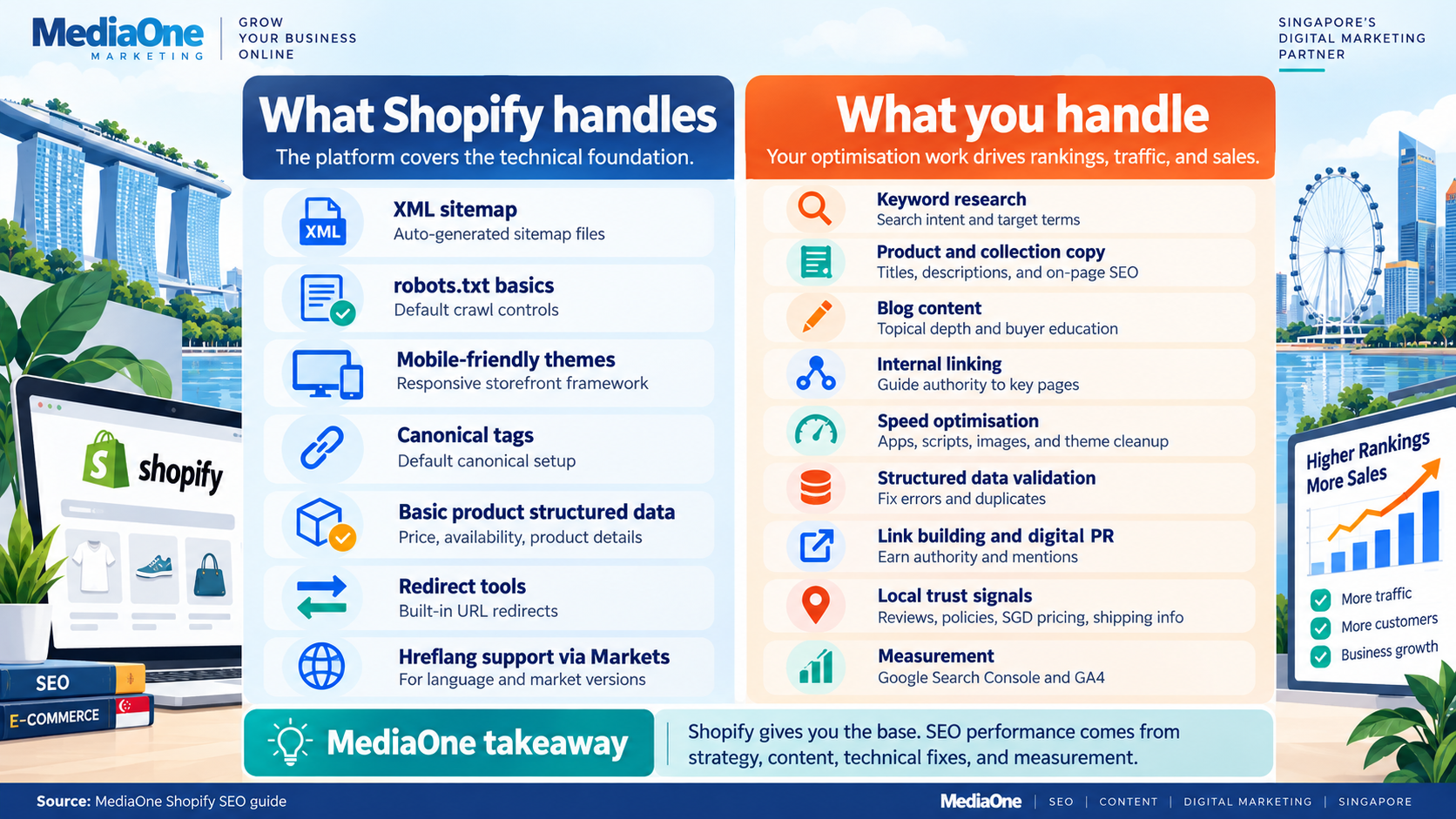
What Shopify does for you, and what it does not
| Feature | What it does | What it does not do | Your action |
|---|---|---|---|
| XML sitemap | /sitemap.xml is an index that links to child sitemaps for products, collections, pages and blog posts. It updates automatically. | Submit itself to Google | Submit it in Search Console |
| robots.txt | Default rules block areas such as admin, cart, checkout and account, plus many sort and filter URLs | Know your crawl needs | Review /robots.txt. Customise via robots.txt.liquid if needed |
| Mobile | Themes are responsive | Guarantee fast pages | Test Core Web Vitals |
| Structured data | Themes usually output Product data: name, price, availability | Guarantee breadcrumb, FAQ, LocalBusiness or error-free review markup. This depends on your theme and apps. | Validate in the Rich Results Test |
| Canonical tags | Outputs canonicals. Collection-scoped product URLs point to /products/… | Fix duplicates caused by apps or filters | Check key templates |
| Redirects | Offers a checkbox to create a redirect when you change a handle. Redirects stay until you delete them. | Create redirects if you leave the box unticked | Tick the box. Review Online Store > Navigation > URL Redirects |
| hreflang | Shopify Markets adds hreflang tags for your language and market versions | Set up your languages for you | Configure Markets, then check page source |

Key insight: Shopify’s defaults get you discovered. They do not win rankings against competitors who invest in content and speed.
Shopify vs a custom-built shop
| Factor | Shopify | Custom-built |
|---|---|---|
| Theme changes | Fast, and themes are pre-tested | Slower, needs code review |
| Page speed control | You control images, apps and theme code. Shopify controls hosting and caching. | Full control, including caching and CDN |
| Schema markup | Theme defaults, extended with code or apps | Full control, needs a developer |
| URL structure | Fixed prefixes such as /products/, /collections/ and /blogs/. You can edit handles. | Complete freedom, and more room for mistakes |
| Redirects | Managed in the admin, with CSV import | Managed on your server |
A skilled developer can sometimes outrank a Shopify store with less content. On Shopify, you make up the difference with better content, smarter linking and disciplined app use.
Do this now: audit your apps
- List every installed app and its purpose.
- Mark any that duplicate something Shopify or your theme already does.
- Remove or replace at least one non-critical app within two weeks.
- Re-run PageSpeed Insights and compare.
On-Page Shopify SEO
On-page work is where most store owners leave ranking potential on the table. Shopify gives you the fields. Most stores fill them with vendor defaults.
Product Pages
Titles
In Shopify, go to Products > [product] > Search engine listing. The page title there is your HTML title tag. It can differ from the product name on the page.
- Lead with what the shopper is looking for, then add a differentiator.
- Keep it to roughly 60 characters so it is not cut off in results.
- Write it the way a person would, not a keyword list.
Example: “Organic Ceremonial Matcha Powder from Kyoto” beats “Matcha Powder”. Google may rewrite titles it finds unhelpful, so clarity matters more than stuffing.
Meta Descriptions
Meta descriptions are not a ranking factor, but they shape clicks. Roughly 150–160 characters displays well. Shopify’s field accepts more, but the extra may be truncated.
- Poor: “Matcha powder, organic, ceremonial grade, Japanese matcha, green tea.”
- Better: “Ceremonial-grade organic matcha from Kyoto. Smooth, vibrant and whisked fresh. Ships to Singapore within 3 days.”
Google may rewrite your description to match the query. That is normal.
Product Descriptions
Answer the questions a shopper has before clicking “Add to cart”:
- What exactly is this?
- Why choose this version over alternatives?
- How do I use it?
- What results should I expect?
- Is it right for my situation?
Use short paragraphs. Work in secondary keywords naturally. As a starting point, aim for 200–350 words on your top products. There is no magic number. Add depth where shoppers have questions.
Structured Data
Your theme outputs Product schema, usually with name, image, price, currency and availability. Check these three things:
- Currency is SGD. Set your store currency in Settings, and confirm priceCurrency shows SGD in the Rich Results Test.
- Availability matches the page. If the page says sold out, schema should say so too.
- No duplicates. Review apps sometimes add a second Product or rating block. Disable apps one at a time to find the culprit.
Payment gateways do not feed structured data. Schema comes from your theme or an app.
Shopify does not output shipping details in schema by default.
The simplest route is to add shipping settings in Google Merchant Center. If a developer adds it to your theme, the valid format sits inside your offers block:
“shippingDetails”: {
“@type”: “OfferShippingDetails”,
“shippingRate”: {
“@type”: “MonetaryAmount”,
“value”: 5.00,
“currency”: “SGD”
},
“shippingDestination”: {
“@type”: “DefinedRegion”,
“addressCountry”: “SG”
}
}
If a product has variants, search results may show the lowest variant price. Check that this fits your pricing position.
Collection Pages
Collection pages are ranking opportunities, not just scaffolding. They suit broader, medium-intent searches such as “best matcha for beginners”.
In Products > Collections > [collection] > Description, write 150–200 words that:
- Explain what the collection contains in plain language.
- Include two or three secondary keywords naturally.
- Answer obvious questions, such as how long a tin lasts.
Link to three to five hero products with descriptive anchor text, such as “best matcha for tea ceremony beginners”. Avoid “shop here”. Prioritise collections that have real search demand and at least five products. Check demand in Search Console or a keyword tool.
Blog and Topical Depth
Your blog supports SEO. It captures informational searches, builds depth on your topic and gives you natural places to link to products. Google does not officially name “topical authority” as a ranking factor. In practice, covering a subject thoroughly tends to help you rank for it, so a cluster of 10–15 linked posts usually beats one product page with no context.

A workable plan:
- Find questions shoppers ask before buying, such as “how to tell if matcha is fresh”.
- Publish a post every two to four weeks.
- Link each post to two or three relevant products or collections.
- Review Search Console after four to six weeks to see which posts bring clicks.
Blog URLs default to /blogs/news/post-title. You can edit the blog handle, for example news to guides, but the /blogs/ prefix stays.
Avoid Keyword Cannibalisation
Cannibalisation happens when several pages compete for the same query.
| Symptom | What it means | Action |
|---|---|---|
| Several product pages rank for one keyword | You compete with yourself | Pick a primary page and link others to it |
| Search Console shows many near-identical queries landing on different pages | Google is unsure which page is best | Give each page one clear primary keyword |
| A collection ranks below its own products | Products are taking category-level queries | Strengthen the collection page and link to it from product pages and posts |
Assign each product one primary keyword. If you sold one tin in three sizes as three separate products, merge them into one product with three variants. Steps for your top 20 products:
- List each product’s target keyword.
- Check Search Console for overlap.
- Choose one winner per keyword.
- Update internal links to point to the winner.
Technical Shopify SEO
Shopify serves your store over HTTPS from a global CDN. Problems start when you add apps, filters and heavy themes.
Pagination and Filters
Collections paginate with ?page=2, ?page=3 and so on. Filters add more URL parameters. Crawl budget mainly matters for very large sites, so a small store will not collapse. Still, endless filter combinations dilute focus and clutter your index report.
Google’s current guidance on pagination:
- Let each paginated page canonicalise to itself. Do not point pages 2+ to page 1, as that can hide products from crawlers.
- Do not rely on rel=”next” and rel=”prev”. Google stopped using them in 2019.
- Avoid nofollow on pagination links.
- If you use “load more” or infinite scroll, make sure crawlable links to paginated URLs still exist.
For filters:
- Keep to the three to five filters shoppers actually use. Shopify’s Search & Discovery app manages storefront filters.
- Check your robots.txt and Search Console’s Pages report for filter URLs you do not want crawled.
Duplicate Content and Canonicals
Shopify already outputs canonical tags. A product reached through /collections/mens/products/shirt canonicalises to /products/shirt. Variant URLs such as ?variant=123 canonicalise to the product as well. So do not add a manual canonical to your theme. Online Store 2.0 themes do not use product.liquid anyway. Instead:
- View source on a product page and confirm one canonical tag exists.
- Run a Screaming Frog crawl (the free version covers up to 500 URLs).
- Fix any theme or app that removes or duplicates the canonical.
- Merge products that are really one product with variants.
Site speed and Core Web Vitals
Google’s Core Web Vitals are:
| Metric | What it measures | Good target |
|---|---|---|
| Largest Contentful Paint (LCP) | How fast the main content loads | 2.5 seconds or less |
| Interaction to Next Paint (INP) | How fast the page responds to input | 200 ms or less |
| Cumulative Layout Shift (CLS) | How much the page jumps | 0.1 or less |
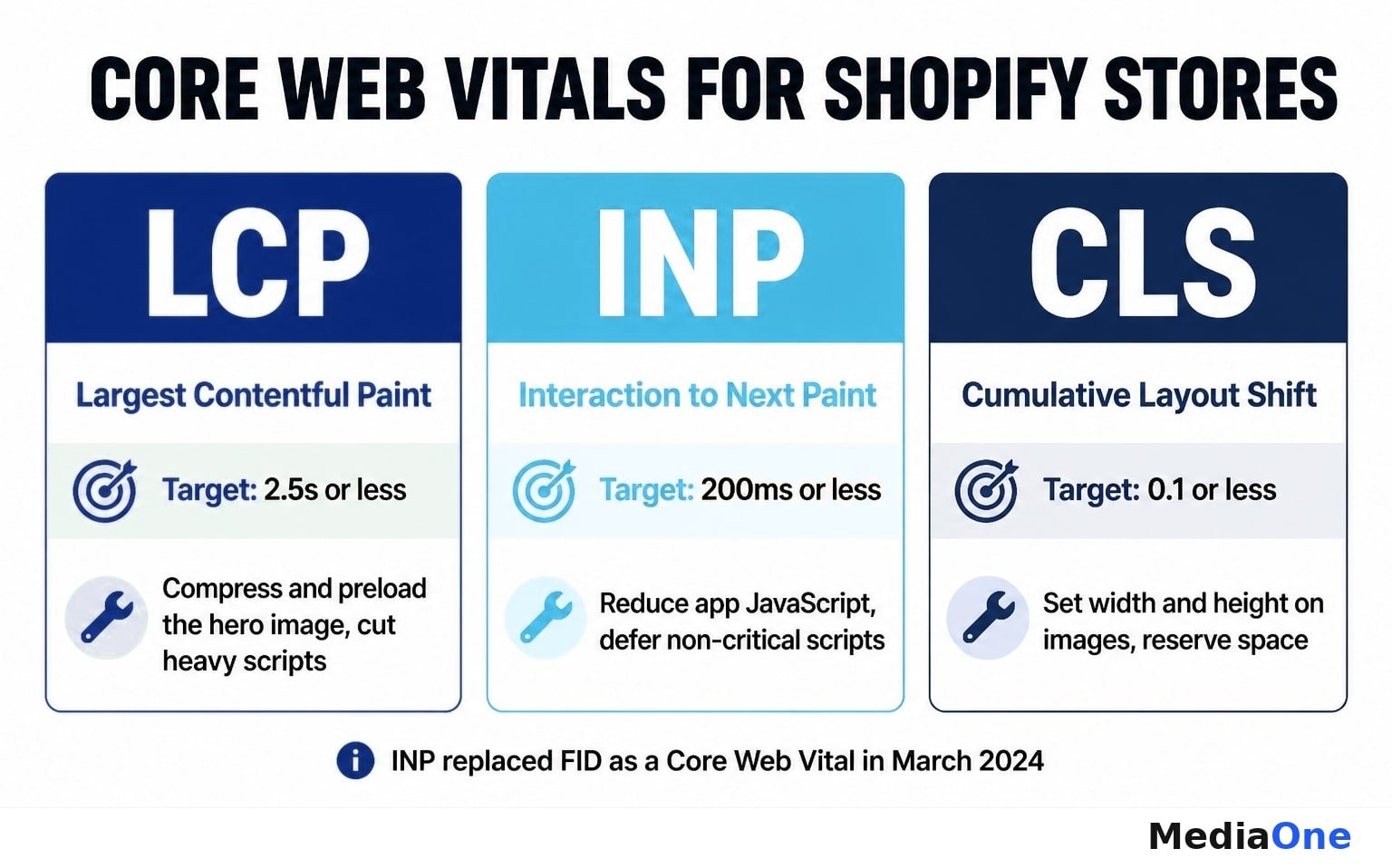
INP replaced First Input Delay (FID) in March 2024, so FID is no longer a Core Web Vital.
The usual cause of slow Shopify pages is JavaScript from apps and heavy themes. To improve speed:
- Run PageSpeed Insights on a product page. Check “Reduce unused JavaScript” and “Eliminate render-blocking resources”.
- Remove apps that you cannot link to a measurable benefit.
- Ask your developer to defer non-critical scripts.
- Compress images before upload. Shopify’s CDN resizes images per request, but smaller sources still help.
- Do not lazy-load the main image at the top of the page. Lazy-load images further down.
- Set width and height on images to reduce layout shift.
Do not place a third-party CDN in front of your Shopify storefront. Shopify does not support that setup, and it can cause problems.
Crawlability and Rendering Checks
Googlebot handles standard loading=”lazy” images fine. The real crawl risks are broken markup, blocked resources and app conflicts.
- In Search Console, open URL Inspection and enter a product URL.
- Click Test live URL, then View tested page.
- Check the screenshot and rendered HTML for missing images or content.
- Run the Rich Results Test or the Schema Markup Validator for schema errors. Google’s older Structured Data Testing Tool was retired in 2021.
- Open Search Console’s Pages report (the old Coverage report) and review excluded and error URLs.
Redirects When URLs Change
When you edit a product or collection handle, tick the option to create a redirect. Redirects stay until you delete them, so they do not expire.
For discontinued products, redirect to the closest relevant product or collection. Add them in Online Store > Navigation > URL Redirects, or import a CSV for many.
Building Authority: Content, Links and Reviews
Authority tells Google your store is a trusted source in its category. It comes from relevant content, internal linking, quality external links and genuine reviews.
Content That Matches Buyer Intent
Map content to the buying journey:
- Informational: buying guides, care guides, comparisons. Link each to relevant products.
- Transactional support: product roundups and seasonal guides. Link to collections and best sellers.
- Authority pieces: one or two in-depth trend or explainer posts each quarter.
Use Singapore’s calendar: Lunar New Year, Deepavali, Hari Raya, National Day and back-to-school.
Internal Linking
Internal links tell Google which pages matter. A simple pattern:
- Homepage to collections to products.
- Related products link to each other.
- Blog posts link to collections and products.
- Overlapping collections link to each other.
As a rule of thumb, give each important product page three to five internal links. Give top sellers more. Use descriptive anchor text, such as “best cotton sheets for hot sleepers”.

Local Link Building
Links from relevant Singapore sources help more than random international links. Ideas:
- Trade bodies and directories. Examples include the Singapore Business Federation, the Singapore Retailers Association and, for furniture, the Singapore Furniture Industries Council (SFIC). Enterprise Singapore (which absorbed SPRING Singapore in 2018) lists support schemes and resources.
- Local media. Pitch real news, such as a product launch or founder story, to outlets like The Straits Times or AsiaOne.
- Complementary businesses. Interior designers, cafés and event planners can feature your products.
- Community events. A sponsorship can earn a mention and link on the organiser’s site.
Avoid bulk link packages. They look unnatural and can hurt you. Aim for steady, relevant links instead.
Reviews and User-Generated Content
Reviews build trust and help shoppers click and buy. Google does not publish a direct “review score” ranking factor, but review markup can make your listing more informative.
- Choose a review app and confirm it outputs one set of rating markup, not two.
- Ask for reviews by email about a week after delivery.
- Do not offer discounts or rewards in exchange for reviews. Google’s review policies discourage incentivised reviews.
- Reply to positive and negative reviews, ideally within two days.
- Check mentions on Google, marketplaces and social groups where Singaporean shoppers talk.
Singapore-Specific Shopify SEO
Singapore is multilingual and regulated. Generic Shopify SEO advice often skips both.
Language and Market Versions (hreflang)
If you serve English and Chinese versions, use Shopify Markets and add languages in the admin. Markets add hreflang tags automatically. Confirm by viewing page source and searching for hreflang.
- Use the correct lang attribute, such as en or zh-Hans.
- Translate titles, descriptions and URLs, not just body text.
- Google retired Search Console’s International Targeting report in 2022, so hreflang and clear content signals do the work now.
Currency, Pricing and Shipping
- Set your store currency to SGD and show prices in SGD on the page. Shopify Payments supports SGD.
- Show clear, final prices. Check GST display rules with an accountant or lawyer.
- State shipping costs, delivery times and returns on product pages and in policies.
- Show payment method badges for shopper trust. They help conversion, but Google does not rank sites for showing them.
- Add your shipping and returns policy to Google Merchant Center if you want free listings eligibility.
Local Trust Signals
Google Business Profile (GBP) is for businesses with in-person customer contact, such as a shop, showroom or pickup point. If that is you:
- Register your real address.
- Verify it using the methods Google offers. A postcard is only one option.
- Add hours, photos and a link to your store.
- Encourage customers to leave Google reviews.
If you are online only, do not use a virtual or registered office address for GBP. It can lead to suspension.
Add LocalBusiness schema only if you have a real location customers can visit. Your theme or a developer can add it.
Compliance and Trust Pages
Legal pages build trust with shoppers. They are not a proven ranking signal, and Search Console does not flag PDPA “dark patterns”.
- PDPA. Collect marketing consent clearly. Unticked consent boxes and a visible unsubscribe link are good practice. Marketing messages are also covered by the Spam Control Act and the Do Not Call rules, so confirm your wording with Singapore counsel.
- Consumer protection. The Consumer Protection (Fair Trading) Act targets unfair practices such as misleading descriptions or pricing. Singapore has no general 14-day cooling-off period for online sales. Cooling-off rules apply to specific sale types, such as door-to-door and telemarketing sales.
- Policy pages. Replace US-focused Shopify templates with Singapore-appropriate terms, privacy and returns pages. Link them in your footer.
Is your store Singapore-ready?
| Check | Action if missing |
|---|---|
| hreflang live for each language | Set up Shopify Markets, then verify in page source |
| Prices and schema in SGD | Set store currency to SGD and test in the Rich Results Test |
| GBP set up, if you have a public-facing location | Register and verify with real address |
| Review markup present, no duplicates | Check Rich Results Test and review app settings |
| LocalBusiness schema, if you have a location | Add via theme or developer |
| Consent collected clearly | Review signup forms and wording with counsel |
| Singapore-specific policy pages | Replace default templates |
| Core Web Vitals in the good range | Run PageSpeed Insights, trim apps, compress images |
Common Shopify SEO Mistakes
Letting apps drive decisions
Each app can add scripts that slow pages. Audit apps quarterly. Keep an app only if you can point to a measurable benefit, then consider consolidating overlapping ones.
Shopify’s Dawn theme does not output BreadcrumbList by default, and many themes lack it. Breadcrumbs help Google understand your structure, though display in results varies. Ask a developer to add it, or choose a lightweight, well-reviewed schema app. Test three product pages in the Rich Results Test afterwards.
Heavy theme customisation on mobile
Most shoppers browse on phones. Custom scripts, large hero images and cramped tap targets hurt LCP, CLS and usability. Test on a real phone. Remove custom code that repeats native Shopify features.
Mismatched availability and stock signals
Schema availability should match what shoppers see. Do not noindex products just because they are out of stock. Keep pages for items that will return. For discontinued items, redirect to the closest alternative.
Quick diagnosis
| Symptom | Likely cause | Fix |
|---|---|---|
| Core Web Vitals poor on mobile | App JavaScript, large images | Audit apps, compress images |
| Slow LCP | Large hero image, lazy-loaded top image, heavy scripts | Preload hero, remove lazy-loading above the fold |
| No breadcrumbs in results | Missing or invalid schema | Add and test BreadcrumbList |
| Wrong rating or price in results | Duplicate schema from an app | Disable apps one by one, retest |
| Many “Duplicate, Google chose different canonical” URLs | Filters, app URLs, near-identical products | Merge products, tidy filters, check canonicals |
Measuring Shopify SEO Performance
Set up measurement before you optimise anything.
- Add your domain in Google Search Console and submit /sitemap.xml.
- Install GA4 through Shopify’s Google channel or a custom setup.
- Record a baseline: clicks, impressions, top queries and top pages.
- Track key keywords monthly against local competitors.
- Review Core Web Vitals in Search Console.
Useful tools:
| Tool | Use |
|---|---|
| Google Search Console | Queries, indexing, Core Web Vitals |
| GA4 | Traffic and conversions |
| PageSpeed Insights | Speed and diagnostics |
| Rich Results Test / Schema Markup Validator | Structured data checks |
| Screaming Frog | Site crawls |
| Ahrefs or Semrush | Keywords, links, competitor research |
A Week-by-Week Shopify SEO Action Plan
Results vary by competition and starting point. Use this plan as a sequence, not a promise.
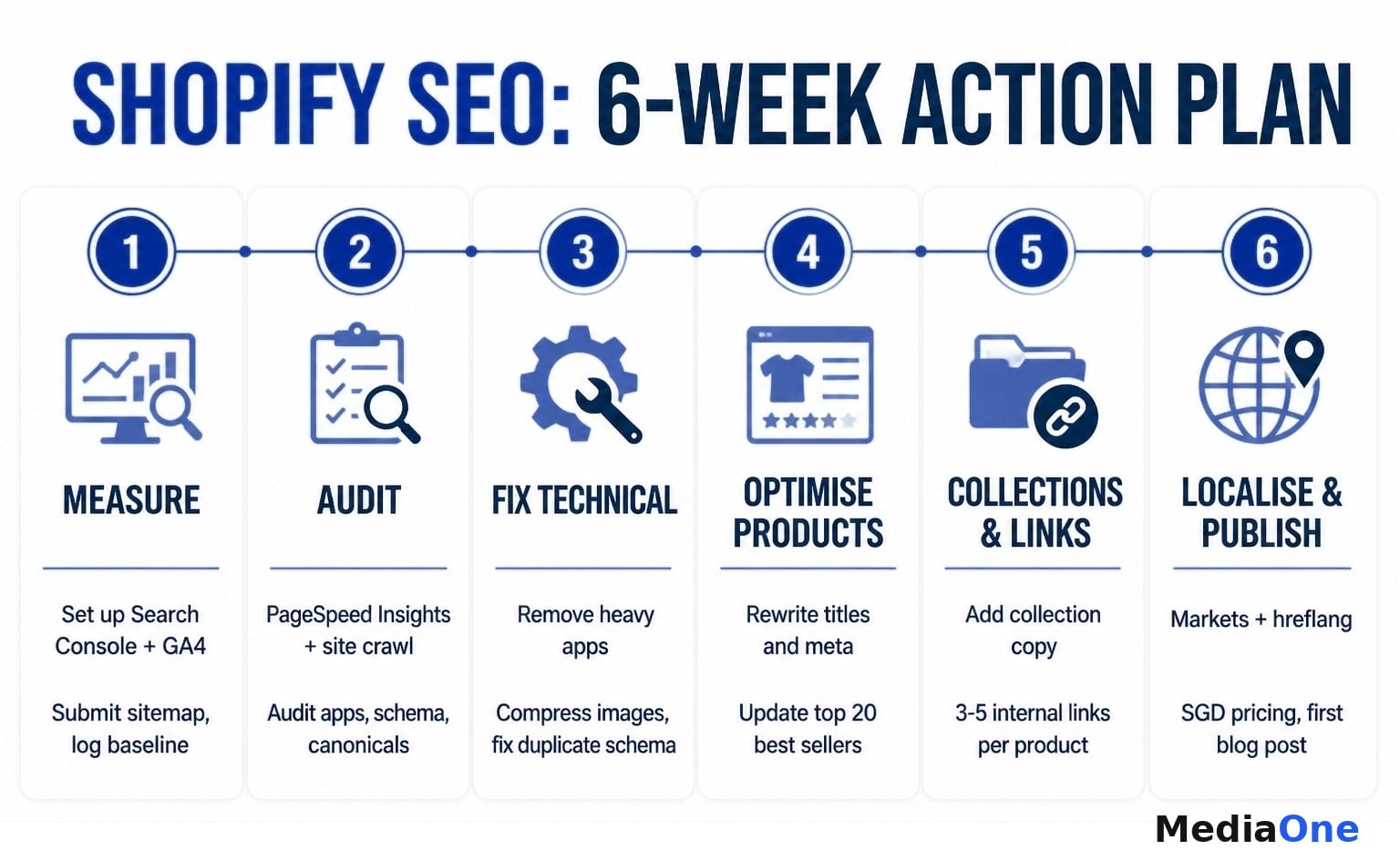
- Week 1: Measure. Set up Search Console and GA4. Submit your sitemap. Record baselines.
- Week 2: Audit. Run PageSpeed Insights and a Screaming Frog crawl. Audit apps. Check schema, canonicals and robots.txt.
- Week 3: Fix technical blockers. Remove heavy apps, compress images, fix duplicate schema, and add breadcrumbs.
- Week 4: Optimise top products. Rewrite titles, meta descriptions and descriptions for your 20 best sellers.
- Week 5: Optimise collections and links. Add collection copy. Add three to five internal links per key product.
- Week 6: Localise and publish. Set up Markets and hreflang if needed. Review SGD pricing, shipping and policy pages. Publish your first buyer-intent blog post.
After week six, publish steadily, track rankings monthly and re-audit apps every quarter.
Sources and Further Reading
Check these primary sources for current details:
- Google Search Central: documentation on pagination, canonicalisation, structured data (product, breadcrumb and merchant listings), title links and snippets, and review policies.
- Google: announcement that INP replaced FID as a Core Web Vital in March 2024, and Core Web Vitals documentation on web.dev.
- Google Business Profile Help: eligibility and verification guidelines.
- Shopify Help Center: URL redirects, Shopify Markets and hreflang, robots.txt.liquid, sitemaps and Search & Discovery.
- Personal Data Protection Commission (PDPC) Singapore: PDPA and Do Not Call guidance.
- Singapore Statutes Online: Consumer Protection (Fair Trading) Act and Spam Control Act.
- Enterprise Singapore: business support and industry resources.
Turn Your Shopify SEO Strategy Into Measurable Growth
Successful Shopify SEO starts with understanding where your store is losing search visibility and potential customers. We recommend prioritising technical issues, improving high-value product pages and strengthening internal links before investing in additional content. Our guide to technical SEO for ecommerce explains how to address crawlability, indexing and website performance.
For Singapore retailers, local relevance also matters. Accurate SGD pricing, transparent shipping policies and useful product information help build customer confidence. Track organic traffic, conversions and sales regularly to identify which improvements deliver results.
At MediaOne, we help businesses develop SEO strategies based on search demand, website performance and commercial goals. Our SEO services help retailers address technical challenges, improve organic visibility and attract qualified customers. Whether you are launching a new Shopify store or optimising an established one, a structured SEO strategy can support sustainable ecommerce growth.
Frequently Asked Questions
Is Shopify good for SEO?
Yes, for the basics. It gives you sitemaps, mobile-friendly themes, HTTPS and canonical tags. Competitive rankings still depend on content, links and speed.
How long does Shopify SEO take to work?
It depends on competition, your starting point and how much you publish. Technical fixes can show effects within weeks. Content and links often take several months.
Do I need SEO apps for Shopify?
Not always. Many tasks, such as titles, descriptions, alt text and redirects, work without apps. Add an app only for a clear gap, and measure its speed cost.
Do Shopify URL redirects expire?
No. Redirects stay until you delete them. Tick the redirect option when you change a handle.
Can I remove /products/ from Shopify URLs?
No. Shopify keeps the /products/, /collections/, /pages/ and /blogs/ prefixes. You can edit the handle that follows.

Do I need a Google Business Profile for my Shopify store?
Only if you have a public-facing location, such as a shop, showroom or pickup point. Online-only stores should not use a virtual or registered office address.
Should I translate my store into Chinese?
If a meaningful share of your customers search in Chinese, yes. Use Shopify Markets so hreflang is added automatically, and translate titles, descriptions and URLs.