| AI Summary
Local SEO helps Singapore businesses appear in Google Maps and geographically relevant search results by improving business information, customer reviews, local citations and location-focused website content. Google identifies relevance, distance and prominence as its main local ranking factors. This guide explains ten practical actions, from verifying a Google Business Profile to measuring enquiries, while avoiding shortcuts that promise guaranteed rankings. |
If you run a local business, appearing in Google search results for customers near you can influence how many enquiries you receive. These local SEO tips are how you get there.


Unlike traditional SEO, which aims for national or global rankings, local SEO optimises your visibility for searches tied to geography. Examples include ‘plumber near me’, ‘best coffee shop in Tiong Bahru’ or ‘dentist open now’. People typing these searches often have a specific need and may be ready to buy, visit or call.
The challenge is that Google’s local ranking system works differently from general web ranking. Three factors shape results: distance from the searcher, relevance to what they are searching for and your online prominence. Your business location affects proximity. Your reviews and the accuracy of your profile can also help.

This guide covers ten concrete steps to claim your online presence, earn trust signals, build local authority and appear in the Google Local Pack, the map section that may appear above or alongside regular search results. Most steps can be started without expensive tools, although results depend on your business and local competition.
Key Takeaways
- Optimise your Google Business Profile. Keep your business information, categories, opening hours, services and photos accurate to improve your visibility in local search results and Google Maps.
- Understand Google’s local ranking factors. Relevance, distance and prominence influence local search rankings. Focus on improving the factors within your control.
- Maintain consistent business information. Ensure your business name, address and phone number (NAP) match across your website and trusted local directories.
- Build trust through customer reviews. Encourage genuine feedback and respond professionally to both positive and negative reviews to strengthen your online reputation.
- Create location-specific content. Target relevant local keywords and publish useful content that addresses the needs of customers in your service areas.
- Strengthen your website’s local SEO. Improve mobile usability, page speed, internal linking and structured data to help customers and search engines understand your business.
- Track performance and refine your strategy. Monitor local search visibility, website traffic, calls and enquiries to identify which improvements deliver measurable results.
Why Local SEO Helps Small Businesses
Local search gives nearby customers a way to find your business and confirm that you can meet their needs.
People use location-specific searches such as ‘pizza near me’, ‘accountant open now’ or ‘best dentist in my area’. Google can use the searcher’s location, or information it has about that location, to show relevant local results even when a place name is not entered.
For small businesses, this is an advantage. You do not need to compete nationally. You compete for customers who are willing to travel to you or are within your service area. Results vary by market saturation, industry and your existing online presence, but better visibility can put your business in front of people with a nearby need.
How Local Search Drives Foot Traffic and Phone Enquiries
Local search can attract people with an immediate need. A person typing ‘plumber near me’ may need a plumber soon. The same applies to restaurants, salons, gyms and repair services.
Appearing prominently in map results can make it easier for a customer to call, request directions or visit your website. Track these actions in Google Business Profile Performance and compare them with enquiries, bookings or your point-of-sale records. Google Search Console can show search queries, landing pages and country-level data, but it does not report neighbourhood-level Google Maps rankings.
For businesses that serve a defined area, local SEO can complement broader organic SEO by attracting nearby customers.
Google’s Local Ranking Factors: Distance, Relevance and Prominence
Google identifies three main factors behind local search rankings: relevance, distance and prominence. Its local ranking guidance explains how these factors interact.
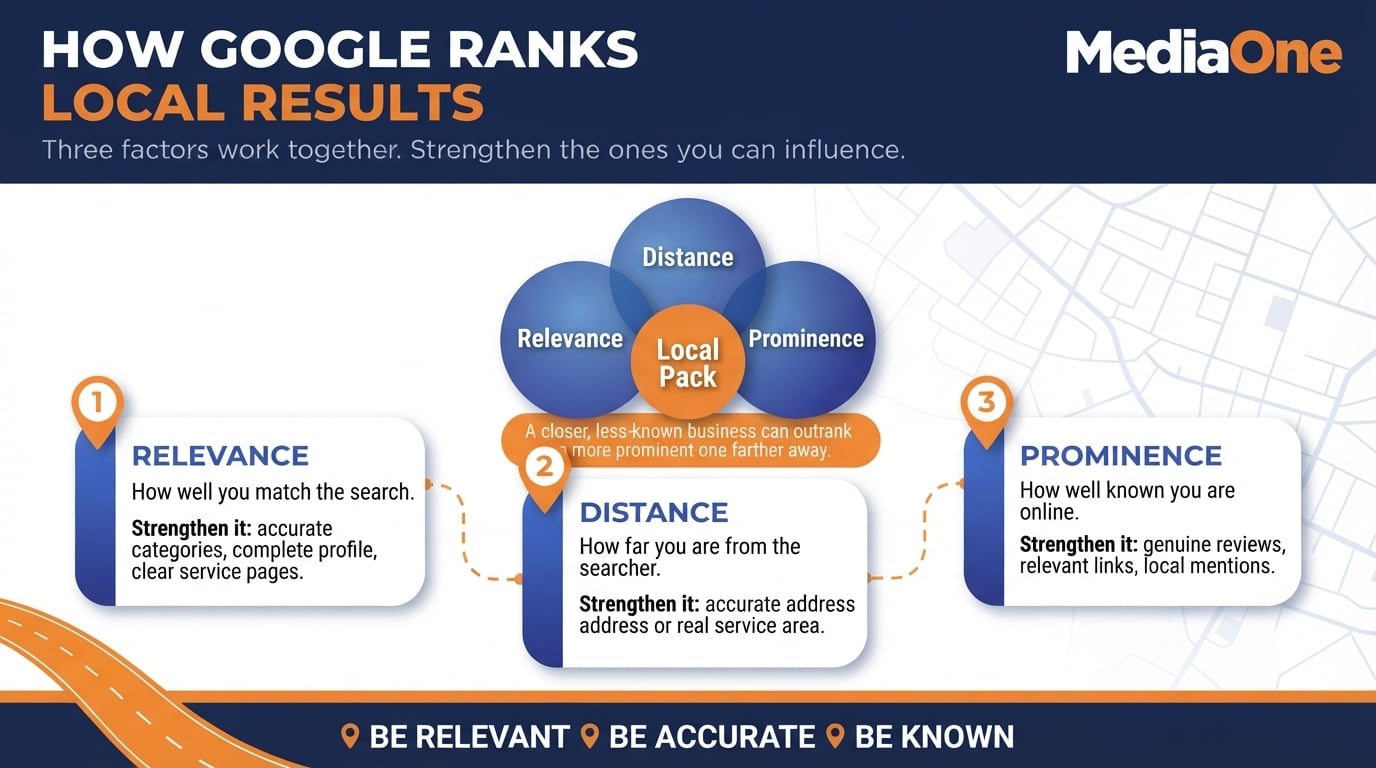
Distance is the geographical distance between the searcher and your business. If you search ‘coffee shop near me’ whilst in Tampines, nearby shops may be more relevant than shops across the island. You cannot move your business closer to every searcher, but you can accurately describe where you operate.
Relevance measures how well your business matches what the searcher is looking for. A search for ‘vegan cafe’ should return cafes that actually serve vegan food. Relevance is supported by a specific business category and complete, accurate profile information. Your website should also describe your services clearly, using language customers recognise.
Prominence is your online reputation and authority in your area. Google says prominence can reflect how well-known a business is, including web links, review counts and positive ratings. More reviews do not automatically place one salon above another: relevance and distance still apply. Mentions from genuine local organisations may also help customers discover you.
These three signals interact. A less well-known business close to the searcher can outrank a more prominent business farther away. A highly relevant and prominent business can rank even if slightly further away. Your task in local SEO is to understand all three and strengthen the factors you can influence.
Distance is largely fixed, but you can improve the accuracy, relevance and credibility of your local presence.
Claim and Optimise Your Google Business Profile
Your Google Business Profile is a central asset for local search visibility. Google can use information from the profile in Maps and local Search results. A verified, accurate profile gives customers clearer reasons to contact or visit your business. For businesses that want specialist help with the process, MediaOne offers local SEO services in Singapore.
1. Set Up and Verify Your Profile
Sign in to Google with the account that will own the Business Profile. Search for your business name and claim its existing profile, or add your business if it is missing. Enter the business name as it is consistently used on your signage, website and other real-world materials. Do not add location keywords or marketing claims that are not part of that name.
If another staff member or agency currently controls the profile, arrange an ownership or manager-access request rather than creating a duplicate. Keep access with an account controlled by the business so staff changes do not leave the listing unmanaged.
Add your address next. If customers visit your staffed premises, provide the accurate street address. If you travel to customers and do not receive them at your base, set a service area and hide your address from the public profile. Google chooses the available verification method, which may include video, phone, email or postcard. Follow the option shown for your business; approval times vary.

Once verified, add your phone number, website URL and primary business category. Choose the category that best describes your core business rather than simply the most profitable service. Add relevant secondary categories only where they accurately describe what you do.
During verification, keep proof of the business’s real location or service operations ready if Google asks for it. That might include permanent signage, equipment used for jobs, or access to staff-only areas. Do not upload private customer information as evidence.
2. Complete Your Profile Information
Google says businesses with complete, accurate information are more likely to appear in relevant local results.
Opening hours: Enter hours for every day of the week, including holidays and special closures. If you are closed Sundays, indicate that clearly.
Service areas: If you travel to customers, define the postcodes or neighbourhoods you genuinely cover. For example, a plumber based in Tampines might serve Bedok, Changi and nearby areas. Listing a larger service area does not make you rank across every neighbourhood.
Photos and videos: Upload clear, recent images of your storefront, team and services where you have permission to share them. Review your images quarterly, and add a video or service walkthrough when it genuinely helps customers understand what you offer.
Write a concise business description in plain language for your customers. For example, ‘We provide emergency plumbing in Tampines and serve domestic and commercial clients’ is clearer than repeating the same keyword. State ’24/7′ only if the service really operates at all hours.
Add the services you actually offer, the appointment or booking option supported by your profile, and relevant attributes such as accessibility or parking where applicable. Double-check opening hours before Singapore public holidays, when a customer may be travelling specifically to visit you.
3. Request and Respond to Genuine Customer Reviews
Google says review counts and positive ratings can help local ranking, and thoughtful replies show customers you value feedback. Aim to respond promptly, ideally within a couple of working days. Keep replies brief, professional and specific.
For positive reviews, thank the reviewer by name and mention a specific detail they noted. Example: ‘Thanks for mentioning how quickly our team arrived. That is the standard we aim for every time.’ This shows you are a real business and encourages others to leave reviews.
For negative reviews, do not get defensive. Acknowledge the complaint, apologise if warranted and invite the reviewer to resolve it offline. Example: ‘We are sorry to hear about the installation problem. Please contact our team directly so we can look into it.’ A private follow-up may resolve the issue, but customers are not obliged to edit or remove a review.
Build reviews consistently by giving customers a direct review link or QR code after genuine interactions. Do not offer discounts or rewards for reviews, and do not selectively request only positive feedback. Reviews describing a real customer experience help others make decisions; Google does not publish a scoring formula that favours one detailed review over a fixed number of short ones.
A short review request can work well at the end of a receipt or follow-up message. Invite honest feedback from customers with first-hand experience, regardless of whether the experience was positive. Never ask team members to write reviews about transactions they did not have.
Flag reviews that appear to violate Google’s policies, such as spam or reviews about another business. Removal is subject to Google’s assessment. For practical request wording and response examples, see MediaOne’s Google review strategies for local businesses.
Build Citations and NAP Consistency Across the Web
A citation is a mention of your business name, address and phone number on another website. Citations help people and search engines encounter consistent details about your business. Google does not publish a fixed citation quota or a weighting for directory entries.
Unlike backlinks, you do not need the citation to be a hyperlink. A simple text mention in a directory, review site or industry listing counts. Correct name, address and phone number (NAP) details reduce confusion for customers and make listings easier to maintain.
Citations also increase your chances of being found on platforms that your customers actually use. Someone looking for a plumber might find you on Google Maps, then later check another business listing before calling.
Prioritise accurate listings on platforms your customers use over a large number of low-quality directory submissions.
4. Choose Relevant Singapore Directories
Focus on directories and mapping platforms that are relevant to Singapore customers. Start with your Google Business Profile, then check where else people may look for your business.
Apple Business replaced Apple Business Connect in April 2026. Apple’s announcement of Apple Business explains that it now manages business information displayed in Apple Maps and other Apple services. Bing Places for Business is another option for checking your details outside Google.
| Platform or Directory | Best For | What to Check |
| Google Business Profile | All eligible local businesses | Category, hours, address or service area, website |
| Apple Business (Apple Maps) | Businesses serving Apple Maps users | Location details, photos, contact information |
| Bing Places for Business | Businesses visible in Bing search and maps | Correct name, address, category and website |
| Facebook Page | Businesses that receive social enquiries | Contact information, opening hours and location |
| Carousell | Sellers and service providers where eligible | Accurate listing and service descriptions |
| HungryGoWhere and Burpple | Restaurants and cafés | Current venue details and booking/contact information |
| Relevant industry directories | Regulated and specialist sectors | Eligibility, licence information and accurate contact details |
Concentrate on a manageable set of genuinely relevant sources instead of chasing unverified ‘authority scores’. A government company-registration record is not interchangeable with an editable customer-facing directory listing. And a classified-listing platform only makes sense when your business genuinely offers an eligible product or service there. For a fuller directory audit process, use MediaOne’s guide to local citations in Singapore.
5. Audit and Correct Your Existing Citations
Start by auditing where you already appear online. This can be faster than building listings from scratch and may reveal errors that confuse customers.
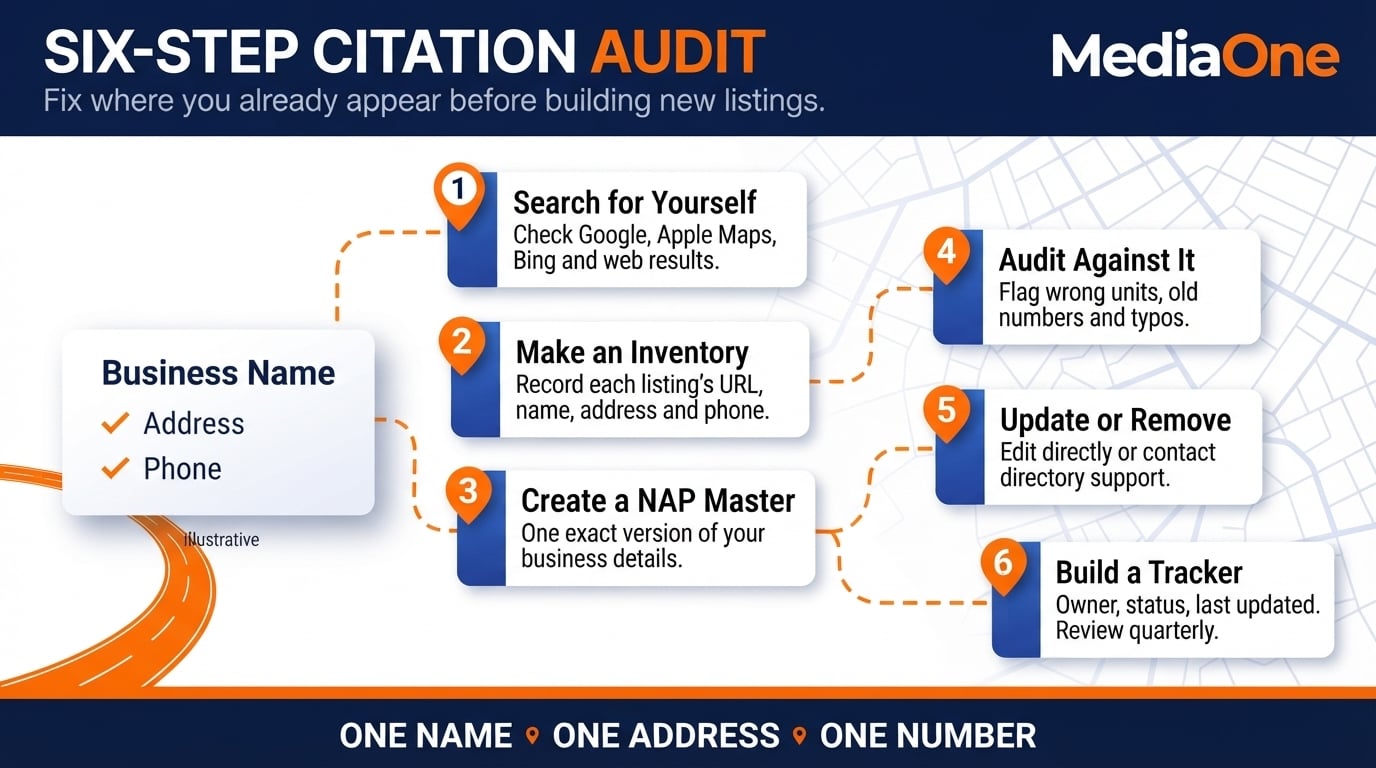
Step 1: Search for yourself. Search your business name inside single quotation marks and review the results for outdated listings, wrong phone numbers or duplicate entries. Check Google Maps, Apple Maps and Bing as well as web results.
Step 2: Make a citation inventory. Record the directory, URL, business name, address and phone number in a spreadsheet. A specialist listing tool is optional; start with platforms where customers actually find you.
Step 3: Create a NAP master document. Write down the exact version of your details you want everywhere:
- Business name (no abbreviations or variations)
- Full street address
- Phone number, using one documented international or local format where accepted
- Postal code
- Website URL, including its correct HTTPS address
Use this as your source of truth. Keep the underlying information consistent, allowing standard address abbreviations where a platform formats them differently.
Step 4: Audit against your master. Check each citation you found. Note:

- Incorrect address or unit number (not merely a standard abbreviation)
- Old phone numbers you have since changed
- Missing postal code
- Typos in your business name
- Incorrect service areas
Step 5: Update or remove incorrect citations. For high-authority directories:
- Log in to your account and edit directly.
- If you cannot edit, contact directory support and request an update.
For directories where you have no account and cannot easily contact support:
- Flag them for update if they carry real authority.
- Ignore them if they are low-quality.
Step 6: Build a tracker. Keep a spreadsheet with three columns: Directory, Current Status, Last Updated. Check this quarterly. Staff changes and customer edits introduce errors over time.
Add a fourth field for the person responsible, plus a link to the live listing. This gives an owner or marketing manager a practical handover record. Recheck the most visible listings after a move, rebrand or phone-number change.
Fixing listings may improve the quality of information customers see, but ranking improvements are not guaranteed. Keep a record of corrections and compare enquiries and profile interactions over time.
If one directory cannot be edited, contact its support team with the correct business details. Prioritise accurate listings rather than spending days chasing obscure platforms.
Create Location-Specific Content That Ranks
Local content shows customers which neighbourhoods you actually serve and can answer specific, location-related searches. Each location page should offer useful local information rather than repeat the same copy with a different area name.
6. Write Neighbourhood Guides and Local Landing Pages
A neighbourhood guide is a page about a specific area you serve. It goes beyond ‘We serve Singapore’ to answer what customers in Tampines, Tiong Bahru or Orchard actually need.
Start with what is unique about the area. What are the main commercial streets? What do residents care about? For a plumber serving multiple Singapore postcodes, a guide to ‘Plumbing Services in Tampines’ might cover access requirements in HDB flats and local emergency call-outs. A fitness studio in Tiong Bahru could explain the commute from nearby MRT stations and how its class schedule fits customers in the area.
Structure each neighbourhood page around a clear question, such as ‘How do I find a plumber in Tampines?’ Include:
- Why the neighbourhood is relevant (brief, specific details about the area)
- Service questions that genuinely arise in that location, supported by your experience
- Your specific solution for that neighbourhood
- A location-specific call-to-action (book a survey in Tampines, book a consultation in Marine Parade)
Use as much content as the customer needs to make a decision. There is no Google-approved 600-to-900-word requirement. Each page should feel distinct, not a copy-paste template with different place names inserted.
A practical page can also include your real coverage boundaries, service hours, response arrangements, a booking link and frequently asked questions. Use verified neighbourhood details rather than inventing local case studies.
If your coverage overlaps several nearby estates, compare the customer questions first. One strong service-area page may be better than several almost identical pages. Create another page only where the neighbourhood requires distinct service information, examples, access instructions or opening arrangements.
7. Use Local Keywords Naturally
Use location modifiers in your existing service pages. Instead of just ‘plumbing repair’, use ’emergency plumbing repair in Orchard’ or ’24-hour plumber near Tanglin’ if those services and locations are accurate.
Do not keyword-stuff. Write naturally. ‘We provide emergency plumbing services to homes and businesses across Orchard and surrounding areas’ works. ‘Plumbing Orchard, plumbing Orchard, plumbing Orchard’ does not.
Your main service pages should mention the areas you serve, but naturally. Avoid long location lists or near-identical pages that simply direct everyone to the same service page. Google treats such pages as potential doorway abuse.
Weave location references into genuine content instead. In a paragraph about your process, you could write, ‘We carry out kitchen renovations across eastern Singapore, from Bedok to Katong. Contact our Tampines team to discuss your project.’ This is an illustrative example, not a client claim.
In a methodology section, reference local context when it is relevant. For example, an accountancy firm might explain how it helps Singapore SMEs prepare documentation for tax questions, without inventing client counts or savings figures.
Mention the location where it is useful, including in the heading, introduction or service details. There is no fixed keyword-density percentage that guarantees local rankings.
Test this by reading the page aloud. If location mentions feel forced or repetitive, remove them. Repeated location terms can make a page harder to read and less useful.
Before publishing, check whether each page answers the query implied by its title. A customer searching for an emergency plumber in Bedok should be able to see the service availability, response method, coverage and contact details without reading generic material about plumbing.
8. Add Accurate LocalBusiness Schema Markup
Schema markup is structured data that helps search engines interpret information about your business. LocalBusiness schema can describe the business name, address, phone number, opening hours and service area in a machine-readable format.
Google’s LocalBusiness structured data documentation lists the properties it supports, including required name and address details for eligible local business rich results. Using structured data does not guarantee a Local Pack ranking or a rich result.
You do not need to write the code yourself if your website builder or CMS supports structured data. For a typical business with a customer-facing address, start with:
- Business name, as customers know it
- Accurate address and postal code
- Phone number and website URL
- Opening hours, where applicable
- Business photo or logo that reflects the real premises
- Relevant service areas using the areaServed property when appropriate
The areaServed property is part of supported Schema.org types; there is no separate Google-supported schema type named ‘Service Area Specification’. Do not mark up fabricated review ratings or assume that reviews about your own business will earn stars in organic results.
Here is a minimal JSON-LD template with placeholders, not a live business listing. Replace every placeholder with truthful, real information before publishing:
| { “@context”: “https://schema.org”, “@type”: “LocalBusiness”, “name”: “[Business name]”, “address”: { “@type”: “PostalAddress”, “streetAddress”: “[Actual street address]”, “addressLocality”: “Singapore”, “postalCode”: “[Actual postal code]”, “addressCountry”: “SG” }, “telephone”: “[Business phone]”, “areaServed”: [“Tampines”, “Bedok”] } |
After adding the markup, test the live page in Google’s Rich Results Test and use the URL Inspection tool in Search Console. Correct syntax errors and keep the information aligned with what customers can see on the site. A passing test is not a promise of enhanced search display. For more implementation details, consult the Local SEO schema markup guide.
Measure and Improve Local Search Performance
Ranking positions can vary depending on the searcher’s location, device and query. Set a baseline before changing your profile or website, then review results against actual customer actions rather than one map search. Calls, direction requests and qualified enquiries give a more useful picture of progress than an isolated keyword position.
9. Monitor Calls, Directions and Local Search Queries
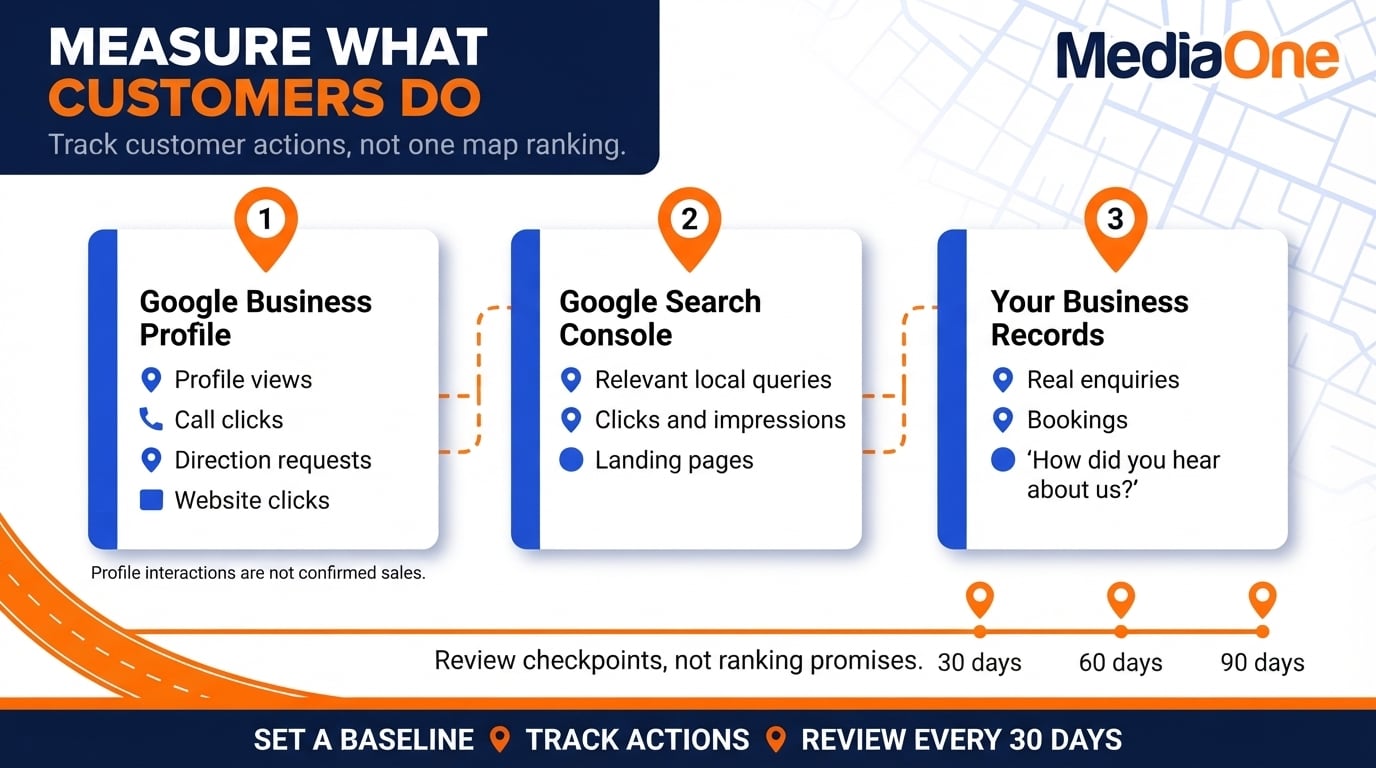
Google Business Profile Performance can show profile views and interactions such as call-button clicks, direction requests and website clicks. These are interactions, not proof that a call connected or a customer bought something. Record them alongside actual enquiries and appointment bookings.
In Google Search Console, filter for relevant service and neighbourhood queries, then look at clicks, impressions and landing pages. Its standard location dimension is country, not a map-level neighbourhood ranking. If you run an appointment-based business, ask how new customers heard about you and record the answers consistently.
Compare a simple 30-, 60- and 90-day scorecard: profile accuracy, new genuine reviews, corrected listings, local search traffic and enquiries. Treat the checkpoints as a management schedule, not as promised ranking milestones.
Record the baseline date and any major changes, such as a profile verification, new service page or corrected phone number. This makes it easier to interpret a rise in enquiries without attributing every change to a single SEO tactic.
10. Earn Relevant Local Mentions and Backlinks
Google includes links from other websites when describing prominence. Where appropriate, look for legitimate links and mentions from suppliers, industry associations, business partners, local event organisers or relevant Singapore publications. A restaurant might appear on an event organiser’s site; a specialist contractor might be listed by a trade association.
Choose relationships that are useful to customers. Do not buy bulk directory links or create false partnerships merely to influence rankings. Make sure a business mention uses the correct name and contact information, and direct visitors to the page that best answers their question. This step works alongside, rather than replacing, your profile and content work.
For each possible mention, ask whether a real customer would find the referring page useful. An industry association’s member directory or an event partner’s supplier page has a clear purpose. A paid bulk-link package with unrelated sites does not.
Common Local SEO Issues and How to Resolve Them
| Issue | Likely Reason | How to Check or Fix It |
| Low visibility despite a complete profile | Weak relevance or prominence; competitors may be closer or better known | Check categories, services, accurate details, reviews and relevant website content |
| Rank changed after a profile edit | Search results vary; an edit may also trigger review or re-verification | Check profile status and correct details; measure across several relevant searches |
| Conflicting phone numbers or addresses | Old listings, duplicate profiles or wrong data | Use your NAP master document; correct important listings first |
| Reviews stop arriving | No simple way for customers to share feedback | Share Google’s review link or QR code without incentives |
| A farther competitor ranks above you | Relevance and prominence can outweigh distance | Compare genuinely relevant categories, quality of information and review feedback |
| Ownership verification is pending | Google has not accepted the selected verification process | Check the profile status and follow the verification method Google offers |
| Thin neighbourhood pages underperform | Similar copy, little local detail or wrong search intent | Add useful service information, unique local details and a clear contact option |
| Business is missing on Apple Maps or Bing | Listing is missing, unclaimed or inaccurate | Check or claim its listing on that platform and update the details |
| Reviews appear on another platform but not Google | Each platform holds its own reviews | Reply on the original platform; invite genuine Google reviews separately |
| Structured data validation reports errors | Invalid JSON-LD or unsupported property values | Check syntax and documented properties; retest the corrected page |
Expectations and Timelines
Timelines vary by business type, current online presence and market competition. Some changes, such as corrected opening hours, may be reflected sooner than changes in ranking or demand. Google gives no universal timeline for local ranking improvements.
New businesses may need time to build genuine reviews and relevant local links. Established businesses may benefit sooner from correcting inaccurate listings, but there is no fixed timetable for any sector.
Track progress using Business Profile interactions, relevant Search Console queries, appointment bookings and actual enquiries, not just keyword rankings. If you need help prioritising the work, review MediaOne’s Singapore local search optimisation services.
Important Note on Regulated Industries
Certain regulated industries, such as healthcare, finance and legal services, may have specific advertising and marketing compliance rules. Before requesting testimonials or publishing claims, check the Singapore rules that apply to your profession and consult the relevant regulator or adviser where needed.
Frequently Asked Questions
How Much Does Local SEO Cost?
Costs depend on the number of locations, the condition of your existing profiles and whether you manage the work in-house. A do-it-yourself audit can be started with a spreadsheet and time for corrections. For an agency quote, ask what is included for profile work, listings, content, reporting and ongoing support. Rates depend on the agreed scope rather than one market-wide fee.
What Is the Difference Between a Citation and a Backlink?
A citation is a mention of your business name, address or phone number, with or without a link. A backlink is a hyperlink from another website to yours. Both can make your business easier to find, but Google does not publish a fixed ranking value for each citation.
How Long Does It Take to See Results from Local SEO?
Timelines vary by business, competition and the changes required. You may be able to correct inaccurate business details quickly, but there is no verified four-to-eight-week guarantee for ranking gains. Track profile interactions, search traffic and enquiries over several reporting periods.
Can I Rank Locally Without a Physical Office Address?
Yes, if you are an eligible service-area business that visits customers at their locations. Use your real base to verify the Google Business Profile and hide the address if you do not receive customers there. An unstaffed virtual office or rented mailing address does not qualify as a business location under Google’s rules.
Which Is More Important, Google Business Profile or Citations?
For visibility in Google Maps and local Search, start with a verified and accurate Google Business Profile. Then check the platforms customers use and correct conflicting details. A large number of directory submissions does not guarantee a better ranking.
Should I Respond to Negative Reviews?
Yes. Reply professionally and promptly, acknowledge the issue and offer an appropriate way to continue the conversation privately. Avoid arguments, sharing personal details or offering rewards for changing or deleting a review.
Are Singapore-Specific Directories Better than International Ones?
Use whichever reputable platforms your customers genuinely visit. Singapore-focused directories may be useful for local discovery, whilst international platforms can be relevant to tourism and cross-border business. There is no verified Google ranking rule that automatically favours a Singapore directory.
What Is Schema Markup and Do I Need It?
Schema markup is structured data that helps search engines interpret business details. LocalBusiness markup can describe location, contact information and hours, but it does not guarantee higher map rankings or rich results. It is useful where the details are accurate and the website can maintain them.
How Often Should I Update My Google Business Profile?
Update your profile whenever opening hours, contact details, services or address details change. Review photos and business information on a regular schedule, and reply to reviews when you can provide a helpful response. Google does not publish a monthly posting quota that guarantees higher local rankings.
What Is a Common Misconception About Local SEO?
One common misconception is that submitting a business to a few directories will automatically deliver local rankings. In practice, accurate profile information, genuine customer reviews, useful location pages and relevant links work together. Rankings still depend partly on proximity and the competition for each query.
What Should I Do If a Citation Has Incorrect Information I Cannot Edit?
Contact the directory support team and request an update with supporting business details. Record the request in your citation tracker and prioritise platforms that customers actually use. For low-quality or unresponsive listings, focus your effort where a correction is most likely to help customers.