

Imagine organising a huge party at your house. You want guests to enjoy the living room and kitchen, but you definitely don’t want them wandering into your messy bedroom or digging through your filing cabinet.
For websites, Google is the guest. And robots.txt is the sign on the door that says, “Party here, but please stay out of the bedroom.” Any experienced SEO agency will tell you this is one of the simplest files on a website, yet it can have a major impact on search visibility.
We have seen it happen too many times: a business launches a beautiful new website, only to realise weeks later that they accidentally left the “Do Not Enter” sign up for Google. Their traffic flatlines, and panic sets in. It is a simple text file, but it has a significant impact on your SEO performance.
In this comprehensive guide for 2026, you will learn exactly how to control that traffic. We will cover essential syntax, provide copy-and-paste templates for WordPress and e-commerce sites, and address the modern challenge of managing AI crawlers such as GPTBot and ClaudeBot.
By the end, you will know how to guide search engines to your best content while keeping the rest private.
Key Takeaways
- Robots.txt controls crawling, not indexing. Combine with noindex tags for full control over which pages appear in search results.
- Simple syntax is powerful. With just User-agent, Disallow, Allow, Sitemap, and Crawl-delay, you can guide all major bots.
- Customise templates for your site. Ready-made examples are helpful, but always replace sitemap URLs and adjust the rules to fit your content structure.
- Test before going live. Use Google or Bing Search Console to validate rules and avoid accidentally blocking important pages.
- Use wildcards and crawl delays strategically. These help manage large sites, infinite URL parameters, and aggressive bots without harming SEO.
What is Robots.txt?

At its core, robots.txt is a simple text file that sits in the root directory of your website. It acts as the first point of contact for any web crawler (bot) visiting your site.
Think of it as the bouncer at a club. Before anyone gets in, they check with the bouncer. The bouncer checks the list (your robots.txt file) and tells them, “You can go to the dance floor (public pages), but the VIP lounge (admin pages) is off-limits.”
For SEO in 2026, this file is critical because it manages your crawl budget. Search engines don’t have infinite resources. If they spend all their time crawling your low-value admin pages, temporary files, or internal search results, they might miss your high-value blog posts or product pages.
An optimised robots.txt file ensures Google spends its time on the content that actually makes you money.
Important Distinction: Robots.txt is not the same as a “noindex” tag.
- Robots.txt tells bots: “Don’t scan this page.”
- Noindex tells bots: “You can scan this, but don’t show it in search results.”
You can verify whether you have one by typing your domain followed by /robots.txt in your browser (e.g., yourdomain.com/robots.txt).
How Robots.txt Works
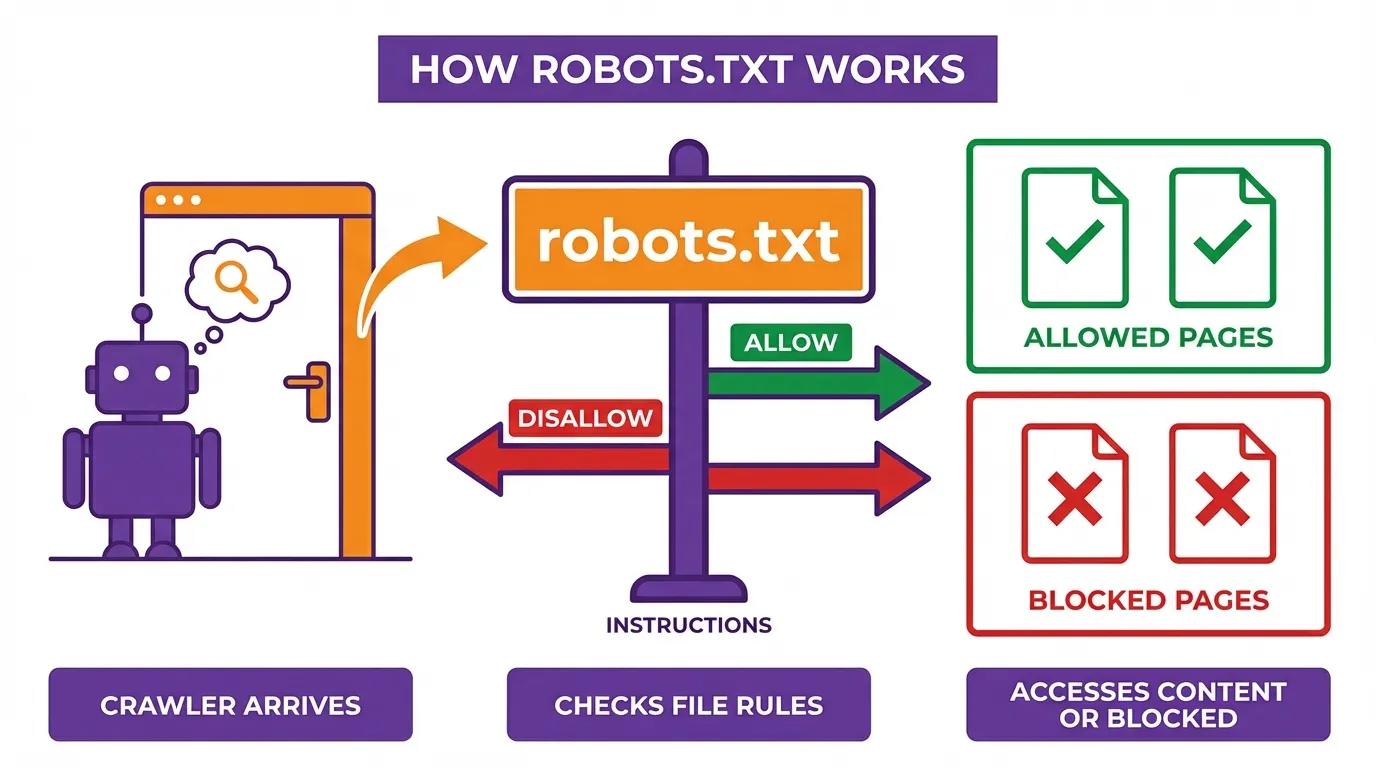
The internet relies on the Robots Exclusion Protocol (REP). This is a standard that benevolent bots agree to follow. It operates on a trust system.
When a bot like Googlebot or Bingbot arrives at your site, the very first thing it does is look for that robots.txt file. If it finds one, it reads the instructions. If the file says a URL path is “Disallowed,” the bot will simply skip it and move on.
However, it is vital to understand what robots.txt cannot do:
- It is not a security device. Malicious bots (scrapers, hackers) will ignore it completely. In fact, they might use it to find the very “private” directories you are trying to hide.
- It does not guarantee exclusion. If you block a page in robots.txt, Google won’t crawl it, but if other sites link to that page, Google might still index the URL (it just won’t show a description underneath it in search results).
In 2026, the landscape has shifted. We aren’t just dealing with search engines anymore. We are managing AI crawlers that scrape content to train Large Language Models (LLMs). Controlling these bots has become a standard part of modern technical SEO.
Robots.txt Syntax: The Building Blocks
You don’t need to be a developer to write or understand a robots.txt file. Its syntax is intentionally simple and human-readable, using a small set of directives that tell search engine crawlers how they should (or shouldn’t) interact with your site. Think of it as a set of polite instructions for bots, not an enforced security measure.
Below are the core components you need to know.
1. User-agent

The User-agent directive specifies which crawler the rules apply to. Each search engine identifies itself with a user-agent name.
- An asterisk (*) is a wildcard meaning “all bots”.
- You can target specific crawlers if you want different rules for different search engines.
Examples:
- User-agent: Googlebot
- Applies only to Google’s main crawler.
- User-agent: *
- Applies to all bots, including Google, Bing, and others.
Best practice: If you’re just getting started, using User-agent: * is usually sufficient.
2. Disallow
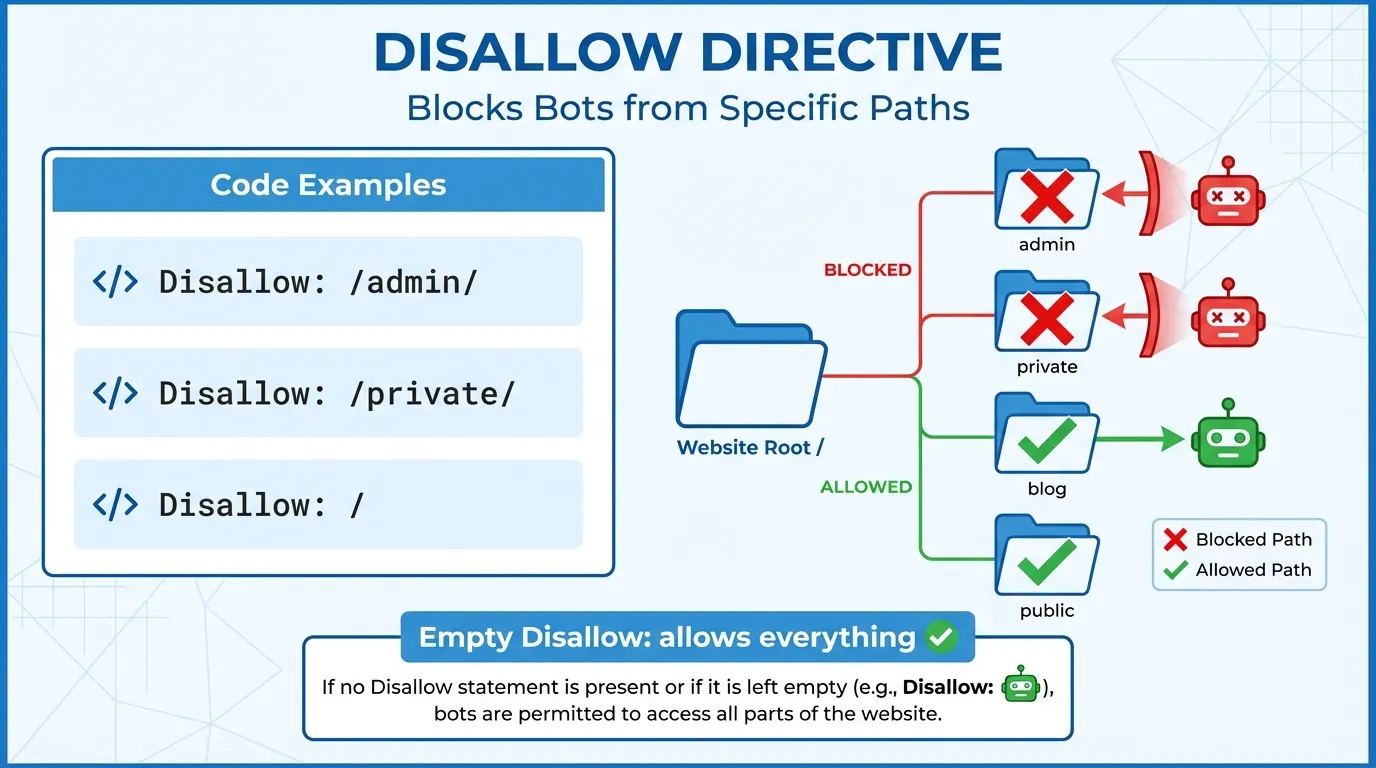
The Disallow directive tells bots which URLs they should not crawl. This can apply to an entire directory, a specific page, or a pattern of URLs.
- An empty Disallow value means nothing is blocked.
- A forward slash (/) represents the root of your site.
Examples:
- Disallow: /admin/
- Prevents crawlers from accessing everything inside the /admin/ folder.
- Disallow: /private.html
- Blocks a single file from being crawled.
Important note: Disallow does not prevent a page from being indexed if it is linked elsewhere. For sensitive content, use proper authentication or noindex instead.
3. Allow

The Allow directive is used to override a broader Disallow rule. This is especially useful when you want to block a directory but still allow access to a specific file or subfolder within it.
Example:
- Disallow: /photos/
- Allow: /photos/public/
In this case:
- All of /photos/ is blocked
- /photos/public/ remains accessible to crawlers
This is commonly used for:
- Blocking filter URLs while allowing main category pages
- Restricting staging assets while exposing production content
4. Sitemap
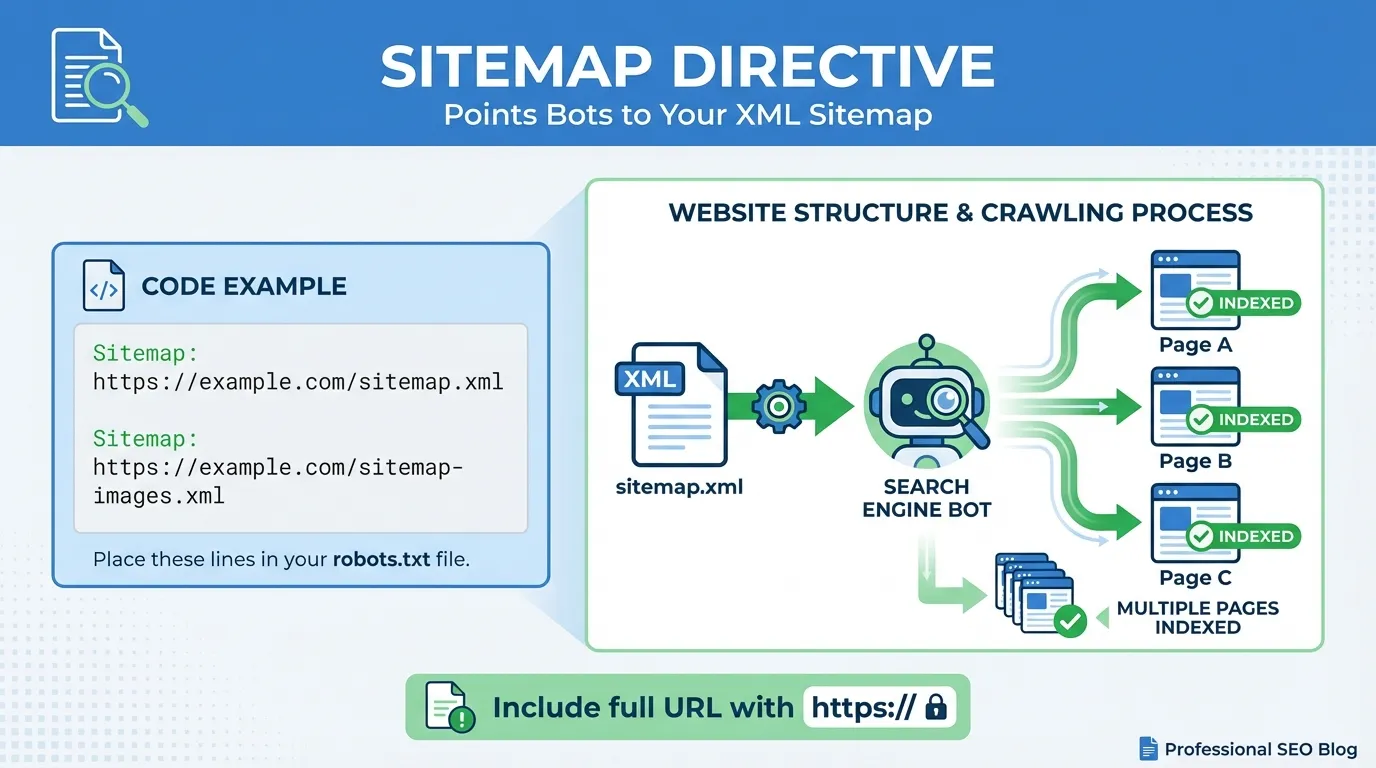
The Sitemap directive tells crawlers exactly where your XML sitemap is located, helping them discover and prioritise your content more efficiently.
Example:
- Sitemap: https://www.yourdomain.com/sitemap_index.xml
Key points:
- You can list multiple sitemaps
- The sitemap URL does not need to be on the same domain path as the robots.txt file
- This directive is supported by all major search engines
Best practice: Always include your sitemap reference in robots.txt, even if you’ve submitted it in Search Console.
5. Crawl-delay

Crawl-delay instructs bots to wait a specified number of seconds between requests, helping to reduce server load.
Example:
- Crawl-delay: 10
Tells compliant bots to wait 10 seconds between each request.
Important caveats:
- Googlebot ignores Crawl-delay
- Google crawl rate is controlled via Google Search Console
- Bing, Yandex, and some other bots do respect this directive
Use this sparingly. An overly long delay can slow down content discovery.
6. Comments

Anything following a hash symbol (#) is treated as a comment for humans and ignored by bots. Comments are useful for documentation and future maintenance.
Example:
- # Block admin area to prevent wasted crawl budget
- Disallow: /admin/
Well-commented files are easier to audit, especially on large or long-running websites.
Wildcards in Robots.txt
Robots.txt supports two special wildcard characters that allow for flexible URL matching:
* (Asterisk)
Matches any sequence of characters.
Example:
- Disallow: /*?sessionid=
- Blocks all URLs containing ?sessionid= anywhere in the URL.
$ (Dollar Sign)
Indicates the end of a URL, allowing precise targeting.
Example:
- Disallow: /*.pdf$
- Blocks all URLs that end with .pdf, but not URLs that merely contain .pdf elsewhere.
Robots.txt is a crawl management tool, not a security solution. Use it to guide bots efficiently, protect crawl budget, and prevent unnecessary crawling. Pair it with proper indexing controls and server-side protections where needed.
Ready-to-Use Robots.txt Templates
Below are practical robots.txt templates you can copy, customise, and paste directly into your file. They cover the most common real-world scenarios, from small business sites to large enterprise platforms.
Important: Always replace the sitemap URL with your own, and double-check the file before deploying it live. A single incorrect line can unintentionally block your entire site from search engines.
Template 1: Allow All (Default)
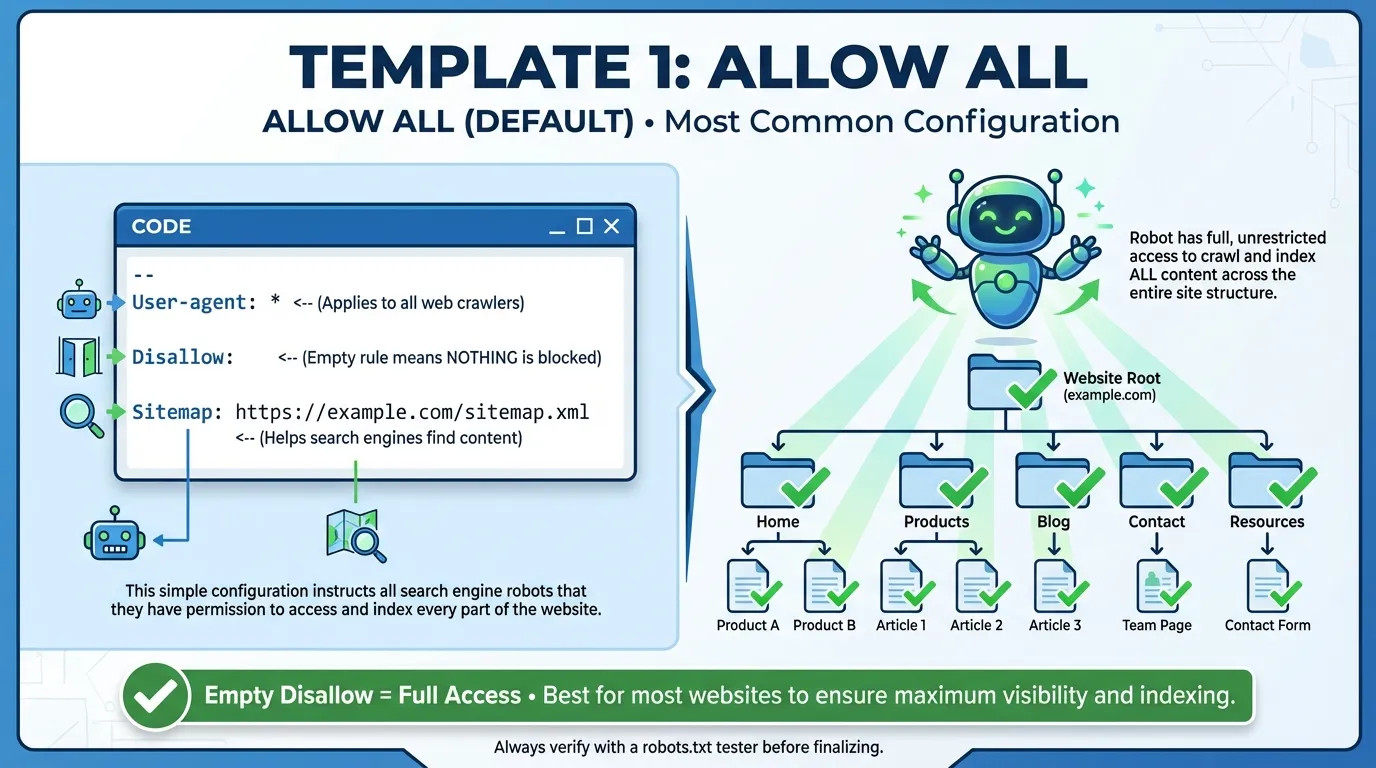
Use this for most small business websites where all content is public and indexable. This setup gives search engines full access while still pointing them to your sitemap.
User-agent: *
Disallow:
Sitemap: https://www.yourdomain.com/sitemap.xml
When to use:
- Brochure sites
- Blogs
- Service-based business websites
Template 2: Block All (Staging / Development Sites)
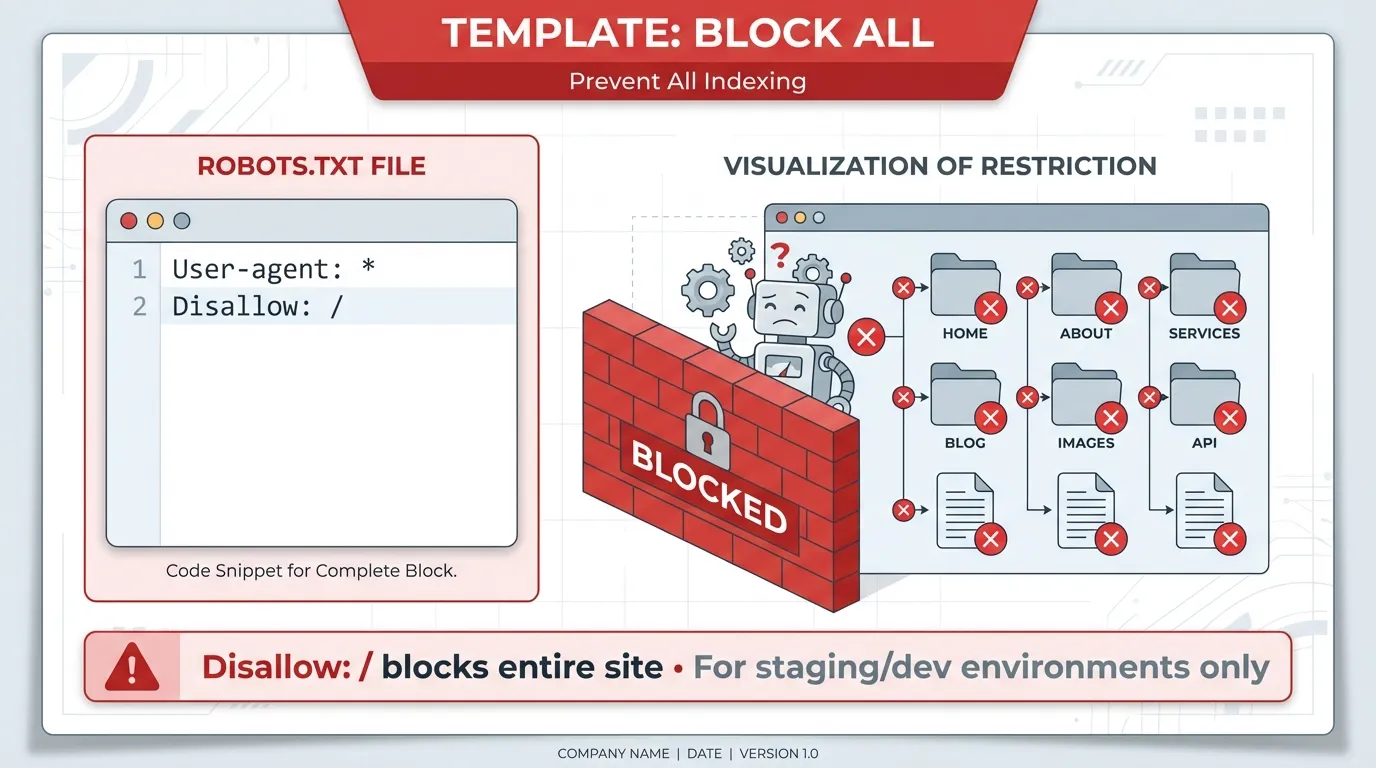
This completely blocks all crawlers from accessing your site. Use this only on non-production environments.
User-agent: *
Disallow: /
Critical warning: Never use this on a live site. If deployed in production, your pages will stop being crawled and may eventually disappear from search results.
Template 3: WordPress Site (Best Practice)

A standard, widely accepted setup for WordPress websites. It blocks administrative areas while allowing essential AJAX functionality.
User-agent: *
Disallow: /wp-admin/
Allow: /wp-admin/admin-ajax.php
Sitemap: https://www.yourdomain.com/sitemap_index.xml
Why this works:
- Keeps bots out of backend admin pages
- Preserves functionality for front-end features
- Supports most SEO plugins (Yoast, RankMath, etc.)
Template 4: E-commerce Site (Block Filters & Search)
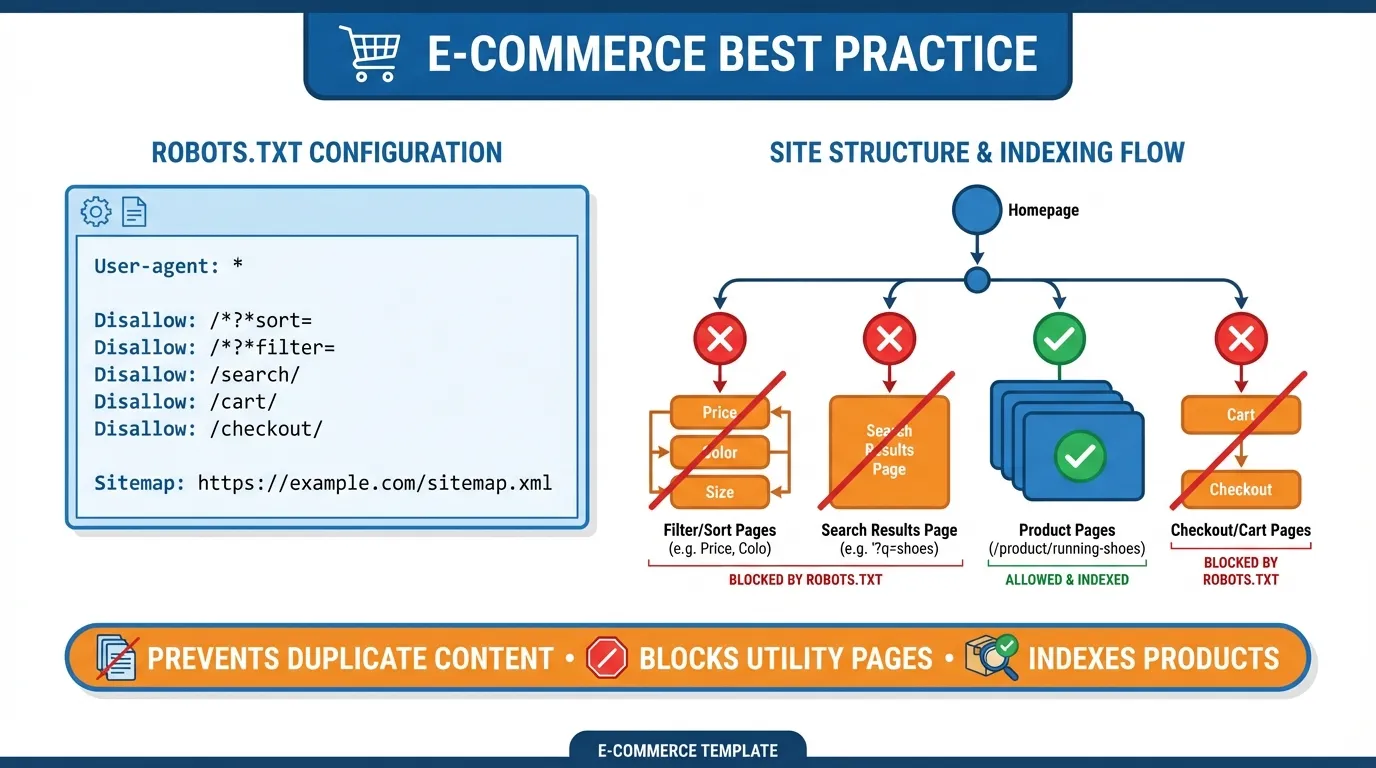
Prevents crawlers from wasting crawl budget on infinite URL combinations caused by filters, sorting options, and internal searches.
User-agent: *
Disallow: /cart/
Disallow: /checkout/
Disallow: /my-account/
Disallow: /*?sort=
Disallow: /*&filter=
Disallow: /search/
Sitemap: https://www.yourdomain.com/sitemap.xml
Best for:
- Online stores with layered navigation
- Large product catalogues
- Sites experiencing crawl budget issues
Template 5: Allow Search Engines, Block AI Crawlers

Allows traditional search engines like Google and Bing to crawl your site, while blocking selected AI crawlers from using your content for training or ingestion.
User-agent: Googlebot
Disallow:
User-agent: GPTBot
Disallow: /
User-agent: CCBot
Disallow: /
User-agent: ClaudeBot
Disallow: /
User-agent: *
Disallow:
Use case: Publishers and brands that want search visibility but prefer to limit AI content reuse.
Note: AI crawler behaviour can change over time, so review this periodically.
Template 6: Selective AI Crawler Access
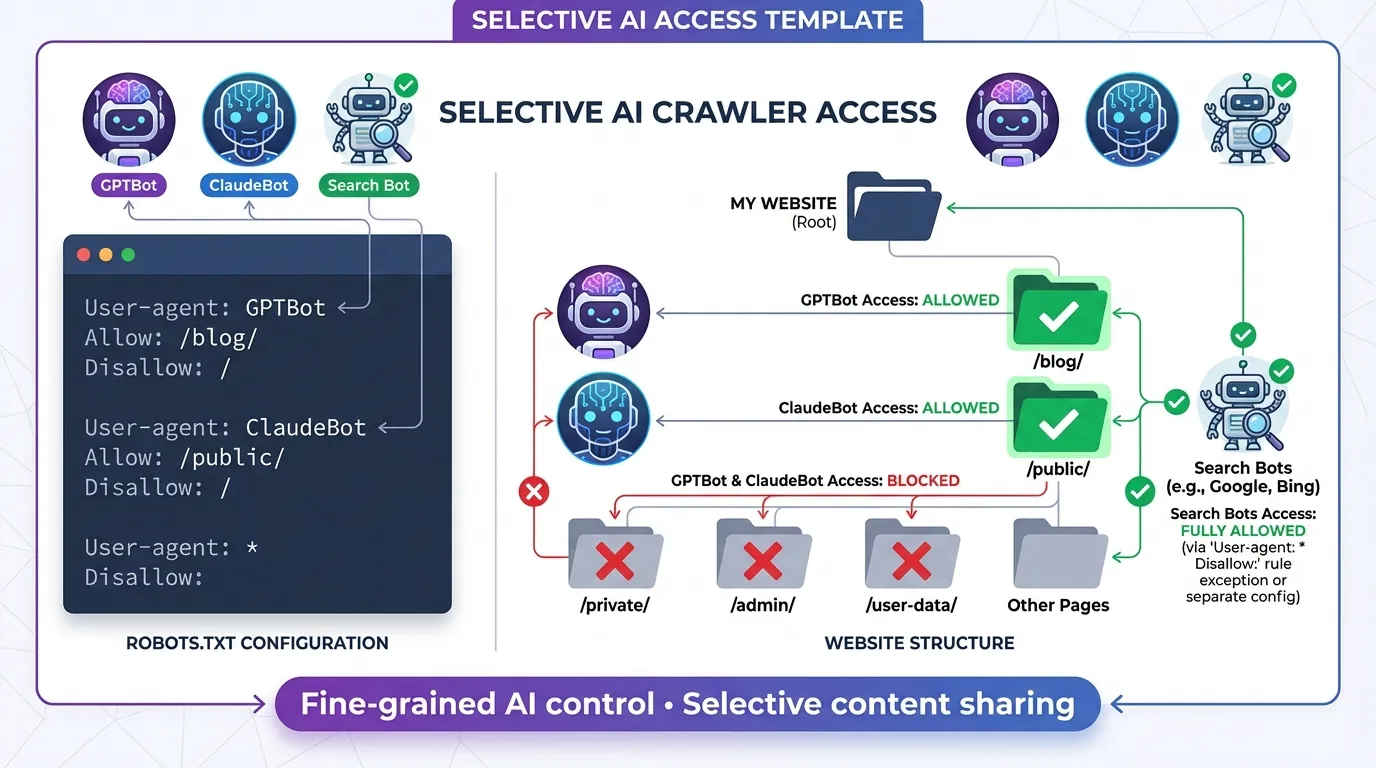
Allows AI bots to crawl public, citation-friendly content (such as blogs), while blocking private or sensitive areas.
User-agent: GPTBot
Disallow: /private-docs/
Disallow: /client-data/
Allow: /blog/
User-agent: *
Disallow: /admin/
Ideal for:
- Thought leadership blogs
- Agencies sharing public insights
- Sites balancing visibility with data protection
Template 7: Enterprise Site with Crawl Control

Designed for large websites that need to manage server load and control how aggressively different bots crawl the site.
User-agent: *
Disallow: /temp/
Disallow: /cgi-bin/
Disallow: /login/
# Slow down aggressive bots (except Google)
User-agent: Bingbot
Crawl-delay: 5
User-agent: Baiduspider
Crawl-delay: 10
Sitemap: https://www.yourdomain.com/sitemap.xml
When to use:
- High-traffic enterprise sites
- Platforms with limited server resources
- International sites dealing with multiple crawlers
After updating your robots.txt file:
- Test it using Google Search Console or Bing Webmaster Tools
- Monitor crawl errors and index coverage
- Revisit it whenever your site structure changes
A well-configured robots.txt file keeps your crawl budget focused where it matters most.
Managing AI Crawlers in 2026 for Robots.txt
The biggest change in the robots.txt landscape recently is the explosion of AI data scrapers. Companies like OpenAI, Google, and Anthropic crawl the web to feed their massive datasets.
Unlike traditional search engines, AI crawlers may index and train models on your content, impacting both your intellectual property and brand visibility.
Understanding who is crawling your site and why is essential for protecting your content while still benefiting from traffic and citations.
The Major AI Bots
| AI Bot | Operator | Purpose | What Webmasters Should Know |
| GPTBot | OpenAI | Crawls the web to train and improve ChatGPT and related models. | GPTBot respects robots.txt directives. Blocking it prevents OpenAI from using your content for model training but may reduce chances of being cited in ChatGPT outputs. |
| ClaudeBot | Anthropic | Supports Claude AI models by indexing web content to enhance conversational AI responses. | Can be controlled via robots.txt. Blocking ClaudeBot protects your content from Anthropic’s AI models but may reduce visibility in Claude-generated answers. |
| Google-Extended | Allows Google to separately crawl content for AI training (Gemini/Bard) while Google Search (Googlebot) continues indexing normally. | Webmasters can block AI training specifically without affecting standard Google search rankings. Useful if you want search visibility but opt out of AI data usage. | |
| CCBot | Common Crawl | Collects web data for open datasets used by multiple AI developers. | Often used indirectly by many AI models. Blocking CCBot prevents your content from entering publicly available AI datasets. |
| PerplexityBot | Perplexity AI | Indexes websites to power Perplexity AI’s search and Q&A services. | Respecting robots.txt controls whether your content is included in Perplexity’s model training and search results. |
To Block or Not to Block?
This is a strategic decision. If you block them, your content won’t be used to train their models, which protects your intellectual property. However, it also means your brand might be less likely to appear as a source or citation in AI-generated answers, which are becoming a major source of traffic.
If you want to appear in Google Search but opt out of AI training for Gemini, add this:
User-agent: Google-Extended
Disallow: /
Deciding on an AI strategy can be complex. Many businesses work with a professional SEO agency to develop the right crawler management strategy that balances brand visibility with content protection.
Managing AI Crawlers Effectively
As AI continues to reshape the web, managing which crawlers access your content has become critical for webmasters and content owners. Left unchecked, AI bots can index your work for model training. This potentially impacts intellectual property and traffic.
By taking a structured approach, you can protect valuable content while still benefiting from visibility in AI-powered tools.
Key Steps to Manage AI Crawlers:
- Audit your crawlers: Use server logs or analytics tools to see which bots visit your site and how frequently.
- Use robots.txt and meta tags: Control which bots can access your pages. Consider separate directives for AI crawlers versus traditional search engines.
- Define your AI strategy: Decide which content is critical to protect and which can be shared to improve visibility and potential AI citations.
- Monitor AI citations: Even if blocked, AI tools may still reference your site indirectly. Track mentions to evaluate the impact on traffic and brand exposure.
- Consult SEO professionals: With AI crawlers growing in complexity, expert guidance ensures you balance content protection with discoverability.
Effectively managing AI crawlers is about making informed decisions that protect your intellectual property while maximising your presence where it matters. A thoughtful AI strategy helps webmasters stay in control of their content in an era where AI-generated outputs are becoming a major source of web traffic.
Common Robots.txt Mistakes (And How to Avoid Them)

Even experienced webmasters can make errors in robots.txt. A single typo or misconfiguration can accidentally de-index your website or prevent search engines from properly crawling important resources. Below are the most common robots.txt mistakes and how to fix them.
1. Blocking CSS and JavaScript
- The Mistake: Years ago, we used to block /wp-includes/ or script folders.
- The Fix: Don’t do this. Google needs to render your page like a human to rank it properly. Allow access to your CSS and JS files.
2. Syntax Errors
- The Mistake: Writing Disallow: / folder/ (with a space) or putting directives on the same line.
- The Fix: Robots.txt is case-sensitive and space-sensitive. Keep each instruction on its own line.
3. Using Robots.txt for Sensitive Data
- The Mistake: Trying to hide /secret-pdf/ using Disallow.
- The Fix: If the file is truly private (like customer data), it is password-protected on the server level. Robots.txt is a polite request, not a locked door.
4. The Trailing Slash Trap
- The Mistake: Disallow: /fish vs Disallow: /fish/.
- The Consequence: The first one blocks /fish, /fishing, and /fish-and-chips. The second one only blocks the folder /fish/.
5. Using Disallow Instead of Noindex
- The Mistake: Disallowing a page you want removed from Google.
- The Fix: If you block a page in robots.txt, Google cannot see the “noindex” tag on that page. To remove a page, allow the crawl, and put a <meta name=”robots” content=”noindex”> tag on the page itself.
6. Indexed, though blocked by robots.txt
- The Mistake: Google discovered the URL through links or your sitemap, but a Disallow rule prevented crawling. Google indexed the page without fully understanding its content, leading to guessed meta titles/descriptions, unstable rankings, and poor evaluation of page quality.
- The Fix:
- If the page should rank, remove the Disallow so Google can crawl it.
- If the page should not be indexed: Allow crawling and add a noindex meta tag or HTTP header. Blocking alone isn’t enough.
- Also, check internal links; removing unnecessary links can reduce rediscovery.
7. New content isn’t appearing in search results
- The Mistake: Google can’t find, crawl, or prioritise your new pages. Pages remain unindexed and don’t appear in search results.
- The Fix:
- Review robots.txt for broad Disallow rules.
- Check that your sitemap URL is correct and accessible.
- Resubmit the sitemap in Google Search Console.
- Use the URL Inspection tool to request indexing.
- Link new pages from relevant existing content.
8. Server usage or hosting resources are spiking
- The Mistake: Bots are crawling your site too aggressively. Your server slows down, affecting real users.
- The Fix:
- For non-Google bots, use Crawl-delay in robots.txt:
- User-agent: Bingbot
- Crawl-delay: 5
- Block problematic bots entirely if needed.
- Reduce crawlable low-value URLs (filters, search pages, parameters).
- For Googlebot, manage crawl rate via Google Search Console, since it ignores Crawl-delay.
- For non-Google bots, use Crawl-delay in robots.txt:
Testing Your Robots.txt File
Always test your robots.txt file before uploading it to ensure you do not accidentally block important pages or resources. Using the Google Search Console Robots.txt Tester is the simplest way to validate your directives.
Steps to Test Your Robots.txt File:
- Log in to your Google Search Console account.
- Navigate to the “Settings” section and locate the Robots.txt Tester tool (legacy tools).
- Paste your new robots.txt code into the editor.
- Enter a URL from your site in the test bar (e.g., https://yourdomain.com/admin/).
- Click the “Test” button.
- Check the results: URLs highlighted in red are blocked, while those in green are allowed.
This testing process assures that critical pages, your homepage, and blog posts remain accessible to search engines, helping maintain proper indexing and SEO performance.
Best Practices for Robots.txt in 2026
To maintain your website’s health, visibility, and search engine performance in 2026, follow these robots.txt best practices:
- Keep it Simple: Only block resources you absolutely must. Overly complex rules increase the risk of errors.
- Use Comments: Annotate your rules with notes explaining why each directive exists. Your future self, or a new developer, will thank you.
- Conduct Regular Audits: Websites evolve, and plugins create new folders. Review your robots.txt quarterly to ensure your rules remain relevant.
- Prioritise Crawl Budget: For large sites (10,000+ pages), block unnecessary filters, parameters, and tag pages. This ensures Google focuses on your high-value “money” pages.
- Always Link Your Sitemap: Including a sitemap in your robots.txt is a simple yet effective way to improve crawlability.
Following these 2026 robots.txt best practices ensures search engines can crawl your site efficiently while avoiding accidental blocking of important pages.
At MediaOne, we recommend conducting quarterly robots.txt audits to ensure optimal crawler management and safeguard your SEO rankings.
Robots.txt Management & Next Steps for 2026
In 2026, robots.txt may be small, but it wields enormous influence over how search engines and AI crawlers interact with your website. Properly managing your crawl budget, blocking unwanted bots, and guiding AI access ensures your content gets the attention it deserves.
Take action by reviewing your current robots.txt, updating it with best-practice templates, and testing changes in Google Search Console. Regularly revisiting this file keeps your SEO strategy aligned with your site’s growth.
Don’t leave your website’s door wide open. Take control of your crawling strategy today and build a stronger foundation for long-term SEO success.
For expert support, MediaOne can audit your robots.txt, optimise your crawling rules, and ensure your site is fully SEO-ready so your content reaches the right audience efficiently. Contact us today!
Frequently Asked Questions
Does robots.txt affect how pages rank?
Robots.txt does not directly influence rankings, but it affects how search engines crawl your site. If important pages are blocked, search engines cannot fully understand or evaluate them, which can indirectly harm rankings and visibility.
How often do search engines re-read robots.txt?
Most major crawlers check your robots.txt file frequently, often daily or even multiple times per day. However, changes may not take effect instantly, especially for lower-crawl-priority sites.
Can robots.txt block images, CSS, or JavaScript files?
Yes. You can block any file type or directory using robots.txt. However, blocking CSS or JavaScript can prevent search engines from rendering pages correctly, which may negatively affect indexing and rankings. Blocking images is sometimes useful for managing crawl budget or controlling image search visibility.
Should I use robots.txt to manage duplicate content?
Robots.txt is not recommended for handling duplicate content. Blocking duplicate URLs can prevent search engines from seeing canonical signals. Instead, use canonical tags, parameter handling, or redirects to guide search engines toward the preferred version.
Can I test my robots.txt file before deploying it live?
Yes. You can use tools like Google Search Console’s robots.txt Tester or Bing Webmaster Tools to validate your rules before they impact crawling. Testing helps you catch critical errors, such as accidentally blocking your entire site, before they affect indexing and traffic.



