| AI Summary
Mobile marketing helps Singapore businesses reach customers on their phones through SMS, WhatsApp, email, social ads, search and app notifications. The best channel depends on what customers want to do, what they have agreed to receive and what the team can manage. This guide explains how to choose channels, check Singapore’s messaging rules, build pages people can use on a phone and measure whether a campaign pays for itself. |
Mobile marketing is the use of phones and other mobile devices to reach customers and help them take an action. It includes SMS, WhatsApp, mobile email, social ads, app notifications and landing pages. A small business can start with one goal, one channel and one result it can count, such as paid orders or confirmed bookings.
Key Takeaways
- Match the channel to the customer’s next step. A short video can show a product in use. A WhatsApp chat can answer a question before someone books.
- Keep service updates separate from offers. A customer who shares a number for delivery updates may expect messages about that order alone.
- Test the whole visit on a phone. The ad may load perfectly while the booking form fails when the keyboard opens.
- Give credit and measure impact separately. A campaign link shows where a visit came from. A comparison group helps show how many extra orders the campaign generated.
- Count the cost of running the channel. Staff time, message fees and creative work can change whether a campaign earns a return.
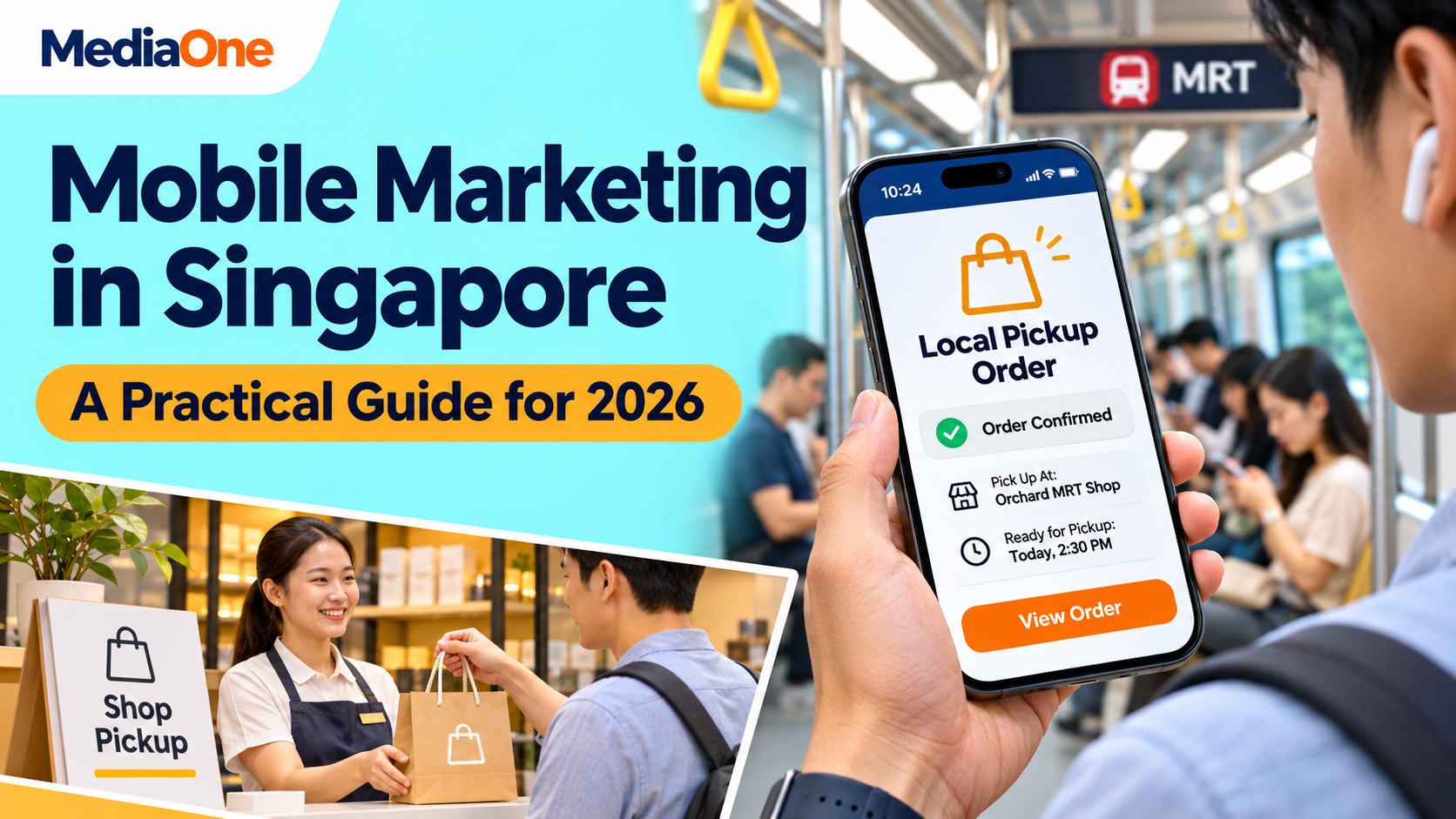
A shopper sees a product on Instagram during an MRT ride. The video answers their first question, so they tap the link. The page asks them to create an account before showing the delivery fee. By the time the train reaches the next stop, they’ve closed it.
That lost sale could look like an ad problem. On the customer’s phone, it was a page problem. This guide follows the campaign from the first tap to the sale, with examples a Singapore business can adapt.
What Does Mobile Marketing Include?
Mobile marketing covers the message a customer sees on their phone and what happens after they respond. A search ad, an SMS offer and a QR code on a café counter can all be part of it. The campaign works when each piece helps someone take the next step, whether that means comparing prices, asking about stock or paying for an order.
A mobile-friendly website gives people room to read, tap and complete a form. Mobile marketing uses that site as part of a campaign. For example, a florist’s website might work well on a phone. A Mother’s Day campaign still needs a page that shows the featured bouquets, delivery dates and order cut-off from the ad. Those details help the customer decide whether to buy today.
Mobile advertising is the paid part of the mix. A retailer could pay to show a product video and then use its own website to take orders. If buyers separately sign up for future offers, the retailer can use email or messaging to bring them back. The paid ad, the order page and the follow-up each have a different job.
Which Mobile Marketing Channels Should You Use?
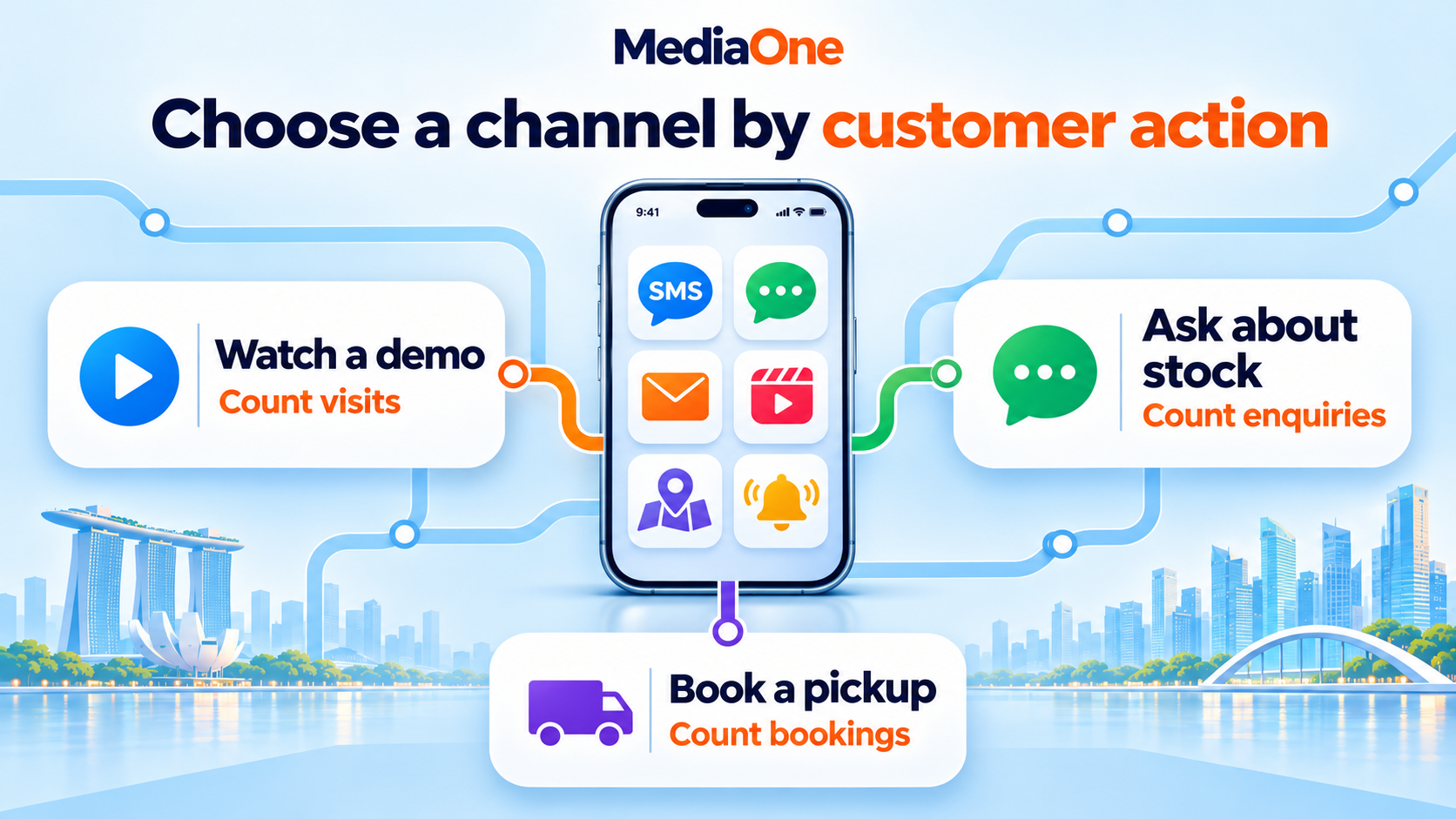
The easiest way to choose a channel is to write down what the customer should do. “Get more interest” could mean watching a demo, checking a menu or asking for a quote. A campaign built around one of those actions is easier to plan and measure. The same choice anchors the rest of your digital marketing campaign.
| Channel | Where it helps | What the team needs | Result to count |
| SMS | A short offer or reminder with a deadline | A suitable contact list, a messaging provider and a way to handle opt-outs | Paid orders, bookings or redemptions |
| Stock questions, quotes and bookings that need a reply | A business account and someone to answer messages | Chats that turn into qualified enquiries or bookings | |
| Mobile email | Product comparisons, longer offers and follow-up | A mailing list, a phone-friendly template and a matching page | Orders, replies or quote requests |
| Short video and social ads | Showing a product or service to new customers | Video your team can make and a page that picks up where the clip ends | Product page visits, qualified leads or sales |
| Search and Maps | Helping people find a business when they need it | Accurate outlet or service details and a working contact option | Calls, bookings or direction requests |
| App notifications | Updates tied to an app people already use | An app, notification settings and a reason to send each alert | Completed tasks or repeat orders |
The table can also help a team rule out a channel. A furniture shop that gets detailed questions about dimensions may have more to gain from WhatsApp than SMS, if someone can answer during business hours. A takeaway stall with one lunch offer and an existing SMS list might need only a short text and a direct order link.
A second channel earns its place when it solves a different problem. A bakery can use a video to show its cake sizes and a chat link to answer questions about pickup. If the team has time to manage only one new task, a page with photos, prices and pickup slots may do more for buyers than another platform to check.
How Each Mobile Marketing Channel Works
SMS and WhatsApp for timely messages
SMS gives a short message its own place on the phone. It can work for an offer with a deadline, such as a Friday preorder for customers who signed up for bakery offers. The text can state the item, outlet and cut-off in one or two lines. The order page can show the remaining slots and let people pay.
WhatsApp suits questions that need a reply. A tailor might invite people to share the date they need an outfit and ask whether there is time for a fitting. A greeting can tell customers when the shop replies and what details to send. A lead becomes easier to count once the shop defines what qualifies, such as an enquiry with a date, a service request and an available slot.
The WhatsApp Business Messaging Policy requires businesses to have the person’s number and opt-in permission before contacting them, and to honour requests to stop. A chat about an order is also a different purpose from a sale announcement. A business can give customers a separate way to sign up for future offers.
Mobile email for details customers may want to revisit
Email has room for information a text would struggle to carry. A workshop provider can show two dates, what each class covers and who should attend. A single-column layout keeps those details in reading order on a phone. A button labelled View class dates tells the reader what comes next.
An email can also serve a different role at each point in the customer email lifecycle. A welcome email can explain what the subscriber will receive. A later message can introduce a product once there is a reason to feature it. A team can judge an email by what people do after opening it, such as selecting a date or completing an order.
Social video and ads for product discovery
A phone video can answer a question that takes several lines to explain. A homeware shop can show a folding table in a small kitchen and give its width in a caption. Viewers can then judge whether they have room for it. The product page should show that same table, with its price and delivery terms close to the buying button.
A social media marketing strategy gives each post a job. A demo might send people to a product page. A customer Q&A might help someone decide between two versions. If the business pays to distribute a clip, its report should match the job. A video view can show interest. A paid order shows a sale.
Search and Maps for customers who need something nearby
Someone looking for a bike repair shop in Tampines may want to know whether it is open and accepts walk-ins. A suitable listing and outlet page can answer both questions before the customer calls. Accurate hours and outlet details support local searches with “near me” intent, especially when there is more than one branch.
Google says local results depend mainly on relevance, distance and prominence. A shop can keep its Business Profile accurate and make the outlet page easy to use. A branch-specific offer can also show which shop accepts it, how long it runs and whether the buyer needs to book. A customer who finds the offer through Search or Maps can act without sharing their live location.
App notifications for customers who already use your app
Push alerts can help when a customer expects a time-sensitive update. A retailer might tell someone that an item they asked about is back in stock. The alert can open that product inside the app. A message that appears while someone is already in the app has a different role, such as explaining where to find a voucher during checkout.
Device settings affect delivery. Android’s notification permission applies to most notifications on Android 13 and later. App teams can explain what an alert does when a customer turns on a feature that needs it. Someone who asks for a restock alert has a concrete reason to allow that notification.
What Are Singapore’s Rules for Mobile Marketing Messages?
Singapore’s Do Not Call provisions apply to specified marketing messages sent to Singapore telephone numbers. The rules can cover SMS and messages sent through apps such as WhatsApp when addressed to a Singapore number. In general, a sender checks the relevant register before sending unless an exception applies, such as express consent the organisation can show. The Personal Data Protection Commission’s Do Not Call advisory explains how the rules apply to different messages.
A booking reminder and a message selling a new package serve different purposes. If a business adds a promotion to a service message, it should assess the combined message before sending. A simple way to prevent mix-ups is to keep booking and order templates separate from offer templates. That also makes it easier for staff to see which list each message should use.
What should a business record before a send?
- Sign-up details. The record can show when and where the person signed up and the wording they saw.
- Message types. The sign-up can explain whether the person is choosing email offers, WhatsApp offers or another type of message.
- Sender details. The customer should be able to tell who sent the message and how to contact the business.
- Stop requests. The team needs a way to record and apply opt-outs across the tools it uses, including when it imports a new list.
- Branded SMS IDs. The Singapore SMS Sender ID Registry sets registration requirements for organisations using SMS Sender IDs to reach Singapore mobile users. The team can check the sender ID setup with its provider before scheduling a send.
How Can You Make a Mobile Campaign Easier to Use?
Give the first screen one job
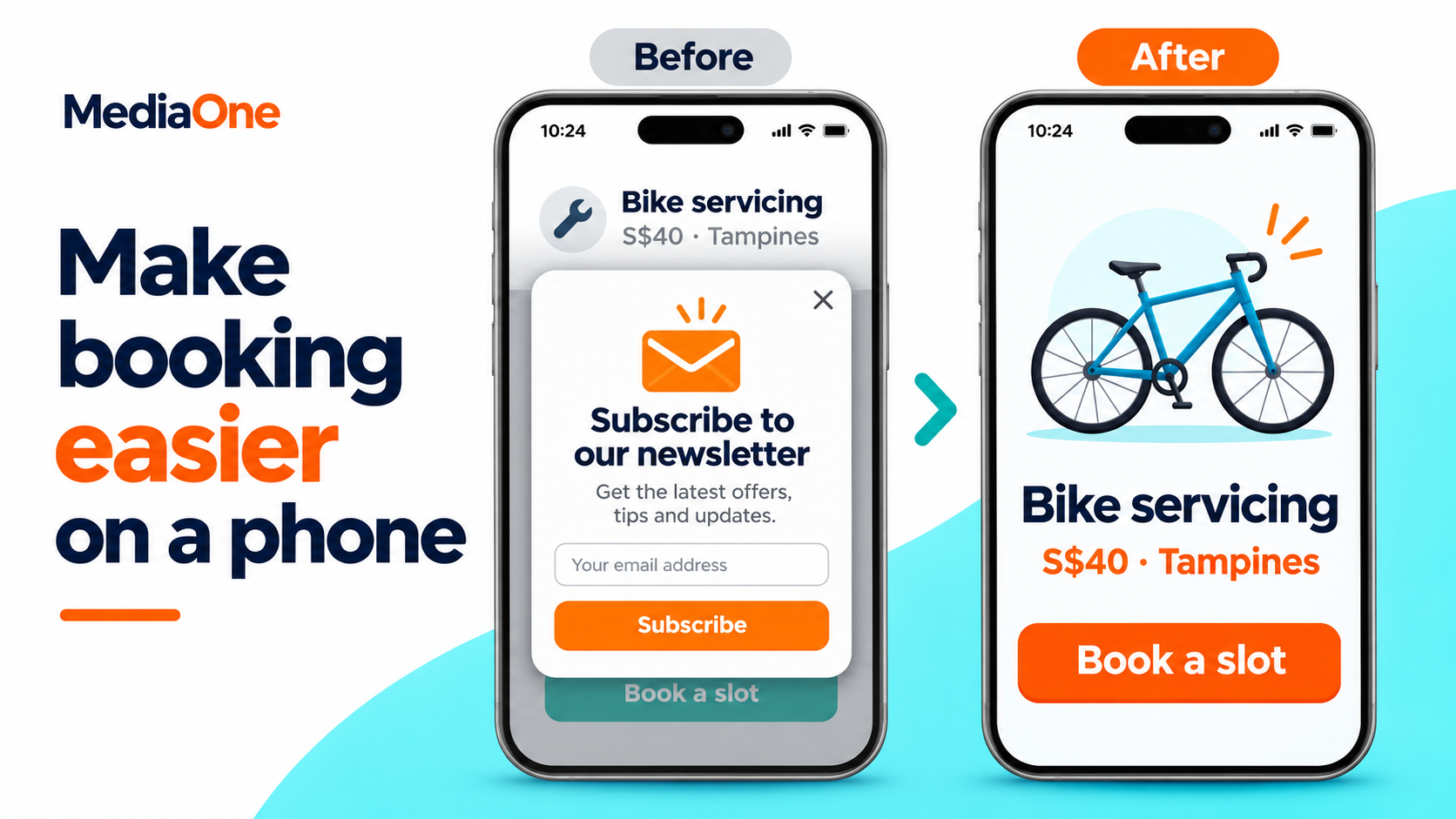
The first screen should tell customers they reached the right page. If an ad offers weekend bike servicing at one outlet, the page can put that service, outlet and booking button near the top. A customer can then decide whether to continue before reading about the full range of repairs. Good website design and development carries the promise from the ad through to the last step.
Phone screens also leave little room for mistakes. A small close button next to a form link makes it easy to tap the wrong thing. The W3C’s minimum target size criterion explains button size, spacing and exceptions. A real-phone test can reveal problems that a desktop preview misses.
| Customer task | What to check on a phone |
| Read the offer | The price, outlet, dates and main terms make sense without zooming in. |
| Tap the main button | The button has room around it, and a pop-up or banner leaves it visible. |
| Fill in the form | Labels stay visible, the keyboard leaves room to continue and errors explain what to fix. |
| Pay or book | Delivery costs, appointment times or pickup details appear before confirmation. |
| See what happened | The final screen confirms the order or explains when the team will reply. |
Find the step that slows people down
A slow page can hide the offer while photos load. A page that moves as it loads can put a different button under someone’s thumb. Core Web Vitals measure aspects of loading, responsiveness and layout movement. Large images, autoplay video and extra scripts are places to look when a campaign page feels slow.
The campaign report can show where to test first. If people tap the ad and land on the page, check whether they reach the form and finish it. A high bounce rate in GA4 gives the team a reason to investigate. The page itself can explain why. A visitor might have found the address and left, or they might have missed the booking button under a banner. Each case calls for a different response.
How Do You Set Up a Small Mobile Marketing Campaign?
A campaign brief can be one page. A small retailer might write, “We want 30 paid Saturday pickups for our new lunch box.” The brief can name the outlet, order deadline, channel, offer and person who checks the results. The team also knows when to close the order page if it runs out of stock.
Plan the send and follow-up together
| Step | Example for a Saturday pickup campaign |
| Define the audience | Customers who signed up for offers from the outlet. |
| Set the offer | A lunch box at a stated price, with a Saturday pickup window. |
| Choose the first send | An email with a photo, order deadline and direct link to the order page. |
| Set a stopping rule | The reminder goes only to eligible customers who have yet to order, and stops when slots sell out. |
| Assign a person to check | A staff member checks that the order page works and that the kitchen can fill each slot. |
Automation can handle a step when the trigger is easy to explain. A booking system might send a confirmation as soon as an appointment is made. A marketing tool might remove buyers from the audience for a second offer email after they place an order. The important check is what happens when someone books, cancels or changes their contact preferences just before a scheduled send.
Frequency depends on what people signed up to receive and how they respond. A monthly menu email has a different purpose from a delivery update customers expect that day. If opt-outs rise after an extra send, the team can look at who received it and what they received earlier that week. A shared calendar helps avoid sending an email and a WhatsApp offer to the same people by accident.
How Do You Measure Mobile Marketing Results and ROI?
Separate campaign activity from sales
Campaign results start with a count tied to the goal. A service business might count attended appointments. A retailer might count paid orders after refunds. Clicks and replies can show where customers lost interest or needed help, but they belong beside the main result. For example, ten chats that produce six bookings can tell a business more about a campaign than thirty chats it never followed up.
Google Analytics can identify visits from links that use campaign tags. A bakery could label the link in its email separately from the link in its social ad. A till code can record some in-store sales when someone sees an offer on a phone and later walks in. The business can then compare orders against both sources without counting the same sale twice.
A customer may see a video on their phone, check prices on a laptop and buy in the shop. A campaign report may record only part of that sequence. Links and codes help explain where activity came from. The order system tells the team what customers bought. A test with a comparison group can help answer whether the promotion created extra sales.
Estimate extra sales with a comparison group
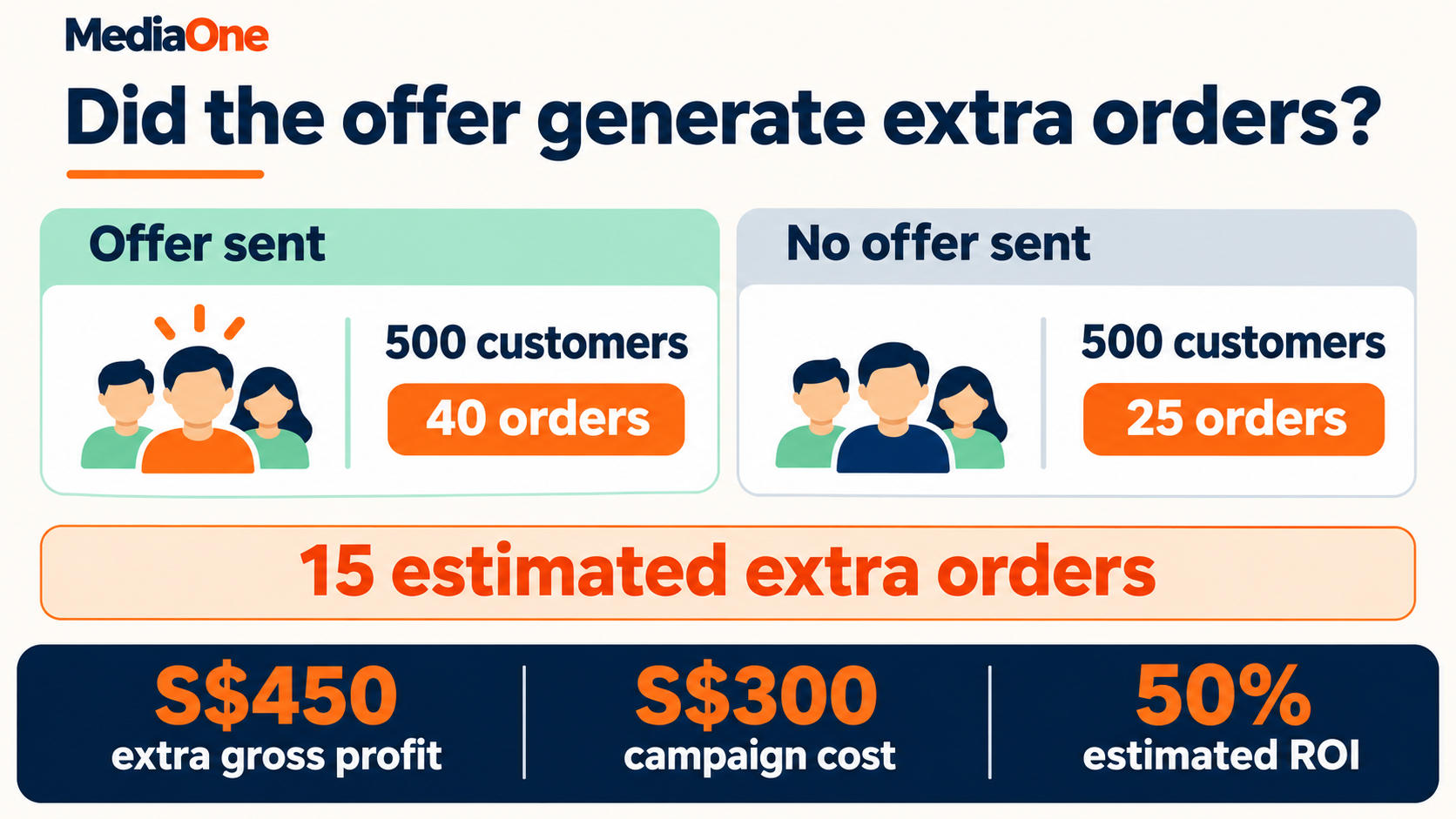
A holdout is a group of eligible customers who sit out the promotion. If the list is large enough, a business can assign people at random to the send group or the holdout group before the campaign. Both groups can still receive any service updates they need. The team counts purchases over the same dates and compares the share of people who bought, since the groups may differ in size.
Suppose 500 customers receive an offer and 40 buy, for an 8% purchase rate. Another 500 sit out the promotion and 25 buy, for a 5% rate. The three-point gap gives an estimate of 15 extra orders among the people who received the offer. A single test can be noisy, particularly when few people buy or the offer spreads outside the send group. Small teams can record those limits and look for the same pattern in later tests.
Calculate return after campaign costs
Mobile marketing ROI = (extra gross profit from the campaign − campaign cost) ÷ campaign cost × 100.
If each extra order brings in S$30 in gross profit after direct product costs, 15 extra orders generate an estimated S$450 in gross profit. If the campaign cost S$300, the estimated return is 50%. That leaves S$150 in estimated profit after the campaign cost. The S$300 could include message fees, creative work and paid promotion. If a discount lowers profit per order, the calculation should reflect the lower amount.
The same campaign might have attracted more orders than expected while earning little. A discount can cut the profit on every order that uses it, including orders that might have happened anyway. When that cost is substantial, the team can compare total gross profit per customer across the two groups before taking off campaign costs. That gives a fuller view than counting extra orders alone.
Put Your First Mobile Campaign to Work
A good first campaign starts with a customer decision your business can make easier. That could be finding an outlet, getting an answer about stock or paying for a Saturday pickup. A single offer gives your team enough room to test what happens from the first tap through to the order.
If customers reach the page but fail to finish, we can help identify which step needs work and how to measure the result after fixing it. A mobile campaign consultation with MediaOne can start with one live page, the channel sending people there and the action you want them to take.
FAQs About Mobile Marketing
Can QR codes be part of a mobile marketing campaign?
Yes. A QR code can take a customer from a printed menu, shop sign or parcel insert to a page they can use on a phone. A café could use one on its counter to open the preorder page for the next day. A short web address beside the code gives customers another way to reach the page if their camera cannot scan it.
Can a mobile campaign use more than one language?
Yes. A business can offer languages its customers prefer and its staff can support. The language choice should carry through from the message to the page, form and confirmation. A translated offer can cause problems if the page has different terms or the team cannot answer follow-up questions in that language.
Can two outlets run the same mobile offer?
Yes. Each outlet can have its own booking page or redemption code so staff can see where demand came from. The offer should name the branches taking part, especially when stock or opening hours differ. Separate codes also help the business see whether one outlet needs more stock before the next campaign.
Some social apps open links in their own browser. A page can look and behave differently there, especially when a customer needs to sign in or move to a payment app. A test from the live post or ad shows whether the customer can complete the action and return to the confirmation page.
Can a service business run mobile marketing without taking payments online?
Yes. A mobile campaign can lead to an estimate request, a phone call or a booked appointment. An aircon servicing company, for example, can ask for the postal code, number of units and preferred date, then confirm the job by phone. The campaign report can count completed jobs once the team has matched them to the original enquiries.