Most Singapore businesses do not need to send more emails. They need to send the right message at the right time, to the right contact, with a clear next step.

That is the purpose of an email marketing lifecycle strategy. Instead of sending every subscriber the same campaign, businesses plan emails around customer behaviour, purchase history and the stage of the relationship.
For small and medium-sized enterprises (SMEs), the best approach is to start with a few useful automated flows, keep customer data accurate and assign someone to monitor each flow.
This guide explains the four main lifecycle stages, which emails to prioritise, how to prepare your data and how to choose automation tools that fit your business.
Key Takeaways
- Clean your data first. Check email addresses, consent records, duplicates and the information each automation trigger needs.
- Start with three email flows. Welcome, cart abandonment and win-back emails are practical starting points for businesses with the relevant subscriber or purchase data.
- Match emails to customer behaviour. Use triggers such as sign-ups, completed purchases and periods of inactivity instead of relying only on a fixed sending calendar.
- Assign an owner to every flow. Someone should check delivery, suppression rules, errors and results.
- Measure business outcomes. Track conversions, repeat purchases and revenue alongside clicks and unsubscribes.
What Is the Email Marketing Lifecycle?
The email marketing lifecycle is the planned sequence of email communications a business uses to guide people from discovering its brand to considering its products or services, making a purchase and building a lasting customer relationship.
Each lifecycle email should have four key elements:
- Stage: Where the contact is in the customer journey.
- Trigger: The action or condition that initiates the email or sequence.
- Goal: The outcome the email is intended to achieve.
- Measurement: The metrics used to evaluate its performance.
For example, a newsletter sign-up can trigger a welcome email, while a shopper who adds a product to their basket but does not complete checkout may receive an abandoned-cart reminder.
The lifecycle continues beyond the first purchase. Depending on the product or service, businesses can send:
- Product-use tips to help customers get more value from their purchase.
- Replenishment reminders when a product may be running low.
- Relevant recommendations based on previous purchases or interests.
- Review requests to gather feedback and encourage customer engagement.
Unlike a one-off campaign, an email lifecycle flow responds to a defined event or customer condition. Once configured, it can run automatically, provided the required data is available and the triggering rules work correctly.
What Makes an Email Marketing Lifecycle Work?
Effective lifecycle marketing depends on more than the emails themselves. The systems behind them must work together to capture subscriber information, track customer behaviour, trigger relevant messages and keep contact records up to date.

When these systems are disconnected, businesses risk missing enquiries, delaying follow-ups or sending messages that no longer reflect a customer’s needs.
For Singapore SMEs, the priority is not to adopt as many marketing tools as possible, but to build a reliable workflow in which each tool serves a clear purpose. This means ensuring that:
- Information flows correctly between email platforms, customer relationship management (CRM) systems and other connected tools.
- Automated actions happen at the right time, based on accurate customer data and clearly defined triggers.
- Responsibility is clearly assigned so someone can monitor results, resolve issues and manage the next action when needed.
With these foundations in place, businesses can build a more consistent customer experience, strengthen retention and measure the impact of their email marketing efforts.
The Lifecycle Email Priority Matrix
Before building multiple automations, decide which ones deserve attention first. The Lifecycle Email Priority Matrix helps a small team compare potential revenue impact with setup effort.
Score each proposed flow from 1 to 5 on the following criteria:
- Expected impact: How closely does the flow connect to a purchase, renewal or other valuable action?
- Setup effort: How much work is required to prepare the data, connect systems, write emails and test the automation?
- Data readiness: Does the business already have the information required to trigger the flow reliably?
The first two criteria can be scored numerically. Data readiness should act as a separate gate: a flow should not go live until its required data is available and reliable.
| Example flow | Expected impact | Setup effort | Priority |
|---|---|---|---|
| Welcome email | 4 | 1 | High |
| Abandoned-cart reminder | 5 | 2 | High, if suitable cart data is available |
| Win-back sequence | 3 | 2 | Medium |
| Loyalty-tier automation | 4 | 5 | Later, if a loyalty system is not yet in place |
These scores are illustrative, not industry benchmarks. Adjust them to your business model, sales cycle and available data.
How to use the matrix
- List the email flows that could help your business.
- Score each flow for expected impact and setup effort.
- Check whether the required data and integrations are ready.
- Prioritise high-impact flows that are relatively easy to implement.
- Assign an owner and define the success metric before launch.
A welcome email is often a straightforward starting point because it can use a sign-up event. An abandoned-cart flow may be more commercially valuable for an online store, but it depends on reliable cart and purchase events.
Do not prioritise a flow purely because its potential revenue looks attractive. If its trigger is unreliable, it may send irrelevant or duplicate messages.
The Four Stages of the Email Marketing Lifecycle
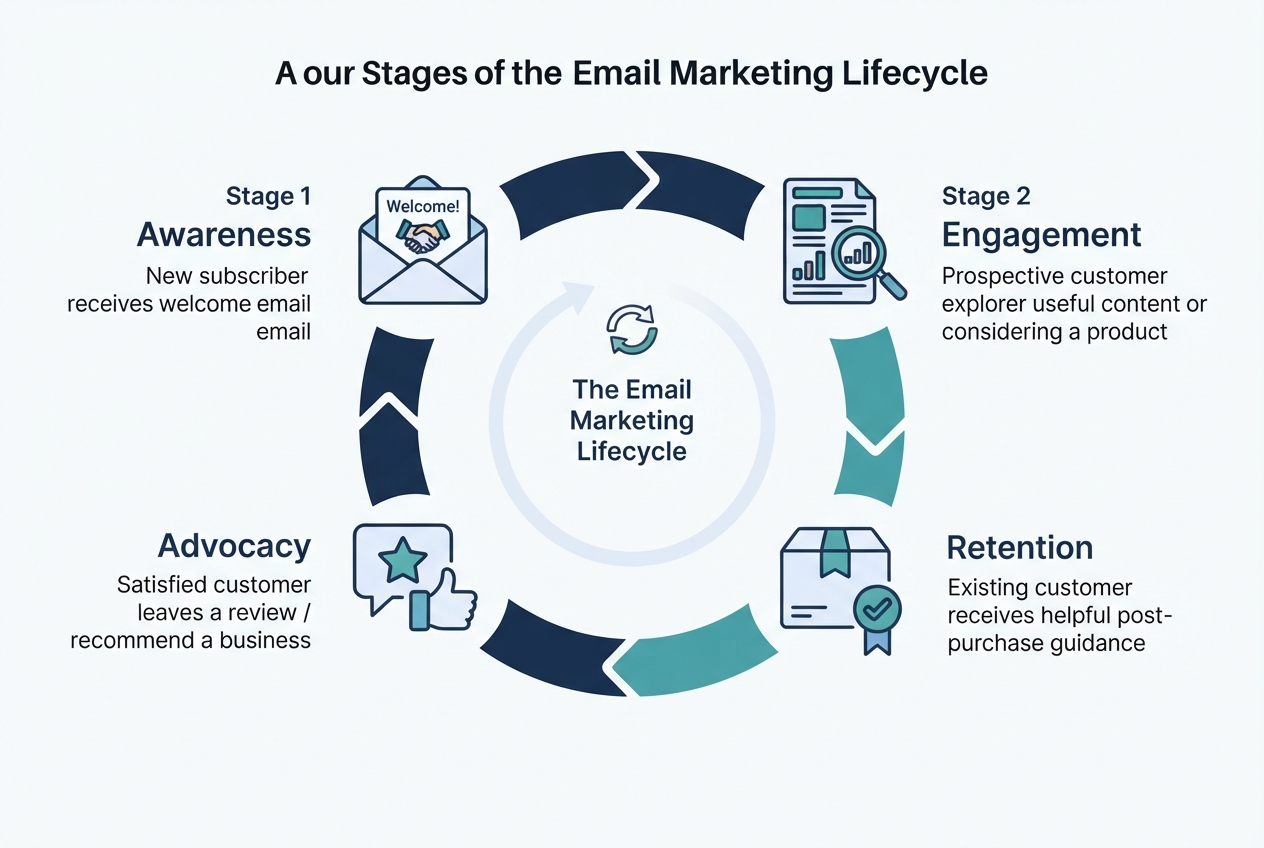
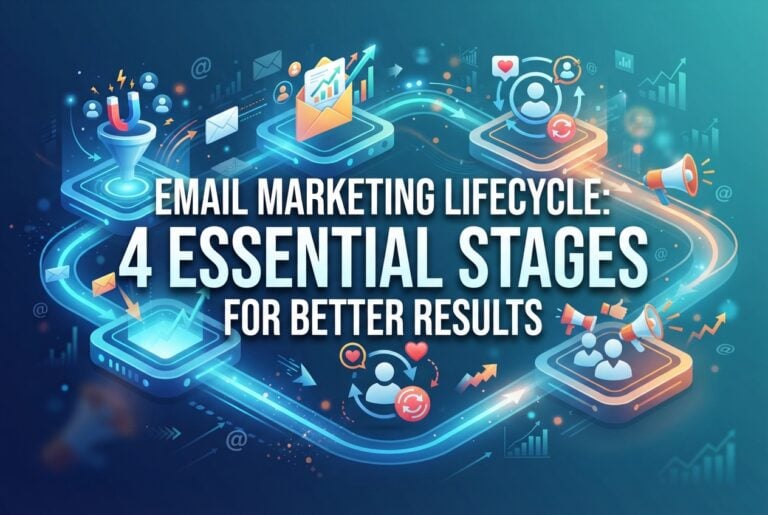
Businesses can use different lifecycle models. This guide groups the journey into four practical stages: awareness, engagement, retention and advocacy. These stages are a working framework rather than a universal standard.
1. Awareness
Awareness begins when someone first discovers your business and takes an action such as subscribing to a mailing list, downloading a guide or submitting an enquiry.
The goal is to establish expectations and encourage a relevant next step.
Useful email tactics include:
- Sending a welcome email after a valid sign-up.
- Explaining what subscribers can expect to receive and how often.
- Sharing a useful guide or introduction to your products and services.
- Providing a clear link to the next relevant page or action.
What to measure:
- Successful sign-ups.
- Email delivery and bounce rates.
- Click-through rate.
- The share of new contacts who take the next intended action.
Opens can provide some context, but they are not a reliable measure of interest on their own because email privacy features can affect open tracking.
A welcome email should fulfil the expectation created by the sign-up form. If someone requested a practical guide, deliver it rather than immediately sending an unrelated sales pitch.
2. Engagement
Engagement begins when a contact interacts with your emails, website, products or services. The goal is to help them take a meaningful next step, such as making a first purchase or enquiring about a service.
Useful email tactics include:
- Sending a nurture email after a content download or enquiry.
- Sharing a product comparison or case study.
- Answering common questions about pricing, delivery or implementation.
- Sending an abandoned-cart reminder when the necessary tracking data is available.
A simple lead-nurturing sequence might look like this:
- Initial email: Answer a common question and link to a relevant resource.
- Follow-up: Share a practical example or case study.
- Next step: Invite the contact to book a consultation, request a demo or explore a product.
- Optional final follow-up: Check whether they need further information.
The timing should reflect the buying cycle. A business selling an inexpensive product may need a shorter sequence than a company selling a complex service.
Stop or adjust the sequence when the contact converts, unsubscribes or enters a sales process that makes the automated messages inappropriate.
What to measure:
- Click-through rate.
- Qualified enquiries or purchases attributed to the flow.
- Time from first interaction to conversion.
- Unsubscribe and complaint rates.
Every email should respond to a genuine customer need. Sending more messages does not necessarily move a contact closer to a decision.
3. Retention
Retention begins after a customer has bought a product, subscribed to a service or otherwise started a commercial relationship with the business.
The goal is to help customers get value from their purchase and give them relevant reasons to return.
Useful email tactics include:
- Sending order confirmations and other necessary transactional messages.
- Sharing setup instructions or product-use tips.
- Recommending relevant complementary products.
- Sending replenishment reminders when purchase patterns support them.
- Offering renewal information before a subscription or service expires.
- Re-engaging customers who have not purchased within an appropriate period.
A win-back sequence should reflect the normal repurchase cycle. For example, a business selling frequently replenished products may contact inactive customers sooner than a business selling furniture or other long-lasting items.
Avoid assuming that every inactive customer needs a discount. A useful guide, product-care advice or service reminder may be more appropriate and less costly.
What to measure:
- Repeat purchase rate.
- Time between purchases.
- Revenue from returning customers.
- Renewal rate, where applicable.
- Unsubscribe and complaint rates.
Retention emails should help customers, not simply encourage them to spend more. Relevant post-purchase guidance can improve the customer experience while supporting future sales.
4. Advocacy
Advocacy occurs when satisfied customers recommend a business, leave a review or refer another person.
The goal is to make it easy for customers to share genuine feedback and experiences.
Useful email tactics include:
- Asking for a review after the customer has had time to use the product.
- Inviting eligible customers to refer someone who may benefit.
- Sharing relevant customer stories or community updates.
- Offering loyalty benefits where the business has a suitable programme.
Ask for feedback at a sensible moment. A customer may need time to use a product before they can provide a meaningful review. For a service business, the right time may be after a project milestone or successful outcome.
What to measure:
- Review requests completed.
- Referral visits, enquiries or sign-ups.
- Conversions from referral links.
- Participation in loyalty or advocacy programmes.
Keep review requests honest and avoid pressuring customers to leave only positive feedback.
Choosing the Right Tools for Your Email Marketing Lifecycle
The right tools help businesses manage each stage of the email marketing lifecycle without creating unnecessary manual work. Each tool serves a different purpose:
- Email marketing platforms send campaigns, manage subscriber lists and automate email sequences.
- Customer relationship management (CRM) systems store contact details, enquiry status and sales activity.
- Website analytics and behaviour tracking tools identify customer actions that can trigger relevant follow-up emails.
Some platforms combine several of these functions, so businesses do not necessarily need a separate tool for every task. What matters is whether the tools support the customer journey and share information reliably.
Before choosing an email marketing platform, consider the following:
- Identify your main workflow needs. Determine whether you need to welcome new subscribers automatically, follow up with service enquiries, send post-purchase guidance or re-engage inactive customers. Choose tools based on these requirements rather than the number of features they advertise.
- Check integration capabilities. Make sure the platform works with your website forms, CRM and existing email system to minimise manual data transfers and keep contact information consistent.
- Review automation and reporting features. Confirm that the platform supports the audience segments and triggers you need, and allows your team to monitor campaign performance.
- Compare the actual costs. Check the price of the plan that includes your required features, rather than relying solely on the advertised entry price.

A smaller, well-connected setup is often more practical than a collection of tools that require constant manual updates. The goal is to create a reliable workflow that supports your email marketing objectives while keeping day-to-day management manageable.
The Role of Data in Lifecycle Marketing
Automation is only as reliable as the data behind it. If purchase events arrive late, consent records are missing or customer records are duplicated, a flow can send the wrong message at the wrong time.
Clean your data before launching a flow
Before activating an automation, check that:
- Email addresses are valid and obvious duplicates have been resolved.
- Consent and subscription preferences are recorded appropriately.
- Unsubscribed contacts are excluded from promotional sends.
- Purchase and checkout events are recorded accurately.
- The fields used for segmentation are consistently populated.
- Data is transferred correctly between the email platform, website and CRM.
Keep a record of how and when a contact subscribed, along with the scope of the permission given. Do not assume that possessing an email address means a person has agreed to receive every kind of marketing message.

Start with three useful segments
A small team does not need dozens of audience segments to begin. Start with groups that support clear, useful actions.
| Segment | Data needed | Possible email flow |
|---|---|---|
| New sign-ups | Sign-up date, source and preferences | Welcome email |
| Active customers | Purchase history and relevant product data | Post-purchase tips or related recommendations |
| Lapsed customers | Last purchase date and purchase history | Win-back sequence |
These are starting segments, not rigid definitions. A business-to-business service provider may segment contacts by enquiry type, buying stage or service contract instead of purchase frequency.
Why segmentation improves personalisation
Segmentation allows businesses to send more relevant messages without creating a completely different email for every individual. By grouping contacts according to shared characteristics, behaviours or interests, businesses can tailor communications to match each audience’s needs.
For example:
- Online retailers can send product recommendations based on previous purchases, such as suggesting running accessories to customers who bought running shoes and hiking gear to those who purchased hiking equipment.
- Service providers can tailor follow-up emails to a contact’s actions, such as sending pricing information to someone who requested a quote and an introductory message to someone who downloaded a guide.
An effective audience segmentation strategy helps businesses identify meaningful customer groups based on factors such as behaviour, preferences and engagement. This makes it easier to personalise messages while keeping email automation manageable as the contact list grows.
To make segmentation effective, businesses should focus on three key practices:

- Maintain accurate data. Check that subscriber details, sign-up sources, purchase history and relevant website interactions are recorded correctly. Remove duplicate or invalid records where appropriate, and keep consent and unsubscribe information up to date.
- Start with manageable segments. Create a small number of useful segments that your existing data can support, then expand as your tracking improves. Missing or outdated information can lead to irrelevant messages or exclude contacts who should receive them.
- Respect subscriber privacy. Use only data that is relevant to the purpose of each communication. Avoid collecting or using personal information simply because a platform makes it possible, and ensure segmentation practices respect subscribers’ privacy and consent.
By combining relevant audience groups with reliable data, businesses can create more useful automated emails and deliver a better experience for their subscribers.
Singapore compliance: What businesses should check
Singapore businesses should consider the Personal Data Protection Act (PDPA) and the Spam Control Act when planning marketing communications. The rules that apply depend on the data, message and circumstances.
The Personal Data Protection Commission (PDPC) provides guidance on consent and the handling of personal data. The Info-communications Media Development Authority (IMDA) explains Singapore’s spam-control framework.
In particular:
- Assess whether you have the appropriate consent or other lawful basis for collecting and using personal data for the intended marketing purpose.
- For bulk unsolicited commercial electronic messages covered by the Spam Control Act, check the applicable requirements, including unsubscribe facilities and message identification.
- Review the Do Not Call provisions where your campaign involves marketing messages to Singapore telephone numbers by voice call, SMS or fax.
- Honour opt-outs and keep suppression records so contacts are not accidentally added back into promotional flows.
Do not assume that the requirements for email, SMS, WhatsApp and phone calls are identical. Check the official guidance for your specific campaign and seek qualified advice if the legal position is unclear.
Lifecycle Email Types: Which Should You Build First?
Different email types serve different purposes. Use the table below to choose a flow that matches your business and the data you already collect.
Before choosing your first flows, review the fundamentals of email marketing campaigns, including how to plan messages that meet your subscribers’ needs.
| Email type | Trigger | Main goal | Data needed |
|---|---|---|---|
| Welcome | Valid sign-up | Set expectations and encourage a first action | Sign-up source, preferences and consent record |
| Lead nurture | Enquiry or content download | Help the contact evaluate an offer | Enquiry details, relevant interactions |
| Cart abandonment | Cart created without a completed purchase | Remind the shopper about the unfinished purchase | Cart contents and purchase status |
| Post-purchase | Completed order | Help the customer use the product | Order and product information |
| Win-back | No purchase or engagement within a defined period | Encourage a relevant return visit or purchase | Last order date and purchase history |
| Review or referral | Appropriate post-purchase milestone | Encourage feedback or referrals | Order status and eligibility criteria |
Welcome emails
Send the welcome email promptly after a valid sign-up. Keep it focused on what the subscriber requested.
A useful welcome email includes:
- A brief introduction to the business.
- Confirmation of what the subscriber signed up for.
- The promised resource or next step.
- A clear way to manage preferences or unsubscribe from marketing messages.
Lead-nurturing emails
A nurture sequence should answer questions that might prevent a contact from taking the next step.
For example, a business selling marketing services might share:
- A guide to identifying the customer’s problem.
- A case study explaining how a similar problem was addressed.
- A comparison of possible solutions.
- An invitation to discuss the customer’s requirements.
Treat the number of emails and timing as a starting hypothesis. Review performance and stop the sequence when the contact converts or no longer qualifies for the flow.
Cart-abandonment emails
An abandoned-cart email can remind a shopper about products they left in their basket. It is most useful when the business can reliably identify the cart and determine whether the customer completed the purchase.
Campaign Monitor has cited an indicative recovery range of 5%–15% for abandoned-cart emails or series in its lifecycle marketing guide. Treat this as a reported range, not a forecast or guarantee. Actual results depend on the store, audience, products, timing and measurement method.
To build a safer flow:
- Trigger the sequence when a cart is abandoned under a clearly defined rule.
- Wait an appropriate interval before sending the reminder.
- Check for a completed purchase before each message.
- Suppress contacts who are not eligible to receive promotional messages.
- Monitor duplicate sends and checkout-event failures.
Measure recovered purchases against a defined baseline. Where possible, distinguish purchases influenced by the email from purchases that would have happened anyway.
Win-back emails
Win-back messages target customers who have become inactive. Define inactivity according to the normal buying pattern rather than applying the same number of days to every business.
A sample sequence could be:
- First message: Share a relevant product update, guide or reminder.
- Second message: Offer a useful recommendation or an incentive if it makes commercial sense.
- Final message: Invite the customer to return or update their preferences.
Stop the sequence after a purchase, unsubscribe or complaint, and avoid sending endless reminders to people who remain inactive.
Lifecycle Marketing Automation and Tools
Automation platforms help businesses create triggers, manage segments, schedule messages and track outcomes. The right setup depends on the existing website, CRM, sales process and budget.
Most small businesses need four core capabilities:
- Email platform: Stores subscribers and sends campaigns.
- CRM: Maintains contact records, enquiry status and sales activity.
- Behaviour tracking: Records relevant website or product interactions.
- Workflow integration: Moves information between systems and starts the next action.
Some products combine several of these functions. A business does not necessarily need a separate tool for each category.
Use a Connected Workflow to Prevent Missed Follow-Ups
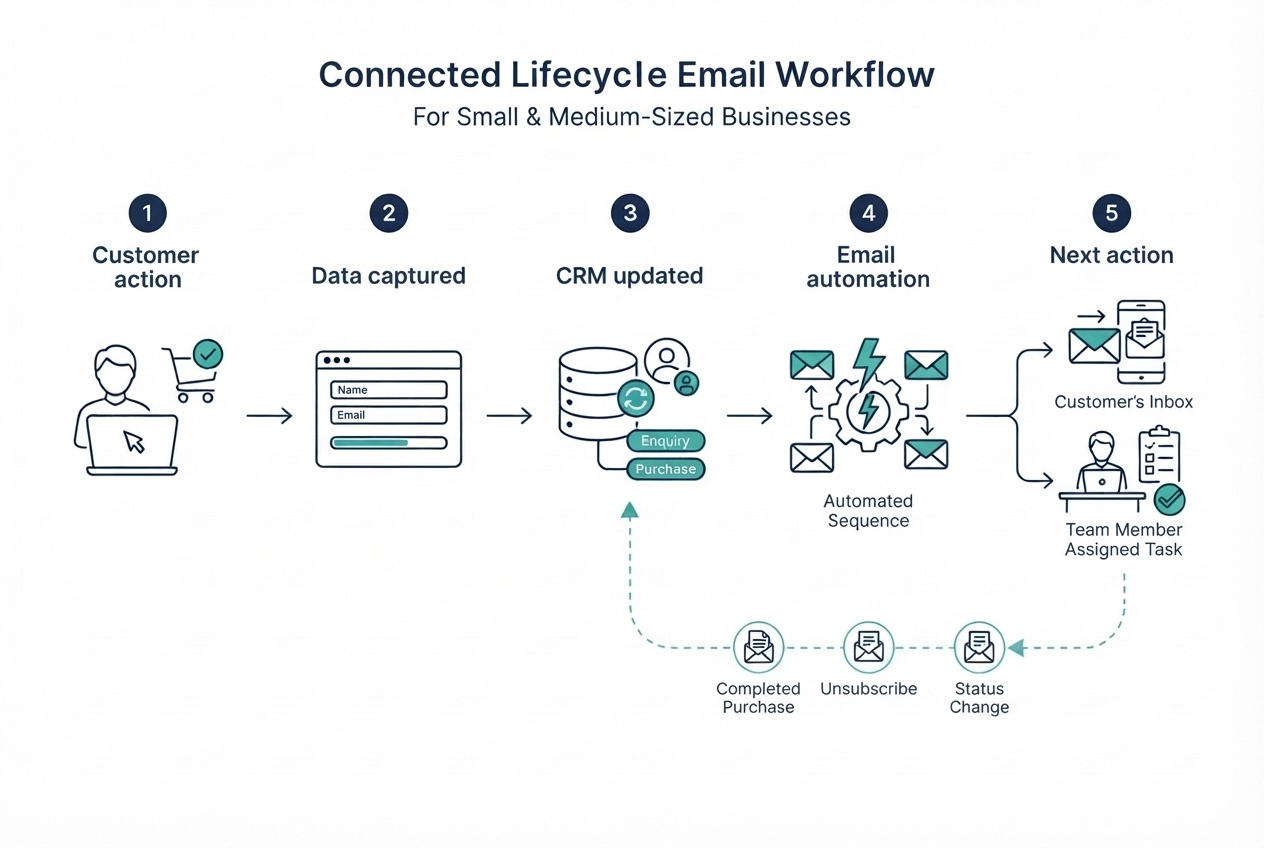
A lifecycle email workflow should do more than send a message when someone meets a condition. It should also update the relevant contact record and make the next action clear.
For example, when a prospect submits an enquiry form, the website should pass the details to the CRM. The CRM should assign the enquiry to a named team member, while the email platform adjusts the nurture sequence if a sales conversation begins. If the prospect converts, the system should stop messages that are no longer relevant and move the contact into the appropriate post-conversion journey.
Before launching a workflow, check three things:
- Integration: Can the website, email platform and CRM exchange the required information reliably?
- Ownership: Which person or system is responsible for the next step, such as contacting an enquiry or resolving a failed automation?
- Exit conditions: What event should stop or change the sequence, such as a purchase, a completed booking, an unsubscribe or a change in customer status?
Test the workflow using sample contacts before making it live. Confirm that contact details update correctly, messages are sent only when their conditions are met and completed actions prevent unnecessary follow-ups. Assign someone to review errors and pause a flow if it sends the wrong message.
Automation should reduce repetitive work while keeping accountability clear. Without reliable integrations and ownership, a technically functional email sequence can still create a poor customer experience.
Evaluate Your Email Marketing Setup
Use this checklist to assess whether your current tools are ready to support an effective email marketing lifecycle.
| Evaluation area | 1 — Needs improvement | 2 — Acceptable | 3 — Strong |
|---|---|---|---|
| Integration | Systems require frequent manual updates | Key systems are connected, but some steps remain manual | Required data passes reliably between systems |
| Lead ownership | Follow-ups are easily missed | Most enquiries have an assigned owner | Every relevant enquiry has a clear next action and owner |
| Segmentation and triggers | Data is incomplete or triggers are unreliable | Basic segments and triggers work | Segments and triggers are accurate and regularly tested |
| Reporting | Results are difficult to connect to business outcomes | Basic campaign results are tracked | Lifecycle-stage performance and conversions are monitored |
| Cost and scalability | Costs or plan limits are unclear | Current needs are covered | Total costs and likely future requirements are understood |
Score each area from 1 to 3. Treat a score of 1 for integration or lead ownership as a priority to address before adding more automation. Use the remaining scores to identify where better data, reporting or budget planning would improve the programme.
The scorecard is a starting point rather than a universal benchmark. Adapt it to your business model, customer journey and available resources.
Check the Handoff and Test Your Automation
Once your workflow is configured, confirm that the right information reaches the right person and that each system responds correctly when a contact’s status changes.
For example, your customer relationship management (CRM) system should maintain accurate contact records and make enquiry ownership clear. Your email platform should use those records and relevant customer actions to determine whether a contact should continue receiving a nurture sequence.
Before launching a flow, run through this checklist:
- Test the triggers: Use sample contacts to confirm that the workflow starts under the intended conditions.
- Check the handoff: Verify that enquiry details reach the CRM and that the appropriate team member is assigned.
- Verify exclusions: Confirm that purchases, unsubscribes and other relevant status changes stop or adjust messages as intended.
- Review errors: Check send logs and error notifications for duplicate messages, failed updates or incorrect sends.
- Assign an owner: Make sure someone can investigate problems, pause the flow when necessary and document any changes.
Repeat these checks after making significant changes to your integrations, triggers or email sequences. Testing should be part of ongoing maintenance, not just a one-time task before launch.
A reliable workflow combines accurate data, clear responsibility and regular checks. This helps businesses reduce manual work without losing control over the customer experience.
Budget for the whole setup
Do not compare email platforms on subscription price alone. Consider the total cost of running the programme, including:
- Monthly platform fees and contact limits.
- Setup and integration work.
- Email design and copywriting.
- Data cleanup and migration.
- Staff training and ongoing maintenance.
- Additional charges for features or usage.
Confirm current prices in Singapore dollars where available and check which features are included in each plan.
Businesses that need help planning and managing their campaigns can explore our email marketing services to see whether external support fits their needs.
When comparing platforms, estimate the total cost of running your lifecycle email programme over the next 12 months. Include contact-volume limits, automation features, integrations, migration, staff training and ongoing maintenance. A free or low-cost plan may be suitable for a simple welcome sequence, but it may not cover the reporting, segmentation or workflow requirements needed as your programme grows. Verify current pricing and plan limits directly with each vendor before making a decision, and consider how easily you could export your contact data if you change platforms.
Creating Engaging Content Across Lifecycle Stages
The email should match the customer’s needs at that point in the journey. A welcome email does not need the same content as a renewal reminder or review request.
| Lifecycle stage | Useful content | Main purpose |
|---|---|---|
| Awareness | Welcome message, introductory guide | Set expectations and encourage a first action |
| Engagement | Product explainer, comparison, case study | Answer questions and support a decision |
| Retention | Setup instructions, usage tips, relevant recommendations | Help customers get value and return when appropriate |
| Advocacy | Review request, referral invitation | Make it easy to share feedback or recommend the business |
Write clear subject lines and email copy
Use a subject line that accurately reflects the message. Avoid misleading urgency or promises the email cannot deliver.
For the email body:
- Focus on one main message.
- Use short paragraphs and descriptive subheadings where helpful.
- Include one clear primary call to action.
- Make links and buttons easy to understand.
- Check that the email works on mobile devices.
- Provide a plain-text or accessible reading experience where appropriate.
A welcome email might use a short introduction and one button. A nurture email might link to a case study. A win-back email might remind the customer of a relevant product and provide a clear route back.
Tools such as Canva can help teams create email graphics and supporting assets. However, design should support the message rather than distract from it.
Test one meaningful change at a time
A/B testing compares two versions of an email or page to understand which performs better against a defined metric.
You might test:
- Two subject lines.
- Different calls to action.
- A shorter versus longer email.
- The timing of a message.
- A product-focused message versus a useful educational resource.
You can also review these tips on email scheduling when deciding when to send messages and how to test different sending times.
Choose the primary metric before running the test. For example, a subject-line test might examine clicks or downstream conversions, not just opens.
If your audience is small, results may be inconclusive. Avoid declaring a winner based on a few clicks. Run tests when you have enough relevant traffic to make a useful comparison, and prioritise changes that could meaningfully improve business outcomes.
Measure Performance Across the Lifecycle
Each lifecycle stage has its own goal, but reviewing the customer journey as a whole helps you understand whether your emails are moving contacts towards meaningful outcomes.
For example, welcome emails should encourage a relevant next action, nurture sequences should help generate qualified enquiries or conversions, post-purchase emails should support customer engagement and repeat purchases, and win-back campaigns should encourage reactivation.
Track the metrics that matter for each flow, such as clicks, completed forms, bookings, purchases, repeat purchases, unsubscribes and complaints. Use consistent tracking and attribution rules so you can compare results over time and understand how email activity contributes to business outcomes.
Review performance across the journey to identify where contacts stop progressing, which flows generate engagement without conversions, and whether messages are being triggered correctly. Assign an owner to investigate issues and document changes to timing, content, segmentation or triggers.
Use these findings to improve existing flows before adding more complexity. The goal is to make the overall customer journey more effective, rather than optimising individual emails in isolation.
Dotdigital vs Klaviyo: Which Platform Fits Your Business?
Dotdigital and Klaviyo are options to evaluate for customer engagement and lifecycle email programmes. Their suitability depends on your business model, required integrations, available data and budget.
Rather than assuming one platform is best for every SME, use the same test cases to compare them.
| Criterion | What to check | Decision rule |
|---|---|---|
| Integrations | Does it connect to your website, e-commerce platform and CRM? | Prefer a reliable connection to the systems you already use |
| Segmentation | Can it create the segments your business needs? | Start with your minimum viable segments |
| Automation | Can it trigger, delay and stop messages based on customer actions? | Test a welcome flow and an abandoned-cart flow if relevant |
| Handoffs | Can it update the CRM or alert the right person? | Choose a workflow with clear ownership and reliable data transfer |
| Reporting | Can it track conversions and meaningful business outcomes? | Check how the platform attributes sales and reports results |
| Pricing | What does your expected contact count and feature set cost? | Compare the total cost, not just the entry-level plan |
| Data portability | Can you export contacts and relevant records if you leave? | Understand migration options before committing |
Before buying, ask each vendor to demonstrate your actual workflow using sample data. Confirm current features, integrations and prices on the Dotdigital website and Klaviyo website.
The best fit is the platform that supports your required workflows without adding unnecessary complexity or cost.
A Practical Starting Stack for a Singapore SME
You do not need a large marketing technology stack to begin. Start with the tools needed to collect enquiries, manage contact records and send relevant messages.
A simple setup could include:
- A website form that records enquiries and subscription preferences.
- A CRM that stores contacts and assigns follow-up tasks.
- An email platform that supports basic segmentation and automation.
- Website analytics to monitor traffic and conversions.
A product such as HubSpot may be worth evaluating if you want CRM and marketing functions in one environment. Check the current plan limits and features before deciding; free-tier availability does not mean every feature is free.
Connect the core systems first, test that data flows correctly, and add tools only when a clear need emerges.
Build a Better Email Marketing Lifecycle
A successful email marketing lifecycle gives every stage a clear purpose and connects each message to the next relevant customer action. Review each flow against your customer journey and refine or remove messages that no longer serve a meaningful role. Use reliable contact data, valid consent records and the Lifecycle Email Priority Matrix to prioritise flows that support customer acquisition, engagement and retention.
Review your sign-up forms, check how contacts enter your mailing list and confirm that your email platform, CRM and website exchange information correctly. Assign an owner to monitor results, fix errors and update email rules as customer behaviour or business priorities change. Use stage-level performance data to identify gaps, improve underperforming flows and keep the programme aligned with your business goals.
The aim is not to build the most complicated automation setup. It is to create a reliable, measurable process that sends relevant messages, protects the customer experience and supports long-term business growth.
Frequently Asked Questions
What is an email marketing lifecycle?
An email marketing lifecycle is a planned set of communications that responds to a contact’s stage, behaviour or relationship with a business. It can include welcome emails, nurture sequences, post-purchase messages, win-back campaigns and review requests.
How many lifecycle email flows should a small business build first?
Start with one to three flows, depending on your business and available data. A welcome flow is a common starting point. E-commerce businesses may also prioritise cart abandonment, while businesses with repeat customers may benefit from post-purchase or win-back emails.
Do I need clean data before setting up email automation?
Yes. Invalid addresses, missing consent records, duplicate contacts and inaccurate purchase events can cause messages to go to the wrong people. Check data quality and suppression rules before launching any flow.
What does Singapore law require for marketing emails?
The PDPA governs the collection, use and disclosure of personal data, including relevant consent obligations. The Spam Control Act sets requirements for covered unsolicited commercial electronic messages sent in bulk. The rules depend on the circumstances, so consult the PDPC and IMDA guidance for your campaign.
What recovery rate should I expect from abandoned-cart emails?
There is no guaranteed recovery rate. Campaign Monitor has cited an indicative 5%–15% range, but results vary by business, audience, product and measurement method. Track your own baseline and evaluate the additional purchases associated with the flow.
Who should own lifecycle email automation?
Assign a named person to each flow. The owner should monitor delivery, check triggers and suppression rules, review performance and know how to pause the automation if something goes wrong.
How do I prevent an email flow from contacting someone who has already purchased?
Add a purchase condition that removes or suppresses the contact from the flow after checkout. Test the condition, verify that purchase events sync correctly and review the send log for duplicate or mistimed messages.
When should I ask customers for a review?
Ask after customers have had enough time to use the product or experience the service. Choose a timing that makes it possible for them to give meaningful feedback, and make the request easy to complete.