

| AI Summary
Image SEO involves optimising website images to improve search visibility, accessibility and loading performance. This guide explains how to use descriptive filenames, accurate alt text, efficient image formats, responsive images, structured data and image sitemaps. It introduces the Image SEO Priority Matrix to help businesses prioritise optimisation efforts based on search value and performance impact. It also covers Core Web Vitals, Google Lens, visual search, ecommerce image optimisation and performance measurement through Google Search Console. |
Image SEO is the practice of optimising website images so search engines can discover, understand, index and display them in relevant search results. It involves descriptive filenames, accessible alt text, relevant page content, efficient file formats and technically sound image delivery.
Effective image optimisation can improve visibility across Google Images, traditional search results, Google Lens and other visual discovery platforms. It also supports website performance by reducing unnecessary data transfers and preventing unexpected layout shifts.
At MediaOne, we recommend treating images as part of your overall search strategy from the beginning. A relevant, high-quality image on a well-optimised page can support organic discovery while helping visitors evaluate products, understand information and make informed decisions.
Key Takeaways
-
Optimise image relevance, filenames, alt text and surrounding content together to help search engines understand your visuals.
-
Use responsive images, efficient file formats and appropriate compression to balance visual quality with loading performance.
-
Reserve image layout space to reduce visual instability. Prioritise critical images to improve loading speed.
-
Improve image discovery through crawlable HTML, image sitemaps and applicable structured data.
-
Measure image search visibility, multimodal search performance and Core Web Vitals to identify meaningful optimisation opportunities.
What Is Image SEO and Why Does It Matter?
Image SEO combines content optimisation, accessibility and technical SEO to improve how images are discovered and presented online.
A product photograph can attract shoppers through Google Images. An original research chart can generate interest from readers and publishers. A detailed screenshot can help someone understand how software works before visiting its website.
According to Google’s image SEO guidelines, images can appear across several search experiences. These include Google Images, standard search results and Google Discover.
Image optimisation also supports page experience. Oversized photographs and poorly configured image galleries can consume unnecessary bandwidth and delay important content.
However, image optimisation cannot compensate for an irrelevant landing page or inaccurate information. It should complement your broader on-page SEO strategy.
How Google Discovers, Indexes and Ranks Images
Google must discover an image before it can consider displaying it in search results. Discovery, crawling, indexing and ranking are separate processes.
| Stage | What happens |
|---|---|
| Discovery | Google finds an image URL through HTML markup, links or sitemaps. |
| Crawling | Google attempts to retrieve the image and associated page. |
| Indexing | Google processes the image and evaluates it for inclusion in its index. |
| Ranking | Google selects relevant indexed images for a particular search. |
Google can use computer vision, alternative text and surrounding page content to understand an image. Descriptive filenames provide additional contextual clues, although Google describes their contribution as limited.
Use standard HTML image elements for visuals you want Google Images to discover. Google does not index images referenced solely through Cascading Style Sheets (CSS) backgrounds in the same way.
Keep important image URLs accessible. An image sitemap may help discovery, but neither sitemap submission nor successful crawling guarantees indexing or rankings.
9 Image SEO Best Practices for Better Search Visibility
1. Use original, relevant and high-quality images
Choose images that help readers understand the page’s subject. Generic stock photographs may be suitable for decoration, but original visuals can provide information unavailable elsewhere.
Useful examples include product photographs showing specific features, annotated software screenshots, original research charts and diagrams explaining complex processes.
For ecommerce websites, photograph products from multiple angles. For educational content, create illustrations that clarify difficult concepts rather than repeating the surrounding text.
We recommend evaluating every image against its intended purpose. If an image contributes little to the reader’s understanding, reconsider whether it belongs on the page.
2. Create descriptive image filenames
Name image files according to their actual subject before uploading them. Use short, descriptive words separated by hyphens.
| Generic filename | SEO-friendly filename |
|---|---|
| IMG_4471.jpg | six-seater-teak-dining-table.jpg |
| screenshot-01.png | sales-analytics-dashboard.png |
| product-final.webp | black-leather-office-chair.webp |
| infographic-v3.png | image-seo-audit-workflow.png |
Include a relevant keyword when it accurately describes the image. Avoid repeating the primary page keyword across unrelated photographs.
Be cautious when renaming existing indexed images. Changing a filename usually changes its URL. Update affected references and configure appropriate redirects where possible to prevent broken images and unnecessary disruption.
3. Write accessible and SEO-friendly alt text
Alternative text, commonly called alt text, describes an image’s relevant content or function for users who cannot see it. Search engines can also use this information to understand the image.
The Web Content Accessibility Guidelines for images distinguish between informative, decorative, functional and complex visuals.
| Image type | Poor alt text | Appropriate alt text |
|---|---|---|
| Product photograph | Best shoes cheap shoes | Black mesh running shoes with white soles |
| Software screenshot | Dashboard image | Analytics dashboard displaying monthly conversion rates |
| Property photograph | House for sale | Two-storey brick house with a covered entrance |
| Informative diagram | SEO infographic | Diagram showing how search engines discover and index images |
| Decorative graphic | Blue decorative divider | Empty alt attribute |
Decorative HTML images should generally use an empty alt attribute so assistive technology can ignore them.
<img src=”decorative-divider.svg” alt=””>
For complex infographics, provide a concise description alongside a detailed text equivalent where needed.
There is no universal SEO-specific alt text character limit. Write enough to communicate the relevant information without unnecessary wording. Avoid keyword stuffing and descriptions that misrepresent the image.
4. Optimise image captions and surrounding content
An image becomes easier to interpret when the surrounding content explains its relevance. Place images near the paragraphs they support. A chart showing conversion rates should appear beside the analysis of those rates, not several sections away.
Use captions when readers need additional context. A caption can explain a chart’s findings, identify a product feature or clarify the purpose of a screenshot.
Alt text and captions serve different functions. They can complement each other without repeating identical wording. For multilingual websites, write image descriptions and captions in the language of the corresponding page.
5. Choose the right image file format
Image formats influence file size, visual quality and compatibility. No single format is ideal for every website image.
| Format | Best use | Compression characteristics | Transparency |
|---|---|---|---|
| JPEG | Photographs | Lossy | No |
| PNG | Screenshots and detailed graphics | Lossless | Yes |
| WebP | General website photographs and graphics | Lossy or lossless | Yes |
| AVIF | High-quality photographs with efficient compression | Lossy or lossless | Yes |
| SVG | Icons, logos and vector illustrations | Scalable vector format | Yes |
| GIF | Simple animations | Limited colour palette | Limited |
Google Search also supports BMP, although its typically larger file sizes make it less practical for websites.
We recommend comparing WebP and AVIF for photographic content. Use PNG or lossless WebP when preserving sharp graphic details is important. SVG works particularly well for suitable vector illustrations.
Check platform-specific requirements before choosing a format for product feeds, advertisements or other external distribution channels.
6. Compress and resize images appropriately
Image compression reduces file size by removing unnecessary data or simplifying image information. Resizing reduces the number of pixels delivered. Both techniques can improve loading performance when applied correctly.
Consider a hypothetical ecommerce product page containing ten images:
| Measurement | Before optimisation | After optimisation |
|---|---|---|
| Number of images | 10 | 10 |
| Average image size | 500 KB | 150 KB |
| Total image payload | 5 MB | 1.5 MB |
| Payload reduction | — | 70% |
This illustrates a potential saving of 3.5 MB if all ten images are downloaded. Actual results depend on image complexity, dimensions, format and compression settings.
There is no universal ideal image file size for SEO. Set performance budgets according to page requirements rather than applying arbitrary limits.
Our guide to website page speed explains how image delivery interacts with other performance issues.
7. Implement responsive images
Responsive images allow browsers to choose suitable image files based on layout requirements and device characteristics. Instead of serving a large desktop photograph to every visitor, provide several versions of the same image.
<img
src=”running-shoes-800.webp”
srcset=”
running-shoes-400.webp 400w,
running-shoes-800.webp 800w,
running-shoes-1600.webp 1600w”
sizes=”(max-width: 768px) 100vw, 800px”
alt=”Black mesh running shoes with white soles”
width=”800″
height=”600″>
The srcset attribute identifies available image versions. The sizes attribute describes the expected display width under different layout conditions. The browser uses this information when selecting an appropriate resource.
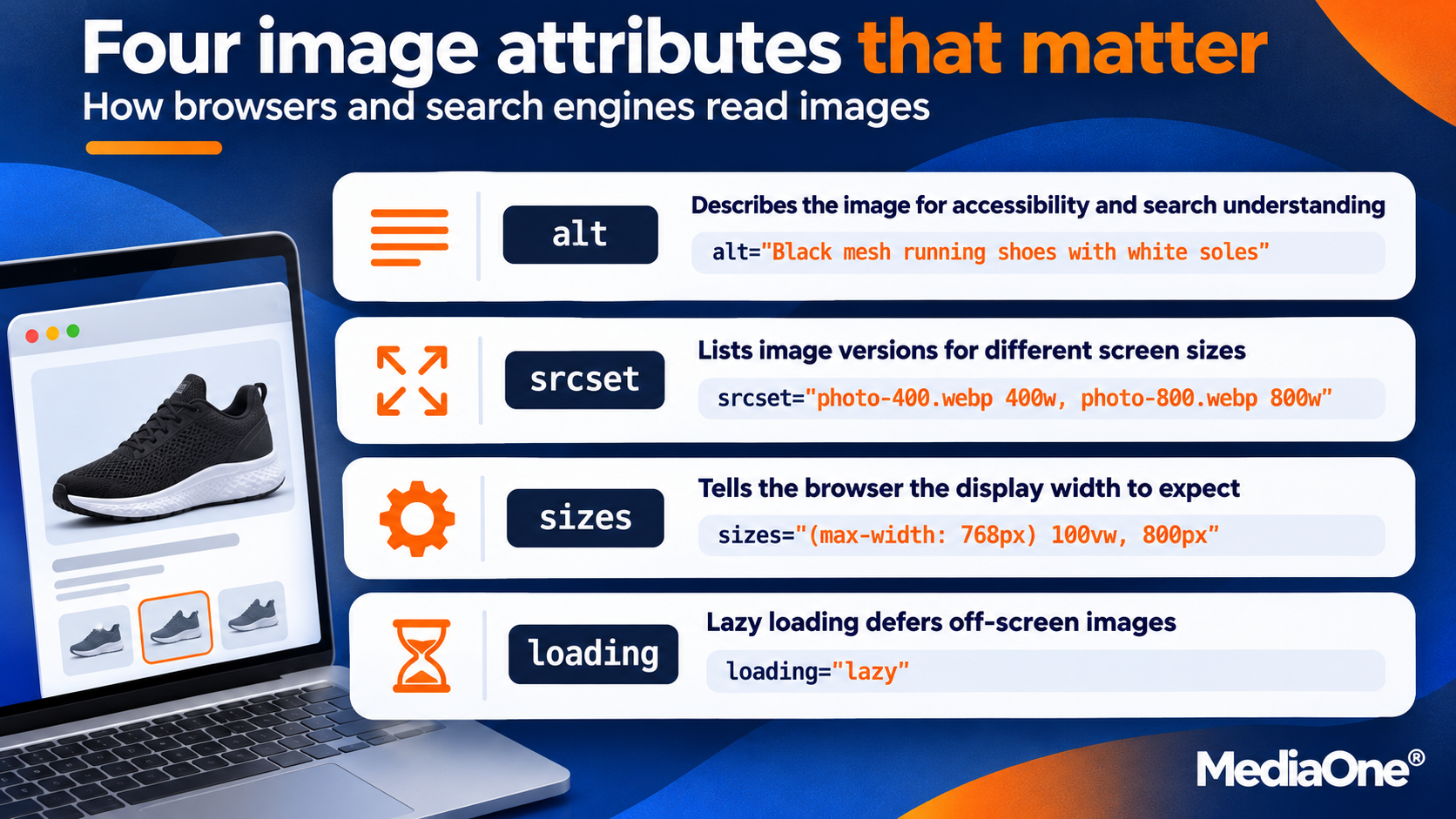
Use the picture element when you need alternative formats or different image crops across screen sizes. Follow established responsive image practices and retain a valid fallback image URL.
8. Set explicit image dimensions
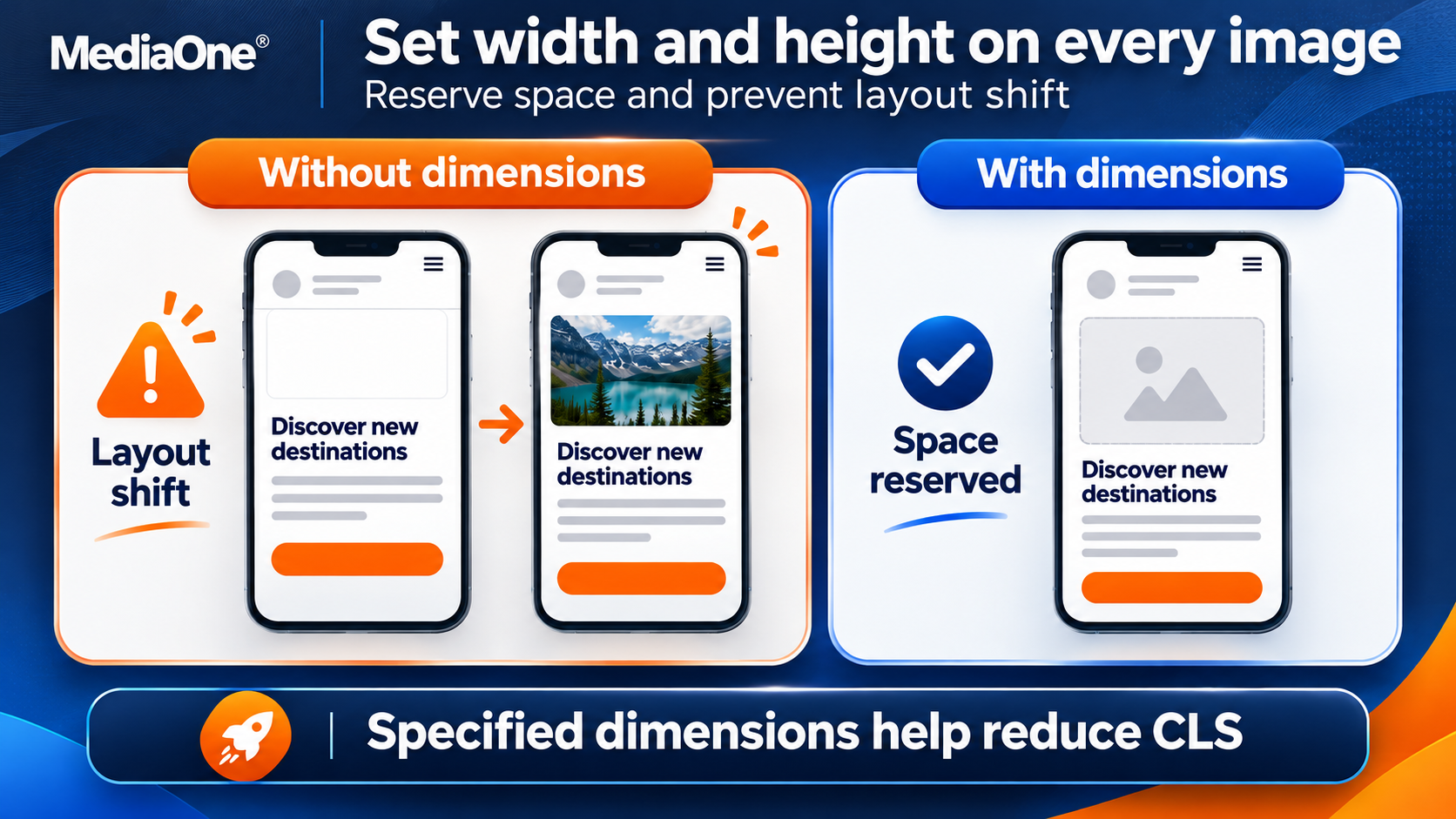
Missing image dimensions can cause content to move unexpectedly when photographs or illustrations finish loading. Specify appropriate width and height attributes so browsers can establish the image’s aspect ratio and reserve layout space.
This primarily helps reduce Cumulative Layout Shift (CLS), a Core Web Vitals metric that measures visual instability.
| Metric | Measures | Good threshold |
|---|---|---|
| Largest Contentful Paint (LCP) | Main content loading performance | 2.5 seconds or less |
| Cumulative Layout Shift (CLS) | Visual stability | 0.1 or less |
These thresholds apply at the 75th percentile of measured visits. Follow Google’s CLS optimisation recommendations and our guide to improving Core Web Vitals when diagnosing image-related performance issues.
9. Optimise lazy loading and image loading priority
Lazy loading delays the retrieval of images until they approach the visible area of a webpage. It is useful for lengthy articles, product galleries and pages containing numerous images.
<img
src="teak-sideboard.webp"
alt="Teak sideboard with three storage compartments"
loading="lazy"
width="800"
height="600">
Do not lazy-load images likely to appear immediately in the viewport, particularly the main LCP image.
For an important hero image, consider using:
<img
src=”hero-image.webp”
alt=”Modern office furniture collection”
loading=”eager”
fetchpriority=”high”
width=”1600″
height=”900″>
The fetchpriority attribute provides a loading priority hint to the browser. Reserve high priority for genuinely critical resources. Google’s LCP optimisation guidance explains why early resource discovery and appropriate loading priority matter.
Technical Image SEO: Sitemaps, Structured Data and Crawlability
Ensure images are accessible to search engines
An optimised image cannot achieve its intended search visibility if search engines cannot retrieve it. Check that important image URLs return successful HTTP responses. Review robots.txt restrictions, broken resources and content delivery network configurations.
Images loaded through JavaScript should become available without requiring Google to click buttons or perform other user interactions. A comprehensive technical SEO audit can reveal template-level problems affecting hundreds of images simultaneously.
Create and submit an image sitemap
Image sitemaps help Google discover images that it might otherwise overlook. They are particularly useful for large product catalogues and websites with complex image delivery systems.
A basic image sitemap entry looks like this:
<urlset xmlns=”http://www.sitemaps.org/schemas/sitemap/0.9″
xmlns:image=”http://www.google.com/schemas/sitemap-image/1.1″>
<url>
<loc>https://www.example.com/products/office-chair</loc>
<image:image>
<image:loc>https://www.example.com/images/office-chair.webp</image:loc>
</image:image>
</url>
</urlset>
Google’s image sitemap documentation permits image URLs from other domains. If a content delivery network (CDN) hosts your images, verify ownership of its domain in Search Console where possible. Ensure its configuration permits search engine crawling.
Implement relevant image structured data
Structured data helps search engines interpret page entities and can establish eligibility for supported enhanced search appearances.
| Page type | Relevant schema | Image considerations |
|---|---|---|
| Product page | Product | Representative product photographs and applicable shopping feature requirements |
| Article | Article | Relevant, high-quality editorial images |
| Licensed photograph | ImageObject | Image URL, creator and licensing information |
| Online store | Product and Offer | Accurate product images, prices and availability |
For product pages, follow Google’s merchant listing structured data requirements rather than relying on an image property alone. Publishers should consult the relevant Article structured data guidelines.
Ensure marked-up information matches visible page content. Correct structured data supports eligibility but does not guarantee rich results or higher rankings.
Manage image indexing and licensing
Public image visibility and copyright protection require different approaches. Restricting Google Images from displaying a full-sized image does not prevent people from downloading it elsewhere. Private assets require proper access controls.
For publicly available licensed photography, implement appropriate image licensing metadata. This can help Google communicate creator information and licensing options in eligible image results.
The Image SEO Priority Matrix
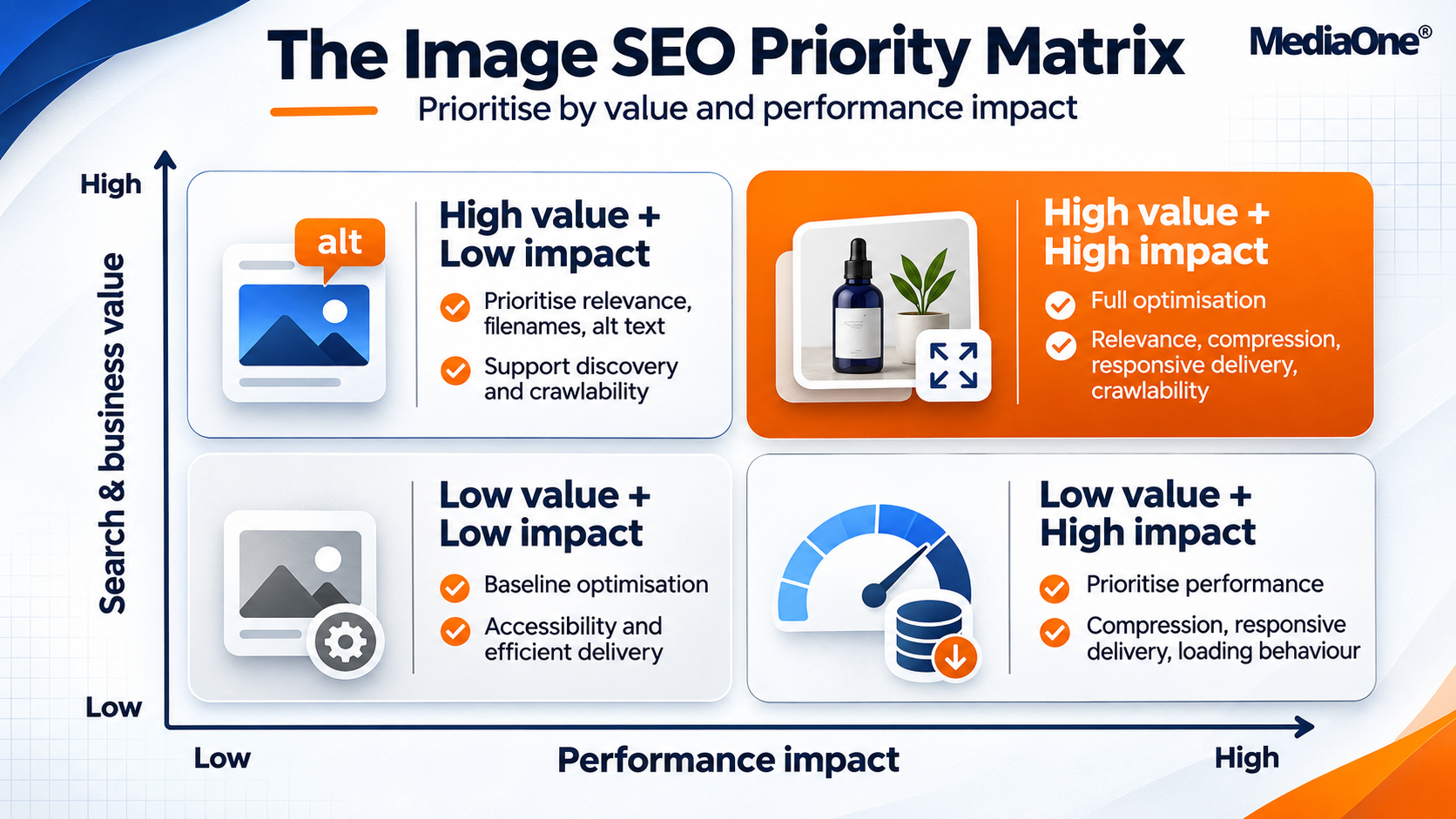
Not every image warrants the same optimisation investment. We recommend assessing images using two criteria:
-
Search and business value: The image’s potential to support organic discovery, customer decisions or useful educational content.
-
Performance impact: The image’s contribution to page weight, loading delays or layout instability.

| Search and business value | Performance impact | Recommended treatment |
|---|---|---|
| High | High | Full optimisation covering discovery, accessibility, quality and performance |
| High | Low | Prioritise image relevance, descriptive metadata and crawlability |
| Low | High | Prioritise compression, responsive delivery and loading behaviour |
| Low | Low | Apply appropriate accessibility and efficient delivery |
A large product hero image belongs in the high-value, high-impact category. An original research chart may have high search value despite its relatively small file size. Large decorative banners should receive performance attention even when they have limited independent search value.
This matrix is our recommended prioritisation framework, not a published Google ranking model. Every image still requires appropriate accessibility treatment.
Image SEO for Ecommerce and Content Websites
Ecommerce product image optimisation
Product images influence how customers evaluate items and can support visibility across shopping and visual search experiences. Use accurate photographs that represent the correct product variant. Include supplementary angles, close-ups and contextual photographs where they assist purchasing decisions.
Google Merchant Center’s product image requirements differ from general Google Images recommendations. Google has announced a minimum image dimension requirement of 500 × 500 pixels for all products beginning 31 January 2027. Check these requirements before preparing large catalogues.
Our technical SEO for ecommerce guide covers the wider relationship between product discovery, website architecture and technical performance.
Editorial images and infographics
Publishers should use original charts, diagrams and screenshots that add meaningful information. Accompany data visualisations with explanatory text and verifiable sources. Avoid placing essential information exclusively inside an image, where it may be inaccessible to some readers.
This approach also supports content designed for answer engines and Google AI Mode, although no specific image optimisation technique guarantees inclusion in AI-generated answers.
WordPress and Shopify image optimisation
Modern content management systems can automate responsive image generation, compression and delivery. However, themes and third-party applications may introduce conflicting settings.
For WordPress, check generated image sizes, alt attributes and loading behaviour. For Shopify, review product templates and ensure image applications do not duplicate existing optimisation features. Our Shopify SEO guide provides additional store-level optimisation recommendations.
Visual Search, Google Lens and Google Discover
Visual search allows users to find information using photographs, screenshots or other image inputs. Google Lens can help users identify objects, explore visually similar products and discover relevant webpages. Bing Visual Search and Pinterest also support visual discovery.
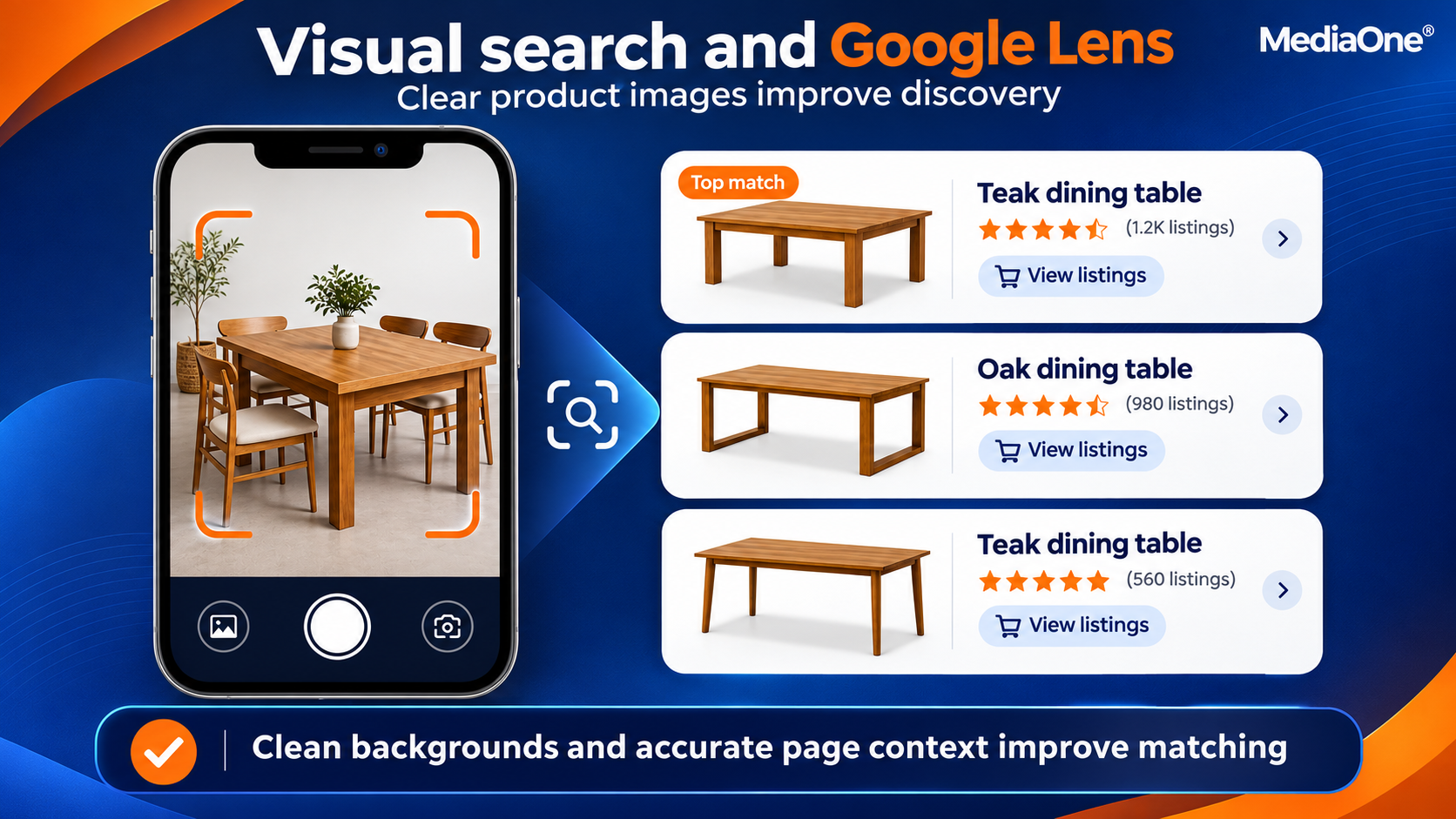
To prepare images for these experiences, use accurate product imagery, recognisable subjects and relevant landing page information. Avoid heavily cluttered compositions that obscure important details.
For editorial discovery, Google’s Discover guidelines recommend compelling, high-quality images at least 1,200 pixels wide for large image previews, with appropriate preview permissions.
Artificial intelligence (AI) can assist image production, but generated images still require editorial review. Verify factual accuracy, visual consistency, licensing considerations and any platform-specific disclosure requirements. Never use fabricated screenshots or misleading product representations.
How to Audit and Measure Image SEO Performance
Start with pages that already attract organic traffic or support important conversions. Record baseline measurements before implementing changes.
Follow a repeatable audit process:
-
Crawl priority pages to identify missing alt attributes, broken images and oversized files.
-
Assess important images using the Image SEO Priority Matrix.
-
Examine loading behaviour with Chrome DevTools and PageSpeed Insights.
-
Correct shared template issues before addressing individual images.
-
Compare search visibility and performance metrics after implementation.
Our SEO audit checklist provides a broader framework for prioritising website improvements.
Track image and multimodal search performance
Use Google Search Console’s Performance report and select the Image search type to monitor Google Images visibility. In September 2026, Google introduced web multimodal search reporting. This provides performance insights for web searches involving visual inputs, including Google Lens, Circle to Search and image uploads.
Track image and multimodal search separately because they represent different search experiences.
| Metric | Recommended tool |
|---|---|
| Image search impressions | Google Search Console |
| Image search clicks and click-through rate | Google Search Console |
| Multimodal search visibility | Google Search Console |
| LCP and CLS | PageSpeed Insights |
| Image transfer size | Chrome DevTools |
| Landing page engagement and conversions | Google Analytics 4 |
Our Google Search Console reporting guide explains how to investigate changes in organic visibility. Review performance monthly and conduct deeper technical audits quarterly. Allow sufficient time for recrawling and updated field data before assessing results.
Common image SEO problems and fixes
| Problem | Recommended solution |
|---|---|
| Images missing from search | Investigate crawlability, indexing restrictions and landing page relevance. |
| Slow hero image | Reduce resource size and improve loading priority. |
| Unexpected layout movement | Specify image dimensions and preserve the aspect ratio. |
| Blurry product photographs | Review compression settings and responsive image sizes. |
| Missing product rich results | Validate structured data against applicable requirements. |
| Impressions without clicks | Improve image usefulness and evaluate query relevance. |
Image SEO Checklist
Before publishing a webpage or completing an image optimisation audit, confirm the following:
-
Images are relevant, accurate and visually clear.
-
Filenames describe the actual image subject.
-
Alt attributes reflect each image’s purpose.
-
File formats and compression settings preserve appropriate visual quality.
-
Responsive image versions serve different device requirements.
-
Image dimensions reserve sufficient layout space.
-
Critical images load promptly, while suitable off-screen images use lazy loading.
-
Important image URLs remain crawlable and accessible.
-
Image sitemaps and structured data are implemented where beneficial.
-
Search visibility and website performance are measured regularly.
Frequently Asked Questions
Does alt text improve image rankings?
Alt text helps search engines understand images while improving accessibility. It should describe the image accurately and complement relevant page content rather than serve as a keyword-stuffing opportunity.
What is the best image format for SEO?
WebP and AVIF are strong options for efficient photographic image delivery. PNG, JPEG and SVG remain appropriate for specific requirements, depending on visual quality, compatibility and image type.
What is the ideal image file size for SEO?
There is no universal ideal file size. Aim for the smallest file that preserves necessary visual quality and serves the intended display dimensions efficiently.
Do image filenames affect SEO?
Descriptive filenames provide search engines with limited contextual clues. Use meaningful names for new uploads, but avoid changing established image URLs without a valid reason.
Do all websites need an image sitemap?
No. Image sitemaps are particularly useful for extensive image libraries or websites where important images may be difficult for search engines to discover.
Should every website image be lazy-loaded?
No. Lazy loading is generally suitable for off-screen images. Images visible immediately after loading, particularly the likely LCP image, should normally load without that delay.
Can Google index images hosted on a CDN?
Yes. CDN-hosted images can appear in Google Images when they are discoverable, crawlable and otherwise eligible for indexing.
Are AI-generated images bad for SEO?
AI-generated images are not inherently unsuitable for SEO. Their value depends on accuracy, relevance, quality and compliance with applicable platform requirements.
How can I check whether my images appear in Google Search?
Review image search performance in Google Search Console and investigate specific image results manually. Search Console does not provide a comprehensive inventory of every indexed image.
How long does image SEO take to produce results?
Results depend on crawl frequency, competition, image relevance and website quality. There is no guaranteed timeline, so monitor comparable reporting periods after implementing changes.
Build a Sustainable Image SEO Strategy
Effective image SEO begins with selecting visuals that serve a genuine purpose. Search visibility then depends on accessible descriptions, relevant page content, crawlable resources and appropriate technical implementation.
We recommend starting with high-value product pages, important landing pages and articles that attract significant organic traffic. Apply the Image SEO Priority Matrix to identify improvements with the strongest potential impact.
Establish a consistent publishing workflow and monitor results regularly. This helps prevent recurring performance problems as your website grows.
If image-related issues are limiting your website’s organic visibility or performance, our professional SEO services can help identify technical barriers and develop an optimisation strategy aligned with your business objectives.