A Singapore renovation firm can launch a polished Wix website and still receive almost no enquiries from Google. Another firm using the same platform might appear for searches such as ‘kitchen renovation Tampines’ because its service pages answer specific questions, are accessible to search engines and work well on mobile. The website builder alone does not explain the difference.

Wix gives business owners control over page titles, meta descriptions, URL slugs, canonical tags and structured data, alongside an SEO Setup Checklist and a connection to Google Search Console. Those controls remove common technical obstacles. They cannot identify profitable search terms, write persuasive service pages or build a business’s local reputation. A completed checklist also says little about where a page ranks for competitive searches.
For Singapore owners deciding whether to stay on Wix or move to another platform, the sensible starting point is evidence. Find out which pages Google has indexed, what searches generate impressions, whether visitors can use the site comfortably on a phone and where the content misses local demand. Those checks can reveal improvements worth making before committing to an expensive rebuild.
Key Takeaways
- Wix offers capable technical SEO controls, but a green score is not a ranking promise.
- Start with search intent and useful pages, not a platform migration. Match each key service page to the question a customer is asking, write a distinct answer and connect it to relevant pages on your site.
- Use the Wix SEO Readiness Scorecard to find the weakest layer. Score indexing, page setup, content, Singapore relevance and mobile experience from 0 to 2 each.
- Make local relevance specific. A bakery serving Tiong Bahru needs accurate location details and a relevant product or service page, not dozens of near-identical neighbourhood pages.
- Check indexability separately from search performance. Wix can create and update sitemaps, while Site Inspection uses Google Search Console data to highlight problems.
- Treat mobile speed and maintenance as ongoing work. Resize large images, review third-party apps, test Core Web Vitals and inspect important pages after publishing changes.
Why Wix SEO Is Worth Re-Examining in 2026
Wix has spent years as the website builder people reach for when they want something quick and good-looking. The question now is whether it can also hold its own in search. That is a different test from design. It is especially relevant to Singapore businesses competing for English-language queries, where broad terms can attract directories and larger brands. Optimise for the services and local needs you can genuinely answer, rather than creating a page for every possible location. The same principle applies to technical local SEO in Singapore.
Who Wix SEO Works For
Businesses such as bakeries, clinics and renovation firms often target queries that combine a service with a place, such as ‘sourdough delivery Singapore’ or ‘physiotherapist near Toa Payoh’. The best starting point is to find the phrases customers actually type and build each page around a clear need.
What the Evidence Says About Wix’s SEO Performance
The independent 2025 Web Almanac’s CMS analysis reports a median Lighthouse SEO score of 100 for Wix sites on desktop and mobile. Webflow also scored 100, while several other major content management systems recorded 92. Those are technical audit results, not Google ranking positions or a comparison of customer enquiries.
Wix provides built-in tools for meta tags, structured data, sitemaps and page-level indexing controls, but none of these guarantees a ranking. The difference lies in whether a site can be discovered, meets the visitor’s needs and earns visibility for relevant searches. A Wix site can be technically sound and still need better content and stronger local relevance.
Wix SEO-Friendliness Overview: Where the Platform Stands

Each important page still needs a clear purpose, a useful answer and the correct SEO settings. A page-level review is more revealing than treating every Wix site as equally well optimised.
Lighthouse SEO Scores and What They Measure
Lighthouse is Google’s open-source auditing tool. Its SEO category checks basic, verifiable items, including page titles, meta descriptions, crawlable links and indexing restrictions. It does not measure how relevant your content is, what customers search for or whether reputable sites link to you. A high score means the audited page clears certain technical checks, not that it is competitive in Google results.
The 2025 Web Almanac recorded a Wix median of 100 for Lighthouse SEO on both desktop and mobile, alongside a median Lighthouse mobile performance score of 64. These are different metrics. If your page fails an SEO check, inspect the specific error, such as an unintended indexing restriction, before assuming the entire Wix platform is at fault.

What Vendor Claims Cannot Establish
A vendor’s statement that customers improved their rankings after using its SEO features cannot isolate the effects of keyword research, content changes or new backlinks. Technical benchmark data and your own Search Console reports answer different questions. The first tells you whether a platform tends to meet basic audit criteria; the second shows whether people actually encounter your pages for useful queries.
What Wix Can Edit Today
These capabilities are supported in Wix’s current SEO controls:
| Capability | What You Can Manage | When to Review It |
| Page metadata | Title tags, meta descriptions and URL slugs | Before publishing each important page |
| Canonical URLs | Default canonicals and supported overrides | After copying content or changing URLs |
| Structured data | Preset and custom markup on supported page types | When publishing eligible content |
| Indexing controls | Whether eligible pages can be indexed | When a page is missing from Search |
| Redirects | 301 redirects through the URL Redirect Manager | During renames and site changes |
| Search monitoring | Wix Site Inspection and Search Console data | After major edits and during monthly review |
Wix SEO Features and Tools: What You Get Out of the Box
Wix puts its main search settings in the SEO & GEO dashboard. MediaOne also covers less obvious Wix SEO settings for owners who need more control. Start with the SEO Setup Checklist, then check the settings for the pages that actually bring in enquiries. The checklist can help a new owner establish a starting configuration, but Wix says it does not analyse the body content of Wix Blog or Wix Stores products. Review those pages separately rather than assuming they have passed.
Set Up Pages and Connect Search Console
Use Wix’s page-level SEO settings to edit titles, descriptions, URL slugs and supported structured data. For each service page, make the heading and description accurately reflect the searcher’s need. Wix’s guided Google Search Console connection requires a Premium plan and a connected domain; manual verification is a separate option. The platform maintains a sitemap, but submitting it is a discovery aid, not a guarantee of indexing.

A Singapore café might give its catering page a descriptive title, add original menu and delivery information, and link to a relevant enquiry page. These small edits connect a search term to a useful action far better than repeating the same keyword across several thin pages.
The Wix SEO Readiness Scorecard
Use this editorial diagnostic, not an official Wix or Google score. Give each layer 0 for missing, 1 for partly complete or 2 for checked and working; inspect your three most valuable pages rather than marking the whole site from memory.
| Layer | Evidence to Check | Score from 0 to 2 |
| Discoverability | Important pages are crawlable, indexable and visible in Search Console | Missing / partial / checked |
| Page Setup | Descriptive titles, headings, URLs and sensible internal links | Missing / partial / checked |
| Content Quality | Each priority page answers a distinct customer need | Missing / partial / checked |
| Singapore Relevance | Genuine service-area details and accurate business information | Missing / partial / checked |
| Mobile Experience | Readable layout and acceptable real-user performance data | Missing / partial / checked |
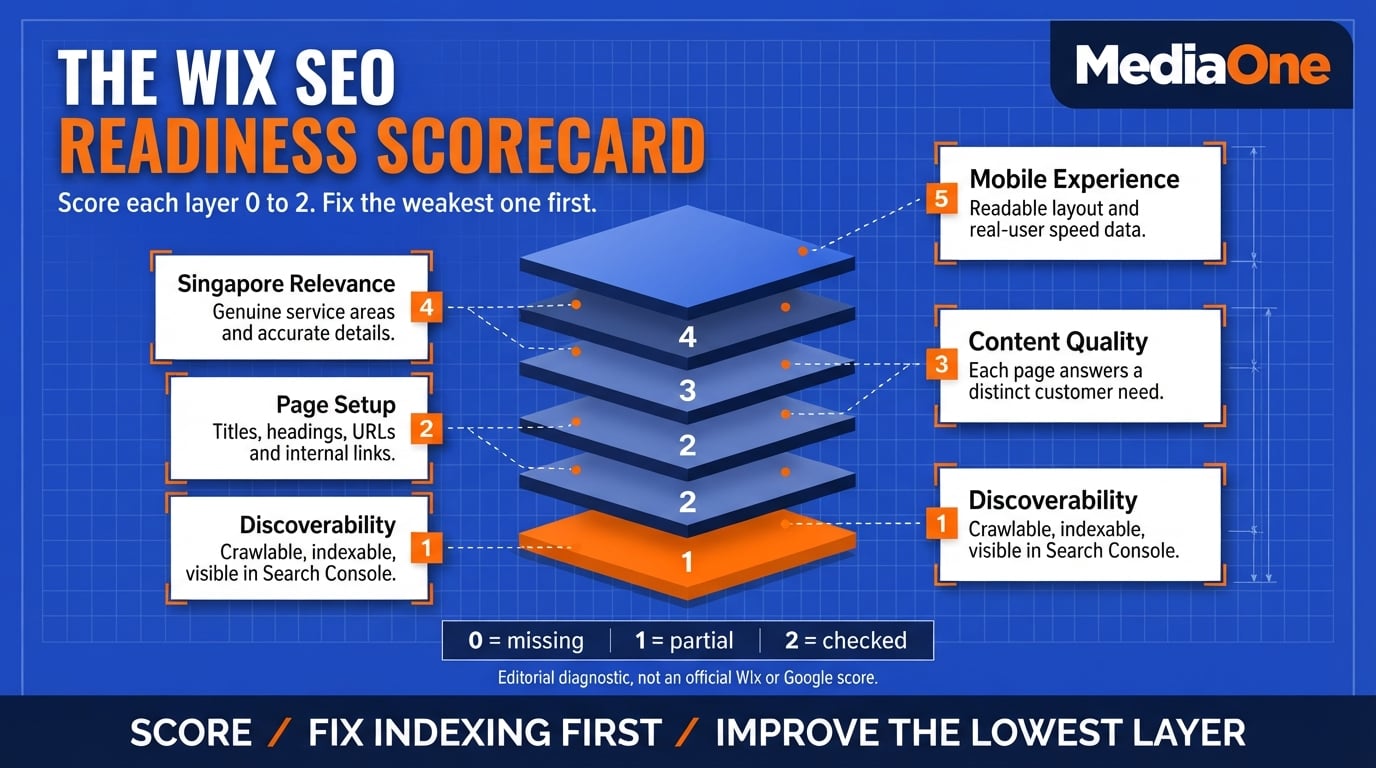
Add the five scores for a total out of 10. A higher score means fewer obvious gaps in this limited audit; it is not a search ranking or publication threshold. Fix any serious indexing issue first, then improve the lowest-scoring layer that can affect prospective customers.
Technical SEO on Wix: Crawlability, Indexing and Canonicals
Indexing and ranking are separate. A page can be present in Google’s index without appearing prominently for your target search, while a page blocked from indexing has no chance to rank in ordinary search results. Start in Search Console’s Page indexing report and inspect a priority URL before changing site-wide settings. MediaOne’s Google Search Console guide explains how to interpret performance and indexing reports.
Check Sitemaps, Indexing and Redirects
Wix generates and updates sitemaps for eligible pages. Check that important URLs are published, set to allow indexing and linked from elsewhere on the site. Use Wix Site Inspection to review information drawn from Google’s latest available crawl and index records. After changing a URL, confirm that its old address redirects to the correct new page, and update internal links where practical.
Review Canonicals and Structured Data
Wix adds default canonical tags and allows supported page-level edits. A canonical indicates your preferred URL when content is duplicated; Google can choose a different canonical. Avoid overriding the default unless you have a clear reason, and test structured data against the visible content rather than adding markup solely to attract rich results.

Know When Wix May Not Fit
Large editorial teams, intricate custom publishing workflows or complex catalogue structures may need controls beyond those that suit an ordinary small-business website. Test bulk updates, user permissions, integration needs and how you would export content before planning a migration. A platform switch is a business and maintenance decision, not an automatic SEO upgrade.
Performance, Page Speed and Mobile-Friendliness
Lighthouse SEO scores and loading speed are different measures. In the 2025 Web Almanac, Wix’s median Lighthouse mobile performance score was 64, compared with its median SEO score of 100. Those figures describe the sampled sites, not the speed or rankings of an individual business website. Test your most important pages before deciding whether the platform or page content is slowing visitors down.
How Wix Scores on Speed and Mobile
Lighthouse SEO checks crawlability and basic on-page signals. It does not measure how quickly pages load for a visitor. Use Google’s Core Web Vitals guidance to interpret Largest Contentful Paint (loading), Interaction to Next Paint (responsiveness) and Cumulative Layout Shift (visual stability). PageSpeed Insights and Search Console show different types of measurements, so compare like with like.
Your site’s real speed depends on the template, the number of apps and embedded widgets, and the size of your images. A clean template with few apps usually loads more quickly. A page packed with animations, video backgrounds and third-party scripts can slow down even when the platform handles basic technical SEO well.
Wix provides mobile editing and responsive features, but every page still deserves a phone check. A large hero image, overlapping button or heavy embed can make an otherwise attractive design difficult to use on a mobile connection.
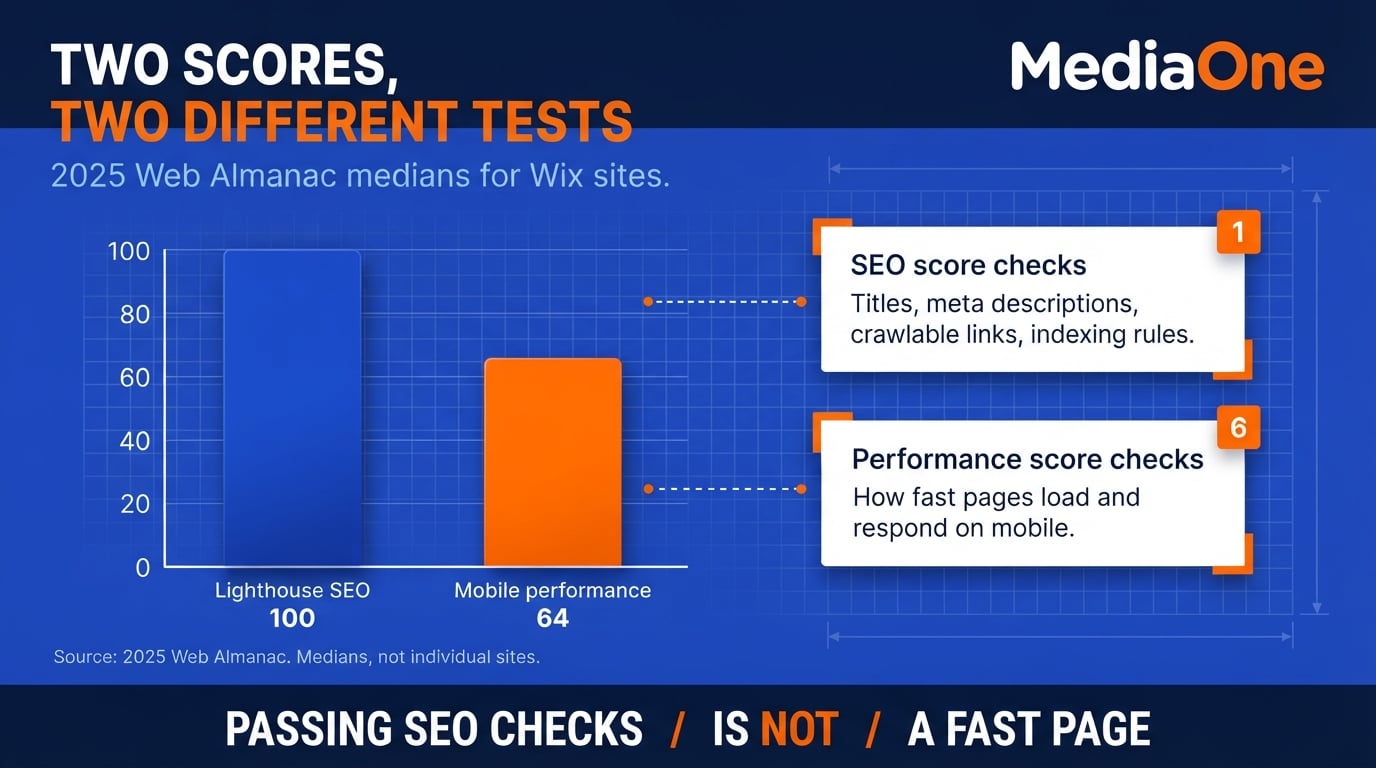
Image SEO: File Names, Alt Text and Compression
Images are a frequent source of avoidable slowness on small business websites. They are also useful for Google Images when their subject is clearly described. Image optimisation can improve loading and accessibility without requiring custom code.
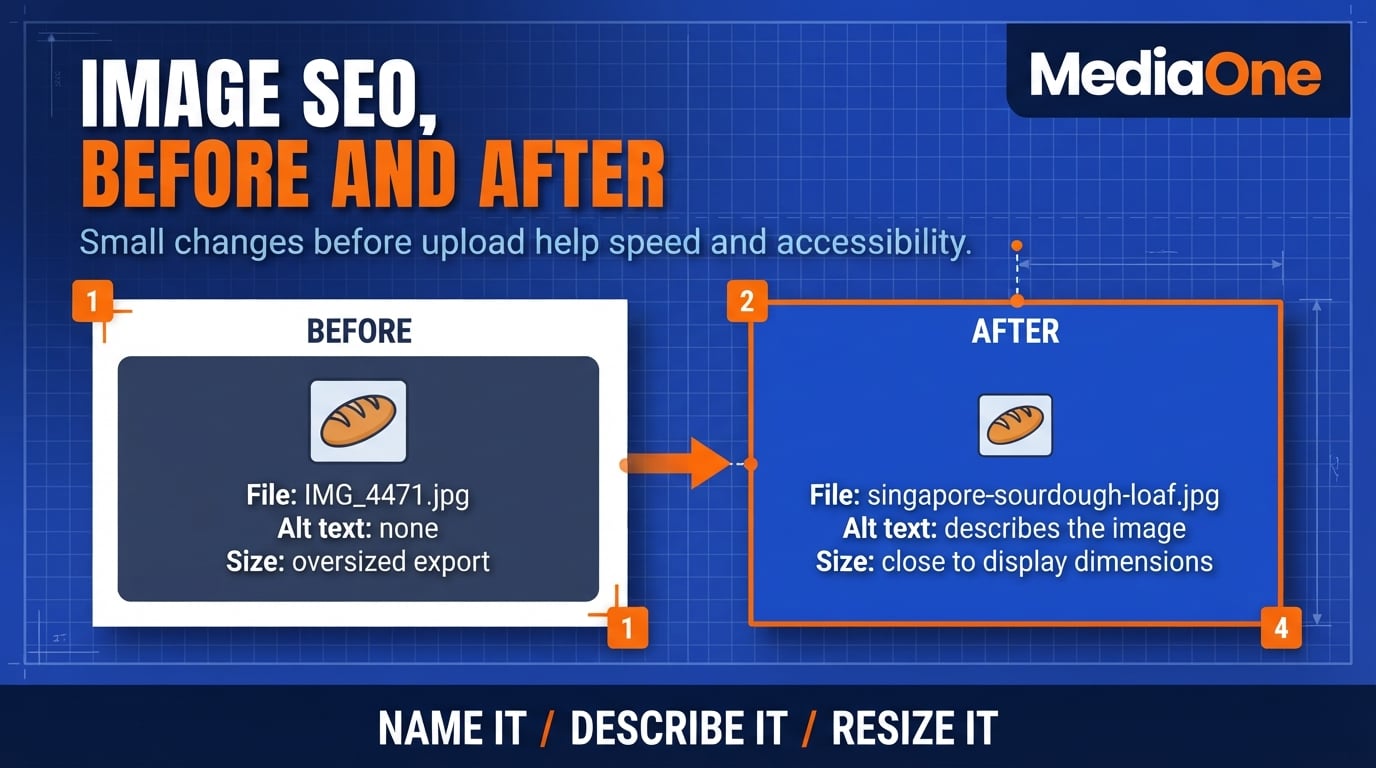
- File names: Rename files descriptively before uploading. Use singapore-sourdough-loaf.jpg, not IMG_4471.jpg.
- Alt text: Describe the visible image for people using screen readers. Add a relevant search term only when it makes the description more accurate; there is no universal SEO rule requiring 125 characters.
- Compression: Export photographs close to their intended display dimensions. Wix can optimise delivery, but smaller suitable source images still help keep pages manageable.
- Format: Consider WebP or a well-compressed JPEG for photographs, and PNG when transparency is required. Check how Wix processes each format on the published page.
A Practical Speed Checklist for Wix Sites
- Choose a light template and test a representative page before committing.
- Remove unused apps and third-party widgets that load on every page.
- Resize large images before upload and review mobile hero images.
- Replace unnecessary video backgrounds on mobile-heavy pages.
- Run PageSpeed Insights on the homepage and a priority service page.
- Review Core Web Vitals in Search Console where field data is available.
- Retest after meaningful design changes, especially new embeds or app installations.
Test pages on an ordinary mobile connection rather than assuming office broadband represents customers on the move. Treat performance as regular maintenance, not a one-time launch task.
Conclusion: Is Wix Good for SEO?
Wix is a credible starting point for small-business SEO in Singapore. Its technical controls cover many common requirements, but completing a checklist cannot substitute for keyword research, accurate service pages and ongoing measurement. A high Lighthouse SEO score shows that basic checks pass; it does not prove the site reaches local buyers.
Use the Wix SEO Readiness Scorecard to identify weaknesses rather than treating its ten-point total as a universal target. If indexing is blocked, repair that first. If pages are indexed but attract no relevant impressions, revisit search intent and content. If mobile visitors struggle to use the site, test its design and performance. For businesses that need support beyond the editor, a structured SEO audit and optimisation programme can help prioritise those tasks without assuming the site needs rebuilding.
Start with one valuable page in Google Search Console, make one evidenced change and review its performance against the same period and search intent.
Frequently Asked Questions
Is Wix good for SEO in 2026?
Yes, Wix offers the technical SEO controls that many small businesses need, including titles, descriptions, indexing settings and canonical URLs. Its strong median Lighthouse SEO score in the 2025 Web Almanac measures basic technical checks, not where an individual site will rank. Content quality, search intent and site credibility still need attention.
Can I rank on Google with a Wix site?
Yes. A Wix page can appear in Google search results when it is crawlable, indexed and useful for a relevant search. For example, a Singapore bakery may benefit from a genuine custom-cakes page with accurate service information and a complete Google Business Profile, rather than several near-duplicate neighbourhood pages. Ranking is never guaranteed.
Does Wix support schema markup and canonical URLs?
Yes. Wix supplies default canonical tags and structured data for supported page types, with options to adjust those settings. Google treats canonicals as hints, and even valid structured data does not guarantee a special search result. Review a duplicated page carefully before changing its canonical URL.
Is Wix fast enough for Core Web Vitals?
It can be, but performance depends on your particular pages, images, third-party apps and design choices. Test the mobile experience with PageSpeed Insights, then check Search Console’s Core Web Vitals report when enough field data exists. A good Lighthouse SEO score is not a substitute for speed testing.
Can I use Wix SEO tools for a multilingual site?
Yes. Wix supports multilingual sites with separate language versions and URL options, but the site owner still needs accurate translations and properly matched pages. Confirm each important language URL’s index status and intended regional relevance before relying on it for search visibility.
Does Wix support IndexNow for Bing?
Yes. Wix’s current IndexNow documentation says the feature is built into Premium sites and automatically alerts participating search engines about relevant page changes. It does not guarantee crawling or indexing, and Google does not use IndexNow. Continue checking Google indexing independently in Search Console.